# gf-orb-slam2
**Repository Path**: njustmxn/gf-orb-slam2
## Basic Information
- **Project Name**: gf-orb-slam2
- **Description**: No description available
- **Primary Language**: Unknown
- **License**: GPL-3.0
- **Default Branch**: master
- **Homepage**: None
- **GVP Project**: No
## Statistics
- **Stars**: 0
- **Forks**: 1
- **Created**: 2025-06-14
- **Last Updated**: 2025-06-14
## Categories & Tags
**Categories**: Uncategorized
**Tags**: None
## README
1. 屏蔽轨迹预测
2. 双目校正屏蔽,euroc的文件最后生成的畸变参数也被改了,原本为0,并且程序里使用自己的去畸变逻辑
+ 如果想恢复原来的,除了使能校正,还要把程序里自己的"选择双目匹配"去掉
3.
+ 不用立体匹配加速
+ good feature & good graph
+ ORB extraction 0.022186; Init tracking 0.003076; Map tracking 0.006355; Post proc. 0.000532
Pose Tracking Latency: 0.035068
+ no good feature & good graph
+ ORB extraction 0.018507; Init tracking 0.001524; Map tracking 0.002748; Post proc. 0.000193
Pose Tracking Latency: 0.024881
+ no good feature & no good graph
+ ORB extraction 0.016123; Init tracking 0.001324; Map tracking 0.002333; Post proc. 0.000156
Pose Tracking Latency: 0.021484
+ 用立体匹配加速
+ ORB extraction 0.0137092; Init tracking 0.00201828; Map tracking 0.00243329; Post proc. 0.000483895
Pose Tracking Latency: 0.0190633

# A cost-efficient, heavily-modified ORB-SLAM2 (tested on Ubuntu 16.04 + ROS Kinetic)
The cost-efficiency of visual SLAM is crucial for target applications in Robotics and VR/AR. One principal enforced in this project is to persue better computation-performance trade-off in both front-end and back-end of visual SLAM. To that end, three major algorithmic innovations are integrated to ORB-SLAM 2:
1. **Good feature matching** (IROS18, TRO20) is an enhancement module to the front-end of feature-based BA SLAM, such as ORB-SLAM2. As an efficient variant of active feature matching, good feature matching has much better computation-performance trade-off than conventional batch feature matching.
*Performance vs. latency evaluation on EuRoC monocular sequences:*
2. **Local map hashing** (ICRA19) is specifically designed for large-scale, long-term VSLAM applications, where the cost of local map related operations could be computation-heavy. The local map is indexed with a light-weight, robust, and temporally-evolving Multi-Index Hashing method.
*Local map hashing vs. ORB-SLAM baseline on New College dataset:*
3. **Good graph selection** (submitted to TRO) is an enhancement module to the back-end of BA-based SLAM. It enables fine-grained and timely control of the local BA problem in SLAM back-end: solve large BA when resource is sufficient, while focus on smaller BA under computation/time limit. Compared with sliding window or covisibily graph, good graph selection has much better computation-performance trade-off.
*Full BA vs. subgraph BA on Venice dataset:*
Following **additional features** are also included for practical applications:
- **catkinize** (by default; for non-ros usage, check out the **master** branch instead);
- **GPU accelerated FASTdetection** (uncomment Macro **CUDA_ACC_FAST** in **ORBextractor.h** to enable it);
- **speed-up stereo matching** (uncomment Macro **ALTER_STEREO_MATCHING** & **DELAYED_STEREO_MATCHING** in **Frame.h** to enable it; for fisheye lens, uncomment **USE_FISHEYE_DISTORTION** as well);
- **map saving & loading** (uncomment Macro **ENABLE_MAP_IO** in **Frame.h** to enable them)
- **pose initialization** with ChAruco (uncomment Macro **INIT_WITH_ARUCHO** in **Tracking.h** to enable it) out the master branch)
## Build & Run
To build GF-ORB-SLAM2, first clone the repo to your catkin workspace
cd ~/catkin_ws/src && git clone https://github.com/ivalab/gf_orb_slam2.git
as well as the config files
git clone https://github.com/ivalab/ORB_Data.git
Then build dependencies (by default we assume a GPU is available for opencv; otherwise use the non-gpu build cmd in build_dep.sh accordingly)
cd gf_orb_slam2 && ./build_dep.sh && ./build_supports.sh
Now build the GF-ORB-SLAM2 package with GPU
catkin config --cmake-args -DCMAKE_BUILD_TYPE=Release -DCMAKE_CXX_FLAGS="-O3 -DNDEBUG -march=native" -DCMAKE_C_FLAGS_RELEASE="-O3 -DNDEBUG -march=native"
catkin build --this
or without GPU:
catkin config --cmake-args -DCMAKE_BUILD_TYPE=Release -DCMAKE_CXX_FLAGS="-O3 -DNDEBUG -march=native" -DCMAKE_C_FLAGS_RELEASE="-O3 -DNDEBUG -march=native"
catkin build --this -DENABLE_CUDA_IN_OPENCV=False
We recommend converting the ORB vocabulary to binary format, by calling
./tools/bin_vocabulary
### Open-loop Evaluation
To run GF-ORB-SLAM2 on open-loop, e.g., as a standalone running on public benchmarks, make sure the closed-loop macro `ENABLE_PLANNER_PREDICTION` at [include/Tracking.h](https://github.com/ivalab/gf_orb_slam2/tree/catkin/include/Tracking.h#L92) is commented out:
// #define ENABLE_PLANNER_PREDICTION
and refer to batch evaluation scripts at folder [batch_script](https://github.com/ivalab/gf_orb_slam2/tree/catkin/batch_scripts) as examples.
You could also follow the example calls at **rosrun_cmd.md** for your own sensor / sequence.
Similar to original ORB-SLAM2, the camera parameters shall be provided in yaml format. Some example configurations for public benchmarks are available at `ORB_Data` we just cloned.
### Closed-loop Evaluation
To run GF-ORB-SLAM2 on closed-loop navigation tasks, e.g., as the state estimator of [gazebo_turtlebot_simulator](https://github.com/ivalab/gazebo_turtlebot_simulator), make sure the closed-loop macro `ENABLE_PLANNER_PREDICTION` at [include/Tracking.h](https://github.com/ivalab/gf_orb_slam2/tree/catkin/include/Tracking.h#L92) is uncommented:
#define ENABLE_PLANNER_PREDICTION
and refer to closed-loop evaluation scripts at [gazebo_turtlebot_simulator/script](https://github.com/ivalab/gazebo_turtlebot_simulator/tree/master/script) on how to config the evaluation.
## References
If you use features in GF-ORB-SLAM2 at an academic work, please cite the following papers accordingly:
**Good Feature Matching**:
@article{zhao2020tro-gfm,
title={Good Feature Matching: Towards Accurate, Robust VO/VSLAM with Low Latency},
author={Zhao, Yipu and Vela, Patricio A.},
journal={IEEE Transactions on Robotics},
doi={10.1109/TRO.2020.2964138},
year={2020}
}
@inproceedings{zhao2018good,
title={Good Feature Selection for Least Squares Pose Optimization in VO/VSLAM},
author={Zhao, Yipu and Vela, Patricio A},
booktitle={IEEE/RSJ International Conference on Intelligent Robots and Systems (IROS)},
pages={1183--1189},
year={2018}
}
**Map Hashing**:
@article{zhao2019low,
title={Low-latency Visual SLAM with Appearance-Enhanced Local Map Building},
author={Zhao, Yipu and Ye, Wenkai and Vela, Patricio A},
journal={IEEE International Conference on Robotics and Automation (ICRA)},
year={2019}
}
**Good Graph Selection**:
@article{zhao2020graph,
title={Good Graph to Optimize: Cost-Effective, Budget-Aware Bundle Adjustment in Visual SLAM},
author={Zhao, Yipu and Smith, Justin S. and Vela, Patricio A.},
journal={submitted to IEEE Transactions on Robotics},
year={2020}
}
## Contact information
- Yipu Zhao yipu.zhao@gatech.edu
- Wenkai Ye wye1206@gatech.edu
- Patricio A. Vela pvela@gatech.edu
---
# ORB-SLAM2
**Authors:** [Raul Mur-Artal](http://webdiis.unizar.es/~raulmur/), [Juan D. Tardos](http://webdiis.unizar.es/~jdtardos/), [J. M. M. Montiel](http://webdiis.unizar.es/~josemari/) and [Dorian Galvez-Lopez](http://doriangalvez.com/) ([DBoW2](https://github.com/dorian3d/DBoW2))
**13 Jan 2017**: OpenCV 3 and Eigen 3.3 are now supported.
**22 Dec 2016**: Added AR demo (see section 7).
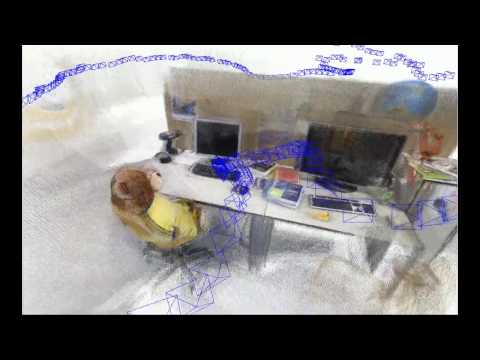
ORB-SLAM2 is a real-time SLAM library for **Monocular**, **Stereo** and **RGB-D** cameras that computes the camera trajectory and a sparse 3D reconstruction (in the stereo and RGB-D case with true scale). It is able to detect loops and relocalize the camera in real time. We provide examples to run the SLAM system in the [KITTI dataset](http://www.cvlibs.net/datasets/kitti/eval_odometry.php) as stereo or monocular, in the [TUM dataset](http://vision.in.tum.de/data/datasets/rgbd-dataset) as RGB-D or monocular, and in the [EuRoC dataset](http://projects.asl.ethz.ch/datasets/doku.php?id=kmavvisualinertialdatasets) as stereo or monocular. We also provide a ROS node to process live monocular, stereo or RGB-D streams. **The library can be compiled without ROS**. ORB-SLAM2 provides a GUI to change between a *SLAM Mode* and *Localization Mode*, see section 9 of this document.
### Related Publications:
[Monocular] Raúl Mur-Artal, J. M. M. Montiel and Juan D. Tardós. **ORB-SLAM: A Versatile and Accurate Monocular SLAM System**. *IEEE Transactions on Robotics,* vol. 31, no. 5, pp. 1147-1163, 2015. (**2015 IEEE Transactions on Robotics Best Paper Award**). **[PDF](http://webdiis.unizar.es/~raulmur/MurMontielTardosTRO15.pdf)**.
[Stereo and RGB-D] Raúl Mur-Artal and Juan D. Tardós. **ORB-SLAM2: an Open-Source SLAM System for Monocular, Stereo and RGB-D Cameras**. *IEEE Transactions on Robotics,* vol. 33, no. 5, pp. 1255-1262, 2017. **[PDF](https://128.84.21.199/pdf/1610.06475.pdf)**.
[DBoW2 Place Recognizer] Dorian Gálvez-López and Juan D. Tardós. **Bags of Binary Words for Fast Place Recognition in Image Sequences**. *IEEE Transactions on Robotics,* vol. 28, no. 5, pp. 1188-1197, 2012. **[PDF](http://doriangalvez.com/php/dl.php?dlp=GalvezTRO12.pdf)**
# 1. License
ORB-SLAM2 is released under a [GPLv3 license](https://github.com/raulmur/ORB_SLAM2/blob/master/License-gpl.txt). For a list of all code/library dependencies (and associated licenses), please see [Dependencies.md](https://github.com/raulmur/ORB_SLAM2/blob/master/Dependencies.md).
For a closed-source version of ORB-SLAM2 for commercial purposes, please contact the authors: orbslam (at) unizar (dot) es.
If you use ORB-SLAM2 (Monocular) in an academic work, please cite:
@article{murTRO2015,
title={{ORB-SLAM}: a Versatile and Accurate Monocular {SLAM} System},
author={Mur-Artal, Ra\'ul, Montiel, J. M. M. and Tard\'os, Juan D.},
journal={IEEE Transactions on Robotics},
volume={31},
number={5},
pages={1147--1163},
doi = {10.1109/TRO.2015.2463671},
year={2015}
}
if you use ORB-SLAM2 (Stereo or RGB-D) in an academic work, please cite:
@article{murORB2,
title={{ORB-SLAM2}: an Open-Source {SLAM} System for Monocular, Stereo and {RGB-D} Cameras},
author={Mur-Artal, Ra\'ul and Tard\'os, Juan D.},
journal={IEEE Transactions on Robotics},
volume={33},
number={5},
pages={1255--1262},
doi = {10.1109/TRO.2017.2705103},
year={2017}
}
# 2. Prerequisites
We have tested the library in **Ubuntu 12.04**, **14.04** and **16.04**, but it should be easy to compile in other platforms. A powerful computer (e.g. i7) will ensure real-time performance and provide more stable and accurate results.
## C++11 or C++0x Compiler
We use the new thread and chrono functionalities of C++11.
## Pangolin
We use [Pangolin](https://github.com/stevenlovegrove/Pangolin) for visualization and user interface. Dowload and install instructions can be found at: https://github.com/stevenlovegrove/Pangolin.
## OpenCV
We use [OpenCV](http://opencv.org) to manipulate images and features. Dowload and install instructions can be found at: http://opencv.org. **Required at leat 2.4.3. Tested with OpenCV 2.4.11 and OpenCV 3.2**.
## Eigen3
Required by g2o (see below). Download and install instructions can be found at: http://eigen.tuxfamily.org. **Required at least 3.1.0**.
## DBoW2 and g2o (Included in Thirdparty folder)
We use modified versions of the [DBoW2](https://github.com/dorian3d/DBoW2) library to perform place recognition and [g2o](https://github.com/RainerKuemmerle/g2o) library to perform non-linear optimizations. Both modified libraries (which are BSD) are included in the *Thirdparty* folder.
## ROS (optional)
We provide some examples to process the live input of a monocular, stereo or RGB-D camera using [ROS](ros.org). Building these examples is optional. In case you want to use ROS, a version Hydro or newer is needed.
# 3. Building ORB-SLAM2 library and examples
Clone the repository:
```
git clone https://github.com/raulmur/ORB_SLAM2.git ORB_SLAM2
```
We provide a script `build.sh` to build the *Thirdparty* libraries and *ORB-SLAM2*. Please make sure you have installed all required dependencies (see section 2). Execute:
```
cd ORB_SLAM2
chmod +x build.sh
./build.sh
```
This will create **libORB_SLAM2.so** at *lib* folder and the executables **mono_tum**, **mono_kitti**, **rgbd_tum**, **stereo_kitti**, **mono_euroc** and **stereo_euroc** in *Examples* folder.
# 4. Monocular Examples
## TUM Dataset
1. Download a sequence from http://vision.in.tum.de/data/datasets/rgbd-dataset/download and uncompress it.
2. Execute the following command. Change `TUMX.yaml` to TUM1.yaml,TUM2.yaml or TUM3.yaml for freiburg1, freiburg2 and freiburg3 sequences respectively. Change `PATH_TO_SEQUENCE_FOLDER`to the uncompressed sequence folder.
```
./Examples/Monocular/mono_tum Vocabulary/ORBvoc.txt Examples/Monocular/TUMX.yaml PATH_TO_SEQUENCE_FOLDER
```
## KITTI Dataset
1. Download the dataset (grayscale images) from http://www.cvlibs.net/datasets/kitti/eval_odometry.php
2. Execute the following command. Change `KITTIX.yaml`by KITTI00-02.yaml, KITTI03.yaml or KITTI04-12.yaml for sequence 0 to 2, 3, and 4 to 12 respectively. Change `PATH_TO_DATASET_FOLDER` to the uncompressed dataset folder. Change `SEQUENCE_NUMBER` to 00, 01, 02,.., 11.
```
./Examples/Monocular/mono_kitti Vocabulary/ORBvoc.txt Examples/Monocular/KITTIX.yaml PATH_TO_DATASET_FOLDER/dataset/sequences/SEQUENCE_NUMBER
```
## EuRoC Dataset
1. Download a sequence (ASL format) from http://projects.asl.ethz.ch/datasets/doku.php?id=kmavvisualinertialdatasets
2. Execute the following first command for V1 and V2 sequences, or the second command for MH sequences. Change PATH_TO_SEQUENCE_FOLDER and SEQUENCE according to the sequence you want to run.
```
./Examples/Monocular/mono_euroc Vocabulary/ORBvoc.txt Examples/Monocular/EuRoC.yaml PATH_TO_SEQUENCE_FOLDER/mav0/cam0/data Examples/Monocular/EuRoC_TimeStamps/SEQUENCE.txt
```
```
./Examples/Monocular/mono_euroc Vocabulary/ORBvoc.txt Examples/Monocular/EuRoC.yaml PATH_TO_SEQUENCE/cam0/data Examples/Monocular/EuRoC_TimeStamps/SEQUENCE.txt
```
# 5. Stereo Examples
## KITTI Dataset
1. Download the dataset (grayscale images) from http://www.cvlibs.net/datasets/kitti/eval_odometry.php
2. Execute the following command. Change `KITTIX.yaml`to KITTI00-02.yaml, KITTI03.yaml or KITTI04-12.yaml for sequence 0 to 2, 3, and 4 to 12 respectively. Change `PATH_TO_DATASET_FOLDER` to the uncompressed dataset folder. Change `SEQUENCE_NUMBER` to 00, 01, 02,.., 11.
```
./Examples/Stereo/stereo_kitti Vocabulary/ORBvoc.txt Examples/Stereo/KITTIX.yaml PATH_TO_DATASET_FOLDER/dataset/sequences/SEQUENCE_NUMBER
```
## EuRoC Dataset
1. Download a sequence (ASL format) from http://projects.asl.ethz.ch/datasets/doku.php?id=kmavvisualinertialdatasets
2. Execute the following first command for V1 and V2 sequences, or the second command for MH sequences. Change PATH_TO_SEQUENCE_FOLDER and SEQUENCE according to the sequence you want to run.
```
./Examples/Stereo/stereo_euroc Vocabulary/ORBvoc.txt Examples/Stereo/EuRoC.yaml PATH_TO_SEQUENCE/mav0/cam0/data PATH_TO_SEQUENCE/mav0/cam1/data Examples/Stereo/EuRoC_TimeStamps/SEQUENCE.txt
```
```
./Examples/Stereo/stereo_euroc Vocabulary/ORBvoc.txt Examples/Stereo/EuRoC.yaml PATH_TO_SEQUENCE/cam0/data PATH_TO_SEQUENCE/cam1/data Examples/Stereo/EuRoC_TimeStamps/SEQUENCE.txt
```
# 6. RGB-D Example
## TUM Dataset
1. Download a sequence from http://vision.in.tum.de/data/datasets/rgbd-dataset/download and uncompress it.
2. Associate RGB images and depth images using the python script [associate.py](http://vision.in.tum.de/data/datasets/rgbd-dataset/tools). We already provide associations for some of the sequences in *Examples/RGB-D/associations/*. You can generate your own associations file executing:
```
python associate.py PATH_TO_SEQUENCE/rgb.txt PATH_TO_SEQUENCE/depth.txt > associations.txt
```
3. Execute the following command. Change `TUMX.yaml` to TUM1.yaml,TUM2.yaml or TUM3.yaml for freiburg1, freiburg2 and freiburg3 sequences respectively. Change `PATH_TO_SEQUENCE_FOLDER`to the uncompressed sequence folder. Change `ASSOCIATIONS_FILE` to the path to the corresponding associations file.
```
./Examples/RGB-D/rgbd_tum Vocabulary/ORBvoc.txt Examples/RGB-D/TUMX.yaml PATH_TO_SEQUENCE_FOLDER ASSOCIATIONS_FILE
```
# 7. ROS Examples
### Building the nodes for mono, monoAR, stereo and RGB-D
1. Add the path including *Examples/ROS/ORB_SLAM2* to the ROS_PACKAGE_PATH environment variable. Open .bashrc file and add at the end the following line. Replace PATH by the folder where you cloned ORB_SLAM2:
```
export ROS_PACKAGE_PATH=${ROS_PACKAGE_PATH}:PATH/ORB_SLAM2/Examples/ROS
```
2. Execute `build_ros.sh` script:
```
chmod +x build_ros.sh
./build_ros.sh
```
### Running Monocular Node
For a monocular input from topic `/camera/image_raw` run node ORB_SLAM2/Mono. You will need to provide the vocabulary file and a settings file. See the monocular examples above.
```
rosrun ORB_SLAM2 Mono PATH_TO_VOCABULARY PATH_TO_SETTINGS_FILE
```
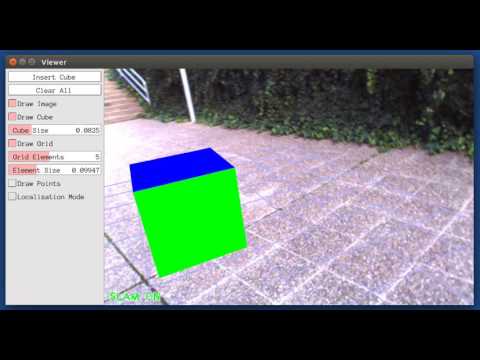
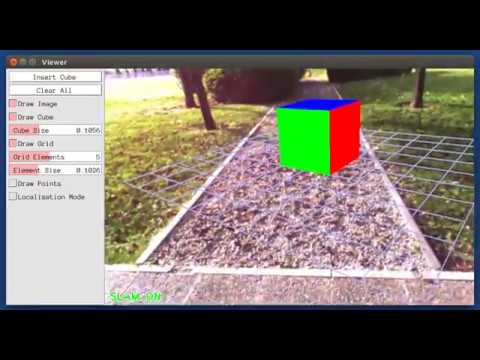
### Running Monocular Augmented Reality Demo
This is a demo of augmented reality where you can use an interface to insert virtual cubes in planar regions of the scene.
The node reads images from topic `/camera/image_raw`.
```
rosrun ORB_SLAM2 MonoAR PATH_TO_VOCABULARY PATH_TO_SETTINGS_FILE
```
### Running Stereo Node
For a stereo input from topic `/camera/left/image_raw` and `/camera/right/image_raw` run node ORB_SLAM2/Stereo. You will need to provide the vocabulary file and a settings file. If you **provide rectification matrices** (see Examples/Stereo/EuRoC.yaml example), the node will recitify the images online, **otherwise images must be pre-rectified**.
```
rosrun ORB_SLAM2 Stereo PATH_TO_VOCABULARY PATH_TO_SETTINGS_FILE ONLINE_RECTIFICATION
```
**Example**: Download a rosbag (e.g. V1_01_easy.bag) from the EuRoC dataset (http://projects.asl.ethz.ch/datasets/doku.php?id=kmavvisualinertialdatasets). Open 3 tabs on the terminal and run the following command at each tab:
```
roscore
```
```
rosrun ORB_SLAM2 Stereo Vocabulary/ORBvoc.txt Examples/Stereo/EuRoC.yaml true
```
```
rosbag play --pause V1_01_easy.bag /cam0/image_raw:=/camera/left/image_raw /cam1/image_raw:=/camera/right/image_raw
```
Once ORB-SLAM2 has loaded the vocabulary, press space in the rosbag tab. Enjoy!. Note: a powerful computer is required to run the most exigent sequences of this dataset.
### Running RGB_D Node
For an RGB-D input from topics `/camera/rgb/image_raw` and `/camera/depth_registered/image_raw`, run node ORB_SLAM2/RGBD. You will need to provide the vocabulary file and a settings file. See the RGB-D example above.
```
rosrun ORB_SLAM2 RGBD PATH_TO_VOCABULARY PATH_TO_SETTINGS_FILE
```
# 8. Processing your own sequences
You will need to create a settings file with the calibration of your camera. See the settings file provided for the TUM and KITTI datasets for monocular, stereo and RGB-D cameras. We use the calibration model of OpenCV. See the examples to learn how to create a program that makes use of the ORB-SLAM2 library and how to pass images to the SLAM system. Stereo input must be synchronized and rectified. RGB-D input must be synchronized and depth registered.
# 9. SLAM and Localization Modes
You can change between the *SLAM* and *Localization mode* using the GUI of the map viewer.
### SLAM Mode
This is the default mode. The system runs in parallal three threads: Tracking, Local Mapping and Loop Closing. The system localizes the camera, builds new map and tries to close loops.
### Localization Mode
This mode can be used when you have a good map of your working area. In this mode the Local Mapping and Loop Closing are deactivated. The system localizes the camera in the map (which is no longer updated), using relocalization if needed.

 3. **Good graph selection** (submitted to TRO) is an enhancement module to the back-end of BA-based SLAM. It enables fine-grained and timely control of the local BA problem in SLAM back-end: solve large BA when resource is sufficient, while focus on smaller BA under computation/time limit. Compared with sliding window or covisibily graph, good graph selection has much better computation-performance trade-off.
*Full BA vs. subgraph BA on Venice dataset:*
3. **Good graph selection** (submitted to TRO) is an enhancement module to the back-end of BA-based SLAM. It enables fine-grained and timely control of the local BA problem in SLAM back-end: solve large BA when resource is sufficient, while focus on smaller BA under computation/time limit. Compared with sliding window or covisibily graph, good graph selection has much better computation-performance trade-off.
*Full BA vs. subgraph BA on Venice dataset:*

 ### Related Publications:
[Monocular] Raúl Mur-Artal, J. M. M. Montiel and Juan D. Tardós. **ORB-SLAM: A Versatile and Accurate Monocular SLAM System**. *IEEE Transactions on Robotics,* vol. 31, no. 5, pp. 1147-1163, 2015. (**2015 IEEE Transactions on Robotics Best Paper Award**). **[PDF](http://webdiis.unizar.es/~raulmur/MurMontielTardosTRO15.pdf)**.
[Stereo and RGB-D] Raúl Mur-Artal and Juan D. Tardós. **ORB-SLAM2: an Open-Source SLAM System for Monocular, Stereo and RGB-D Cameras**. *IEEE Transactions on Robotics,* vol. 33, no. 5, pp. 1255-1262, 2017. **[PDF](https://128.84.21.199/pdf/1610.06475.pdf)**.
[DBoW2 Place Recognizer] Dorian Gálvez-López and Juan D. Tardós. **Bags of Binary Words for Fast Place Recognition in Image Sequences**. *IEEE Transactions on Robotics,* vol. 28, no. 5, pp. 1188-1197, 2012. **[PDF](http://doriangalvez.com/php/dl.php?dlp=GalvezTRO12.pdf)**
# 1. License
ORB-SLAM2 is released under a [GPLv3 license](https://github.com/raulmur/ORB_SLAM2/blob/master/License-gpl.txt). For a list of all code/library dependencies (and associated licenses), please see [Dependencies.md](https://github.com/raulmur/ORB_SLAM2/blob/master/Dependencies.md).
For a closed-source version of ORB-SLAM2 for commercial purposes, please contact the authors: orbslam (at) unizar (dot) es.
If you use ORB-SLAM2 (Monocular) in an academic work, please cite:
@article{murTRO2015,
title={{ORB-SLAM}: a Versatile and Accurate Monocular {SLAM} System},
author={Mur-Artal, Ra\'ul, Montiel, J. M. M. and Tard\'os, Juan D.},
journal={IEEE Transactions on Robotics},
volume={31},
number={5},
pages={1147--1163},
doi = {10.1109/TRO.2015.2463671},
year={2015}
}
if you use ORB-SLAM2 (Stereo or RGB-D) in an academic work, please cite:
@article{murORB2,
title={{ORB-SLAM2}: an Open-Source {SLAM} System for Monocular, Stereo and {RGB-D} Cameras},
author={Mur-Artal, Ra\'ul and Tard\'os, Juan D.},
journal={IEEE Transactions on Robotics},
volume={33},
number={5},
pages={1255--1262},
doi = {10.1109/TRO.2017.2705103},
year={2017}
}
# 2. Prerequisites
We have tested the library in **Ubuntu 12.04**, **14.04** and **16.04**, but it should be easy to compile in other platforms. A powerful computer (e.g. i7) will ensure real-time performance and provide more stable and accurate results.
## C++11 or C++0x Compiler
We use the new thread and chrono functionalities of C++11.
## Pangolin
We use [Pangolin](https://github.com/stevenlovegrove/Pangolin) for visualization and user interface. Dowload and install instructions can be found at: https://github.com/stevenlovegrove/Pangolin.
## OpenCV
We use [OpenCV](http://opencv.org) to manipulate images and features. Dowload and install instructions can be found at: http://opencv.org. **Required at leat 2.4.3. Tested with OpenCV 2.4.11 and OpenCV 3.2**.
## Eigen3
Required by g2o (see below). Download and install instructions can be found at: http://eigen.tuxfamily.org. **Required at least 3.1.0**.
## DBoW2 and g2o (Included in Thirdparty folder)
We use modified versions of the [DBoW2](https://github.com/dorian3d/DBoW2) library to perform place recognition and [g2o](https://github.com/RainerKuemmerle/g2o) library to perform non-linear optimizations. Both modified libraries (which are BSD) are included in the *Thirdparty* folder.
## ROS (optional)
We provide some examples to process the live input of a monocular, stereo or RGB-D camera using [ROS](ros.org). Building these examples is optional. In case you want to use ROS, a version Hydro or newer is needed.
# 3. Building ORB-SLAM2 library and examples
Clone the repository:
```
git clone https://github.com/raulmur/ORB_SLAM2.git ORB_SLAM2
```
We provide a script `build.sh` to build the *Thirdparty* libraries and *ORB-SLAM2*. Please make sure you have installed all required dependencies (see section 2). Execute:
```
cd ORB_SLAM2
chmod +x build.sh
./build.sh
```
This will create **libORB_SLAM2.so** at *lib* folder and the executables **mono_tum**, **mono_kitti**, **rgbd_tum**, **stereo_kitti**, **mono_euroc** and **stereo_euroc** in *Examples* folder.
# 4. Monocular Examples
## TUM Dataset
1. Download a sequence from http://vision.in.tum.de/data/datasets/rgbd-dataset/download and uncompress it.
2. Execute the following command. Change `TUMX.yaml` to TUM1.yaml,TUM2.yaml or TUM3.yaml for freiburg1, freiburg2 and freiburg3 sequences respectively. Change `PATH_TO_SEQUENCE_FOLDER`to the uncompressed sequence folder.
```
./Examples/Monocular/mono_tum Vocabulary/ORBvoc.txt Examples/Monocular/TUMX.yaml PATH_TO_SEQUENCE_FOLDER
```
## KITTI Dataset
1. Download the dataset (grayscale images) from http://www.cvlibs.net/datasets/kitti/eval_odometry.php
2. Execute the following command. Change `KITTIX.yaml`by KITTI00-02.yaml, KITTI03.yaml or KITTI04-12.yaml for sequence 0 to 2, 3, and 4 to 12 respectively. Change `PATH_TO_DATASET_FOLDER` to the uncompressed dataset folder. Change `SEQUENCE_NUMBER` to 00, 01, 02,.., 11.
```
./Examples/Monocular/mono_kitti Vocabulary/ORBvoc.txt Examples/Monocular/KITTIX.yaml PATH_TO_DATASET_FOLDER/dataset/sequences/SEQUENCE_NUMBER
```
## EuRoC Dataset
1. Download a sequence (ASL format) from http://projects.asl.ethz.ch/datasets/doku.php?id=kmavvisualinertialdatasets
2. Execute the following first command for V1 and V2 sequences, or the second command for MH sequences. Change PATH_TO_SEQUENCE_FOLDER and SEQUENCE according to the sequence you want to run.
```
./Examples/Monocular/mono_euroc Vocabulary/ORBvoc.txt Examples/Monocular/EuRoC.yaml PATH_TO_SEQUENCE_FOLDER/mav0/cam0/data Examples/Monocular/EuRoC_TimeStamps/SEQUENCE.txt
```
```
./Examples/Monocular/mono_euroc Vocabulary/ORBvoc.txt Examples/Monocular/EuRoC.yaml PATH_TO_SEQUENCE/cam0/data Examples/Monocular/EuRoC_TimeStamps/SEQUENCE.txt
```
# 5. Stereo Examples
## KITTI Dataset
1. Download the dataset (grayscale images) from http://www.cvlibs.net/datasets/kitti/eval_odometry.php
2. Execute the following command. Change `KITTIX.yaml`to KITTI00-02.yaml, KITTI03.yaml or KITTI04-12.yaml for sequence 0 to 2, 3, and 4 to 12 respectively. Change `PATH_TO_DATASET_FOLDER` to the uncompressed dataset folder. Change `SEQUENCE_NUMBER` to 00, 01, 02,.., 11.
```
./Examples/Stereo/stereo_kitti Vocabulary/ORBvoc.txt Examples/Stereo/KITTIX.yaml PATH_TO_DATASET_FOLDER/dataset/sequences/SEQUENCE_NUMBER
```
## EuRoC Dataset
1. Download a sequence (ASL format) from http://projects.asl.ethz.ch/datasets/doku.php?id=kmavvisualinertialdatasets
2. Execute the following first command for V1 and V2 sequences, or the second command for MH sequences. Change PATH_TO_SEQUENCE_FOLDER and SEQUENCE according to the sequence you want to run.
```
./Examples/Stereo/stereo_euroc Vocabulary/ORBvoc.txt Examples/Stereo/EuRoC.yaml PATH_TO_SEQUENCE/mav0/cam0/data PATH_TO_SEQUENCE/mav0/cam1/data Examples/Stereo/EuRoC_TimeStamps/SEQUENCE.txt
```
```
./Examples/Stereo/stereo_euroc Vocabulary/ORBvoc.txt Examples/Stereo/EuRoC.yaml PATH_TO_SEQUENCE/cam0/data PATH_TO_SEQUENCE/cam1/data Examples/Stereo/EuRoC_TimeStamps/SEQUENCE.txt
```
# 6. RGB-D Example
## TUM Dataset
1. Download a sequence from http://vision.in.tum.de/data/datasets/rgbd-dataset/download and uncompress it.
2. Associate RGB images and depth images using the python script [associate.py](http://vision.in.tum.de/data/datasets/rgbd-dataset/tools). We already provide associations for some of the sequences in *Examples/RGB-D/associations/*. You can generate your own associations file executing:
```
python associate.py PATH_TO_SEQUENCE/rgb.txt PATH_TO_SEQUENCE/depth.txt > associations.txt
```
3. Execute the following command. Change `TUMX.yaml` to TUM1.yaml,TUM2.yaml or TUM3.yaml for freiburg1, freiburg2 and freiburg3 sequences respectively. Change `PATH_TO_SEQUENCE_FOLDER`to the uncompressed sequence folder. Change `ASSOCIATIONS_FILE` to the path to the corresponding associations file.
```
./Examples/RGB-D/rgbd_tum Vocabulary/ORBvoc.txt Examples/RGB-D/TUMX.yaml PATH_TO_SEQUENCE_FOLDER ASSOCIATIONS_FILE
```
# 7. ROS Examples
### Building the nodes for mono, monoAR, stereo and RGB-D
1. Add the path including *Examples/ROS/ORB_SLAM2* to the ROS_PACKAGE_PATH environment variable. Open .bashrc file and add at the end the following line. Replace PATH by the folder where you cloned ORB_SLAM2:
```
export ROS_PACKAGE_PATH=${ROS_PACKAGE_PATH}:PATH/ORB_SLAM2/Examples/ROS
```
2. Execute `build_ros.sh` script:
```
chmod +x build_ros.sh
./build_ros.sh
```
### Running Monocular Node
For a monocular input from topic `/camera/image_raw` run node ORB_SLAM2/Mono. You will need to provide the vocabulary file and a settings file. See the monocular examples above.
```
rosrun ORB_SLAM2 Mono PATH_TO_VOCABULARY PATH_TO_SETTINGS_FILE
```
### Running Monocular Augmented Reality Demo
This is a demo of augmented reality where you can use an interface to insert virtual cubes in planar regions of the scene.
The node reads images from topic `/camera/image_raw`.
```
rosrun ORB_SLAM2 MonoAR PATH_TO_VOCABULARY PATH_TO_SETTINGS_FILE
```
### Running Stereo Node
For a stereo input from topic `/camera/left/image_raw` and `/camera/right/image_raw` run node ORB_SLAM2/Stereo. You will need to provide the vocabulary file and a settings file. If you **provide rectification matrices** (see Examples/Stereo/EuRoC.yaml example), the node will recitify the images online, **otherwise images must be pre-rectified**.
```
rosrun ORB_SLAM2 Stereo PATH_TO_VOCABULARY PATH_TO_SETTINGS_FILE ONLINE_RECTIFICATION
```
**Example**: Download a rosbag (e.g. V1_01_easy.bag) from the EuRoC dataset (http://projects.asl.ethz.ch/datasets/doku.php?id=kmavvisualinertialdatasets). Open 3 tabs on the terminal and run the following command at each tab:
```
roscore
```
```
rosrun ORB_SLAM2 Stereo Vocabulary/ORBvoc.txt Examples/Stereo/EuRoC.yaml true
```
```
rosbag play --pause V1_01_easy.bag /cam0/image_raw:=/camera/left/image_raw /cam1/image_raw:=/camera/right/image_raw
```
Once ORB-SLAM2 has loaded the vocabulary, press space in the rosbag tab. Enjoy!. Note: a powerful computer is required to run the most exigent sequences of this dataset.
### Running RGB_D Node
For an RGB-D input from topics `/camera/rgb/image_raw` and `/camera/depth_registered/image_raw`, run node ORB_SLAM2/RGBD. You will need to provide the vocabulary file and a settings file. See the RGB-D example above.
```
rosrun ORB_SLAM2 RGBD PATH_TO_VOCABULARY PATH_TO_SETTINGS_FILE
```
# 8. Processing your own sequences
You will need to create a settings file with the calibration of your camera. See the settings file provided for the TUM and KITTI datasets for monocular, stereo and RGB-D cameras. We use the calibration model of OpenCV. See the examples to learn how to create a program that makes use of the ORB-SLAM2 library and how to pass images to the SLAM system. Stereo input must be synchronized and rectified. RGB-D input must be synchronized and depth registered.
# 9. SLAM and Localization Modes
You can change between the *SLAM* and *Localization mode* using the GUI of the map viewer.
### SLAM Mode
This is the default mode. The system runs in parallal three threads: Tracking, Local Mapping and Loop Closing. The system localizes the camera, builds new map and tries to close loops.
### Localization Mode
This mode can be used when you have a good map of your working area. In this mode the Local Mapping and Loop Closing are deactivated. The system localizes the camera in the map (which is no longer updated), using relocalization if needed.
### Related Publications:
[Monocular] Raúl Mur-Artal, J. M. M. Montiel and Juan D. Tardós. **ORB-SLAM: A Versatile and Accurate Monocular SLAM System**. *IEEE Transactions on Robotics,* vol. 31, no. 5, pp. 1147-1163, 2015. (**2015 IEEE Transactions on Robotics Best Paper Award**). **[PDF](http://webdiis.unizar.es/~raulmur/MurMontielTardosTRO15.pdf)**.
[Stereo and RGB-D] Raúl Mur-Artal and Juan D. Tardós. **ORB-SLAM2: an Open-Source SLAM System for Monocular, Stereo and RGB-D Cameras**. *IEEE Transactions on Robotics,* vol. 33, no. 5, pp. 1255-1262, 2017. **[PDF](https://128.84.21.199/pdf/1610.06475.pdf)**.
[DBoW2 Place Recognizer] Dorian Gálvez-López and Juan D. Tardós. **Bags of Binary Words for Fast Place Recognition in Image Sequences**. *IEEE Transactions on Robotics,* vol. 28, no. 5, pp. 1188-1197, 2012. **[PDF](http://doriangalvez.com/php/dl.php?dlp=GalvezTRO12.pdf)**
# 1. License
ORB-SLAM2 is released under a [GPLv3 license](https://github.com/raulmur/ORB_SLAM2/blob/master/License-gpl.txt). For a list of all code/library dependencies (and associated licenses), please see [Dependencies.md](https://github.com/raulmur/ORB_SLAM2/blob/master/Dependencies.md).
For a closed-source version of ORB-SLAM2 for commercial purposes, please contact the authors: orbslam (at) unizar (dot) es.
If you use ORB-SLAM2 (Monocular) in an academic work, please cite:
@article{murTRO2015,
title={{ORB-SLAM}: a Versatile and Accurate Monocular {SLAM} System},
author={Mur-Artal, Ra\'ul, Montiel, J. M. M. and Tard\'os, Juan D.},
journal={IEEE Transactions on Robotics},
volume={31},
number={5},
pages={1147--1163},
doi = {10.1109/TRO.2015.2463671},
year={2015}
}
if you use ORB-SLAM2 (Stereo or RGB-D) in an academic work, please cite:
@article{murORB2,
title={{ORB-SLAM2}: an Open-Source {SLAM} System for Monocular, Stereo and {RGB-D} Cameras},
author={Mur-Artal, Ra\'ul and Tard\'os, Juan D.},
journal={IEEE Transactions on Robotics},
volume={33},
number={5},
pages={1255--1262},
doi = {10.1109/TRO.2017.2705103},
year={2017}
}
# 2. Prerequisites
We have tested the library in **Ubuntu 12.04**, **14.04** and **16.04**, but it should be easy to compile in other platforms. A powerful computer (e.g. i7) will ensure real-time performance and provide more stable and accurate results.
## C++11 or C++0x Compiler
We use the new thread and chrono functionalities of C++11.
## Pangolin
We use [Pangolin](https://github.com/stevenlovegrove/Pangolin) for visualization and user interface. Dowload and install instructions can be found at: https://github.com/stevenlovegrove/Pangolin.
## OpenCV
We use [OpenCV](http://opencv.org) to manipulate images and features. Dowload and install instructions can be found at: http://opencv.org. **Required at leat 2.4.3. Tested with OpenCV 2.4.11 and OpenCV 3.2**.
## Eigen3
Required by g2o (see below). Download and install instructions can be found at: http://eigen.tuxfamily.org. **Required at least 3.1.0**.
## DBoW2 and g2o (Included in Thirdparty folder)
We use modified versions of the [DBoW2](https://github.com/dorian3d/DBoW2) library to perform place recognition and [g2o](https://github.com/RainerKuemmerle/g2o) library to perform non-linear optimizations. Both modified libraries (which are BSD) are included in the *Thirdparty* folder.
## ROS (optional)
We provide some examples to process the live input of a monocular, stereo or RGB-D camera using [ROS](ros.org). Building these examples is optional. In case you want to use ROS, a version Hydro or newer is needed.
# 3. Building ORB-SLAM2 library and examples
Clone the repository:
```
git clone https://github.com/raulmur/ORB_SLAM2.git ORB_SLAM2
```
We provide a script `build.sh` to build the *Thirdparty* libraries and *ORB-SLAM2*. Please make sure you have installed all required dependencies (see section 2). Execute:
```
cd ORB_SLAM2
chmod +x build.sh
./build.sh
```
This will create **libORB_SLAM2.so** at *lib* folder and the executables **mono_tum**, **mono_kitti**, **rgbd_tum**, **stereo_kitti**, **mono_euroc** and **stereo_euroc** in *Examples* folder.
# 4. Monocular Examples
## TUM Dataset
1. Download a sequence from http://vision.in.tum.de/data/datasets/rgbd-dataset/download and uncompress it.
2. Execute the following command. Change `TUMX.yaml` to TUM1.yaml,TUM2.yaml or TUM3.yaml for freiburg1, freiburg2 and freiburg3 sequences respectively. Change `PATH_TO_SEQUENCE_FOLDER`to the uncompressed sequence folder.
```
./Examples/Monocular/mono_tum Vocabulary/ORBvoc.txt Examples/Monocular/TUMX.yaml PATH_TO_SEQUENCE_FOLDER
```
## KITTI Dataset
1. Download the dataset (grayscale images) from http://www.cvlibs.net/datasets/kitti/eval_odometry.php
2. Execute the following command. Change `KITTIX.yaml`by KITTI00-02.yaml, KITTI03.yaml or KITTI04-12.yaml for sequence 0 to 2, 3, and 4 to 12 respectively. Change `PATH_TO_DATASET_FOLDER` to the uncompressed dataset folder. Change `SEQUENCE_NUMBER` to 00, 01, 02,.., 11.
```
./Examples/Monocular/mono_kitti Vocabulary/ORBvoc.txt Examples/Monocular/KITTIX.yaml PATH_TO_DATASET_FOLDER/dataset/sequences/SEQUENCE_NUMBER
```
## EuRoC Dataset
1. Download a sequence (ASL format) from http://projects.asl.ethz.ch/datasets/doku.php?id=kmavvisualinertialdatasets
2. Execute the following first command for V1 and V2 sequences, or the second command for MH sequences. Change PATH_TO_SEQUENCE_FOLDER and SEQUENCE according to the sequence you want to run.
```
./Examples/Monocular/mono_euroc Vocabulary/ORBvoc.txt Examples/Monocular/EuRoC.yaml PATH_TO_SEQUENCE_FOLDER/mav0/cam0/data Examples/Monocular/EuRoC_TimeStamps/SEQUENCE.txt
```
```
./Examples/Monocular/mono_euroc Vocabulary/ORBvoc.txt Examples/Monocular/EuRoC.yaml PATH_TO_SEQUENCE/cam0/data Examples/Monocular/EuRoC_TimeStamps/SEQUENCE.txt
```
# 5. Stereo Examples
## KITTI Dataset
1. Download the dataset (grayscale images) from http://www.cvlibs.net/datasets/kitti/eval_odometry.php
2. Execute the following command. Change `KITTIX.yaml`to KITTI00-02.yaml, KITTI03.yaml or KITTI04-12.yaml for sequence 0 to 2, 3, and 4 to 12 respectively. Change `PATH_TO_DATASET_FOLDER` to the uncompressed dataset folder. Change `SEQUENCE_NUMBER` to 00, 01, 02,.., 11.
```
./Examples/Stereo/stereo_kitti Vocabulary/ORBvoc.txt Examples/Stereo/KITTIX.yaml PATH_TO_DATASET_FOLDER/dataset/sequences/SEQUENCE_NUMBER
```
## EuRoC Dataset
1. Download a sequence (ASL format) from http://projects.asl.ethz.ch/datasets/doku.php?id=kmavvisualinertialdatasets
2. Execute the following first command for V1 and V2 sequences, or the second command for MH sequences. Change PATH_TO_SEQUENCE_FOLDER and SEQUENCE according to the sequence you want to run.
```
./Examples/Stereo/stereo_euroc Vocabulary/ORBvoc.txt Examples/Stereo/EuRoC.yaml PATH_TO_SEQUENCE/mav0/cam0/data PATH_TO_SEQUENCE/mav0/cam1/data Examples/Stereo/EuRoC_TimeStamps/SEQUENCE.txt
```
```
./Examples/Stereo/stereo_euroc Vocabulary/ORBvoc.txt Examples/Stereo/EuRoC.yaml PATH_TO_SEQUENCE/cam0/data PATH_TO_SEQUENCE/cam1/data Examples/Stereo/EuRoC_TimeStamps/SEQUENCE.txt
```
# 6. RGB-D Example
## TUM Dataset
1. Download a sequence from http://vision.in.tum.de/data/datasets/rgbd-dataset/download and uncompress it.
2. Associate RGB images and depth images using the python script [associate.py](http://vision.in.tum.de/data/datasets/rgbd-dataset/tools). We already provide associations for some of the sequences in *Examples/RGB-D/associations/*. You can generate your own associations file executing:
```
python associate.py PATH_TO_SEQUENCE/rgb.txt PATH_TO_SEQUENCE/depth.txt > associations.txt
```
3. Execute the following command. Change `TUMX.yaml` to TUM1.yaml,TUM2.yaml or TUM3.yaml for freiburg1, freiburg2 and freiburg3 sequences respectively. Change `PATH_TO_SEQUENCE_FOLDER`to the uncompressed sequence folder. Change `ASSOCIATIONS_FILE` to the path to the corresponding associations file.
```
./Examples/RGB-D/rgbd_tum Vocabulary/ORBvoc.txt Examples/RGB-D/TUMX.yaml PATH_TO_SEQUENCE_FOLDER ASSOCIATIONS_FILE
```
# 7. ROS Examples
### Building the nodes for mono, monoAR, stereo and RGB-D
1. Add the path including *Examples/ROS/ORB_SLAM2* to the ROS_PACKAGE_PATH environment variable. Open .bashrc file and add at the end the following line. Replace PATH by the folder where you cloned ORB_SLAM2:
```
export ROS_PACKAGE_PATH=${ROS_PACKAGE_PATH}:PATH/ORB_SLAM2/Examples/ROS
```
2. Execute `build_ros.sh` script:
```
chmod +x build_ros.sh
./build_ros.sh
```
### Running Monocular Node
For a monocular input from topic `/camera/image_raw` run node ORB_SLAM2/Mono. You will need to provide the vocabulary file and a settings file. See the monocular examples above.
```
rosrun ORB_SLAM2 Mono PATH_TO_VOCABULARY PATH_TO_SETTINGS_FILE
```
### Running Monocular Augmented Reality Demo
This is a demo of augmented reality where you can use an interface to insert virtual cubes in planar regions of the scene.
The node reads images from topic `/camera/image_raw`.
```
rosrun ORB_SLAM2 MonoAR PATH_TO_VOCABULARY PATH_TO_SETTINGS_FILE
```
### Running Stereo Node
For a stereo input from topic `/camera/left/image_raw` and `/camera/right/image_raw` run node ORB_SLAM2/Stereo. You will need to provide the vocabulary file and a settings file. If you **provide rectification matrices** (see Examples/Stereo/EuRoC.yaml example), the node will recitify the images online, **otherwise images must be pre-rectified**.
```
rosrun ORB_SLAM2 Stereo PATH_TO_VOCABULARY PATH_TO_SETTINGS_FILE ONLINE_RECTIFICATION
```
**Example**: Download a rosbag (e.g. V1_01_easy.bag) from the EuRoC dataset (http://projects.asl.ethz.ch/datasets/doku.php?id=kmavvisualinertialdatasets). Open 3 tabs on the terminal and run the following command at each tab:
```
roscore
```
```
rosrun ORB_SLAM2 Stereo Vocabulary/ORBvoc.txt Examples/Stereo/EuRoC.yaml true
```
```
rosbag play --pause V1_01_easy.bag /cam0/image_raw:=/camera/left/image_raw /cam1/image_raw:=/camera/right/image_raw
```
Once ORB-SLAM2 has loaded the vocabulary, press space in the rosbag tab. Enjoy!. Note: a powerful computer is required to run the most exigent sequences of this dataset.
### Running RGB_D Node
For an RGB-D input from topics `/camera/rgb/image_raw` and `/camera/depth_registered/image_raw`, run node ORB_SLAM2/RGBD. You will need to provide the vocabulary file and a settings file. See the RGB-D example above.
```
rosrun ORB_SLAM2 RGBD PATH_TO_VOCABULARY PATH_TO_SETTINGS_FILE
```
# 8. Processing your own sequences
You will need to create a settings file with the calibration of your camera. See the settings file provided for the TUM and KITTI datasets for monocular, stereo and RGB-D cameras. We use the calibration model of OpenCV. See the examples to learn how to create a program that makes use of the ORB-SLAM2 library and how to pass images to the SLAM system. Stereo input must be synchronized and rectified. RGB-D input must be synchronized and depth registered.
# 9. SLAM and Localization Modes
You can change between the *SLAM* and *Localization mode* using the GUI of the map viewer.
### SLAM Mode
This is the default mode. The system runs in parallal three threads: Tracking, Local Mapping and Loop Closing. The system localizes the camera, builds new map and tries to close loops.
### Localization Mode
This mode can be used when you have a good map of your working area. In this mode the Local Mapping and Loop Closing are deactivated. The system localizes the camera in the map (which is no longer updated), using relocalization if needed.