# xleapmouse
**Repository Path**: npc1993/xleapmouse
## Basic Information
- **Project Name**: xleapmouse
- **Description**: LeapMotion mouse controller for Linux/X, with optional Qt GUI
- **Primary Language**: Unknown
- **License**: GPL-3.0
- **Default Branch**: master
- **Homepage**: None
- **GVP Project**: No
## Statistics
- **Stars**: 0
- **Forks**: 0
- **Created**: 2021-08-02
- **Last Updated**: 2021-08-02
## Categories & Tags
**Categories**: Uncategorized
**Tags**: None
## README
#  xleapmouse
This is a practical, usable mouse controller for the LeapMotion
controller, for Linux and X11. This is vaguely based off my
fork/total rewrite of the PyLeapMouse finger controller (also
available on github). This has the following features:
* **Motion**: Move your hand around with all fingers out, mouse moves.
"Picking up" and "dropping" the cursor is easy, motion is relative.
Jumping cursor has been minimized.
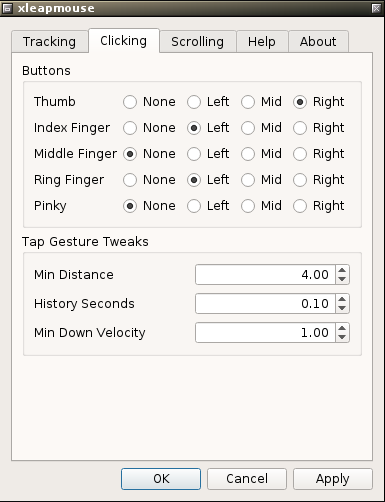
* **Clicking**: Clicking is possible by a gentle downward tapping of a
finger, by default the index finger (left click) and thumb (right
click).
* **Scrolling**: Scrolling can be accomplished by making a small
circling motion with the index finger, if it's the only finger
extended. (Two fingers are actually allowed, since the thumb tends
to stick out a bit.)
* **Pausing**: By extending only the pinky and making a "tap" motion
toward the screen, xleapmouse will stop tracking movement, until the
motion is made again to toggle it on. Useful if you need to use a
"real" mouse near the LeapMotion or gesticulate wildly.
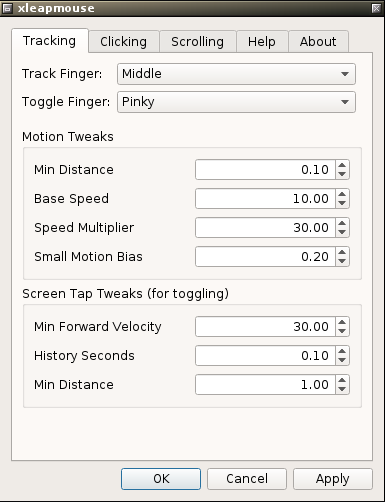
* **GUI**: Optionally, with Qt 5.3+, a system tray icon and
configuration GUI are available, similar to LeapMotion's
configuration panel. Full functionality is available without.
* **Responsive**: Written purely in C++, and very snappy.
xleapmouse
This is a practical, usable mouse controller for the LeapMotion
controller, for Linux and X11. This is vaguely based off my
fork/total rewrite of the PyLeapMouse finger controller (also
available on github). This has the following features:
* **Motion**: Move your hand around with all fingers out, mouse moves.
"Picking up" and "dropping" the cursor is easy, motion is relative.
Jumping cursor has been minimized.
* **Clicking**: Clicking is possible by a gentle downward tapping of a
finger, by default the index finger (left click) and thumb (right
click).
* **Scrolling**: Scrolling can be accomplished by making a small
circling motion with the index finger, if it's the only finger
extended. (Two fingers are actually allowed, since the thumb tends
to stick out a bit.)
* **Pausing**: By extending only the pinky and making a "tap" motion
toward the screen, xleapmouse will stop tracking movement, until the
motion is made again to toggle it on. Useful if you need to use a
"real" mouse near the LeapMotion or gesticulate wildly.
* **GUI**: Optionally, with Qt 5.3+, a system tray icon and
configuration GUI are available, similar to LeapMotion's
configuration panel. Full functionality is available without.
* **Responsive**: Written purely in C++, and very snappy.
 ## Building
This requires:
* A C++ compiler (e.g., g++)
* The LeapMotion **V2** SDK.
* cmake 3.6+ (or probably earlier, picked randomly)
Optionally:
* Qt 5.3+ with SDK (not just the libraries)
To build:
```console
$ git clone https://github.com/rpav/xleapmouse.git
$ cd xleapmouse/
$ mkdir build; cd build
$ cmake .. -DCMAKE_BUILD_TYPE=Release
: ...
$ make
: ...
$ make install
```
This should detect and build with Qt5 if you have it. If you have qt5, but *don't* want the gui for whatever reason, you can pass `-DXLEAP_DISABLE_GUI=1` to cmake.
## Running
Once you have a built `xleapmouse`, running it will start up with
defaults and write to `$HOME/.xleapmouse`. You can alter the (saved)
configuration either with the GUI or with command-line options.
```console
Usage: xleapmouse [options...]
-t, --track-finger N Finger off which to track motion
-T, --toggle-finger N Finger which toggles tracking (screen tap)
-s, --scroll-finger N Finger which scrolls (circle motion)
--lclick-fingers LIST Finger(s) which left-click (default: 1 3)
--mclick-fingers LIST Finger(s) which middle-click (default: none)
--rclick-fingers LIST Finger(s) which right-click (default: 0)
Tracking:
--distance-cutoff F Minimum hand distance from sensor (default: 0.1)
--base-scale F Base speed (default: 10.0)
--scale-factor F Speed multiplier as hand moves toward sensor
(default: 30.0)
--small-motion-cutoff F Accumulate small motions larger than this
(default: 0.2)
Scrolling:
--scroll-reverse (0|1) Reverse scrolling directions
--scroll-radius F Minimum circle radius to register (default: 1.0)
--scroll-delay F Delay between scroll clicks (default: 0.2)
Clicking tweaks (see SDK for details):
--kt-mindist F Gesture.KeyTap.MinDistance Default: 4.0
--kt-hist F Gesture.KeyTap.HistorySeconds Default: 0.1
--kt-mindown F Gesture.KeyTap.MinDownVelocity Default: 1.0
Tapping tweaks for toggle (see SDK for details):
--st-minforward F Gesture.ScreenTap.MinForwardVelocity
Default: 30.0
--st-hist F Gesture.ScreenTap.HistorySeconds Default: 0.1
--st-mindist F Gesture.ScreenTap.MinDistance Default: 1.0
Note: Fingers should be specified as a number, 0-4, or a space-
separated list of numbers, e.g. --lclick-fingers "1 2"
```
## Q&A
**I ran it and I don't see anything. Where's the GUI?**
This appears first as a tray icon you can right-click on. Given you
need this for `LeapControlPanel`, you probably have it already. If
not, and you're not running a desktop environment that has one
already, try [stalonetray](http://stalonetray.sourceforge.net/).
**I don't see any tray icon.**
You probably don't have qt5 and/or the `-dev` packages installed. Install this stuff and build. If it doesn't say `Qt5: Enabled`, you won't have a tray icon.
**It doesn't work! Or at least, motion sometimes doesn't work but clicking kinda does...**
Try a newer/older version of the SDK. This seems to happen with the latest as of writing (v2.3.1), with a pretty new Linux dist (Mint 19), and I'm trying to track down the cause.
Running one of the tools like the visualizer seems to help.
**I modified all the settings and it doesn't work very well!**
That's not a question, and the defaults are there for a reason. Try
them first. Delete your `~/.xleapmouserc` and start over.
**Will this replace my mouse?**
Doubtful unless you have a really steady hand. I don't. It's great
in conjunction with keyboard navigation for waving the cursor around
the screen like you have telekinesis, though. I use sawfish along
with hotkeys assigned to packing and growing windows, and it works
pretty well.
Also it's great for browsing while you eat. No getting food on the
mouse...
**No grabbing and dragging?!**
I might add it, but when I prototyped it with PyLeapMouse it just
didn't work very well. More often than not windows would end up all
over and getting a good selection was impossible.
**No middle mouse clicking?**
You *can* configure this. Use the GUI or `--mclick-fingers`.
Given middle mouse pastes in X, and the LeapMotion is often wont to
interpreting the slightest spurious motion in the worst possible way,
I don't use it myself.
**Why not Windows/OSX?**
This would probably be easy to port---even the GUI, which is Qt. But
I don't have the time or knowledge.
Patches accepted! But before you begin, let me know so I can abstract
out the mouse stuff slightly.
**This sucks and I hate it**
Go use something else.
**Your C++ sucks**
Probably! Not my language of choice and I'm not terribly familiar.
Patches accepted, as long as they make things more maintainable (fewer
lines, easier comprehension, more flexibiliy) and don't break
anything.
## Building
This requires:
* A C++ compiler (e.g., g++)
* The LeapMotion **V2** SDK.
* cmake 3.6+ (or probably earlier, picked randomly)
Optionally:
* Qt 5.3+ with SDK (not just the libraries)
To build:
```console
$ git clone https://github.com/rpav/xleapmouse.git
$ cd xleapmouse/
$ mkdir build; cd build
$ cmake .. -DCMAKE_BUILD_TYPE=Release
: ...
$ make
: ...
$ make install
```
This should detect and build with Qt5 if you have it. If you have qt5, but *don't* want the gui for whatever reason, you can pass `-DXLEAP_DISABLE_GUI=1` to cmake.
## Running
Once you have a built `xleapmouse`, running it will start up with
defaults and write to `$HOME/.xleapmouse`. You can alter the (saved)
configuration either with the GUI or with command-line options.
```console
Usage: xleapmouse [options...]
-t, --track-finger N Finger off which to track motion
-T, --toggle-finger N Finger which toggles tracking (screen tap)
-s, --scroll-finger N Finger which scrolls (circle motion)
--lclick-fingers LIST Finger(s) which left-click (default: 1 3)
--mclick-fingers LIST Finger(s) which middle-click (default: none)
--rclick-fingers LIST Finger(s) which right-click (default: 0)
Tracking:
--distance-cutoff F Minimum hand distance from sensor (default: 0.1)
--base-scale F Base speed (default: 10.0)
--scale-factor F Speed multiplier as hand moves toward sensor
(default: 30.0)
--small-motion-cutoff F Accumulate small motions larger than this
(default: 0.2)
Scrolling:
--scroll-reverse (0|1) Reverse scrolling directions
--scroll-radius F Minimum circle radius to register (default: 1.0)
--scroll-delay F Delay between scroll clicks (default: 0.2)
Clicking tweaks (see SDK for details):
--kt-mindist F Gesture.KeyTap.MinDistance Default: 4.0
--kt-hist F Gesture.KeyTap.HistorySeconds Default: 0.1
--kt-mindown F Gesture.KeyTap.MinDownVelocity Default: 1.0
Tapping tweaks for toggle (see SDK for details):
--st-minforward F Gesture.ScreenTap.MinForwardVelocity
Default: 30.0
--st-hist F Gesture.ScreenTap.HistorySeconds Default: 0.1
--st-mindist F Gesture.ScreenTap.MinDistance Default: 1.0
Note: Fingers should be specified as a number, 0-4, or a space-
separated list of numbers, e.g. --lclick-fingers "1 2"
```
## Q&A
**I ran it and I don't see anything. Where's the GUI?**
This appears first as a tray icon you can right-click on. Given you
need this for `LeapControlPanel`, you probably have it already. If
not, and you're not running a desktop environment that has one
already, try [stalonetray](http://stalonetray.sourceforge.net/).
**I don't see any tray icon.**
You probably don't have qt5 and/or the `-dev` packages installed. Install this stuff and build. If it doesn't say `Qt5: Enabled`, you won't have a tray icon.
**It doesn't work! Or at least, motion sometimes doesn't work but clicking kinda does...**
Try a newer/older version of the SDK. This seems to happen with the latest as of writing (v2.3.1), with a pretty new Linux dist (Mint 19), and I'm trying to track down the cause.
Running one of the tools like the visualizer seems to help.
**I modified all the settings and it doesn't work very well!**
That's not a question, and the defaults are there for a reason. Try
them first. Delete your `~/.xleapmouserc` and start over.
**Will this replace my mouse?**
Doubtful unless you have a really steady hand. I don't. It's great
in conjunction with keyboard navigation for waving the cursor around
the screen like you have telekinesis, though. I use sawfish along
with hotkeys assigned to packing and growing windows, and it works
pretty well.
Also it's great for browsing while you eat. No getting food on the
mouse...
**No grabbing and dragging?!**
I might add it, but when I prototyped it with PyLeapMouse it just
didn't work very well. More often than not windows would end up all
over and getting a good selection was impossible.
**No middle mouse clicking?**
You *can* configure this. Use the GUI or `--mclick-fingers`.
Given middle mouse pastes in X, and the LeapMotion is often wont to
interpreting the slightest spurious motion in the worst possible way,
I don't use it myself.
**Why not Windows/OSX?**
This would probably be easy to port---even the GUI, which is Qt. But
I don't have the time or knowledge.
Patches accepted! But before you begin, let me know so I can abstract
out the mouse stuff slightly.
**This sucks and I hate it**
Go use something else.
**Your C++ sucks**
Probably! Not my language of choice and I'm not terribly familiar.
Patches accepted, as long as they make things more maintainable (fewer
lines, easier comprehension, more flexibiliy) and don't break
anything.