# smart-excel-ai
**Repository Path**: ocisly/smart-excel-ai
## Basic Information
- **Project Name**: smart-excel-ai
- **Description**: Saas开发模板。Next.js,集成了登录、支付(lemon squeezy)、AI功能。
- **Primary Language**: Unknown
- **License**: MIT
- **Default Branch**: main
- **Homepage**: None
- **GVP Project**: No
## Statistics
- **Stars**: 0
- **Forks**: 0
- **Created**: 2025-01-14
- **Last Updated**: 2025-01-14
## Categories & Tags
**Categories**: Uncategorized
**Tags**: None
## README
🌍 *[English](README.md) ∙ [简体中文](README-zh.md)*
 > [Sponsor - 赞助]
> 302.AI是一个按需付费的一站式AI应用平台,开放平台,开源生态。
>
> 1.集合了最新最全的AI模型和品牌,包括但不限于语言模型、图像模型、声音模型、视频模型。
> 2.在基础模型上进行深度应用开发,做到让小白用户都可以零门槛上手使用,无需学习成本。
> 3.零月费,所有功能按需付费,全面开放,做到真正的门槛低,上限高。
> 4.创新的使用模式,管理和使用分离,面向团队和中小企业,一人管理,多人使用。
> 5.所有AI能力均提供API接入,所有应用开源支持自行定制(进行中)。
> 6.强大的开发团队,每周推出2-3个新应用,平台功能每日更新。
>
> 302.AI开源工具啦:https://github.com/302ai
# [SmartExcel.cc](https://www.smartExcel.cc/)
用AI在几秒钟内生成你想要的Excel公式。
[](https://www.smartExcel.cc/)
## 工作原理
该项目使用[ChatGPT API](https://openai.com/api/)和具有流功能的[Vercel AI SDK](https://sdk.vercel.ai/docs)。它基于表单和用户输入构建提示,将其发送至ChatGPT API通过Vercel边缘函数,然后将响应流式传输回应用程序界面。
## 技术栈
SmartExcel构建于以下技术栈:
- Next.js – 前端/后端
- TailwindCSS – 样式
- Postgres和Prisma - 数据库和存储([如何使用?](https://weijunext.com/article/061d8cd9-fcf3-4d9e-bd33-e257bc4f9989))
- Next-auth - 认证([如何使用?](https://weijunext.com/article/061d8cd9-fcf3-4d9e-bd33-e257bc4f9989))
- Chat GPT - 生成Excel公式
- Upstash - Redis([如何使用?](https://weijunext.com/article/6510121c-90da-4d20-85a1-72cbbdb3983b))
- Lemon Squeezy - 支付([如何使用?](https://weijunext.com/article/integrate-lemonsqueezy-api))
- Google Analytics - 访问分析([如何使用?](https://weijunext.com/article/979b9033-188c-4d88-bfff-6cf74d28420d))
- Docker - 开发存储([如何使用?](https://weijunext.com/article/b33a5545-fd26-47a6-8641-3c7467fb3910))
- Vercel - 托管
如果您对某些技术栈不熟悉,请点击上面的“如何使用”链接,阅读我的中文博客。或者到我的另一个开源仓库学习 —— [Learn Next.js Stack](https://github.com/weijunext/nextjs-learn-demos)
## 本地运行
克隆仓库后,你需要复制`.env.example`文件来创建一个`.env`文件,并填写所需字段。
然后,在命令行运行应用程序,它将在`http://localhost:3000`上可用。
```bash
pnpm i
pnpm run dev
```
## 一键部署
使用[Vercel](https://vercel.com?utm_source=github&utm_medium=readme&utm_campaign=vercel-examples)部署示例:
[](https://vercel.com/new/clone?repository-url=https://github.com/weijunext/smart-excel-ai&project-name=&repository-name=smart-excel-ai&demo-title=SmartExcel&demo-description=Generate%20the%20Excel%20formulas%20you%20need%20in%20seconds%20using%20AI.&demo-url=https://smartexcel.cc&demo-image=https://smartexcel.cc/opengraph-image.png)
## 关于我
**Full-Stack Engineer, Open-Source Next.js Artist & AI Enthusiast.**
**全栈工程师,Next.js 开源手艺人,AI降临派。**
[博客](https://weijunext.com)
[Github](https://github.com/weijunext)
[Twitter/X](https://x.com/weijunext)
[Medium](https://medium.com/@weijunext)
[掘金](https://juejin.cn/user/26044008768029)
[知乎](https://www.zhihu.com/people/mo-mo-mo-89-12-11)
[微信交流群](https://weijunext.com/make-a-friend)
如果这个项目对您有帮助,请给仓库点个star,能赞助一下就更好了👇
> [Sponsor - 赞助]
> 302.AI是一个按需付费的一站式AI应用平台,开放平台,开源生态。
>
> 1.集合了最新最全的AI模型和品牌,包括但不限于语言模型、图像模型、声音模型、视频模型。
> 2.在基础模型上进行深度应用开发,做到让小白用户都可以零门槛上手使用,无需学习成本。
> 3.零月费,所有功能按需付费,全面开放,做到真正的门槛低,上限高。
> 4.创新的使用模式,管理和使用分离,面向团队和中小企业,一人管理,多人使用。
> 5.所有AI能力均提供API接入,所有应用开源支持自行定制(进行中)。
> 6.强大的开发团队,每周推出2-3个新应用,平台功能每日更新。
>
> 302.AI开源工具啦:https://github.com/302ai
# [SmartExcel.cc](https://www.smartExcel.cc/)
用AI在几秒钟内生成你想要的Excel公式。
[](https://www.smartExcel.cc/)
## 工作原理
该项目使用[ChatGPT API](https://openai.com/api/)和具有流功能的[Vercel AI SDK](https://sdk.vercel.ai/docs)。它基于表单和用户输入构建提示,将其发送至ChatGPT API通过Vercel边缘函数,然后将响应流式传输回应用程序界面。
## 技术栈
SmartExcel构建于以下技术栈:
- Next.js – 前端/后端
- TailwindCSS – 样式
- Postgres和Prisma - 数据库和存储([如何使用?](https://weijunext.com/article/061d8cd9-fcf3-4d9e-bd33-e257bc4f9989))
- Next-auth - 认证([如何使用?](https://weijunext.com/article/061d8cd9-fcf3-4d9e-bd33-e257bc4f9989))
- Chat GPT - 生成Excel公式
- Upstash - Redis([如何使用?](https://weijunext.com/article/6510121c-90da-4d20-85a1-72cbbdb3983b))
- Lemon Squeezy - 支付([如何使用?](https://weijunext.com/article/integrate-lemonsqueezy-api))
- Google Analytics - 访问分析([如何使用?](https://weijunext.com/article/979b9033-188c-4d88-bfff-6cf74d28420d))
- Docker - 开发存储([如何使用?](https://weijunext.com/article/b33a5545-fd26-47a6-8641-3c7467fb3910))
- Vercel - 托管
如果您对某些技术栈不熟悉,请点击上面的“如何使用”链接,阅读我的中文博客。或者到我的另一个开源仓库学习 —— [Learn Next.js Stack](https://github.com/weijunext/nextjs-learn-demos)
## 本地运行
克隆仓库后,你需要复制`.env.example`文件来创建一个`.env`文件,并填写所需字段。
然后,在命令行运行应用程序,它将在`http://localhost:3000`上可用。
```bash
pnpm i
pnpm run dev
```
## 一键部署
使用[Vercel](https://vercel.com?utm_source=github&utm_medium=readme&utm_campaign=vercel-examples)部署示例:
[](https://vercel.com/new/clone?repository-url=https://github.com/weijunext/smart-excel-ai&project-name=&repository-name=smart-excel-ai&demo-title=SmartExcel&demo-description=Generate%20the%20Excel%20formulas%20you%20need%20in%20seconds%20using%20AI.&demo-url=https://smartexcel.cc&demo-image=https://smartexcel.cc/opengraph-image.png)
## 关于我
**Full-Stack Engineer, Open-Source Next.js Artist & AI Enthusiast.**
**全栈工程师,Next.js 开源手艺人,AI降临派。**
[博客](https://weijunext.com)
[Github](https://github.com/weijunext)
[Twitter/X](https://x.com/weijunext)
[Medium](https://medium.com/@weijunext)
[掘金](https://juejin.cn/user/26044008768029)
[知乎](https://www.zhihu.com/people/mo-mo-mo-89-12-11)
[微信交流群](https://weijunext.com/make-a-friend)
如果这个项目对您有帮助,请给仓库点个star,能赞助一下就更好了👇


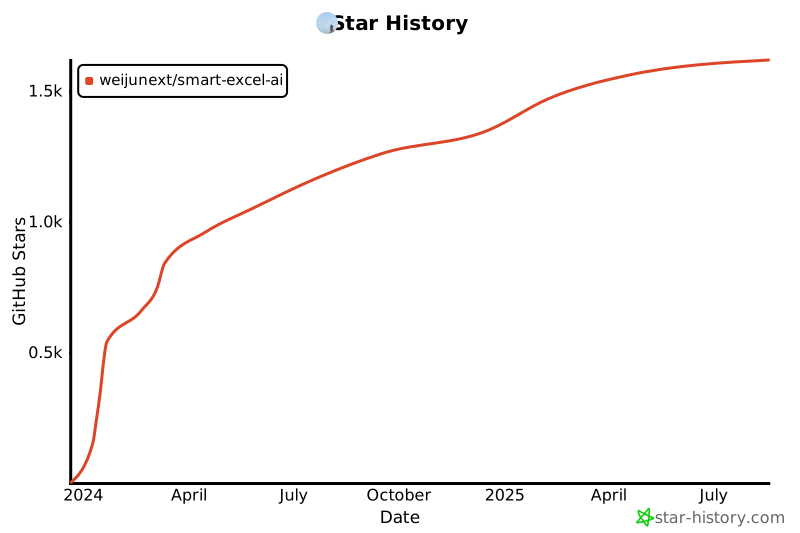
 ## Star 记录
## Star 记录
