# openinstall-flutter-plugin
**Repository Path**: openinstall/openinstall-flutter-plugin
## Basic Information
- **Project Name**: openinstall-flutter-plugin
- **Description**: flutter 集成 openinstall
- **Primary Language**: Unknown
- **License**: BSD-3-Clause
- **Default Branch**: master
- **Homepage**: None
- **GVP Project**: No
## Statistics
- **Stars**: 0
- **Forks**: 0
- **Created**: 2022-06-13
- **Last Updated**: 2026-03-27
## Categories & Tags
**Categories**: Uncategorized
**Tags**: None
## README
# openinstall flutter plugin
openinstall插件封装了openinstall平台原生SDK,集成了 **渠道统计,携带参数安装,快速安装与一键拉起** 功能,目前渠道支持 **H5渠道**,**广告平台渠道** 以及 **Apple Search Ads (ASA) 渠道**。
使用openinstall可实现以下多种场景:

## 一、安装
### 1. 添加依赖
在项目的 `pubspec.yaml` 文件中添加以下内容:
``` json
dependencies:
openinstall_flutter_plugin: ^2.5.2
```
### 2. 安装插件
使用命令行获取
``` shell
$ flutter pub get
```
或者使用开发工具的 `flutter pub get`
### 3. 导入
在 `Dart` 代码中使用以下代码导入:
``` dart
import 'package:openinstall_flutter_plugin/openinstall_flutter_plugin.dart';
```
## 二、配置
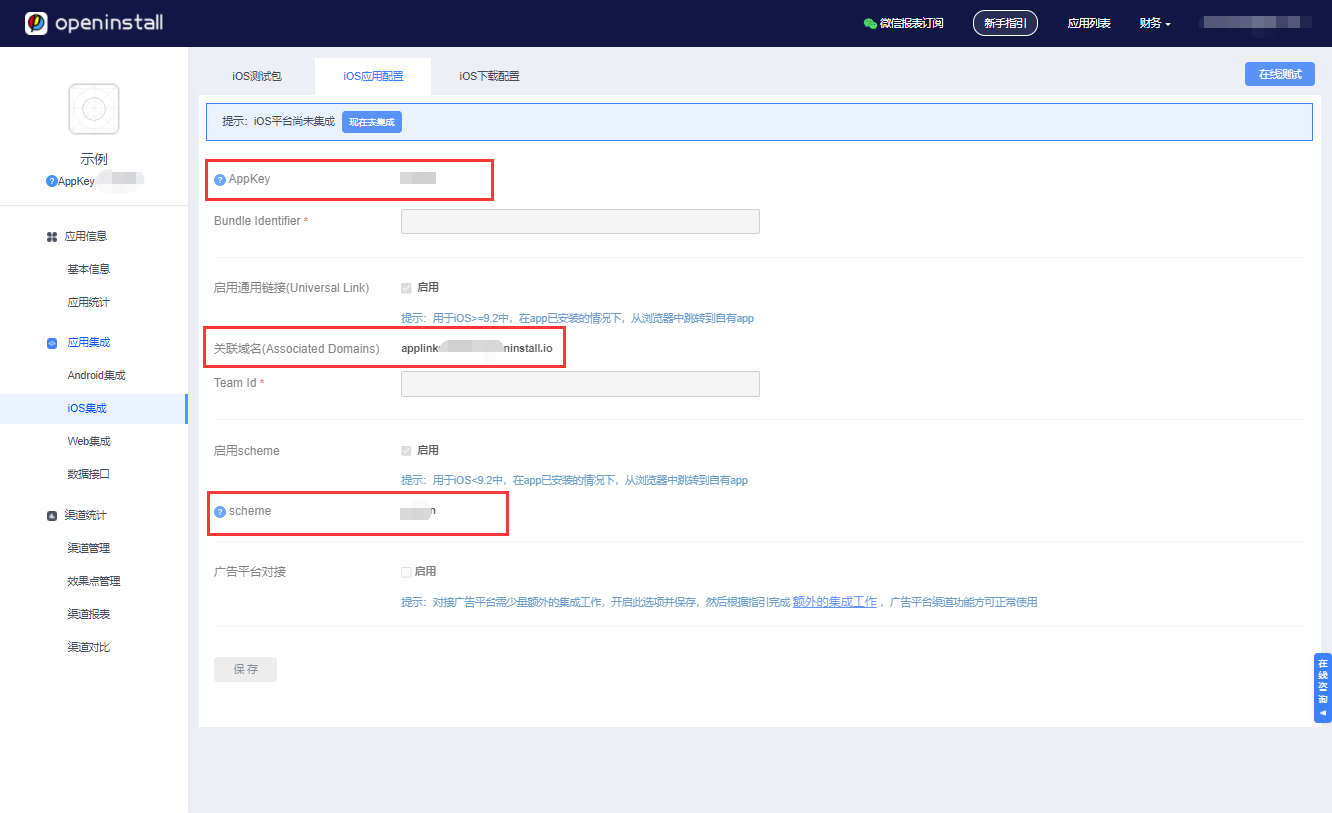
前往 [openinstall控制台](https://developer.openinstall.io/) 创建应用并获取 openinstall 为应用分配的` appkey` 和 `scheme` 以及 iOS的关联域名(Associated Domains)
### Android 平台配置
#### 配置 appkey
在 `/android/app/build.gradle` 中添加代码设置appkey:
``` groovy
android: {
....
defaultConfig {
...
manifestPlaceholders += [
OPENINSTALL_APPKEY : "openinstall为应用分配的appkey",
]
}
}
```
#### 配置 scheme
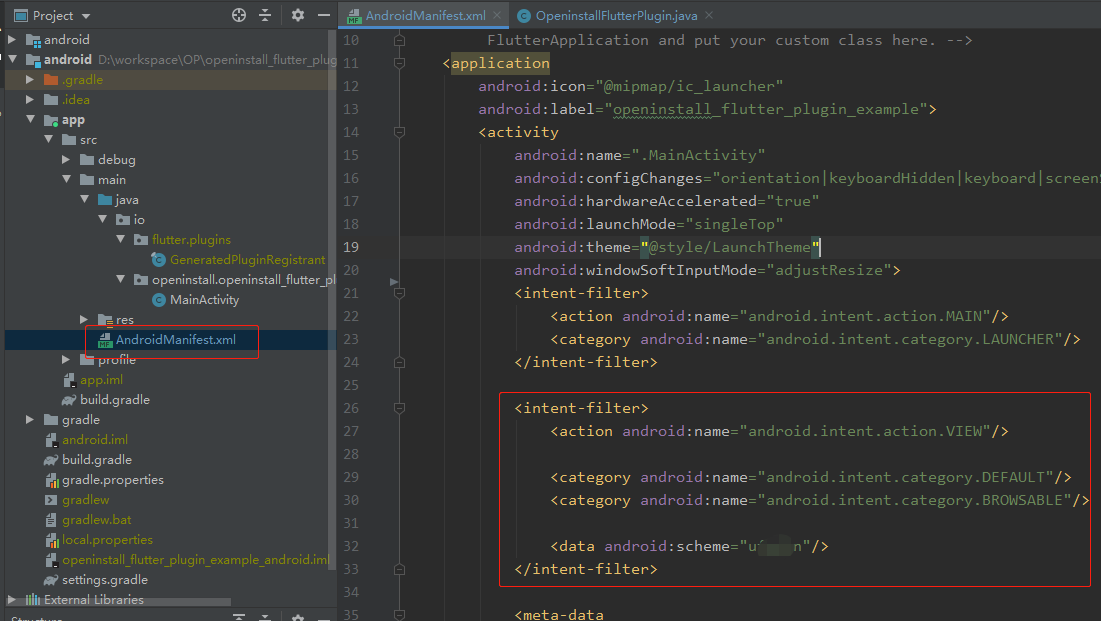
修改 `/android/app/src/main/AndroidMenifest.xml` 文件,在跳转 `Activity` 标签内添加 `intent-filter`
``` xml
```
如果跳转与启动页面是同一 `Activity` ,则配置示例如图:
### iOS 平台配置
#### 配置 appkey
在Flutter工程下的 `ios/Runner/Info.plist` 文件中配置 `appKey` 键值对,如下:
``` xml
com.openinstall.APP_KEY
openinstall 分配给应用的 appkey
```
#### 一键拉起配置
##### universal links 相关配置
1. 开启Associated Domains服务
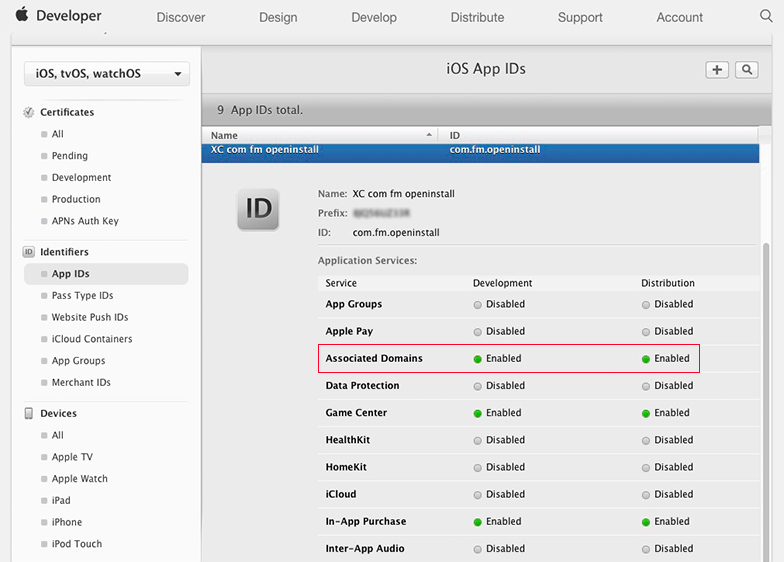
对于iOS,为确保能正常跳转,AppID必须开启Associated Domains功能,请到[苹果开发者网站](https://developer.apple.com/ "苹果开发者网站"),选择Certificate, Identifiers & Profiles,选择相应的AppID,开启Associated Domains。
**注意:当AppID重新编辑过之后,需要更新相应的mobileprovision证书。**
2. 配置universal links关联域名(iOS 9以后推荐使用)
关联域名(Associated Domains) 的值请在openinstall控制台获取(openinstall应用控制台->iOS集成->iOS应用配置)
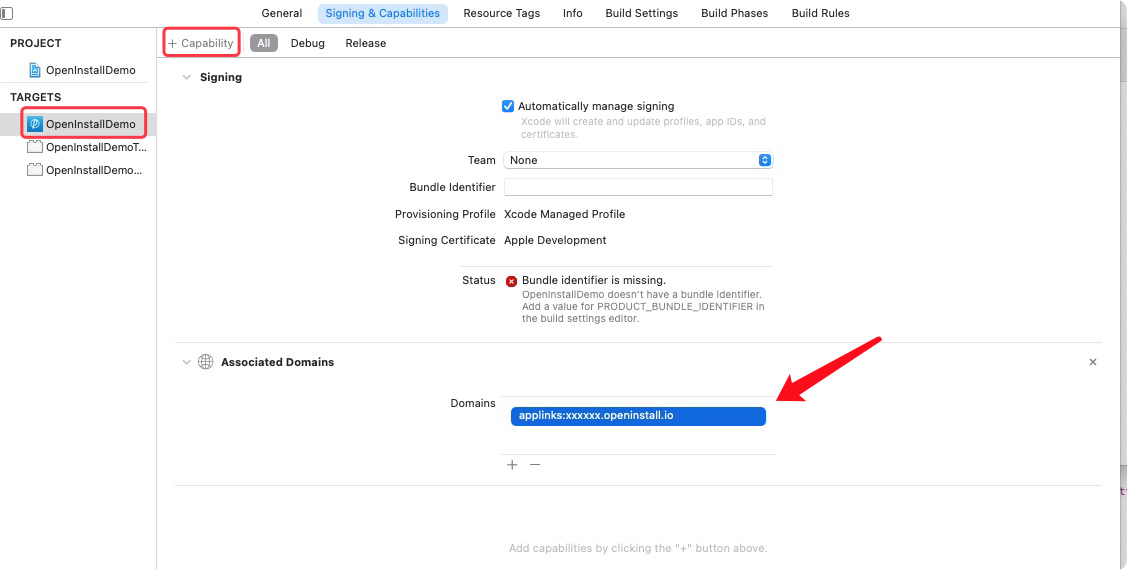
该文件是给iOS平台配置的文件,在 ios/Runner 目录下创建文件名为 Runner.entitlements 的文件,Runner.entitlements 内容如下:
``` xml
com.apple.developer.associated-domains
applinks:xxxxxx.openinstall.io
```
Xcode中快速添加:
**注意:插件版本>=1.3.1开始,iOS通用链接原生代码已在插件内部完成**
如果拉起无法获取到参数,可能是因为方法被其它插件覆盖导致(openinstall插件不会覆盖其它插件),可以修改其它插件通用链接delegate回调`..userActivity..`方法`return NO;`来解决,可参考OpeninstallFlutterPlugin.m文件相关内容。
##### scheme 配置
添加应用对应的 scheme,可在工程“TARGETS -> Info -> URL Types” 里快速添加,图文请看
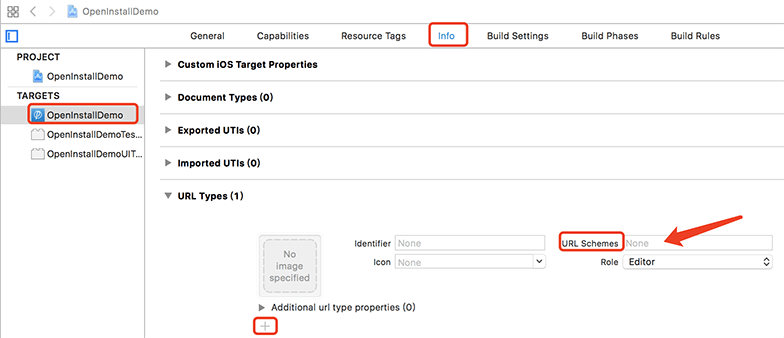
**注意:插件版本>=1.3.1开始,iOS通用链接原生代码已在插件内部完成**
如果拉起无法获取到参数,可能是因为方法被其它插件覆盖导致(openinstall插件不会覆盖其它插件),可以修改其它插件通用链接delegate回调`..hanldeOpenURL..`方法`return NO;`来解决,可参考OpeninstallFlutterPlugin.m文件相关内容。
## 三、使用
### 初始化
`init(EventHandler wakeupHandler)`
初始化时,需要传入**拉起回调** 获取 web 端传过来的动态参数
示例:
``` dart
Future wakeupHandler(Map data) async {
setState(() {
debugLog = "wakeup result : channel=" +
data['channelCode'] +
", data=" +
data['bindData'];
});
}
_openinstallFlutterPlugin.init(wakeupHandler);
```
### 获取安装参数
`install(EventHandler installHandler, [int seconds = 10])`
在 APP 需要安装参数时(由 web 网页中传递过来的,如邀请码、游戏房间号等动态参数),调用此接口,在回调中获取参数
示例:
``` dart
Future installHandler(Map data) async {
setState(() {
debugLog = "install result : channel=" +
data['channelCode'] +
", data=" +
data['bindData'] +
", shouldRetry" +
data['shouldRetry'];
});
}
_openinstallFlutterPlugin.install(installHandler);
```
#### 注册统计
`reportRegister()`
如需统计每个渠道的注册量(对评估渠道质量很重要),可根据自身的业务规则,在确保用户完成 APP 注册的情况下调用此接口
示例:
``` dart
_openinstallFlutterPlugin.reportRegister();
```
#### 效果点统计
`reportEffectPoint(String pointId, int pointValue)`
效果点建立在渠道基础之上,主要用来统计终端用户对某些特殊业务的使用效果。调用此接口时,请使用后台创建的 “效果点ID” 作为 pointId
示例:
``` dart
_openinstallFlutterPlugin.reportEffectPoint("effect_test", 1);
```
#### 效果点明细统计
`reportEffectPoint(String pointId, int pointValue, Map extraMap)`
效果点建立在渠道基础之上,主要用来统计终端用户对某些特殊业务的使用效果。调用此接口时,请使用后台创建的 “效果点ID” 作为 pointId
示例:
``` dart
Map extraMap = {
"key1": "value1",
"key2": "value2"
};
_openinstallFlutterPlugin.reportEffectPoint("effect_detail", 1, extraMap);
```
备注:效果点明细统计需要原生iOS SDK >=2.6.0,请从CocoaPods拉取、更新、确认版本。
#### 裂变分享上报
`reportShare(String shareCode, String platform)`
分享上报主要是统计某个具体用户在某次分享中,分享给了哪个平台,再通过JS端绑定被分享的用户信息,进一步统计到被分享用户的激活回流等情况
示例:
``` dart
_openinstallFlutterPlugin.reportShare("123456", "WechatSession")
.then((data) => print("reportShare : " + data.toString()));
```
可以通过返回的data中的`shouldRetry`决定是否需要重试,以及`message`查看失败的原因
## 四、导出apk/ipa包并上传
集成完毕后,导出iOS/Android安装包上传[openinstall控制台](https://developer.openinstall.io/),openinstal会检查应用的集成配置
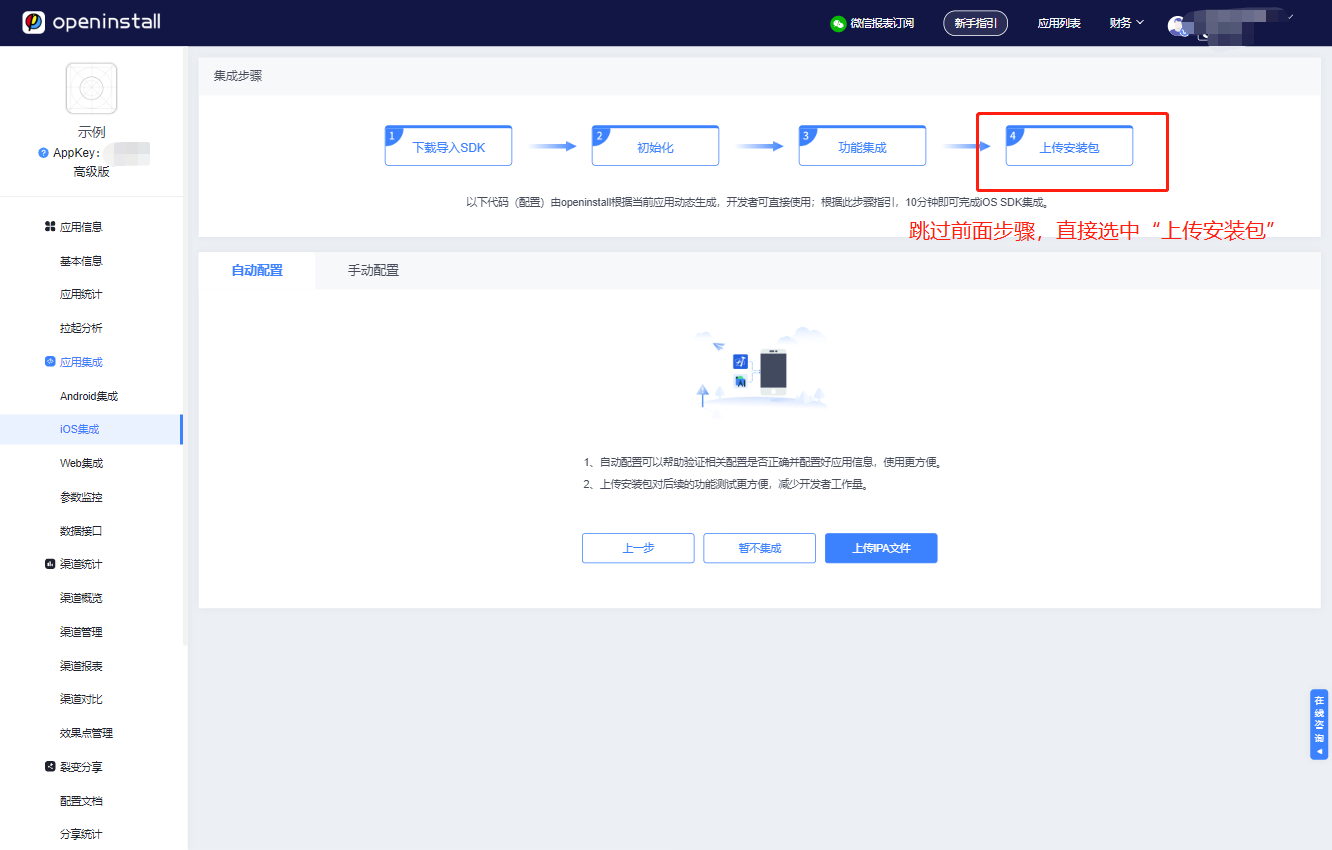
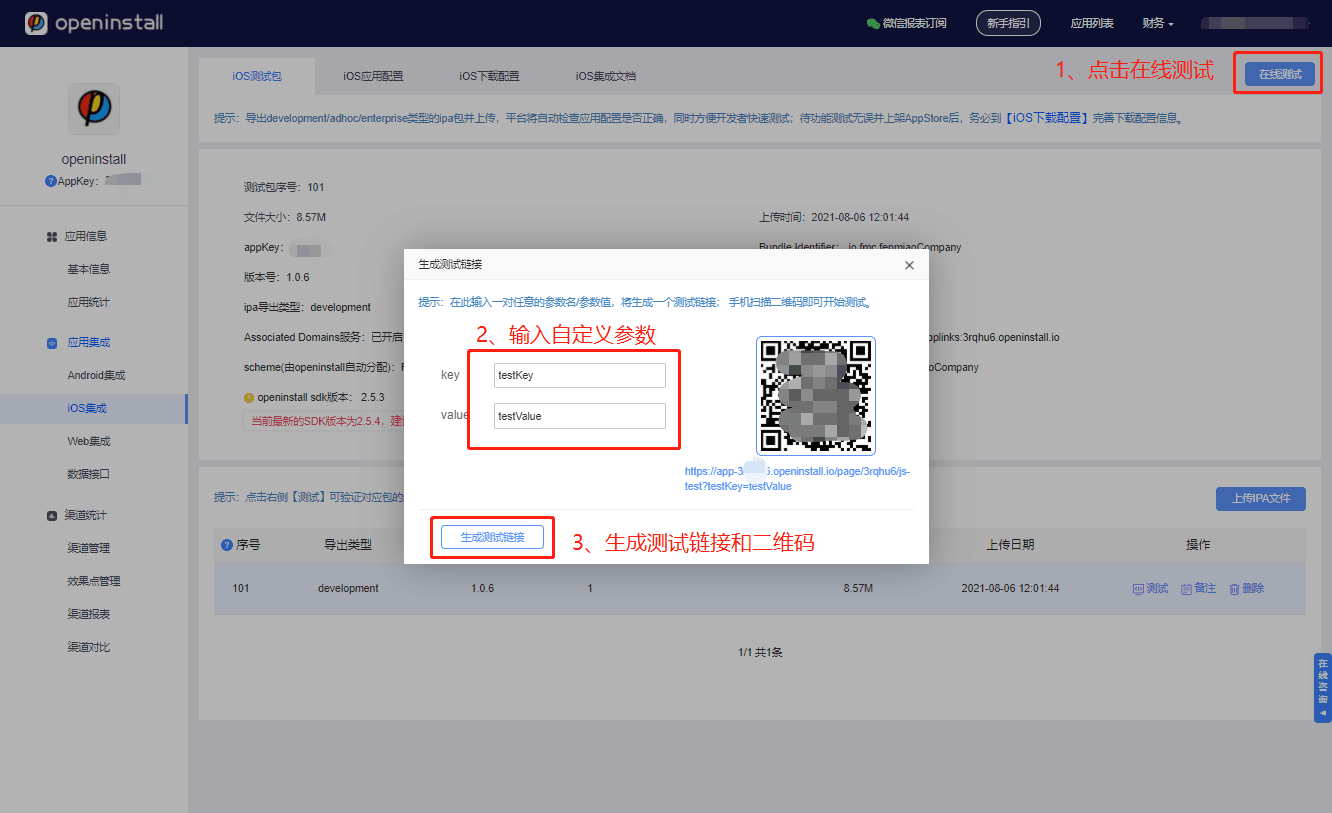
上传完成后即可开始在线模拟测试,体验完整的App安装/跳转流程
---
## 五、广告接入补充文档
### Android平台
1、针对广告平台接入,新增配置接口,在调用 `init` 之前调用。参考 [广告平台对接Android集成指引](https://www.openinstall.io/doc/ad_android.html)
``` dart
var adConfig = new Map();
adConfig["adEnabled"] = true;
_openinstallFlutterPlugin.configAndroid(adConfig);
```
**注意: `_openinstallFlutterPlugin.config(adEnabled, oaid, gaid)` 接口已废弃,请使用新的配置接口**
可选参数说明:
| 参数名| 参数类型 | 描述 |
| --- | --- | --- |
| androidId | string | android_id 原值 |
| serialNumber | string | serialNumber原值 |
| adEnabled| bool | 接入移动广告效果监测时需要开启 |
| macDisabled | bool | 是否禁止 SDK 获取 mac 地址 |
| imeiDisabled | bool | 是否禁止 SDK 获取 imei |
| gaid | string | 通过 google api 获取到的 advertisingId,SDK 将不再获取gaid |
| oaid | string | 通过移动安全联盟获取到的 oaid,SDK 将不再获取oaid |
| imei | string | imei 原值 |
| mac | string | mac address 原值 |
2、针对广告平台,为了精准地匹配到渠道,需要获取设备唯一标识码(IMEI),因此需要在 AndroidManifest.xml 中添加权限声明
```
```
3、在权限申请成功后,再进行openinstall初始化。**无论终端用户是否同意,都要调用初始化**
代码示例如下:
``` dart
// 使用 permission_handler
if (await Permission.phone.request().isGranted) {
// 获取到了权限
}
_openinstallFlutterPlugin.init(wakeupHandler);
```
**注意:** `_openinstallFlutterPlugin.init(wakeupHandler, permission);` 接口已废弃,请自行处理权限请求
### iOS平台
#### 广告平台渠道和ASA渠道的配置
1、针对广告平台接入,新增配置接口,在调用`init`之前调用。
``` dart
var adConfig = new Map();
adConfig["adEnable"] = true;//必要,开启广告平台渠道
adConfig["ASAEnable"] = true;//必要,开启苹果ASA功能
//adConfig["idfaStr"] = "";//可选,通过其它插件获取的idfa字符串一般格式为xxxx-xxxx-xxxx-xxxx
//adConfig["ASADebug"] = true;//可选,ASA测试debug模式,注意:正式环境中请务必关闭(不配置或配置为false)
_openinstallFlutterPlugin.configIos(adConfig);
```
可选参数说明:
| 参数名| 参数类型 | 描述 | 要求 |
| --- | --- | --- | --- |
| adEnable | bool | 必要,默认为false,是否开启广告平台统计功能 | 无 |
| idfaStr | string | 可选,默认为空,用户传入的idfa字符串,用于广告平台统计功能 | adEnable为true时才生效,不配置则由插件内部去获取隐私权限和idfa字符串 |
| ASAEnable | bool | 必要,默认为false,是否开启苹果ASA功能 | 无 |
| ASADebug | bool | 可选,默认为false,使用ASA功能时是否开启debug模式 | ASAEnable为true时才生效,正式环境中请务必关闭(不配置或配置为false) |
备注:adEnable为false时,插件内部不会去请求隐私权限和idfa字符串,idfaStr配置也会失效;
adEnable为true时,如果idfaStr有值且不为空,则使用idfaStr的值,如果未配置idfaStr或为空,则插件内部去获取隐私权限和idfa字符串;
2、需要在 `ios/Runner/Info.plist` 文件中配置权限
``` xml
NSUserTrackingUsageDescription
为了您可以精准获取到优质推荐内容,需要您允许使用该权限
```
**注意:**广告平台统计里面,如果出现权限弹窗无法正常弹出的情况,考虑把configIos和init方法放在 App生命周期的“应用进入前台resumed” 的时候调用。
**备注:** 2021年iOS14.5苹果公司将正式启用idfa新隐私政策,详情可参考:[广告平台对接iOS集成指引](https://www.openinstall.io/doc/ad_ios.html)
ASA渠道相关详细文档参考:[ASA渠道使用指南](https://www.openinstall.io/doc/asa.html)