# wavedrom
**Repository Path**: osEDA/wavedrom
## Basic Information
- **Project Name**: wavedrom
- **Description**: :ocean: Digital timing diagram rendering engine
- **Primary Language**: Unknown
- **License**: MIT
- **Default Branch**: master
- **Homepage**: None
- **GVP Project**: No
## Statistics
- **Stars**: 0
- **Forks**: 1
- **Created**: 2021-05-13
- **Last Updated**: 2022-05-07
## Categories & Tags
**Categories**: Uncategorized
**Tags**: None
## README
[](https://travis-ci.org/drom/wavedrom)
[](https://david-dm.org/drom/wavedrom)
[](https://david-dm.org/drom/wavedrom?type=dev)
[](https://www.npmjs.org/package/wavedrom)
[](http://gruntjs.com/)
[](http://wavedrom.com)
 [EDITOR](http://wavedrom.com/editor.html) | [TUTORIAL](http://wavedrom.com/tutorial.html)
## Introduction
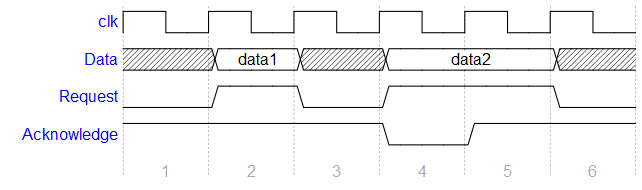
**WaveDrom** is a Free and Open Source online digital timing diagram (waveform) rendering engine that uses javascript, HTML5 and SVG to convert a [WaveJSON](https://github.com/drom/wavedrom/wiki/WaveJSON) input text description into SVG vector graphics.
[WaveJSON](https://github.com/drom/wavedrom/wiki/WaveJSON) is an application of the [JSON](http://json.org/) format. The purpose of [WaveJSON](https://github.com/drom/wavedrom/wiki/WaveJSON) is to provide a compact exchange format for digital timing diagrams utilized by digital HW / IC engineers.
The engine is using [WaveDromSkin](unpacked/README.md) skin mechanism to render a complete picture.
## Screenshot
## Web usage
**WaveDrom** timing diagrams can be embedded into the web pages, blogs, and wikis to be rendered by the most of modern browsers:
 4+
 10+
 5.1+
 12+
 11
### HTML pages
There are three steps to insert **WaveDrom** diagrams directly into your page:
1) Put the following line into your HTML page `````` or ``````:
```html
```
or from a CDN:
```html
```
2) Set the ``onload`` event for the HTML body.
```html
```
3) Insert [WaveJSON](https://github.com/drom/wavedrom/wiki/WaveJSON) source inside HTML ```` wrapped with the ``
```
The script will find all ``
[EDITOR](http://wavedrom.com/editor.html) | [TUTORIAL](http://wavedrom.com/tutorial.html)
## Introduction
**WaveDrom** is a Free and Open Source online digital timing diagram (waveform) rendering engine that uses javascript, HTML5 and SVG to convert a [WaveJSON](https://github.com/drom/wavedrom/wiki/WaveJSON) input text description into SVG vector graphics.
[WaveJSON](https://github.com/drom/wavedrom/wiki/WaveJSON) is an application of the [JSON](http://json.org/) format. The purpose of [WaveJSON](https://github.com/drom/wavedrom/wiki/WaveJSON) is to provide a compact exchange format for digital timing diagrams utilized by digital HW / IC engineers.
The engine is using [WaveDromSkin](unpacked/README.md) skin mechanism to render a complete picture.
## Screenshot

## Web usage
**WaveDrom** timing diagrams can be embedded into the web pages, blogs, and wikis to be rendered by the most of modern browsers:
 4+
 10+
 5.1+
 12+
 11
### HTML pages
There are three steps to insert **WaveDrom** diagrams directly into your page:
1) Put the following line into your HTML page `````` or ``````:
```html
```
or from a CDN:
```html
```
2) Set the ``onload`` event for the HTML body.
```html
```
3) Insert [WaveJSON](https://github.com/drom/wavedrom/wiki/WaveJSON) source inside HTML ```` wrapped with the ``
```
The script will find all ``