A modern animation engine for JavaScript ecosystem
---
## Examples Preview
---
## 📔 Introduction
Newcar is a highly configurable and advanced universal engine designed for rapid animation creation. It is suitable for a wide range of applications, including video clips, dynamic charts (planned for the future), and even 2D game development (also planned for the future).
## 🌟 Features
- **Rich API Interfaces** 🛠️: Offers powerful and diverse APIs, providing you with greater flexibility in animation creation.
- **Based on CanvasKit-WASM** 🧬: Utilizes CanvasKit-WASM to minimize communication and data exchange between the CPU and GPU, ensuring robust animation performance.
- **High Degree of Customization** ⚙️: Features strong customizability, allowing you to create unique animation styles.
- **Chain Syntax** ⛓️: Enables the use of chain syntax for a more efficient development process, eliminating the need to save objects into variables.
## ⌨️ Getting Started
### Creating a Project
Although Newcar can be used in various ways, we recommend using Vite for project creation and PNPM for package management.
```shell
$ pnpm create vite project-name
$ cd project-name
$ pnpm install
```
Next, select your preferred framework.
### Installation
```shell
$ pnpm add newcar
```
You will also need to install CanvasKit-WASM. For quick setup, we recommend using the CDN version.
### Initialization
```typescript
import * as nc from 'newcar'
const engine = await new nc.Engine().init(
'../node_modules/canvaskit-wasm/bin/canvaskit.wasm',
)
const defaultScene = new nc.Scene(new Widget())
engine.createApp().checkout(defaultScene).play()
```
1. Await `init()` until CanvasKit is fully loaded.
2. Create a `Scene` with a root widget as its first parameter.
3. Check out to the `defaultScene` and play the animation.
Simple, right? Let's dive deeper.
### Adding Widgets as Root's Children
Now, let's add some excitement.
```typescript
const engine = await new nc.Engine().init(
'../node_modules/canvaskit-wasm/bin/canvaskit.wasm',
)
const defaultScene = new nc.Scene(new Widget().add(new nc.Circle(100)))
engine.createApp().checkout(defaultScene).play()
```
## Animating It
```typescript
const engine = await new nc.Engine().init(
'../node_modules/canvaskit-wasm/bin/canvaskit.wasm',
)
const defaultScene = new nc.Scene(
new Widget().add(new nc.Circle(100).animate(nc.create, 0, 30)),
)
```
These codes will add a `create` animation to the `Circle` object.
If everything is set up correctly, you will see a circle drawn on the canvas.
## 📖 Documentation
The documentation is available at [newcar.js.org](https://newcar.js.org).
_Copyright (c) 2022-present, BugDuck Team & Dromara Community_
**Note: Newcar is a open-source project which belong to Dromara Community and maintained by BugDuck Team. The members of BugDuck just join with a personal identity, BugDuck Team will always keep its independence**
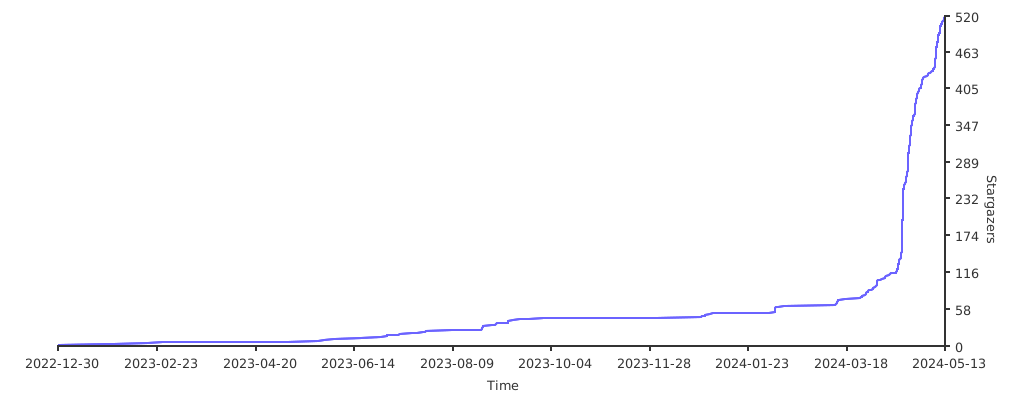
## Stargazers over time
[](https://starchart.cc/dromara/newcar)







