# FaceAlgorithm
**Repository Path**: peng-chuanbo/FaceAlgorithm
## Basic Information
- **Project Name**: FaceAlgorithm
- **Description**: 包含人脸检测(Retinaface,yolov5face,yolov7face),人脸检测跟踪(ByteTracker),人脸角度计算(Face_Angle)人脸矫正(Face_Aligner),人脸识别(Arcface),口罩检测(MaskRecognitiion),年龄性别检测(Gender_age),静默活体检测(Silent_Face_Anti_Spoofing)
- **Primary Language**: C++
- **License**: MIT
- **Default Branch**: main
- **Homepage**: None
- **GVP Project**: No
## Statistics
- **Stars**: 5
- **Forks**: 2
- **Created**: 2023-07-27
- **Last Updated**: 2025-03-10
## Categories & Tags
**Categories**: Uncategorized
**Tags**: None
## README
简体中文 | [English](./README_en.md)
如果觉得有用,不妨给个Star⭐️🌟支持一下吧~ 谢谢!
# Acknowledgments & Contact
### 1.WeChat ID: cbp931126
加我微信#(备注:FaceAlgorithm),拉进群(群里超多大佬)
### 2.QQ Group:517671804
# FaceAlgorithm
## 特性
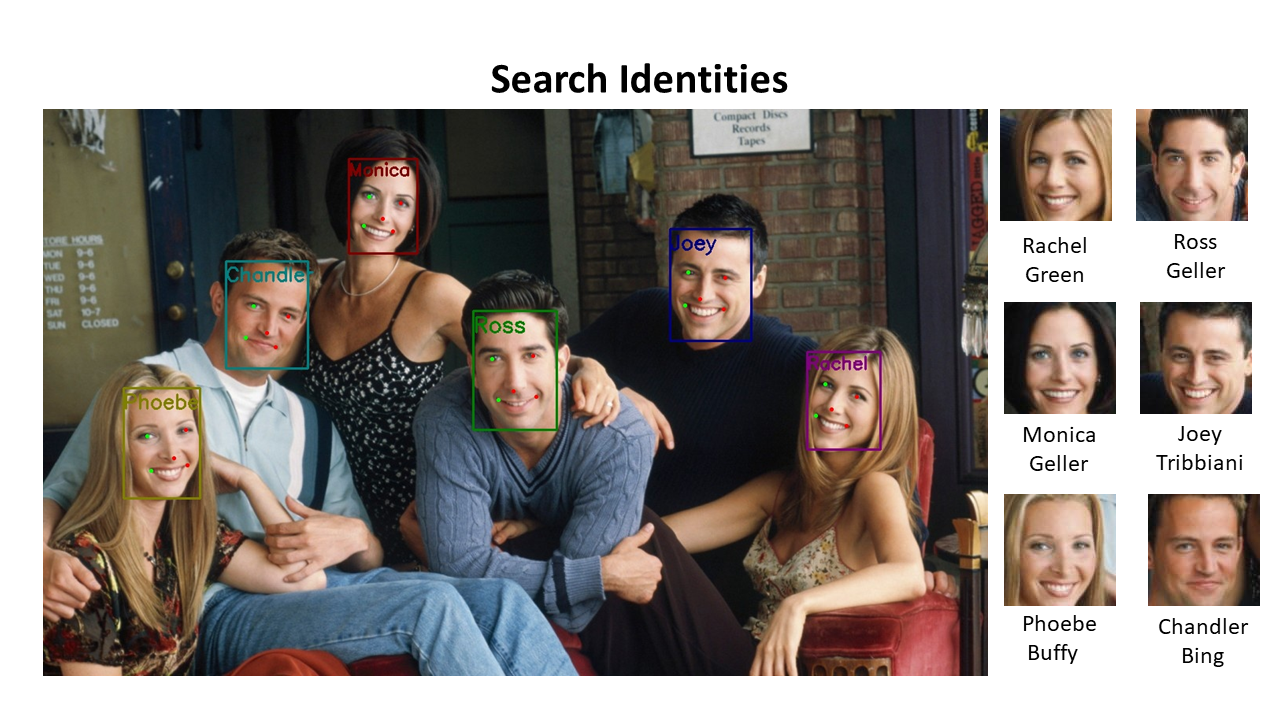
1. 人脸检测(retinaface,yolov5face,yolov7face,yolov8face),人脸旋转角度计算(俯仰角,偏航角),人脸矫正,人脸识别,带口罩识别,年龄性别识别,静默活体识别;
2. 所有模型均使用C++和TensorRT加速推理,yolov7face的前后处理使用cuda加速,(其他模型加速优化也可参考);
3. 所有模型使用C++和OnnxRuntime.OpenVINO,NCNN加速推理(TO DO);
4. 构造类似NV Deepstream,支持多种推理框架(TensorRT,OnnxRuntime,OpenVINO,NCNN),用于多路RTSP拉流+硬解码+Pipeline+推流(TO DO);
5. 根据不同的显卡型号自动生成对应的engine(如果文件夹下有其他显卡适配engine,则删除engine才能重新生成使用中的显卡对应的engien);
6. 提供C/C++接口,可以直接移植在项目里;
7. 人脸识别一般流程:
1)人脸检测(图像、视频流)
2)根据每个人脸返回的角度,筛选出合适角度的人脸用于人脸矫正,人脸识别
3)人脸矫正(根据5个人脸关键点)
4)人脸特征特征提取(512维特征)
5)人脸特征比对(人脸相似度计算)
8. 条件编译测试说明
| 测试类别 | enable | 说明 |
|:----------|:----------|:----------|
|face_detect |1| 人脸检测 |
|yolov5face_detect |1| yolov5face 人脸检测 |
|yolov7face_detect |1| yolov7face 人脸检测 |
|yolov8face_detect |1| yolov8face 人脸检测 |
|face_recognition |1| 人脸识别(人脸特征提取)+相似度计算 |
|face_detect_tracker |1| 人脸检测跟踪 |
|face_detect_aligner_recognitiion |0| 人脸检测——矫正——识别(人脸特征提取) |
|mask_recognition |1| 口罩识别 |
|gender_age_recognition |1| 性别年龄识别 |
|silnet_face_anti_spoofing |1| 静默活体检测 |
## 算法说明
### 1人脸检测
#### 1)人脸检测retinaface(mobilenet0.25,R50需要自己修改代码)
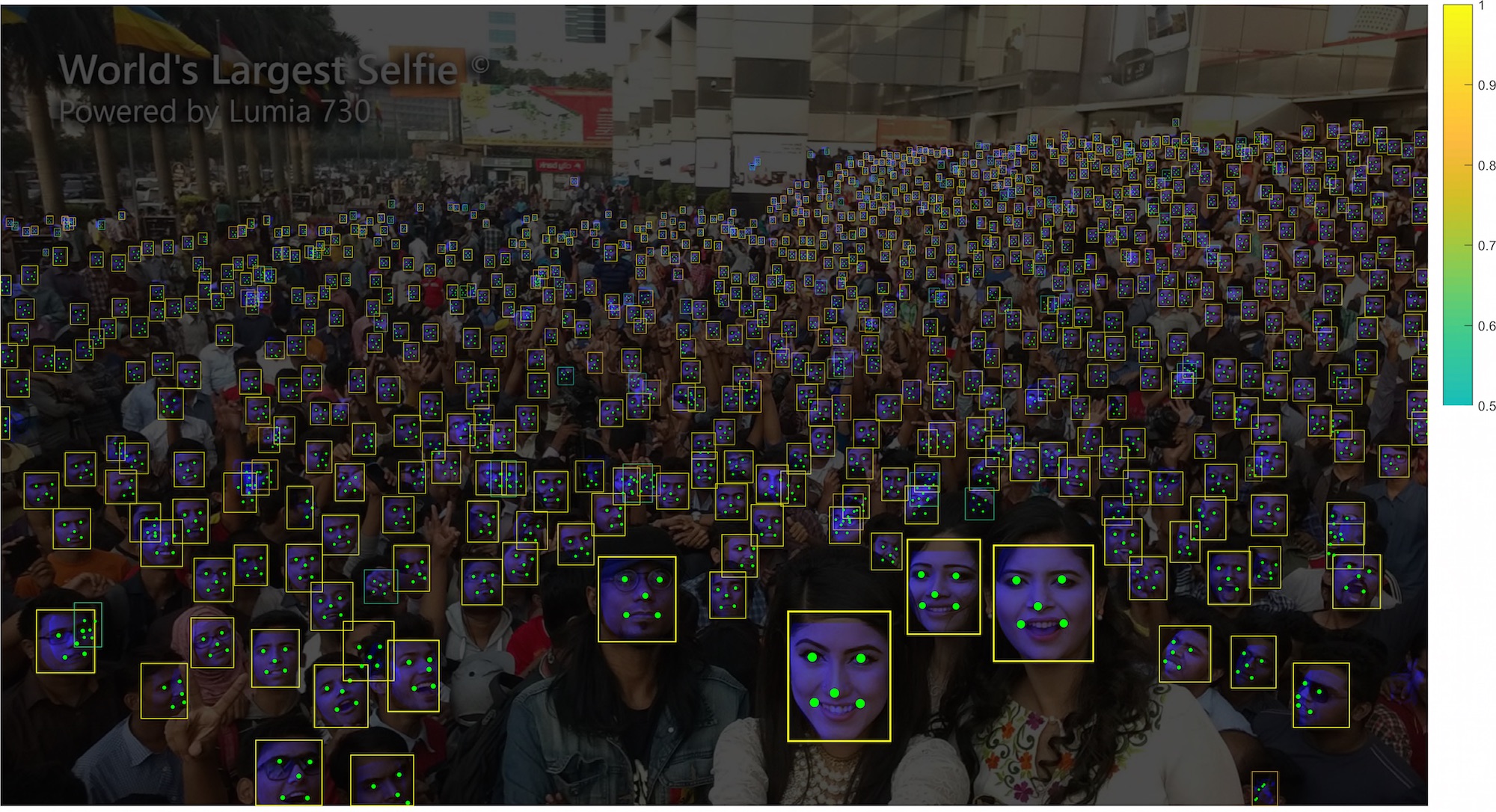
#### 2)yolov5face(yolov5sface(640*640),n,m,l,x需要自己转换对应的onnx)
 #### 3)yolov7face(yolov7sface(640*640),另外不同大小的模型需要自己转换)
 #### 4)yolov8facee(yolov8nface(640*640),另外不同大小的模型需要自己转换)
 #### 5) ***Large family***
| Method | Backbone | Easy | Medium | Hard | \#Params(M) | \#Flops(G) |
|:-------------------:|:--------------:|:-----:|:------:|:-----:|:-----------:|:----------:|
| RetinaFace (CVPR20) | ResNet50 | 94.92 | 91.90 | 64.17 | 29.50 | 37.59 |
| ***YOLOv5s*** | CSPNet | 94.67 | 92.75 | 83.03 | 7.075 | 5.751 |
| **YOLOv5s6** | CSPNet | 95.48 | 93.66 | 82.8 | 12.386 | 6.280 |
| ***YOLOv5m*** | CSPNet | 95.30 | 93.76 | 85.28 | 21.063 | 18.146 |
| **YOLOv5m6** | CSPNet | 95.66 | 94.1 | 85.2 | 35.485 | 19.773 |
| ***YOLOv5l*** | CSPNet | 95.78 | 94.30 | 86.13 | 46.627 | 41.607 |
| ***YOLOv5l6*** | CSPNet | 96.38 | 94.90 | 85.88 | 76.674 | 45.279 |
| ***yolov7-tiny*** | 640 | 94.7 | 92.6 | 82.1 | 13.2 | - |
| ***yolov7s*** | 640 | 94.8 | 93.1 | 85.2 | 16.8 | - |
| ***yolov7*** | 640 | 96.9 | 95.5 | 88.0 | 103.4 | - |
| ***yolov7+TTA*** | 640 | 97.2 | 95.8 | 87.7 | 103.4 | - |
| ***yolov7-w6*** | 960 | 96.4 | 95.0 | 88.3 | 89.0 | - |
| ***yolov7-w6+TTA*** | 1280 | 96.9 | 95.8 | 90.4 | 89.0 | - |
| ***yolov8s*** | 640 | 96.0 | 94.2 | 82.6 | - | - |
| ***yolov8m*** | 640 | 96.6 | 95.0 | 84.1 | - | - |
#### 6) ***Small family***
| Method | Backbone | Easy | Medium | Hard | \#Params(M) | \#Flops(G) |
| -------------------- | --------------- | ----- | ------ | ----- | ----------- | ---------- |
| RetinaFace (CVPR20 | MobileNet0.25 | 87.78 | 81.16 | 47.32 | 0.44 | 0.802 |
| FaceBoxes (IJCB17) | | 76.17 | 57.17 | 24.18 | 1.01 | 0.275 |
| ***YOLOv5n*** | ShuffleNetv2 | 93.74 | 91.54 | 80.32 | 1.726 | 2.111 |
| ***YOLOv5n-0.5*** | ShuffleNetv2 | 90.76 | 88.12 | 73.82 | 0.447 | 0.571 |
| ***yolov7-lite-t*** | | 88.7 | 85.2 | 71.5 | 0.8 | |
| ***yolov7-lite-s*** | | 92.7 | 89.9 | 78.5 | 3.0 | - |
| ***yolov8-lite-t*** | 640 | 90.3 | 87.5 | 72.8 | - | - |
| ***yolov8-lite-s*** | 640 | 93.4 | 91.1 | 77.7 | - | - |
| ***yolov8n*** | 640 | 94.5 | 92.2 | 79.0 | - | - |
#### 7) TensorRT
| Backbone | Pytorch(1.10.0+cu102) | TensorRT_FP16(RTX2080Ti) |TensorRT_FP16(RTX3090)@640|
| :----------: | :---------: | :---------------: |:---------------: |
| yolov5n-0.5 | 7.7 ms | 2.1 ms | | |
| yolov5n-face | 7.7 ms | 2.4 ms | | |
| yolov5m-face | 9.9 ms | 3.3 ms | | |
| yolov5l-face | 15.9 ms | 4.5 ms | | |
| RetinaFace | - | - | 1.38ms (前后处理+推理+人脸角度计算) |
| yolov5s-face | 5.6 ms | 2.2 ms | 1.47ms (前后处理+推理+人脸角度计算) |
| yolov7s-face | - | - | 1.69ms (前后处理+推理+人脸角度计算) |
| yolov8n-face | - | - | 1.03ms (前后处理+推理+人脸角度计算) |
### 2.人脸识别
#### 1) arcface(R50)
#### 2)arcface(R101,需要自己下载模型修改代码)
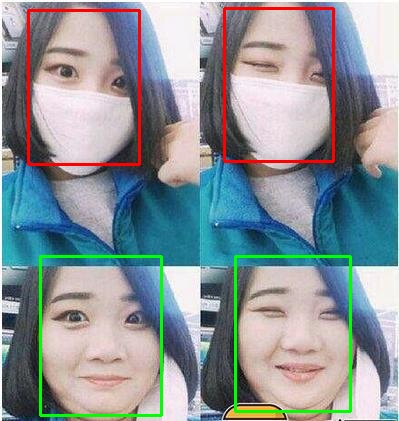
### 3.带口罩识别
#### 1)检测->裁剪->识别(分类模型)
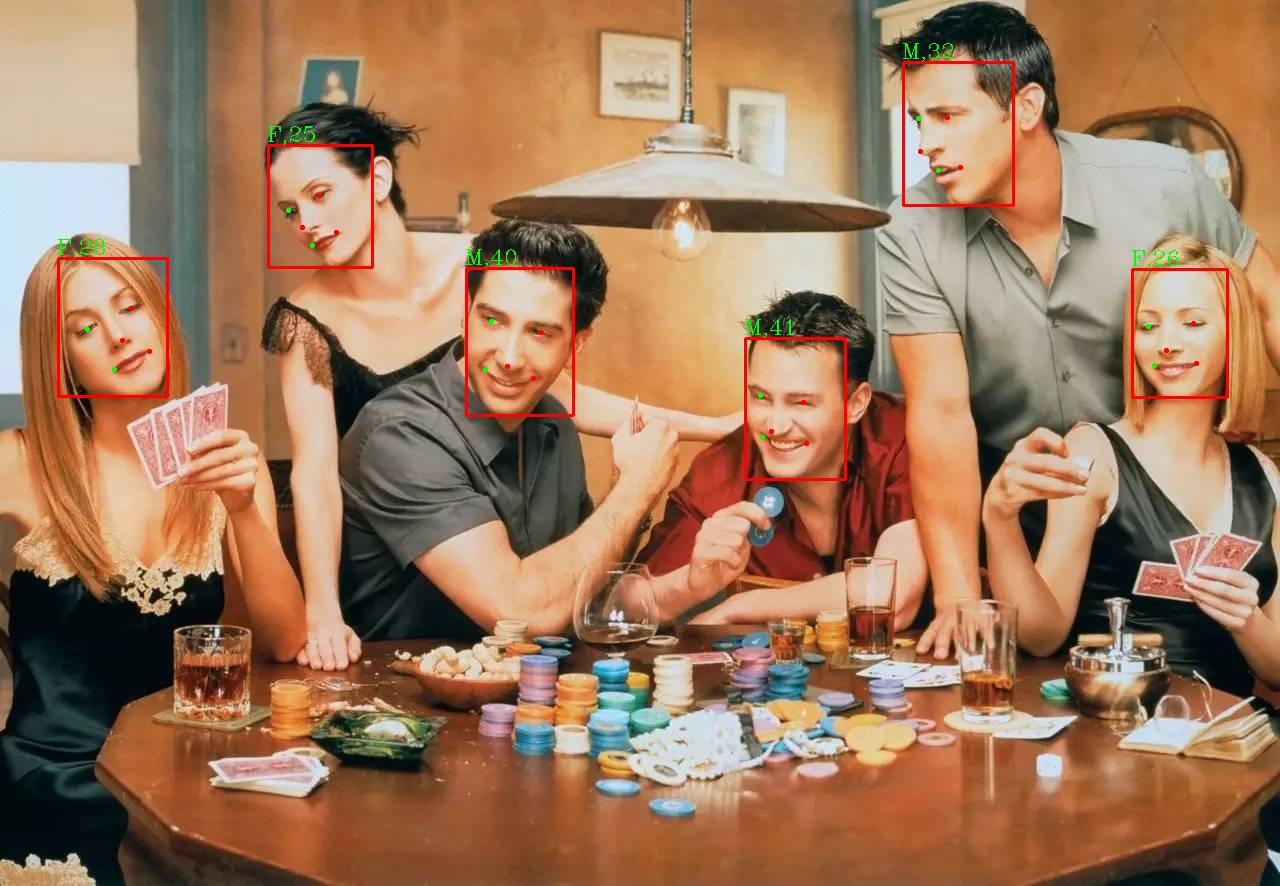
### 4.年龄性别
#### 1)人脸检测->裁剪->年龄和性别识别
### 5.静默活体识别
#### 1)Silent-Face-Anti-Spoofing
|name| sample| result |image| sample| result |
|:----------:|:----------:|:----------:|:----------:|:----------:|:----------:|
0.jpg|
#### 5) ***Large family***
| Method | Backbone | Easy | Medium | Hard | \#Params(M) | \#Flops(G) |
|:-------------------:|:--------------:|:-----:|:------:|:-----:|:-----------:|:----------:|
| RetinaFace (CVPR20) | ResNet50 | 94.92 | 91.90 | 64.17 | 29.50 | 37.59 |
| ***YOLOv5s*** | CSPNet | 94.67 | 92.75 | 83.03 | 7.075 | 5.751 |
| **YOLOv5s6** | CSPNet | 95.48 | 93.66 | 82.8 | 12.386 | 6.280 |
| ***YOLOv5m*** | CSPNet | 95.30 | 93.76 | 85.28 | 21.063 | 18.146 |
| **YOLOv5m6** | CSPNet | 95.66 | 94.1 | 85.2 | 35.485 | 19.773 |
| ***YOLOv5l*** | CSPNet | 95.78 | 94.30 | 86.13 | 46.627 | 41.607 |
| ***YOLOv5l6*** | CSPNet | 96.38 | 94.90 | 85.88 | 76.674 | 45.279 |
| ***yolov7-tiny*** | 640 | 94.7 | 92.6 | 82.1 | 13.2 | - |
| ***yolov7s*** | 640 | 94.8 | 93.1 | 85.2 | 16.8 | - |
| ***yolov7*** | 640 | 96.9 | 95.5 | 88.0 | 103.4 | - |
| ***yolov7+TTA*** | 640 | 97.2 | 95.8 | 87.7 | 103.4 | - |
| ***yolov7-w6*** | 960 | 96.4 | 95.0 | 88.3 | 89.0 | - |
| ***yolov7-w6+TTA*** | 1280 | 96.9 | 95.8 | 90.4 | 89.0 | - |
| ***yolov8s*** | 640 | 96.0 | 94.2 | 82.6 | - | - |
| ***yolov8m*** | 640 | 96.6 | 95.0 | 84.1 | - | - |
#### 6) ***Small family***
| Method | Backbone | Easy | Medium | Hard | \#Params(M) | \#Flops(G) |
| -------------------- | --------------- | ----- | ------ | ----- | ----------- | ---------- |
| RetinaFace (CVPR20 | MobileNet0.25 | 87.78 | 81.16 | 47.32 | 0.44 | 0.802 |
| FaceBoxes (IJCB17) | | 76.17 | 57.17 | 24.18 | 1.01 | 0.275 |
| ***YOLOv5n*** | ShuffleNetv2 | 93.74 | 91.54 | 80.32 | 1.726 | 2.111 |
| ***YOLOv5n-0.5*** | ShuffleNetv2 | 90.76 | 88.12 | 73.82 | 0.447 | 0.571 |
| ***yolov7-lite-t*** | | 88.7 | 85.2 | 71.5 | 0.8 | |
| ***yolov7-lite-s*** | | 92.7 | 89.9 | 78.5 | 3.0 | - |
| ***yolov8-lite-t*** | 640 | 90.3 | 87.5 | 72.8 | - | - |
| ***yolov8-lite-s*** | 640 | 93.4 | 91.1 | 77.7 | - | - |
| ***yolov8n*** | 640 | 94.5 | 92.2 | 79.0 | - | - |
#### 7) TensorRT
| Backbone | Pytorch(1.10.0+cu102) | TensorRT_FP16(RTX2080Ti) |TensorRT_FP16(RTX3090)@640|
| :----------: | :---------: | :---------------: |:---------------: |
| yolov5n-0.5 | 7.7 ms | 2.1 ms | | |
| yolov5n-face | 7.7 ms | 2.4 ms | | |
| yolov5m-face | 9.9 ms | 3.3 ms | | |
| yolov5l-face | 15.9 ms | 4.5 ms | | |
| RetinaFace | - | - | 1.38ms (前后处理+推理+人脸角度计算) |
| yolov5s-face | 5.6 ms | 2.2 ms | 1.47ms (前后处理+推理+人脸角度计算) |
| yolov7s-face | - | - | 1.69ms (前后处理+推理+人脸角度计算) |
| yolov8n-face | - | - | 1.03ms (前后处理+推理+人脸角度计算) |
### 2.人脸识别
#### 1) arcface(R50)
#### 2)arcface(R101,需要自己下载模型修改代码)
### 3.带口罩识别
#### 1)检测->裁剪->识别(分类模型)

### 4.年龄性别
#### 1)人脸检测->裁剪->年龄和性别识别
### 5.静默活体识别
#### 1)Silent-Face-Anti-Spoofing
|name| sample| result |image| sample| result |
|:----------:|:----------:|:----------:|:----------:|:----------:|:----------:|
0.jpg| |fake|1.jpg|
 |fake
2.jpg|
|fake
2.jpg| |real|3.jpg|
 |real
4.jpg|
|real
4.jpg| |fake|5.jpg|
 |fake
### 6.FaceAlignment
|fake
### 6.FaceAlignment
Points mark-up(ordered by point names):
Image result:

### 7.跟踪
#### 1)ByteTracker(加上人脸bbox和人脸关键点作为跟踪的输入,修改Bug)
# 算法接口
```
/**
* @brief 人脸初始化函数
* @param config 模块配置参数结构体
* @return HZFLAG
*/
HZFLAG Initialize(Config& config);
/**
* @brief 人脸检测
* @param img opencv Mat格式
* @param FaceDets 人脸检测结果列表,包括人脸bbox,置信度,五个关键点坐标
* @return HZFLAG
*/
HZFLAG Face_Detect(std::vector&img, std::vector>&FaceDets);
/**
* @brief 人脸检测(yolov5_face)
* @param img opencv Mat格式
* @param FaceDets 人脸检测结果列表,包括人脸bbox,置信度,五个关键点坐标
* @return HZFLAG
*/
HZFLAG Yolov5Face_Detect(std::vector&img, std::vector>&FaceDets);
/**
* @brief 人脸检测(yolov7_face)
* @param img opencv Mat格式
* @param FaceDets 人脸检测结果列表,包括人脸bbox,置信度,五个关键点坐标
* @return HZFLAG
*/
HZFLAG Yolov7Face_Detect(std::vector&img, std::vector>&FaceDets);
/**
* @brief 人脸检测(yolov8_face)
* @param img opencv Mat格式
* @param FaceDets 人脸检测结果列表,包括人脸bbox,置信度,五个关键点坐标
* @return HZFLAG
*/
HZFLAG Yolov8Face_Detect(std::vector&img, std::vector>&FaceDets);
/**
* @brief 人脸检测跟踪(视频流)
* @param img opencv Mat格式
* @param FaceDets FaceDets 人脸检测结果列表,包括人脸bbox,id,置信度,偏航角度,俯仰角度,五个关键点坐标
* @return HZFLAG
*/
HZFLAG Face_Detect_Tracker(std::vector&img, std::vector>&FaceDets);
/**
* @brief 人脸矫正
* @param Faceimg 需要矫正的人脸图像(矩形框bbox外扩1.2倍得到的人脸图像然后进行矫正!!!!)
* @param KeyPoints 人脸关键点
* @param Face_Aligener 矫正之后的图像
* @return HZFLAG
*/
HZFLAG Face_Aligner(cv::Mat&Face_image,cv::Point2f *KeyPoints,cv::Mat&Face_Aligener);
/**
* @brief 人脸特征提取
* @param Face_Aligener 经过人脸矫正的人脸图像
* @param Face_Feature 人脸特征(512维特征)
* @return HZFLAG
*/
HZFLAG Face_Feature_Extraction(cv::Mat&Face_Aligener,Feature&Face_Feature);
/**
* @brief 计算人脸特征的相似度
* @param Feature1 经过人脸矫正的人脸图像
* @param Feature2 人脸特征(512维特征)
* @return float 相似度得分
*/
float Cal_Score(Feature&Feature1,Feature&Feature2);
/**
* @brief 人脸戴口罩识别
* @param img 需要识别的人脸戴口罩图像
* @param Result 人脸戴口罩识别结果
* @return HZFLAG
*/
HZFLAG Mask_Recognition(cv::Mat &img,float&pred);
/**
* @brief 性别年龄识别
* @param img 需要识别的人脸图像
* @param Result 性别年龄识别别结果
* @return HZFLAG
*/
HZFLAG Gender_Age_Recognition(cv::Mat &img,attribute&gender_age);
/**
* @brief 静默活体检测
* @param img 需要检测的人脸图像
* @param Result 静默活体检测识别结果
* @return HZFLAG
*/
HZFLAG Silent_Face_Anti_Spoofing(cv::Mat&img, SilentFace&silentface);
/**
* @brief 反初始化
* @return HZFLAG
*/
HZFLAG Release(Config& config);
```
# 使用方法
模型和测试数据 ([Baidu Drive](https://pan.baidu.com/s/1vmrxV5oyzJKmJ_UABqfK3w)code: gbub)
| name | 功能 | 说明 |
|:----------:|:----------:|:----------:|
|FaceDetect.wts |人脸检测|
|FaceRecognition.wts |人脸识别|
|GenderAge.onnx |年龄性别识别|
|MaskRecognition.onnx |口罩识别|
|yolov5s-face_bs=1.onnx |yolov5s人脸检测|
|yolov5s-face_bs=4.onnx |yolov5s人脸检测| bs=4
|yolov7s-face_bs=1.onnx |yolov7s人脸检测|
|yolov7s-face_bs=4.onnx |yolov7s人脸检测| bs=4
|yolov8n-face_bs=1.onnx |yolov8n人脸检测|
|yolov8n-face_bs=4.onnx |yolov8n人脸检测| bs=4
|2.7_80x80_MiniFASNetV2.onnx |静默活体检测|
|2d106det_bs=1.onnx |106keypoints| bs=1
## 2.环境
1. ubuntu20.04+cuda11.1+cudnn8.2.1+TrnsorRT8.2.5.1(测试通过)
2. ubuntu18.04+cuda10.2+cudnn8.2.1+TrnsorRT8.2.5.1(测试通过)
3. Win10+cuda11.1+cudnn8.2.1+TrnsorRT8.2.5.1 (测试通过)
4. 其他环境请自行尝试或者加群了解
## 3.编译
1. 更改根目录下的CMakeLists.txt,设置tensorrt的安装目录
```
set(TensorRT_INCLUDE "/xxx/xxx/TensorRT-8.2.5.1/include" CACHE INTERNAL "TensorRT Library include location")
set(TensorRT_LIB "/xxx/xxx/TensorRT-8.2.5.1/lib" CACHE INTERNAL "TensorRT Library lib location")
```
2. 默认opencv已安装,cuda,cudnn已安装
3. 为了Debug默认编译 ```-g O0``` 版本,如果为了加快速度请编译Release版本
4. 使用Visual Studio Code快捷键编译(4,5二选其一):
```
ctrl+shift+B
```
5. 使用命令行编译(4,5二选其一):
```
mkdir build
cd build
cmake ..
make -j6
```
# References
1. https://github.com/deepcam-cn/yolov5-face
2. https://github.com/wang-xinyu/tensorrtx
3. https://github.com/minivision-ai/Silent-Face-Anti-Spoofing
4. https://github.com/linghu8812/tensorrt_inference
5. https://github.com/derronqi/yolov7-face/tree/main
6. https://github.com/we0091234/yolov7-face-tensorrt
7. https://github.com/deepinsight/insightface
8. https://github.com/derronqi/yolov8-face