# debezium-custom-converter
**Repository Path**: poetHB/debezium-custom-converter
## Basic Information
- **Project Name**: debezium-custom-converter
- **Description**: debezium自定义转换处理:
1、支持时间转换,时间转换成string格式
2、基于1,扩展支持时间转换成long,去掉时区影响
3、基于debezium custom converter自己实现的Json String转Array(List)
4、基于kafka connect实现的Json String转Array(List),现在(2024.3.20)有bug,忙,后期再研究
- **Primary Language**: Java
- **License**: Apache-2.0
- **Default Branch**: master
- **Homepage**: None
- **GVP Project**: No
## Statistics
- **Stars**: 2
- **Forks**: 2
- **Created**: 2022-08-03
- **Last Updated**: 2024-04-02
## Categories & Tags
**Categories**: Uncategorized
**Tags**: None
## README
> [参考大牛的源码](https://github.com/holmofy/debezium-datetime-converter#readme)
[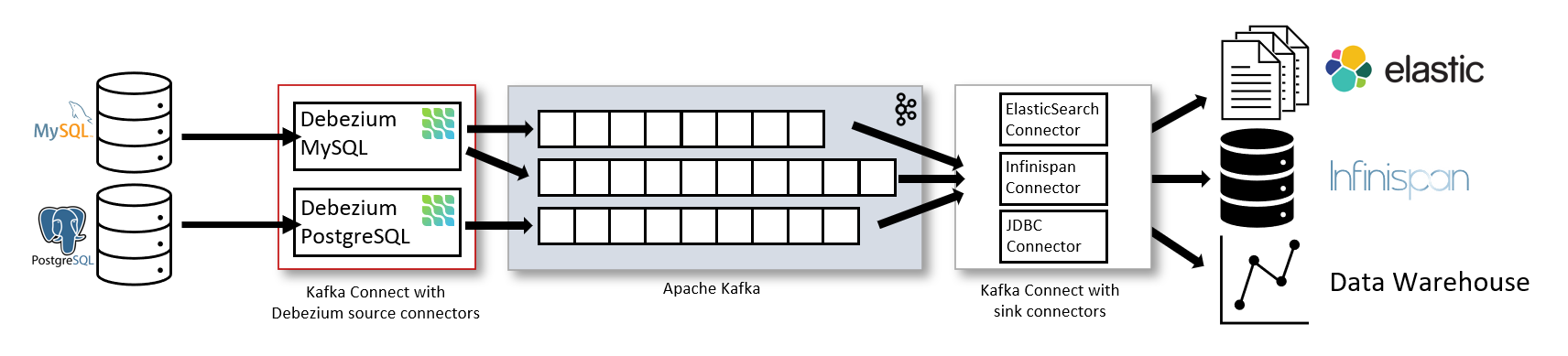](https://debezium.io/documentation/reference/1.9/connectors/mysql.html)
[](https://github.com/holmofy/debezium-datetime-converter/releases)
# debezium-datetime-converter
Debezium [custom converter](https://debezium.io/documentation/reference/development/converters.html) is used to deal
with
mysql [datetime type problems](https://debezium.io/documentation/reference/1.9/connectors/mysql.html#mysql-temporal-types)
.
| mysql | binlog-connector | debezium | schema |
| ----------------------------------- | ---------------------------------------- | --------------------------------- | ----------------------------------- |
| date
(2021-01-28) | LocalDate
(2021-01-28) | Integer
(18655) | io.debezium.time.Date |
| time
(17:29:04) | Duration
(PT17H29M4S) | Long
(62944000000) | io.debezium.time.Time |
| timestamp
(2021-01-28 17:29:04) | ZonedDateTime
(2021-01-28T09:29:04Z) | String
(2021-01-28T09:29:04Z) | io.debezium.time.ZonedTimestamp |
| Datetime
(2021-01-28 17:29:04) | LocalDateTime
(2021-01-28T17:29:04) | Long
(1611854944000) | io.debezium.time.Timestamp |
> For details, please refer to [this article](https://blog.hufeifei.cn/2021/03/13/DB/mysql-binlog-parser/)
>
> 在此基础上,我对代码进行了改造,我需要把MySql的Datetime类型转成时间戳,即long类型数值,然后存入es.(其他类型可以自行修改)
# Usage
###### 0. 官方提供:IsbnConverter,TinyIntOneToBooleanConverter可供学习参考!!!
###### 1. debezium-datetime-converter 自定义转换器使用方法
[Download](https://github.com/holmofy/debezium-datetime-converter/releases) the extended jar package and put it in
the same level directory of the debezium plugin.或者debezium的lib目录下,当然debezium本身也是在plugin目录下的。
###### 2. 时间转换成string类型的格式:MySqlDateTimeConverter
In debezium-connector,如果想把时间转换成string类型的格式, Add the following configuration:
```properties
"connector.class": "io.debezium.connector.mysql.MySqlConnector",
# ...
"converters": "datetime",
"datetime.type": "MySqlDateTimeConverter",
"datetime.format": "yyyy-MM-dd",
"datetime.format.time": "HH:mm:ss",
"datetime.format.datetime": "yyyy-MM-dd HH:mm:ss",
"datetime.format.timestamp": "yyyy-MM-dd HH:mm:ss",
"datetime.format.timestamp.zone": "UTC+8"
```
###### 3. 时间转换成timestamp:MySqlDateTime2TimestampConverter
In debezium-connector, 如果想把时间转换成timestamp,Add the following configuration:
去掉了时区的影响,根据配置的时区,转换后的long类型时间无时区影响
```properties
"connector.class": "io.debezium.connector.mysql.MySqlConnector",
# ...
"converters": "datetime",
"datetime.type": "MySqlDateTime2TimestampConverter",
"datetime.format": "yyyy-MM-dd",
"datetime.format.time": "HH:mm:ss",
"datetime.format.datetime": "yyyy-MM-dd HH:mm:ss",
"datetime.format.timestamp": "yyyy-MM-dd HH:mm:ss",
"datetime.format.timestamp.zone": "+08:00"
```
###### 4. String转Array:JsonString2ObjectConverter
String转Array,支持将 '[111111111,2222222222222]' 转为 ["111111111","2222222222222"] ;或者将 '["aaaaaa","ccccccccccccc"]' 转为 ["aaaaaa","ccccccccccccc"]
```properties
"connector.class": "io.debezium.connector.mysql.MySqlConnector",
# ...
"converters": "jsonextract",
"jsonextract.type": "JsonString2ObjectConverter",
"jsonextract.transfer.field": "column_field"
```
###### 5,String转Array:ES自带的Ingest Pipeline处理
当然,这个String转Array的需求也可以在mysql数据库存储,'aaa,bbb,ccc'这样的字符串,然后使用ES自带的Ingest Pipeline处理,方便快捷:
```properties
PUT _ingest/pipeline/string_to_array_pipeline
{
"description": "Transfer the string which is concat with a separtor to array.",
"processors": [
{
"split": {
"field": "field1",
"separator": ","
}
},
{
"split": {
"field": "field2",
"separator": ","
}
}
]
}
PUT index/_settings
{
"default_pipeline": "string_to_array_pipeline"
}
```