# Hue
**Repository Path**: pure-iOS/Hue
## Basic Information
- **Project Name**: Hue
- **Description**: iOS Color拓展工具库
- **Primary Language**: Unknown
- **License**: MIT
- **Default Branch**: master
- **Homepage**: None
- **GVP Project**: No
## Statistics
- **Stars**: 0
- **Forks**: 0
- **Created**: 2021-02-20
- **Last Updated**: 2024-05-29
## Categories & Tags
**Categories**: Uncategorized
**Tags**: None
## README

Hue is the all-in-one coloring utility that you'll ever need.
[](http://cocoadocs.org/docsets/Hue)
[](https://github.com/Carthage/Carthage)
[](http://cocoadocs.org/docsets/Hue)
[](http://cocoadocs.org/docsets/Hue)

## Usage
#### Hex
 You can easily use hex colors with the `init(hex:)` convenience initializer on `UIColor`. It supports the following hex formats `#ffffff`, `ffffff`, `#fff`, `fff`
```swift
let white = UIColor(hex: "#ffffff")
let black = UIColor(hex: "#000000")
let red = UIColor(hex: "#ff0000")
let blue = UIColor(hex: "#0000ff")
let green = UIColor(hex: "#00ff00")
let yellow = UIColor(hex: "#ffff00")
```
#### Computed color properties
```swift
let white = UIColor(hex: "#ffffff")
let black = UIColor(hex: "#000000")
if white.isDarkColor {} // return false
if white.isBlackOrWhite {} // return true
```
#### Alpha
`.alpha` is a sugar for `colorWithAlphaComponent`, internally it does the exact same thing, think of it as a
lipstick for your implementation.
```swift
let colorWithAlpha = myColor.alpha(0.75)
```
#### Gradients
You can easily create gradient layers using the `gradient()` method on arrays with `UIColor`.
As an extra bonus, you can also add a transform closure if you want to modify the `CAGradientLayer`.
```swift
let gradient = [UIColor.blackColor(), UIColor.orangeColor()].gradient()
let secondGradient = [UIColor.blackColor(), UIColor.orangeColor()].gradient { gradient in
gradient.locations = [0.25, 1.0]
return gradient
}
```
#### Image colors
```swift
let image = UIImage(named: "My Image")
let (background, primary, secondary, detail) = image.colors()
```
#### Components
You can get red, green, blue, and alpha components from any UIColor by using the (red|green|blue|alpha)Component property.
```swift
let myColor = UIColor(hex: "#ffafc2")
let myColorBlueComponent = myColor.blueComponent
let myColorGreenComponent = myColor.greenComponent
let myColorRedComponent = myColor.redComponent
let myColorAlphaComponent = myColor.alphaComponent
```
#### Blending
```swift
let red = UIColor.redColor()
let green = UIColor.greenColor()
let yellow = red.addRGB(green)
let desaturatedBlue = UIColor(hex: "#aaaacc")
let saturatedBlue = desaturatedBlue.addHue(0.0, saturation: 1.0, brightness: 0.0, alpha: 0.0)
```
## Supporting the project
If you want to support the development of this framework, you can do so by becoming a [sponsor](https://github.com/sponsors/zenangst). ❤️
## Examples
You can easily use hex colors with the `init(hex:)` convenience initializer on `UIColor`. It supports the following hex formats `#ffffff`, `ffffff`, `#fff`, `fff`
```swift
let white = UIColor(hex: "#ffffff")
let black = UIColor(hex: "#000000")
let red = UIColor(hex: "#ff0000")
let blue = UIColor(hex: "#0000ff")
let green = UIColor(hex: "#00ff00")
let yellow = UIColor(hex: "#ffff00")
```
#### Computed color properties
```swift
let white = UIColor(hex: "#ffffff")
let black = UIColor(hex: "#000000")
if white.isDarkColor {} // return false
if white.isBlackOrWhite {} // return true
```
#### Alpha
`.alpha` is a sugar for `colorWithAlphaComponent`, internally it does the exact same thing, think of it as a
lipstick for your implementation.
```swift
let colorWithAlpha = myColor.alpha(0.75)
```
#### Gradients
You can easily create gradient layers using the `gradient()` method on arrays with `UIColor`.
As an extra bonus, you can also add a transform closure if you want to modify the `CAGradientLayer`.
```swift
let gradient = [UIColor.blackColor(), UIColor.orangeColor()].gradient()
let secondGradient = [UIColor.blackColor(), UIColor.orangeColor()].gradient { gradient in
gradient.locations = [0.25, 1.0]
return gradient
}
```
#### Image colors
```swift
let image = UIImage(named: "My Image")
let (background, primary, secondary, detail) = image.colors()
```
#### Components
You can get red, green, blue, and alpha components from any UIColor by using the (red|green|blue|alpha)Component property.
```swift
let myColor = UIColor(hex: "#ffafc2")
let myColorBlueComponent = myColor.blueComponent
let myColorGreenComponent = myColor.greenComponent
let myColorRedComponent = myColor.redComponent
let myColorAlphaComponent = myColor.alphaComponent
```
#### Blending
```swift
let red = UIColor.redColor()
let green = UIColor.greenColor()
let yellow = red.addRGB(green)
let desaturatedBlue = UIColor(hex: "#aaaacc")
let saturatedBlue = desaturatedBlue.addHue(0.0, saturation: 1.0, brightness: 0.0, alpha: 0.0)
```
## Supporting the project
If you want to support the development of this framework, you can do so by becoming a [sponsor](https://github.com/sponsors/zenangst). ❤️
## Examples
 #### Hex
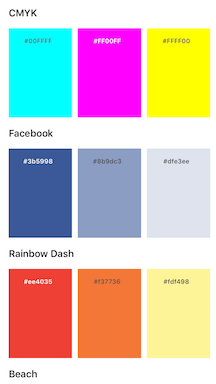
This super simple example that displays a bunch of color schemes in a Carousel view.
It uses hex to set the color for the schemes. It leverages from `.isDarkColor` to make the text color readable in all scenarios.
The demo also features [Spots](http://github.com/hyperoslo/Spots) for rendering the Carousel view.
**Example code:**
```swift
let color = UIColor(hex: "#3b5998")
backgroundColor = color
label.textColor = color.isDark
? UIColor.whiteColor()
: UIColor.darkGrayColor()
```
#### Gradients
#### Hex
This super simple example that displays a bunch of color schemes in a Carousel view.
It uses hex to set the color for the schemes. It leverages from `.isDarkColor` to make the text color readable in all scenarios.
The demo also features [Spots](http://github.com/hyperoslo/Spots) for rendering the Carousel view.
**Example code:**
```swift
let color = UIColor(hex: "#3b5998")
backgroundColor = color
label.textColor = color.isDark
? UIColor.whiteColor()
: UIColor.darkGrayColor()
```
#### Gradients
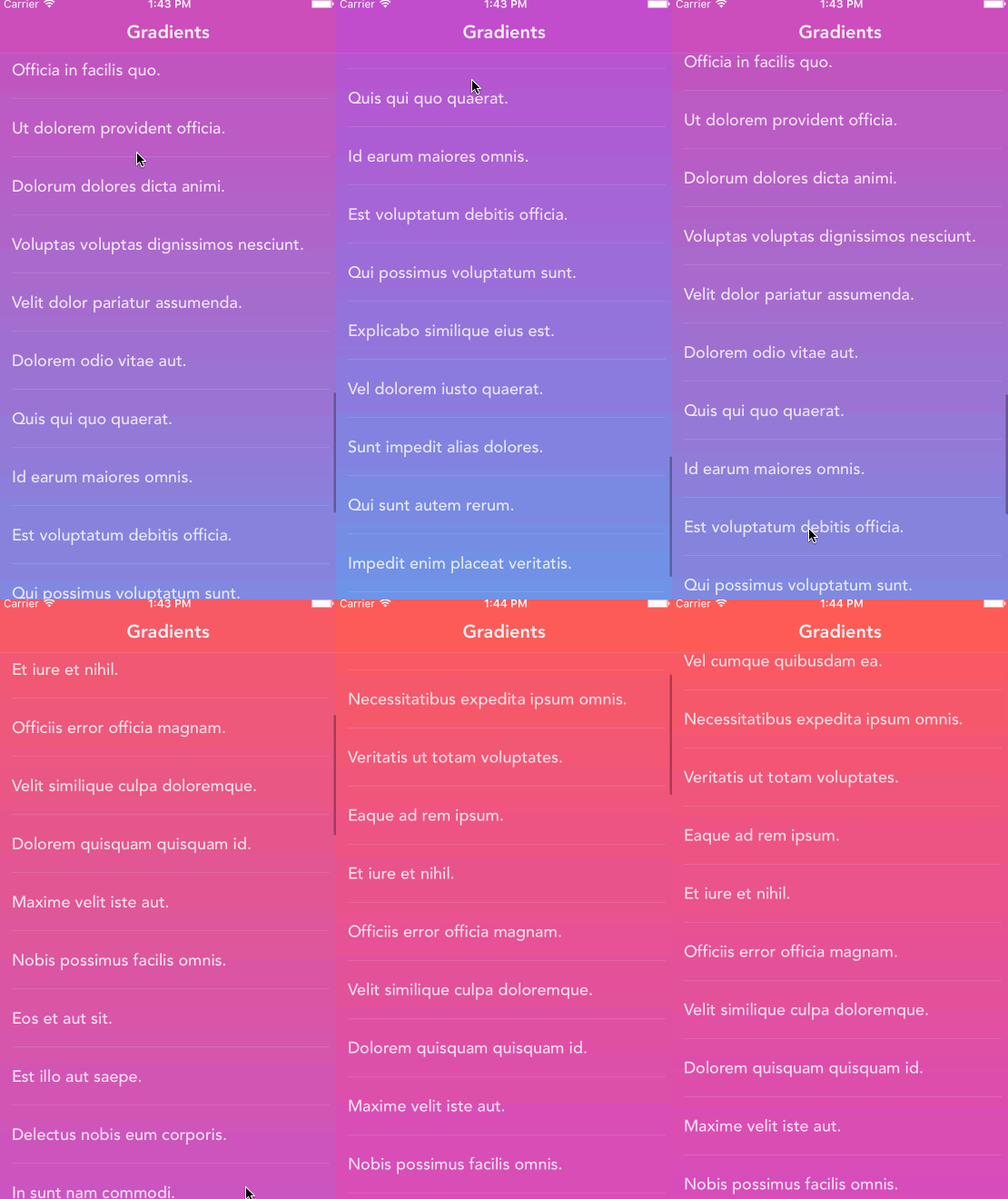 This examples shows how much fun you can have with combining `CAGradientLayer` with `CABasicAnimation`.
It uses `.hex` for getting the colors and `.gradient()` for transforming
a collection of `UIColor`'s into a `CAGradientLayer`.
The demo features [Spots](http://github.com/hyperoslo/Spots) for rendering the list view and [Fakery](https://github.com/vadymmarkov/Fakery) for generating random content strings.
**Extract from the demo:**
```swift
lazy var gradient: CAGradientLayer = [
UIColor(hex: "#FD4340"),
UIColor(hex: "#CE2BAE")
].gradient { gradient in
gradient.speed = 0
gradient.timeOffset = 0
return gradient
}
```
## Installation
**Hue** is available through [CocoaPods](http://cocoapods.org). To install
it, simply add the following line to your Podfile:
```ruby
pod 'Hue'
```
**Hue** is also available through [Carthage](https://github.com/Carthage/Carthage).
To install just write into your Cartfile:
```ruby
github "hyperoslo/Hue"
```
To install **Hue** using [Swift Package Manager](https://swift.org/package-manager) with Xcode 11, just follow the instructions at and import the platform specific library to the project:
```swift
import Hue
```
## Author
[Hyper](http://hyper.no) made this with ❤️
## Contribute
We would love you to contribute to **Hue**, check the [CONTRIBUTING](https://github.com/hyperoslo/Hue/blob/master/CONTRIBUTING.md) file for more info.
## Credits
Credit goes out to Panic Inc who created [ColorArt](https://github.com/panicinc/ColorArt) and [@jathu](https://github.com/jathu) for his work on [UIImageColors](https://github.com/jathu/UIImageColors) which deeply inspired the functionality behind the image color analysis.
## License
**Hue** is available under the MIT license. See the LICENSE file for more info.
This examples shows how much fun you can have with combining `CAGradientLayer` with `CABasicAnimation`.
It uses `.hex` for getting the colors and `.gradient()` for transforming
a collection of `UIColor`'s into a `CAGradientLayer`.
The demo features [Spots](http://github.com/hyperoslo/Spots) for rendering the list view and [Fakery](https://github.com/vadymmarkov/Fakery) for generating random content strings.
**Extract from the demo:**
```swift
lazy var gradient: CAGradientLayer = [
UIColor(hex: "#FD4340"),
UIColor(hex: "#CE2BAE")
].gradient { gradient in
gradient.speed = 0
gradient.timeOffset = 0
return gradient
}
```
## Installation
**Hue** is available through [CocoaPods](http://cocoapods.org). To install
it, simply add the following line to your Podfile:
```ruby
pod 'Hue'
```
**Hue** is also available through [Carthage](https://github.com/Carthage/Carthage).
To install just write into your Cartfile:
```ruby
github "hyperoslo/Hue"
```
To install **Hue** using [Swift Package Manager](https://swift.org/package-manager) with Xcode 11, just follow the instructions at and import the platform specific library to the project:
```swift
import Hue
```
## Author
[Hyper](http://hyper.no) made this with ❤️
## Contribute
We would love you to contribute to **Hue**, check the [CONTRIBUTING](https://github.com/hyperoslo/Hue/blob/master/CONTRIBUTING.md) file for more info.
## Credits
Credit goes out to Panic Inc who created [ColorArt](https://github.com/panicinc/ColorArt) and [@jathu](https://github.com/jathu) for his work on [UIImageColors](https://github.com/jathu/UIImageColors) which deeply inspired the functionality behind the image color analysis.
## License
**Hue** is available under the MIT license. See the LICENSE file for more info.