# XCTestWD
**Repository Path**: q7w/XCTestWD
## Basic Information
- **Project Name**: XCTestWD
- **Description**: No description available
- **Primary Language**: Unknown
- **License**: MIT
- **Default Branch**: master
- **Homepage**: None
- **GVP Project**: No
## Statistics
- **Stars**: 0
- **Forks**: 0
- **Created**: 2024-05-14
- **Last Updated**: 2024-05-14
## Categories & Tags
**Categories**: Uncategorized
**Tags**: None
## README
# XCTestWD
---
[![NPM version][npm-image]][npm-url]
[![node version][node-image]][node-url]
[![npm download][download-image]][download-url]
[](https://circleci.com/gh/macacajs/XCTestWD)
[npm-image]: https://img.shields.io/npm/v/xctestwd.svg
[npm-url]: https://npmjs.org/package/xctestwd
[node-image]: https://img.shields.io/badge/node.js-%3E=_8-green.svg
[node-url]: http://nodejs.org/download/
[download-image]: https://img.shields.io/npm/dm/xctestwd.svg
[download-url]: https://npmjs.org/package/xctestwd
> Swift implementation of WebDriver server for iOS that runs on Simulator/iOS devices.
## Contributors
|[
SamuelZhaoY](https://github.com/SamuelZhaoY)
|[
xudafeng](https://github.com/xudafeng)
|[
paradite](https://github.com/paradite)
|[
holy-lousie](https://github.com/holy-lousie)
|[
adudurant](https://github.com/adudurant)
|[
Chan-Chun](https://github.com/Chan-Chun)
|
| :---: | :---: | :---: | :---: | :---: | :---: |
[
gurisxie](https://github.com/gurisxie)
|[
xqin](https://github.com/xqin)
|[
butterflyingdog](https://github.com/butterflyingdog)
|[
donlinglok](https://github.com/donlinglok)
|[
Nicolasyy](https://github.com/Nicolasyy)
|[
fengguochao](https://github.com/fengguochao)
This project follows the git-contributor [spec](https://github.com/xudafeng/git-contributor), auto updated at `Wed Apr 15 2020 13:12:56 GMT+0800`.
## 1. Requirements
- XCode version > 10.1
- iOS version 11.0 and above. (there is significant change on XCUITest interfaces and system private headers, hence we decide to support newest OS version only)
### 1.1. Carthage
Using Carthage with Xcode 12
> https://github.com/Carthage/Carthage/blob/master/Documentation/Xcode12Workaround.md
carthage.sh can be found at the root of the project
```bash
./carthage.sh bootstrap --platform iOS --cache-builds
```
## 2. Starting XCTestWD
XCTestWD can be either started with XCode IDE or via simple xcodebuild command line. By default, the webdriver agent occupies port `8001`. You can override the default port in XCode by searching `XCTESTWD_PORT` under project build settings. Alternatively, it can also be overrided when you execute command line method as specified in `2.2. Using Xcodebuild`
### 2.1. Using Xcode
Download the project and open the XCode project, checkout the scheme `XCTestWDUITests` and run the test case `XCTextWDRunner`
### 2.2. Using XcodeBuild
Open the terminal, go to the directory where contains `XCTestWD.xcodeproj` file and execute the following command:
```bash
#
# Change the port number to override the default port
#
xcodebuild -project XCTestWD.xcodeproj \
-scheme XCTestWDUITests \
-destination 'platform=iOS Simulator,name=iPhone 6' \
XCTESTWD_PORT=8001 \
clean test
```
To execute for iOS device, run the following command:
```bash
#
# Change the port number to override the default port
# Specify the device name
#
xcodebuild -project XCTestWD.xcodeproj \
-scheme XCTestWDUITests \
-destination 'platform=iOS,name=(your device name)' \
XCTESTWD_PORT=8001 \
clean test
```
**Note:** For versions above wxtestwd 2.0.0, please install ideviceinstaller for supporting real device testing
## 3. Element Types
In the current protocol, element strings for each `XCUIElementType` are generated based on the existing mapping in [reference/xctest/xcuielementtype](https://developer.apple.com/reference/xctest/xcuielementtype)
## 4. Common Issues
### 4.1 Socket hangup error
Socket Hangup Error happens in the following two scenarios:
- **Case 1**
Issue:
When you have some existing XCTestWD instances running and creating new ones.
Solution:
verify whether ideviceinstaller and xcrun is properly working on your device and simulator.
Hint:
https://github.com/libimobiledevice/ideviceinstaller/issues/48
- **Case 2**
Issue:
When you have started the XCTestWD instance properly but fails in middle of a testing process.
Solution:
See the Macaca Service log to checkout which command leads the error. With detailed and comprehensive log information, please submit an issue to us.
Optional:
If you cannot get anything from macaca server log, open the XCTestWD in your node installation path and attatch for debugging on process 'XCTRunnerUITests-Runner'.
**Additional Info**
`The project path is at`
```
cd "$(npm root -g)/macaca-ios/node_modules/xctestwd"
```
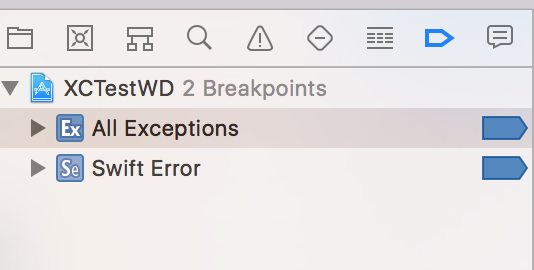
`Set up the linebreak for swift error and exceptions:`
 `Run your command regularly, once the driver has been initialized, attach the process:`
 ### 4.2 Swift modules fails to compile
Check carthage installation
### 4.3 Debug info
Now XCTestWD supports gathering debug log into log files which is stored in "Your-App-Sandbox-Root"/Documents/Logs dir. For real devices, you can connect to itunes and choose backup for `XCTestWDUITests` and get the debug log. For iOS simulators, the log file is in your computer's simulator app directory like:
```
"/Users/${user-name}/Library/Developer/CoreSimulator/Devices \
/${device-id}/data/Containers/Data/Application/${app-id}/Documents/Logs"
```
You can use `xcrun simctl list` to get the id of the booted device.
### 4.4
user PATH variable MACACA_XCTESTWD_ROOT_PATH to override the default one.
```bash
MACACA_XCTESTWD_ROOT_PATH=/path/to/macaca_xctest app-inspector -u xxx --verbose
```
### 4.5
We update dependencies by using other npm packages, because the XCode upgrade swift syntax is often not backward compatible.
| package | XCode version | notes |
| --- | --- | --- |
| [xctestwd-frameworks](https://github.com/macacajs/xctestwd-frameworks) | 11.2.1 | |
### 4.2 Swift modules fails to compile
Check carthage installation
### 4.3 Debug info
Now XCTestWD supports gathering debug log into log files which is stored in "Your-App-Sandbox-Root"/Documents/Logs dir. For real devices, you can connect to itunes and choose backup for `XCTestWDUITests` and get the debug log. For iOS simulators, the log file is in your computer's simulator app directory like:
```
"/Users/${user-name}/Library/Developer/CoreSimulator/Devices \
/${device-id}/data/Containers/Data/Application/${app-id}/Documents/Logs"
```
You can use `xcrun simctl list` to get the id of the booted device.
### 4.4
user PATH variable MACACA_XCTESTWD_ROOT_PATH to override the default one.
```bash
MACACA_XCTESTWD_ROOT_PATH=/path/to/macaca_xctest app-inspector -u xxx --verbose
```
### 4.5
We update dependencies by using other npm packages, because the XCode upgrade swift syntax is often not backward compatible.
| package | XCode version | notes |
| --- | --- | --- |
| [xctestwd-frameworks](https://github.com/macacajs/xctestwd-frameworks) | 11.2.1 | |