# gkBlog
**Repository Path**: qlad/gkBlog
## Basic Information
- **Project Name**: gkBlog
- **Description**: gkBlog 是一个使用 Turborepo + pnpm 构建的个人博客网站 📚
- **Primary Language**: TypeScript
- **License**: MIT
- **Default Branch**: main
- **Homepage**: None
- **GVP Project**: No
## Statistics
- **Stars**: 0
- **Forks**: 1
- **Created**: 2025-03-30
- **Last Updated**: 2026-06-22
## Categories & Tags
**Categories**: Uncategorized
**Tags**: None
## README
🚀 gkBlog · A Modern Blog Starter
A performant, full-stack blog starter kit built with Next.js 15, MDX, and Tailwind CSS — forked from enji.dev and heavily customized.

✨ Live Demo:
www.qladgk.com ✨
[](https://vercel.com/new/clone?utm_source=busiyi&utm_campaign=oss&repository-url=https%3A%2F%2Fgithub.com%2FqlAD%2FgkBlog&env=DATABASE_URL%2CSALT_IP_ADDRESS%2CNEXT_PUBLIC_BAIDU_TONGJI%2CNEXT_PUBLIC_GOOGLE_ID)
 ---
## 🌟 Star History
[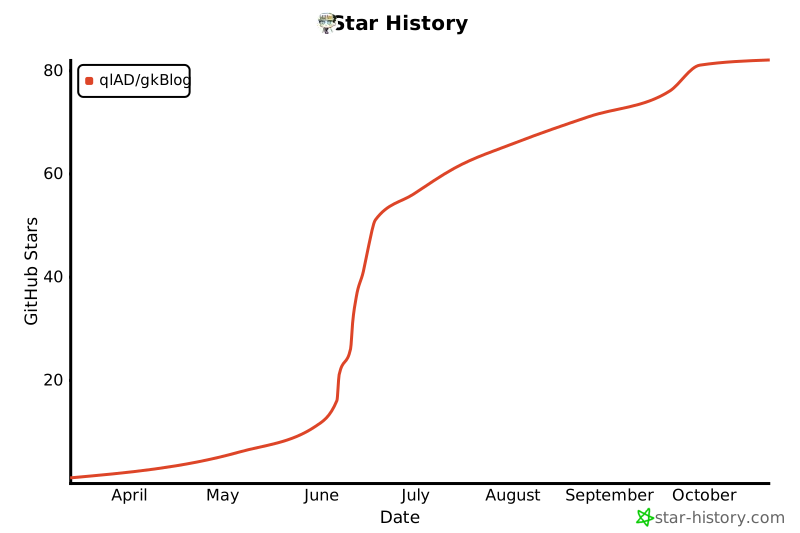](https://www.star-history.com/#qlAD/gkBlog&Date)
**If you find this project useful, please consider giving it a ⭐ — it helps others discover it!**
---
## 📜 License
[MIT License](LICENSE) — feel free to use, modify, and share.
---
## 🔑 Environment Variables Reference
| Variable | Description | How to Get |
|---|---|---|
| `DATABASE_URL` | MongoDB connection string | [MongoDB Atlas](https://www.mongodb.com/) (free tier) |
| `SALT_IP_ADDRESS` | Salt for session ID hashing | Any random string you choose |
| `NEXT_PUBLIC_BAIDU_TONGJI` | Baidu Analytics ID | [tongji.baidu.com](https://tongji.baidu.com/) |
| `NEXT_PUBLIC_GOOGLE_ID` | Google Analytics ID | [analytics.google.com](https://analytics.google.com/) |
| `NEXT_PUBLIC_CLARITY_TAG_ID` | Microsoft Clarity ID | [clarity.microsoft.com](https://clarity.microsoft.com/) |
| `NEXT_PUBLIC_TWIKOO_ENVID` | Twikoo Comment System Env ID | [twikoo.js.org](https://twikoo.js.org/) |
| `BAIDU_API_URL` | Baidu Search API URL | [ziyuan.baidu.com](https://ziyuan.baidu.com/) |
| `BING_API_KEY` | Bing IndexNow API Key | [bing.com/indexnow](https://www.bing.com/indexnow/getstarted/) |
| `ALIYUN_REGISTRY` | Alibaba Cloud Container Registry | [cr.console.aliyun.com](https://cr.console.aliyun.com/) |
| `DOCKER_USERNAME` | Docker registry username | Alibaba Cloud CR credentials |
| `DOCKER_PASSWORD` | Docker registry password | Alibaba Cloud CR credentials |
| `NEODB_ACCESS_TOKEN` | NeoDB Access Token | [neodb.social/developer](https://neodb.social/developer/) |
---
---
---
## 🌟 Star History
[](https://www.star-history.com/#qlAD/gkBlog&Date)
**If you find this project useful, please consider giving it a ⭐ — it helps others discover it!**
---
## 📜 License
[MIT License](LICENSE) — feel free to use, modify, and share.
---
## 🔑 Environment Variables Reference
| Variable | Description | How to Get |
|---|---|---|
| `DATABASE_URL` | MongoDB connection string | [MongoDB Atlas](https://www.mongodb.com/) (free tier) |
| `SALT_IP_ADDRESS` | Salt for session ID hashing | Any random string you choose |
| `NEXT_PUBLIC_BAIDU_TONGJI` | Baidu Analytics ID | [tongji.baidu.com](https://tongji.baidu.com/) |
| `NEXT_PUBLIC_GOOGLE_ID` | Google Analytics ID | [analytics.google.com](https://analytics.google.com/) |
| `NEXT_PUBLIC_CLARITY_TAG_ID` | Microsoft Clarity ID | [clarity.microsoft.com](https://clarity.microsoft.com/) |
| `NEXT_PUBLIC_TWIKOO_ENVID` | Twikoo Comment System Env ID | [twikoo.js.org](https://twikoo.js.org/) |
| `BAIDU_API_URL` | Baidu Search API URL | [ziyuan.baidu.com](https://ziyuan.baidu.com/) |
| `BING_API_KEY` | Bing IndexNow API Key | [bing.com/indexnow](https://www.bing.com/indexnow/getstarted/) |
| `ALIYUN_REGISTRY` | Alibaba Cloud Container Registry | [cr.console.aliyun.com](https://cr.console.aliyun.com/) |
| `DOCKER_USERNAME` | Docker registry username | Alibaba Cloud CR credentials |
| `DOCKER_PASSWORD` | Docker registry password | Alibaba Cloud CR credentials |
| `NEODB_ACCESS_TOKEN` | NeoDB Access Token | [neodb.social/developer](https://neodb.social/developer/) |
---
---
🚀 @qlAD 乔 · gkBlog 现代化博客网站主题
🌐 使用 Turborepo 和 pnpm 构建的博客网站,基于 enji.dev 主题二次开发
✨在线预览: ✨
---
## 🛠️ 系统架构
gkBlog 系统采用现代化的全栈技术架构,具体如下:
- **前端**:使用 Next.js、React 和 TypeScript 构建用户界面,确保应用的高性能和开发效率。
- **样式**:采用 Tailwind CSS 框架,实现灵活且响应式的样式管理。
- **内容**:支持 MDX 格式,便于内容创作和富文本编辑。
- **数据库**:使用在线版 MongoDB 存储文章元数据,而文章内容则存储在本地项目目录中。
- **部署**:支持通过 Vercel 或 Node.js 环境进行部署,也可以生成 Docker 镜像。
> 📝 有关更多流程图见: [项目流程图](FlowChart.md)
---
## 💻 项目开发
首先,我建议[安装 pnpm](https://pnpm.io/installation),因为它是此项目中使用的包管理器。
1. **Fork 本项目**,然后将其克隆到本地机器:
```bash
git clone
cd ./gkBlog
```
2. **准备好对 `.env.local` 文件进行配置**:
```bash
cp ./apps/gkBlog/.env.example ./apps/gkBlog/.env.local
```
```yaml
DATABASE_URL = your-database-connection-string
SALT_IP_ADDRESS = super-secret
NEXT_PUBLIC_BAIDU_TONGJI = xxxxxxxxxxxxxx
NEXT_PUBLIC_GOOGLE_ID = xxxxxxxxxxxxxx
NEXT_PUBLIC_CLARITY_TAG_ID = xxxxxxxxxxxxxx
NEXT_PUBLIC_TWIKOO_ENVID = xxxxxxxxxxxxxx
```
> 📝 对于 `DATABASE_URL`,请使用您的数据库连接字符串。我个人使用的是免费版的 [MongoDB](https://www.mongodb.com/),你也可以在免费版中创建数据库,并在 `env.local` 中添加连接字符串。它看起来应该如下所示:
>
> ```
> mongodb+srv://:@/?retryWrites=true&w=majority&appName=
> ```
>
> 🗝️ 至于 `SALT_IP_ADDRESS`,你可以随意填写一些你的密码。它的作用是用于加密数据库处理。
3. **配置完成后**,仍然在项目根目录下安装所需的依赖项:
```bash
pnpm install
```
4. **最后,运行项目**:
```bash
pnpm dev
```
现在,你的项目应该已经启动并顺利运行了!🎉
---
## 🚀 部署运行
- **支持 Vercel 一键部署(海外用户推荐)**
[](https://vercel.com/new/clone?utm_source=busiyi&utm_campaign=oss&repository-url=https%3A%2F%2Fgithub.com%2FqlAD%2FgkBlog&env=DATABASE_URL%2CSALT_IP_ADDRESS%2CNEXT_PUBLIC_BAIDU_TONGJI%2CNEXT_PUBLIC_GOOGLE_ID)
- **使用 Docker 部署(国内服务器推荐)**
```bash
docker compose build
docker compose up -d
```
- **支持 Node.js 环境部署**
```bash
pnpm install
pnpm build
pnpm start
```
---
## 📝 备忘录
### 🔄 网站更新
- **Vercel**:随着 GitHub 仓库的更新自动部署。
- **国内服务器**:采用 Docker 蓝绿部署,具体命令如下:
假设当前运行的是 **Green:3000**,此时需要更新 **Blue:3001**
```bash
docker compose -f docker-compose-blue.yml pull # 给 blue 容器拉取最新镜像
docker compose -f docker-compose-blue.yml up -d # 运行 blue 容器
```
然后检查 `ip:30001` 后无问题切换流量到 `3001`
```bash
docker compose -f docker-compose-green.yml pause # 先停止 green 容器
```
过一段时间后发现 Blue 无问题就可停止或删除 Green,反之恢复 Green 后切换流量。
### 📂 主仓库
- GitHub:[https://github.com/qlAD/gkBlog](https://github.com/qlAD/gkBlog)
#### 📑 备份仓库
- 自建 Git 服务器:[https://git.qladgk.com/qlAD/gkBlog](https://git.qladgk.com/qlad/gkBlog)
- 国内码云:[https://gitee.com/qlAD/gkBlog](https://gitee.com/qlad/gkBlog)
### 🌐 运行架构
- **国内**:阿里云 Docker 容器、ESA [https://www.qladgk.com](https://www.qladgk.com)
- **国外**:Vercel [https://gkblog.vercel.app](https://gkblog.vercel.app)
### ✏️ 内容创作
#### 文章 FrontMatter
```yaml
---
title: Next.js 静态博客搭建指南 - 从架构设计到部署上线
description: "详细解析如何使用 Next.js 搭建静态博客,包括技术选型对比(Hexo/Hugo/WordPress)、MDX 内容管理、Twikoo 评论系统集成和 Serverless 部署方案。"
date: "2024-10-18"
lang: zh
tags:
- nextjs
- 环境配置
category: 技术笔记
cover: images/20250422153424876.png
---
```
#### 🖼️ 图床工具
- 阿里云 OSS 自建图床,使用 PicGo 客户端上传图片。
- 或者使用阿里云官方提供工具 OSS-Browser [https://help.aliyun.com/zh/oss/developer-reference/use-ossbrowser](https://help.aliyun.com/zh/oss/developer-reference/use-ossbrowser)
#### 🎨 图片生成工具
- **Mermaid 流程图**:使用在线 Mermaid 生成工具:[https://mermaid.live/edit](https://mermaid.live/edit)
- **封面/缩略图**:在线图片生成器:[https://picprose.pixpark.net/zh](https://picprose.pixpark.net/zh) ,设计布局如下:
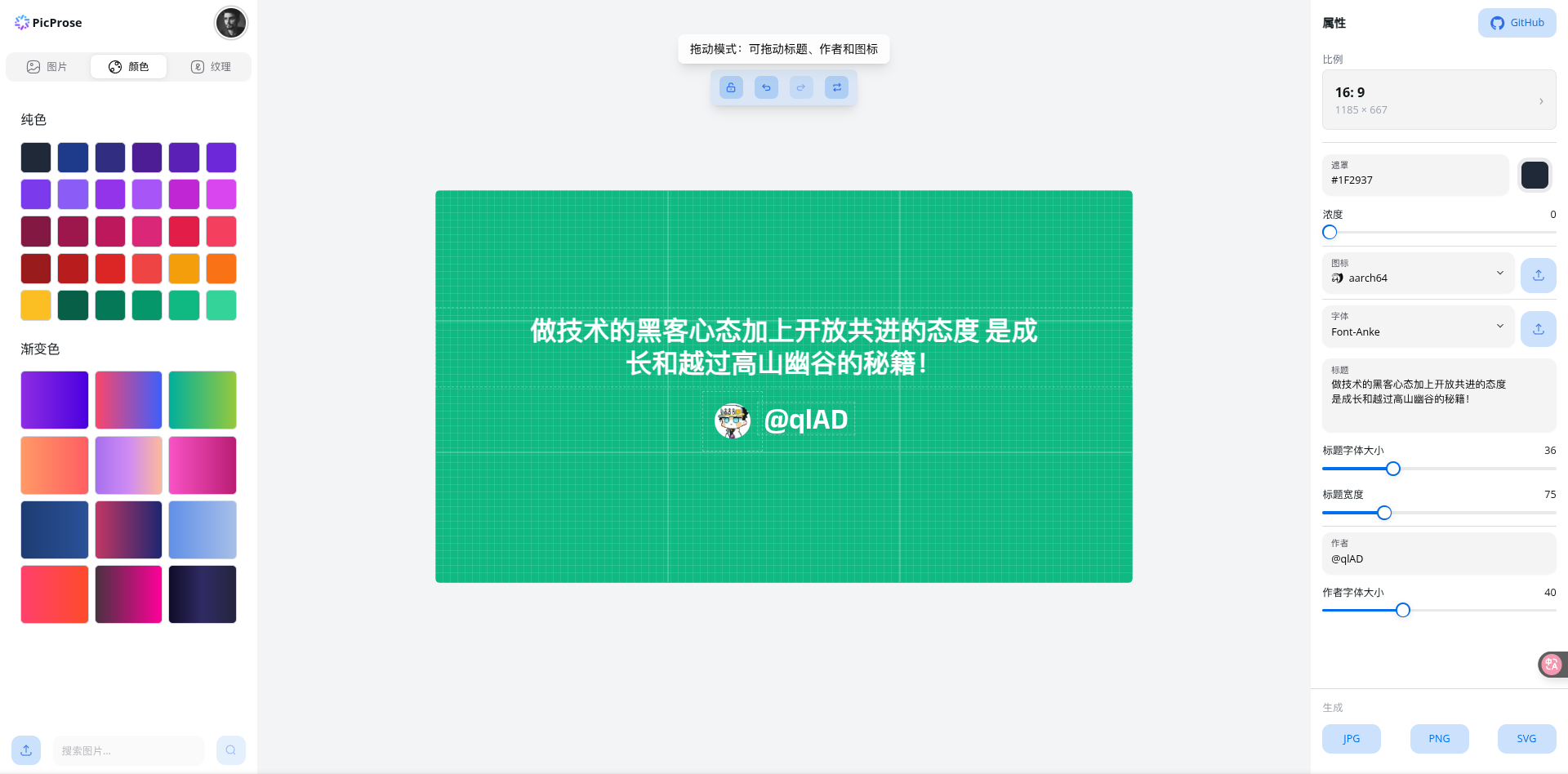
- **手绘风格图**:使用在线 excalidraw 绘图工具:[https://excalidraw.com/](https://excalidraw.com/)
#### 📸 图片处理
- 图片压缩工具:图小小 [https://picsmaller.com/](https://picsmaller.com/)
---
## 🤝 贡献
对于那些想要贡献代码的人,请参阅 [贡献指南](CONTRIBUTING.md)。
**贡献者名单**
---
## 🌟 Star 历史
[](https://www.star-history.com/#qlAD/gkBlog&Date)
---
## 📜 License
本仓库遵循 [MIT License](LICENSE) 开源协议,请在使用前仔细阅读,欢迎您的使用和贡献。 


