# git-master
**Repository Path**: qwhacker/git-master
## Basic Information
- **Project Name**: git-master
- **Description**: Git Master Extension for git file tree, support GitHub、GitLab 、 Gitee、Gitea
- **Primary Language**: JavaScript
- **License**: MIT
- **Default Branch**: master
- **Homepage**: None
- **GVP Project**: No
## Statistics
- **Stars**: 0
- **Forks**: 2
- **Created**: 2024-03-17
- **Last Updated**: 2024-03-17
## Categories & Tags
**Categories**: Uncategorized
**Tags**: None
## README
🚀 Git Master
Git code tree extension.




🙋♂️ Made by neo
English | [简体中文](./README.zh-CN.md)
## Install
| [ ](http://godban.github.io/browsers-support-badges/)
Edge | [ ](http://godban.github.io/browsers-support-badges/)
Firefox | [ ](http://godban.github.io/browsers-support-badges/)
Chrome |
| --------- | --------- | --------- |
| [Edge Web Store](https://microsoftedge.microsoft.com/addons/detail/pcpkfgepcjdmdfelbabogmgoadgmiocg) | [Firefox Addon](https://addons.mozilla.org/zh-CN/firefox/addon/git-master/) | [Chrome Web Store](https://chrome.google.com/webstore/detail/git-master/klmeolbcejnhefkapdchfhlhhjgobhmo)
## Features
- Git file tree (GitHub && GitLab && Gitee && Gitea && Gogs)
- File search
- Show GitHub repo size and file download support
- GitHub notifications
- GitHub dark mode, also work for gist
- Code Snippet
- Browse the history of files (GitHub && GitLab)
## Usage
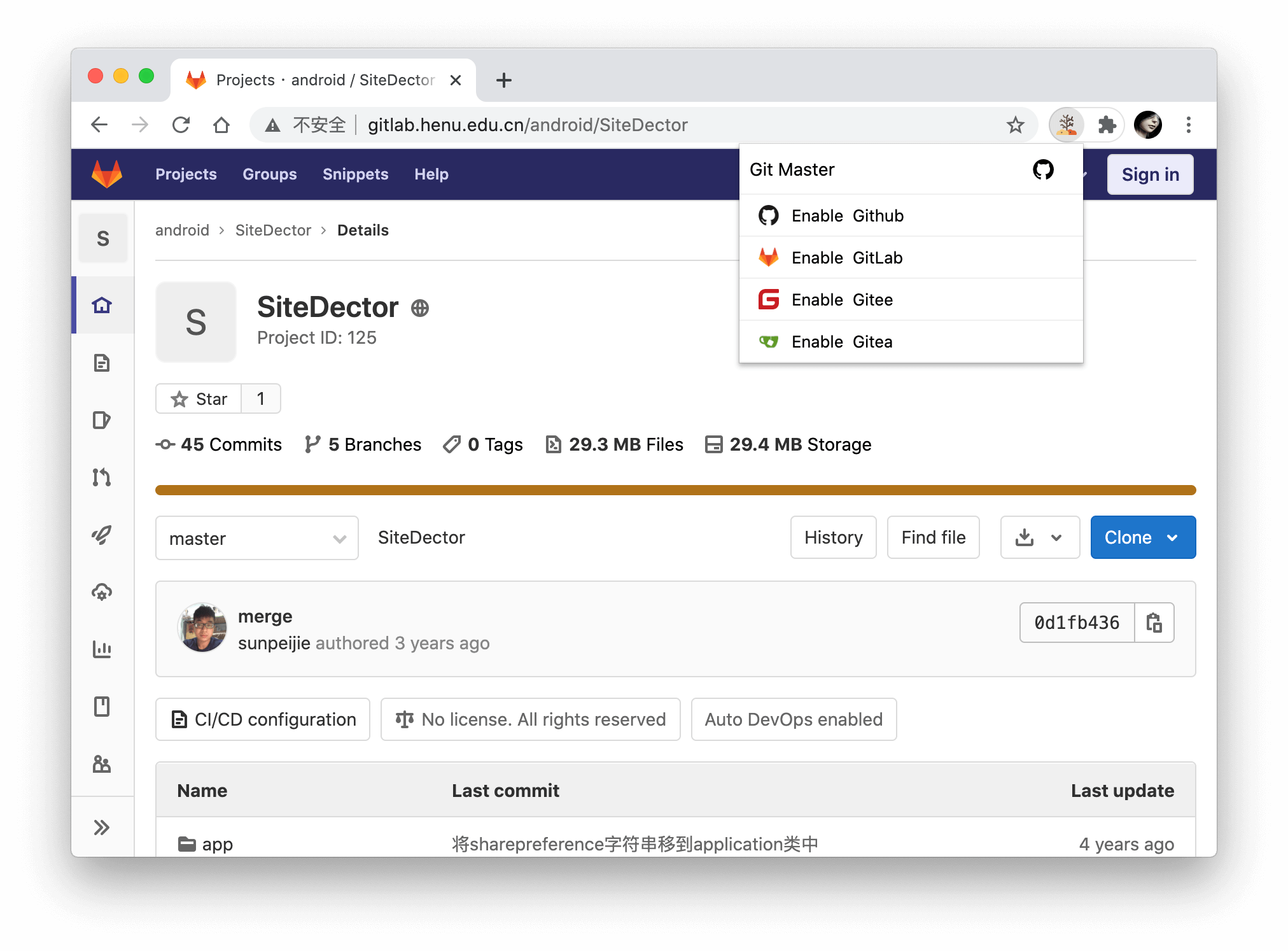
By default, the extension only loads on domains below. You can manually enable the extension for your custom domain by clicking the extension icon and choosing Enable xxx.
- github.com
- gitlab.com
- git.oschina.net, gitee.com
- gitea.com, try.gitea.io
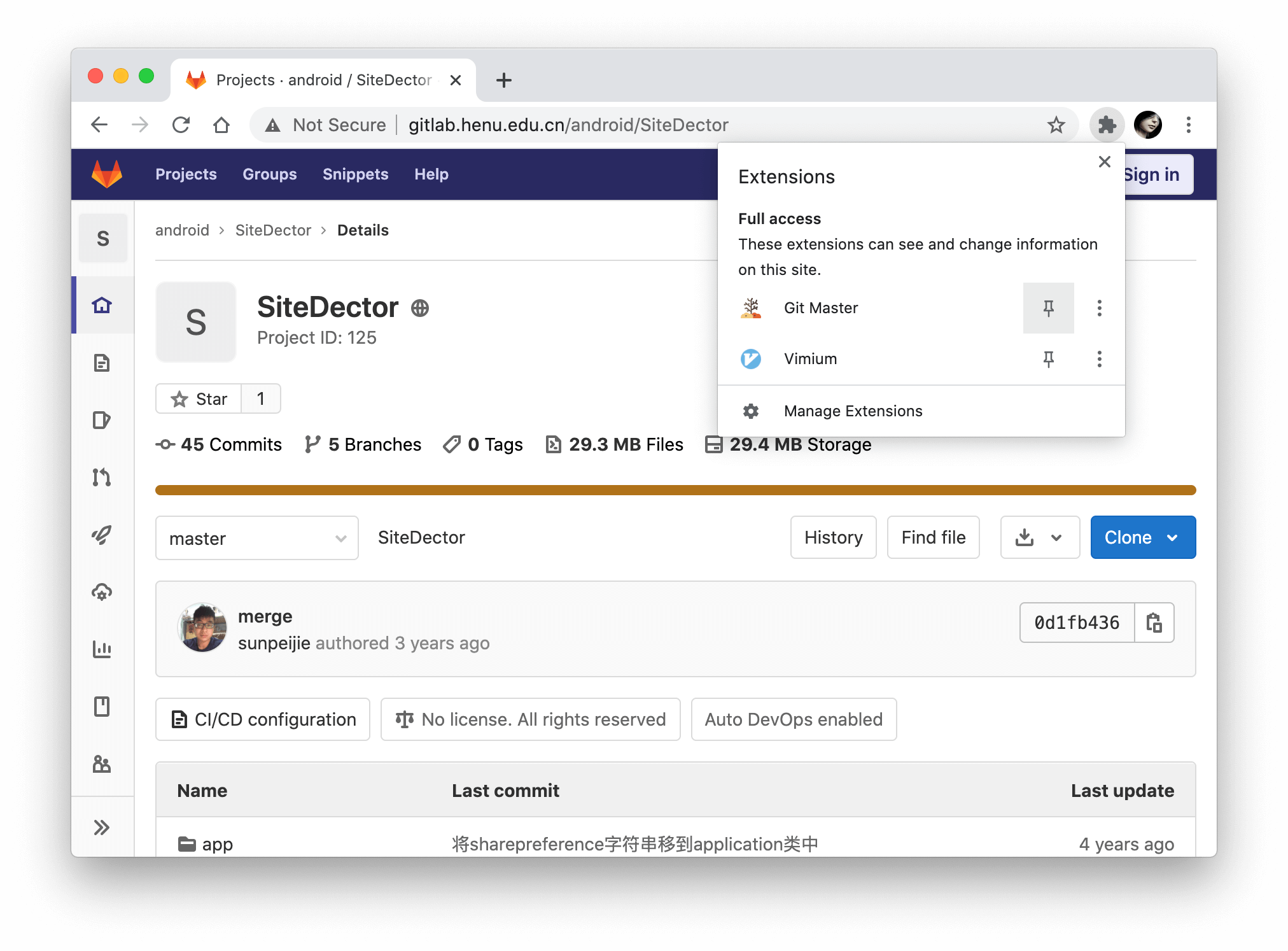
### Pin first
### Mark site
## Settings
### Access Token
By default, GitMaster makes unauthenticated requests to get repository metadata. However, there are two situations when GitHub require such requests to be authenticated:
- You access a private repository
- You exceed the API rate limit
When that happens, GitMaster will ask for your [GitHub personal access token](https://help.github.com/articles/creating-an-access-token-for-command-line-use). If you don't already have one, [create one](https://github.com/settings/tokens/new?scopes=repo&description=Git%20Master%20extension), then copy and paste it into the token textbox in the Settings screen. Note that the minimal scopes that should be granted are `public_repo` and `repo`.
GitLab and Gitee have same configuration.
**Access tokens are stored in the browser's local storage, only enter access tokens when you use a trusted computer.**
### Hotkeys
Hotkeys to pin or unpin the sidebar. You can enter multiple hotkeys by separating them with a comma.
- Supported modifiers: `⇧`, `shift`, `option`, `⌥`, `alt`, `ctrl`, `control`, `command`, and `⌘`.
- Supported special keys: `backspace`, `tab`, `clear`, `enter`, `return`, `esc`, `escape`, `space`, `up`, `down`, `left`, `right`, `home`, `end`, `pageup`, `pagedown`, `del`, `delete` and `f1` through `f19`.
Learn more at [keymaster](https://github.com/madrobby/keymaster#supported-keys).
## Contribute
We welcome all contributions. Please read [CONTRIBUTING.md](./CONTRIBUTING.md) first.
## Coffee or Star
Give a ⭐️ if this project helped you!
Coffee is also welcome.
| WeChat |
| --- |
|  |
## Licence
Code released under the [MIT License](LICENSE).
|
## Licence
Code released under the [MIT License](LICENSE).