# vfox
**Repository Path**: qwhacker/vfox
## Basic Information
- **Project Name**: vfox
- **Description**: 多语言多版本管理管理工具
vfox 是一个类 nvm、fvm、sdkman、asdf 的版本管理工具
例如:nvm、fvm、gvm、sdkman、fnm、n、g、rvm、jenv、phpbrew、rustup、swiftenv、pyenv、rbenv
- **Primary Language**: Go
- **License**: Apache-2.0
- **Default Branch**: main
- **Homepage**: None
- **GVP Project**: No
## Statistics
- **Stars**: 7
- **Forks**: 0
- **Created**: 2024-03-13
- **Last Updated**: 2025-04-15
## Categories & Tags
**Categories**: Uncategorized
**Tags**: None
## README

# vfox
[](https://goreportcard.com/report/github.com/version-fox/vfox)
[](LICENSE)
[](https://github.com/version-fox/vfox/releases)
[](https://discord.gg/85c8ptYgb7)
[[English]](./README.md) [[中文文档]](./README_CN.md)
如果你经常需要在**各种开发项目之间切换**,而这些项目又各自**需要不同的运行环境**,尤其是不同的运行时版本或环境库, 或者
**厌倦了各种繁琐的环境配置**,那么 `vfox` 就是你的不二选择。
## 介绍
`vfox` 是一个跨平台版本管理器(类似于 `nvm`、`fvm`、`sdkman`、`asdf-vm` 等),可通过插件扩展。它允许您快速安装和切换您需要的环境。
## 为什么选择 vfox?
- 支持**Windows(非WSL)**、Linux、macOS!
- **一致的命令** 用于管理你所有的语言
- 支持**Global**、**Project**、**Session** 三种作用域
- 简单的 **插件系统** 来添加对你选择的语言的支持
- 在您切换项目时, 帮您**自动切换**运行时版本
- 支持常用Shell(Powershell、Bash、ZSH),并提供补全功能
- **比 `asdf-vm` 更快**,并提供更简单的命令和真正的跨平台统一。参见 [与asdf-vm对比](https://vfox.lhan.me/zh-hans/misc/vs-asdf.html)。
## 演示
[](https://asciinema.org/a/630778)
## 快速入门
> 详细的安装指南请参见 [快速入门](https://vfox.lhan.me/zh-hans/guides/quick-start.html)
#### 1.选择一个适合你的[安装方式](https://vfox.lhan.me/zh-hans/guides/quick-start.html#_1-%E5%AE%89%E8%A3%85vfox)。
#### 2. ⚠️ **挂载vfox到你的 Shell (从下面选择一条适合你 shell 的命令)** ⚠️
```bash
echo 'eval "$(vfox activate bash)"' >> ~/.bashrc
echo 'eval "$(vfox activate zsh)"' >> ~/.zshrc
echo 'vfox activate fish | source' >> ~/.config/fish/config.fish
# PowerShell:
# 1. 打开 PowerShell 配置文件:
New-Item -Type File -Path $PROFILE # 无需在意 `文件已存在` 错误
Invoke-Item $PROFILE
# 2. 将下面一行添加到你的 $PROFILE 文件末尾并保存:
Invoke-Expression "$(vfox activate pwsh)"
```
> 请记住重启你的 Shell 以应用更改。
#### 3.添加插件
```bash
$ vfox add nodejs/nodejs
```
#### 4. 安装运行时
```bash
$ vfox install nodejs@21.5.0
```
#### 5. 切换运行时
```bash
$ vfox use nodejs@21.5.0
$ node -v
21.5.0
```
## 完整文档
请浏览 [vfox.lhan.me](https://vfox.lhan.me) 查看完整文档。
## 目前支持的插件
> 如果您已经安装了 `vfox`,您可以使用 `vfox available` 命令查看所有可用的插件。
[](https://github.com/version-fox/version-fox-plugins)
详细内容,请看 [version-fox-plugins](https://github.com/version-fox/version-fox-plugins)
## 贡献者
> 感谢以下贡献者对本项目的贡献。🎉🎉🙏🙏
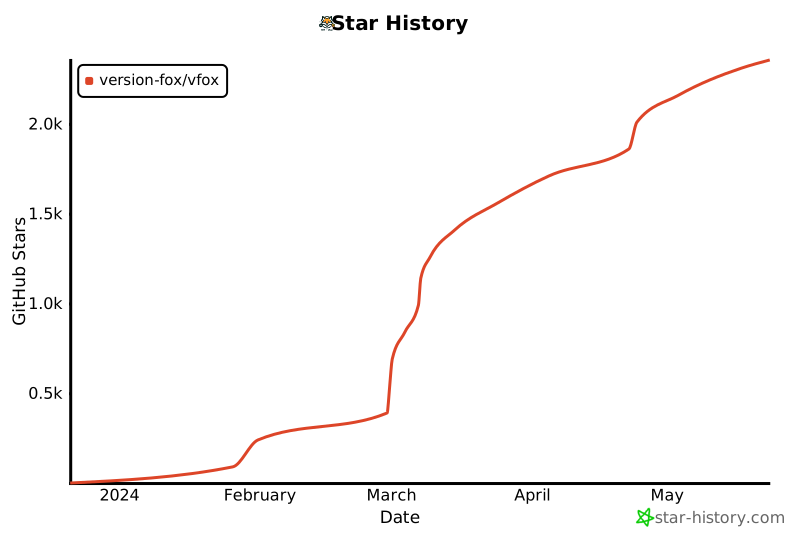
 ## Star History
## 感谢
## Star History

## 感谢
 ## COPYRIGHT
[Apache 2.0 license](./LICENSE) - Copyright (C) 2024 Han Li
and [contributors](https://github.com/version-fox/vfox/graphs/contributors)
## COPYRIGHT
[Apache 2.0 license](./LICENSE) - Copyright (C) 2024 Han Li
and [contributors](https://github.com/version-fox/vfox/graphs/contributors)