# ESP32-BLE-Steering
**Repository Path**: ramon09/ESP32-BLE-Steering
## Basic Information
- **Project Name**: ESP32-BLE-Steering
- **Description**: 自制ESP32蓝牙方向盘(DIY ESP32 Bluetooth Steering)
- **Primary Language**: Unknown
- **License**: MIT
- **Default Branch**: main
- **Homepage**: None
- **GVP Project**: No
## Statistics
- **Stars**: 0
- **Forks**: 0
- **Created**: 2026-04-16
- **Last Updated**: 2026-04-27
## Categories & Tags
**Categories**: Uncategorized
**Tags**: None
## README
# ESP32-BLE-Steering
自制ESP32蓝牙方向盘
[Rust版本](https://github.com/loopade/ESP32-BLE-Steering-rs)
DIY ESP32 Bluetooth Steering
[Rust Version](https://github.com/loopade/ESP32-BLE-Steering-rs)
准备工作:
* ESP32(D/E)开发板,足够多的GPIO、ADC接口
* MPU6050陀螺仪
* 若干电位器(摇杆、踏板)
* 按钮、拨动开关
* 小型振动电机
* Arduino(选择ESP32开发板)
* esptool
管脚图:
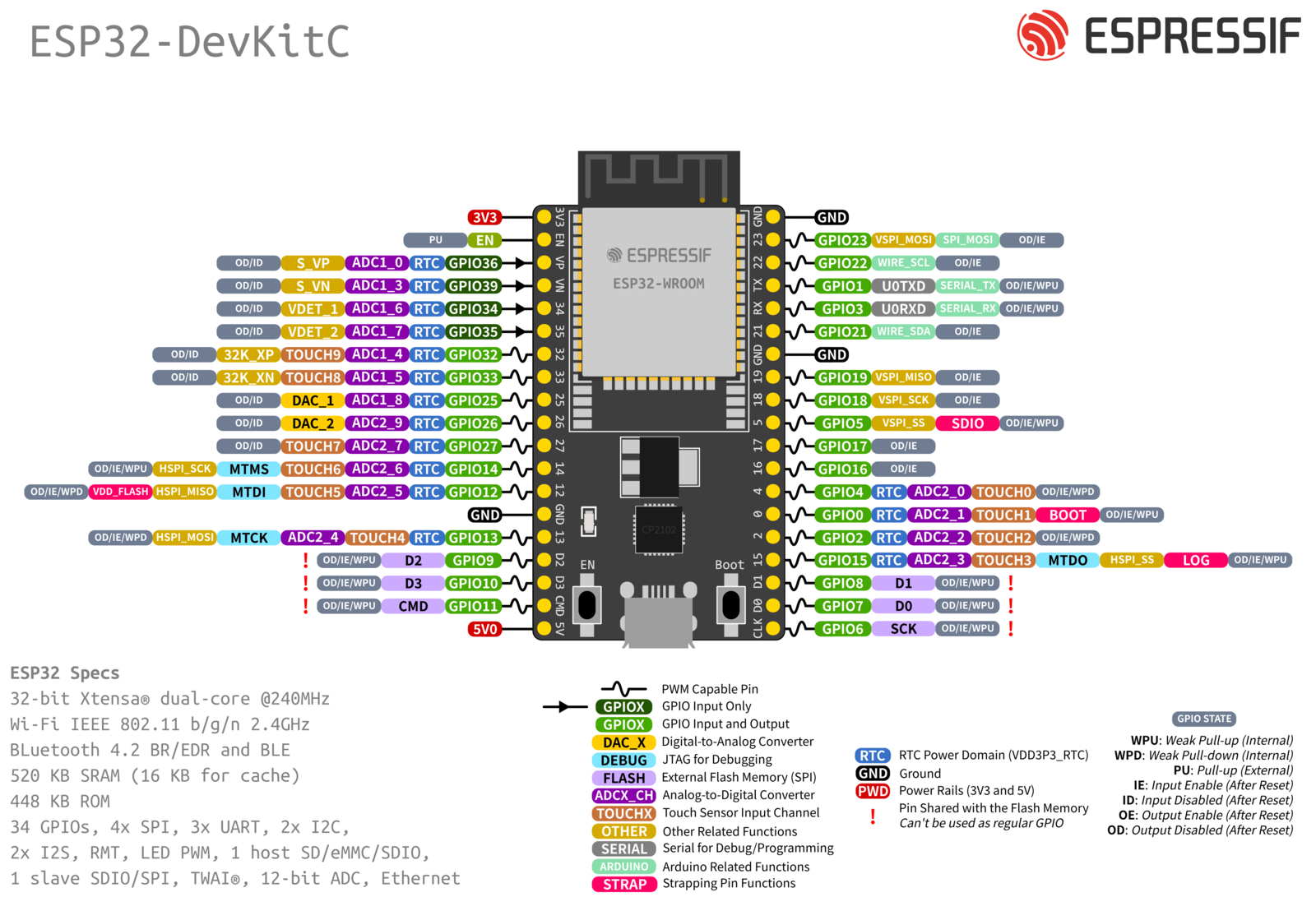
| 引线颜色 | 功能 | 引脚 | 引脚 | 功能 | 引线颜色 |
|----------|-----------------------------|------|------|-----------------------------|----------|
| 黄 | 外接VCC(摇杆VCC、踏板VCC) | 3V3 | GND | 外接GND(踏板GND、电机GND) | 橙 |
| | | EN | 23 | | |
| | | VP | 22 | 陀螺仪SCL | 棕 |
| | | VN | TX | | |
| | | 34 | RX | | |
| | | 35 | 21 | 陀螺仪SDA | 红 |
| 蓝 | 油门踏板 | 32 | GND | 陀螺仪GND | 黑 |
| 绿 | 刹车踏板 | 33 | 19 | 键盘行4 | 紫 |
| 棕 | 摇杆X轴 | 25 | 18 | 键盘行3 | 灰 |
| 红 | 摇杆Y轴 | 26 | 5 | 键盘行2 | 白 |
| 橙 | 摇杆按钮 | 27 | 17 | 键盘行1 | 黑 |
| | | 14 | 16 | 键盘列4 | 黑 |
| 绿 | 排挡前进挡 | 12 | 4 | 键盘列3 | 白 |
| 黄 | 排挡接地 | GND | 0 | 键盘列2 | 灰 |
| 蓝 | 排挡后退挡 | 13 | 2 | 键盘列1 | 紫 |
| | | D2 | 15 | 电机VCC | 白 |
| | | D3 | D1 | | |
| | | CMD | D0 | | |
| 红 | 外接VCC(陀螺仪VCC) | 5V | CLK | | |
Arduino库:
* 蓝牙功能:[NimBLE](https://github.com/h2zero/NimBLE-Arduino)
* 游戏板控制:[BleGamepad](https://github.com/lemmingDev/ESP32-BLE-Gamepad)
* 4x4矩阵键盘:[Adafruit Keypad](https://github.com/adafruit/Adafruit_Keypad)
* MPU6050角度识别:[MPU6050_Madgwick](https://github.com/baohuiming/madgwick_steer)
* I2C通信:Wire(Arduino自带)
❗注意事项:
* 摇杆和踏板需接在3.3v
* 陀螺仪需接在5v
* 11/23/2022更新:修改角度识别库,须将陀螺仪的x轴作为方向盘的转动轴,移除了霍尔传感器
* 3/9/2023更新:移除了avdweb_Switch库,采用读电平的方式替代
* 3/22/2023更新:增加按键的防抖功能,兼容欧卡2和神力科莎
Previous work:
* ESP32(D/E)-Devkit (Enough GPIO/ADC pins)
* MPU6050 gyroscope
* Some potentiometer (joystick and pedal)
* Buttons and switches
* Small vibration motor
* Arduino(choose ESP32 board)
* esptool
Pinout:

| Wire color | Function | Pin | Pin | Function | Wire color |
|------------|------------------------------|------|------|------------------------------|------------|
| Yellow | External VCC (Joystick VCC) | 3V3 | GND | External GND (Pedal GND) | Orange |
| | | EN | 23 | | |
| | | VP | 22 | Gyroscope SCL | Brown |
| | | VN | TX | | |
| | | 34 | RX | | |
| | | 35 | 21 | Gyroscope SDA | Red |
| Blue | Throttle pedal | 32 | GND | Gyroscope GND | Black |
| Green | Brake pedal | 33 | 19 | Keyboard row 4 | Purple |
| Brown | Joystick X-axis | 25 | 18 | Keyboard row 3 | Gray |
| Red | Joystick Y-axis | 26 | 5 | Keyboard row 2 | White |
| Orange | Joystick button | 27 | 17 | Keyboard row 1 | Black |
| | | 14 | 16 | Keyboard column 4 | Black |
| Green | Forward gear | 12 | 4 | Keyboard column 3 | White |
| Yellow | Gear ground | GND | 0 | Keyboard column 2 | Gray |
| Blue | Reverse gear | 13 | 2 | Keyboard column 1 | Purple |
| | | D2 | 15 | Motor VCC | White |
| | | D3 | D1 | | |
| | | CMD | D0 | | |
| Red | External VCC (Gyroscope VCC) | 5V | CLK | | |
Arduino libraries:
* Bluetooth:[NimBLE](https://github.com/h2zero/NimBLE-Arduino)
* Gamepad control:[BleGamepad](https://github.com/lemmingDev/ESP32-BLE-Gamepad)
* 4x4 matrix keypad:[Adafruit Keypad](https://github.com/adafruit/Adafruit_Keypad)
* MPU6050 angle detect:[MPU6050_Madgwick](https://github.com/baohuiming/madgwick_steer)
* I2C communication:Wire(Arduino built-in)
❗Attention:
* Connect joystick and pedal to +3.3v
* Connect gyroscope to +5v
* 11/23/2022 updated:Modify MPU6050 library. The x-axis of the gyroscope must be used as the rotation axis of the steering wheel. The Hall sensor is removed.
* 3/9/2023 updated: The module avdweb_Switch is removed.
* 3/22/2023 updated: Add debounce function to the button. Compatible with ETS2 and Assetto Corsa.