# OpenCopilot
**Repository Path**: regiontech/OpenCopilot
## Basic Information
- **Project Name**: OpenCopilot
- **Description**: No description available
- **Primary Language**: Unknown
- **License**: MIT
- **Default Branch**: main
- **Homepage**: None
- **GVP Project**: No
## Statistics
- **Stars**: 0
- **Forks**: 0
- **Created**: 2023-12-29
- **Last Updated**: 2023-12-29
## Categories & Tags
**Categories**: Uncategorized
**Tags**: None
## README
| Get 1:1 support, Join the community! | 1 Click install |
|:-:|:-:|
| [](https://discord.gg/yjEgCgvefr)| [](https://gitpod.io/#https://github.com/openchatai/opencopilot)
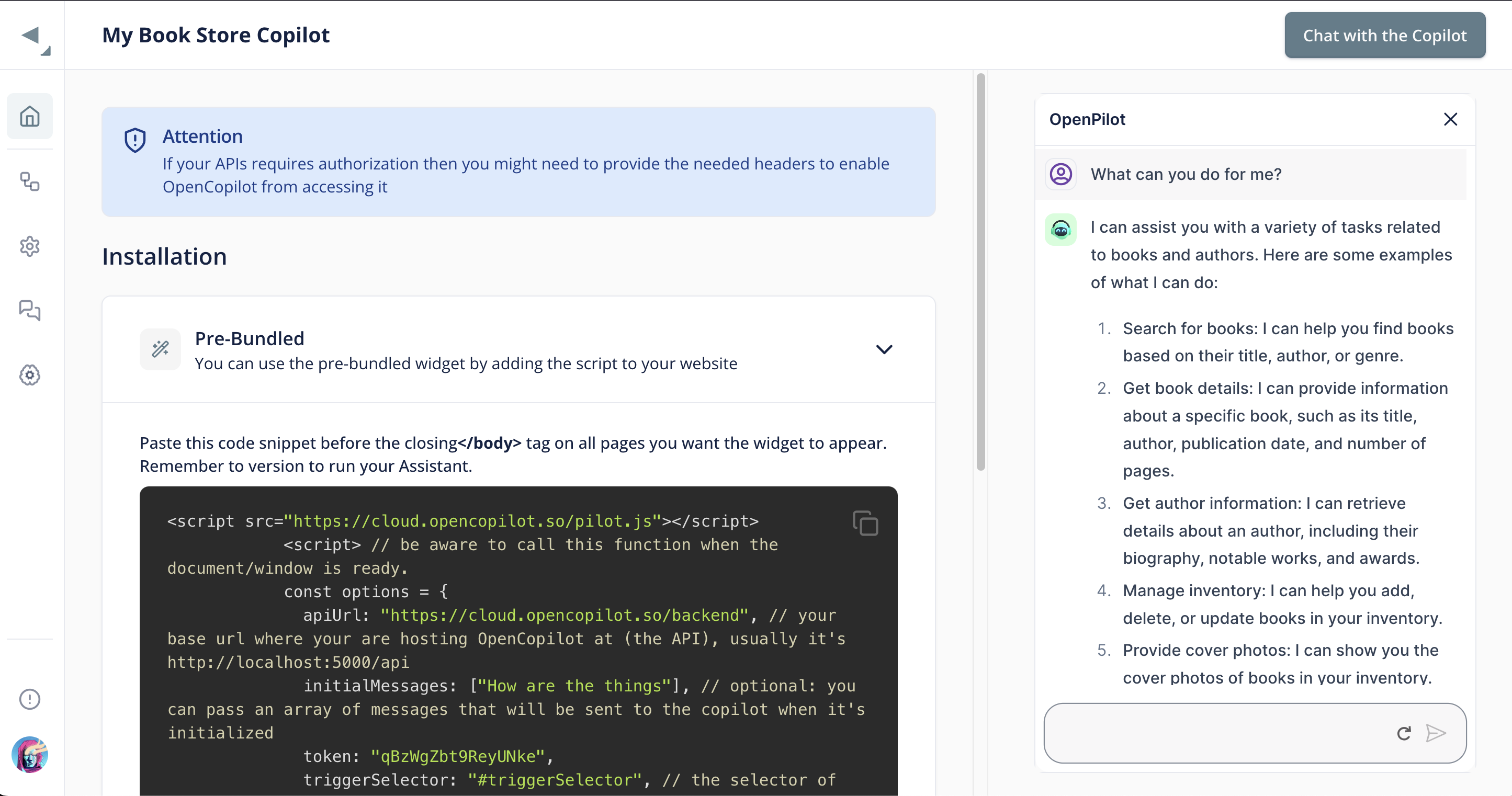 **Documentation [available here](https://docs.opencopilot.so)**
------
# 🔥 OpenCopilot
----
OpenCopilot allows you to have your own product's AI copilot. It integrates with your underlying APIs and can execute API calls whenever needed. It uses LLMs to determine if the user's request requires calling an API endpoint. Then, it decides which endpoint to call and passes the appropriate payload based on the given API definition.
## How does it work?
- Provide your APIs/actions definition, including your public endpoints and how to call them. Currently, OpenCopilot supports Swagger OpenAPI 3.0 for bulk import.
- OpenCopilot validates your schema to achieve the best results.
- Finally, you can integrate our user-friendly chat bubble into your SaaS app.
## 🚀 Getting Started
- Make sure you have docker installed.
- To begin, clone this Git repository:
```
git clone git@github.com:openchatai/OpenCopilot.git
```
In the `.env` file located in the `llm-server` directory, make sure to replace the placeholder value for the `OPENAI_API_KEY` variable with your actual token:
```
OPENAI_API_KEY=YOUR_TOKEN_HERE
```
### For Linux Machines
To install the necessary dependencies and set up the environment for the OpenCopilot project, use the following command:
```bash
make install
```
### For ARM Machines (Mac Silicon)
If you are using an ARM machine, specifically Mac Silicon, use the following command to install dependencies and set up the environment:
```bash
make install-arm
```
Once the installation is complete, you can access the OpenCopilot console at [http://localhost:8888](http://localhost:8888).
## Additional Commands
- **make migrate**: Run Alembic migrations.
- **make down**: Stop and remove all containers.
- **make exec-dashboard**: Access the dashboard container's shell.
- **make exec-llm-server**: Access the llm-server container's shell.
- **make restart**: Restart all containers.
- **make logs**: Show container logs.
- **make purge**: Fully clean uninstall (remove containers, networks, volumes, .env).
- **make help**: Display help message with available targets.
This will install the necessary dependencies and set up the environment for the OpenCopilot project.
Once the installation is complete, you can access the OpenCopilot console at http://localhost:8888
## Try it out:
**You can try it out on [opencopilot.so](http://opencopilot.so/)**
[](http://www.youtube.com/watch?v=HVvbY7A7lIQ "Video Title")
(OpenCopilot is not affiliated with Shopify, and they do not use OpenCopilot, it's just a demo of what copilots are capable of)
## AI Copilot: a growing trend
- [Shopify is developing "Shopify Sidekick."](https://www.youtube.com/watch?v=HVvbY7A7lIQ&ab_channel=Shopify)
- [Microsoft is working on "Windows Copilot."](https://www.youtube.com/watch?v=FCfwc-NNo30&ab_channel=MicrosoftDeveloper)
- [GitHub is in the process of creating "GitHub Copilot."](https://github.com/features/copilot)
- [Microsoft is also developing "Bing Copilot."](https://www.microsoft.com/en-us/bing?form=MA13FV)
Our goal is to empower every SaaS product with the ability to have their own AI copilots tailored for their unique products.
## 🏁 What OpenCopilot can and can't do now?
- It is capable of calling your underlying APIs.
- It can transform the response into meaningful text.
- It can automatically populate certain request payload fields based on the context.
- For instance, you can request actions like: "Initiate a new case about X problem," and the title field will be automatically filled with the appropriate name.
- It is not suitable for handling large APIs (you will need to write JSON transformers to make it work, refer to the docs for more)
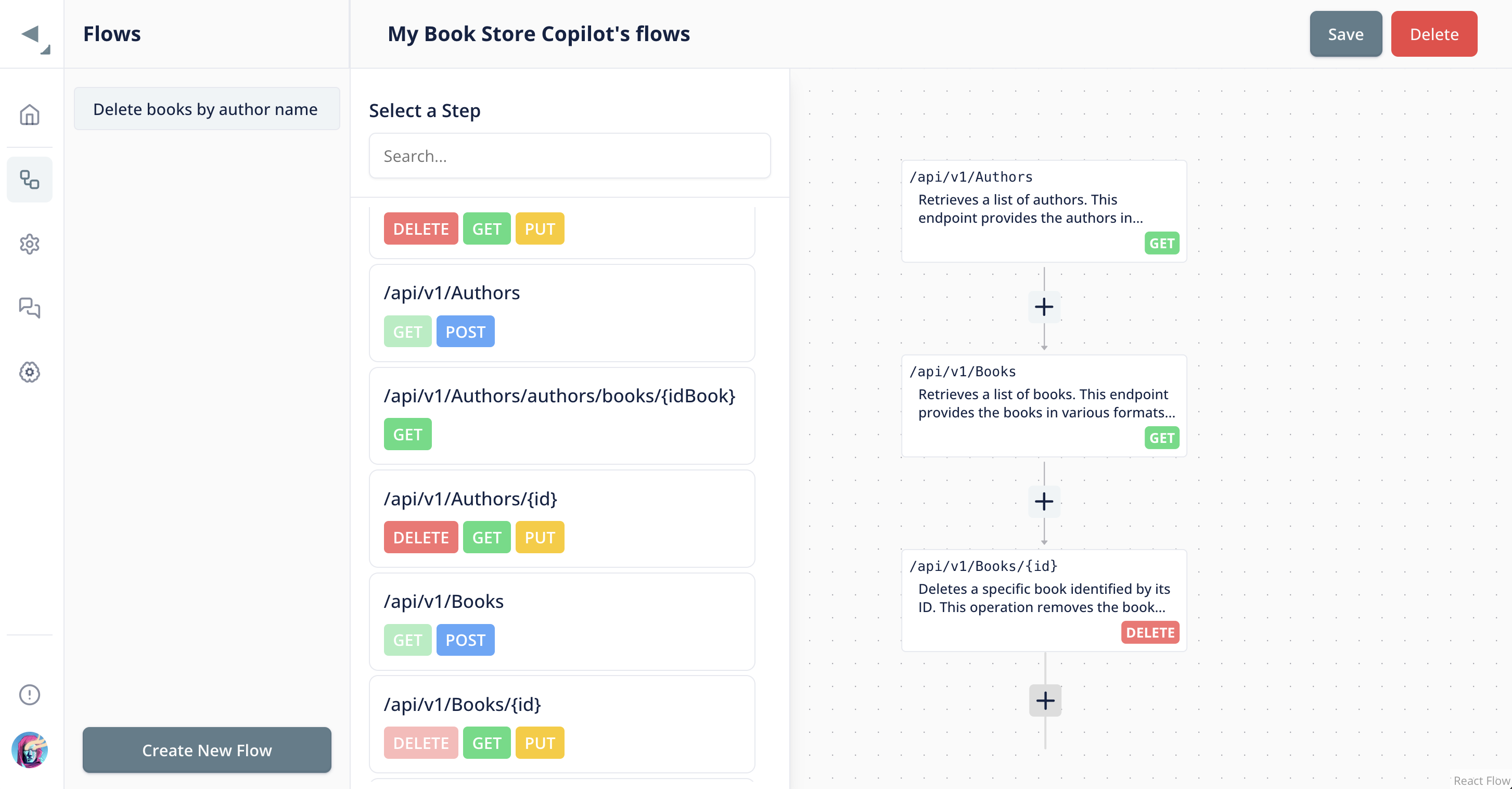
## 🛣️ Teach the copilot via flows:
Most of the time, the copilot can figure out what actions to execute when the user requests something, but in case there is a complex flow, you can define it to help the copilot:
**Documentation [available here](https://docs.opencopilot.so)**
------
# 🔥 OpenCopilot
----
OpenCopilot allows you to have your own product's AI copilot. It integrates with your underlying APIs and can execute API calls whenever needed. It uses LLMs to determine if the user's request requires calling an API endpoint. Then, it decides which endpoint to call and passes the appropriate payload based on the given API definition.
## How does it work?
- Provide your APIs/actions definition, including your public endpoints and how to call them. Currently, OpenCopilot supports Swagger OpenAPI 3.0 for bulk import.
- OpenCopilot validates your schema to achieve the best results.
- Finally, you can integrate our user-friendly chat bubble into your SaaS app.
## 🚀 Getting Started
- Make sure you have docker installed.
- To begin, clone this Git repository:
```
git clone git@github.com:openchatai/OpenCopilot.git
```
In the `.env` file located in the `llm-server` directory, make sure to replace the placeholder value for the `OPENAI_API_KEY` variable with your actual token:
```
OPENAI_API_KEY=YOUR_TOKEN_HERE
```
### For Linux Machines
To install the necessary dependencies and set up the environment for the OpenCopilot project, use the following command:
```bash
make install
```
### For ARM Machines (Mac Silicon)
If you are using an ARM machine, specifically Mac Silicon, use the following command to install dependencies and set up the environment:
```bash
make install-arm
```
Once the installation is complete, you can access the OpenCopilot console at [http://localhost:8888](http://localhost:8888).
## Additional Commands
- **make migrate**: Run Alembic migrations.
- **make down**: Stop and remove all containers.
- **make exec-dashboard**: Access the dashboard container's shell.
- **make exec-llm-server**: Access the llm-server container's shell.
- **make restart**: Restart all containers.
- **make logs**: Show container logs.
- **make purge**: Fully clean uninstall (remove containers, networks, volumes, .env).
- **make help**: Display help message with available targets.
This will install the necessary dependencies and set up the environment for the OpenCopilot project.
Once the installation is complete, you can access the OpenCopilot console at http://localhost:8888
## Try it out:
**You can try it out on [opencopilot.so](http://opencopilot.so/)**
[](http://www.youtube.com/watch?v=HVvbY7A7lIQ "Video Title")
(OpenCopilot is not affiliated with Shopify, and they do not use OpenCopilot, it's just a demo of what copilots are capable of)
## AI Copilot: a growing trend
- [Shopify is developing "Shopify Sidekick."](https://www.youtube.com/watch?v=HVvbY7A7lIQ&ab_channel=Shopify)
- [Microsoft is working on "Windows Copilot."](https://www.youtube.com/watch?v=FCfwc-NNo30&ab_channel=MicrosoftDeveloper)
- [GitHub is in the process of creating "GitHub Copilot."](https://github.com/features/copilot)
- [Microsoft is also developing "Bing Copilot."](https://www.microsoft.com/en-us/bing?form=MA13FV)
Our goal is to empower every SaaS product with the ability to have their own AI copilots tailored for their unique products.
## 🏁 What OpenCopilot can and can't do now?
- It is capable of calling your underlying APIs.
- It can transform the response into meaningful text.
- It can automatically populate certain request payload fields based on the context.
- For instance, you can request actions like: "Initiate a new case about X problem," and the title field will be automatically filled with the appropriate name.
- It is not suitable for handling large APIs (you will need to write JSON transformers to make it work, refer to the docs for more)
## 🛣️ Teach the copilot via flows:
Most of the time, the copilot can figure out what actions to execute when the user requests something, but in case there is a complex flow, you can define it to help the copilot:
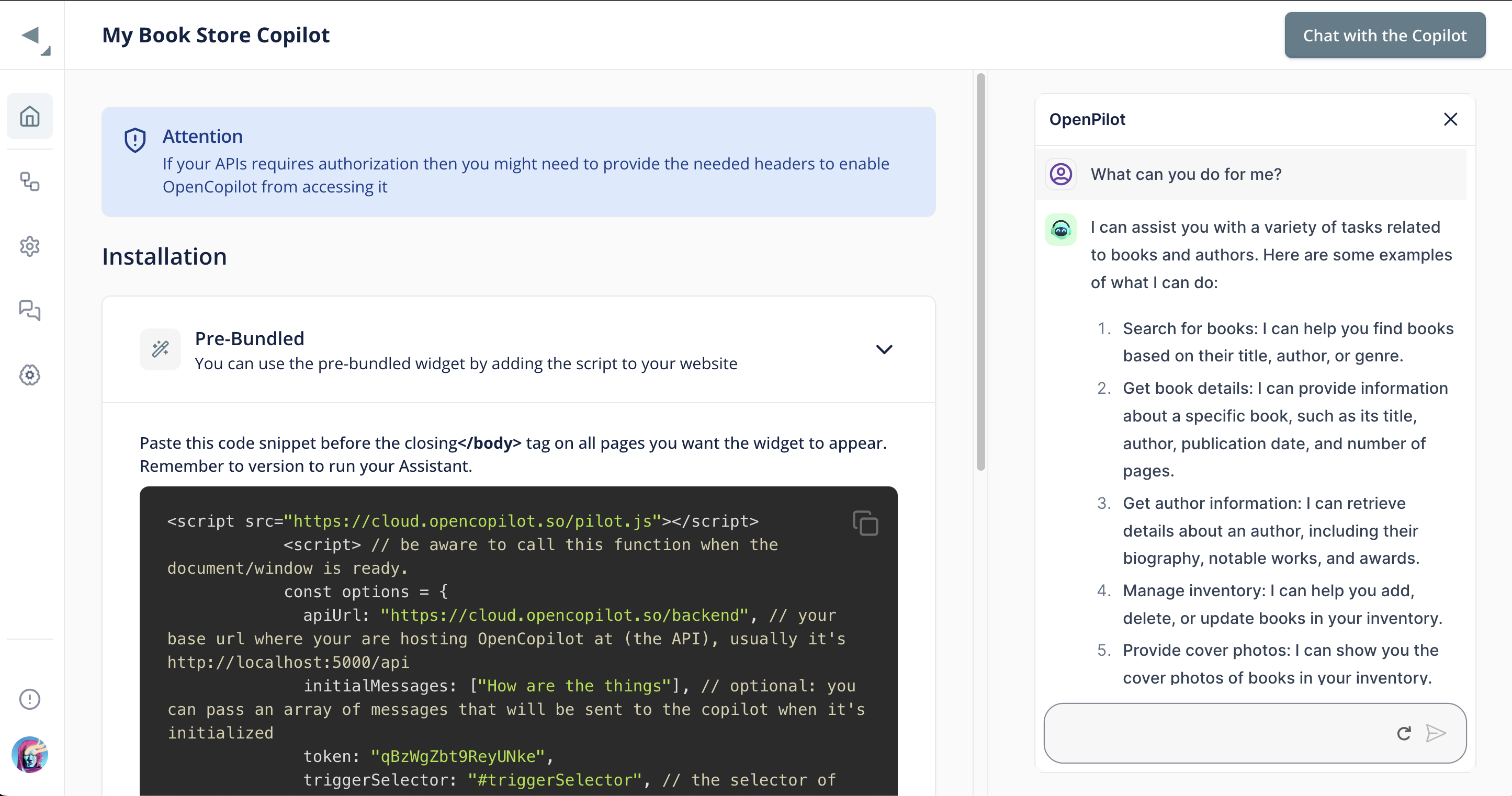
 ## 🛣️ Embed on your app in a few lines of code
Less than <10 lines of codes to implement on your web app or desktop app
## 🛣️ Embed on your app in a few lines of code
Less than <10 lines of codes to implement on your web app or desktop app
 ### Important links
- The backend server (API) is reachable via http://localhost:8888/backend
- The dashboard server is reachable via http://localhost:8888/
- You can also [use our SDK](https://github.com/openchatai/typescript-sdk)
This project follows the [all-contributors](https://github.com/all-contributors/all-contributors) specification. Contributions of any kind are welcome!
## Contributors ✨
Thanks goes to these wonderful people ([emoji key](https://allcontributors.org/docs/en/emoji-key)):
This project follows the [all-contributors](https://github.com/all-contributors/all-contributors) specification. Contributions of any kind are welcome!
We love hearing from you! Got any cool ideas or requests? We're all ears! So, if you have something in mind, give us a shout!
### Important links
- The backend server (API) is reachable via http://localhost:8888/backend
- The dashboard server is reachable via http://localhost:8888/
- You can also [use our SDK](https://github.com/openchatai/typescript-sdk)
This project follows the [all-contributors](https://github.com/all-contributors/all-contributors) specification. Contributions of any kind are welcome!
## Contributors ✨
Thanks goes to these wonderful people ([emoji key](https://allcontributors.org/docs/en/emoji-key)):
This project follows the [all-contributors](https://github.com/all-contributors/all-contributors) specification. Contributions of any kind are welcome!
We love hearing from you! Got any cool ideas or requests? We're all ears! So, if you have something in mind, give us a shout!