# LCUI
**Repository Path**: rfider/LCUI
## Basic Information
- **Project Name**: LCUI
- **Description**: C 的图形界面开发库,可借助 XML 和 CSS 构建简单的跨平台桌面应用
- **Primary Language**: C
- **License**: MIT
- **Default Branch**: master
- **Homepage**: http://lcui.lc-soft.io
- **GVP Project**: No
## Statistics
- **Stars**: 0
- **Forks**: 89
- **Created**: 2020-06-02
- **Last Updated**: 2020-12-19
## Categories & Tags
**Categories**: Uncategorized
**Tags**: None
## README

LCUI
A small C library for building user interfaces with C, XML and CSS.





## Table of contents
- [Table of contents](#table-of-contents)
- [Introduction](#introduction)
- [Features](#features)
- [Screenshots](#screenshots)
- [Related projects](#related-projects)
- [Design references](#design-references)
- [Quick start](#quick-start)
- [Windows](#windows)
- [Create new LCUI project](#create-new-lcui-project)
- [Install LCUI for existing project](#install-lcui-for-existing-project)
- [Manual compilation and installation](#manual-compilation-and-installation)
- [Ubuntu](#ubuntu)
- [Roadmap](#roadmap)
- [Primary Roadmap](#primary-roadmap)
- [Secondary Roadmap](#secondary-roadmap)
- [Contribution](#contribution)
- [Documentation](#documentation)
- [FAQ](#faq)
- [License](#license)
## Introduction
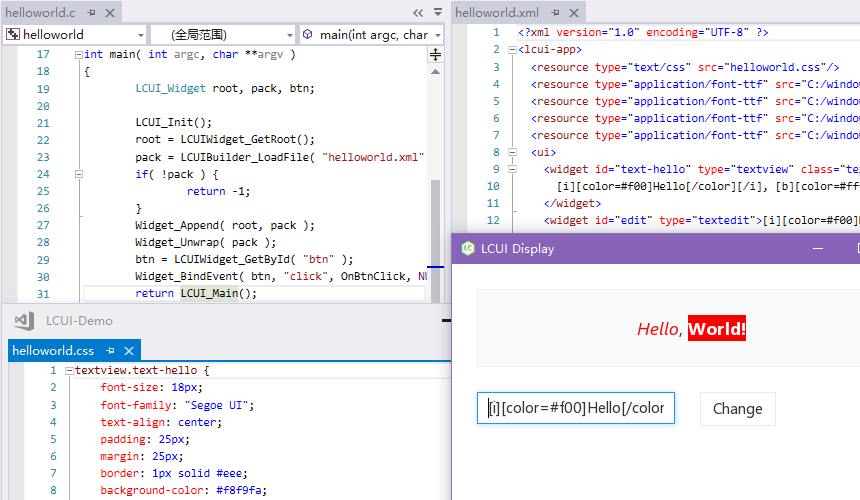
LCUI is a freely available software library for building user interfaces. It is written in C and supports the use of XML and CSS to describe the graphical interface of simple desktop apps.
[中文版说明文档](README.zh-cn.md)
### Features
- **Written in C:** Suitable for small applications written primarily in C.language designed for LCUI, it makes it easier to create interactive UIs.
- **Cross platform:** Support for Windows and Linux, you can write Windows Desktop apps and Universal Windows Platform apps, as well as Linux Desktop apps.
- **XML + CSS:** Support the use of XML and CSS to describe the GUI layout and style, saving interface development time and maintenance costs.
- **Flexible:** Support for adapting the interface to screens of different pixel densities by setting global scaling. Support for using screen density related sp and dp units to describe position and size of the elements.
- **Simple image reading:** Provide jpg, png and bmp image read APIs.
- **Touch:** Supports multi-touch, but currently only on Windows platforms.
### Screenshots
### Related projects
Want to know what LCUI can do? You can view the following projects:
- [LCUI CLI](https://github.com/lc-ui/lcui-cli) - Command line interface for rapid LCUI development.
- [LCUI Router](https://github.com/lc-soft/lcui-router) - The official router for LCUI. It provides a similar development experience to the [Vue Router](https://github.com/vuejs/vue-router) and make building multiple views applications with LCUI a breeze.
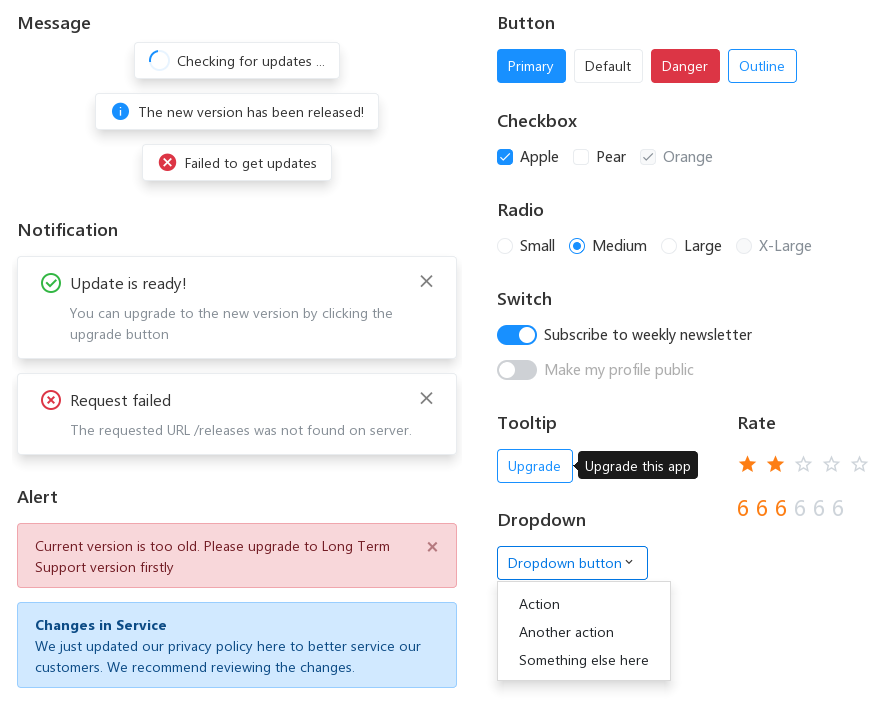
- [LC Design](https://github.com/lc-ui/lc-design) - A UI component framework for building LCUI application.
- [LC Finder](https://github.com/lc-soft/LC-Finder) - An image manager, it uses most of the features of LCUI, and you can use it as a reference to evaluate whether LCUI's performance and development complexity meets your needs.
- [Trad](https://github.com/lc-soft/trad) - A language based on JavaScript syntax that can be compiled into C, it preset LCUI bindings, provides [React](https://reactjs.org/) like development experience, makes it painless to create interactive UIs based on LCUI.
### Design references
- [SDL](https://github.com/SDL-mirror/SDL/tree/master/src/video/x11) — X11 driver code reference
- [FreeType](https://www.freetype.org/freetype2/docs/design/design-3.html#section-1) — Data structure naming style reference
- [LevelDB](https://github.com/google/leveldb/blob/master/include/leveldb/c.h) — Function naming style reference
- [jQuery](https://jquery.com/) — Widget operation method naming style reference
- [MDN](https://developer.mozilla.org/zh-CN/docs/Web/CSS) — CSS standard reference
## Quick start
### Windows
#### Create new LCUI project
Quickly create an LCUI project using [lcui-cli](https://github.com/lc-ui/lcui-cli):
```bash
# Install lcui-cli
npm install -g @lcui/cli
# Create an LCUI project named myapp
lcui create myapp
# Go into project directory
cd myapp
# Run it
npm run start
```
#### Install LCUI for existing project
Use [lcpkg](https://github.com/lc-soft/lcpkg) to quick install LCUI in your project directory:
```bash
# Initialize the lcpkg configuration file to tell lcpkg about your project
lcpkg init
# Download and install the compiled LCUI library from GitHub
lcpkg install github.com/lc-soft/LCUI
```
After successful installation, follow the help documentation output by lcpkg to configure your project's build configuration.
#### Manual compilation and installation
If you want to manually compile LCUI from source code:
1. Open CMD window, and run following command in the LCUI source directory to install the dependency libraries:
```bash
lcpkg install
# If you want compile for x64 CPU architecture
lcpkg install --arch x64
# If you want compile for Universal Windows Platform (UWP)
lcpkg install --platform uwp
lcpkg install --arch x64 --platform uwp
```
1. Rename `config.win.h.in` in the include directory to `config.h`.
1. Open the `build/windows/LCUI.sln` file with [Visual Studio](https://visualstudio.microsoft.com/), and then build LCUI.
### Ubuntu
```bash
# Install the dependencies
sudo apt-get install libpng-dev libjpeg-dev libxml2-dev libfreetype6-dev libx11-dev
# Clone this repository
git clone https://github.com/lc-soft/LCUI.git
# Go into the repository
cd LCUI
# Generate automake configure script
./autogen.sh
# Check the build environment and configure automake scripts
./configure
# Build
make
# If you wnat install LCUI
sudo make install
# Go into test directory
cd test
# Run helloworld application
./helloworld
```
> **Note:** If you want to customize the compiler, compile flags, install location, and other configuration items, read the [INSTALL](INSTALL) file.
## Roadmap
The roadmap for this project is divided into primary and secondary roadmaps, with the primary roadmap developed by the project maintainer and the secondary roadmap developed by the open source community contributors and developers like you.
### Primary Roadmap
- Make project code more standardized, readable, and maintainable
- Improve relevant development tools and sample applications to improve the development efficiency and make it easier to use
### Secondary Roadmap
- Explore new GUI development methods to make LCUI unique
- [Accessbility](https://developer.mozilla.org/en-US/docs/Learn/Accessibility/What_is_accessibility) support
- Research [SDL](https://github.com/SDL-mirror/SDL), [imgui](https://github.com/ocornut/imgui) and other similar open source projects, and try to fill in what LCUI is missing
- Refactor the existing graphics processing interface to make it easy to integrate with mainstream 2D graphics libraries and bring better graphics rendering performance to LCUI
- Add driver support for Mac OS, Android and iOS
- Add more mouse cursor styles
- Add clipboard support
## Contribution
Think LCUI is slow to update? there are many ways to [contribute](.github/CONTRIBUTING.md) to LCUI.
- [Submit bugs](https://github.com/lc-soft/LCUI/issues) and help us verify fixes as they are checked in.
- Share some interesting ideas related to GUI development in the [issues page](https://github.com/lc-soft/LCUI/issues).
- [Search for FIXME comments](https://github.com/lc-soft/LCUI/search?l=C&q=FIXME) in the source code and try to fix them.
- Fund the issues that interest you on [IssueHunt](https://issuehunt.io/r/lc-soft/LCUI) to attract other developers to contribute.
- Review the [source code changes](https://github.com/lc-soft/LCUI/pulls).
- [Contribute bug fixes](CONTRIBUTING.md).
LCUI has adopted the code of conduct defined by the Contributor Covenant. This document is used across many open source communities, and we think it articulates our values well. For more, see the [Code of Conduct](CODE_OF_CONDUCT.md).
## Documentation
- Tutorial: [https://docs.lcui.lc-soft.io/](https://docs.lcui.lc-soft.io/) (Chinese version only)
- Changelog: [docs/CHANGES.md](docs/CHANGES.md)
The English version of the documentation is not available, because the author does not have time to write the English version, please read the files in the [test](test) directory and related projects to learn how to use LCUI.
## FAQ
1. **Why develop it?**
- Explore and experiment new GUI development way
- Let other developers share about how to write better code
- Leave a proof of existence in the world
- Get more better jobs and make more money
- Pass the time
1. **Is this a browser kernel? Or a development library like Electron that integrates the browser environment?**
No, you can think of it as a traditional GUI development library that applied some Web technologies.
1. **Why do I choose the LCUI instead of Electron?**
In contrast to fully functional Electron, these features of lcui, such as small binary file size and low memory usage, are not worth mentioning, except for technical research and share, you have no reason to use LCUI.
1. **Is it the same as writing a web page?**
Not exactly, there are the following differences need to be noted:
- The interface description file format is XML, slightly different from HTML.
- You need to implement all the features of your application in C code, which is much less development efficiency than JavaScript.
- No `