# concent
**Repository Path**: roytan883/concent
## Basic Information
- **Project Name**: concent
- **Description**: Build-in dependency collection, a predictable、zero-cost-use、progressive、high performance's react develop framework
- **Primary Language**: JavaScript
- **License**: MIT
- **Default Branch**: master
- **Homepage**: None
- **GVP Project**: No
## Statistics
- **Stars**: 0
- **Forks**: 0
- **Created**: 2020-08-19
- **Last Updated**: 2020-12-19
## Categories & Tags
**Categories**: Uncategorized
**Tags**: None
## README
[English](./README.md) | 简体中文
## [concent](https://concentjs.github.io/concent-doc)
一个可预测、0入侵、渐进式、高性能的增强型状态管理方案,基于**引用收集**、**依赖标记**和**状态分发**原理,power you react!
了解更多请访问官方文档[https://concentjs.github.io/concent-doc](https://concentjs.github.io/concent-doc).

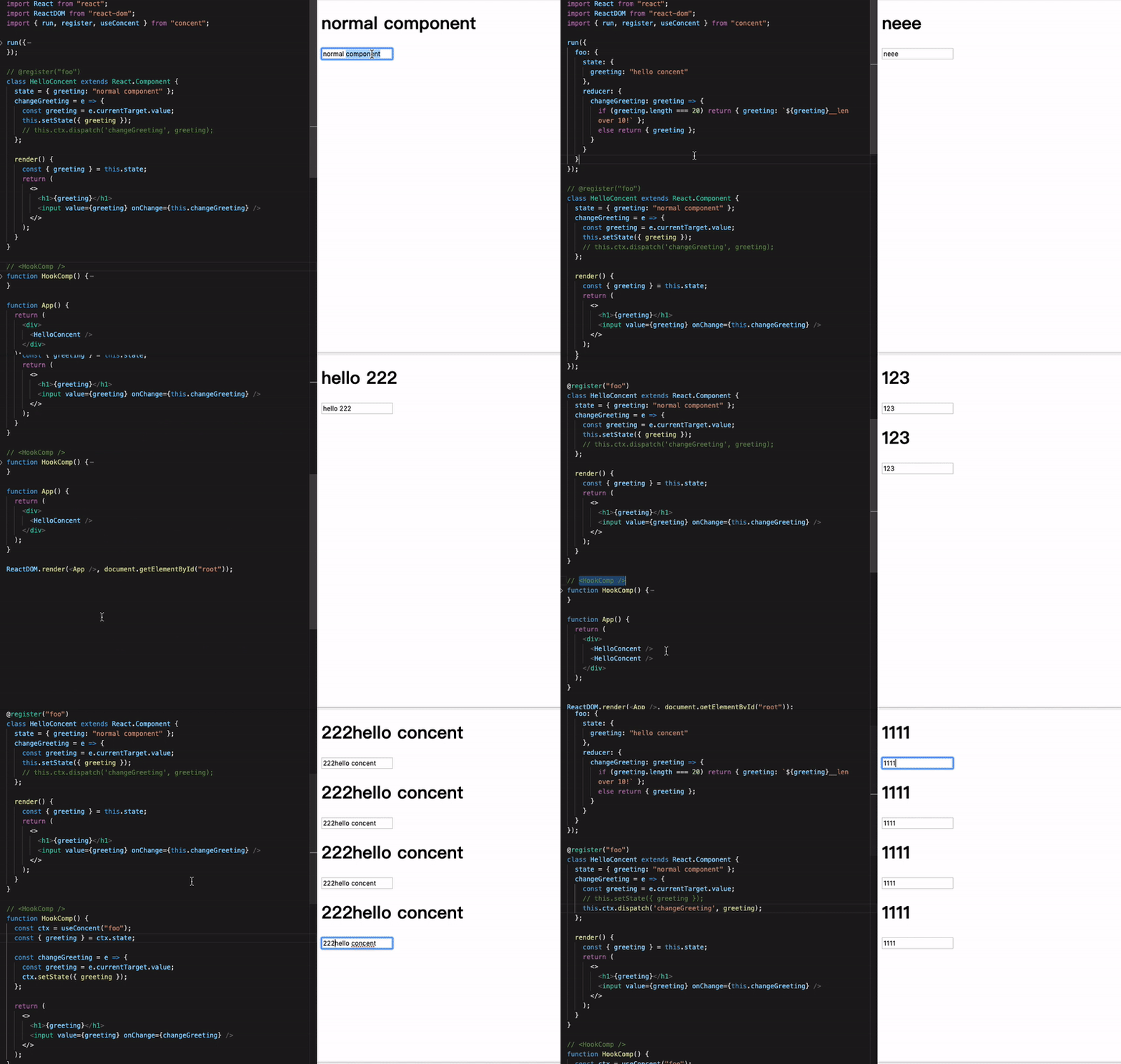
[review this gif](https://xvcej.csb.app/#/)
## 🎇依赖收集&精确更新

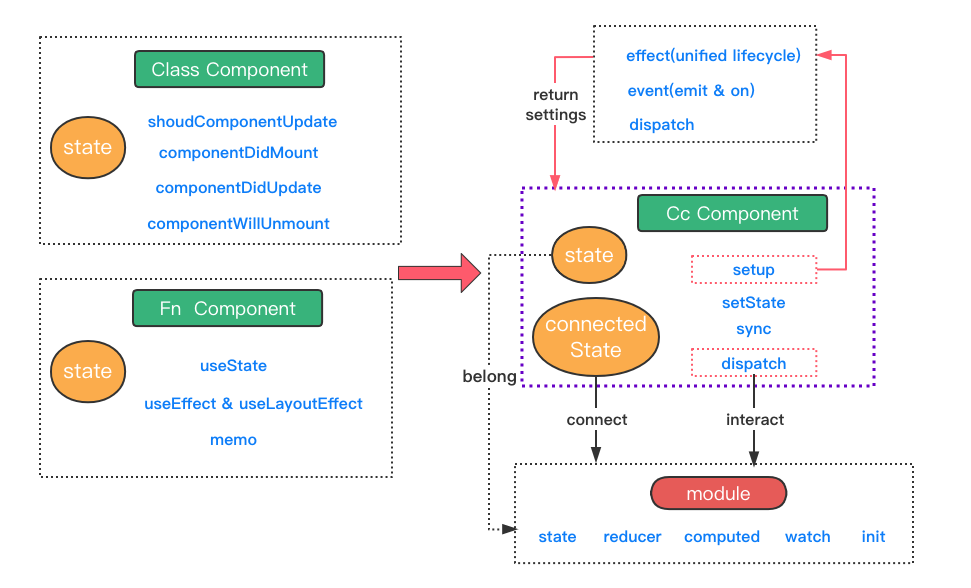
## 🎆统一类组件和函数组件编码方式
## 🖥在线体验
- 快速开始:
**快速了解和上手concent的强大特性!!**

- todo app:
**下面还有一个链接使用hook&redux编写,可以点击查看并感受concent版本和hook&redux版本的差异**
> [使用hook&redux编写 (author:Gábor Soós@blacksonic)](https://codesandbox.io/s/github/blacksonic/todoapp-react-hooks)
- 结合了concent生态库的企业级项目模板(js):
- 结合了concent生态库的企业级项目模板(ts):
source code see here:https://github.com/fantasticsoul/concent-guid-ts
## ✨特性
* **极简的核心api**,`run`载入模块配置启动concent,`register`注册组件,无需包一层`Provider`在根组件。
* **0入侵成本接入**,不改造代码的情况下直接接入;[hello-concent](https://stackblitz.com/edit/cc-course-hello-concent-simple)
* **贴心的模块配置**,除了`state`,还提供`reducer`、`computed`、`watch`和`init`四项可选定义。
* **灵活的数据消费粒度**,支持跨多个模块场景,以及模块内stateKey级别的细粒度控制。
* **渐进式构建react应用**,除了`setState`,支持`dispatch`、`invoke`调用来让ui视图与业务逻辑彻底解耦。[从class到function](https://stackblitz.com/edit/cc-multi-ways-to-wirte-code)
* **组件能力增强**,支持实例级别`computed`、`watch`定义,支持`emit&on`,以及支持`setup`特性,让函数组件拥有定义静态api的能力。
* **高度一致的编程体验**,`hoc`、`render props`和`hook`3种方式定义的组件均享有一致的api调用体验,相互切换代价为0。[多种方式定义组件](https://stackblitz.com/edit/cc-4-render-mode)
* **渲染性能出众**,内置`renderKey`、`lazyDispatch`、`delayBroadcast`等特性,保证极速的渲染效率。[长列表精准渲染](https://stackblitz.com/edit/concent-render-key?file=BookItem.js)、[批处理状态提交](https://stackblitz.com/edit/concent-lazy-dispatch?file=runConcent.js)、[高频输入场景状态延迟分发](https://stackblitz.com/edit/concent-delay-broadcast)
* **干净的dom层级**,对于class组件,默认采用反向继承策略,让react dom树的层级结构保持简洁与干净。
* **扩展中间件与插件**,允许用户定义中间件拦截所有的数据变更提交记录,做额外处理,也可以自定义插件,接收运行时的发出的各种信号,按需增强concent自身的能力。
* **去中心化配置模块**,除了`run`接口一次性配置模块,还提供`configure`接口在任意地方动态配置模块。
* **模块克隆**,支持对已定义模块进行克隆,满足你高维度抽象的需要。
* **完整的typescript支持**,能够非常容易地书写[优雅的ts代码](https://codesandbox.io/s/concent-guide-ts-zrxd5)。
## 搭配react-router使用
请移步阅读和了解[react-router-concent](https://github.com/concentjs/react-router-concent),暴露`history`对象,可以全局任意地方使用,享受编程式的导航跳转。
[react-router-concent在线示例](https://stackblitz.com/edit/cc-multi-ways-to-wirte-code)
## 搭配redux-dev-tool使用
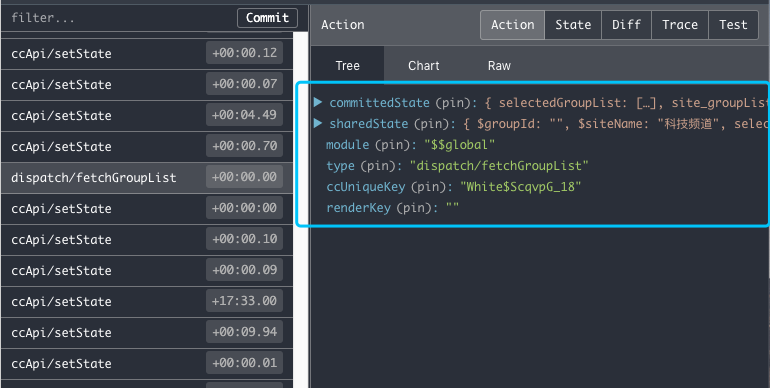
请移步阅读和了解[concent-plugin-redux-devtool](https://github.com/concentjs/concent-plugin-redux-devtool),全流程追溯你的状态变更过程。
## 搭配loading插件使用
请移步阅读和了解[concent-plugin-loading](https://github.com/concentjs/concent-plugin-loading),轻松控制concent应用里所有reducer函数的loading状态。
[concent-plugin-loading在线示例](https://stackblitz.com/edit/cc-plugin-loading?file=models%2Fstudent%2Freducer.js)
___
## 📦 快速开始
确保你本地机器上安装有[nodejs](http://nodejs.cn/download/)。
### 创建一个app
在你的电脑上,选择一个合适的目录并进入,使用[create-react-app](https://github.com/facebookincubator/create-react-app) 创建一个app
```sh
$ npm i -g create-react-app
$ create-react-app cc-app
```
### 安装concent
创建好app后,进入你的app根目录,使用npm安装`concent`
```sh
$ cd cc-app
$ npm i --save concent
```
或者使用yarn安装
```sh
$ yarn add concent
```
### 将`App.js`文件的内容全部替换为以下代码
> 你也可以[点击这里在线编辑](https://codesandbox.io/s/green-tdd-g2mcr).
```javascript
import React, { Component } from 'react';
import { register, run, useConcent } from 'concent';
// 运行concent,配置一个名为counter的模块
run({
counter:{
state:{count:1}
}
})
// 定义一个属于counter模块的类组件
@register('counter')
class Counter extends Component{
render(){
//此时setState能够直接提交状态到store,并广播到其他同属于counter模块的实例
const add = ()=>this.setState({count:this.state.count+1});
return (
{this.state.count}
)
}
}
// 定义一个属于counter模块的函数组件
function FnCounter(){
const ctx = useConcent('counter');
const add = ()=>ctx.setState({count:ctx.state.count+1});
return (
{ctx.state.count}
)
}
export default function App() {
return (
);
}
```
## ❤️依赖收集
concent使用`Proxy`&`defineProperty` in `v2.3+`完成了运行时的依赖收集特性,大幅缩小UI视图渲染范围,提高应用性能。
### 模块级别的计算依赖收集
```js
run({
counter:{
state:{
modCount: 10,
modCountBak: 100,
factor: 1,
},
computed:{
xxx(n){
return n.modCount + n.modCountBak;
},// for xxx computed retKey, the depKeys is ['modCount', 'modCountBak']
yyy(n){
return n.modCountBak;
},// for yyy computed retKey, the depKeys is ['modCountBak']
zzz(n, o, f){// n means newState, o means oldState, f means fnCtx
return f.cuVal.xxx + n.factor;
},// for zzz computed retKey, the depKeys is ['factor', 'modCount', 'modCountBak']
},
watch:{
xxx:{
fn(n){
console.log('---> trigger watch xxx', n.modCount);
},// for xxx watch retKey, the depKeys is ['modCount']
immediate: true,
},
}
}
});
```
### 实例级别的计算依赖收集
```js
const setup = ctx => {
ctx.computed('show', (n)=>{
return n.show + n.cool + n.good;
});// for show retKey, the depKeys is ['show', 'cool', 'good']
ctx.computed('show2', (n)=>{
return n.show + '2222' + n.cool;
});// for show2 retKey, the depKeys is ['show', 'cool', 'good']
};
```
### 渲染期间的依赖收集
```js
import {register, useConcent} from 'concent';
const iState = ()=>({show:true});
function FnComp(){
const {state, syncBool} = useConcent({module:'counter', state:iState, setup});
return (
{/** if show is true, current ins's dependency is ['modCount']*/}
{state.show? {state.modCount} : ''}
);
}
@register({module:'counter', state:iState, setup})
class ClassComp extends React.Component{
// state = iState(); //or write private state here
render(){
const {state, syncBool} = this.ctx;
return (
{/** if show is true, current ins's dependency is ['modCount']*/}
{state.show? {state.modCount} : ''}
}
}
```
**[edit this demo on CodeSandbox](https://codesandbox.io/s/condescending-satoshi-p5e5dr)**
## 🔨其他高级特性实例
- 运行concent,载入模块配置
```javascript
import React, { Component, Fragment } from 'react';
import { register, run } from 'concent';
run({
counter: {// 定义counter模块
state: {// 【必需】,定义state
count: 0,
products: [],
type: '',
},
reducer: {// 【可选】定义reducer,书写修改模块状态逻辑
inc(payload=1, moduleState) {
return { count: moduleState.count + payload };
},
dec(payload=1, moduleState) {
return { count: moduleState.count - payload };
},
async inc2ThenDec3(payload, moduleState, actionCtx){
await actionCtx.dispatch('inc', 2);
await actionCtx.dispatch('dec', 3);
}
},
computed:{// 【可选】定义模块computed,当对应的stateKey发生变化时触发计算函数,结果将被缓存
count(newState, oldState){
return newState.count * 2;
}
},
watch:{// 【可选】定义模块watch,当对应的stateKey发生变化时触发watch函数,通常用于触发一些异步任务的执行
count(newState, oldState){
console.log(`count changed from ${oldState.count} to ${newState.count}`);
}
},
init: async ()=>{// 【可选】模块状态的初始化函数,当状态需要异步的定义,且与具体挂载的组件无关时定义此项
const state = await api.fetchState();
return state;
}
}
})
```
更推荐将模块定义选项放置到各个文件中,然后在各自导出交给`run`函数配置.
```
|____models # business models
| |____index.js
| |____counter
| | |____index.js
| | |____reducer.js # change state methods(optional)
| | |____computed.js # computed methods(optional)
| | |____watch.js # watch methods(optional)
| | |____init.js # async state initialization function(optional)
| | |____state.js # module init state(required)
```
此时reducer文件里函数可以不需要基于字符串发起组合型调用了
```js
export function inc(payload=1, moduleState) {
return { count: moduleState.count + payload };
}
export function dec(payload=1, moduleState) {
return { count: moduleState.count - payload };
}
// 组合调用其他的reducer函数完成业务逻辑
export async function inc2ThenDec3(payload, moduleState, actionCtx){
await actionCtx.dispatch(inc, 2);
await actionCtx.dispatch(dec, 3);
}
```
当然reducer文件里,你可以调用setState,是一个被promise话的句柄
```js
export updateLoading(loading){
return { loading }
}
export async function inc2ThenDec3(payload, moduleState, actionCtx){
await actionCtx.dispatch(inc, 2);
//等效于调用actionCtx.dispatch(updateLoading, true);
await actionCtx.setState({loading: true});
await actionCtx.dispatch(dec, 3);
//等效于调用actionCtx.dispatch(updateLoading, false);
await actionCtx.setState({loading: false});
//最后这里你可以选择的返回一个新的片断状态,也会触发视图更新
return { tip: 'you can return some new value in current reducer fn ot not' };
}
```
- 定义 setup
`setup`只会在初次渲染之前被执行一次,同样用于定义一些副作用函数,或者一些随后可以在渲染函数体内通过`ctx.settings`取到的方法,所以将不在产生大量的**临时闭包函数**,且`setup`可以同时传递给类组件和函数组件,意味着你可以随时地切换组件形态,优雅的复用业务逻辑。
```js
const setup = ctx => {
console.log('setup函数只会在组件初次渲染之前被执行一次');
ctx.on('someEvent', (p1, p2)=> console.log('receive ', p1, p2));
ctx.effect(() => {
fetchProducts();
}, ["type", "sex", "addr", "keyword"]);//这里只需要传key名称就可以了
/** 原函数组件内写法:
useEffect(() => {
fetchProducts(type, sex, addr, keyword);
}, [type, sex, addr, keyword]);
*/
ctx.effect(() => {
return () => {
// 返回一个清理函数
// 等价于componentWillUnmout, 这里搞清理事情
};
}, []);
/** 原函数组件内写法:
useEffect(()=>{
return ()=>{// 返回一个清理函数
// 等价于componentWillUnmout, 这里搞清理事情
}
}, []);//第二位参数传空数组,次副作用只在初次渲染完毕后执行一次
*/
ctx.effectProps(() => {
// 对props上的变更书写副作用,注意这里不同于ctx.effect,ctx.effect是针对state写副作用
const curTag = ctx.props.tag;
if (curTag !== ctx.prevProps.tag) ctx.setState({ tag: curTag });
}, ["tag"]);//这里只需要传key名称就可以了
/** 原函数组件内写法:
useEffect(()=>{
// 首次渲染时,此副作用还是会执行的,在内部巧妙的再比较一次,避免一次多余的ui更新
// 等价于类组件里getDerivedStateFromProps里的逻辑
if(tag !== propTag)setTag(tag);
}, [propTag, tag]);
*/
// 定义实例计算函数,当count值变化时会触发其计算,用户可随后在渲染函数体内通过ctx.refComputed.doubleTen获得计算结果
ctx.computed('doubleTen', (newState, oldState)=>{
return newState.count * 10;
}, ['count']);
// 大多数情况你应该首先考虑定义模块计算函数,如果你想所有实例共享计算逻辑且计算函数只被执行一次,因为对于实例计算函数来说是每个实例都会自己单独触发的
// 如果结果key和状态key命名一样,可简写为如下格式
ctx.computed('count', ({count})=>count*2);
// 定义实例观察函数, 和模块计算的理由一样,你应该优先考虑定义模块模块级别的观察函数
ctx.watch('retKey', ()=>{}, ['count']);
const fetchProducts = () => {
const { type, sex, addr, keyword } = ctx.state;
api.fetchProducts({ type, sex, addr, keyword })
.then(products => ctx.setState({ products }))
.catch(err => alert(err.message));
};
const inc = () => {
ctx.setState({ count: this.state.count + 1 });
}
const dec = () => {
ctx.setState({ count: this.state.count - 1 });
}
// 通过dispatch触发reducer函数
const incD = () => {
ctx.dispatch('inc');// 也可以写为: this.ctx.moduleReducer.inc()
}
const decD = () => {
ctx.dispatch('dec');// 也可以写为: this.ctx.moduleReducer.dec()
}
// 返回结果将收集ctx.settings里
return {
inc,
dec,
incD,
decD,
fetchProducts,
//同步type值, sync能够自动提取event事件里的值
changeType: ctx.sync('type'),
};
};
```
- 基于`class`、`renderProps`, `hook`3种方式注册为concent组件
```jsx
@register({module:'counter', setup})
class Counter extends Component {
constructor(props, context){
super(props, context);
this.state = {tag: props.tag};// 私有状态
}
render() {
// 此时的state由私有状态和模块状态合并而得
const { count, products, tag } = this.state;
// this.state 也可以写为 this.ctx.state
//const { count, products, tag } = this.ctx.state;
const {inc, dec, indD, decD, fetchProducts, changeType} = this.ctx.settings;
return 'your ui xml...';
}
}
const PropsCounter = registerDumb({module:'counter', setup})(ctx=>{
const { count, products, tag } = ctx.state;
const {inc, dec, indD, decD, fetchProducts, changeType} = ctx.settings;
return 'your ui xml...';
});
function HookCounter(){
const ctx = useConcent({module:'counter', setup});
const { count, products, tag } = ctx.state;
const {inc, dec, indD, decD, fetchProducts, changeType} = ctx.settings;
return 'your ui xml...';
}
```
## ⚖️在线比较
* [concent代办列表mvc](https://codesandbox.io/s/todoapp-react-concent-fvgvc) **vs** [redux&hook代办列表mvc](https://codesandbox.io/s/github/blacksonic/todoapp-react-hooks)
* [基于concent的计算器](https://codesandbox.io/s/react-calculator-8hvqw) **vs** [基于hook的计算器](https://codesandbox.io/s/react-calculator-84f2m)
* [基于concent的查询列表](https://codesandbox.io/s/query-react-list-00mkd)& [基于concent的共享状态查询列表](https://codesandbox.io/s/query-react-list-shared-state-l3fhb) **vs** [基于hook的查询列表](https://codesandbox.io/s/elastic-dhawan-qw7m4)
## 💻在线示例
* [渐进式的开发react应用](https://stackblitz.com/edit/cc-multi-ways-to-wirte-code?file=index.js)
* [有趣的counter](https://stackblitz.com/edit/funny-counter)
* [stackblitz示例集合](https://stackblitz.com/@fantasticsoul)
* [run api demo](https://stackblitz.com/edit/cc-awesome)
## ⌨️在线git
* [concent ant-design-pro](https://github.com/concentjs/antd-pro-concent)
## 📰图文收集
* [redux、mobx、concent特性大比拼, 看后生如何对局前辈](https://juejin.im/post/5e7c18d9e51d455c2343c7c4)
* [聊一聊状态管理&Concent设计理念](https://juejin.im/post/5da7cb9cf265da5bbb1e4f8c)
* [应战Vue3 setup,Concent携手React出招了!](https://juejin.im/post/5dd123ec5188253dbe5eeebd)
* [深度挖掘Concent的effect,全面提升useEffect的开发体验](https://juejin.im/post/5deb43256fb9a0166316c3e9)
* [concent 骚操作之组件创建&状态更新](https://juejin.im/post/5dbe3f18f265da4d3429a439)
* [使用concent,体验一把渐进式地重构react应用之旅](https://juejin.im/post/5d64f504e51d4561c94b0ff8)
___
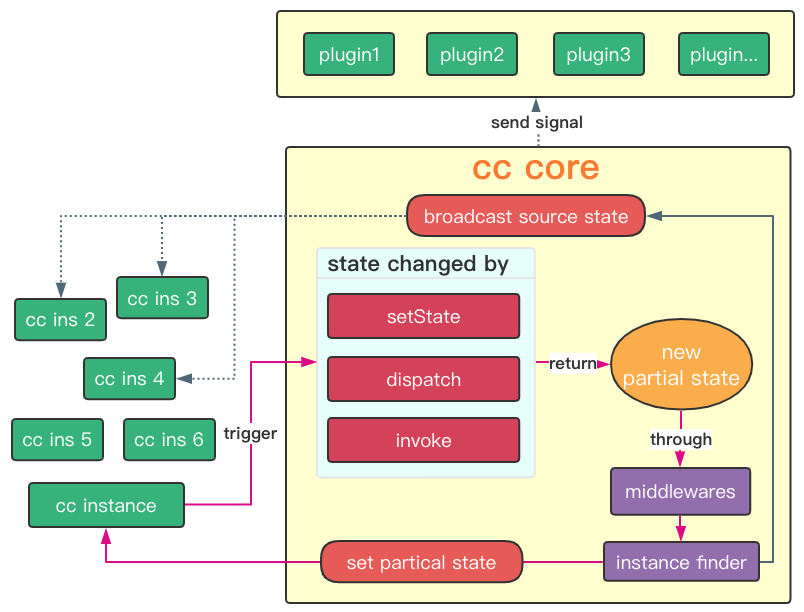
## 图片介绍
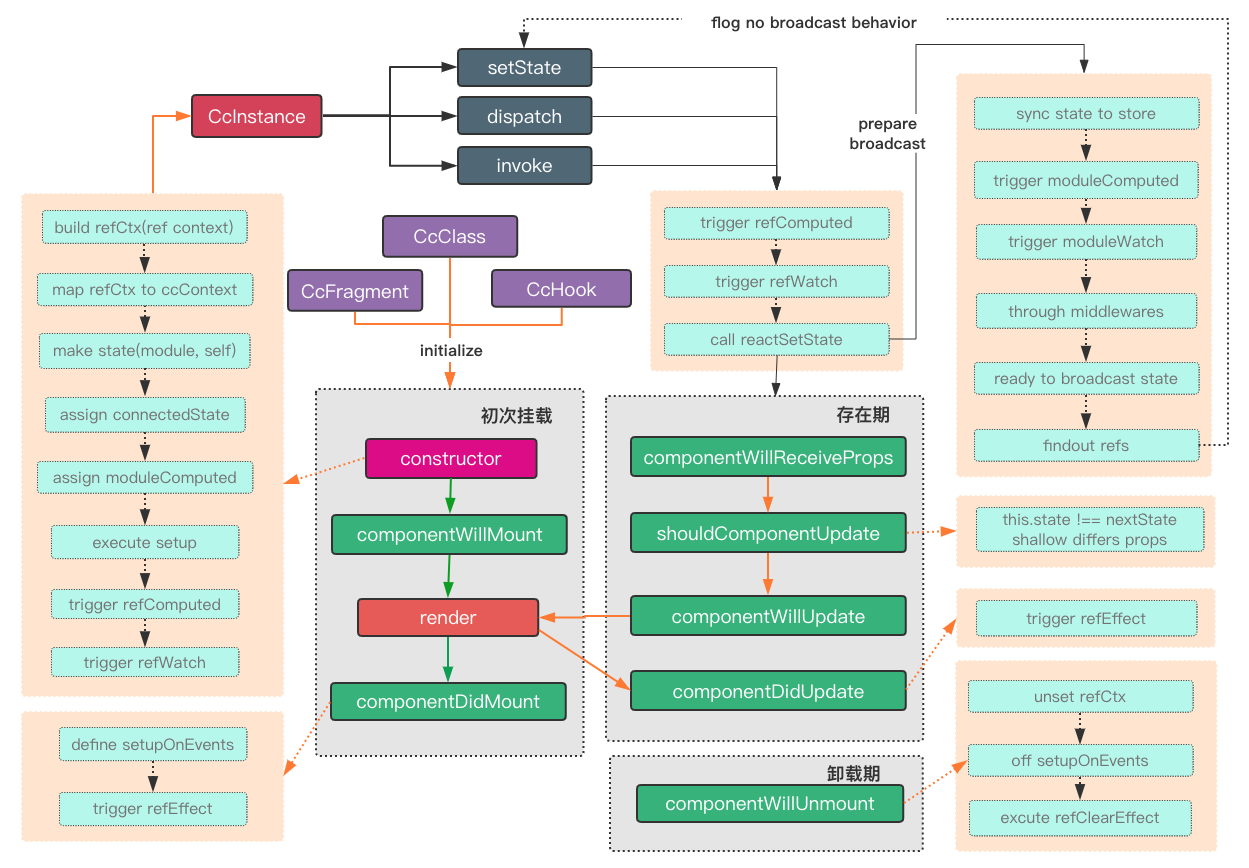
### cc状态分发流程
### cc组件渲染流程