# flutter_scalable_ocr
**Repository Path**: rqf/flutter_scalable_ocr
## Basic Information
- **Project Name**: flutter_scalable_ocr
- **Description**: 镜像 https://github.com/vbalagovic/flutter_scalable_ocr.git
- **Primary Language**: Dart
- **License**: MIT
- **Default Branch**: main
- **Homepage**: None
- **GVP Project**: No
## Statistics
- **Stars**: 0
- **Forks**: 1
- **Created**: 2024-03-28
- **Last Updated**: 2024-03-28
## Categories & Tags
**Categories**: Uncategorized
**Tags**: None
## README
# Flutter Scalable OCR
`v1.0.1`
Flutter scalable OCR package is a wrapper around [Google ML kit Text Recognition](https://pub.dev/packages/google_mlkit_text_recognition). It tackles the issue of fetching data just from part od a camera and also narowing down the camera viewport which was common problem. To see how it work in real case scenario you can check the app where it was used [Exchange Rate Scanner](https://www.erscanner.com/) and here are some gifs from example project.


## Requirements
Since thus package uses [ML Kit](https://pub.dev/packages/google_mlkit_commons) check [requirements](https://github.com/bharat-biradar/Google-Ml-Kit-plugin#requirements) before running the package in project.
## Features
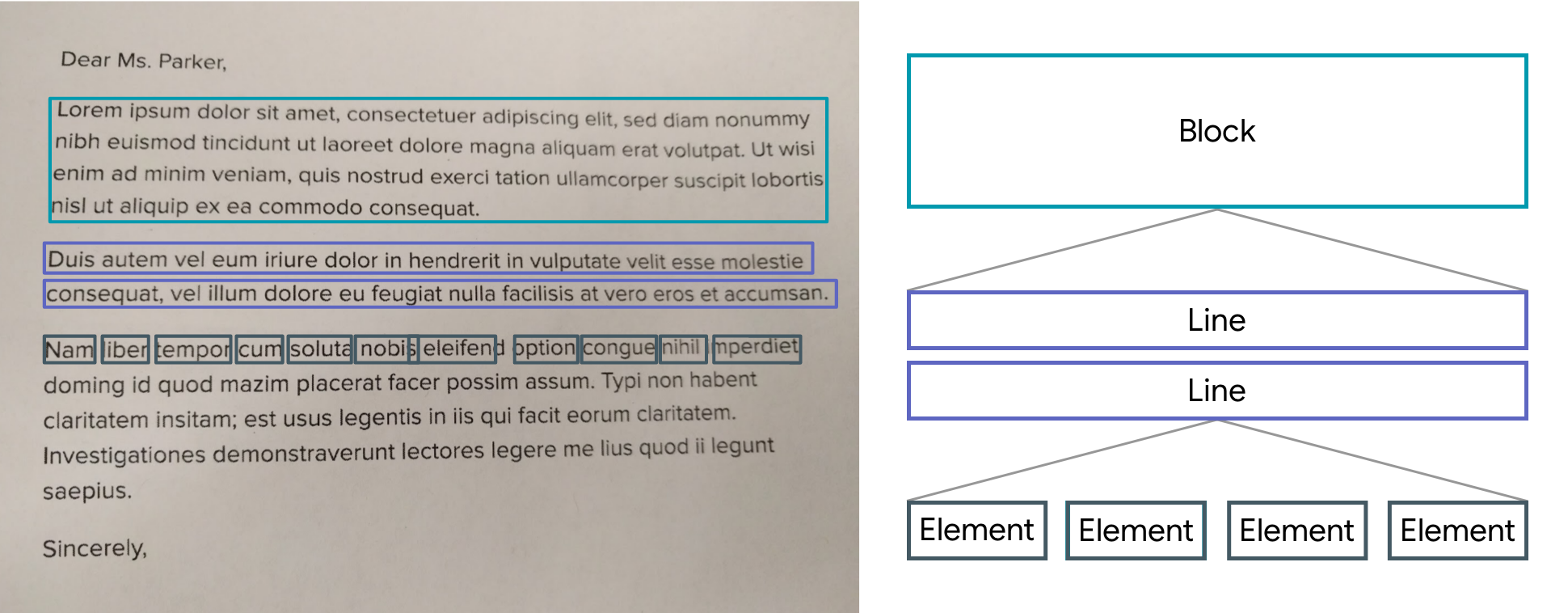
Scan text from narow window of camera and not whole screen. There are two function `getScannedText` to fetch readed text as a string, or `getRawData` which returns list of `TextElement` consult [ML Kit Text Recognition](https://developers.google.com/ml-kit/vision/text-recognition) objects as from followin structure from google developer site image. Pinch and zoom should also work:
Note: Wrapper uses [Camera](https://pub.dev/packages/camera) package so you need to add perimission as in documentation.
## Usage
Add the package to pubspec.yaml
```dart
dependencies:
flutter_scalable_ocr: x.x.x
```
Import it
```dart
import 'package:flutter_scalable_ocr/flutter_scalable_ocr.dart';
```
Full examples for all three options are in `/example` folder so please take a look for working version.
Parameters:
| Parameter | Description | Default |
|--------------- |:---------------------:|---------:|
| `boxLeftOff` | Scalable center square left | 4 |
| `boxBottomOff` | Scalable center square bottom | 2.7 |
| `boxRightOff` | Scalable center square right | 4 |
| `boxTopOff` | Scalable center square top | 2.7 |
| `paintboxCustom` | Narrowed square in camera window | from example|
| `boxHeight` | Camera Window height | from example |
| `getScannedText` | Callback function that returns string | |
| `getRawData` | Callback function that returns list of `TextElement` |
Use widget:
```dart
ScalableOCR(
paintboxCustom: Paint()
..style = PaintingStyle.stroke
..strokeWidth = 4.0
..color = const Color.fromARGB(153, 102, 160, 241),
boxLeftOff: 4,
boxBottomOff: 2.7,
boxRightOff: 4,
boxTopOff: 2.7,
boxHeight: MediaQuery.of(context).size.height / 5,
getRawData: (value) {
inspect(value);
},
getScannedText: (value) {
setText(value);
}),
```