# fq-book **Repository Path**: sanliang/fq-book ## Basic Information - **Project Name**: fq-book - **Description**: 神奇的书 - **Primary Language**: Unknown - **License**: Not specified - **Default Branch**: master - **Homepage**: None - **GVP Project**: No ## Statistics - **Stars**: 0 - **Forks**: 1 - **Created**: 2024-09-28 - **Last Updated**: 2024-09-28 ## Categories & Tags **Categories**: Uncategorized **Tags**: None ## README # 《这本书能让你连接互联网 Ⅱ》 |[![cc](https://i.creativecommons.org/l/by-nc/4.0/80x15.png)](http://creativecommons.org/licenses/by-nc/4.0/)|[![fq-book](https://img.shields.io/badge/%F0%9F%93%96book-fq--book-red.svg?longCache=true&style=flat-square)](https://hoochanlon.github.io/fq-book)|[![blog](https://img.shields.io/badge/%F0%9F%94%97blog-hoochanlon-lightgrey.svg?longCache=true&style=flat-square)](https://hoochanlon.github.io/)|[![outlook](https://img.shields.io/badge/%F0%9F%93%A7hotmail-@邮箱联系-blue.svg?longCache=true&style=flat-square)](mailto:hoochanlon@outlook.com)|[![telegram](https://img.shields.io/badge/telegram-:me-blue.svg?longCache=true&style=flat-square)](https://t.me/hoochanlon)|[![stars](https://img.shields.io/github/stars/hoochanlon/fq-book.svg?style=social)](https://github.com/hoochanlon/fq-book) |:-:|:-:|:-:|:-:|:-:|:-:| ## ***intro*** 本书着重于上网的方式与获取信息的技巧,并对相关流行且典型的软件做简要的上手配置,以及原理的相关说明。 * [导读](docs/README.md) * [目录](docs/_sidebar.md) * [后记](docs/postscript.md) **《这本书》示例的多数网址,以及更多资料收录在 [w3-goto-world](https://github.com/hoodiearon/w3-goto-world) ,书中的相关章节搭配存储库 `科学上网` 效果会更好!** ## ***update*** 《这本书能让你连接互联网》-> 《这本书能让你连接互联网 Ⅱ》的更新要点: * 增加速成科学上网篇章 * 增加相关上网方式以及软件配置操作 * crx_header_invalid 解决方案的说明 * VPN连接上服务器却无法访问任何网页及其他网络的解决办法 * Windows 无法设置系统代理的问题 * 项目内置 probot 机器人,method 新增 战略家模式 *


其他更新 click me! * 增加对虚拟电话注册方案的说明 * 谷歌新账户注册方式 * 网页时光机以及查找相似站点 * 利用个人博客作为连接互联网的中转
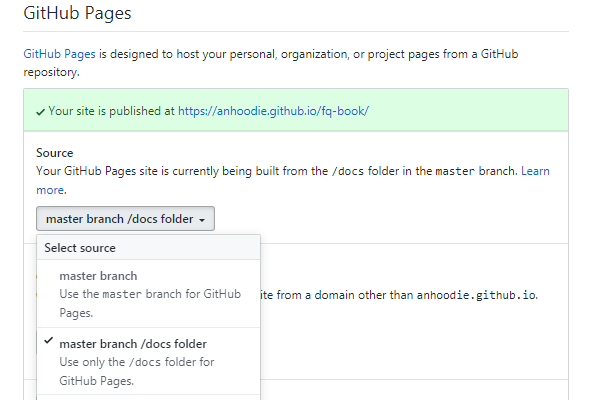
此外,还精简了不必要的重复内容,图片采用 postimages 支持,项目由30M降低到144KB大小,非常方便在线部署及下载,欢迎 fork 《这本书》! ## ***usage*** ### 在线部署 1. fork 《这本书》 到你的 repo 2. 修改 docs/index.html 将`window.$docsify = {}` 的`repo` 修改成你的 repo 3. 在 settings 找到 GitHub Pages 并选择 `master brach/docs folder` 4. 访问 `https://你的GitHub用户名.github.io/fq-book` 即可看到效果
这里以 anhoodie 为示例 click me! ![](https://user-images.githubusercontent.com/35732922/59164863-80b72000-8b45-11e9-8807-849ba56056f4.png) ![](https://user-images.githubusercontent.com/35732922/59164963-e061fb00-8b46-11e9-9647-c827fa784e38.png)
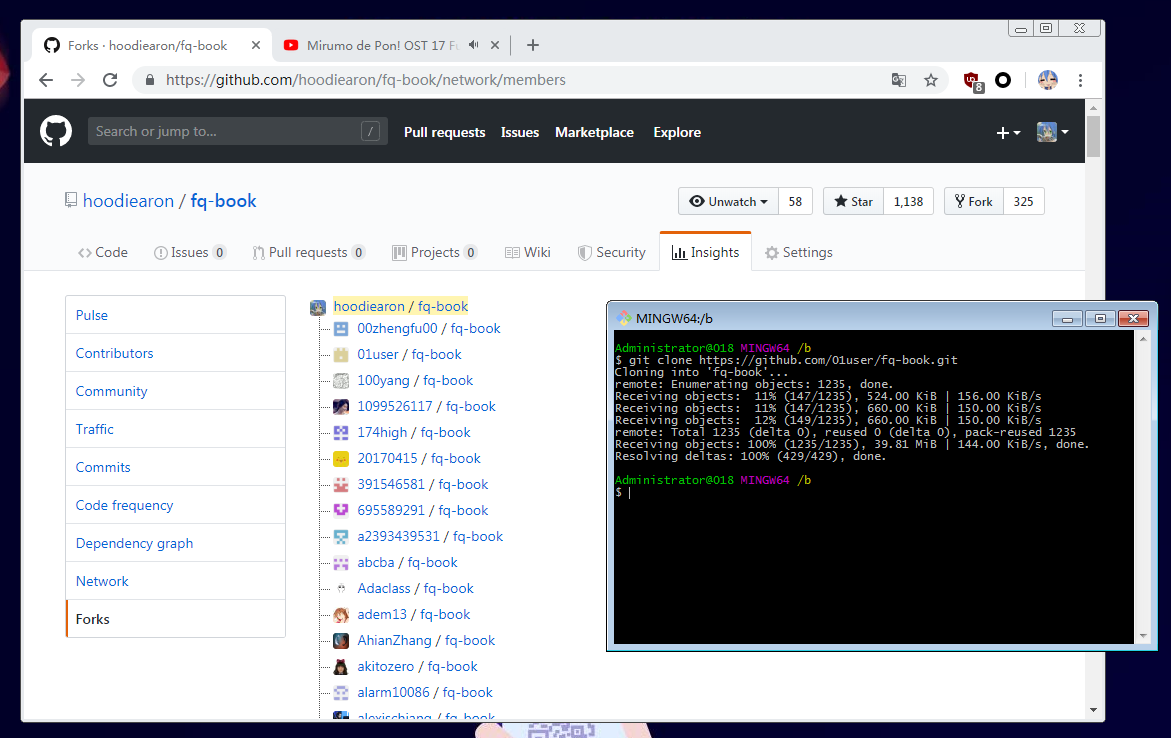
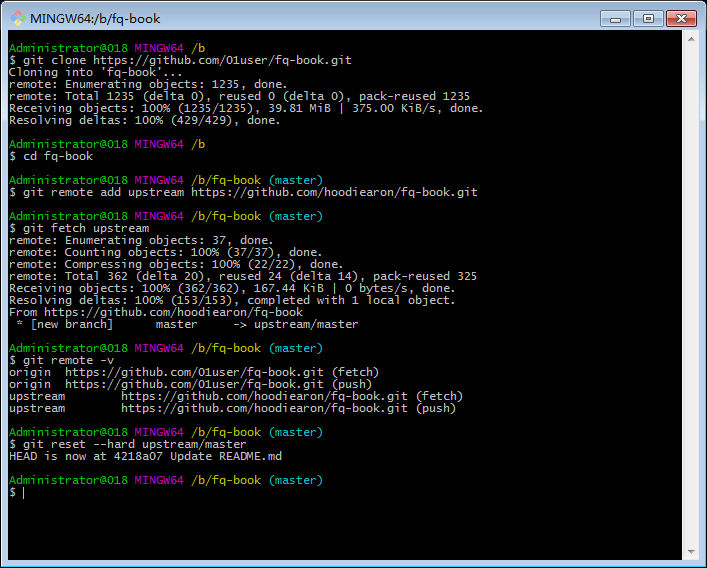
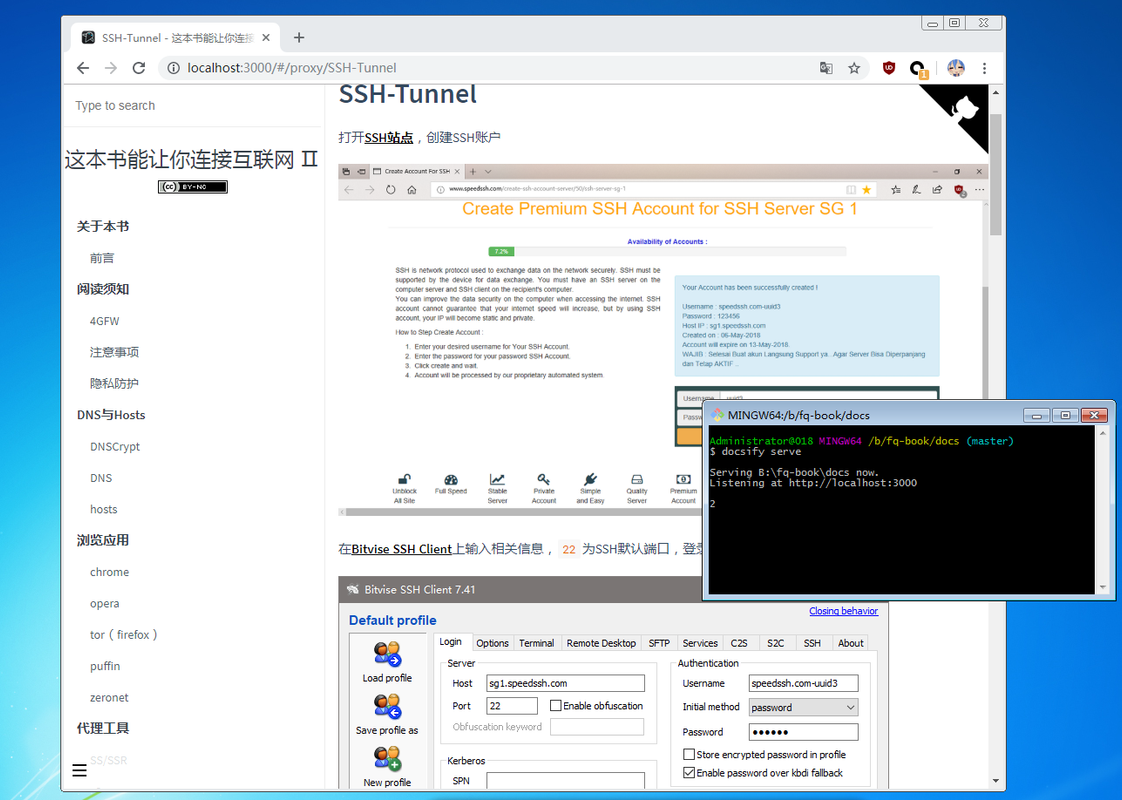
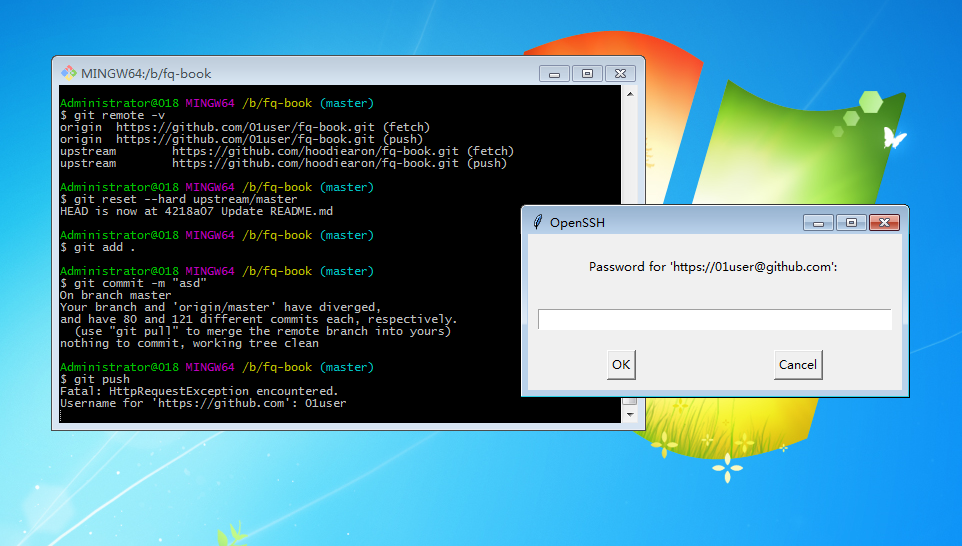
预览 ![Snipaste_2019-06-10_06-18-56](https://user-images.githubusercontent.com/35732922/59165031-d7255e00-8b47-11e9-8a5b-829b61afeb24.png) ### 本地部署 所需环境:[git](https://git-scm.com/)、[node](https://nodejs.org/zh-cn);安装很简单一直 `下一步` 直到完成安装即可。 * 右击选择`git bash`在命令行中输入 `npm i docsify-cli -g` * 点击`clone or download`下载`.zip` 并解压缩 * 进入到`fq-book-master/docs`目录 * 右击打开`git bash`输入`docsify init .` * 使用`docsify serve`完成本地部署 * 在浏览器中输入`localhost:3000`即可看到效果 :joy: 关于更多详细,请看[docsify官网文档](https://docsify.js.org/) 使用[Offline Explorer](https://www.52pojie.cn/thread-790037-1-1.html)可将《这本书》的整个网页内容下载到本地,进行离线观看 当然,也可选择将该书docsify类型转换为gitbook生成格式,并用其自带的命令制作《这本书》的PDF ### 获取更新 以01user为例,在本地部署时,旧版图链已经失效了,新版已经采用 postimage 支持;此时就需升级成 《这本书Ⅱ》,获取更新其实非常简单,在fork的基础上,执行以下指令 ``` git clone https://github.com/你的github用户名/fq-book.git cd fq-book git remote add upstream https://github.com/hoodiearon/fq-book.git # 若需必要的分支变更,还是使用合适: git fetch --all git fetch upstream # 对Git有所了解的话,建议还是使用:`git pull upstream master --allow-unrelated-histories` 以审查代码的形式更新 git reset --hard upstream/master ``` 提交到自己的repo ``` git add . git commit -m "test" # 此指令只方便newbie或不得已的强制;会些Git还是推荐:git push -u --force-with-lease origin master git push -u -f origin master ``` 输入账号&密码即可上传到自己repo完成Github账户仓库远程更新。**更多作业指令操作说明,请看[Git 官方文档](https://git-scm.com/book/zh/v2)**,在特殊情况,有可能需要涉及到代理设置 ``` # 代理设置 git config --global http.proxy 'socks5://127.0.0.1:1080' git config --global https.proxy 'socks5://127.0.0.1:1080' # 取消代理 git config --global --unset https.proxy 'socks5://127.0.0.1:1080' git config --global --unset http.proxy 'socks5://127.0.0.1:1080' ```
更新图示 click me! ![](https://i.postimg.cc/YSY78GPL/Snipaste-2019-06-12-15-59-16.png) ![](https://i.postimg.cc/pTrZRztp/Snipaste-2019-06-12-16-40-01.png) 部署测试 ![](https://i.postimg.cc/dV1tRjrW/Snipaste-2019-06-12-16-42-04.png) 提交到repo ![](https://i.postimg.cc/tRkjrVX8/Snipaste-2019-06-12-16-43-37.png)
## ***mind you*** 本书允许演绎及共享但禁止商用,科学上网仅为研究需要,以下是免责声明: * 本书面向海外华人用户且仅供科研与学习,切勿用于其他用途 * 中国居民请自觉关闭本书并24小时内删掉与此相关的所有内容,否则出现一切后果本书作者概不负责 © 2019 [hoochanlon](https://github.com/hoochanlon)