# MM_StoryAgent
**Repository Path**: sanqianclx/MM_StoryAgent
## Basic Information
- **Project Name**: MM_StoryAgent
- **Description**: No description available
- **Primary Language**: Python
- **License**: Apache-2.0
- **Default Branch**: main
- **Homepage**: None
- **GVP Project**: No
## Statistics
- **Stars**: 0
- **Forks**: 0
- **Created**: 2025-11-17
- **Last Updated**: 2025-11-24
## Categories & Tags
**Categories**: Uncategorized
**Tags**: None
## README
## 运行需求
1. moviepy需回退版本1.0.3
2. 安装imageMagick,在安装过程中勾选 "Install legacy utilities (e.g. convert)" 选项
3. 需要配置setup_env.bat文件,设置环境变量
@echo off
set DASHSCOPE_API_KEY= #使用的模型为wanx-v1(文生图)和qwen3-max(文本生成)
set ALIYUN_ACCESS_KEY_ID=
set ALIYUN_ACCESS_KEY_SECRET=
set ALIYUN_APP_KEY=
set ALIYUN_ACCESS_TOKEN= #现在不需要了
set IMAGEMAGICK_BINARY=D:\imagemagick\ImageMagick-7.1.2-Q16-HDRI\magick.exe #imageMagick的路径
#用于检查是否配置成功
echo DASHSCOPE_API_KEY: %DASHSCOPE_API_KEY%
echo ALIYUN_ACCESS_KEY_ID: %ALIYUN_ACCESS_KEY_ID%
echo ALIYUN_ACCESS_KEY_SECRET: %ALIYUN_ACCESS_KEY_SECRET%
echo ALIYUN_APP_KEY: %ALIYUN_APP_KEY%
echo ALIYUN_ACCESS_TOKEN: %ALIYUN_ACCESS_TOKEN%
echo IMAGEMAGICK_BINARY: %IMAGEMAGICK_BINARY%
echo python run.py -c configs/mm_story_agent.yaml
pause
4. 运行setup_env.bat以配置环境
5. 然后应该就可以运行了,也不确定
6. 暂时将输入的故事主题放在了story_data.txt里面
7. 语音合成的app配置为小云 MP3
8. configs/mm_story_agent.yaml中的4-7行用于控制是否生成对应资源(可以复用之前生成的省点额度)
# MM-StoryAgent
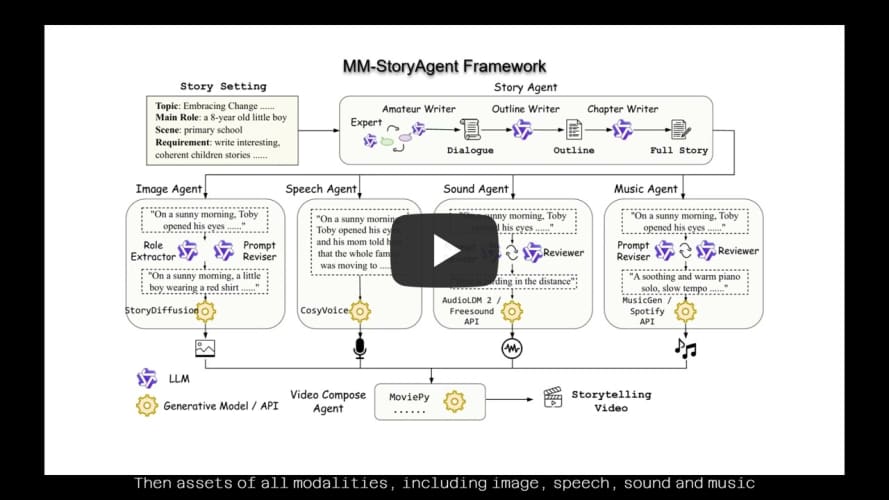
This repo is the official implementation of "MM-StoryAgent: Immersive Narrated Storybook Video Generation with a Multi-Agent Paradigm across Text, Image and Audio".
## Introduction
MM-StoryAgent is a multi-agent framework that employs LLMs and diverse expert tools across several modalities to produce expressive storytelling videos. It hightlights in the following aspects:
* MM-StoryAgent designs a reliable and **customizable** workflow. Users can define their own expert tools to improve the generation quality of each component.
* MM-StoryAgent writes **high-quality** stories based on the input story setting, in a multi-agent, multi-stage pipeline.
* Agents of all modalities (image, speech, sound, music) generated corresponding assets are composed to an **immersive** storytelling video.
Besides, we provide a story topic list and story evaluation criteria for further story writing evaluation.
## News
* Aug 16, 2024: The initial version of MM-StoryAgent was released.
## Demo Video
The demo video is available:
## Installation
Install the required dependencies and install this repo as a package:
```bash
pip install -r requirements.txt
pip install -e .
```
## Quickstart
MM-StoryAgent can be called by configuration files:
```bash
python run.py -c configs/mm_story_agent.yaml
```
Each agent is called in the following format:
```yaml
story_writer: # agent name
tool: qa_outline_story_writer # name registered in the definition
cfg: # parameters for initializing the agent instance
max_conv_turns: 3
...
params: # parameters for calling the agent instance
story_topic: "Time Management: A child learning how to manage their time effectively."
...
```
The customization of new agents can refer to [music_agent.py](mm_story_agent/modality_agents/music_agent.py#L42). The agent class should implement `__init__` and `call` to work properly, like the following:
```python
from typing import Dict
from mm_story_agent.base import register_tool
@register_tool("my_speech_agent")
class MySpeechAgent:
def __init__(self, cfg: Dict):
# For example, the agent need `attr1` and `attr2` for initilization
self.attr1 = cfg.attr1
self.attr2 = cfg.attr2
...
def call(self, params: Dict):
# For example, calling the agent needs `voice` and `speed` parameters
voice = params["voice"]
speed = params["speed"]
...
```
Then the agent can be called by simply modifying the configuration like:
```yaml
speech_generation:
tool: my_speech_agent
cfg:
attr1: val1
attr2: val2
params:
voice: en_female
speed: 1.0
```
## Evaluation Data
The evaluation topics are provided in [story_topics.json](story_eval/story_topics.json). Evaluation rubrics and prompts are also provided accordingly.
### Story Content Evaluation
We use GPT-4 to automatically evaluate the story quality according to several aspects.
Our story writing agent is compared with directly prompting LLM to write stories.
Evaluation scores show the advantage of our multi-agent, multi-stage story writing pipeline.
| Rubric Grading | | Attractiveness | Warmth | Education | Average |
|---------------------------|--------------|----------------|--------|-----------|---------|
| **Topic 1: Self-growing** | Direct | 3.68 | 4.42 | 4.84 | 4.31 |
| | Story Agent | 4.1 | 4.5 | 4.80 | **4.47**|
| **Topic 2: Family & Friendship** | Direct | 3.94 | 5.0 | 4.72 | 4.55 |
| | Story Agent | 4.36 | 4.8 | 4.92 | **4.69**|
| **Topic 3: Environments** | Direct | 4.0 | 4.62 | 4.92 | 4.51 |
| | Story Agent | 4.44 | 4.68 | 4.86 | **4.66**|
| **Topic 4: Knowledge Learning** | Direct | 4.46 | 4.14 | 4.86 | 4.49 |
| | Story Agent | 4.84 | 4.52 | 4.90 | **4.75**|
| **All** | Direct | 4.02 | 4.55 | 4.84 | 4.47 |
| | Story Agent | 4.44 | 4.63 | 4.87 | **4.65**|
## Citation