# cclyric
**Repository Path**: seagazer/cclyric
## Basic Information
- **Project Name**: cclyric
- **Description**: A lyric library for OpenHarmony
- **Primary Language**: TypeScript
- **License**: Apache-2.0
- **Default Branch**: main
- **Homepage**: None
- **GVP Project**: No
## Statistics
- **Stars**: 0
- **Forks**: 0
- **Created**: 2023-10-29
- **Last Updated**: 2026-01-05
## Categories & Tags
**Categories**: Uncategorized
**Tags**: None
## README
# cclyric
## 简介
**cclyric** 是一个为 **OpenHarmony** 和 **HarmonyOS** 设计的音乐歌词组件库。
- 支持逐字歌词(卡拉ok效果)
- 支持逐行歌词
- 支持滑动seek操作
- 支持歌词滚动显示
- 支持歌词左对齐和居中显示模式
- 支持自定义seek界面
- 支持自定义歌词样式,包括歌词行距,字体大小/颜色,聚焦大小/颜色等
## 示例效果
| 居中对齐 | 左对齐 | 自定义样式 | 自定义seek界面 |
| --------------------------------------------------------------------------------- | --------------------------------------------------------------------------------- | --------------------------------------------------------------------------------- | --------------------------------------------------------------------------------- |
| 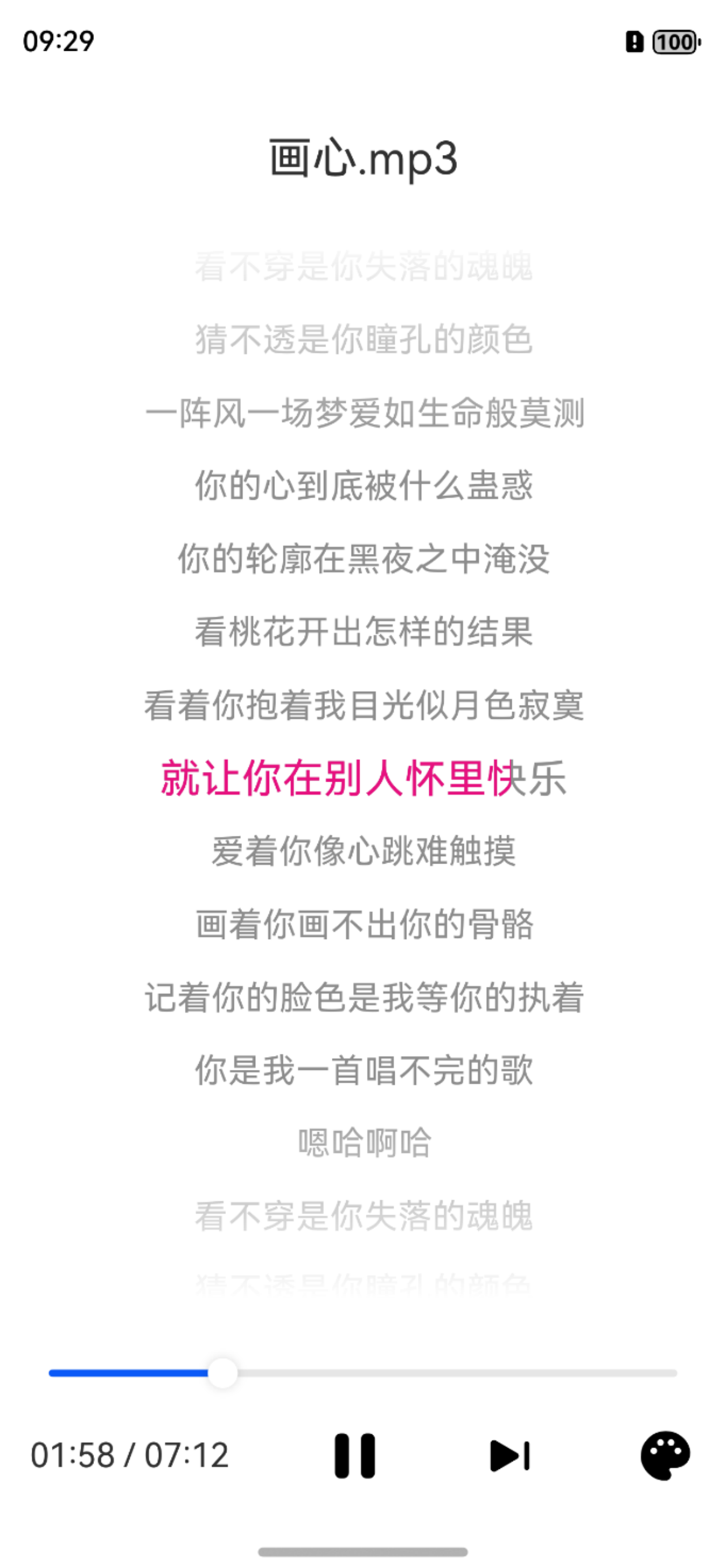 |
| 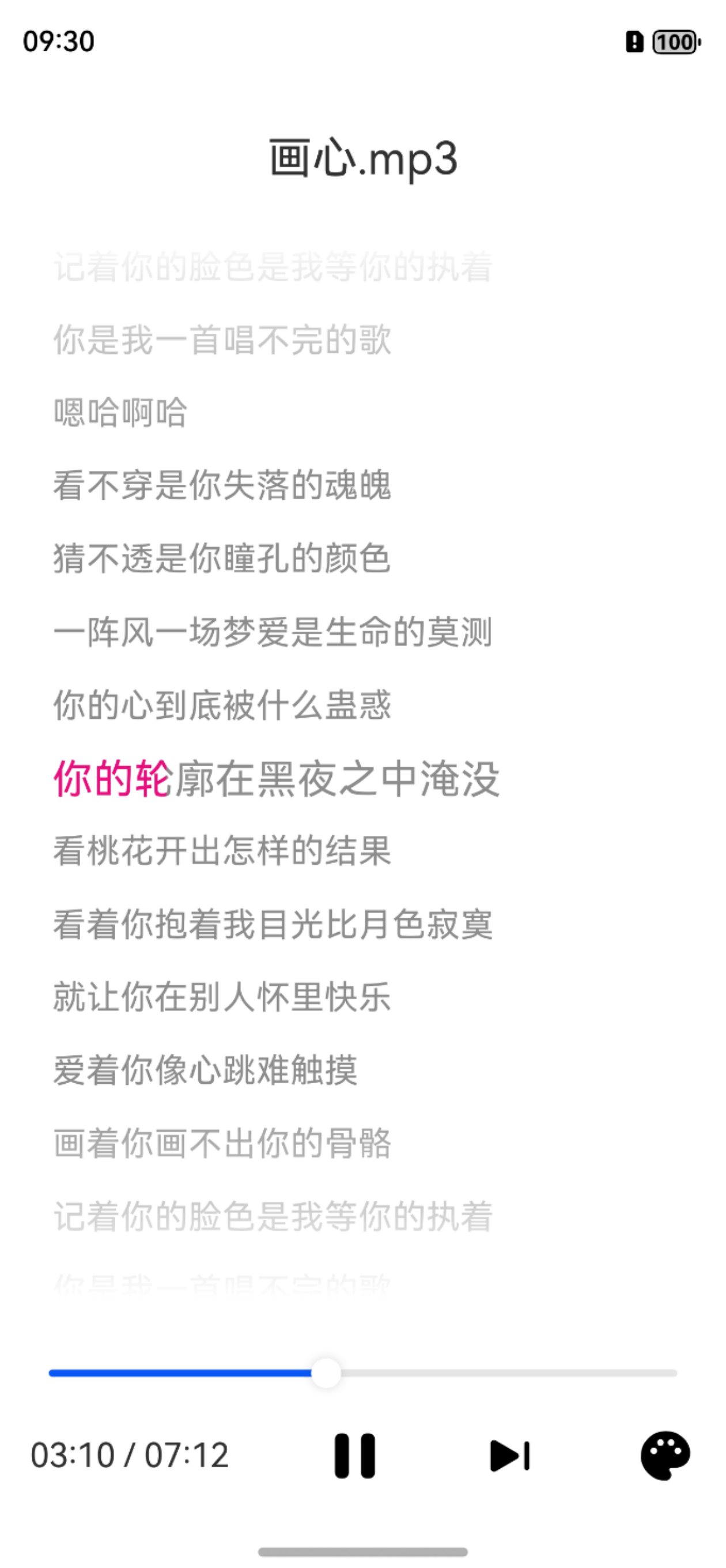 |
| 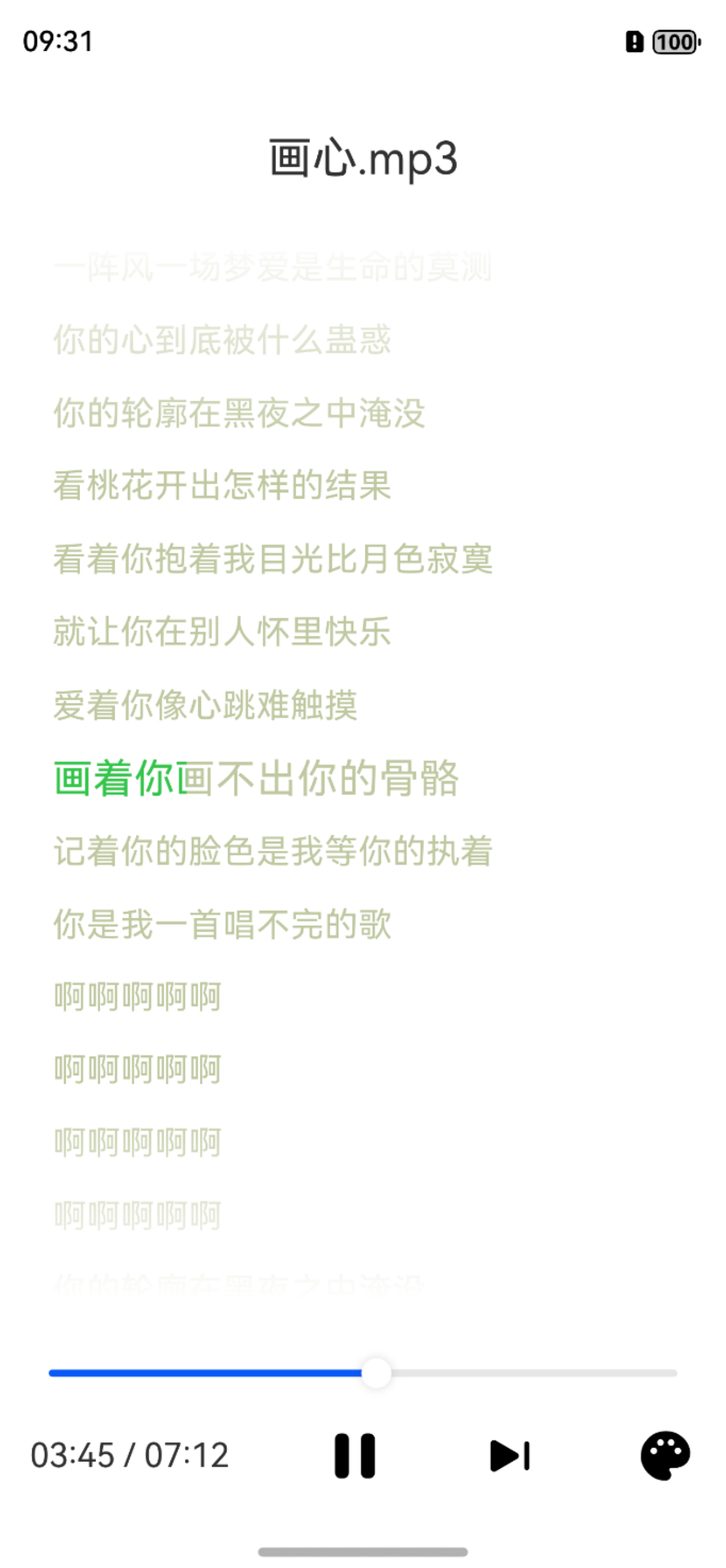 |
| 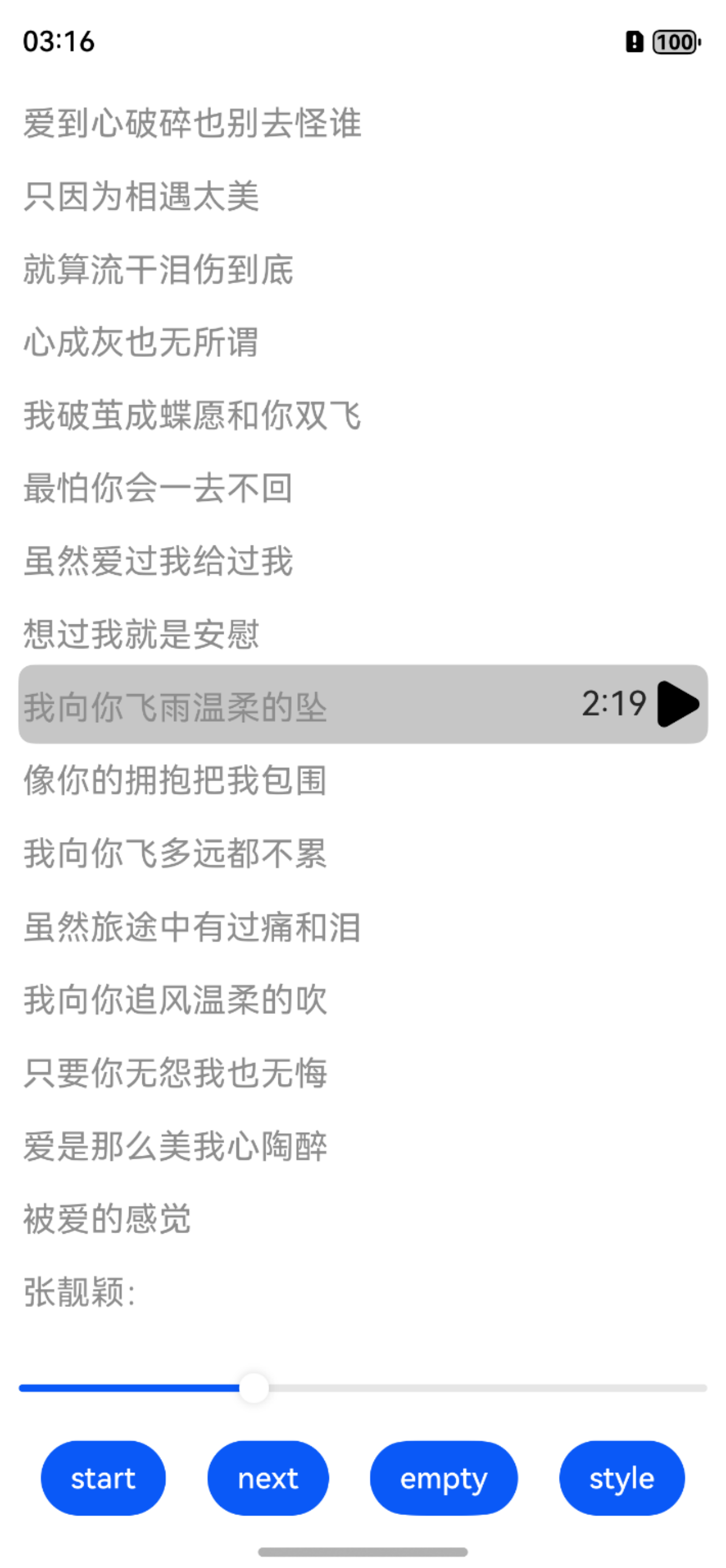 |
## 注意事项
- 从 1.1.1 版本开始,重构逐字动画逻辑,动效更加平滑和精准,因为采用了部分高版本接口,因此后续版本仅支持Api14以上。
- 从 1.0.8 版本开始,新增逐字歌词能力,新增了 CcLyricView 组件和 CcLrcController 控制器,取替之前的 LyricView(不再维护)。
- 从 1.0.8 版本开始,不再提供默认的歌词解析器,建议提供数据源格式和Lrc数据结构,使用AI工具编写解析代码。
## 依赖方式
```ts
ohpm install @seagazer/cclyric
```
## 接口能力
**cclyric** 提供视图组件 **CcLyricView**,用户可以通过 **CcLyricController** 来操作组件。
### CcLyricView
歌词组件
| 属性 | 属性类型 | 属性说明 | 必填 |
| -------------------- | ------------------------------------------ | ---------------------------------------- | ---- |
| controller | CcLyricController | 歌词组件控制器 | 是 |
| supportSeek | boolean | 是否开启滑动seek能力,默认false | 否 |
| onSeekAction | (position: number) => void | seek回调 | 否 |
| onScrollChanged | (centerLine: LrcLine \| undefined) => void | 滑动时中间歌词信息回调,用于自定义seekui | 否 |
| onScrollStateChanged | (scrolling: boolean) => void | 用户手动滑动状态回调,用于自定义seekui | 否 |
| onDataSourceReady | () => void | 歌词数据加载完成回调 | 否 |
### CcLyricController
CcLyricView 组件控制器,通过接口控制歌词状态,样式。
#### setDebugger(debug: boolean): void
设置是否开启调试日志,默认false
| 参数 | 参数类型 | 参数说明 |
| ----- | -------- | ---------------- |
| debug | boolean | 是否开启调试日志 |
#### setLyric(lyric: Lrc | undefined): CcLyricController
设置歌词数据。
| 参数 | 参数类型 | 参数说明 |
| ----- | --------------- | --------------------------- |
| lyric | Lrc \|undefined | 歌词,没有歌词设置undefined |
#### setAlignMode(mode: AlignMode): CcLyricController
设置歌词显示的对齐模式,当前支持左对齐和居中对齐,默认居中显示。**注意:该属性暂不支持动态设置,在绑定CcLyricView前请设置。**
| 参数 | 参数类型 | 参数说明 |
| ---- | --------- | ------------------ |
| mode | AlignMode | 歌词显示的对齐模式 |
#### setEmptyHint(hint: ResourceStr): CcLyricController
设置无歌词时的提示语,默认为`--`。
| 参数 | 参数类型 | 参数说明 |
| ---- | ----------- | ---------------- |
| hint | ResourceStr | 无歌词时的提示语 |
#### setFadeColor(color: ResourceColor): CcLyricController
设置歌词上下边缘渐变颜色,默认为#00ffffff,**1.1.1版本开始废弃**。
| 参数 | 参数类型 | 参数说明 |
| ----- | ------------- | ---------------- |
| color | ResourceColor | 歌词边缘渐变颜色 |
#### setFadeEnable(enable: boolean): CcLyricController
设置歌词上下边缘是否渐变显示,默认true
| 参数 | 参数类型 | 参数说明 |
| ------ | -------- | ------------------------ |
| enable | boolean | 歌词上下边缘是否渐变显示 |
#### setFadePercent(percent: number): CcLyricController
设置歌词上下边缘渐变占比,默认0.2,取值范围为[0,1]。
| 参数 | 参数类型 | 参数说明 |
| ------- | -------- | ---------------- |
| percent | number | 上下边缘渐变占比 |
#### setTextSize(textSize: number): CcLyricController
设置歌词文本尺寸,默认为 20vp。**注意:该属性暂不支持动态设置,在绑定CcLyricView前请设置。**
| 参数 | 参数类型 | 参数说明 |
| -------- | -------- | --------------------- |
| textSize | number | 歌词文本尺寸(单位 vp) |
#### setTextColor(color: number): CcLyricController
设置歌词文本普通颜色,默认为0xff000000。
| 参数 | 参数类型 | 参数说明 |
| ----- | -------- | ------------ |
| color | number | 文本普通颜色 |
#### setHighlightColor(color: number): CcLyricController
设置歌词文本聚焦颜色,当前播放的歌词属于聚焦状态,默认为0xffff0000。
| 参数 | 参数类型 | 参数说明 |
| ----- | -------- | ------------ |
| color | number | 文本聚焦颜色 |
#### setHighlightScale(scale: number): CcLyricController
设置歌词文本聚焦缩放,当前播放的歌词属于聚焦状态,默认为 1.1f。**注意:该属性暂不支持动态设置,在绑定CcLyricView前请设置。**
| 参数 | 参数类型 | 参数说明 |
| ----- | -------- | ---------------- |
| scale | number | 文本聚焦缩放比例 |
#### setLineSpace(lineSpace: number): CcLyricController
设置歌词行间距,默认为 12vp。**注意:该属性暂不支持动态设置,在绑定CcLyricView前请设置。**
| 参数 | 参数类型 | 参数说明 |
| --------- | -------- | ------------------- |
| lineSpace | number | 歌词行间距(单位 vp) |
#### updatePosition(position: number)
更新媒体播放进度,组件会自动刷新歌词显示。
| 参数 | 参数类型 | 参数说明 |
| -------- | -------- | --------------------- |
| position | number | 媒体播放进度(单位 ms) |
#### setLrcAnimDuration(duration: number)
设置逐字歌词的动效时间,默认250ms。**1.1.1版本开始废弃**。
| 参数 | 参数类型 | 参数说明 |
| -------- | -------- | ----------------- |
| duration | number | 动效时间(单位 ms) |
### Lrc
歌词数据结构
| 属性 | 属性类型 | 属性说明 |
| --------- | --------------- | ------------ |
| artist | string | 艺术家 |
| title | string | 标题 |
| album | string | 专辑 |
| by | string | 作者 |
| offset | number | 时间戳偏移量 |
| lyricList | Array\ | 歌词行数组 |
### LrcLine
单行歌词数据结构
| 属性 | 属性类型 | 属性说明 |
| --------- | ---------------------- | -------------------------------------------- |
| text | string | 歌词内容 |
| beginTime | number | 当前行歌词起始时间戳 |
| endTime | number | 当前行歌词结束时间戳 |
| wordList | LrcWord[] \| undefined | 单个字的时间信息,Lrc逐行歌词场景为undefined |
### LrcWord
单个字数据结构
| 属性 | 属性类型 | 属性说明 |
| --------- | -------- | ---------------- |
| text | string | 字符文本 |
| beginTime | number | 该字符起始时间戳 |
| endTime | number | 该字符结束时间戳 |
### AlignMode
歌词对齐模式枚举
| 属性 | 属性说明 |
| ------ | -------- |
| CENTER | 居中对齐 |
| START | 左对齐 |
## 场景示例
- 下面是基础示例和使用方式:
```ts
@Entry
@ComponentV2
struct Index {
@Local lyric?: Lrc = undefined
// 1.init the controller
private controller: CcLyricController = new CcLyricController()
aboutToAppear(): void {
// 2. setup the attribute
this.controller.setDebugger(true)
this.controller.setTextSize(18)
.setLineSpace(12)
.setTextColor(0xCC000000)
.setTextHighlightColor(0xffe7107f)
.setFadeEnable(true)
this.lyric = this.parser.parse(MockData.krc1)
// 3. set the lyric
this.controller.setLyric(this.lyric)
}
build() {
Column() {
// 4. init the view
CcLyricView({
controller: this.controller,
// 使用默认的seekui
supportSeek: true, // support scroll seek
onSeekAction: (position) => {
this.mockPlayerSeek(position)
}
})
.width("100%")
.height("100%)
}
.height('100%')
.width('100%')
}
onPlayerPositionUpdate(position: number) {
// 5. update the mediaplayer position
this.controller.updatePosition(position)
}
mockPlayerSeek(position: number) {
// 6. update the mediaplayer position
this.player.seekTo(position)
}
}
```
- 自定义滑动seek界面:
```ts
@Entry
@ComponentV2
struct Index {
@Local lyric?: Lrc = undefined
// 1.init the controller
private controller: CcLyricController = new CcLyricController()
// 自定义ui数据
@Local userScrolling: boolean = false
@Local scrollTargetTime: number = 0
aboutToAppear(): void {
// 2. setup the attribute
this.controller.setDebugger(true)
this.controller.setTextSize(18)
.setLineSpace(12)
.setTextColor(0xCC000000)
.setTextHighlightColor(0xffe7107f)
this.lyric = this.parser.parse(MockData.krc1)
// 3. set the lyric
this.controller.setLyric(this.lyric)
}
build() {
Column() {
Stack() {
Stack() {
CcLyricView({
controller: this.controller,
// custom seek ui: 1.set supportSeek false, 2.get current center duration from onScrollChanged and onScrollStateChanged callback
supportSeek: false, //设置默认seek属性为false
onScrollChanged: (centerLine) => {
if (centerLine !== undefined) {
this.scrollTargetTime = centerLine.beginTime
}
},
onScrollStateChanged: (scrolling) => {
this.userScrolling = scrolling
}
})
}.padding(12)
// 自定义seekui,数据从上面的onScrollChanged和onScrollStateChanged回调获取
if (this.userScrolling && this.scrollTargetTime >= 0) {
Row() {
Blank()
Text(duration2text(this.scrollTargetTime))
.fontSize(18)
SymbolGlyph($r("sys.symbol.play_fill"))
.fontSize(32)
.onClick(() => {
this.mockPlayerSeek(this.scrollTargetTime)
this.userScrolling = false
})
}
.width("95%")
.height(42)
.border({ radius: 8 })
.backgroundColor("#808d8d8d")
}
}
.width("100%")
.height('100%')
}
.height('100%')
.width('100%')
}
onPlayerPositionUpdate(position: number) {
// 5. update the mediaplayer position
this.controller.updatePosition(position)
}
mockPlayerSeek(position: number) {
// 6. update the mediaplayer position
this.player.seekTo(position)
}
}
```
- 更多使用场景和示例,可以参考本库代码仓的 entry 工程: https://github.com/seagazer/cclyric
- 播放器场景可以参考示例CcLyricViewSample.ets,使用ccplayer搭配使用(三方库中心仓地址 https://ohpm.openharmony.cn/#/cn/detail/@seagazer%2Fccplayer)可以快捷构建媒体播放应用
- 使用过程中存在任何相关问题欢迎各位开发者提Issue和PR,或者加群反馈(Q群:1051643574),欢迎大家一起共建完善该库,如果觉得对你有用,请给个star鼓励一下谢谢。
|
## 注意事项
- 从 1.1.1 版本开始,重构逐字动画逻辑,动效更加平滑和精准,因为采用了部分高版本接口,因此后续版本仅支持Api14以上。
- 从 1.0.8 版本开始,新增逐字歌词能力,新增了 CcLyricView 组件和 CcLrcController 控制器,取替之前的 LyricView(不再维护)。
- 从 1.0.8 版本开始,不再提供默认的歌词解析器,建议提供数据源格式和Lrc数据结构,使用AI工具编写解析代码。
## 依赖方式
```ts
ohpm install @seagazer/cclyric
```
## 接口能力
**cclyric** 提供视图组件 **CcLyricView**,用户可以通过 **CcLyricController** 来操作组件。
### CcLyricView
歌词组件
| 属性 | 属性类型 | 属性说明 | 必填 |
| -------------------- | ------------------------------------------ | ---------------------------------------- | ---- |
| controller | CcLyricController | 歌词组件控制器 | 是 |
| supportSeek | boolean | 是否开启滑动seek能力,默认false | 否 |
| onSeekAction | (position: number) => void | seek回调 | 否 |
| onScrollChanged | (centerLine: LrcLine \| undefined) => void | 滑动时中间歌词信息回调,用于自定义seekui | 否 |
| onScrollStateChanged | (scrolling: boolean) => void | 用户手动滑动状态回调,用于自定义seekui | 否 |
| onDataSourceReady | () => void | 歌词数据加载完成回调 | 否 |
### CcLyricController
CcLyricView 组件控制器,通过接口控制歌词状态,样式。
#### setDebugger(debug: boolean): void
设置是否开启调试日志,默认false
| 参数 | 参数类型 | 参数说明 |
| ----- | -------- | ---------------- |
| debug | boolean | 是否开启调试日志 |
#### setLyric(lyric: Lrc | undefined): CcLyricController
设置歌词数据。
| 参数 | 参数类型 | 参数说明 |
| ----- | --------------- | --------------------------- |
| lyric | Lrc \|undefined | 歌词,没有歌词设置undefined |
#### setAlignMode(mode: AlignMode): CcLyricController
设置歌词显示的对齐模式,当前支持左对齐和居中对齐,默认居中显示。**注意:该属性暂不支持动态设置,在绑定CcLyricView前请设置。**
| 参数 | 参数类型 | 参数说明 |
| ---- | --------- | ------------------ |
| mode | AlignMode | 歌词显示的对齐模式 |
#### setEmptyHint(hint: ResourceStr): CcLyricController
设置无歌词时的提示语,默认为`--`。
| 参数 | 参数类型 | 参数说明 |
| ---- | ----------- | ---------------- |
| hint | ResourceStr | 无歌词时的提示语 |
#### setFadeColor(color: ResourceColor): CcLyricController
设置歌词上下边缘渐变颜色,默认为#00ffffff,**1.1.1版本开始废弃**。
| 参数 | 参数类型 | 参数说明 |
| ----- | ------------- | ---------------- |
| color | ResourceColor | 歌词边缘渐变颜色 |
#### setFadeEnable(enable: boolean): CcLyricController
设置歌词上下边缘是否渐变显示,默认true
| 参数 | 参数类型 | 参数说明 |
| ------ | -------- | ------------------------ |
| enable | boolean | 歌词上下边缘是否渐变显示 |
#### setFadePercent(percent: number): CcLyricController
设置歌词上下边缘渐变占比,默认0.2,取值范围为[0,1]。
| 参数 | 参数类型 | 参数说明 |
| ------- | -------- | ---------------- |
| percent | number | 上下边缘渐变占比 |
#### setTextSize(textSize: number): CcLyricController
设置歌词文本尺寸,默认为 20vp。**注意:该属性暂不支持动态设置,在绑定CcLyricView前请设置。**
| 参数 | 参数类型 | 参数说明 |
| -------- | -------- | --------------------- |
| textSize | number | 歌词文本尺寸(单位 vp) |
#### setTextColor(color: number): CcLyricController
设置歌词文本普通颜色,默认为0xff000000。
| 参数 | 参数类型 | 参数说明 |
| ----- | -------- | ------------ |
| color | number | 文本普通颜色 |
#### setHighlightColor(color: number): CcLyricController
设置歌词文本聚焦颜色,当前播放的歌词属于聚焦状态,默认为0xffff0000。
| 参数 | 参数类型 | 参数说明 |
| ----- | -------- | ------------ |
| color | number | 文本聚焦颜色 |
#### setHighlightScale(scale: number): CcLyricController
设置歌词文本聚焦缩放,当前播放的歌词属于聚焦状态,默认为 1.1f。**注意:该属性暂不支持动态设置,在绑定CcLyricView前请设置。**
| 参数 | 参数类型 | 参数说明 |
| ----- | -------- | ---------------- |
| scale | number | 文本聚焦缩放比例 |
#### setLineSpace(lineSpace: number): CcLyricController
设置歌词行间距,默认为 12vp。**注意:该属性暂不支持动态设置,在绑定CcLyricView前请设置。**
| 参数 | 参数类型 | 参数说明 |
| --------- | -------- | ------------------- |
| lineSpace | number | 歌词行间距(单位 vp) |
#### updatePosition(position: number)
更新媒体播放进度,组件会自动刷新歌词显示。
| 参数 | 参数类型 | 参数说明 |
| -------- | -------- | --------------------- |
| position | number | 媒体播放进度(单位 ms) |
#### setLrcAnimDuration(duration: number)
设置逐字歌词的动效时间,默认250ms。**1.1.1版本开始废弃**。
| 参数 | 参数类型 | 参数说明 |
| -------- | -------- | ----------------- |
| duration | number | 动效时间(单位 ms) |
### Lrc
歌词数据结构
| 属性 | 属性类型 | 属性说明 |
| --------- | --------------- | ------------ |
| artist | string | 艺术家 |
| title | string | 标题 |
| album | string | 专辑 |
| by | string | 作者 |
| offset | number | 时间戳偏移量 |
| lyricList | Array\ | 歌词行数组 |
### LrcLine
单行歌词数据结构
| 属性 | 属性类型 | 属性说明 |
| --------- | ---------------------- | -------------------------------------------- |
| text | string | 歌词内容 |
| beginTime | number | 当前行歌词起始时间戳 |
| endTime | number | 当前行歌词结束时间戳 |
| wordList | LrcWord[] \| undefined | 单个字的时间信息,Lrc逐行歌词场景为undefined |
### LrcWord
单个字数据结构
| 属性 | 属性类型 | 属性说明 |
| --------- | -------- | ---------------- |
| text | string | 字符文本 |
| beginTime | number | 该字符起始时间戳 |
| endTime | number | 该字符结束时间戳 |
### AlignMode
歌词对齐模式枚举
| 属性 | 属性说明 |
| ------ | -------- |
| CENTER | 居中对齐 |
| START | 左对齐 |
## 场景示例
- 下面是基础示例和使用方式:
```ts
@Entry
@ComponentV2
struct Index {
@Local lyric?: Lrc = undefined
// 1.init the controller
private controller: CcLyricController = new CcLyricController()
aboutToAppear(): void {
// 2. setup the attribute
this.controller.setDebugger(true)
this.controller.setTextSize(18)
.setLineSpace(12)
.setTextColor(0xCC000000)
.setTextHighlightColor(0xffe7107f)
.setFadeEnable(true)
this.lyric = this.parser.parse(MockData.krc1)
// 3. set the lyric
this.controller.setLyric(this.lyric)
}
build() {
Column() {
// 4. init the view
CcLyricView({
controller: this.controller,
// 使用默认的seekui
supportSeek: true, // support scroll seek
onSeekAction: (position) => {
this.mockPlayerSeek(position)
}
})
.width("100%")
.height("100%)
}
.height('100%')
.width('100%')
}
onPlayerPositionUpdate(position: number) {
// 5. update the mediaplayer position
this.controller.updatePosition(position)
}
mockPlayerSeek(position: number) {
// 6. update the mediaplayer position
this.player.seekTo(position)
}
}
```
- 自定义滑动seek界面:
```ts
@Entry
@ComponentV2
struct Index {
@Local lyric?: Lrc = undefined
// 1.init the controller
private controller: CcLyricController = new CcLyricController()
// 自定义ui数据
@Local userScrolling: boolean = false
@Local scrollTargetTime: number = 0
aboutToAppear(): void {
// 2. setup the attribute
this.controller.setDebugger(true)
this.controller.setTextSize(18)
.setLineSpace(12)
.setTextColor(0xCC000000)
.setTextHighlightColor(0xffe7107f)
this.lyric = this.parser.parse(MockData.krc1)
// 3. set the lyric
this.controller.setLyric(this.lyric)
}
build() {
Column() {
Stack() {
Stack() {
CcLyricView({
controller: this.controller,
// custom seek ui: 1.set supportSeek false, 2.get current center duration from onScrollChanged and onScrollStateChanged callback
supportSeek: false, //设置默认seek属性为false
onScrollChanged: (centerLine) => {
if (centerLine !== undefined) {
this.scrollTargetTime = centerLine.beginTime
}
},
onScrollStateChanged: (scrolling) => {
this.userScrolling = scrolling
}
})
}.padding(12)
// 自定义seekui,数据从上面的onScrollChanged和onScrollStateChanged回调获取
if (this.userScrolling && this.scrollTargetTime >= 0) {
Row() {
Blank()
Text(duration2text(this.scrollTargetTime))
.fontSize(18)
SymbolGlyph($r("sys.symbol.play_fill"))
.fontSize(32)
.onClick(() => {
this.mockPlayerSeek(this.scrollTargetTime)
this.userScrolling = false
})
}
.width("95%")
.height(42)
.border({ radius: 8 })
.backgroundColor("#808d8d8d")
}
}
.width("100%")
.height('100%')
}
.height('100%')
.width('100%')
}
onPlayerPositionUpdate(position: number) {
// 5. update the mediaplayer position
this.controller.updatePosition(position)
}
mockPlayerSeek(position: number) {
// 6. update the mediaplayer position
this.player.seekTo(position)
}
}
```
- 更多使用场景和示例,可以参考本库代码仓的 entry 工程: https://github.com/seagazer/cclyric
- 播放器场景可以参考示例CcLyricViewSample.ets,使用ccplayer搭配使用(三方库中心仓地址 https://ohpm.openharmony.cn/#/cn/detail/@seagazer%2Fccplayer)可以快捷构建媒体播放应用
- 使用过程中存在任何相关问题欢迎各位开发者提Issue和PR,或者加群反馈(Q群:1051643574),欢迎大家一起共建完善该库,如果觉得对你有用,请给个star鼓励一下谢谢。