# feishu
**Repository Path**: serialt/feishu
## Basic Information
- **Project Name**: feishu
- **Description**: fork from github.com/CatchZeng/feishu
- **Primary Language**: Unknown
- **License**: MIT
- **Default Branch**: master
- **Homepage**: None
- **GVP Project**: No
## Statistics
- **Stars**: 0
- **Forks**: 0
- **Created**: 2022-02-12
- **Last Updated**: 2022-09-05
## Categories & Tags
**Categories**: Uncategorized
**Tags**: None
## README
# feishu

[](https://codecov.io/gh/CatchZeng/feishu)
[](https://goreportcard.com/report/github.com/CatchZeng/feishu)
[](https://github.com/CatchZeng/feishu/releases)
[](https://pkg.go.dev/github.com/CatchZeng/feishu?tab=doc)
> feishu 是飞书机器人的 go 实现。支持 **Docker、Jenkinsfile、命令行模式,module 模式**;支持**加签**安全设置,支持**链式语法**创建消息;支持**文本(text)、富文本(post)、图片(image)、群名片(share_chat)、消息卡片(interactive)** 消息类型。
> 注:使用钉钉(DingTalk)的小伙伴,可以使用[钉钉(DingTalk)版](https://github.com/CatchZeng/dingtalk)。
## 文档
[飞书文档](https://www.feishu.cn/hc/zh-CN/articles/360024984973)
## 特性
- [x] 支持[Docker](https://github.com/CatchZeng/feishu#Docker)
- [x] 支持[Jenkinsfile](https://github.com/CatchZeng/feishu#Jenkinsfile)
- [x] 支持[module](https://github.com/CatchZeng/feishu#%E4%BD%9C%E4%B8%BA-module)
- [x] 支持[命令行模式](https://github.com/CatchZeng/feishu#%E5%91%BD%E4%BB%A4%E8%A1%8C%E5%B7%A5%E5%85%B7)
- [x] 支持[配置文件](https://github.com/CatchZeng/feishu#%E9%85%8D%E7%BD%AE%E6%96%87%E4%BB%B6)
- [x] 支持[环境变量](https://github.com/CatchZeng/feishu#%E7%8E%AF%E5%A2%83%E5%8F%98%E9%87%8F)
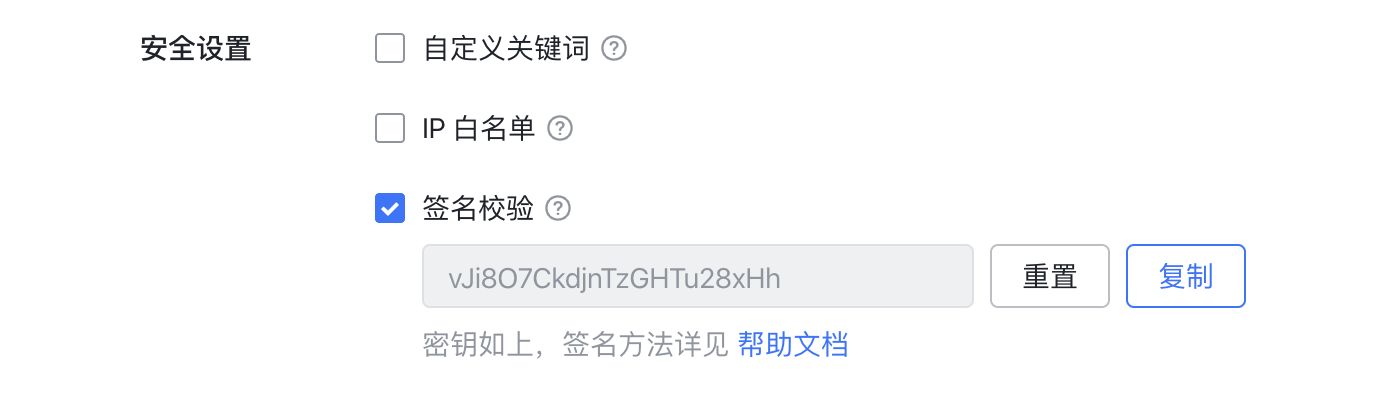
- [x] 支持加签
 - [x] 文本(text)消息
 - [x] 富文本(post)消息
 - [x] 图片(image)消息
 - [x] 群名片(share_chat)消息
 - [x] 消息卡片(interactive)消息
 ## 安装
## Docker 安装
```shell
docker pull catchzeng/feishu
```
### 二进制安装
到 [releases](https://github.com/CatchZeng/feishu/releases/) 下载相应平台的二进制可执行文件,然后加入到 PATH 环境变量即可。
### go install 安装
```sh
# Go 1.16+
go install github.com/CatchZeng/feishu@v1.3.2
# Go version < 1.16
go get -u github.com/CatchZeng/feishu@v1.3.2
```
## 使用方法
### 配置文件
可以在 `$/HOME/.feishu` 下创建 `config.yaml` 填入 `access_token` 和 `secret` 默认值。
```yaml
access_token: "6cxxxx80-xxxx-49e2-ac86-7f378xxxx960"
secret: "k6usknqxxxxazNxxxx443d"
```
### 环境变量
```sh
$ export ACCESS_TOKEN="6cxxxx80-xxxx-49e2-ac86-7f378xxxx960"
$ export SECRET="k6usknqxxxxazNxxxx443d"
$ feishu post -i 测试 -e 测试信息 -r https://makeblock.com/ -f 链接文本 -a all
```
你也可以为环境变量设置一个**前缀**
```sh
$ export FEISHU_ENV_PREFIX="FEISHU_"
$ export FEISHU_ACCESS_TOKEN="6cxxxx80-xxxx-49e2-ac86-7f378xxxx960"
$ export FEISHU_SECRET="k6usknqxxxxazNxxxx443d"
$ feishu post -i 测试 -e 测试信息 -r https://makeblock.com/ -f 链接文本 -a all
```
### Docker
```shell
docker run catchzeng/feishu feishu text -t 6cxxxx80-xxxx-49e2-ac86-7f378xxxx960 -s k6usknqxxxxazNxxxx443d -e "docker test"
```
### Jenkinsfile
```shell
pipeline {
agent {
docker {
image 'catchzeng/feishu'
}
}
environment {
FEISHU_TOKEN = '6cxxxx80-xxxx-49e2-ac86-7f378xxxx960'
FEISHU_SECRET = 'k6usknqxxxxazNxxxx443d'
}
stages {
stage('notify') {
steps {
sh 'feishu post -t ${FEISHU_TOKEN} -s ${FEISHU_SECRET} -i 标题 -e 信息 -r https://makeoptim.com/ -f 链接文本 -a all'
}
}
}
}
```
> 注:post 有两种用法,除了像上面使用一堆参数外,还可以使用 `post` 参数,直接将 [post json string](https://open.feishu.cn/document/ukTMukTMukTM/uMDMxEjLzATMx4yMwETM#1b8abd5d) 传入,做到更灵活的配置。如下所示:
```shell
$ post='{
"zh_cn": {
"title": "项目更新通知",
"content": [
[
{
"tag": "text",
"text": "项目有更新: "
},
{
"tag": "a",
"text": "请查看",
"href": "http://www.example.com/"
}
]
]
}
}
'
$ feishu post -t 6cxxxx80-xxxx-49e2-ac86-7f378xxxx960 -s k6usknqxxxxazNxxxx443d -p $post
```
### 作为 module
```
go get github.com/CatchZeng/feishu
```
```go
package main
import (
"log"
"github.com/CatchZeng/feishu/pkg/feishu"
)
func main() {
token := "6cxxxx80-xxxx-49e2-ac86-7f378xxxx960"
secret := "k6usknqxxxxazNxxxx443d"
client := feishu.NewClient(token, secret)
text := feishu.NewText("文本")
a := feishu.NewA("链接", "https://www.baidu.com/")
at := feishu.NewAT("all")
line := []feishu.PostItem{text, a, at}
msg := feishu.NewPostMessage()
msg.SetZHTitle("测试富文本 @all").
AppendZHContent(line)
req, resp, err := client.Send(msg)
if err != nil {
log.Print(err)
return
}
log.Print(resp)
}
```
### 命令行工具
#### Demo
##### Post
```sh
feishu post -t 6cxxxx80-xxxx-49e2-ac86-7f378xxxx960 -s k6usknqxxxxazNxxxx443d -i 标题 -e 信息 -r https://makeoptim.com/ -f 链接文本 -a all
```
```sh
❯ feishu post -t 6cxxxx80-xxxx-49e2-ac86-7f378xxxx960 -s k6usknqxxxxazNxxxx443d -i 标题 -e 信息 -r https://makeoptim.com/ -f 链接文本 -a all -D
{"content":{"post":{"zh_cn":{"content":[[{"tag":"text","text":"信息"},{"tag":"a","text":"链接文本","href":"https://makeoptim.com/"},{"tag":"at","user_id":"all"}]],"title":"标题"}}},"msg_type":"post","sign":"HR7kQhgapScmp/2bfLWdYmC7C6pUV3C/pQUiS3OQDIA=","timestamp":"1642561080"}
```
> -D 参数:打印发送的消息内容
##### Interactive
```shell
$ card='{
"config": {
"wide_screen_mode": true,
"enable_forward": true
},
"elements": [
{
"tag": "div",
"text": {
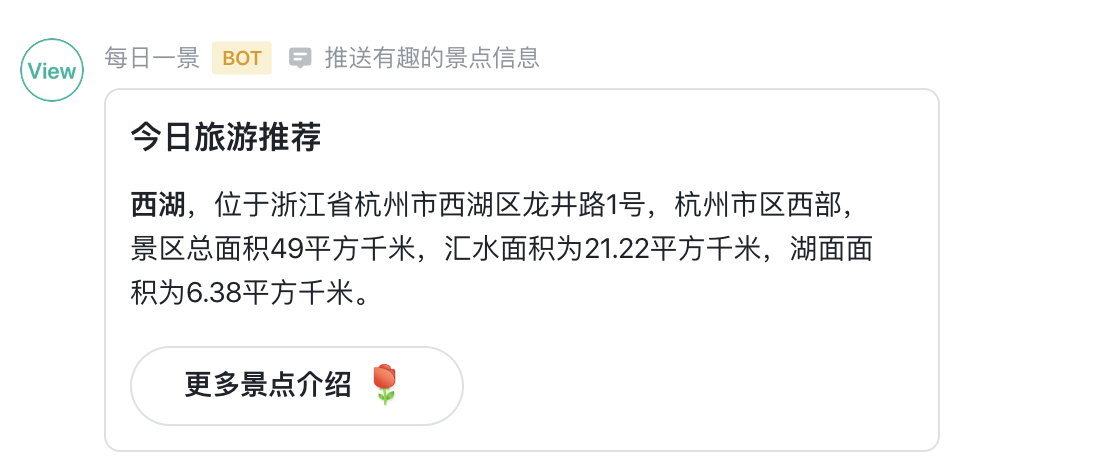
"content": "**西湖**,位于浙江省杭州市西湖区龙井路1号,杭州市区西部,景区总面积49平方千米,汇水面积为21.22平方千米,湖面面积为6.38平方千米。",
"tag": "lark_md"
}
},
{
"actions": [
{
"tag": "button",
"text": {
"content": "更多景点介绍 :玫瑰:",
"tag": "lark_md"
},
"url": "https://www.example.com",
"type": "default",
"value": {}
}
],
"tag": "action"
}
],
"header": {
"title": {
"content": "今日旅游推荐",
"tag": "plain_text"
}
}
}
'
$ feishu interactive -t 6cxxxx80-xxxx-49e2-ac86-7f378xxxx960 -s k6usknqxxxxazNxxxx443d -c $card
```
> 注:`card` 可以使用[飞书可视化搭建工具 cardbuilder](https://open.feishu.cn/tool/cardbuilder?from=custom_bot_doc) 自动生成。
#### Help
```shell
$ feishu -h
feishu is a command line tool for feishu robot
Usage:
feishu [command]
Available Commands:
help Help about any command
image send image message with feishu robot
interactive send interactive message with feishu robot
post send post message with feishu robot
shareChat send shareChat message with feishu robot
text send text message with feishu robot
version feishu version
Flags:
-t, --access_token string access_token
-D, --debug debug
-h, --help help for feishu
-s, --secret string secret
Use "feishu [command] --help" for more information about a command.
```
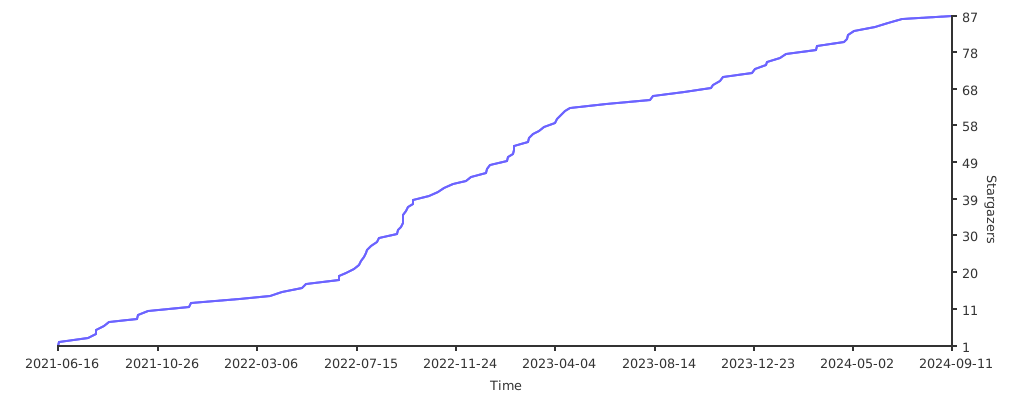
## Stargazers
[](https://starchart.cc/CatchZeng/feishu)
## 安装
## Docker 安装
```shell
docker pull catchzeng/feishu
```
### 二进制安装
到 [releases](https://github.com/CatchZeng/feishu/releases/) 下载相应平台的二进制可执行文件,然后加入到 PATH 环境变量即可。
### go install 安装
```sh
# Go 1.16+
go install github.com/CatchZeng/feishu@v1.3.2
# Go version < 1.16
go get -u github.com/CatchZeng/feishu@v1.3.2
```
## 使用方法
### 配置文件
可以在 `$/HOME/.feishu` 下创建 `config.yaml` 填入 `access_token` 和 `secret` 默认值。
```yaml
access_token: "6cxxxx80-xxxx-49e2-ac86-7f378xxxx960"
secret: "k6usknqxxxxazNxxxx443d"
```
### 环境变量
```sh
$ export ACCESS_TOKEN="6cxxxx80-xxxx-49e2-ac86-7f378xxxx960"
$ export SECRET="k6usknqxxxxazNxxxx443d"
$ feishu post -i 测试 -e 测试信息 -r https://makeblock.com/ -f 链接文本 -a all
```
你也可以为环境变量设置一个**前缀**
```sh
$ export FEISHU_ENV_PREFIX="FEISHU_"
$ export FEISHU_ACCESS_TOKEN="6cxxxx80-xxxx-49e2-ac86-7f378xxxx960"
$ export FEISHU_SECRET="k6usknqxxxxazNxxxx443d"
$ feishu post -i 测试 -e 测试信息 -r https://makeblock.com/ -f 链接文本 -a all
```
### Docker
```shell
docker run catchzeng/feishu feishu text -t 6cxxxx80-xxxx-49e2-ac86-7f378xxxx960 -s k6usknqxxxxazNxxxx443d -e "docker test"
```
### Jenkinsfile
```shell
pipeline {
agent {
docker {
image 'catchzeng/feishu'
}
}
environment {
FEISHU_TOKEN = '6cxxxx80-xxxx-49e2-ac86-7f378xxxx960'
FEISHU_SECRET = 'k6usknqxxxxazNxxxx443d'
}
stages {
stage('notify') {
steps {
sh 'feishu post -t ${FEISHU_TOKEN} -s ${FEISHU_SECRET} -i 标题 -e 信息 -r https://makeoptim.com/ -f 链接文本 -a all'
}
}
}
}
```
> 注:post 有两种用法,除了像上面使用一堆参数外,还可以使用 `post` 参数,直接将 [post json string](https://open.feishu.cn/document/ukTMukTMukTM/uMDMxEjLzATMx4yMwETM#1b8abd5d) 传入,做到更灵活的配置。如下所示:
```shell
$ post='{
"zh_cn": {
"title": "项目更新通知",
"content": [
[
{
"tag": "text",
"text": "项目有更新: "
},
{
"tag": "a",
"text": "请查看",
"href": "http://www.example.com/"
}
]
]
}
}
'
$ feishu post -t 6cxxxx80-xxxx-49e2-ac86-7f378xxxx960 -s k6usknqxxxxazNxxxx443d -p $post
```
### 作为 module
```
go get github.com/CatchZeng/feishu
```
```go
package main
import (
"log"
"github.com/CatchZeng/feishu/pkg/feishu"
)
func main() {
token := "6cxxxx80-xxxx-49e2-ac86-7f378xxxx960"
secret := "k6usknqxxxxazNxxxx443d"
client := feishu.NewClient(token, secret)
text := feishu.NewText("文本")
a := feishu.NewA("链接", "https://www.baidu.com/")
at := feishu.NewAT("all")
line := []feishu.PostItem{text, a, at}
msg := feishu.NewPostMessage()
msg.SetZHTitle("测试富文本 @all").
AppendZHContent(line)
req, resp, err := client.Send(msg)
if err != nil {
log.Print(err)
return
}
log.Print(resp)
}
```
### 命令行工具
#### Demo
##### Post
```sh
feishu post -t 6cxxxx80-xxxx-49e2-ac86-7f378xxxx960 -s k6usknqxxxxazNxxxx443d -i 标题 -e 信息 -r https://makeoptim.com/ -f 链接文本 -a all
```
```sh
❯ feishu post -t 6cxxxx80-xxxx-49e2-ac86-7f378xxxx960 -s k6usknqxxxxazNxxxx443d -i 标题 -e 信息 -r https://makeoptim.com/ -f 链接文本 -a all -D
{"content":{"post":{"zh_cn":{"content":[[{"tag":"text","text":"信息"},{"tag":"a","text":"链接文本","href":"https://makeoptim.com/"},{"tag":"at","user_id":"all"}]],"title":"标题"}}},"msg_type":"post","sign":"HR7kQhgapScmp/2bfLWdYmC7C6pUV3C/pQUiS3OQDIA=","timestamp":"1642561080"}
```
> -D 参数:打印发送的消息内容
##### Interactive
```shell
$ card='{
"config": {
"wide_screen_mode": true,
"enable_forward": true
},
"elements": [
{
"tag": "div",
"text": {
"content": "**西湖**,位于浙江省杭州市西湖区龙井路1号,杭州市区西部,景区总面积49平方千米,汇水面积为21.22平方千米,湖面面积为6.38平方千米。",
"tag": "lark_md"
}
},
{
"actions": [
{
"tag": "button",
"text": {
"content": "更多景点介绍 :玫瑰:",
"tag": "lark_md"
},
"url": "https://www.example.com",
"type": "default",
"value": {}
}
],
"tag": "action"
}
],
"header": {
"title": {
"content": "今日旅游推荐",
"tag": "plain_text"
}
}
}
'
$ feishu interactive -t 6cxxxx80-xxxx-49e2-ac86-7f378xxxx960 -s k6usknqxxxxazNxxxx443d -c $card
```
> 注:`card` 可以使用[飞书可视化搭建工具 cardbuilder](https://open.feishu.cn/tool/cardbuilder?from=custom_bot_doc) 自动生成。
#### Help
```shell
$ feishu -h
feishu is a command line tool for feishu robot
Usage:
feishu [command]
Available Commands:
help Help about any command
image send image message with feishu robot
interactive send interactive message with feishu robot
post send post message with feishu robot
shareChat send shareChat message with feishu robot
text send text message with feishu robot
version feishu version
Flags:
-t, --access_token string access_token
-D, --debug debug
-h, --help help for feishu
-s, --secret string secret
Use "feishu [command] --help" for more information about a command.
```
## Stargazers
[](https://starchart.cc/CatchZeng/feishu)