# VideoVAEPlus
**Repository Path**: shen-youxin/VideoVAEPlus
## Basic Information
- **Project Name**: VideoVAEPlus
- **Description**: No description available
- **Primary Language**: Unknown
- **License**: Not specified
- **Default Branch**: main
- **Homepage**: None
- **GVP Project**: No
## Statistics
- **Stars**: 0
- **Forks**: 0
- **Created**: 2025-06-14
- **Last Updated**: 2025-06-14
## Categories & Tags
**Categories**: Uncategorized
**Tags**: None
## README
# VideoVAE+: Large Motion Video Autoencoding with Cross-modal Video VAE
| Ground Truth (GT) | Reconstructed |
|-------------------|---------------|
|  | |
|
| |
|  |
|  |
|
|
|  |
|  |
|
|
|  |
|  |
|
|
|  |
|  |
[Yazhou Xing](https://yzxing87.github.io)\*, [Yang Fei](https://sunfly04.github.io)\*, [Yingqing He](https://yingqinghe.github.io)\*†, [Jingye Chen](https://jingyechen.github.io), [Jiaxin Xie](https://jiaxinxie97.github.io/Jiaxin-Xie), [Xiaowei Chi](https://scholar.google.com/citations?user=Vl1X_-sAAAAJ&hl=zh-CN), [Qifeng Chen](https://cqf.io/)† (*equal contribution, †corresponding author)
*The Hong Kong University of Science and Technology*
#### [Project Page](https://yzxing87.github.io/vae/) | [Paper](https://arxiv.org/abs/2412.17805) | [High-Res Demo](https://www.youtube.com/embed/Kb4rn9z9xAA)
A state-of-the-art **Video Variational Autoencoder (VAE)** designed for high-fidelity video reconstruction. This project leverages cross-modal and joint video-image training to enhance reconstruction quality.
---
## ✨ Features
- **High-Fidelity Reconstruction**: Achieve superior image and video reconstruction quality.
- **Cross-Modal Reconstruction**: Utilize captions to guide the reconstruction process.
- **State-of-the-Art Performance**: Set new benchmarks in video reconstruction tasks.

---
## 📰 News
- [Jan 2025] 🏋️ Released training code & better pretrained 4z-text weight
- [Dec 2024] 🚀 Released inference code and pretrained models
- [Dec 2024] 📝 Released paper on [arXiv](https://arxiv.org/abs/2412.17805)
- [Dec 2024] 💡 Project page is live at [VideoVAE+](https://yzxing87.github.io/vae/)
---
## ⏰ Todo
- [x] **Release Pretrained Model Weights**
- [x] **Release Inference Code**
- [x] **Release Training Code**
---
## 🚀 Get Started
Follow these steps to set up your environment and run the code:
### 1. Clone the Repository
```bash
git clone https://github.com/VideoVerses/VideoVAEPlus.git
cd VideoVAEPlus
```
### 2. Set Up the Environment
Create a Conda environment and install dependencies:
```bash
conda create --name vae python=3.10 -y
conda activate vae
pip install -r requirements.txt
```
---
## 📦 Pretrained Models
| Model Name | Latent Channels | Download Link |
|-----------------|-----------------|------------------|
| sota-4z | 4 | [Download](https://drive.google.com/file/d/1WEKBdRFjEUxwcBgX_thckXklD8s6dDTj/view?usp=drive_link) |
| sota-4z-text | 4 | [Download](https://drive.google.com/file/d/1QfqrKIWu5zG10U-xRgeF8Dhp__njC8OH/view?usp=sharing) |
| sota-16z | 16 | [Download](https://drive.google.com/file/d/13v2Pq6dG1jo7RNImxNOXr9-WizgMiJ7M/view?usp=sharing) |
| sota-16z-text | 16 | [Download](https://drive.google.com/file/d/1iYCAtmdaOX0V41p0vbt_6g8kRS1EK56p/view?usp=sharing) |
- **Note**: '4z' and '16z' indicate the number of latent channels in the VAE model. Models with 'text' support text guidance.
---
## 📁 Data Preparation
To reconstruct videos and images using our VAE model, organize your data in the following structure:
### Videos
Place your videos and optional captions in the `examples/videos/gt` directory.
#### Directory Structure:
```
examples/videos/
├── gt/
│ ├── video1.mp4
│ ├── video1.txt # Optional caption
│ ├── video2.mp4
│ ├── video2.txt
│ └── ...
├── recon/
└── (reconstructed videos will be saved here)
```
- **Captions**: For cross-modal reconstruction, include a `.txt` file with the same name as the video containing its caption.
### Images
Place your images in the `examples/images/gt` directory.
#### Directory Structure:
```
examples/images/
├── gt/
│ ├── image1.jpg
│ ├── image2.png
│ └── ...
├── recon/
└── (reconstructed images will be saved here)
```
- **Note**: The images dataset does not require captions.
---
## 🔧 Inference
Our video VAE supports both image and video reconstruction.
Please ensure that the `ckpt_path` in all your configuration files is set to the actual path of your checkpoint.
### Video Reconstruction
Run video reconstruction using:
```bash
bash scripts/run_inference_video.sh
```
This is equivalent to:
```bash
python inference_video.py \
--data_root 'examples/videos/gt' \
--out_root 'examples/videos/recon' \
--config_path 'configs/inference/config_16z.yaml' \
--chunk_size 8 \
--resolution 720 1280
```
- If the chunk size is too large, you may encounter memory issues. In this case, reduce the `chunk_size` parameter. Ensure the `chunk_size` is divisible by 4.
- To enable cross-modal reconstruction using captions, modify `config_path` to `'configs/config_16z_cap.yaml'` for the 16-channel model with caption guidance.
### Image Reconstruction
Run image reconstruction using:
```bash
bash scripts/run_inference_image.sh
```
This is equivalent to:
```bash
python inference_image.py \
--data_root 'examples/images/gt' \
--out_root 'examples/images/recon' \
--config_path 'configs/inference/config_16z.yaml' \
--batch_size 1
```
- **Note**: that the batch size is set to 1 because the images in the example folder have varying resolutions. If you have a batch of images with the same resolution, you can increase the batch size to accelerate inference.
---
## 🏋️ Training
### Quick Start
To start training, use the following command:
```bash
bash scripts/run_training.sh config_16z
```
This default command trains the 16-channel model with video reconstruction on a single GPU.
### Configuration Options
You can modify the training configuration by changing the config parameter:
- `config_4z`: 4-channel model
- `config_4z_joint`: 4-channel model trained jointly on both image and video data
- `config_4z_cap`': 4-channel model with text guidance
- `config_16z`: Default 16-channel model
- `config_16z_joint`: 16-channel model trained jointly on both image and video data
- `config_16z_cap`: 16-channel model with text guidance
Note: Do not include the `.yaml` extension when specifying the config.
### Data Preparation
#### Dataset Structure
The training data should be organized in a CSV file with the following format:
```csv
path,text
/absolute/path/to/video1.mp4,A person walking on the beach
/absolute/path/to/video2.mp4,A car driving down the road
```
#### Requirements:
- Use absolute paths for video files
- Include two columns: path and text
- For training without text guidance, leave the caption column empty but maintain the CSV structure
#### Example CSV:
```csv
# With captions
/data/videos/clip1.mp4,A dog playing in the park
/data/videos/clip2.mp4,Sunset over the ocean
# Without captions
/data/videos/clip1.mp4,
/data/videos/clip2.mp4,
```
---
## 📊 Evaluation
Use the provided scripts to evaluate reconstruction quality using **PSNR**, **SSIM**, and **LPIPS** metrics.
### Evaluate Image Reconstruction
```bash
bash scripts/evaluation_image.sh
```
### Evaluate Video Reconstruction
```bash
bash scripts/evaluation_video.sh
```
---
## 📝 License
Please follow [CC-BY-NC-ND](./LICENSE).
## Star History
[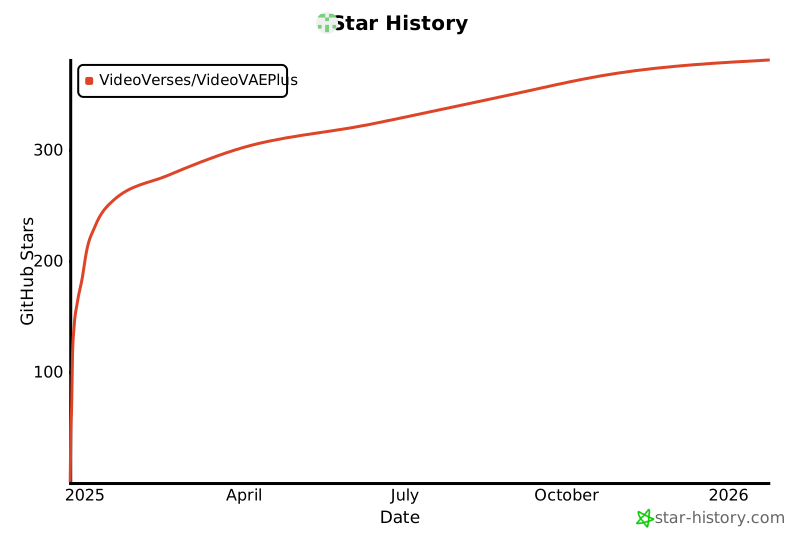](https://star-history.com/#VideoVerses/VideoVAEPlus&Date)
|
[Yazhou Xing](https://yzxing87.github.io)\*, [Yang Fei](https://sunfly04.github.io)\*, [Yingqing He](https://yingqinghe.github.io)\*†, [Jingye Chen](https://jingyechen.github.io), [Jiaxin Xie](https://jiaxinxie97.github.io/Jiaxin-Xie), [Xiaowei Chi](https://scholar.google.com/citations?user=Vl1X_-sAAAAJ&hl=zh-CN), [Qifeng Chen](https://cqf.io/)† (*equal contribution, †corresponding author)
*The Hong Kong University of Science and Technology*
#### [Project Page](https://yzxing87.github.io/vae/) | [Paper](https://arxiv.org/abs/2412.17805) | [High-Res Demo](https://www.youtube.com/embed/Kb4rn9z9xAA)
A state-of-the-art **Video Variational Autoencoder (VAE)** designed for high-fidelity video reconstruction. This project leverages cross-modal and joint video-image training to enhance reconstruction quality.
---
## ✨ Features
- **High-Fidelity Reconstruction**: Achieve superior image and video reconstruction quality.
- **Cross-Modal Reconstruction**: Utilize captions to guide the reconstruction process.
- **State-of-the-Art Performance**: Set new benchmarks in video reconstruction tasks.

---
## 📰 News
- [Jan 2025] 🏋️ Released training code & better pretrained 4z-text weight
- [Dec 2024] 🚀 Released inference code and pretrained models
- [Dec 2024] 📝 Released paper on [arXiv](https://arxiv.org/abs/2412.17805)
- [Dec 2024] 💡 Project page is live at [VideoVAE+](https://yzxing87.github.io/vae/)
---
## ⏰ Todo
- [x] **Release Pretrained Model Weights**
- [x] **Release Inference Code**
- [x] **Release Training Code**
---
## 🚀 Get Started
Follow these steps to set up your environment and run the code:
### 1. Clone the Repository
```bash
git clone https://github.com/VideoVerses/VideoVAEPlus.git
cd VideoVAEPlus
```
### 2. Set Up the Environment
Create a Conda environment and install dependencies:
```bash
conda create --name vae python=3.10 -y
conda activate vae
pip install -r requirements.txt
```
---
## 📦 Pretrained Models
| Model Name | Latent Channels | Download Link |
|-----------------|-----------------|------------------|
| sota-4z | 4 | [Download](https://drive.google.com/file/d/1WEKBdRFjEUxwcBgX_thckXklD8s6dDTj/view?usp=drive_link) |
| sota-4z-text | 4 | [Download](https://drive.google.com/file/d/1QfqrKIWu5zG10U-xRgeF8Dhp__njC8OH/view?usp=sharing) |
| sota-16z | 16 | [Download](https://drive.google.com/file/d/13v2Pq6dG1jo7RNImxNOXr9-WizgMiJ7M/view?usp=sharing) |
| sota-16z-text | 16 | [Download](https://drive.google.com/file/d/1iYCAtmdaOX0V41p0vbt_6g8kRS1EK56p/view?usp=sharing) |
- **Note**: '4z' and '16z' indicate the number of latent channels in the VAE model. Models with 'text' support text guidance.
---
## 📁 Data Preparation
To reconstruct videos and images using our VAE model, organize your data in the following structure:
### Videos
Place your videos and optional captions in the `examples/videos/gt` directory.
#### Directory Structure:
```
examples/videos/
├── gt/
│ ├── video1.mp4
│ ├── video1.txt # Optional caption
│ ├── video2.mp4
│ ├── video2.txt
│ └── ...
├── recon/
└── (reconstructed videos will be saved here)
```
- **Captions**: For cross-modal reconstruction, include a `.txt` file with the same name as the video containing its caption.
### Images
Place your images in the `examples/images/gt` directory.
#### Directory Structure:
```
examples/images/
├── gt/
│ ├── image1.jpg
│ ├── image2.png
│ └── ...
├── recon/
└── (reconstructed images will be saved here)
```
- **Note**: The images dataset does not require captions.
---
## 🔧 Inference
Our video VAE supports both image and video reconstruction.
Please ensure that the `ckpt_path` in all your configuration files is set to the actual path of your checkpoint.
### Video Reconstruction
Run video reconstruction using:
```bash
bash scripts/run_inference_video.sh
```
This is equivalent to:
```bash
python inference_video.py \
--data_root 'examples/videos/gt' \
--out_root 'examples/videos/recon' \
--config_path 'configs/inference/config_16z.yaml' \
--chunk_size 8 \
--resolution 720 1280
```
- If the chunk size is too large, you may encounter memory issues. In this case, reduce the `chunk_size` parameter. Ensure the `chunk_size` is divisible by 4.
- To enable cross-modal reconstruction using captions, modify `config_path` to `'configs/config_16z_cap.yaml'` for the 16-channel model with caption guidance.
### Image Reconstruction
Run image reconstruction using:
```bash
bash scripts/run_inference_image.sh
```
This is equivalent to:
```bash
python inference_image.py \
--data_root 'examples/images/gt' \
--out_root 'examples/images/recon' \
--config_path 'configs/inference/config_16z.yaml' \
--batch_size 1
```
- **Note**: that the batch size is set to 1 because the images in the example folder have varying resolutions. If you have a batch of images with the same resolution, you can increase the batch size to accelerate inference.
---
## 🏋️ Training
### Quick Start
To start training, use the following command:
```bash
bash scripts/run_training.sh config_16z
```
This default command trains the 16-channel model with video reconstruction on a single GPU.
### Configuration Options
You can modify the training configuration by changing the config parameter:
- `config_4z`: 4-channel model
- `config_4z_joint`: 4-channel model trained jointly on both image and video data
- `config_4z_cap`': 4-channel model with text guidance
- `config_16z`: Default 16-channel model
- `config_16z_joint`: 16-channel model trained jointly on both image and video data
- `config_16z_cap`: 16-channel model with text guidance
Note: Do not include the `.yaml` extension when specifying the config.
### Data Preparation
#### Dataset Structure
The training data should be organized in a CSV file with the following format:
```csv
path,text
/absolute/path/to/video1.mp4,A person walking on the beach
/absolute/path/to/video2.mp4,A car driving down the road
```
#### Requirements:
- Use absolute paths for video files
- Include two columns: path and text
- For training without text guidance, leave the caption column empty but maintain the CSV structure
#### Example CSV:
```csv
# With captions
/data/videos/clip1.mp4,A dog playing in the park
/data/videos/clip2.mp4,Sunset over the ocean
# Without captions
/data/videos/clip1.mp4,
/data/videos/clip2.mp4,
```
---
## 📊 Evaluation
Use the provided scripts to evaluate reconstruction quality using **PSNR**, **SSIM**, and **LPIPS** metrics.
### Evaluate Image Reconstruction
```bash
bash scripts/evaluation_image.sh
```
### Evaluate Video Reconstruction
```bash
bash scripts/evaluation_video.sh
```
---
## 📝 License
Please follow [CC-BY-NC-ND](./LICENSE).
## Star History
[](https://star-history.com/#VideoVerses/VideoVAEPlus&Date)