# Hermes-CN-Desktop
**Repository Path**: shifeipython/Hermes-CN-Desktop
## Basic Information
- **Project Name**: Hermes-CN-Desktop
- **Description**: No description available
- **Primary Language**: JavaScript
- **License**: Not specified
- **Default Branch**: main
- **Homepage**: None
- **GVP Project**: No
## Statistics
- **Stars**: 1
- **Forks**: 0
- **Created**: 2026-06-26
- **Last Updated**: 2026-07-12
## Categories & Tags
**Categories**: Uncategorized
**Tags**: None
## README
# Hermes Agent CN Desktop
简体中文 · [English](./README.en-US.md)
[](https://github.com/Eynzof/Hermes-CN-Desktop/actions/workflows/web-test.yml)
[](https://github.com/Eynzof/Hermes-CN-Desktop/actions/workflows/rust-test.yml)
[](https://github.com/Eynzof/Hermes-CN-Desktop/actions/workflows/release-desktop.yml)
[](./LICENSE)
[](https://hermesagent.org.cn)
Hermes Agent CN Desktop 是 Hermes Agent 中文社区推出的桌面客户端,原生支持 Windows 与 macOS 系统。项目基于 [Tauri v2](https://v2.tauri.app/)、Rust、React 和 TypeScript 构建,包含 [Hermes-CN-Core](https://github.com/Eynzof/Hermes-CN-Core) 中文社区修改版的 Hermes Agent 内核。
官网与下载页见 [desktop.hermesagent.org.cn](https://desktop.hermesagent.org.cn)。桌面端隶属于 [Hermes Agent 中文社区](https://hermesagent.org.cn) 生态,社区主站提供中文文档、实践指南、社群入口和更多生态项目。
> 当前版本是 `v0.5.3`。项目仍在快速迭代,API、打包流程、运行时分发策略和界面细节都可能继续调整。
## Hermes Agent 中文社区
Hermes Agent CN Desktop 由 Hermes Agent 中文社区维护。你可以访问 [Hermes Agent 中文社区主站](https://hermesagent.org.cn) 了解项目动态,通过 [中文文档](https://hermesagent.org.cn/docs) 学习使用方式,在 [实践指南](https://hermesagent.org.cn/practice-guides) 查看落地案例,也可以进入 [社群入口](https://hermesagent.org.cn/community) 加入更多讨论渠道。
扫码加入 Hermes Agent 中文社区微信群;如果二维码过期,请访问 [最新微信群入口](https://hermesagent.org.cn/qr-entrance)。
[ ](https://hermesagent.org.cn/qr-entrance)
## 演示
### 原型图预览
可以在 [hermes-cn-ui-prototypes-sans.vercel.app](https://hermes-cn-ui-prototypes-sans.vercel.app/) 浏览高保真 UI 原型图。
### 演示视频
点击下方预览图,或直接打开 [MP4 演示视频](./docs/assets/demo/hermes-agent-cn-desktop-demo.mp4)。README 渲染器对本地视频内嵌播放支持不稳定,因此这里用可点击预览图链接到视频文件。
[
](https://hermesagent.org.cn/qr-entrance)
## 演示
### 原型图预览
可以在 [hermes-cn-ui-prototypes-sans.vercel.app](https://hermes-cn-ui-prototypes-sans.vercel.app/) 浏览高保真 UI 原型图。
### 演示视频
点击下方预览图,或直接打开 [MP4 演示视频](./docs/assets/demo/hermes-agent-cn-desktop-demo.mp4)。README 渲染器对本地视频内嵌播放支持不稳定,因此这里用可点击预览图链接到视频文件。
[ ](./docs/assets/demo/hermes-agent-cn-desktop-demo.mp4)
### 界面截图
下面的截图同步自官网 landing 仓库,覆盖工作台、归档、对话、LaTeX/Markdown、任务控制台、飞书接入、用量统计、健康状态、Skills、Memory、模型服务商配置、运行时诊断和日志等页面。
| 工作台(深色主题) | 工作台(浅色主题) |
| --- | --- |
|
](./docs/assets/demo/hermes-agent-cn-desktop-demo.mp4)
### 界面截图
下面的截图同步自官网 landing 仓库,覆盖工作台、归档、对话、LaTeX/Markdown、任务控制台、飞书接入、用量统计、健康状态、Skills、Memory、模型服务商配置、运行时诊断和日志等页面。
| 工作台(深色主题) | 工作台(浅色主题) |
| --- | --- |
|  | |
| 归档工作台(深色主题) | 归档工作台(浅色主题) |
| --- | --- |
|
| |
| 归档工作台(深色主题) | 归档工作台(浅色主题) |
| --- | --- |
|  |
|  |
| 聊天回复工作流 | 对话历史 |
| --- | --- |
|
|
| 聊天回复工作流 | 对话历史 |
| --- | --- |
|  |
|  |
| LaTeX 与 Markdown 渲染 | 任务控制台输出 |
| --- | --- |
|
|
| LaTeX 与 Markdown 渲染 | 任务控制台输出 |
| --- | --- |
|  |
|  |
| 飞书平台接入 | 用量统计与图表 |
| --- | --- |
|
|
| 飞书平台接入 | 用量统计与图表 |
| --- | --- |
|  |
|  |
| 系统健康状态 | 内置 Skills |
| --- | --- |
|
|
| 系统健康状态 | 内置 Skills |
| --- | --- |
|  |
|  |
| 记忆管理 | 模型服务商配置 |
| --- | --- |
|
|
| 记忆管理 | 模型服务商配置 |
| --- | --- |
|  |
|  |
| 配置总览 | 运行时诊断 |
| --- | --- |
|
|
| 配置总览 | 运行时诊断 |
| --- | --- |
|  |
|  |
| 日志查看 | 项目 Review 工作流 |
| --- | --- |
|
|
| 日志查看 | 项目 Review 工作流 |
| --- | --- |
|  |
|  |
## 项目定位
Hermes Agent 已经提供本地 Dashboard。本仓库专注于 Dashboard 之外的桌面体验:原生窗口、本地进程管理、文件对话框、托管运行时安装、运行时诊断,以及生产模式下更安全的 REST 代理层与必要时的 WS 中继。
本仓库是桌面端外壳。Agent runtime 和 Dashboard 源码位于 [Hermes-CN-Core](https://github.com/Eynzof/Hermes-CN-Core)。
## 亮点
- **一键安装,使用门槛极低**:针对 Windows 和 macOS 用户适配,下载安装后配置 API Key 或本地模型端点即可使用。
- **轻量,跨平台**:Tauri 使用系统 WebView,不需要随应用打包 Chromium,安装包体积小,支持 Windows 及 macOS。
- **内置独立 Hermes Agent 内核**:桌面端支持安装、更新、签名校验、健康检查和回滚本地 Hermes Agent 内核。
- **面向 Agent 的完整 UI**:支持聊天、流式输出、附件、MCP 工具、Skills、Memory、Profiles、定时任务、LaTeX/Mermaid 渲染和运行时健康面板。
- **中文模型与平台生态**:覆盖主流云端模型服务商和 Ollama、vLLM、LM Studio、llama.cpp 等本地部署方案,并提供飞书等平台接入配置;更多中文生态内容见 [Hermes Agent 中文社区](https://hermesagent.org.cn)。
- **生产级传输桥**:生产模式下通过 Rust command 代理 REST 与上传;Gateway 使用官方 `/api/ws`,打包态必要时通过 Rust WS 中继绕过 WebView 限制,并集中处理鉴权。
- **YOLO 模式开关**:「设置 → 常规」底部独立的「高风险操作」区提供开关,开启需二次确认,自动批准危险命令(对应后端 `HERMES_YOLO_MODE`),切换后自动重启内核生效,详见 [docs/yolo-mode.md](./docs/yolo-mode.md)。
## 下载
安装包可以从 [桌面端官网](https://desktop.hermesagent.org.cn) 下载,也会同步发布在 [GitHub Releases](https://github.com/Eynzof/Hermes-CN-Desktop/releases) 页面。
当前版本包含:
- macOS Apple Silicon DMG:`Hermes.Agent.CN.Desktop_0.5.3_aarch64.dmg`
- macOS Intel DMG:`Hermes.Agent.CN.Desktop_0.5.3_x64.dmg`
- Windows x64 安装器:`Hermes.Agent.CN.Desktop_0.5.3_x64-setup.exe`
当前 Windows 与 macOS 安装包都会预置 `Hermes-CN-Core` runtime,安装后优先从包内 runtime 完成本地内核初始化;托管 runtime 下载与更新流程只作为升级或兜底路径使用。
## 开发环境要求
- [Rust](https://rustup.rs/) stable
- [Node.js](https://nodejs.org/) 20+
- [pnpm](https://pnpm.io/) 9+
- [Hermes-CN-Core](https://github.com/Eynzof/Hermes-CN-Core) 或本机已安装的 Hermes CLI,用于本地 Dashboard 开发
macOS 还需要安装 Xcode Command Line Tools:
```bash
xcode-select --install
```
## 快速开始
安装依赖:
```bash
pnpm install
```
另开一个终端启动 Hermes Dashboard:
```bash
hermes dashboard --host 127.0.0.1 --port 9120 --no-open
```
启动桌面端开发模式:
```bash
pnpm web:dev
cargo run
```
也可以让 Tauri dev 命令自动启动 Vite:
```bash
pnpm tauri:dev
```
## 构建
```bash
# 为当前平台构建生产包
pnpm tauri:build
# 构建带调试信息的 Debug 包
pnpm tauri:build:debug
```
构建产物位于 `target/release/bundle/` 或 `target/debug/bundle/`。
## 仓库结构
```text
├── src/ Rust 后端:Tauri commands、进程管理、runtime 管理
├── web/ React 前端:Vite、TanStack Query、Jotai
├── packages/
│ ├── protocol/ Zod schema、API 契约、IPC 类型
│ └── shared-ui/ 设计 token 和共享 UI 组件
├── static/ 打包时注入的 Dashboard、runtime、内置 skills
├── scripts/ 本地开发、runtime staging、release staging 脚本
├── .github/workflows/ CI 和桌面端发布流水线
├── Cargo.toml Rust crate 配置
├── tauri.conf.json Tauri 窗口、安全和打包配置
└── package.json pnpm workspace root
```
## 常用命令
| 命令 | 说明 |
| --- | --- |
| `pnpm web:dev` | 启动 Vite dev server,默认端口 `9545` |
| `cargo run` | 编译并启动 Tauri 桌面窗口 |
| `pnpm typecheck` | 运行 TypeScript 类型检查 |
| `pnpm test:unit` | 运行 Vitest 单元测试 |
| `cargo check` | 运行 Rust 编译检查 |
| `cargo test --all-features` | 运行 Rust 测试 |
| `pnpm tauri:build` | 构建生产桌面包 |
## 质量门禁
提交 Pull Request 前,建议运行相关检查:
```bash
pnpm typecheck
pnpm test:unit
cargo fmt --all -- --check
cargo clippy --all-targets -- -D warnings
cargo test --all-features --no-fail-fast
```
CI 会在 `main` 和指向 `main` 的 Pull Request 上分别运行前端和 Rust 测试流水线。
## 发布流程
版本使用 SemVer tag:
```text
v0.1.0-alpha.1
v0.1.0-beta.1
v0.1.0
v0.1.1
```
推送 `v*` tag 后会触发 `.github/workflows/release-desktop.yml`,自动构建并上传桌面端安装包到 GitHub Releases。Alpha、beta 和 release candidate tag 会被标记为 GitHub 预发布。
## Roadmap
近期重点包括:
- 加固托管 runtime 的安装、更新和回滚链路;
- 改进首次启动引导和模型服务商配置体验;
- 扩展 Dashboard、gateway、MCP、skills 和模型配置诊断;
- 打磨 macOS 与 Windows 的打包和安装行为;
- 完善桌面端与 runtime 边界文档,降低贡献门槛。
## Star Track
可以通过下面的趋势图查看本仓库 GitHub Star 的增长变化。
[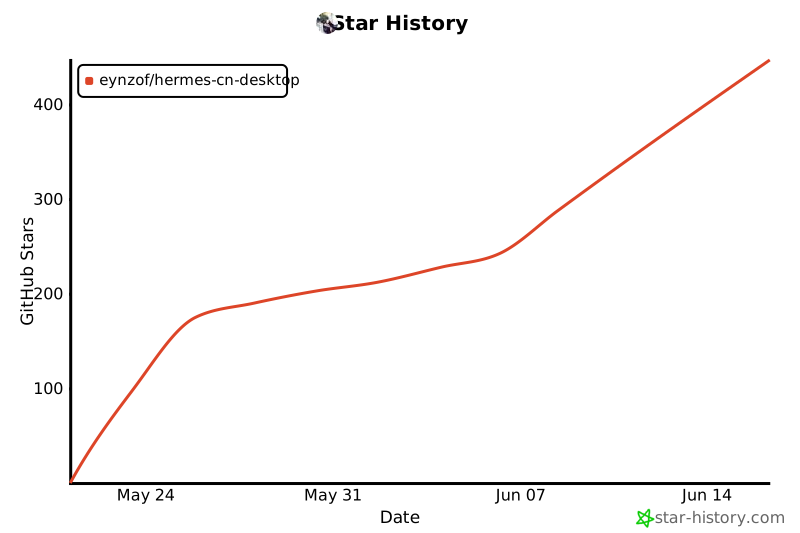](https://www.star-history.com/#Eynzof/Hermes-CN-Desktop&Date)
## 贡献
欢迎提交 Issue 和 Pull Request。参与贡献前请阅读 [CONTRIBUTING.md](./CONTRIBUTING.md)。如果你想先了解中文社区动态、文档和实践案例,可以访问 [Hermes Agent 中文社区](https://hermesagent.org.cn)、[中文文档](https://hermesagent.org.cn/docs) 与 [实践指南](https://hermesagent.org.cn/practice-guides)。
如果要报告安全问题,请遵循 [SECURITY.md](./SECURITY.md),不要直接创建公开 Issue。
## 许可
本项目的非商业使用遵守 [PolyForm Noncommercial License 1.0.0](./LICENSE)。商业使用、商业分发、商业集成、托管销售或作为商业产品组成部分使用,需提前获得青岛万德缦思网络科技有限公司的单独商业授权;授权联系邮箱:lijiale@wanderminds.cn。
|
## 项目定位
Hermes Agent 已经提供本地 Dashboard。本仓库专注于 Dashboard 之外的桌面体验:原生窗口、本地进程管理、文件对话框、托管运行时安装、运行时诊断,以及生产模式下更安全的 REST 代理层与必要时的 WS 中继。
本仓库是桌面端外壳。Agent runtime 和 Dashboard 源码位于 [Hermes-CN-Core](https://github.com/Eynzof/Hermes-CN-Core)。
## 亮点
- **一键安装,使用门槛极低**:针对 Windows 和 macOS 用户适配,下载安装后配置 API Key 或本地模型端点即可使用。
- **轻量,跨平台**:Tauri 使用系统 WebView,不需要随应用打包 Chromium,安装包体积小,支持 Windows 及 macOS。
- **内置独立 Hermes Agent 内核**:桌面端支持安装、更新、签名校验、健康检查和回滚本地 Hermes Agent 内核。
- **面向 Agent 的完整 UI**:支持聊天、流式输出、附件、MCP 工具、Skills、Memory、Profiles、定时任务、LaTeX/Mermaid 渲染和运行时健康面板。
- **中文模型与平台生态**:覆盖主流云端模型服务商和 Ollama、vLLM、LM Studio、llama.cpp 等本地部署方案,并提供飞书等平台接入配置;更多中文生态内容见 [Hermes Agent 中文社区](https://hermesagent.org.cn)。
- **生产级传输桥**:生产模式下通过 Rust command 代理 REST 与上传;Gateway 使用官方 `/api/ws`,打包态必要时通过 Rust WS 中继绕过 WebView 限制,并集中处理鉴权。
- **YOLO 模式开关**:「设置 → 常规」底部独立的「高风险操作」区提供开关,开启需二次确认,自动批准危险命令(对应后端 `HERMES_YOLO_MODE`),切换后自动重启内核生效,详见 [docs/yolo-mode.md](./docs/yolo-mode.md)。
## 下载
安装包可以从 [桌面端官网](https://desktop.hermesagent.org.cn) 下载,也会同步发布在 [GitHub Releases](https://github.com/Eynzof/Hermes-CN-Desktop/releases) 页面。
当前版本包含:
- macOS Apple Silicon DMG:`Hermes.Agent.CN.Desktop_0.5.3_aarch64.dmg`
- macOS Intel DMG:`Hermes.Agent.CN.Desktop_0.5.3_x64.dmg`
- Windows x64 安装器:`Hermes.Agent.CN.Desktop_0.5.3_x64-setup.exe`
当前 Windows 与 macOS 安装包都会预置 `Hermes-CN-Core` runtime,安装后优先从包内 runtime 完成本地内核初始化;托管 runtime 下载与更新流程只作为升级或兜底路径使用。
## 开发环境要求
- [Rust](https://rustup.rs/) stable
- [Node.js](https://nodejs.org/) 20+
- [pnpm](https://pnpm.io/) 9+
- [Hermes-CN-Core](https://github.com/Eynzof/Hermes-CN-Core) 或本机已安装的 Hermes CLI,用于本地 Dashboard 开发
macOS 还需要安装 Xcode Command Line Tools:
```bash
xcode-select --install
```
## 快速开始
安装依赖:
```bash
pnpm install
```
另开一个终端启动 Hermes Dashboard:
```bash
hermes dashboard --host 127.0.0.1 --port 9120 --no-open
```
启动桌面端开发模式:
```bash
pnpm web:dev
cargo run
```
也可以让 Tauri dev 命令自动启动 Vite:
```bash
pnpm tauri:dev
```
## 构建
```bash
# 为当前平台构建生产包
pnpm tauri:build
# 构建带调试信息的 Debug 包
pnpm tauri:build:debug
```
构建产物位于 `target/release/bundle/` 或 `target/debug/bundle/`。
## 仓库结构
```text
├── src/ Rust 后端:Tauri commands、进程管理、runtime 管理
├── web/ React 前端:Vite、TanStack Query、Jotai
├── packages/
│ ├── protocol/ Zod schema、API 契约、IPC 类型
│ └── shared-ui/ 设计 token 和共享 UI 组件
├── static/ 打包时注入的 Dashboard、runtime、内置 skills
├── scripts/ 本地开发、runtime staging、release staging 脚本
├── .github/workflows/ CI 和桌面端发布流水线
├── Cargo.toml Rust crate 配置
├── tauri.conf.json Tauri 窗口、安全和打包配置
└── package.json pnpm workspace root
```
## 常用命令
| 命令 | 说明 |
| --- | --- |
| `pnpm web:dev` | 启动 Vite dev server,默认端口 `9545` |
| `cargo run` | 编译并启动 Tauri 桌面窗口 |
| `pnpm typecheck` | 运行 TypeScript 类型检查 |
| `pnpm test:unit` | 运行 Vitest 单元测试 |
| `cargo check` | 运行 Rust 编译检查 |
| `cargo test --all-features` | 运行 Rust 测试 |
| `pnpm tauri:build` | 构建生产桌面包 |
## 质量门禁
提交 Pull Request 前,建议运行相关检查:
```bash
pnpm typecheck
pnpm test:unit
cargo fmt --all -- --check
cargo clippy --all-targets -- -D warnings
cargo test --all-features --no-fail-fast
```
CI 会在 `main` 和指向 `main` 的 Pull Request 上分别运行前端和 Rust 测试流水线。
## 发布流程
版本使用 SemVer tag:
```text
v0.1.0-alpha.1
v0.1.0-beta.1
v0.1.0
v0.1.1
```
推送 `v*` tag 后会触发 `.github/workflows/release-desktop.yml`,自动构建并上传桌面端安装包到 GitHub Releases。Alpha、beta 和 release candidate tag 会被标记为 GitHub 预发布。
## Roadmap
近期重点包括:
- 加固托管 runtime 的安装、更新和回滚链路;
- 改进首次启动引导和模型服务商配置体验;
- 扩展 Dashboard、gateway、MCP、skills 和模型配置诊断;
- 打磨 macOS 与 Windows 的打包和安装行为;
- 完善桌面端与 runtime 边界文档,降低贡献门槛。
## Star Track
可以通过下面的趋势图查看本仓库 GitHub Star 的增长变化。
[](https://www.star-history.com/#Eynzof/Hermes-CN-Desktop&Date)
## 贡献
欢迎提交 Issue 和 Pull Request。参与贡献前请阅读 [CONTRIBUTING.md](./CONTRIBUTING.md)。如果你想先了解中文社区动态、文档和实践案例,可以访问 [Hermes Agent 中文社区](https://hermesagent.org.cn)、[中文文档](https://hermesagent.org.cn/docs) 与 [实践指南](https://hermesagent.org.cn/practice-guides)。
如果要报告安全问题,请遵循 [SECURITY.md](./SECURITY.md),不要直接创建公开 Issue。
## 许可
本项目的非商业使用遵守 [PolyForm Noncommercial License 1.0.0](./LICENSE)。商业使用、商业分发、商业集成、托管销售或作为商业产品组成部分使用,需提前获得青岛万德缦思网络科技有限公司的单独商业授权;授权联系邮箱:lijiale@wanderminds.cn。