# eden-demo-cola
**Repository Path**: shiyindaxiaojie/eden-demo-cola
## Basic Information
- **Project Name**: eden-demo-cola
- **Description**: 阿里巴巴 COLA 架构,基于个人对 DDD、CQRS、SOLID 等设计思想的理解,在企业完成生产落地。
- **Primary Language**: Unknown
- **License**: Apache-2.0
- **Default Branch**: main
- **Homepage**: None
- **GVP Project**: No
## Statistics
- **Stars**: 15
- **Forks**: 5
- **Created**: 2022-01-30
- **Last Updated**: 2026-01-07
## Categories & Tags
**Categories**: Uncategorized
**Tags**: None
## README
 # COLA Architecture
[](https://github.com/shiyindaxiaojie/eden-demo-cola)
[](https://github.com/shiyindaxiaojie/eden-demo-cola/actions)
[](https://www.apache.org/licenses/LICENSE-2.0.html)
[](https://sonarcloud.io/dashboard?id=shiyindaxiaojie_eden-demo-cola)
# COLA Architecture
[](https://github.com/shiyindaxiaojie/eden-demo-cola)
[](https://github.com/shiyindaxiaojie/eden-demo-cola/actions)
[](https://www.apache.org/licenses/LICENSE-2.0.html)
[](https://sonarcloud.io/dashboard?id=shiyindaxiaojie_eden-demo-cola)
Clean, Object-oriented, Layered, Adaptable Application Architecture
English | [简体中文](./README-zh-CN.md)
---
This project is built using the COLA architecture. COLA is a clean, object-oriented, layered, and adaptable application architecture that helps reduce system entropy in complex application scenarios and improves development and operational efficiency. Whether it's traditional layered architecture, hexagonal architecture, or onion architecture, they all advocate for business-centric design, decoupling external dependencies, and separating business complexity from technical complexity. COLA architecture integrates CQRS, DDD, SOLID and other design principles on this foundation, forming a practical and implementable application architecture. For more details, please check the [WIKI](https://github.com/shiyindaxiaojie/eden-demo-cola/wiki).
## Documentation
📚 For detailed component integration guides, please refer to the documentation:
- [English Documentation](./docs/en/README.md) - Component integration guides in English
- [中文文档](./docs/zh-CN/README.md) - 中文组件集成指南
## Component Structure
```mermaid
---
title: Alibaba COLA Application Architecture Component Diagram
---
flowchart TB
%% Driving Adapters - Top
subgraph ActiveAdapters[" "]
direction LR
RPC_CLIENT(["«Driving Adapter»
RPC Client"])
JOB{{"Job Scheduler"}}
MQ_CONSUMER(["«Driving Adapter»
MQ Consumer"])
APP_TERMINAL(["«Driving Adapter»
APP Terminal"])
end
%% COLA Core Components
ADAPTER["«Adapter Layer»
eden-demo-cola-adapter"]
START["«Bootstrap»
eden-demo-cola-start"]
APP_LAYER["«Application Layer»
eden-demo-cola-app"]
CLIENT["«API Layer»
eden-demo-cola-client"]
DOMAIN["«Domain Layer»
eden-demo-cola-domain"]
INFRA["«Infrastructure Layer»
eden-demo-cola-infrastructure"]
%% Interface Nodes
rpc((rpc))
http((http))
%% Driven Adapters - Bottom
subgraph PassiveDrivers[" "]
direction LR
THIRD_PARTY(["«Driven Adapter»
Third-party API"])
MYSQL[("«Driven Adapter»
MySQL")]
REDIS[("«Driven Adapter»
Redis")]
MQ_PRODUCER[("«Driven Adapter»
MQ")]
ES[("«Driven Adapter»
Elasticsearch")]
MONGO[("«Driven Adapter»
MongoDB")]
end
%% Driving Adapter Connections
RPC_CLIENT -.->|Network Call| rpc
rpc ---|RPC Interface| ADAPTER
APP_TERMINAL -.->|Frontend Integration| http
http ---|REST Interface| ADAPTER
RPC_CLIENT -.->|Code Integration| CLIENT
JOB <-.->|Task Scheduling| ADAPTER
MQ_CONSUMER <-.->|Consume Messages| ADAPTER
%% Internal Component Connections
START --> ADAPTER
ADAPTER -->|Inbound Adaptation, Data Assembly| APP_LAYER
APP_LAYER -->|Implement Interface| CLIENT
APP_LAYER -->|CQRS Commands| DOMAIN
APP_LAYER -->|CQRS Queries| INFRA
INFRA -.->|Dependency Inversion| DOMAIN
%% Driven Adapter Connections
INFRA -.->|API Call| THIRD_PARTY
INFRA -.->|Read/Write Data| MYSQL
INFRA -.->|Read/Write Cache| REDIS
INFRA -.->|Produce Messages| MQ_PRODUCER
INFRA -.->|Read/Write Index| ES
INFRA -.->|Read/Write Data| MONGO
%% Style Definitions
style ADAPTER fill:#90EE90,stroke:#333,stroke-width:2px
style START fill:#90EE90,stroke:#333,stroke-width:2px
style APP_LAYER fill:#90EE90,stroke:#333,stroke-width:2px
style CLIENT fill:#F0E68C,stroke:#333,stroke-width:2px
style DOMAIN fill:#90EE90,stroke:#333,stroke-width:2px
style INFRA fill:#90EE90,stroke:#333,stroke-width:2px
style RPC_CLIENT fill:#87CEEB,stroke:#333,stroke-width:1px
style JOB fill:#87CEEB,stroke:#333,stroke-width:1px
style MQ_CONSUMER fill:#87CEEB,stroke:#333,stroke-width:1px
style APP_TERMINAL fill:#87CEEB,stroke:#333,stroke-width:1px
style THIRD_PARTY fill:#FFB6C1,stroke:#333,stroke-width:1px
style MYSQL fill:#FFB6C1,stroke:#333,stroke-width:1px
style REDIS fill:#FFB6C1,stroke:#333,stroke-width:1px
style MQ_PRODUCER fill:#FFB6C1,stroke:#333,stroke-width:1px
style ES fill:#FFB6C1,stroke:#333,stroke-width:1px
style MONGO fill:#FFB6C1,stroke:#333,stroke-width:1px
style rpc fill:#fff,stroke:#333
style http fill:#fff,stroke:#333
```
* **eden-demo-cola-adapter**: Adapter layer, the inbound adapter in **Hexagonal Architecture**.
* **eden-demo-cola-app**: Application layer, responsible for **CQRS** command processing, update commands call the domain layer, query operations bypass the domain layer and directly call the infrastructure layer.
* **eden-demo-cola-client**: API layer, provides interfaces externally as a jar package.
* **eden-demo-cola-domain**: Domain layer, core business implementation. Unlike traditional layered architecture, it provides anti-corruption layer interfaces and does not depend on infrastructure layer technical implementations.
* **eden-demo-cola-infrastructure**: Infrastructure layer, the outbound adapter in **Hexagonal Architecture**, encapsulates technical details, uses **Dependency Inversion** to implement the anti-corruption layer interfaces exposed by Domain.
* **eden-demo-cola-start**: Application bootstrap entry, unified management of application configuration and delivery.
## Runtime Flow
```mermaid
%%{init: {
'theme': 'base',
'themeVariables': {
'primaryColor': '#90EE90',
'primaryTextColor': '#000',
'primaryBorderColor': '#333',
'lineColor': '#333',
'secondaryColor': '#87CEEB',
'tertiaryColor': '#FFB6C1',
'noteBkgColor': '#FFFACD',
'noteTextColor': '#333',
'noteBorderColor': '#DAA520',
'actorBkg': '#87CEEB',
'actorBorder': '#333',
'actorTextColor': '#000',
'signalColor': '#333',
'signalTextColor': '#333'
},
'sequence': {
'actorMargin': 50,
'boxMargin': 10,
'boxTextMargin': 5,
'noteMargin': 10,
'messageMargin': 35,
'mirrorActors': true,
'useMaxWidth': true
}
}}%%
sequenceDiagram
autonumber
box rgb(135,206,235,0.3) Driving Adapter
participant A as Driving Adapter
end
box rgb(144,238,144,0.3) COLA Application Architecture
participant B as eden-demo-cola-adapter
participant C as eden-demo-cola-app
participant D as eden-demo-cola-domain
participant E as eden-demo-cola-infrastructure
end
box rgb(255,182,193,0.3) Driven Adapter
participant F as Driven Adapter
end
box rgb(240,230,140,0.3) Extension Point
participant G as Extension Point
end
Note over A,G: Scenario 1: HTTP Data Update Request
A->>B: 1. Send write request
B->>C: 2. Adapter assembles DTO
C->>C: 3. CQRS parses command parameters
C->>G: 4. Call extension based on command (optional)
C->>D: 5. Call domain layer
D->>E: 6. Execute data write via anti-corruption layer
E->>F: 7. Call underlying component for write operation
F-->>E:
E-->>C: 8. Return result data
C-->>B: 9. Assemble return data
B-->>A: 10. Response
Note over A,G: Scenario 2: HTTP Data Query Request
A->>B: 11. Send read request
B->>C: 12. Adapter assembles DTO
C->>C: 13. CQRS parses query parameters
C->>E: 14. Execute data read operation
E->>F: 15. Call underlying component for read operation
F-->>E:
E-->>C: 16. Return query data
C-->>B: 17. Assemble return data
B-->>A: 18. Response
Note over A,G: Scenario 3: MQ Message Driven / Job Scheduled Task
A->>B: 19. Listen for event trigger
B->>C: 20. CQRS dispatch
alt Domain Call
C->>D: 21. Call domain layer
D->>E: 22. Execute data write via anti-corruption layer
E->>F: 23. Call underlying component for write operation
F-->>E:
E-->>C: 24. Return update result
else Simple Query
C->>E: 25. Execute data read operation
E->>F: 26. Call underlying component for read operation
F-->>E:
E-->>C: 27. Return query data
end
C->>C: 28. Internal processing (ACK/Status)
C-->>B: 29. Report processing result
B-->>A: 30. Report result
```
## How to Build
This project uses Maven for building. The quickest way to get started is to `git clone` to your local machine. To simplify unnecessary technical details, this project depends on [eden-architect](https://github.com/shiyindaxiaojie/eden-architect). Execute `mvn install -T 4C` in the project root directory to complete the build.
## How to Run
### Quick Start
This project is configured with a dev environment by default. For your convenience, all external component dependencies are disabled.
1. Run `mvn install` in the project directory (add `-DskipTests` parameter to skip tests).
2. Navigate to `eden-demo-cola-start` directory, execute `mvn spring-boot:run` or start the `ColaApplication` class. If successful, you'll see the Spring Boot startup screen.
3. A simple `RestController` interface is implemented in this application. Click [Demo API](http://localhost:8081/api/users/1) to test.
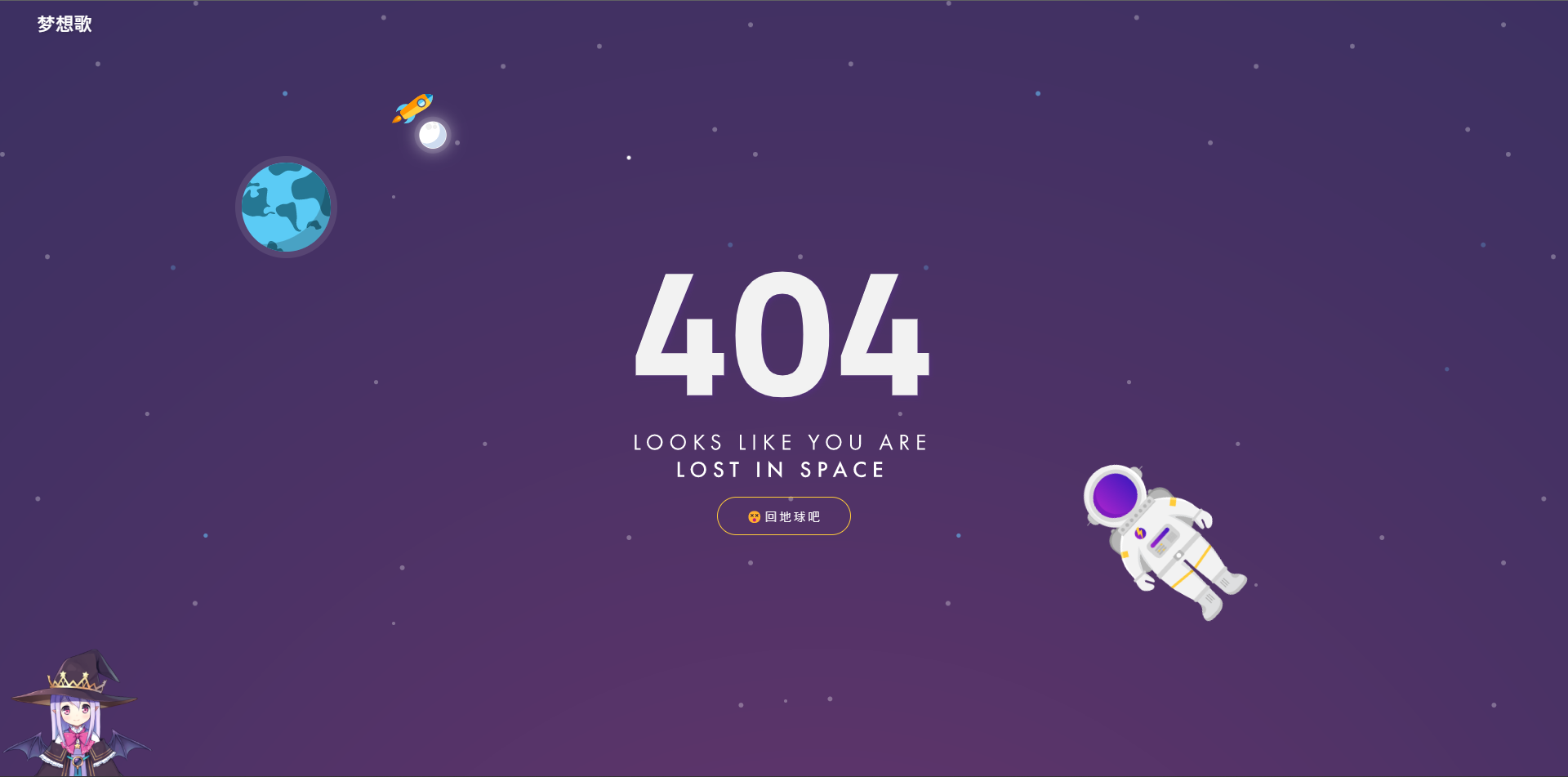
4. Since frontend-backend separation is the mainstream approach, please implement pages as needed. Accessing [http://localhost:8081](http://localhost:8081) will redirect to a 404 page.
### Configuration Tuning
**Enable Service Registry and Configuration Management**: We recommend using `Nacos`. You can refer to [Nacos Quick Start](https://nacos.io/en-us/docs/quick-start.html) for quick setup. Modify the configuration file according to your Nacos address: [bootstrap-dev.yml](https://github.com/shiyindaxiaojie/eden-demo-cola/blob/main/eden-demo-cola-start/src/main/resources/config/bootstrap-dev.yml):
```yaml
spring:
cloud:
nacos:
discovery: # Service Registry
enabled: true # Disabled by default, enable as needed
config: # Configuration Center
enabled: true # Disabled by default, enable as needed
```
**Modify Default Data Source**: This project uses `H2` in-memory database by default, with `Liquibase` automatically initializing SQL scripts at startup. If you're using an external MySQL database, adjust the connection information here: [application-dev.yml](https://github.com/shiyindaxiaojie/eden-demo-cola/blob/main/eden-demo-cola-start/src/main/resources/config/application-dev.yml), and remove any `H2` related configurations.
```yaml
spring:
# h2: # In-memory database
# console:
# enabled: true # Do not enable in production
# path: /h2-console
# settings:
# trace: false
# web-allow-others: false
datasource: # Data source management
username:
password:
url: jdbc:mysql://host:port/schema?rewriteBatchedStatements=true&useSSL=false&useOldAliasMetadataBehavior=true&useUnicode=true&serverTimezone=GMT%2B8
driver-class-name: com.mysql.cj.jdbc.Driver
```
Additionally, this project includes usage examples for common components like `Redis` cache, `RocketMQ` message queue, and `ShardingSphere` database sharding, all disabled by default via `xxx.enabled`. You can enable configurations as needed to complete component integration.
## How to Deploy
### FatJar Simple Deployment
Execute `mvn -T 4C clean package` to package into a runnable fat jar, then start with the following command:
```bash
java -Dserver.port=8081 -jar target/eden-demo-cola-start.jar
```
### Assembly Package Deployment
Execute `mvn -P assembly -T 4C clean package` to create compressed packages. Copy one of the following to your desired deployment directory:
* target/eden-demo-cola-start-assembly.zip
* target/eden-demo-cola-start-assembly.tar.gz
After extraction, you can find `startup.sh` or `startup.bat` scripts in the `bin` directory. Simply run them to start.
### Jib Image Deployment
Google Jib plugin allows you to build images without installing Docker.
```bash
mvn -T 4C -U package
mvn -pl eden-demo-cola-start jib:build -Djib.disableUpdateChecks=true -DskipTests
```
### Docker Container Deployment
Build images based on Spring Boot's layered feature. Ensure Docker is properly installed, then execute:
```bash
docker build -f docker/Dockerfile -t eden-demo-cola:{tag} .
```
### Helm Application Deployment
For application-centric deployment, we recommend using Helm to manage K8s resource descriptors. Use the following commands for installation and uninstallation:
```bash
helm install eden-demo-cola ./helm # Deploy resources
helm uninstall eden-demo-cola # Uninstall resources
```
## Continuous Integration
> CI/CD Tool Options: Jenkins, CODING, Codeup, Zadig, KubeVela
### Jenkins CI
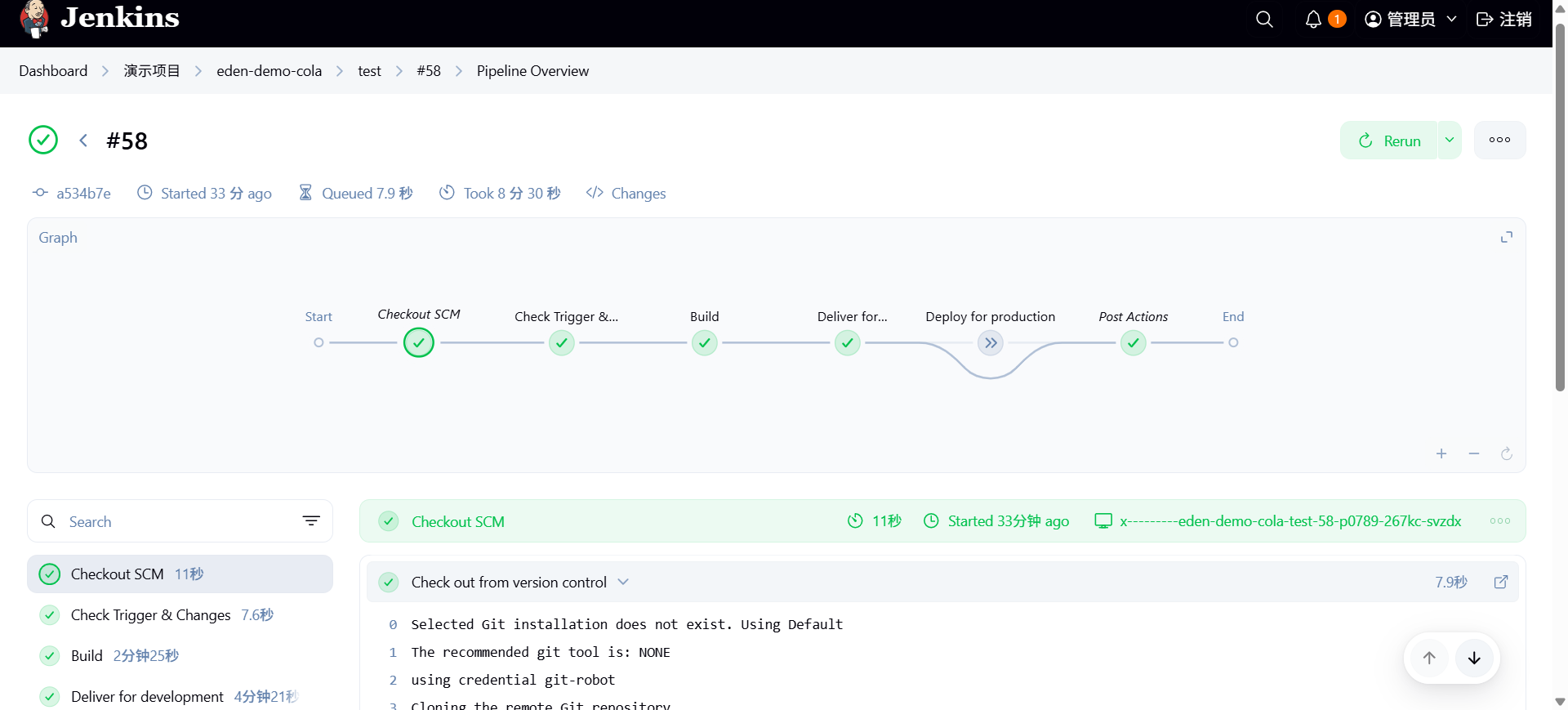
The following demonstrates continuous build and deployment using Jenkins.
### CODING CI
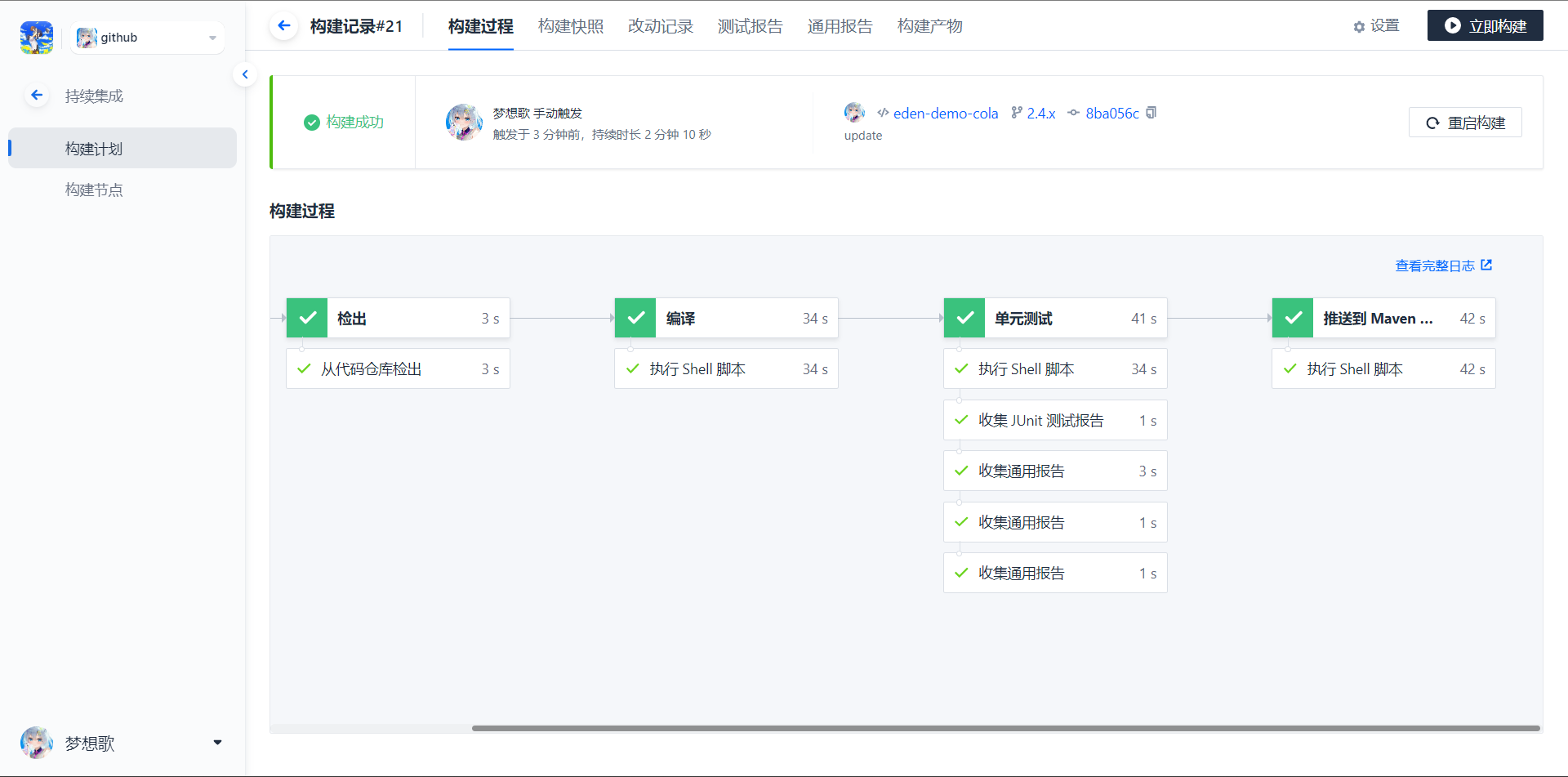
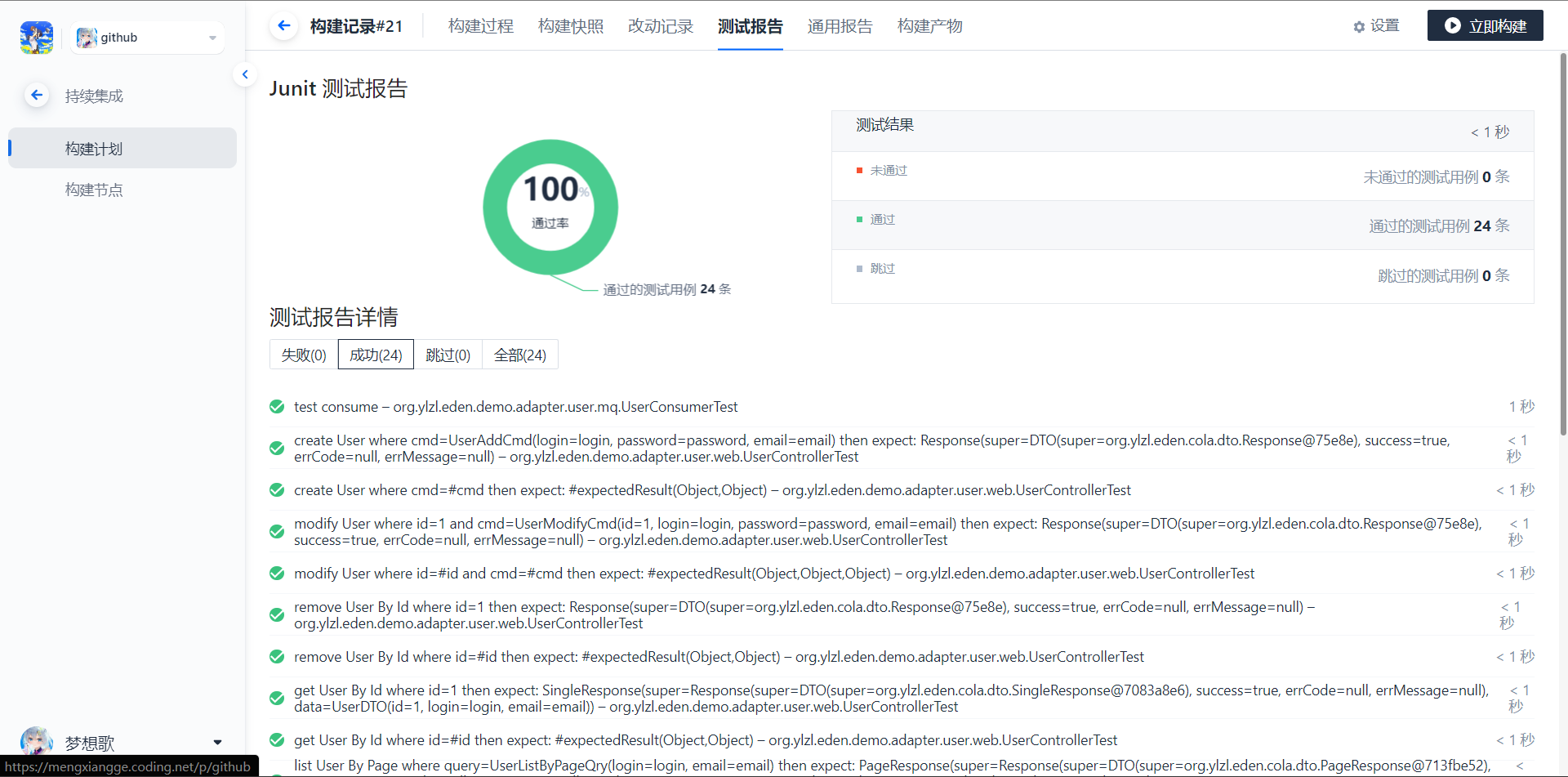
The following demonstrates continuous build and deployment using CODING. [Anchor Link](https://mengxiangge.netlify.app/2022/08/10/devops/coding%20%E6%8C%81%E7%BB%AD%E9%83%A8%E7%BD%B2%E5%AE%9E%E8%B7%B5/?highlight=coding)
## Best Practices
### DDD Domain-Driven Design
This project uses RBAC (Role-Based Access Control) as an example to demonstrate how to implement DDD in COLA architecture.
**Strategic Design - Bounded Context Division**
The RBAC system is divided into four bounded contexts: User, Role, Permission, and Menu. Each context contains aggregate roots, gateway interfaces, and domain services. The RBAC context serves as a coordinator responsible for cross-context business orchestration.
```mermaid
graph TB
subgraph User Context
User[User Aggregate Root]
UserGateway[User Gateway]
UserDomainService[User Domain Service]
end
subgraph Role Context
Role[Role Aggregate Root]
RoleGateway[Role Gateway]
end
subgraph Permission Context
Permission[Permission Aggregate Root]
PermissionGateway[Permission Gateway]
end
subgraph Menu Context
Menu[Menu Aggregate Root]
MenuGateway[Menu Gateway]
end
subgraph RBAC Context
RbacDomainService[RBAC Domain Service]
end
User -.->|Assign| Role
Role -.->|Associate| Permission
Role -.->|Associate| Menu
RbacDomainService --> User
RbacDomainService --> Role
RbacDomainService --> Permission
```
#### Tactical Design
**Domain Model**
```mermaid
classDiagram
class User {
-Long id
-Login login
-Email email
-Password password
-UserStatus status
+create(login, email, password) User
+changeEmail(newEmail)
+changePassword(currentPassword, newPassword)
+activate()
+lock()
+unlock()
+disable()
+verifyPassword(plainPassword) boolean
+canLogin() boolean
}
class Role {
-Long id
-RoleCode code
-RoleName name
-String description
-RoleStatus status
-Integer sort
+create(code, name) Role
+updateInfo(name, description, sort)
+enable()
+disable()
+isEnabled() boolean
}
class Permission {
-Long id
-PermissionCode code
-String name
-PermissionType type
-Long parentId
-String description
-Integer sort
+create(code, name, type) Permission
+updateInfo(name, description, sort)
+setParent(parentId)
+isMenuPermission() boolean
+isButtonPermission() boolean
+isRoot() boolean
}
class Menu {
-Long id
-String name
-MenuPath path
-String icon
-Long parentId
-Integer sort
-MenuStatus status
-String component
+create(name, path, parentId) Menu
+updateInfo(name, icon, sort, component)
+updatePath(path)
+setParent(parentId)
+show()
+hide()
+isVisible() boolean
+isRootMenu() boolean
}
class Login {
<>
-String value
+of(value) Login
}
class Email {
<>
-String value
+of(value) Email
}
class Password {
<>
-String value
+of(plainPassword) Password
+matches(plainPassword) boolean
}
class RoleCode {
<>
-String value
+of(value) RoleCode
}
class RoleName {
<>
-String value
+of(value) RoleName
}
class PermissionCode {
<>
-String value
+of(value) PermissionCode
}
class MenuPath {
<>
-String value
+of(value) MenuPath
}
User *-- Login
User *-- Email
User *-- Password
Role *-- RoleCode
Role *-- RoleName
Permission *-- PermissionCode
Menu *-- MenuPath
User "1" -- "*" Role : Assign
Role "1" -- "*" Permission : Associate
Role "1" -- "*" Menu : Associate
```
**Domain Events**
```mermaid
sequenceDiagram
participant App as Application Layer
participant User as User Aggregate Root
participant EventPublisher as Event Publisher
participant EventHandler as Event Handler
App->>User: Create User
User->>User: Register UserCreatedEvent
App->>User: Get Domain Events
App->>EventPublisher: Publish Event
EventPublisher->>EventHandler: Handle UserCreatedEvent
EventHandler->>EventHandler: Send Welcome Email
App->>User: Clear Domain Events
```
#### Layered Architecture
**COLA Layers and DDD Mapping**
```mermaid
graph TB
subgraph Adapter Layer
Controller[REST Controller]
RpcProvider[RPC Provider]
end
subgraph Application Layer
Service[Application Service]
CmdExe[Command Executor]
QryExe[Query Executor]
Assembler[DTO Assembler]
end
subgraph Domain Layer
Entity[Aggregate Root/Entity]
ValueObject[Value Object]
DomainService[Domain Service]
DomainEvent[Domain Event]
Gateway[Anti-corruption Layer Interface]
end
subgraph Infrastructure Layer
GatewayImpl[Gateway Implementation]
Mapper[Data Mapper]
DataObject[Data Object]
EventHandler[Event Handler]
end
Controller --> Service
RpcProvider --> Service
Service --> CmdExe
Service --> QryExe
CmdExe --> Entity
CmdExe --> DomainService
CmdExe --> Gateway
QryExe --> Mapper
Entity --> ValueObject
Entity --> DomainEvent
DomainService --> Gateway
GatewayImpl -.->|Implements| Gateway
GatewayImpl --> Mapper
Mapper --> DataObject
EventHandler --> DomainEvent
```
**CQRS Command Query Separation**
```mermaid
flowchart LR
subgraph Input[" "]
A1[Controller]
A2[Controller]
end
subgraph Service[" "]
B1[CommandService]
B2[QueryService]
end
subgraph Executor[" "]
C1[CmdExe]
C2[QryExe]
end
subgraph Core[" "]
D1[Domain]
D2["-"]
end
subgraph Data[" "]
E1[Gateway]
E2[Mapper]
end
subgraph Storage[" "]
F1[(Database)]
F2[(Database)]
end
A1 -->|Command| B1 --> C1 --> D1 --> E1 --> F1
A2 -->|Query| B2 --> C2 -.->|Bypass Domain| E2 --> F2
style D1 fill:#90EE90,stroke:#333
style D2 fill:#f5f5f5,stroke:#ddd,stroke-dasharray: 5 5
style E1 fill:#90EE90,stroke:#333
style E2 fill:#FFB6C1,stroke:#333
```
| Type | Path | Characteristics |
|------|------|-----------------|
| Command (Write) | Controller → Service → CmdExe → Domain → Gateway → DB | Goes through Domain layer, ensures business rules |
| Query (Read) | Controller → Service → QryExe → Mapper → DB | Bypasses Domain layer, improves performance |
#### Code Structure
```
eden-demo-cola-domain/
├── user/ # User Bounded Context
│ ├── entity/ # Entities
│ │ ├── User.java # User Aggregate Root
│ │ └── UserStatus.java # User Status Enum
│ ├── valueobject/ # Value Objects
│ │ ├── Login.java # Login Account
│ │ ├── Email.java # Email
│ │ └── Password.java # Password
│ ├── event/ # Domain Events
│ │ ├── UserCreatedEvent.java # User Created Event
│ │ └── UserEmailChangedEvent.java
│ ├── domainservice/ # Domain Services
│ │ └── UserDomainService.java
│ ├── gateway/ # Anti-corruption Layer Interfaces
│ │ └── UserGateway.java
│ └── statemachine/ # State Machine
│ └── UserStateMachine.java
├── role/ # Role Bounded Context
│ ├── entity/
│ │ ├── Role.java # Role Aggregate Root
│ │ └── RoleStatus.java
│ ├── valueobject/
│ │ ├── RoleCode.java
│ │ └── RoleName.java
│ └── gateway/
│ └── RoleGateway.java
├── permission/ # Permission Bounded Context
│ ├── entity/
│ │ ├── Permission.java # Permission Aggregate Root
│ │ └── PermissionType.java
│ ├── valueobject/
│ │ └── PermissionCode.java
│ └── gateway/
│ └── PermissionGateway.java
├── menu/ # Menu Bounded Context
│ ├── entity/
│ │ ├── Menu.java # Menu Aggregate Root
│ │ └── MenuStatus.java
│ ├── valueobject/
│ │ └── MenuPath.java
│ └── gateway/
│ └── MenuGateway.java
└── rbac/ # RBAC Cross-context Coordination
└── domainservice/
└── RbacDomainService.java
```
#### Design Principles
| Principle | Description | Example |
|-----------|-------------|---------|
| Aggregate Root | Entry point of an aggregate, ensures consistency within the aggregate | User, Role, Permission, Menu |
| Value Object | No unique identifier, equality determined by attribute values | Login, Email, Password, RoleCode |
| Domain Event | Records important events that occur in the domain | UserCreatedEvent, UserEmailChangedEvent |
| Domain Service | Handles business logic across aggregates | UserDomainService, RbacDomainService |
| Anti-corruption Layer | Isolates domain layer from infrastructure layer | UserGateway, RoleGateway |
| Dependency Inversion | Domain layer defines interfaces, infrastructure layer implements | Gateway interface and GatewayImpl implementation |
### Git Multi-person Collaboration Branch Management
In the era of agile development, `GitFlow` seems inadequate. We've developed a simple and easy-to-use workflow for the team. [Anchor Link](https://www.processon.com/view/63d5d1fc56e18032d4a00998)
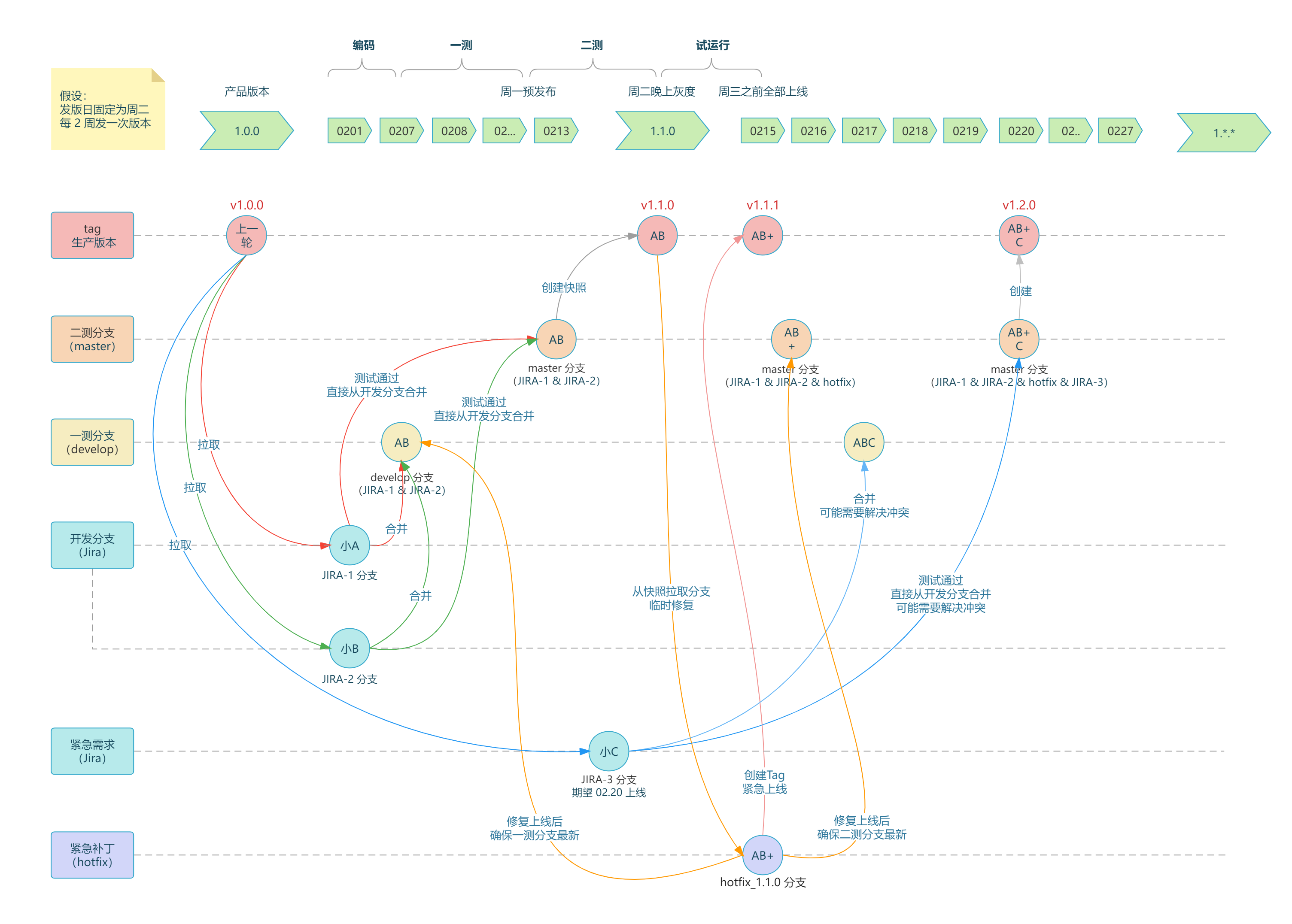
For detailed branch management strategies, Maven version management, and agile iteration cycles, please refer to the [Git Workflow](https://github.com/shiyindaxiaojie/eden-demo-cola/wiki/Git-Workflow).
### CAT Observability Solution
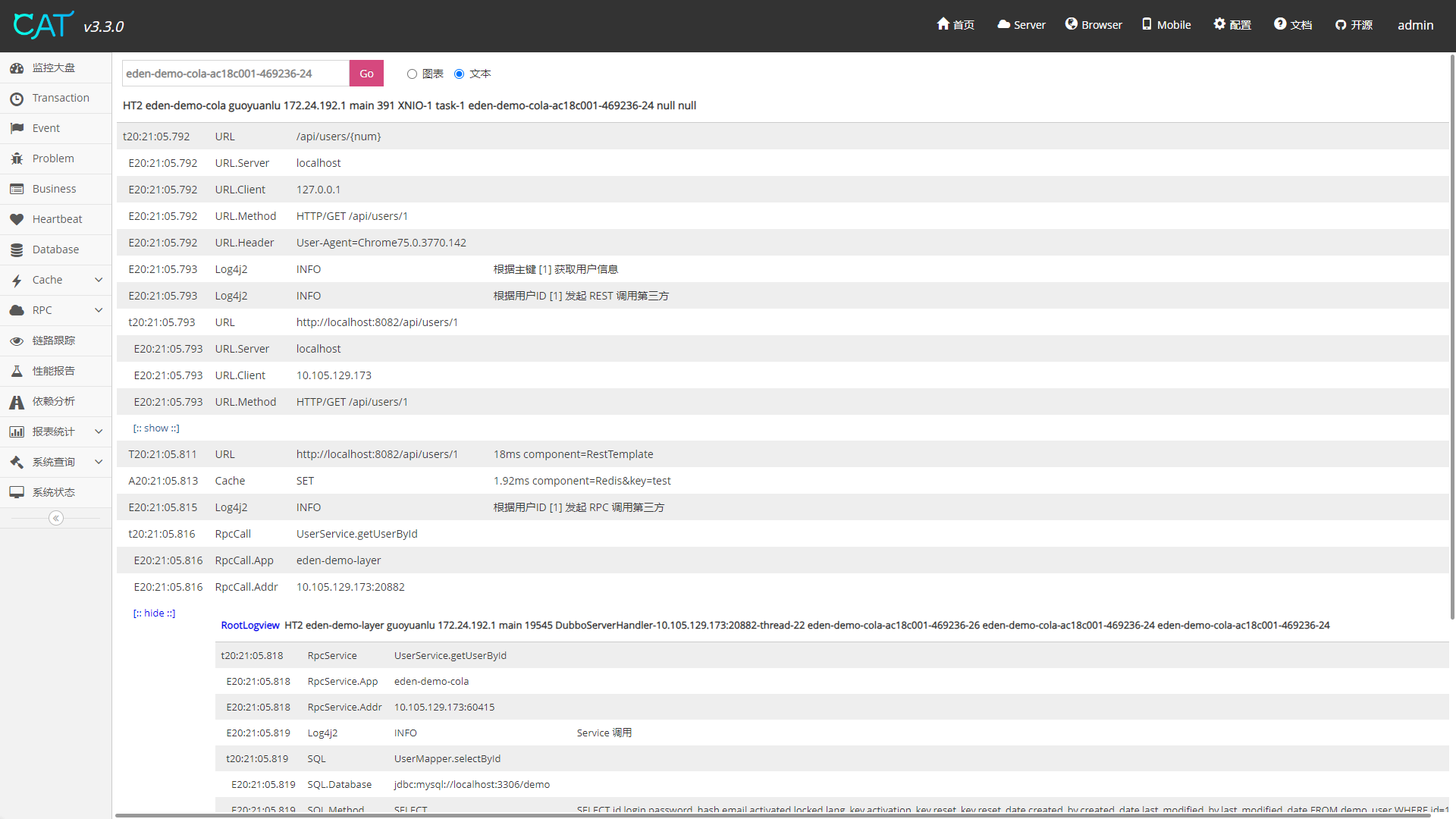
Analyze the entire trace including `HTTP` request latency, `RPC` call details, `Log` business logs, `SQL` and `Cache` execution time through `TraceId`. [Anchor Link](https://github.com/shiyindaxiaojie/cat)
### Sentinel Traffic Governance Solution
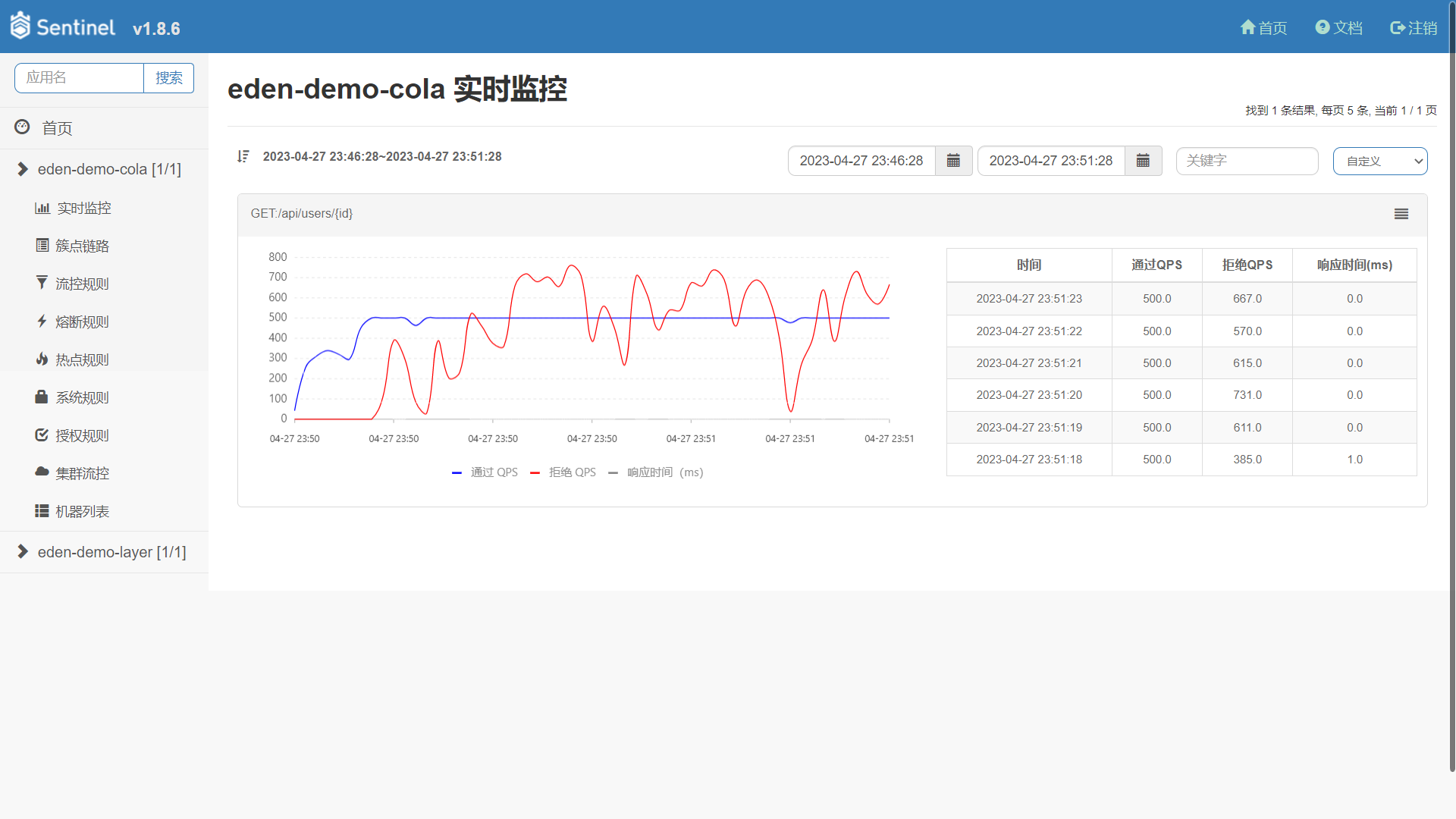
Configure flow control rules based on business load, and view interface QPS and rate limiting status at any time. [Anchor Link](https://github.com/shiyindaxiaojie/Sentinel)
### Arthas Online Diagnostic Tool
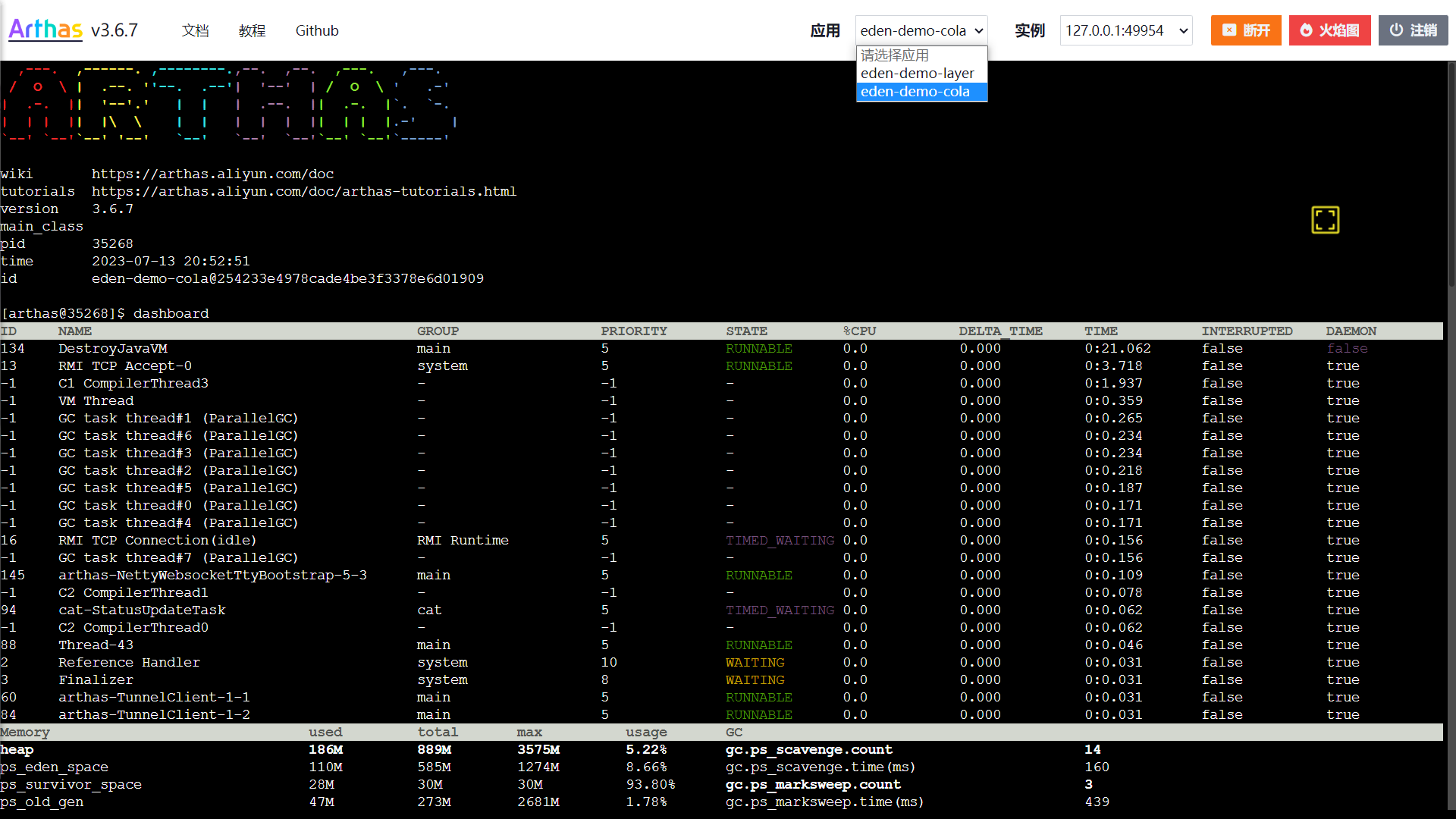
Use runtime probes for dynamic service discovery, out-of-the-box, allowing you to diagnose your application in low-load environments. [Anchor Link](https://github.com/shiyindaxiaojie/arthas)
## Versioning
The project version number follows the `x.y.z` format, where x is a numeric value starting from 0 and not limited to the 0-9 range. During the incubation phase, the first digit is fixed at 0, i.e., version numbers follow the `0.x.x` format.
* Incubation version: 0.0.1-SNAPSHOT
* Development version: 1.0.0-SNAPSHOT
* Release version: 1.0.0
Version iteration rules:
* 1.0.0 <> 1.0.1: Compatible
* 1.0.0 <> 1.1.0: Mostly compatible
* 1.0.0 <> 2.0.0: Incompatible
## Branch Management
Due to significant architectural changes between `Spring Boot 2.4.x` and `Spring Boot 3.0.x`, we maintain branches aligned with Spring Boot versions:
* 2.4.x branch for `Spring Boot 2.4.x`, minimum JDK 8.
* 2.7.x branch for `Spring Boot 2.7.x`, minimum JDK 11.
* 3.5.x branch for `Spring Boot 3.5.x`, minimum JDK 17.
* 4.0.x branch for `Spring Boot 4.0.x`, minimum JDK 17.
## Changelog
Please refer to [CHANGELOG.md](https://github.com/shiyindaxiaojie/eden-demo-cola/blob/main/CHANGELOG.md)