# CapslockX
**Repository Path**: snomiao/CapslockX
## Basic Information
- **Project Name**: CapslockX
- **Description**: description
- **Primary Language**: Unknown
- **License**: GPL-3.0
- **Default Branch**: main
- **Homepage**: None
- **GVP Project**: No
## Statistics
- **Stars**: 9
- **Forks**: 1
- **Created**: 2020-07-09
- **Last Updated**: 2026-02-25
## Categories & Tags
**Categories**: Uncategorized
**Tags**: None
## README
# CapsLockX - 💻 Get Hacker's Keyboard. Operate your computer like a **hacker**
CapsLockX is a modular hotkey script engine based on AutoHotkey. It allows you to operate your computer efficiently like a hacker in a movie without ever taking your hands off the keyboard. It comes packed with functions that are intuitive and easy to use: enhanced editing, virtual desktop and window management, mouse simulation, in-app hotkey enhancement, JS mathematical expression calculation, and many more multifunctional features are there for you to personally customize.
Here is a tiny online demo to show you the feeling how WASD Mouse + HJKL Keyboard works - [Try CapsLockX](https://snomiao.github.io/capslockx.js/)
Docs in Languages:
**[English Docs (ChatGPT Translated)](https://capslockx.snomiao.com/)**
**[简体中文 説明](./docs/README.zh.md)**
**[See Any Language Docs (Google Translated)](https://capslockx.snomiao.com/)**
---
## Badges Wall 📛 Badges
[](https://github.com/Program-in-Chinese/overview),
[](https://996.icu)
[](https://github.com/snolab/CapsLockX/blob/master/LICENSE.md)


[](https://github.com/snolab/CapsLockX/stargazers)

[](https://github.com/snolab/CapsLockX/actions/workflows/gh-pages-release.yml)

[](https://www.jsdelivr.com/package/gh/snolab/capslockx)
[](https://www.npmjs.com/capslockx)
[](https://github.com/snolab/CapsLockX/actions/workflows/npm-publish.yml)


[](https://community.chocolatey.org/packages/CapsLockX/)
[](https://github.com/snolab/CapsLockX/actions/workflows/choco-push.yml)
[](https://community.chocolatey.org/packages/CapsLockX/)
---
## Why?
CapsLockX was created to address several common frustrations that many computer users face on a daily basis. Here are some of the main reasons why CapsLockX exists:
1. **Efficient Window Management**: Modern computer usage often involves juggling multiple windows and virtual desktops, especially for professionals working on complex projects. CapsLockX provides intuitive hotkeys for managing virtual desktops and windows, making it easy to switch between tasks seamlessly without losing focus.
2. **Enhanced Text Editing**: Moving between the typing area and the editing control area can be cumbersome, especially for heavy typists or programmers. CapsLockX introduces Vim-like keybinds and other enhancements that allow for efficient text navigation and editing directly from the keyboard.
3. **Mouse Simulation**: Constantly switching between the keyboard and the mouse can disrupt workflow and lead to repetitive strain injuries (RSI). CapsLockX solves this by enabling comprehensive mouse emulation using the keyboard, allowing users to perform mouse actions with simple key combinations.
4. **Streamlined Shortcut Management**: Different applications often have their own sets of shortcuts, which can be hard to remember or inefficiently placed. CapsLockX provides a unified way to enhance and customize hotkeys within various applications, allowing for a more cohesive and efficient working environment.
5. **Mathematical Expression Calculation**: For users who frequently need to perform calculations, CapsLockX offers a way to quickly evaluate JavaScript mathematical expressions directly from the keyboard, streamlining workflows that involve frequent calculations.
6. **Multifunctional Customization**: CapsLockX is modular and highly customizable, allowing users to tailor the hotkey scripts to their specific needs. Whether you need specific functions for coding, writing, designing, or managing tasks, CapsLockX can be adapted to meet those requirements.
7. **Portable and Open Source**: CapsLockX is designed to be a portable tool that can be easily transferred and used across different systems. As an open-source project, it also provides transparency and community-driven improvements, ensuring that the software remains secure and continuously enhanced.
In summary, CapsLockX aims to make computer interaction more efficient, ergonomic, and customized to individual workflows, helping users operate like a **hacker** in movies, quickly achieving their tasks without breaking concentration.
## Beginner's Quick Start Tutorial 📖 Tutorial
### Simple Quick Start Tutorial (Completion of this section is considered the beginning of mastering CapsLockX)
CapsLockX has four core functions: **window management**, **mouse emulation**, **arrow key emulation**, and application-specific hotkeys. This beginner tutorial will teach you the first three core functions.
First, get CapsLockX: download this zip file: [Download JSDelivrCDN - Release Package.zip](https://cdn.jsdelivr.net/gh/snolab/CapsLockX@gh-pages/CapsLockX-latest.zip)
After unzipping, open `CapsLockX.exe` within the CapsLockX folder, get past the simple beginner tutorial, and then try out the following functions in the left and right-hand feature areas to understand the capabilities of CapsLockX.
Once CapsLockX is started, it will **not affect** the functionality of other keys on your keyboard. The following features are triggered only when you press `CapsLockX + combination keys`.
Left-hand feature area:
- Window management: `CapsLockX + 1234567890` switches to the `n`th virtual desktop, `CapsLockX + ZXCV` for window operations (window switching, window closing, window arranging, transparency top-most).
- Mouse emulation function: Press `CapsLockX + WASD` to move the mouse (as simple as moving a character while playing a game), press `CapsLockX + QE` for left and right mouse clicks, `CapsLockX + RF` for scrolling up and down.
Right-hand feature area:
- Arrow key emulation: Open any text editor (such as Notepad), press `HJKL` to move the cursor, `YOUI` to move the page
After familiarizing yourself with the basic features, consult the quick reference guide below for more advanced functionalities.
---
## Advanced Reference Manual 🦽 Manual
### Installation and Use 🛠 Installation
#### Portable Program Package (for beginners, stable version) 📦 Packaged Bins
The source code package is the software itself, no need to compile, just unzip and use the green portable software. Source code + program package, the first one is recommended (the fastest).
1. [Download JSDelivrCDN - Release Package.zip](https://cdn.jsdelivr.net/gh/snolab/CapsLockX@gh-pages/CapsLockX-latest.zip)
2. [Alternative Download CloudFlareCDN - Release Package.zip](https://capslockx.snomiao.com/CapsLockX-latest.zip)
3. [Alternative Download GitHub - Release Package.zip](https://github.com/snolab/CapsLockX/raw/gh-pages/CapsLockX-latest.zip)
4. [Alternative Download GitHub - Repository Program Package.zip](https://github.com/snolab/CapsLockX/archive/master.zip)
5. [Alternative Download BitBucket - Repository Program Package.zip](https://bitbucket.org/snomiao/capslockx/get/master.zip)
6. [Alternative Download for Mainland China Users - Gitee - Repository Program Package.zip (login required)](https://gitee.com/snomiao/CapslockX/repository/archive/master.zip)
You can use it after unzipping. Methods to start and set to auto-start: Double-click `CapsLockX.exe` to start the script. To add a startup item, enter shell:startup in the start menu - run, then create a shortcut for this program, and throw it in.
#### Command Line Installation (recommended for advanced users, can be updated automatically) 🖥️ Install by command
Choose any of the following, the 4th one is recommended for users in mainland China
1. `npx capslockx@latest`, -- Directly run with NPX, always run the latest version, recommended (requires installation of NodeJS)
2. `choco update capslockx && capslockx` -- Use [Chocolatey](https://community.chocolatey.org/packages/CapsLockX/) to install and use cup for automatic updates, recommended
3. `npm i -g capslockx && npx capslockx` -- npm global installation
4. `git clone https://gitee.com/snomiao/CapslockX && .\CapsLockX\CapsLockX.exe` -- Mainland China source code package (green software package) unzip and use, recommended for mainland China users
5. `git clone https://github.com/snolab/CapsLockX && .\CapsLockX\CapsLockX.exe` -- GitHub source code package (green software package) unzip and use
6. `winget capslockx` -- TODO #40
7. `scoop capslockx` -- TODO #41
## User Manual 📖 - Usage Manual
### Basic Operations
- Hold down `CapsLockX` to enter CapsLockX mode, at which point your keyboard will become a functional keyboard like the default mode of Vim (see key positions below).
- Press `CapsLockX+Space` at the same time to lock `CLX` mode, where `CLX` will be maintained until `CapsLockX` is pressed again next time. [Origin of Function](https://github.com/snolab/CapsLockX/issues/21)
### Module Description
CapsLockX by default loads some commonly used modules. The features and how to use them are listed below.
If you don't need certain modules, you can also directly delete the `.ahk` files in the `./Modules` directory, and then press `Ctrl + Alt + \` to reload.
You can also write your own `my-ahk.user.ahk` and put it in the `./User/` directory, and CapsLockX will automatically recognize and load them.
### Nightmares of Multitasking
#### Virtual Desktop Overview: Scenario Modes, Work Desks, Entertainment Desks, Project Categories...
Typically, a set of tasks a user is currently performing will include multiple windows. These windows combined can constitute a usage scenario, while multiple scenarios are likely to run at the same time, and some of them will run for a long time, without interference. This will involve a lot of window arrangement and virtual desktop switching operations, in these aspects, using CLX to manage your windows will bring a terrifying efficiency improvement.
Below are some examples of scenario combinations: Suppose you can study, work on several different jobs, chat with friends, play games, listen to BGM in the background, and have a paused movie ready to watch with family in the evening.
- Virtual desktop 1: Planning scenario: Schedule window + Multi-platform sync notes, e.g.: Google Calendar + Notion + Gmail.
- Virtual desktop 2: Learning scenario: Book reading window, note-taking window, e.g.: OneNote + Calibre, etc.
- Virtual desktop 3: Work scenario 1 (Front-end Development): Code editing + Documentation querying + Browser, e.g.: Chrome(dev) + VSCode + [stackoverflow](https://stackoverflow.com), etc.
- Virtual desktop 4: Work scenario 2 (Back-end Development): Code editing + Documentation querying + Backend terminal + Database browser, e.g.: DBeaver + VSCode(+bash) + [stackoverflow](https://stackoverflow.com), etc.
- Virtual desktop 5: Work scenario 3 (Script Development): Code editing + Documentation querying + Script target, e.g.: VSCode(+bash) + [stackoverflow](https://stackoverflow.com) etc.
- Virtual desktop 6: Work scenario 4 (3D Modeling and Rendering): 3D modeling software + Material searching, e.g.: Blender + Chrome.
- Virtual desktop 7: Work scenario 5 (3D Printing Slicing): Slicing software + Model searching window, e.g.: Cura + [thingiverse](https://thingiverse.com)
- Virtual desktop 7: Work scenario 6 (Video Processing): Editing + Material management, e.g.: PR + Everything.
- Virtual desktop 7: Work scenario 7 (Video Processing): Post-production + Documentation tutorial, e.g.: AE + Chrome.
- Virtual desktop 8: Writing scenario: Writing window, material referencing window, e.g.: Obsidian + Chrome (Google Scholar Index), etc.
- Virtual desktop 9: Communication scenario 1: Casual chats, e.g.: Telegram + Reddit + .
- Virtual desktop 9: Communication scenario 2: Work communication, e.g.: Slack + Skype + Gmail.
- Virtual desktop 9: Communication scenario 3: Presentation, e.g.: Google Meeting + (Vscode | Page application | Requirements document | Feedback document).
- Virtual desktop 0: Entertainment scenario 1: Playing games, e.g.: Age of Empires, Minecraft, Skyrim, Overcooked 2, etc.
- Virtual desktop 0: Entertainment scenario 3: Watching movies, listening to songs, e.g.: PotPlayer, Youtube Music, etc...
- ... More examples are welcome. Provide Issues or PRs for supplementation.
Snowstar does not recommend you handle too many tasks at the same time, but CapsLockX can save your thinking environment, greatly reducing the mental cost you incur during task switching, that is, saving you a lot of time rearranging windows and the resulting loss of attention.
(Note: If you like to handle many tasks at the same time, you might need not only a computer with not a small amount of memory but also a brain of significant capacity :D )
#### Enhancing the User Experience of Windows Window Switching - Win+Tab
When switching windows with Alt+Tab, if there are too many windows, a two-dimensional window pre-arrangement display will show up.
Generally speaking, Alt+Tab and Alt+Shift+Tab are purely left-handed keystrokes. If the user wants to select the window in the next line, they will instinctively press Alt+Tab many times.
However, the directional keys used for two-dimensional operations are often ignored because the right hand is usually on the mouse or on the J key.
Also, users will continue to hold down the Alt key after releasing the Tab key to browse the windows and select the target window to switch to.
In CLX, Alt+WASD will be used instead of the arrow keys to perform multiline window switching directly with the left hand, so there is no need to press Shift to go back to the left.
Moreover, if a user needs to clean up or close multiple windows, they simply press Alt+X to batch clean multiple target windows while remaining within the window browsing interface.
In CLX, these features greatly improve the usability of Alt+Tab.
## TODO-Docs
Click to expand TODO-docs
#### Focus count: Active window, default active window, …
Each desktop has only one active focus window, and the virtual desktop can achieve automatic switching to the focus window of that virtual desktop when switching to it, achieving multiple task focuses (i.e., active windows).
#### Utilizing Multiple Screens - Multi-screening
#### Window Arrangement in the Era of 4K - Window arrange with 4k screen
Default window arrangement limitations in Windows 10:
1. Not applicable to multiple desktops.
2. Unnecessary window gaps are too large.
##### Window Management on Linux and Mac - Window Manager in Linux and mac
TODO: i3 Window Management
##### Window Management on Android and iOS - Window Manage in android
Two system-level solutions: Left-right top-bottom split screen, floating windows; Application level: floating components,
### Troubles with Editing Operations
#### The Distance Between the Typing Area and Editing Control Area
TODO Discussion on ThinkPad and Mac arrow keys, inspiration from VIM,
### Human Perception of Speed
TODO: World perception of exponential growth, focus, auditory, visual, tactile, VS conventional linear operations
### Troubles with the Graphical User Interface
TODO: Document: Introduction to mouse simulation function, movement in RPG games
### Shortcut Deficiencies in Software
TODO: Application enhancement module introduction
### The Usability of Portable Keyboards
TODO: FN key, arrow keys, editing operations, 61-key layout vs 87-key layout,
#### The Concept of Chording
TODO Various types of chording
TODO Calculation of information quantity increase with chording
## Module Helps
### ヘルプモジュール
もしCapsLockXのプラグインの開発方法を学びたいなら、以下の手順をご覧ください:
1. `Modules/@Help.ahk` を開き、CapsLockXプラグインの基本フォーマットを確認してください
2. それをコピーして、あなたのプラグイン名で保存してください
3. その機能をあなた自身が必要とするものに変更すれば、プラグインの開発は完了です!
#### 本モジュールの機能は以下をご覧ください
| 使用場所 | キー | 機能 |
| -------- | ----------------------- | -------------------------------- |
| グローバル | CapsLockX + / | 一時的にホットキーヒントを表示 |
| グローバル | CapsLockX + Alt + / | 🔗 CapsLockXの完全なドキュメントページを開く |
| グローバル | CapsLockX + Shift + / | 🕷 バグ報告、提案等を提出 |
### Anki 拡張モジュール
Anki 操作の強化
#### 主な機能/特徴
1. WASD または HJKL を使用してカードを高速で連続切り替え(かつ元に戻すことが可能)
2. Excel で2列の単語リストを作成し、全選択後にコピーし、Anki で Alt + i を押して単語リストを迅速にインポート
3. 4つのオプションを3つの方向キーに簡略化、左は簡単、下は普通、右は難しい、上は元に戻す
4. ゲームパッドと連携可能、XPadder を使用してゲームパッドのジョイスティックを方向キーにマッピング。詳細は bilibili [中二雪星怎背词 - 手柄怎么可以不用来背单词!](https://www.bilibili.com/video/av8456838/)をご覧ください
#### 説明
| モード | Anki 拡張モジュール | 説明 |
| -------------------- | :------------: | ---------------------------------------------------------- |
| Anki-学習画面で | `w または k または ↑` | 押す=元に戻す、離す=答えを表示 |
| Anki-学習画面で | `a または h または ←` | 押す=順調、離す=答えを表示 |
| Anki-学習画面で | `s または j または ↓` | 押す=普通、離す=答えを表示 |
| Anki-学習画面で | `d または l または →` | 押す=不慣れ、離す=答えを表示 |
| Anki-学習画面で | `q` | 前の画面に戻る |
| Anki-学習画面で | `c` | 新しいカードを追加 |
| Anki-学習画面で | `1 または NumPad1` | 難しい(元のキー配置) |
| Anki-学習画面で | `2 または NumPad2` | 不慣れ(元のキー配置) |
| Anki-学習画面で | `3 または NumPad3` | 普通(元のキー配置) |
| Anki-学習画面で | `4 または NumPad4` | 順調(元のキー配置) |
| Anki-学習画面で | `5 または NumPad5` | 元に戻す |
| Anki-学習画面で | `6 または NumPad6` | カードを一時停止 |
| Anki-学習画面で | `Alt + i` | クリップボードの内容を迅速にインポート(Tabで区切る) / 例えば、Excel からコピーできる |
| Anki-カード追加画面で | `Alt + s` | 追加 ボタンを押す |
OneNote 2016 - 2019 エンハンスメント
OneNote 2016 - 2019 のキーボード操作を簡単に強化し、キーボードを使って簡単に:ペンの変更、リンクの作成、ページの整理、ビューの調整などができます。
#### 雪星喵の主な機能
1. 日記を書くときは、最初にメモページで `Alt + T` を押してメモのタイトルに日付タグを追加します(将来の検索のため)。次に全体で `Win + Shift + N` を押して OneNote で今日のタグが付いたすべてのメモを検索し、今日の日記、トレーニング記録、毎日の読書リスト、プロジェクトの日報などを簡単に検索できるようにします。要するに、OneNote で日記を書くのはとても便利で、ボタンを押すだけで簡単に見つかります XD
2. 単語を選択して `Alt + K` を押すと、その単語の下に関連するすべてのページリンクがリストされ、索引ディレクトリを作成して OneNote をネットワークのように繋げます。
3. 新しいメモを作成し「私のクリップボード」と命名します。その後、テキストや画像をコピーすると、CLX がこのメモに自動的に追加します。これにより、情報を収集したり文章を引用したりするのが便利です。
4. `Alt + 1234567` でレベルを折りたたみ、異なる抽象レベルの考えを簡単に切り替えます。
#### キー配置デザイン(開発中)
| キー説明 | 役割 | 備考 |
| ----------------------- | ------------------------- | ---------- |
| ‘すべての OneNote 標準ホットキー’ | 元の機能 | |
| `Alt を押してから他のキーを押す` | OneNote の元のメニュー機能をトリガー | |
| `Alt + 1234567` | アウトラインのレベル1-7 に折りたたみ展開 | |
| `Alt + qwe asd r` | ツール、ペンの変更、ビュー | |
| `Alt + f` | タグを検索 | |
| `Alt + -=` | 数式関連 | |
| `Alt + m` | メモ、セクションの移動 | |
| `Alt + hjkl` | 様々なリンク機能 | |
| `Alt + zxcv` | 高度なコピー&ペースト | 詳細開発中 |
| `Alt + /` | ホットキーのヘルプ、ヒント | 開発中 |
| ‘F2 F3’ | 名前変更、メモ検索 | |
#### 詳細なキーテーブル / チートシート
| 適用先 | フォーマットホットキー | 機能 |
| ------------------------ | ----------------------------- | ------------------------------------------------------- |
| 全体 | `Win + Alt + N` | クイックメモリの最初のページを開く (Notion のようなホームページの概念の欠如を補完) |
| 全体 | `Win + Shift + N` | OneNote を開き、正確に今日のタグを検索 |
| OneNote2019 | `Alt + 1234567` | アウトライン:指定したレベルに折りたたみ展開 (強く推奨、高い
### 讯飞入力法フローティングウィンドウプラグイン
#### 使用法
| 対象 | キー | 機能説明 |
| ------ | :-----------: | --------------------- |
| 全体 | Win + Alt + H | 讯飞音声入力の起動/切替 |
#### 注
1. 讯飞音声がインストールされていない場合、自動的にダウンロードとインストールの案内を行います。
#### 効果は以下の画像の通り

### CLX - ブレインストーム 大脳風暴
任意の時間、任意の入力フィールドで、`CLX+b` キーを押して、AIによる入力支援を開始します。
#### キーの分布(開発中)
| キーの説明 | 機能 | 備考 |
| --------------- | --------------------------------------------------- | ---- |
| CLX + b | 現在選択されている内容を自動コピーし、指示を入力し、AIが入力を支援します | |
| CLX + Alt + b | アクティベーションコードを設定(現在は無料プランのみ、将来は機能強化が追加される予定) | |
| CLX + Shift + b | 利用可能な使用量を確認 | |
#### Protips:
##### いつでも会議記録を整理
1. 任意の入力フィールド内で、Win+Hを使って音声入力を呼び出し、言いたいことを話します。音声入力の正確さは気にせず、だいたいの意味を伝えるだけで大丈夫です。
2. 次に、全選択して`CLX+b`を押し、「要点とToDoリストを列記」と入力すると、AIが自動的に要点とToDoリストを整理してくれます。
##### いつでもどんな言語でも翻訳
1. 任意の入力フィールド内で、翻訳したいテキストを選びます。
2. 次に、全選択して`CLX+b`を押し、`to chinese:`とすると、AIが自動的に中国語に翻訳します。
### CLX - ブレインストーム 大脳風暴
任意の時間、任意の入力フィールドで、`CLX+b` キーを押して、AIによる入力支援を開始します。
#### キーの分布(開発中)
| キーの説明 | 機能 | 備考 |
| --------------- | --------------------------------------------------- | ---- |
| CLX + b | 現在選択されている内容を自動コピーし、指示を入力し、AIが入力を支援します | |
| CLX + Alt + b | アクティベーションコードを設定(現在は無料プランのみ、将来は機能強化が追加される予定) | |
| CLX + Shift + b | 利用可能な使用量を確認 | |
#### Protips:
##### いつでも会議記録を整理
1. 任意の入力フィールド内で、Win+Hを使って音声入力を呼び出し、言いたいことを話します。音声入力の正確さは気にせず、だいたいの意味を伝えるだけで大丈夫です。
2. 次に、全選択して`CLX+b`を押し、「要点とToDoリストを列記」と入力すると、AIが自動的に要点とToDoリストを整理してくれます。
##### いつでもどんな言語でも翻訳
1. 任意の入力フィールド内で、翻訳したいテキストを選びます。
2. 次に、全選択して`CLX+b`を押し、`to chinese:`とすると、AIが自動的に中国語に翻訳します。
### 編集強化プラグイン(TG YUIO HJKL)🌟
この世の中でVimモードのHJKLカーソル移動より素晴らしいものはありますか?
もちろんあります!
それは加速度付きのHJKL滑らかな編集体験です!あなたのカーソルを排水溝のコーナリングのような高級操作で動かしてみたくないですか?これを入れましょう!
| スコープ | Editモジュール | 説明 |
| ---------- | ------------------------ | --------------------------------- |
| 全局(基本) | `CapsLockX + h j k l` | 上下左右方向キー |
| 全局(基本) | `CapsLockX + y o` | Home End |
| 全局(基本) | `CapsLockX + u i` | PageUp PageDown |
| 全局(基本) | `CapsLockX + [ ]` | Shift+Tab と Tab |
| 全局(基本) | `CapsLockX + g` | エンター |
| 全局(進階) | `CapsLockX + t` | Delete |
| 全局(進階) | `CapsLockX + hl` | hl一緒に押して現在の単語を選択 |
| 全局(進階) | `CapsLockX + kj` | kj一緒に押して現在の行を選択 |
| 全局(進階) | `CapsLockX + h + t` | シフト後削除:大部分の場合でバックスペースの代替 |

### Surface ノートパソコンの機能拡張キー
様々なノートパソコンの壊れたキーボードを治療します。
1. 右Ctrlキーがない?Menuキーと右Ctrlキーを統合し、MenuをCtrlとして使用するか、CtrlをMenuとして使用できます。
2. Pauseキーがない?Win + Alt + Pでシステム設定情報を開くことができます。
3. 待補充
| モード | キー | 機能 |
| ---------------- | :------------------------------------ | ------------------------------------------ |
| 全体 | Win + Alt + P | Win + Pause相当、ノートパソコン専用 |
| 全体 | 右Ctrlを押す | Menuを押してメニューを表示 |
| 全体 | 右のMenuを押し続ける | Ctrlを押し続け、その間他のキーと組み合わせ可能 |
| Winキー模擬有効時 | ]を押し続けながら、[を押す | Winキーを押したのと同じ |
| Winキー模擬有効時 | RAlt+\| はAlt+Tabと同じですが、右手で操作 |
| 利用 | メディアキー モジュール | 説明 |
| ---- | ---------------------- | ----------------------------------------- |
| 全体 | `CapsLockX + F1` | オープン:マイコンピュータ |
| 全体 | `CapsLockX + F2` | オープン:電卓 |
| 全体 | `CapsLockX + F3` | オープン:ブラウザーホームページ |
| 全体 | `CapsLockX + F4` | オープン:メディアライブラリ(デフォルトは Windows Media Player) |
| 全体 | `CapsLockX + F5` | 再生:一時停止/再生 |
| 全体 | `CapsLockX + F6` | 再生:前の曲 |
| 全体 | `CapsLockX + F7` | 再生:次の曲 |
| 全体 | `CapsLockX + F8` | 再生:停止 |
| 全体 | `CapsLockX + F9` | 音量アップ |
| 全体 | `CapsLockX + F10` | 音量ダウン |
| 全体 | `CapsLockX + F11` | ミュート |
>>> 入力: # マウスシミュレータープラグイン( WASD QERF )
> 昔から、私は常にキーボード愛好者を自称していました。おそらく、以前モデルを作っていたときに指関節を痛めたことがきっかけで、キーボードの重度ユーザーになったのでしょう。さまざまなキーボードアクセラレーターツールを使いこなし、各種ショートカットを積極的に覚え、できるだけマウスを使わないように努め、さらには vim や emacs を学びました。しかし、多くの場合、特にグラフィカルインターフェイスが主流の時代において、マウスは代替不可能な存在です。
—— 上記は [SimClick 模拟点击](https://github.com/rywiki/simclick) の作者の言葉で、マウスをグリッド細分化方式でシミュレートする作品であり、本プロジェクトと補完的に使用できます。
—— [秦金伟](http://rsytes.coding-pages.com/) による推薦
#### 機能
- 本モジュール使用のキーエリア:CapsLockX + QWER ASDF
- デバイスを使用して、非常に快適に WASD QE RF を使って【完全な】マウス機能をシミュレートできます。私を信じてください、この手触りを試した後、あなたはこれに魅了されるでしょう。
- ポインタ移動時にさまざまなボタンやハイパーリンクに自動吸着します。スクロールホイールの指数関数的な加速度スクロールメカニズムにより、長い文章やウェブページを恐れることはありません。
- 効果は以下の図の通りです:

#### 使用方法
| 作用 | キー | 説明 |
| ---- | --------------------------------------- | ---------------------------------------- |
| グローバル | `CapsLockX + w a s d` | マウス移動(上下左右) |
| グローバル | `CapsLockX + ad` | HJKL キーをスクロールモードに切り替える(上下左右スクロール) |
| グローバル | `CapsLockX + r f` | 垂直スクロールホイール(上下) |
| グローバル | `CapsLockX + Shift + r f` | 水平スクロールホイール(左右) |
| グローバル | `CapsLockX + Ctrl + Alt + r f` | 垂直スクロール自動(上下) |
| グローバル | `CapsLockX + Ctrl + Alt + Shift+ r f` | 水平スクロール自動(左右) |
| グローバル | `CapsLockX + rf` | rf 同時押しはマウス中ボタンに相当 |
| グローバル | `CapsLockX + e` | マウス左クリック |
| グローバル | `CapsLockX + q` | マウス右クリック |
#### 操作の詳細
AD を連続して素早く押すとステップ移動
```
### JavaScript 計算 (NodeJS のインストールをお勧めします)
| 適用範囲 | キー | 効果 |
| -------- | --------------- | -------------------------------------- |
| グローバル | `CapsLockX + -` | 現在の選択の JavaScript 式を計算し、置き換える |
| グローバル | `CapsLockX + =` | 現在の選択の JavaScript 式を計算し、置き換える |
```
### ウィンドウ拡張プラグイン (CLX + 1234567890 ZXCV)
#### 機能概要
Windows 10 標準搭載の10個の仮想デスクトップ、マルチディスプレイでのウィンドウ自動整列、半透明での最前面表示を有効活用(注:タスクバーと AltTab 関連の機能は現時点で Windows 11 と互換性がありませんが、ウィンドウ整列機能は正常に動作します。)
1. ウィンドウ切り替え:`CapsLockX + [Shift] + Z`
2. ウィンドウ閉じる:`CapsLockX + [Shift] + X`
3. ウィンドウ整列:`CapsLockX + [Shift] + C`
4. ウィンドウ最前面固定:`CapsLockX + [Shift] + V`
5. 左手によるウィンドウ管理:`Alt + Tab` の画面で、`WASD` でウィンドウを切り替え、`X` でウィンドウを閉じます。
6. 仮想デスクトップの効率的な使用:`CapsLockX + 0123456789` で仮想デスクトップを切り替え、増減。`Shift` キーを加えることで現在のウィンドウを移動可能。
7. バーチャルマシンとリモートデスクトップの迅速な切り離し:左側で `Shift + Ctrl + Alt` をダブルクリック。
#### 効果図
- Alt + Tab 管理ウィンドウ拡張

- CapsLockX + C 一発整列ウィンドウ(この GIF は古いバージョンで録画したため少しカクついていますが、新バージョンでは API を最適化しているため滑らかです)

#### 使用方法(Alt+Tab と CapsLockX)
| スコープ | ウィンドウ拡張モジュール | 説明 |
| ------------ | ------------------------------------- | ------------------------------------- |
| Alt+Tab 画面 | `Q E` | 左右で複数デスクトップを切り替え |
| Alt+Tab 画面 | `W A S D` | 上下左右でウィンドウ選択を切り替え |
| Alt+Tab 画面 | `X C` | 選択したウィンドウを閉じる(現在 X と C に違いはありません) |
| Win+Tab ビュー | `Alt + W A S D` | ウィンドウ選択を切り替える |
| グローバル | `Win + [Shift] + B` | トレイタスクに移動(Windows システム標準ホットキー) |
| グローバル | `Win + [Shift] + T` | タスクバータスクに移動(Windows システム標準ホットキー) |
| グローバル | `Win + Shift + hjkl` | ウィンドウ間で方向に沿ってフォーカスを切り替え |
| タスクバー | `Ctrl + W または Delete` | トレイアイコンまたはタスクバータスク上で、終了ボタンを選択する |
| グローバル | `CapsLockX + 1 2 ... 9 0` | 第1から第12のデスクトップに切り替え |
| グローバル | `CapsLockX + Shift + 1 2 ... 9 0 - =` | 現在のウィンドウを第nデスクトップに移動(あれば) |
| グローバル | `CapsLockX + Alt + Backspace` | 現在のデスクトップを削除(全ウィンドウは前のデ
```
### クイック入力
| モード | クイック入力 | 説明 |
| ------ | ------------ | -------------------------------------------------- |
| 全体 | `#D#` | 日付入力:`(20220217)` |
| 全体 | `#T#` | 時間入力:`(20220217.220717)` |
| 全体 | `#DT#` | 日時入力:`2022-02-17 22:07:33` |
| 全体 | `#NPW#` | ランダムな数字パスワード入力例: `7500331260229289`|
| 全体 | `#PW#` | ランダムな数字と文字のパスワード入力例: `yyCTCNYodECTLr2h` |
| 全体 | `#WPW#` | ランダムな数字と文字のパスワード入力例: `FtD5BB1m5H98eY7Y` |
| 全体 | `#SPW#` | ランダムな数字、文字、記号のパスワード入力例: `/})y+xK]z~>XKQ+p` |
```
25分間の固定サイクルで休憩を通知します。
`CapsLockX + ,` で設定を開いて、EnableScheduleTasks=1 に設定することでこのプラグインを有効化できます。
- トマトタイマーによる時間報告を使用します(00分と30分に作業ベルが鳴り、毎時25分と55分に休憩ベルが鳴ります)(事前に定期タスクを有効にする必要があります)
```ini
UseTomatoLife=1
```
- トマトタイマー使用時に自動でデスクトップを切り替えます(休憩用デスクトップは1、作業用デスクトップは2)
```ini
UseTomatoLifeSwitchVirtualDesktop=1
```
注意:音声のみが必要でデスクトップの自動切り替えが不要な場合は、このChromeプラグインも試してみてください。[Tomato Life - Chrome ウェブストア](https://chrome.google.com/webstore/detail/25min-tomato-life/kkacpbmkhbljebmpcopjlgfgbgeokbhn)
注意:このプラグインは独立したプロジェクトとして分離されています。トマトタイマーが気に入った場合は、雪星のtomato-lifeプロジェクトをご覧ください:[snomiao/tomato-life](https://github.com/snomiao/tomato-life)
Win + Lを押すと画面がロックされ、それと同時にスクリーンが自動的にオフになります。これは就寝準備の際に画面の明るさが目に刺さらないようにするのに便利です……
Win + Alt + Lを押すと、即座にスクリーンをオフにすることができます。こちらも就寝準備の際に役立ち、画面の明るさが目に刺さらないようにします……
## Past and Future 🛰
### Production Background (Autumn of 2017) 🍁 Background
> I often write code…
> At first, I was used to using the mouse with my right hand... later I found it a bit far to put the mouse on the right... so I switched to using the mouse with my left hand.
> After switching to the left hand, I realized I still had to take it off the keyboard... so I made a script that simulates the mouse with the WASD keys. (Then I could keep playing with the computer with my right hand under my chin)
> Later I wrote more and more scripts and put some of the common ones together to load...
### Development RoadMap 🛰️ RoadMap
The core philosophy of CapsLockX is to simplify system operation logic, improve operation efficiency, and not conflict with existing habitual key positions.
1. [x] Press CapsLockX + - key to display corresponding help (the current display style is quite rough)
2. [ ] i18n (eh this really should exist)
3. [ ] Auto-update (although git pull is also fine)
4. [ ] Tutorial for first-time users (this is a bit simple now...)
5. [ ] Plugin manager (although the file system could handle it too)
6. [ ] Auto-sync of configuration (though throwing it in OneDrive is usually enough)
7. [ ] A user-friendly options configuration UI (though changing ini isn't that hard)
8. [ ] Execute external code (Python, Nodejs, external AHK, Bash, …) (although running a script isn't much trouble)
9. [ ] Can be install with "irm https://get.capslockx.com | iex"
If you have any ideas or suggestions, please propose them here:
[Issues · snomiao/CapslockX](https://github.com/snolab/CapsLockX/issues)
### Key Combination Meaning Design ⌨ Chore Design
Win + series are generally used for operating system functions, desktop window application process management, input method, output device (display, multiple screens) management.
Alt + series typically denote invocation of application internal functions, their meanings should be equivalent to pressing the same function button, or jumping to a specific function interface.
Ctrl + series as above, but used more frequently and it's very likely that there is no button with the same function.
Ctrl + Alt + same as above, but generally for global hotkeys.
The Shift key is used to slightly change the meaning of the above functions (such as reverse operations like Shift+Alt+Tab, or extended function range like Shift+Arrow keys to adjust the selection, etc.)
## Compares
### CapsLockX vs. Similar Projects Function Comparison ⚔ Feat Compare Matrix
Updated (20200627) The information may become outdated over time
| Feature\Project | [CapsLockX](https://github.com/snolab/CapsLockX) | [Vonng/CapsLock](https://github.com/Vonng/CapsLock) | [coralsw/CapsEz](https://github.com/coralsw/CapsEz) | [CapsLock+](https://capslox.com/capslock-plus/) |
| :------------------------------ | :----------------------------------------------- | :-------------------------------------------------- | :-------------------------------------------------- | :---------------------------------------------- |
| Mouse Simulation | ✅ Smooth and complete | ✅ No scroll wheel | 🈚 None | 🈚 None |
| Expression Calculation | ✅ Nodejs or JScript | 🈚 None | 🈚 None | ✅ TabScript (Snippet + Javascript) |
| Window Management | ✅ Strong | ✅ Available | ✅ Available | ✅ Strong |
| Virtual Desktop Management | ✅ Available | 🈚 None | 🈚 None | 🈚 None |
| Editing Enhancement | ✅ Available (parabolic model) | ✅ Available | ✅ Available | ✅ Very comprehensive |
| Portable (No Install) | ✅ Yes | ✅ Yes | ✅ Yes | ✅ Yes |
| Enhanced Media Keys | Not all | ✅ All | 🈚 None | 🈚 None |
| Enhanced Clipboard | Weak | 🈚 None | 🈚 None | ✅ Available |
| Quick Application Launch | ✅ Plugins | ✅ Available | ✅ Available | ✅ Available |
| Application Feature Enhancement | ✅ Rich | 🈚 None | ✅ Available | 🈚 None |
| Bash Control | 🈚 None | ✅ Available | 🈚 None | 🈚 None |
| Quick Start Voice Input | ✅ iFLYTEK | 🈚 None | 🈚 None | 🈚 None |
| Quick Input of Time and Date | ✅ Available | | ✅ Available | |
| Bind Window to Hotkey | 🈚 None | 🈚 None | 🈚 None | ✅ Available |
| Quick Screen Rotation | ✅ Available | 🈚 None | 🈚 None | 🈚 None |
| Secondary Development | ✅ Documentation friendly | ✅ Possible | ✅ Possible | ✅ Possible |
| Memory Usage | ✅ About 2~3M | | | |
| Modularization | ✅ | 🈚 None | 🈚 None | 🈚 None |
| System | Win | Mac (main), Win (secondary) | Win | Win, [Mac](https://capslox.com/) |
| Supported Languages | English / Chinese / Any Language (by ChatGPT) | Chinese / English | Chinese | Chinese / English |
### CapsLockX Address 🔗 Project Urls
The following repositories are updated synchronously:
- GitHub: [https://github.com/snolab/CapsLockX](https://github.com/snolab/CapsLockX)
- Gitee: [https://gitee.com/snomiao/CapslockX](https://gitee.com/snomiao/CapslockX)
- Bitbucket: [https://bitbucket.org/snomiao/capslockx](https://bitbucket.org/snomiao/capslockx)
- Gitlab: [https://gitlab.com/snomiao/CapsLockX/](https://gitlab.com/snomiao/CapsLockX/)
Document Address 📄
- Automatic Translation Document Netlify CDN: [https://capslockx.netlify.com](https://capslockx.netlify.com)
- Automatic Translation Document CloudFlare CDN: [https://capslockx.snomiao.com](https://capslockx.snomiao.com)
Star Chart ⭐️
- [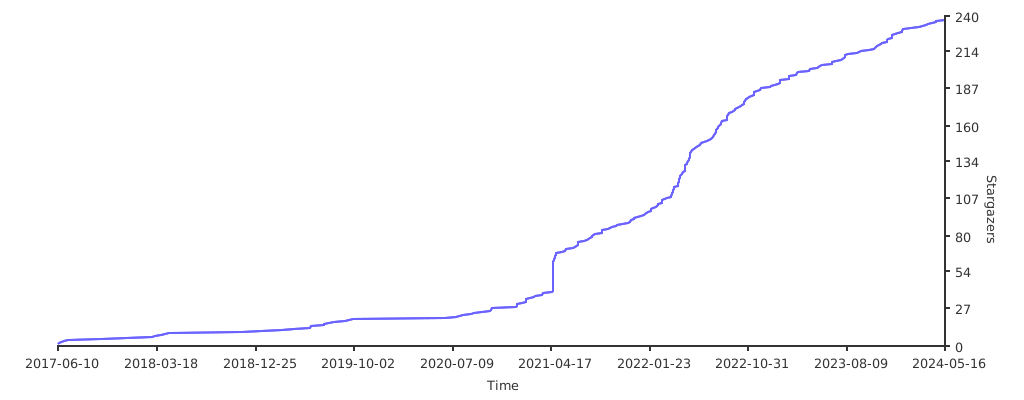](https://starchart.cc/snolab/CapsLockX)
### Similar Project Addresses 🔗 Similar Projects
- [Star Historys](https://star-history.t9t.io/#snolab/CapsLockX&wo52616111/capslock-plus&coralsw/CapsEz&Vonng/CapsLock)
- Source: [Vonng/CapsLock: Make CapsLock Great Again!](https://github.com/Vonng/CapsLock)
Design: [Capslock/design.md at master · Vonng/Capslock](https://github.com/Vonng/Capslock/blob/master/design.md)
- [coralsw/CapsEz: KeyMouse Tools](https://github.com/coralsw/CapsEz)
- [CapsLock+](https://capslox.com/CapsLock-plus/)
- [Capslox](https://capslox.com/cn/)
- CapsLock++ [matrix1001/CapsLock-plus-plus: ⌨Amazing, extendable, readable autohotkey scripts framework utilized by CapsLock.](https://github.com/matrix1001/CapsLock-plus-plus)
- [Power Keys | Liberate Computer Usage Efficiency](https://powerkeys.github.io/)
## Questions and Answers ❓ Questions
Related Communities:
- [CapsLockX's issues (can be used as a forum)](https://github.com/snolab/CapsLockX/issues) ✉️
- CapsLockX User Telegram Group: [t.me/CLX_users](https://t.me/CLX_users)📱
- CapsLockX User QQ Group 🐧: [100949388](https://jq.qq.com/?_wv=1027&k=56lsK8ko)
- QZ/VimD/TC/AHK QQ Group 🐧: 271105729
- AHK Advanced QQ Group 🐧: 717947647
- The Little Red Dot mechanical keyboard group 🐧: 199606725
For questions related to CapsLockX, you can directly join the group [@雪星](tencent://message?uin=997596439) or ask privately.
### Privacy and Security 🔒 Privacy
Considering that any software that can obtain administrative rights is quite dangerous to a user's operating system, CapsLockX must and is currently adopting an open-source approach. This allows the community to freely and arbitrarily inspect any part of the CapsLockX code that may be involved, to ensure that the security of all users' operating systems is not compromised by this software.
## Support ⭐️ Supports
How to help CapsLockX survive? If CapsLockX has been helpful to you:
1. ⭐️ Please star CapsLockX on Github Star
2. 🔗 Please share it with your friends.
3. 🌐 Welcome to help translate this documentation into different languages.
4. 🐞 Welcome to submit bugs and suggestions for improvement [issues](https://github.com/snolab/CapsLockX/issues)
5. Code PR submissions are welcome, even just to correct a typo ~
6. Welcome to create works about this software, such as recording tutorial videos to post on Youtube or Bilibili, Xue Xing will like your video.
7. 💰 Welcome to donate to the development of CapsLockX, each donation will be recorded in the list below:
- Aifadian ⚡️:[https://afdian.net/@snomiao](https://afdian.net/@snomiao)
- PAYPAL: [https://paypal.me/snomiao](https://paypal.me/snomiao)
- Alipay donation [snomiao@gmail.com (click to view QR code)](./docs/支付宝捐助.png)
- Wise donation [snomiao@gmail.com](https://wise.com/pay/r/vPlWg3Mh4zhabUk)
- [CapsLockX - Open Collective](https://opencollective.com/capslockx)
- ETH: [0xdc2eece11a9e09c8db921989e54b30375446e49e](https://etherscan.io/address/0xdc2eece11a9e09c8db921989e54b30375446e49e)
- [Development Roadmap](#发展路线-roadmap)
### Donation Records (as of 20210821) 📄 Donate Records
| Donation Date | Name | Channel | Amount | Comment |
| ------------- | -------------------------------- | --------------- | ----------- | -------------------------------------------------------------- |
| 2021-06-19 | \*\*Yu | Alipay QR | +50.00 CNY | A little support, in favor of independent developers |
| 2023-05-12 | Karawen | WeChat Transfer | +200.00 CNY | 🫡 (Salute) |
| 2023-06-09 | [@andriasw](github.com/andriasw) | Alipay Transfer | +66.66 CNY | for CapsLockX-mac, 66.66 is good (https://github.com/andriasw) |
| 2023-12-19 | Huidan | QQ Red Packet | +45.00 CNY | Buy the developer a coffee |
### Acknowledgements 🙏🏻 Thanks
- Thank you for the financial support from the above donors.
- Thanks to [Qin Jinwei](http://rsytes.coding-pages.com/) for the citation recommendation article and development suggestions: [2020-02-23 When Keyboard Simulates Mouse - Jianshu](https://www.jianshu.com/p/f757f56a7de6)
- Thanks to @He Xuren for helping with the dissemination: [CapsLockX – Operate the computer like a hacker! 【Xue Xing】 – AutoAHK](https://www.autoahk.com/archives/34996)
- Thank you to those who asked questions in the issues and in the group and helped to improve CapsLockX.
### Related Topics for References
- [秦金伟](http://rsytes.coding-pages.com/)
- [2020-02-23 当键盘模拟鼠标 - qwertc](https://mp.weixin.qq.com/s?__biz=MzIzNzczOTkzMw==&mid=2247483745&idx=1&sn=16f16c1fa02e1ef386a83f3023fb109d&chksm=e8c54b93dfb2c285e49fa8045d2380b20810768e3be043f364be146a598faf5f363bbb2623e7&scene=21#wechat_redirect)
- [2020-10-26 键盘模拟鼠标 2 - qwertc](https://mp.weixin.qq.com/s?__biz=MzIzNzczOTkzMw==&mid=2247484272&idx=1&sn=0ed1ff91bee008fc5c01dc0fe20e53ba&chksm=e8c54982dfb2c09493c88a0f7847ffb0b508598e0756ddd7e8ad94d1f31f65490388d6cff7a4&scene=21#wechat_redirect)
- [2021-03-11 capslockX-治愈鼠标手 - qwertc](https://mp.weixin.qq.com/s?__biz=MzIzNzczOTkzMw==&mid=2247484478&idx=1&sn=1518d7ec4dc08c1a72c08fcaff98550e&chksm=e8c54eccdfb2c7daed0ad9b8c03395e4211e029199374f4bc0dbdc9a8403c2dae86b740c95c5&scene=21#wechat_redirect)
- 2021 年 11 月,键盘模拟鼠标 3
- [2022-08-21 t0820 复制后匹配-siyuan-clx-截图 - qwertc](https://mp.weixin.qq.com/s?__biz=MzIzNzczOTkzMw==&mid=2247485441&idx=1&sn=848d5e6f3fb7c1e7b14100615ca7d0db&chksm=e8c542f3dfb2cbe5770fe19bb8b5c81935e52a4a686154e69104bc403ab6ce960d1b6ae429a9&scene=21#wechat_redirect)
- [2024-01-06 t0106 OpenAI 加持的 CapslockX - qwertc](https://mp.weixin.qq.com/s?__biz=MzIzNzczOTkzMw==&mid=2247485707&idx=1&sn=d40eea9f0b5bb81e3387ec592def4ed0&chksm=e8c543f9dfb2caef90939e2fafcb324fd757949c79399c55adfbab0940e70efd753fb6bf3837&token=1464360155&lang=zh_CN#rd)
- V2EX:
- [有没有办法将 Chrome OS 中的快捷键实现到 Windows 10 中 - V2EX](https://www.v2ex.com/t/778967)
- [推荐一下我的键位映射工具 MyKeymap - V2EX](https://v2ex.com/t/844432)
- [有多少人会把键盘上的 CapsLock 和 Backspace 对调? - V2EX](https://www.v2ex.com/t/855901)
- [分享一个用 CapsLock+H/J/K/L 模拟方向键的小工具 - V2EX](https://www.v2ex.com/t/318182)
- [推荐一个适合程序员的效率工具 AltPlus,左边大拇指按下 Alt 键,就可以像使用 vim 一样编程了. - V2EX](https://www.v2ex.com/t/800721)
- [CapsLockX - 像黑客一样操作电脑 - V2EX](https://v2ex.com/t/772052#reply1)
- Zhihu:
- [如何将电脑桌面划分为独立的两半? - 知乎](https://www.zhihu.com/questionz/23443944/answer/1670521971)
- [有哪位残友用的是单手键盘? - 知乎](https://www.zhihu.com/question/50621709/answer/1681247637)
- [怎么样才能只用键盘不用鼠标,包括任何指针触控设备,并优雅地使用电脑? - 知乎](https://www.zhihu.com/question/21281518/answer/1770669886)
- [如何将电脑桌面划分为独立的两半? - 知乎](https://www.zhihu.com/question/23443944/answer/1670521971)
- [我是职场达人,AutoHotKey 让我成为职场超人 - 知乎](https://zhuanlan.zhihu.com/p/60372361)
- [为什么知乎上这么多人推荐 HHKB,却不反复强调说该键盘不适合大多数程序员? - 知乎](https://www.zhihu.com/question/33690121/answer/3495460336)
- AutoAHK:
- [AutoHotKey 中文网专栏 - 知乎](https://www.zhihu.com/column/autoahk)
- [我是职场达人,AutoHotKey 让我成为职场超人 – AutoAHK](https://www.autoahk.com/archives/14636)
- [脱胎于 CapslockX 的雪星鼠标-键盘模拟鼠标 – AutoAHK](https://www.autoahk.com/archives/44126)
- [QZ——Arrary – AutoAHK](https://www.autoahk.com/archives/4133)
- [CapsLockX - 像黑客一样操作电脑! - AutoHotkey Community](https://www.autohotkey.com/boards/viewtopic.php?f=28&t=88593)
- [(10) What are some good career alternatives for a computer programmer with RSI? - Quora](https://www.quora.com/Repetitive-Strain-Injury-RSI/What-are-some-good-career-alternatives-for-a-computer-programmer-with-RSI)
- [simple internationalization function - Scripts and Functions - AutoHotkey Community](https://www.autohotkey.com/board/topic/50131-simple-internationalization-function/)
## Footer Catalog - Table of Contents
- [CapsLockX - 💻 Get Hacker's Keyboard. Operate your computer like a **hacker**](#capslockx----get-hackers-keyboard-operate-your-computer-like-a-hacker)
- [Version Wall - Badge Wall 📛 Badges](#version-wall---badge-wall--badges)
- [Beginner's Quick Start Tutorial 📖 Tutorial](#beginners-quick-start-tutorial--tutorial)
- [Simple Introduction Tutorial (Once you read this section, you're considered to have started using CapsLockX)](#simple-introduction-tutorial-once-you-read-this-section-youre-considered-to-have-started-using-capslockx-)
- [Advanced Reference Manual 🦽 Manual](#advanced-reference-manual--manual)
- [Installation and Usage 🛠 Installation](#installation-and-usage--installation)
- [Green Portable Package (Suitable for beginners, stable version) 📦 Packaged Bins](#green-portable-package-suitable-for-beginners-stable-version--packaged-bins)
- [Command Line Installation (Recommended for advanced users, supports auto-update)🖥️ Install by command](#command-line-installation-recommended-for-advanced-users-supports-auto-update️-install-by-command)
- [Usage Manual 📖 - Usage Manual](#usage-manual----usage-manual)
- [Basic Operations](#basic-operations)
- [Module Descriptions](#module-descriptions)
- [Nightmares of Multitasking](#nightmares-of-multitasking)
- [Virtual Desktop Overview: Scenarios Mode, Work Desktop, Entertainment Desktop, Project Categorization...](#virtual-desktop-overview-scenarios-mode-work-desktop-entertainment-desktop-project-categorization)
- [Improvement of User Experience in Windows Window Switching - Win+tab](#improvement-of-user-experience-in-windows-window-switching---wintab)
- [TODO-Docs](#todo-docs)
- [Focus Amount: Active Window, Default Active Window,...](#focus-amount-active-window-default-active-window)
- [Utilization of Multiple Screens - Multi-screening](#utilization-of-multiple-screens---multi-screening)
- [Window Arrangement in the 4K Era - Window arrange with 4k screen](#window-arrangement-in-the-4k-era---window-arrange-with-4k-screen)
- [Window Management in Linux and Mac - Window Manager in Linux and Mac](#window-management-in-linux-and-mac---window-manager-in-linux-and-mac)
- [Window Management in Android and iOS - Window Management in Android](#window-management-in-android-and-ios---window-management-in-android)
- [Troubles with Edit Operations](#troubles-with-edit-operations)
- [Estrangement between Typing Area and Editing Control Area](#estrangement-between-typing-area-and-editing-control-area)
- [The Concept of Chording](#the-concept-of-chording)
- [Troubles with Graphic User Interface](#troubles-with-graphic-user-interface)
- [Human Perception of Speed](#human-perception-of-speed)
- [Hotkey Flaws of Software](#hotkey-flaws-of-software)
- [Usability of Portable Keyboards](#usability-of-portable-keyboards)
- [Help Module](#help-module)
- [Functions of this module as follows](#functions-of-this-module-as-follows)
- [Anki Enhancement Module](#anki-enhancement-module)
- [Common Features/Characteristics](#common-featurescharacteristics)
- [Explanations](#explanations)
- [Figma Enhanced](#figma-enhanced)
- [Common Features/Characteristics](#common-featurescharacteristics-1)
- [Explanations](#explanations-1)
- [OneNote 2016 - 2019 Enhancement](#onenote-2016---2019-enhancement)
- [Common Features Used by XuexingMiao](#common-features-used-by-xuexingmiao)
- [Key Distribution Design (Under Development)](#key-distribution-design-under-development)
- [Detailed Key Table / CheatSheet](#detailed-key-table--cheatsheet)
- [Editing Enhancement Plugin (TG YUIO HJKL) 🌟](#editing-enhancement-plugin-tg-yuio-hjkl--)
- [Expanded Function Keys for Surface Laptops](#expanded-function-keys-for-surface-laptops)
- [Media Key Module](#media-key-module)
- [Mouse Simulation Plugin (WASD QERF)](#mouse-simulation-plugin-wasd-qerf-)
- [Features](#features)
- [How to Use as follows](#how-to-use-as-follows)
- [Operational Details](#operational-details)
- [JavaScript Calculation (Installation of NodeJS Recommended)](#javascript-calculation-installation-of-nodejs-recommended-)
- [Window Enhancement Plugin (CLX + 1234567890 ZXCV)](#window-enhancement-plugin-clx--1234567890-zxcv)
- [Brief Description of the Features](#brief-description-of-the-features)
- [Effect Pictures](#effect-pictures)
- [How to Use as follows (Alt+Tab and CapsLockX)](#how-to-use-as-follows-alttab-and-capslockx-)
- [Quick Input](#quick-input)
- [Pomodoro Timer](#pomodoro-timer)
- [Auto Screen Off when Locking Screen](#auto-screen-off-when-locking-screen)
- [Past and Future 🛰](#past-and-future-)
- [Creation Background (Autumn 2017) 🍁 Background](#creation-background-autumn-2017--background)
- [Development Path 🛰️ RoadMap](#development-path-️-roadmap)
- [Combination Key Meaning Design ⌨ Chore Design](#combination-key-meaning-design--chore-design)
- [Feature Comparison of CapsLockX and Similar Projects ⚔ Feat Compare Matrix](#feature-comparison-of-capslockx-and-similar-projects--feat-compare-matrix)
- [CapsLockX Project Urls 🔗 Project Urls](#capslockx-project-urls--project-urls)
- [Urls of Similar Projects 🔗 Similar Projects](#urls-of-similar-projects--similar-projects)
- [FAQs Related ❓ Questions](#faqs-related--questions)
- [Privacy and Security 🔒 Privacy](#privacy-and-security--privacy)
- [Support ⭐️ Supports](#support-️-supports)
- [Donation Records (Up to 20210821) 📄 Donate Records](#donation-records-up-to-20210821--donate-records)
- [Acknowledgements 🙏🏻 Thanks](#acknowledgements--thanks)
- [Related Topics](#related-topics)
- [Footer Catalog - Table of Contents](#footer-catalog---table-of-contents)
---