# clickhouse-jdbc-bridge
**Repository Path**: soros_gao/clickhouse-jdbc-bridge
## Basic Information
- **Project Name**: clickhouse-jdbc-bridge
- **Description**: No description available
- **Primary Language**: Unknown
- **License**: Apache-2.0
- **Default Branch**: master
- **Homepage**: None
- **GVP Project**: No
## Statistics
- **Stars**: 0
- **Forks**: 0
- **Created**: 2021-12-15
- **Last Updated**: 2021-12-15
## Categories & Tags
**Categories**: Uncategorized
**Tags**: None
## README
# ClickHouse JDBC Bridge
 
JDBC bridge for ClickHouse®. It acts as a stateless proxy passing queries from ClickHouse to external datasources. With this extension, you can run distributed query on ClickHouse across multiple datasources in real time, which in a way simplifies the process of building data pipelines for data warehousing, monitoring and integrity check etc.
## Overview
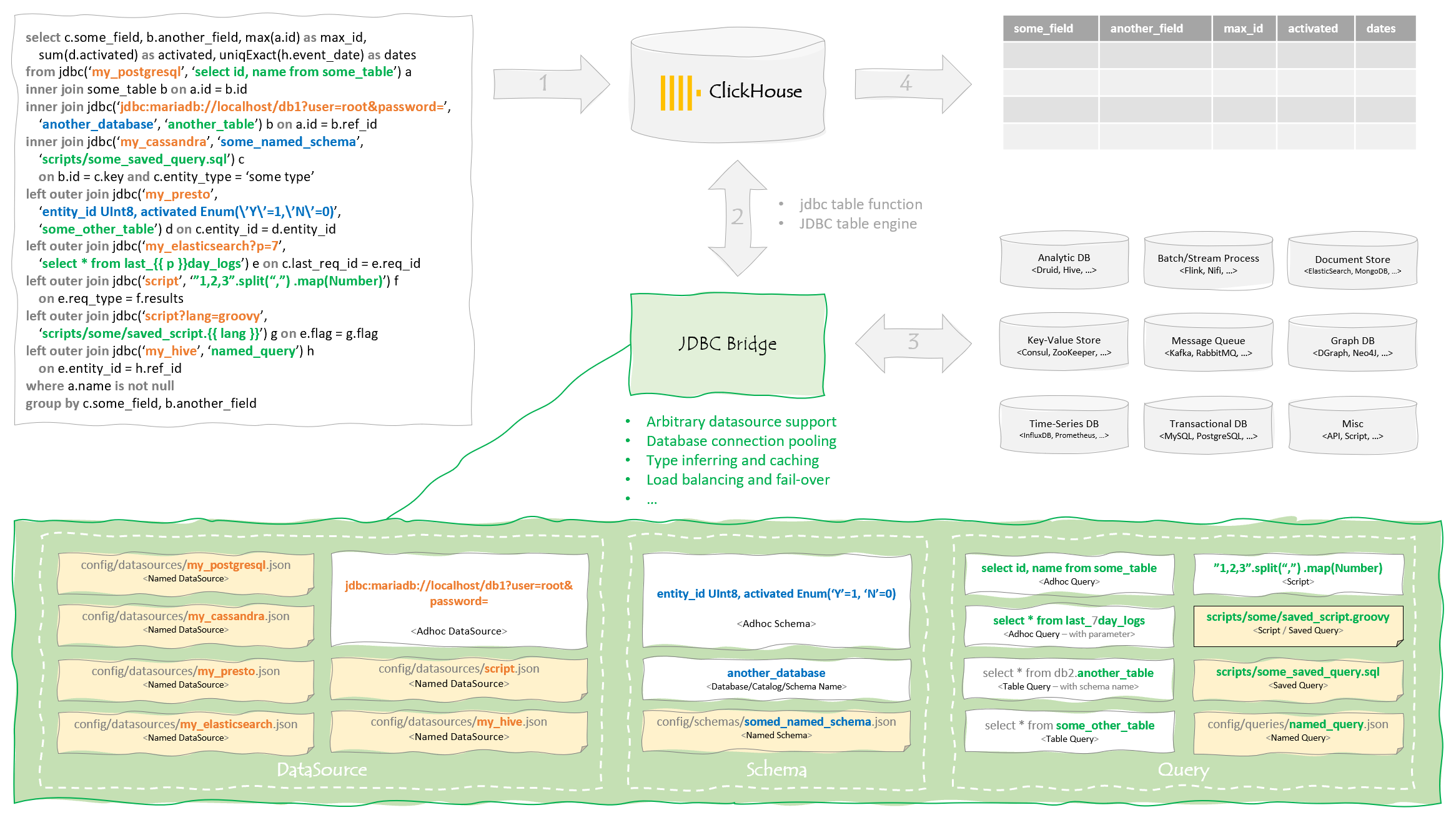
## Known Issues / Limitation
* Connection issue like `jdbc-bridge is not running` or `connect timed out` - see [performance section](#performance) and [this issue](https://github.com/ClickHouse/ClickHouse/issues/9609) for details
* Complex data types like Array and Tuple are currently not supported - they're treated as String
* Pushdown is not supported and query may execute twice because of type inferring
* Mutation is not fully supported - only insertion in simple cases
* Scripting is experimental
## Quick Start
* Docker Compose
```bash
git clone https://github.com/ClickHouse/clickhouse-jdbc-bridge.git
cd clickhouse-jdbc-bridge/misc/quick-start
docker-compose up -d
...
docker-compose ps
Name Command State Ports
--------------------------------------------------------------------------------------------------
quick-start_ch-server_1 /entrypoint.sh Up 8123/tcp, 9000/tcp, 9009/tcp
quick-start_db-mariadb10_1 docker-entrypoint.sh mysqld Up 3306/tcp
quick-start_db-mysql5_1 docker-entrypoint.sh mysqld Up 3306/tcp, 33060/tcp
quick-start_db-mysql8_1 docker-entrypoint.sh mysqld Up 3306/tcp, 33060/tcp
quick-start_db-postgres13_1 docker-entrypoint.sh postgres Up 5432/tcp
quick-start_jdbc-bridge_1 /sbin/my_init Up 9019/tcp
# issue below query, and you'll see "ch-server 1" returned
docker-compose run ch-server clickhouse-client --query="select * from jdbc('self?datasource_column', 'select 1')"
```
* Docker CLI
It's easier to get started using all-in-one docker image:
```bash
# build all-in-one docker image
git clone https://github.com/ClickHouse/clickhouse-jdbc-bridge.git
cd clickhouse-jdbc-bridge
docker build -t my/clickhouse-all-in-one -f all-in-one.Dockerfile .
# start container in background
docker run --rm -d --name ch-and-jdbc-bridge my/clickhouse-all-in-one
# enter container to add datasource and issue query
docker exec -it ch-and-jdbc-bridge bash
cp /etc/clickhouse-jdbc-bridge/config/datasources/datasource.json.example \
/etc/clickhouse-jdbc-bridge/config/datasources/ch-server.json
# you're supposed to see "ch-server 1" returned from ClickHouse
clickhouse-client --query="select * from jdbc('self?datasource_column', 'select 1')"
```
Alternatively, if you prefer the hard way ;)
```bash
# create a network for ClickHouse and JDBC brigde, so that they can communicate with each other
docker network create ch-net --attachable
# start the two containers
docker run --rm -d --network ch-net --name jdbc-bridge --hostname jdbc-bridge clickhouse/jdbc-bridge
docker run --rm -d --network ch-net --name ch-server --hostname ch-server \
--entrypoint /bin/bash yandex/clickhouse-server -c \
"echo 'jdbc-bridge9019' \
> /etc/clickhouse-server/config.d/jdbc_bridge_config.xml && /entrypoint.sh"
# add named datasource and query
docker exec -it jdbc-bridge cp /app/config/datasources/datasource.json.example \
/app/config/datasources/ch-server.json
docker exec -it jdbc-bridge cp /app/config/queries/query.json.example \
/app/config/queries/show-query-logs.json
# issue below query, and you'll see "ch-server 1" returned from ClickHouse
docker exec -it ch-server clickhouse-client \
--query="select * from jdbc('self?datasource_column', 'select 1')"
```
* Debian/RPM Package
Besides docker, you can download and install released Debian/RPM package on existing Linux system.
Debian/Ubuntu
```bash
apt update && apt install -y procps wget
wget https://github.com/ClickHouse/clickhouse-jdbc-bridge/releases/download/v2.0.2/clickhouse-jdbc-bridge_2.0.2-1_all.deb
apt install --no-install-recommends -f ./clickhouse-jdbc-bridge_2.0.2-1_all.deb
clickhouse-jdbc-bridge
```
CentOS/RHEL
```bash
yum install -y wget
wget https://github.com/ClickHouse/clickhouse-jdbc-bridge/releases/download/v2.0.2/clickhouse-jdbc-bridge-2.0.2-1.noarch.rpm
yum localinstall -y clickhouse-jdbc-bridge-2.0.2-1.noarch.rpm
clickhouse-jdbc-bridge
```
* Java CLI
```bash
wget https://github.com/ClickHouse/clickhouse-jdbc-bridge/releases/download/v2.0.2/clickhouse-jdbc-bridge-2.0.2-shaded.jar
# add named datasource
wget -P config/datasources https://raw.githubusercontent.com/ClickHouse/clickhouse-jdbc-bridge/master/misc/quick-start/jdbc-bridge/config/datasources/ch-server.json
# start jdbc bridge, and then issue below query in ClickHouse for testing
# select * from jdbc('ch-server', 'select 1')
java -jar clickhouse-jdbc-bridge-2.0.2-shaded.jar
```
## Usage
In most cases, you'll use [jdbc table function](https://clickhouse.tech/docs/en/sql-reference/table-functions/jdbc/) to query against external datasources:
```sql
select * from jdbc('', '', '')
```
`schema` is optional but others are mandatory. Please be aware that the `query` is in native format of the given `datasource`. For example, if the query is `select * from some_table limit 10`, it may work in MariaDB but not in PostgreSQL, as the latter one does not understand `limit`.
Assuming you started a test environment using docker-compose, please refer to examples below to get familiar with JDBC bridge.
* Data Source
```sql
-- show datasources and usage
select * from jdbc('', 'show datasources')
-- access named datasource
select * from jdbc('ch-server', 'select 1')
-- adhoc datasource is NOT recommended for security reason
select *
from jdbc('jdbc:clickhouse://localhost:8123/system?compress=false&ssl=false&user=default', 'select 1')
```
* Schema
By default, any adhoc query passed to JDBC bridge will be executed twice. The first run is for type inferring, while the second for retrieving results. Although metadata will be cached(for up to 5 minutes by default), executing same query twice could be a problem - that's where schema comes into play.
```sql
-- inline schema
select * from jdbc('ch-server', 'num UInt8, str String', 'select 1 as num, ''2'' as str')
select * from jdbc('ch-server', 'num Nullable(Decimal(10,0)), Nullable(str FixedString(1)) DEFAULT ''x''', 'select 1 as num, ''2'' as str')
-- named schema
select * from jdbc('ch-server', 'query-log', 'show-query-logs')
```
* Query
```sql
-- adhoc query
select * from jdbc('ch-server', 'system', 'select * from query_log where user != ''default''')
select * from jdbc('ch-server', 'select * from query_log where user != ''default''')
select * from jdbc('ch-server', 'select * from system.query_log where user != ''default''')
-- table query
select * from jdbc('ch-server', 'system', 'query_log')
select * from jdbc('ch-server', 'query_log')
-- saved query
select * from jdbc('ch-server', 'scripts/show-query-logs.sql')
-- named query
select * from jdbc('ch-server', 'show-query-logs')
-- scripting
select * from jdbc('script', '[1,2,3]')
select * from jdbc('script', 'js', '[1,2,3]')
select * from jdbc('script', 'scripts/one-two-three.js')
```
* Query Parameters
```sql
select *
from jdbc('ch-server?datasource_column&max_rows=1&fetch_size=1&one=1&two=2',
'select {{one}} union all select {{ two }}')
```
Query result:
```bash
┌─datasource─┬─1─┐
│ ch-server │ 1 │
└────────────┴───┘
```
* JDBC Table
```sql
drop table if exists system.test;
create table system.test (
a String,
b UInt8
) engine=JDBC('ch-server', '', 'select user as a, is_initial_query as b from system.processes');
```
* JDBC Dictionary
```sql
drop dictionary if exists system.dict_test;
create dictionary system.dict_test
(
b UInt64 DEFAULT 0,
a String
) primary key b
SOURCE(CLICKHOUSE(HOST 'localhost' PORT 9000 USER 'default' TABLE 'test' DB 'system'))
LIFETIME(MIN 82800 MAX 86400)
LAYOUT(FLAT());
```
* Mutation
```sql
-- use query parameter
select * from jdbc('ch-server?mutation', 'drop table if exists system.test_table');
select * from jdbc('ch-server?mutation', 'create table system.test_table(a String, b UInt8) engine=Memory()');
select * from jdbc('ch-server?mutation', 'insert into system.test_table values(''a'', 1)');
select * from jdbc('ch-server?mutation', 'truncate table system.test_table');
-- use JDBC table engine
drop table if exists system.test_table;
create table system.test_table (
a String,
b UInt8
) engine=Memory();
drop table if exists system.jdbc_table;
create table system.jdbc_table (
a String,
b UInt8
) engine=JDBC('ch-server?batch_size=1000', 'system', 'test_table');
insert into system.jdbc_table(a, b) values('a', 1);
select * from system.test_table;
```
Query result:
```bash
┌─a─┬─b─┐
│ a │ 1 │
└───┴───┘
```
* Monitoring
You can use [Prometheus](https://prometheus.io/) to monitor metrics exposed by JDBC bridge.
```bash
curl -v http://jdbc-bridge:9019/metrics
```
## Configuration
* JDBC Driver
By default, all JDBC drivers should be placed under `drivers` directory. You can override that by customizing `driverUrls` in datasource configuration file. For example:
```json
{
"testdb": {
"driverUrls": [
"drivers/mariadb",
"D:\\drivers\\mariadb",
"/mnt/d/drivers/mariadb",
"https://repo1.maven.org/maven2/org/mariadb/jdbc/mariadb-java-client/2.7.4/mariadb-java-client-2.7.4.jar"
],
"driverClassName": "org.mariadb.jdbc.Driver",
...
}
}
```
* Named Data Source
By default, named datasource is defined in configuration file in JSON format under `config/datasources` directory. You may check examples at [misc/quick-start/jdbc-bridge/config/datasources](misc/quick-start/jdbc-bridge/config/datasources). If you use modern editors like VSCode, you may find it's helpful to use [JSON schema](docker/config/datasource.jschema) for validation and smart autocomplete.
* Saved Query
Saved queries and scripts are under `scripts` directory by default. For example: [show-query-logs.sql](docker/scripts/show-query-logs.sql).
* Named Query
Similar as named datasource, named queries are JSON configuration files under `config/queries`. You may refer to examples at [misc/quick-start/jdbc-bridge/config/queries](misc/quick-start/jdbc-bridge/config/queries).
* Logging
You can customize logging configuration in [log4j.properties](docker/log4j.properties).
* Vert.x
If you're familiar with [Vert.x](https://vertx.io/), you can customize its configuration by changing `config/httpd.json` and `config/vertx.json`.
* Query Parameters
All supported query parameters can be found at [here](src/main/java/ru/yandex/clickhouse/jdbcbridge/core/QueryParameters.java). `datasource_column=true` can be simplied as `datasource_column`, for example:
```sql
select * from jdbc('ch-server?datasource_column=true', 'select 1')
select * from jdbc('ch-server?datasource_column', 'select 1')
```
* Timeout
Couple of timeout settings you should be aware of:
1. datasource timeout, for example: `max_execution_time` in MariaDB
2. JDBC driver timeout, for example: `connectTimeout` and `socketTimeout` in [MariaDB Connector/J](https://mariadb.com/kb/en/about-mariadb-connector-j/)
3. JDBC bridge timeout, for examples: `queryTimeout` in `config/server.json`, and `maxWorkerExecuteTime` in `config/vertx.json`
4. ClickHouse timeout like `max_execution_time` and `keep_alive_timeout` etc.
5. Client timeout, for example: `socketTimeout` in ClickHouse JDBC driver
## Migration
* Upgrade to 2.x
2.x is a complete re-write not fully compatible with older version. You'll have to re-define your datasources and update your queries accordingly.
## Build
You can use Maven to build ClickHouse JDBC bridge, for examples:
```bash
git clone https://github.com/ClickHouse/clickhouse-jdbc-bridge.git
cd clickhouse-jdbc-bridge
# compile and run unit tests
mvn -Prelease verify
# release shaded jar, rpm and debian packages
mvn -Prelease package
```
In order to build docker images:
```bash
git clone https://github.com/ClickHouse/clickhouse-jdbc-bridge.git
cd clickhouse-jdbc-bridge
docker build -t my/clickhouse-jdbc-bridge .
# or if you want to build the all-ine-one image
docker build --build-arg revision=20.9.3 -f all-in-one.Dockerfile -t my/clickhouse-all-in-one .
```
## Develop
JDBC bridge is extensible. You may take [ConfigDataSource](src/main/java/ru/yandex/clickhouse/jdbcbridge/impl/ConfigDataSource.java) and [ScriptDataSource](src/main/java/ru/yandex/clickhouse/jdbcbridge/impl/ScriptDataSource.java) as examples to create your own extension.
An extension for JDBC bridge is basically a Java class with 3 optional parts:
1. Extension Name
By default, extension class name will be treated as name for the extension. However, you can declare a static member in your extension class to override that, for instance:
```java
public static final String EXTENSION_NAME = "myExtension";
```
2. Initialize Method
Initialize method will be called once and only once at the time when loading your extension, for example:
```java
public static void initialize(ExtensionManager manager) {
...
}
```
3. Instantiation Method
In order to create instance of your extension, in general you should define a static method like below so that JDBC bridge knows how(besides walking through all possible constructors):
```java
public static MyExtension newInstance(Object... args) {
...
}
```
Assume your extension class is `com.mycompany.MyExtension`, you can load it into JDBC bridge by:
* put your extension package(e.g. my-extension.jar) and required dependencies under `extensions` directory
* update `server.json` by adding your extension, for example
```json
...
"extensions": [
...
{
"class": "com.mycompany.MyExtension"
}
]
...
```
Note: order of the extension matters. The first `NamedDataSource` extension will be set as default for all named datasources.
## Performance
Below is a rough performance comparison to help you understand overhead caused by JDBC bridge as well as its stability. MariaDB, ClickHouse, and JDBC bridge are running on separated KVMs. [ApacheBench(ab)](https://httpd.apache.org/docs/2.4/programs/ab.html) is used on another KVM to simulate 20 concurrent users to issue same query 100,000 times after warm-up. Please refer to [this](misc/perf-test) in order to setup test environment and run tests by yourself.
Test Case | Time Spent(s) | Throughput(#/s) | Failed Requests | Min(ms) | Mean(ms) | Median(ms) | Max(ms)
-- | -- | -- | -- | -- | -- | -- | --
[clickhouse_ping](misc/perf-test/results/clickhouse_ping.txt) | 801.367 | 124.79 | 0 | 1 | 160 | 4 | 1,075
[jdbc-bridge_ping](misc/perf-test/results/jdbc-bridge_ping.txt) | 804.017 | 124.38 | 0 | 1 | 161 | 10 | 3,066
[clickhouse_url(clickhouse)](misc/perf-test/results/clickhouse_url(clickhouse).txt) | 801.448 | 124.77 | 3 | 3 | 160 | 8 | 1,077
[clickhouse_url(jdbc-bridge)](misc/perf-test/results/clickhouse_url(jdbc-bridge).txt) | 811.299 | 123.26 | 446 | 3 | 162 | 10 | 3,066
[clickhouse_constant-query](misc/perf-test/results/clickhouse_constant-query.txt) | 797.775 | 125.35 | 0 | 1 | 159 | 4 | 1,077
[clickhouse_constant-query(mysql)](misc/perf-test/results/clickhouse_constant-query(mysql).txt) | 1,598.426 | 62.56 | 0 | 7 | 320 | 18 | 2,049
[clickhouse_constant-query(remote)](misc/perf-test/results/clickhouse_constant-query(remote).txt) | 802.212 | 124.66 | 0 | 2 | 160 | 8 | 3,073
[clickhouse_constant-query(url)](misc/perf-test/results/clickhouse_constant-query(url).txt) | 801.686 | 124.74 | 0 | 3 | 160 | 11 | 1,123
[clickhouse_constant-query(jdbc)](misc/perf-test/results/clickhouse_constant-query(jdbc).txt) | 925.087 | 108.10 | 5,813 | 14 | 185 | 75 | 4,091
[clickhouse(patched)_constant-query(jdbc)](misc/perf-test/results/clickhouse(patched)_constant-query(jdbc).txt) | 833.892 | 119.92 | 1,577 | 10 | 167 | 51 | 3,109
[clickhouse(patched)_constant-query(jdbc-dual)](misc/perf-test/results/clickhouse(patched)_constant-query(jdbc-dual).txt) | 846.403 | 118.15 | 3,021 | 8 | 169 | 50 | 3,054
[clickhouse_10k-rows-query](misc/perf-test/results/clickhouse_10k-rows-query.txt) | 854.886 | 116.97 | 0 | 12 | 171 | 99 | 1,208
[clickhouse_10k-rows-query(mysql)](misc/perf-test/results/clickhouse_10k-rows-query(mysql).txt) | 1,657.425 | 60.33 | 0 | 28 | 331 | 123 | 2,228
[clickhouse_10k-rows-query(remote)](misc/perf-test/results/clickhouse_10k-rows-query(remote).txt) | 854.610 | 117.01 | 0 | 12 | 171 | 99 | 1,201
[clickhouse_10k-rows-query(url)](misc/perf-test/results/clickhouse_10k-rows-query(url).txt) | 853.292 | 117.19 | 5 | 23 | 171 | 105 | 2,026
[clickhouse_10k-rows-query(jdbc)](misc/perf-test/results/clickhouse_10k-rows-query(jdbc).txt) | 1,483.565 | 67.41 | 11,588 | 66 | 297 | 206 | 2,051
[clickhouse(patched)_10k-rows-query(jdbc)](misc/perf-test/results/clickhouse(patched)_10k-rows-query(jdbc).txt) | 1,186.422 | 84.29 | 6,632 | 61 | 237 | 184 | 2,021
[clickhouse(patched)_10k-rows-query(jdbc-dual)](misc/perf-test/results/clickhouse(patched)_10k-rows-query(jdbc-dual).txt) | 1,080.676 | 92.53 | 4,195 | 65 | 216 | 180 | 2,013
Note: `clickhouse(patched)` is a patched version of ClickHouse server by disabling XDBC bridge health check. `jdbc-dual` on the other hand means dual instances of JDBC bridge managed by docker swarm on same KVM(due to limited resources ;).
Test Case | (Decoded) URL
-- | --
clickhouse_ping | `http://ch-server:8123/ping`
jdbc-bridge_ping | `http://jdbc-bridge:9019/ping`
clickhouse_url(clickhouse) | `http://ch-server:8123/?query=select * from url('http://ch-server:8123/ping', CSV, 'results String')`
clickhouse_url(jdbc-bridge) | `http://ch-server:8123/?query=select * from url('http://jdbc-bridge:9019/ping', CSV, 'results String')`
clickhouse_constant-query | `http://ch-server:8123/?query=select 1`
clickhouse_constant-query(mysql) | `http://ch-server:8123/?query=select * from mysql('mariadb:3306', 'test', 'constant', 'root', 'root')`
clickhouse_constant-query(remote) | `http://ch-server:8123/?query=select * from remote('ch-server:9000', system.constant, 'default', '')`
clickhouse_constant-query(url) | `http://ch-server:8123/?query=select * from url('http://ch-server:8123/?query=select 1', CSV, 'results String')`
clickhouse*_constant-query(jdbc*) | `http://ch-server:8123/?query=select * from jdbc('mariadb', 'constant')`
clickhouse_10k-rows-query | `http://ch-server:8123/?query=select 1`
clickhouse_10k-rows-query(mysql) | `http://ch-server:8123/?query=select * from mysql('mariadb:3306', 'test', '10k_rows', 'root', 'root')`
clickhouse_10k-rows-query(remote) | `http://ch-server:8123/?query=select * from remote('ch-server:9000', system.10k_rows, 'default', '')`
clickhouse_10k-rows-query(url) | `http://ch-server:8123/?query=select * from url('http://ch-server:8123/?query=select * from 10k_rows', CSV, 'results String')`
clickhouse*_10k-rows-query(jdbc*) | `http://ch-server:8123/?query=select * from jdbc('mariadb', 'small-table')`