# himarket
**Repository Path**: springzb/himarket
## Basic Information
- **Project Name**: himarket
- **Description**: No description available
- **Primary Language**: Unknown
- **License**: Not specified
- **Default Branch**: main
- **Homepage**: None
- **GVP Project**: No
## Statistics
- **Stars**: 0
- **Forks**: 0
- **Created**: 2026-03-09
- **Last Updated**: 2026-03-09
## Categories & Tags
**Categories**: Uncategorized
**Tags**: None
## README
## 目录
- [HiMarket 是什么?](#himarket-是什么)
- [系统架构](#系统架构)
- [快速开始](#快速开始)
- [文档](#文档)
- [社区](#社区)
- [贡献者](#贡献者)
- [Star History](#star-history)
## HiMarket 是什么?
HiMarket 是基于 Higress AI 网关构建的企业级 AI 开放平台,帮助企业构建私有 AI 能力市场,统一管理和分发 LLM、MCP Server、Agent 等 AI 资源。平台将分散的 AI 能力封装为标准化的 API 产品,支持多版本管理和灰度发布,提供自助式开发者门户,并具备安全管控、观测分析、计量计费等完整的企业级运营能力,让 AI 资源的共享和复用变得高效便捷。
 核心能力
核心能力
## 系统架构
 系统架构
系统架构
HiMarket 系统架构分为三层:
1. **基础设施**:由 AI 网关、API 网关、Higress 和 Nacos 组成。HiMarket 基于这些组件对底层 AI 资源进行抽象封装,形成可对外开放的标准 API 产品。
2. **AI 开放平台后台**:面向管理员的管理平台,管理员可以创建和定制门户,管理 MCP Server、Model、Agent 等 AI 资源,例如设置鉴权策略、订阅审批流程等。后台还提供可观测大盘,帮助管理员实时了解 AI 资源的使用和运行状态。
3. **AI 开放平台前台**:面向外部开发者的门户站点,也称为 AI 市场或 AI 中台,提供一站式自助服务,开发者可以完成身份注册、凭证申请、浏览订阅产品、在线调试等操作。

管理后台
|

开发者门户
|
## 快速开始
方式一:本地搭建
**环境依赖:** JDK 17、Node.js 18+、Maven 3.6+、MySQL 8.0+
**启动后端:**
```bash
# 构建项目
mvn clean package -DskipTests
# 启动后端服务
java --add-opens java.base/java.util=ALL-UNNAMED \
--add-opens java.base/java.lang=ALL-UNNAMED \
--add-opens java.base/java.lang.reflect=ALL-UNNAMED \
-Ddb.host=${DB_HOST} \
-Ddb.port=${DB_PORT} \
-Ddb.name=${DB_NAME} \
-Ddb.username=${DB_USERNAME} \
-Ddb.password=${DB_PASSWORD} \
-jar himarket-bootstrap/target/himarket-bootstrap-1.0-SNAPSHOT.jar
# 后端 API 地址:http://localhost:8080
```
**启动前端:**
```bash
# 启动管理后台
cd himarket-web/himarket-admin
npm install
npm run dev
# 管理后台地址:http://localhost:5174
# 启动开发者门户
cd himarket-web/himarket-frontend
npm install
npm run dev
# 开发者门户地址:http://localhost:5173
```
方式二:Docker Compose
使用 `deploy.sh` 脚本完成 HiMarket、Higress、Nacos 全栈部署和数据初始化。
```bash
# 克隆项目
git clone https://github.com/higress-group/himarket.git
cd himarket/deploy/docker/scripts
# 部署全栈服务并初始化
./deploy.sh install
# 或仅部署 HiMarket 服务(不含 Nacos/Higress)
./deploy.sh himarket-only
# 卸载所有服务
./deploy.sh uninstall
# 服务地址
# 管理后台地址:http://localhost:5174
# 开发者门户地址:http://localhost:5173
# 后端 API 地址:http://localhost:8081
```
> 详细的 Docker 部署说明请参考 [Docker 部署文档](./deploy/docker/Docker部署脚本说明.md)
方式三:Helm Chart
使用 `deploy.sh` 脚本将 HiMarket 部署到 Kubernetes 集群。
```bash
# 克隆项目
git clone https://github.com/higress-group/himarket.git
cd himarket/deploy/helm/scripts
# 部署全栈服务并初始化
./deploy.sh install
# 或仅部署 HiMarket 服务(不含 Nacos/Higress)
./deploy.sh himarket-only
# 卸载
./deploy.sh uninstall
```
> 详细的 Helm 部署说明请参考 [Helm 部署文档](./deploy/helm/Helm部署脚本说明.md)
方式四:云平台部署(阿里云)
阿里云计算巢支持该项目的开箱即用版本,可一键部署社区版:
[](https://computenest.console.aliyun.com/service/instance/create/cn-hangzhou?type=user&ServiceId=service-b96fefcb748f47b7b958)
## 文档
详细的使用说明请参考:
[用户指南](./USER_GUIDE_zh.md)
## 社区
### 加入我们

钉钉交流群
|

微信公众号
|
## 贡献者
感谢所有为 HiMarket 做出贡献的开发者!
 ## Star History
[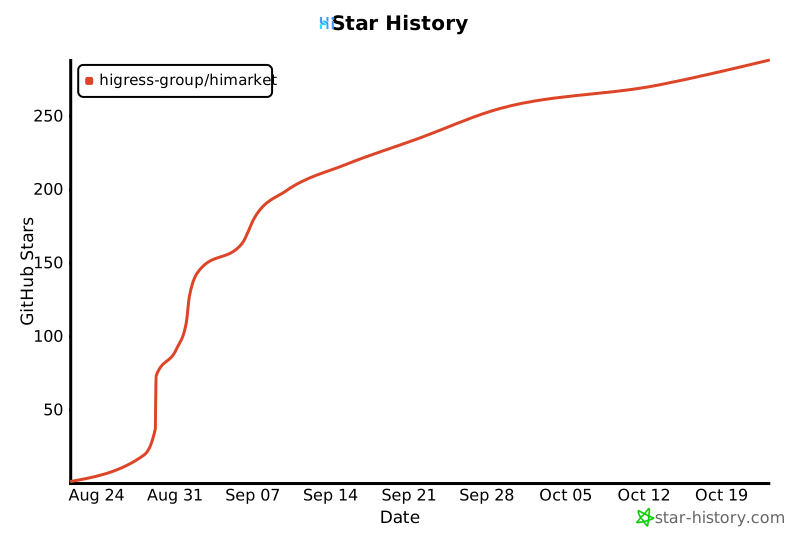](https://star-history.com/#higress-group/himarket&Date)
## Star History
[](https://star-history.com/#higress-group/himarket&Date)


