flutter_html supports a variety of HTML and CSS tags and attributes.
Over a hundred static tags are supported out of the box.
Or you can even define your own using an Extension:
Its easy to add custom styles to your Html as well using the Style class:
Here's a fancy <p> element!
""", extensions: [ TagExtension( tagsToExtend: {"flutter"}, child: const FlutterLogo(), ), ], style: { "p.fancy": Style( textAlign: TextAlign.center, padding: const EdgeInsets.all(16), backgroundColor: Colors.grey, margin: Margins(left: Margin(50, Unit.px), right: Margin.auto()), width: Width(300, Unit.px), fontWeight: FontWeight.bold, ), }, ); } ``` becomes...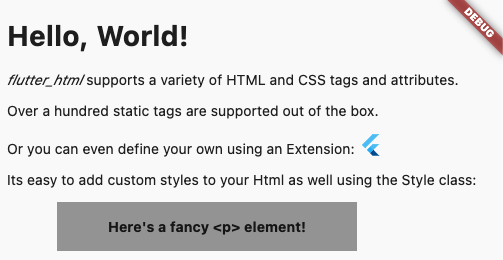 ## Table of Contents:
- [Supported HTML Tags](https://github.com/Sub6Resources/flutter_html/wiki/Supported-HTML-Elements)
- [Supported CSS Attributes](https://github.com/Sub6Resources/flutter_html/wiki/Supported-CSS-Attributes)
- [Why flutter_html?](#why-this-package)
- [Migration Guide](#migration-guides)
- [API Reference](#api-reference)
- [Constructors](#constructors)
- [Parameters Table](#parameters)
- [External Packages](#external-packages)
- [`flutter_html_all`](#flutter_html_all)
- [`flutter_html_audio`](#flutter_html_audio)
- [`flutter_html_iframe`](#flutter_html_iframe)
- [`flutter_html_math`](#flutter_html_math)
- [`flutter_html_svg`](#flutter_html_svg)
- [`flutter_html_table`](#flutter_html_table)
- [`flutter_html_video`](#flutter_html_video)
- [Frequently Asked Questions](#faq)
- [Example](#example)
## Why this package?
This package is designed with simplicity in mind. Originally created to allow basic rendering of HTML content into the Flutter widget tree,
this project has expanded to include support for basic styling as well!
If you need something more robust and customizable, the package also provides a number of extension APIs for extremely granular control over widget rendering!
## Migration Guides
[3.0.0 Migration Guide](https://github.com/Sub6Resources/flutter_html/wiki/Migration-Guides#300)
## API Reference:
For the full API reference, see [here](https://pub.dev/documentation/flutter_html/latest/).
For a full example, see [here](https://github.com/Sub6Resources/flutter_html/tree/master/example).
Below, you will find brief descriptions of the parameters the`Html` widget accepts and some code snippets to help you use this package.
### Constructors:
The package currently has two different constructors - `Html()` and `Html.fromDom()`.
The `Html()` constructor is for those who would like to directly pass HTML from the source to the package to be rendered.
If you would like to modify or sanitize the HTML before rendering it, then `Html.fromDom()` is for you - you can convert the HTML string to a `Document` and use its methods to modify the HTML as you wish. Then, you can directly pass the modified `Document` to the package. This eliminates the need to parse the modified `Document` back to a string, pass to `Html()`, and convert back to a `Document`, thus cutting down on load times.
### Parameters:
| Parameters | Description |
|------------------------|-----------------------------------------------------------------------------------------------------------------------------------------------------------------------------------------------------|
| `data` | The HTML data passed to the `Html` widget. This is required and cannot be null when using `Html()`. |
| `document` | The DOM document passed to the `Html` widget. This is required and cannot be null when using `Html.fromDom()`. |
| `onLinkTap` | Optional. A function that defines what the widget should do when a link is tapped. The function exposes the `src` of the link as a `String` to use in your implementation. |
| `extensions` | Optional. A powerful API that allows you to customize everything when rendering a specific HTML tag. |
| `shrinkWrap` | Optional. A `bool` used while rendering different widgets to specify whether they should be shrink-wrapped or not, like `ContainerSpan` |
| `onlyRenderTheseTags` | Optional. An exclusive set of elements the `Html` widget should render. Note that your html will be wrapped in `` and `` if it isn't already, so you should include those in this list. |
| `doNotRenderTheseTags` | Optional. A set of tags that should not be rendered by the `Html` widget. |
| `style` | Optional. A powerful API that allows you to customize the style that should be used when rendering a specific HTMl tag. |
More examples and in-depth details are available:
- [Style](https://github.com/Sub6Resources/flutter_html/wiki/How-To-Use-Style).
- [HtmlExtension](https://github.com/Sub6Resources/flutter_html/wiki/How-To-Use-Extensions)
## External Packages
### `flutter_html_all`
This package is simply a convenience package that exports all the other external packages below. You should use this if you plan to render all the tags that require external dependencies.
### `flutter_html_audio`
This package renders audio elements using the [`chewie_audio`](https://pub.dev/packages/chewie_audio) and the [`video_player`](https://pub.dev/packages/video_player) plugin.
The package considers the attributes `controls`, `loop`, `src`, `autoplay`, `width`, and `muted` when rendering the audio widget.
#### Adding the `AudioHtmlExtension`:
Add the dependency to your pubspec.yaml:
flutter pub add flutter_html_audio
```dart
import 'package:flutter_html_audio/flutter_html_audio';
Widget html = Html(
data: myHtml,
extensions: [
AudioHtmlExtension(),
],
);
```
### `flutter_html_iframe`
This package renders iframes using the [`webview_flutter`](https://pub.dev/packages/webview_flutter) plugin.
When rendering iframes, the package considers the width, height, and sandbox attributes.
Sandbox controls the JavaScript mode of the webview - a value of `null` or `allow-scripts` will set `javascriptMode: JavascriptMode.unrestricted`, otherwise it will set `javascriptMode: JavascriptMode.disabled`.
#### Adding the `IframeHtmlExtension`:
Add the dependency to your pubspec.yaml:
flutter pub add flutter_html_iframe
```dart
import 'package:flutter_html_iframe/flutter_html_iframe';
Widget html = Html(
data: myHtml,
extensions: [
IframeHtmlExtension(),
],
);
```
You can set the `navigationDelegate` of the webview with the `navigationDelegate` property on `IframeHtmlExtension`. This allows you to block or allow the loading of certain URLs.
### `flutter_html_math`
This package renders MathML elements using the [`flutter_math_fork`](https://pub.dev/packages/flutter_math_fork) plugin.
When rendering MathML, the package takes the MathML data within the `
## Table of Contents:
- [Supported HTML Tags](https://github.com/Sub6Resources/flutter_html/wiki/Supported-HTML-Elements)
- [Supported CSS Attributes](https://github.com/Sub6Resources/flutter_html/wiki/Supported-CSS-Attributes)
- [Why flutter_html?](#why-this-package)
- [Migration Guide](#migration-guides)
- [API Reference](#api-reference)
- [Constructors](#constructors)
- [Parameters Table](#parameters)
- [External Packages](#external-packages)
- [`flutter_html_all`](#flutter_html_all)
- [`flutter_html_audio`](#flutter_html_audio)
- [`flutter_html_iframe`](#flutter_html_iframe)
- [`flutter_html_math`](#flutter_html_math)
- [`flutter_html_svg`](#flutter_html_svg)
- [`flutter_html_table`](#flutter_html_table)
- [`flutter_html_video`](#flutter_html_video)
- [Frequently Asked Questions](#faq)
- [Example](#example)
## Why this package?
This package is designed with simplicity in mind. Originally created to allow basic rendering of HTML content into the Flutter widget tree,
this project has expanded to include support for basic styling as well!
If you need something more robust and customizable, the package also provides a number of extension APIs for extremely granular control over widget rendering!
## Migration Guides
[3.0.0 Migration Guide](https://github.com/Sub6Resources/flutter_html/wiki/Migration-Guides#300)
## API Reference:
For the full API reference, see [here](https://pub.dev/documentation/flutter_html/latest/).
For a full example, see [here](https://github.com/Sub6Resources/flutter_html/tree/master/example).
Below, you will find brief descriptions of the parameters the`Html` widget accepts and some code snippets to help you use this package.
### Constructors:
The package currently has two different constructors - `Html()` and `Html.fromDom()`.
The `Html()` constructor is for those who would like to directly pass HTML from the source to the package to be rendered.
If you would like to modify or sanitize the HTML before rendering it, then `Html.fromDom()` is for you - you can convert the HTML string to a `Document` and use its methods to modify the HTML as you wish. Then, you can directly pass the modified `Document` to the package. This eliminates the need to parse the modified `Document` back to a string, pass to `Html()`, and convert back to a `Document`, thus cutting down on load times.
### Parameters:
| Parameters | Description |
|------------------------|-----------------------------------------------------------------------------------------------------------------------------------------------------------------------------------------------------|
| `data` | The HTML data passed to the `Html` widget. This is required and cannot be null when using `Html()`. |
| `document` | The DOM document passed to the `Html` widget. This is required and cannot be null when using `Html.fromDom()`. |
| `onLinkTap` | Optional. A function that defines what the widget should do when a link is tapped. The function exposes the `src` of the link as a `String` to use in your implementation. |
| `extensions` | Optional. A powerful API that allows you to customize everything when rendering a specific HTML tag. |
| `shrinkWrap` | Optional. A `bool` used while rendering different widgets to specify whether they should be shrink-wrapped or not, like `ContainerSpan` |
| `onlyRenderTheseTags` | Optional. An exclusive set of elements the `Html` widget should render. Note that your html will be wrapped in `` and `` if it isn't already, so you should include those in this list. |
| `doNotRenderTheseTags` | Optional. A set of tags that should not be rendered by the `Html` widget. |
| `style` | Optional. A powerful API that allows you to customize the style that should be used when rendering a specific HTMl tag. |
More examples and in-depth details are available:
- [Style](https://github.com/Sub6Resources/flutter_html/wiki/How-To-Use-Style).
- [HtmlExtension](https://github.com/Sub6Resources/flutter_html/wiki/How-To-Use-Extensions)
## External Packages
### `flutter_html_all`
This package is simply a convenience package that exports all the other external packages below. You should use this if you plan to render all the tags that require external dependencies.
### `flutter_html_audio`
This package renders audio elements using the [`chewie_audio`](https://pub.dev/packages/chewie_audio) and the [`video_player`](https://pub.dev/packages/video_player) plugin.
The package considers the attributes `controls`, `loop`, `src`, `autoplay`, `width`, and `muted` when rendering the audio widget.
#### Adding the `AudioHtmlExtension`:
Add the dependency to your pubspec.yaml:
flutter pub add flutter_html_audio
```dart
import 'package:flutter_html_audio/flutter_html_audio';
Widget html = Html(
data: myHtml,
extensions: [
AudioHtmlExtension(),
],
);
```
### `flutter_html_iframe`
This package renders iframes using the [`webview_flutter`](https://pub.dev/packages/webview_flutter) plugin.
When rendering iframes, the package considers the width, height, and sandbox attributes.
Sandbox controls the JavaScript mode of the webview - a value of `null` or `allow-scripts` will set `javascriptMode: JavascriptMode.unrestricted`, otherwise it will set `javascriptMode: JavascriptMode.disabled`.
#### Adding the `IframeHtmlExtension`:
Add the dependency to your pubspec.yaml:
flutter pub add flutter_html_iframe
```dart
import 'package:flutter_html_iframe/flutter_html_iframe';
Widget html = Html(
data: myHtml,
extensions: [
IframeHtmlExtension(),
],
);
```
You can set the `navigationDelegate` of the webview with the `navigationDelegate` property on `IframeHtmlExtension`. This allows you to block or allow the loading of certain URLs.
### `flutter_html_math`
This package renders MathML elements using the [`flutter_math_fork`](https://pub.dev/packages/flutter_math_fork) plugin.
When rendering MathML, the package takes the MathML data within the `