# 治愈小馆
**Repository Path**: suiboyu/react-jianshu
## Basic Information
- **Project Name**: 治愈小馆
- **Description**: 技术栈:React + react-router + redux + immutable
简介:治愈小馆🏘️,收集人间美好🎨
- **Primary Language**: JavaScript
- **License**: MIT
- **Default Branch**: master
- **Homepage**: None
- **GVP Project**: No
## Statistics
- **Stars**: 6
- **Forks**: 0
- **Created**: 2020-07-07
- **Last Updated**: 2024-10-18
## Categories & Tags
**Categories**: Uncategorized
**Tags**: None
## README
# 治愈小馆
#### 技术栈:React + react-router + redux + immutable
我在人间贩卖星光,只为收集世间温柔去见你。
世间情动,不过盛夏白瓷梅子汤,碎冰撞壁叮当响。
#### 项目截图


## 项目技术点记录:
### React-router
#### react-router与react-router-dom使用时的区别
**1、React-router与React-router-dom的API对比**
**React-router:**提供了router的核心api。如Router、Route、Switch等,但没有提供有关dom操作进行路由跳转的ap;
**React-router-dom:**提供了BrowserRouter、Route、Link等api,可以通过dom操作触发事件控制路由。
**2、React-router与React-router-dom的功能对比**
**React-router:**实现了路由的核心功能
**React-router-dom:**基于React-router,加入了一些在浏览器运行下的一些功能,
例如:`Link`组件会渲染一个a标签。
- BrowserRouter使用 HTML5 提供的 history API可以保证你的 UI 界面和 URL 保持同步,
- HashRouter使用 URL 的 `hash` 部分保证你的 UI 界面和 URL 保持同步
**3、React-router与React-router-dom的写法对比**
**React-router**不能通过操作dom控制路由,此时还需引入React-router-dom
```js
import {Switch, Route, Router} from 'react-router';
import {HashHistory, Link} from 'react-router-dom';
```
**React-router-dom**在React-router的基础上扩展了可操作dom的api
```js
import {Swtich, Route, Router, HashHistory, Link} from 'react-router-dom';
```
**4、React-router与React-router-dom的路由跳转对比**
**React-router:**router4.0以上版本用**this.props.history.push('/path')**实现跳转;router3.0以上版本用**this.props.router.push('/path')**实现跳转。
**React-router-dom:**直接用**this.props.history.push('/path')**就可以实现跳转
**总结:**
在使用React的大多数情况下,我们会想要通过操作dom来控制路由,例如点击一个按钮完成跳转,这种时候使用React-router-dom就比较方便。
### 在 React 中使用 react-router-dom 路由
安装
```bash
yarn add react-router-dom
```
src 目录下,新建 Router.js
```js
import React from 'react';
import { HashRouter, Route, Switch } from 'react-router-dom';
import Home from './pages/home';
import Detail from './pages/detail';
import Login from './pages/login'
const BasicRoute = () => (
);
export default BasicRoute;
```
`App.js` 中引入 `Router`
```js
import React from 'react';
import { Provider } from 'react-redux';
import store from './store/index.js';
import Router from './Router'
function App() {
return (
);
}
export default App;
```
使用
```js
登陆
```
了解更多:https://www.jianshu.com/p/8954e9fb0c7e
### Redux
Redux 是 JavaScript 状态容器,提供可预测化的状态管理。

了解更多:http://www.ruanyifeng.com/blog/2016/09/redux_tutorial_part_one_basic_usages.html
### Redux-thunk
redux-thunk 可以让 `store.dispatch` 变成可以接收一个函数/一个对象的中间件。
了解更多:
https://blog.csdn.net/Jioho_chen/article/details/104884490
https://zhuanlan.zhihu.com/p/85403048
> tip✏️:没有 redux 和 redux-thunk 也是可以构建 react 项目的。但是二者的存在是为了更好的构建 react 应用。当项目不断扩大,所需的状态也多,redux 和 react-thunk 的优势就会显现出来。
新建 store 文件夹
index.js
```js
import { createStore, compose, applyMiddleware } from 'redux';
import thunk from 'redux-thunk';
import reducer from './reducer.js';
const composeEnhancers = window.__REDUX_DEVTOOLS_EXTENSION_COMPOSE__ || compose;
const store = createStore(reducer, composeEnhancers(
applyMiddleware(thunk)
));
export default store;
```
将所有的 reducer 汇合。
reducer.js
```js
import { combineReducers } from 'redux-immutable';
import { reducer as headerReducer } from '../common/header/store';
import { reducer as homeReducer } from '../pages/home/store'
import { reducer as detailReducer } from '../pages/detail/store'
import { reducer as loginReducer } from '../pages/login/store';
const reducer = combineReducers({
header: headerReducer,
home: homeReducer,
detail: detailReducer,
login: loginReducer
})
export default reducer;
```
对于每一个页面都创建一个 reducer,以 login page 为例
> login
>
> |----- store
>
> |-------------actionCreators.js
>
> |-------------constants.js
>
> |-------------index.js
>
> |-------------reducer.js
>
> |----- index.js
index.js
```js
import React, { PureComponent } from 'react';
import { connect } from 'react-redux';
import { LoginWrapper, LoginBox, Input, Button } from './style.js';
import { actionCreators } from './store';
import { Redirect } from 'react-router-dom';
class Login extends PureComponent {
render() {
const { loginStatus } = this.props
if (!loginStatus) {
return (
{this.account = input}} />
{this.password = input}} />
)
} else {
return
}
}
}
const mapState = (state) => ({
loginStatus: state.getIn(['login', 'login'])
})
const mapDispatch = (dispatch) => ({
login(accountElem, passwordElem){
dispatch(actionCreators.login(accountElem.value, passwordElem.value))
}
})
export default connect(mapState, mapDispatch)(Login);
```
点击登陆按钮,执行 login 函数,login 函数中 dispatch 了一个 actionCreators 中的 login 函数,同时携带两个参数(account, password)
```js
import axios from 'axios';
import * as constants from './constants';
const changeLogin = () => ({
type: constants.CHANGE_LOGIN,
value: true
})
export const logout = () => ({
type: constants.LOGOUT,
value: false
})
export const login = (accout, password) => {
return (dispatch) => {
axios.get('/api/login.json?account=' + accout + '&password=' + password).then((res) => {
const result = res.data.data
if (result) {
dispatch(changeLogin())
} else {
alert('登录失败')
}
})
}
}
```
actionCreators 中 login 函数被触发,返回一个函数。在返回的函数中,进行了网络请求。如果请求成功,触发 changeLogin 函数,该函数中携带 type 与 value,来到了 reducer 中。
```js
import { fromJS } from 'immutable';
import * as constants from './constants';
const defaultState = fromJS({
login: false
});
export default (state = defaultState, action) => {
switch (action.type) {
case constants.CHANGE_LOGIN:
return state.set('login', action.value)
case constants.LOGOUT:
return state.set('login', action.value)
default:
return state;
}
}
```
reducer 接收到了 action,根据 action 中的 type 进行判断,触发哪个 case,返回一个新的 state。
index.js 将三者进行共同导出
```js
import reducer from './reducer';
import * as actionCreators from './actionCreators';
import * as constants from './constants';
export { reducer, actionCreators, constants };
```
#### 获取数据
```js
const mapState = (state) => ({
loginStatus: state.getIn(['login', 'login'])
})
```
使用
```js
class Login extends PureComponent {
render() {
const { loginStatus } = this.props
if (!loginStatus) {
return (
// ....
)
}
}
}
```
### styled-components
1. 样式化组件,主要作用是它可以编写实际的CSS代码来设计组件样式,也不需要组件和样式之间的映射,即创建后就是一个正常的React 组件,并且可以附加样式给当前组件。 优化react组件。
2. 在一个组件内会将结构、样式和逻辑写在一起,虽然这违背了关注点分离的原则,但是这有利于组件间的隔离。为了顺应组件化的潮流。
3. 使用styled-components不需要再使用className属性来控制样式,而是将样式写成更具语义化的组件的形式
4. 使用style-components会随机生成一个class名称,这样不会污染到全局变量,当然因为随机生成,维护会增加难度。
> 小声BB🔇:个人观点,不好用,控制台样式不好调,写的时候编辑器无法智能提示,要老命啊。😭😭😭
根目录下 style.js
```js
import { createGlobalStyle } from 'styled-components';
export const GlobalStyle = createGlobalStyle`
html, body, div, span, applet, object, iframe,
h1, h2, h3, h4, h5, h6, p, blockquote, pre,
a, abbr, acronym, address, big, cite, code,
del, dfn, em, img, ins, kbd, q, s, samp,
small, strike, strong, sub, sup, tt, var,
b, u, i, center,
dl, dt, dd, ol, ul, li,
fieldset, form, label, legend,
table, caption, tbody, tfoot, thead, tr, th, td,
article, aside, canvas, details, embed,
figure, figcaption, footer, header, hgroup,
menu, nav, output, ruby, section, summary,
time, mark, audio, video {
margin: 0;
padding: 0;
border: 0;
font-size: 100%;
font: inherit;
vertical-align: baseline;
}
/* HTML5 display-role reset for older browsers */
article, aside, details, figcaption, figure,
footer, header, hgroup, menu, nav, section {
display: block;
}
body {
line-height: 1;
}
ol, ul {
list-style: none;
}
blockquote, q {
quotes: none;
}
blockquote:before, blockquote:after,
q:before, q:after {
content: '';
content: none;
}
table {
border-collapse: collapse;
border-spacing: 0;
}
`
```
index.js
```js
import React from 'react';
import ReactDOM from 'react-dom';
import './style.js';
import App from './App';
ReactDOM.render(
,
document.getElementById('root')
);
```
对使用的组件,以 login 为例
```js
import React, { PureComponent } from 'react';
import { LoginWrapper, LoginBox, Input, Button } from './style.js';
class Login extends PureComponent {
render() {
return (
)
}
}
export default Login;
```
```js
import styled from 'styled-components';
export const LoginWrapper = styled.div`
z-index: 0;
position: absolute;
left: 0;
right: 0;
bottom: 0;
top: 56px;
${'' /* background-image: linear-gradient(to top, #ce5e8a, #fff); */}
`;
export const LoginBox = styled.div`
width: 400px;
height: 180px;
margin: 100px auto;
padding-top: 20px;
background: #fff;
box-shadow: 0 0 8px rgba(0,0,0,.1);
border-radius: 19px;
`;
export const Input = styled.input`
display: block;
width: 200px;
height: 30px;
line-height: 30px;
padding: 0 10px;
margin: 10px auto;
color: #777;
`;
export const Button = styled.div`
width: 220px;
height: 30px;
line-height: 30px;
color: #fff;
background: #3194d0;
border-radius: 15px;
margin: 10px auto;
text-align: center;
`;
```
了解更多:https://www.cnblogs.com/wswm/p/10692168.html
### Immutable
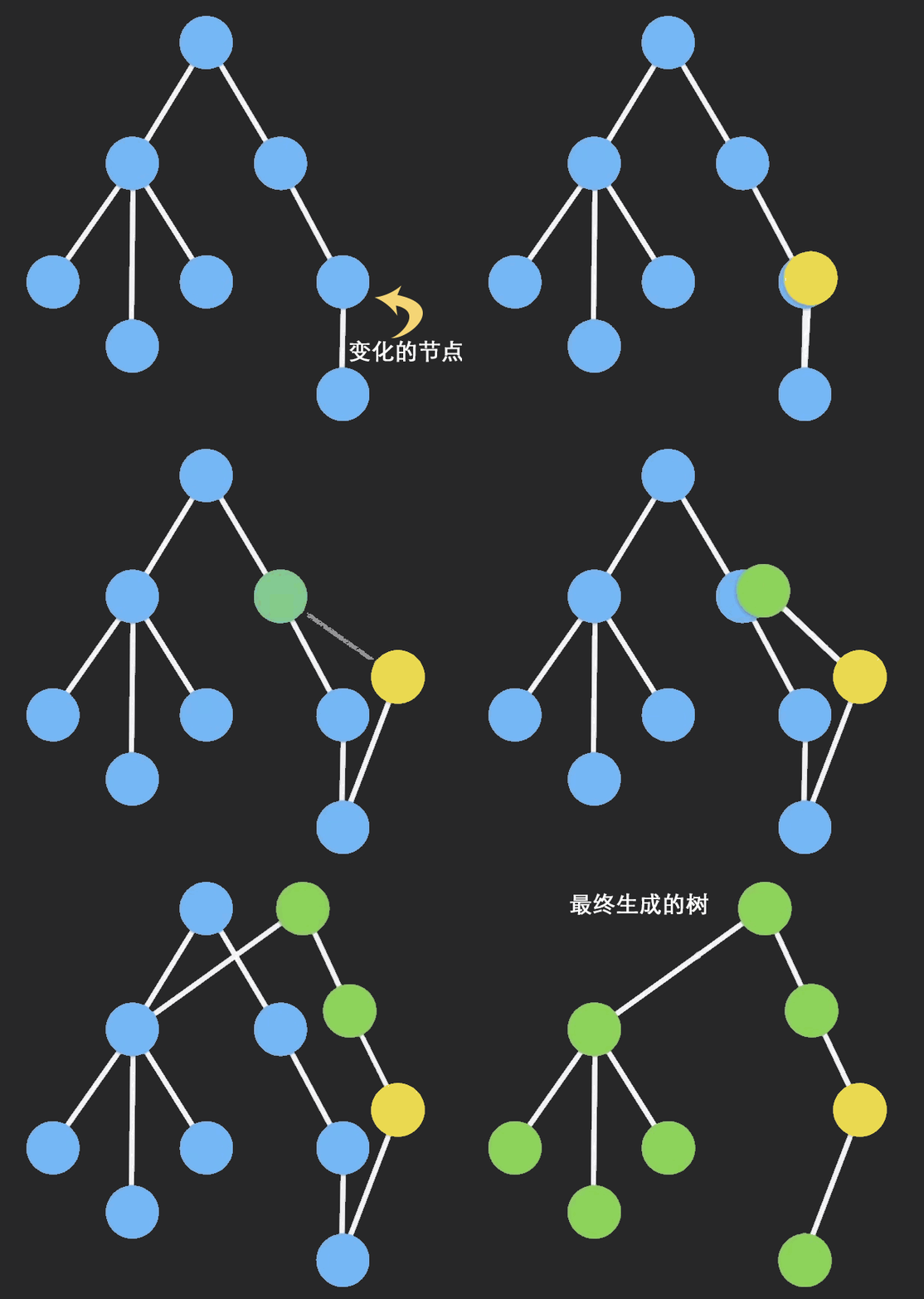
Immutable Data 就是一旦创建,就不能再被更改的数据。对 Immutable 对象的任何修改或添加删除操作都会返回一个新的 Immutable 对象。Immutable 实现的原理是 **Persistent Data Structure**(持久化数据结构),也就是使用旧数据创建新数据时,要保证旧数据同时可用且不变。同时为了避免 deepCopy 把所有节点都复制一遍带来的性能损耗,Immutable 使用了 **Structural Sharing**(结构共享),即如果对象树中一个节点发生变化,只修改这个节点和受它影响的父节点,其它节点则进行共享。
##### fromJS()
作用:将一个js数据转换为Immutable类型的数据
##### set()
作用:设置第一层key、index的值
##### merge()
作用:浅合并,新数据与旧数据对比,旧数据中不存在的属性直接添加,就数据中已存在的属性用新数据中的覆盖
##### get()
作用:获取数据结构中的数据
##### concat()
作用:对象的拼接,用法与js数组中的concat()相同,返回一个新的对象。
了解更多:
https://www.jianshu.com/p/0fa8c7456c15,
https://zhuanlan.zhihu.com/p/20295971?columnSlug=purerender
----
剩下的,我会继续补上的
