# react-native-popover
**Repository Path**: sujunmin/react-native-popover
## Basic Information
- **Project Name**: react-native-popover
- **Description**: A component for react-native
- **Primary Language**: JavaScript
- **License**: Not specified
- **Default Branch**: master
- **Homepage**: None
- **GVP Project**: No
## Statistics
- **Stars**: 0
- **Forks**: 0
- **Created**: 2021-08-05
- **Last Updated**: 2022-02-11
## Categories & Tags
**Categories**: Uncategorized
**Tags**: None
## README
## react-native-popover
[](https://npmjs.org/package/react-native-popover "View this project on npm")
[](https://npmjs.org/package/react-native-popover "View this project on npm")
[](https://npmjs.org/package/react-native-popover "View this project on npm")
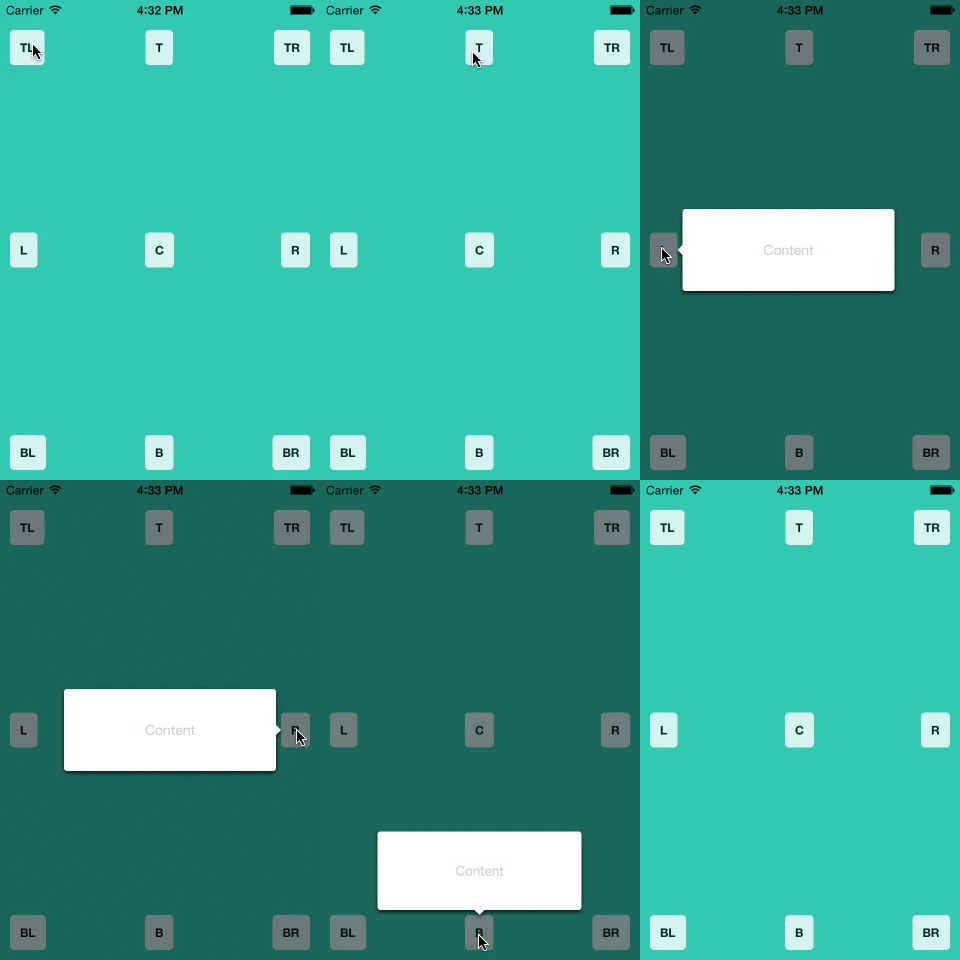
A `` component for react-native. This is still very much a work
in progress and only handles the simplest of cases, ideas and
contributions are very welcome.
## Install
```shell
npm i --save react-native-popover
```
## Usage
```jsx
'use strict';
var React = require('react');
var Popover = require('react-native-popover');
var {
AppRegistry,
StyleSheet,
Text,
TouchableHighlight,
View,
} = require('react-native');
var PopoverExample = React.createClass({
getInitialState() {
return {
isVisible: false,
buttonRect: {},
};
},
showPopover() {
this.refs.button.measure((ox, oy, width, height, px, py) => {
this.setState({
isVisible: true,
buttonRect: {x: px, y: py, width: width, height: height}
});
});
},
closePopover() {
this.setState({isVisible: false});
},
render() {
return (
Press me
I'm the content of this popover!
);
}
});
var styles = StyleSheet.create({
container: {
flex: 1,
alignItems: 'center',
justifyContent: 'center',
backgroundColor: 'rgb(43, 186, 180)',
},
button: {
borderRadius: 4,
padding: 10,
marginLeft: 10,
marginRight: 10,
backgroundColor: '#ccc',
borderColor: '#333',
borderWidth: 1,
},
buttonText: {
}
});
AppRegistry.registerComponent('PopoverExample', () => PopoverExample);
```
### Displaying the popover on top of other elements
React Native doesn't support directly setting a zIndex on a view.
What is recommended instead is to rearrange your view hierarchy and put the popover last at the root of your app.
See [facebook/react-native#131](https://github.com/facebook/react-native/issues/131#issuecomment-77764928)
However, as an alternative, I recommend you use [@brentvatne](https://github.com/brentvatne)'s [react-native-overlay](https://github.com/brentvatne/react-native-overlay) library to wrap `` and bring it to the front no matter where it sits in the render tree.
## Props
Prop | Type | Optional | Default | Description
----------------- | -------- | -------- | ----------- | -----------
isVisible | bool | Yes | false | Show/Hide the popover
fromRect | rect | No | {} | Rectangle at which to anchor the popover
displayArea | rect | Yes | screen rect | Area where the popover is allowed to be displayed
placement | string | Yes | 'auto' | How to position the popover - top | bottom | left | right | auto. When 'auto' is specified, it will determine the ideal placement so that the popover is fully visible within `displayArea`.
onClose | function | Yes | | Callback to be fired when the user taps the popover
customShowHandler | function | Yes | | Custom show animation handler - uses a [react-tween-state wrapper](https://github.com/jeanregisser/react-native-popover/blob/master/Transition.js) API in order to show the modal. See [default show handler](https://github.com/jeanregisser/react-native-popover/blob/754a87b0befccfe534774f3166765732a99bfddf/Popover.js#L185-L192).
customHideHandler | function | Yes | | Custom hide animation handler - uses a [react-tween-state wrapper](https://github.com/jeanregisser/react-native-popover/blob/master/Transition.js) API in order to hide the modal. See [default hide handler](https://github.com/jeanregisser/react-native-popover/blob/754a87b0befccfe534774f3166765732a99bfddf/Popover.js#L193-L200).
rect is an object with the following properties: `{x: number, y: number, width: number, height: number}`
## Credits
The code supporting animations was inspired and adapted from [@brentvatne](https://github.com/brentvatne)'s [Transition.js mixin](https://github.com/brentvatne/react-native-modal/blob/8020a920e7f08a0f1acd6ce897fe888fa39a51bf/Transitions.js).
---
**MIT Licensed**