# ssmp-wx
**Repository Path**: sumuncle/ssmp-wx
## Basic Information
- **Project Name**: ssmp-wx
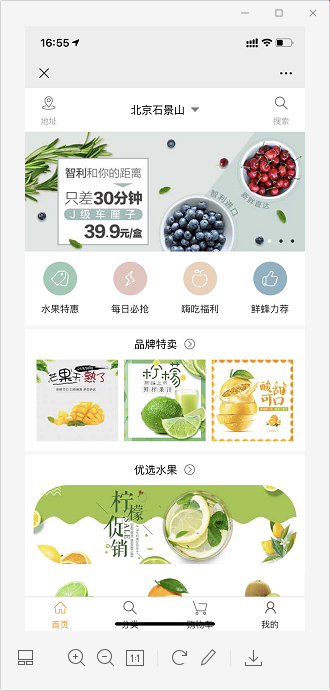
- **Description**: 使用SpringCloud+SpringBoot+MybatisPlus构建的一款基于微信公众号运行的商城项目
- **Primary Language**: Java
- **License**: Not specified
- **Default Branch**: master
- **Homepage**: None
- **GVP Project**: No
## Statistics
- **Stars**: 0
- **Forks**: 67
- **Created**: 2021-02-05
- **Last Updated**: 2021-02-05
## Categories & Tags
**Categories**: Uncategorized
**Tags**: None
## README
## 项目介绍
#### 使用SpringCloud+alibaba+SpringBoot+Mybatis-Plus+weixin-java构建的一款基于微信公众号为载体运行的商城项目
#### 如果你需要一套后台管理系统用来查看管理,商品、用户、订单等信息你可以访问下面链接
| 后端下载地址 https://gitee.com/wuwangwoy/shop-admin
| 前端下载地址 https://gitee.com/wuwangwoy/shop-admin-web
## 如何启动:
- 第1步:首先需要安装maven环境下载依赖,配置镜像仓库,需安装jdk1.8以上环境。
- 第2步:下载nacos注册中心 https://nacos.io/zh-cn/index.html
- 第3步:查看application.yml文件修改对应的nacos地址,数据库连接等
- 第4步:执行ssmp-wx-api根目录下ssmp-wx.sql文件
- 第5步:按顺序启动
```
ssmp-wx-api-user 用户管理模块
ssmp-wx-api-product 商品购物车模块
ssmp-wx-api-order 订单管理模块
ssmp-wx-api 前端管理模块
```
- 第6步:访问前端模块 http://localhost:8001
- 第7步:接口文档地址 http://localhost:8001/doc.html
## 扩展功能:
如果你想通过公众号的方式访问项目的话你可以申请一个测试账号
https://mp.weixin.qq.com/debug/cgi-bin/sandbox?t=sandbox/login
申请了以后修改application.yml
```
wx:
mp:
useRedis: false
redisConfig:
host: 127.0.0.1
port: 6379
configs:
- appId: 11 # 申请公众号的appid
secret: 11 # 申请公众号的appsecret
token: 111 # 接口配置里的Token值
#aesKey: 111 # 接口配置里的EncodingAESKey值
```
###### 那么我没有服务器怎么办呢,本地联调很不方便,不要急可以选择一个内外映射工具网上有很多,我给大家推荐一个我在用的
http://ngrok.ciqiuwl.cn
## 技术框架:
| 名称 | 版本 | 链接 |
|--------|-----|--------------------------------------------------|
| SpringBoot | 2.2.3 | https://spring.io/projects/spring-boot |
| Lombok | 1.18.10 | https://projectlombok.org |
| Mybatis-Plus | 3.4.1 | https://mp.baomidou.com |
| hutool | 5.4.2 | https://www.hutool.cn |
| knife4j | 2.0.8 | https://doc.xiaominfo.com |
## QQ交流群
~~335102947~~ 🈵️ 、1090283135 🔥
## 运行截图: