# in_app_purchase
**Repository Path**: sunyix/in_app_purchase
## Basic Information
- **Project Name**: in_app_purchase
- **Description**: No description available
- **Primary Language**: Unknown
- **License**: BSD-3-Clause
- **Default Branch**: master
- **Homepage**: None
- **GVP Project**: No
## Statistics
- **Stars**: 0
- **Forks**: 0
- **Created**: 2024-07-22
- **Last Updated**: 2024-07-22
## Categories & Tags
**Categories**: Uncategorized
**Tags**: None
## README
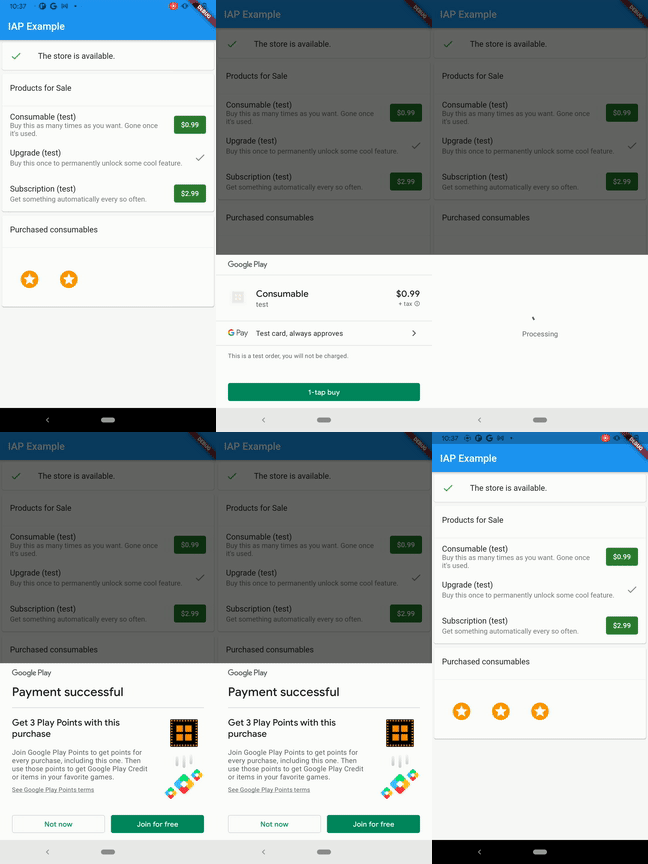
A storefront-independent API for purchases in Flutter apps.
This plugin supports in-app purchases (_IAP_) through an _underlying store_,
which can be the App Store (on iOS and macOS) or Google Play (on Android).
| | Android | iOS | macOS |
|-------------|---------|-------|--------|
| **Support** | SDK 16+ | 12.0+ | 10.15+ |

## Features
Use this plugin in your Flutter app to:
* Show in-app products that are available for sale from the underlying store.
Products can include consumables, permanent upgrades, and subscriptions.
* Load in-app products that the user owns.
* Send the user to the underlying store to purchase products.
* Present a UI for redeeming subscription offer codes. (iOS 14 only)
## Getting started
This plugin relies on the App Store and Google Play for making in-app purchases.
It exposes a unified surface, but you still need to understand and configure
your app with each store. Both stores have extensive guides:
* [App Store documentation](https://developer.apple.com/in-app-purchase/)
* [Google Play documentation](https://developer.android.com/google/play/billing/billing_overview)
> NOTE: Further in this document the App Store and Google Play will be referred
> to as "the store" or "the underlying store", except when a feature is specific
> to a particular store.
For a list of steps for configuring in-app purchases in both stores, see the
[example app README](https://github.com/flutter/packages/blob/main/packages/in_app_purchase/in_app_purchase/example/README.md).
Once you've configured your in-app purchases in their respective stores, you
can start using the plugin. Two basic options are available:
1. A generic, idiomatic Flutter API: [in_app_purchase](https://pub.dev/documentation/in_app_purchase/latest/in_app_purchase/in_app_purchase-library.html).
This API supports most use cases for loading and making purchases.
2. Platform-specific Dart APIs: [store_kit_wrappers](https://pub.dev/documentation/in_app_purchase_storekit/latest/store_kit_wrappers/store_kit_wrappers-library.html)
and [billing_client_wrappers](https://pub.dev/documentation/in_app_purchase_android/latest/billing_client_wrappers/billing_client_wrappers-library.html).
These APIs expose platform-specific behavior and allow for more fine-tuned
control when needed. However, if you use one of these APIs, your
purchase-handling logic is significantly different for the different
storefronts.
See also the codelab for [in-app purchases in Flutter](https://codelabs.developers.google.com/codelabs/flutter-in-app-purchases) for a detailed guide on adding in-app purchase support to a Flutter App.
## Usage
This section has examples of code for the following tasks:
* [Listening to purchase updates](#listening-to-purchase-updates)
* [Connecting to the underlying store](#connecting-to-the-underlying-store)
* [Loading products for sale](#loading-products-for-sale)
* [Restoring previous purchases](#restoring-previous-purchases)
* [Making a purchase](#making-a-purchase)
* [Completing a purchase](#completing-a-purchase)
* [Upgrading or downgrading an existing in-app subscription](#upgrading-or-downgrading-an-existing-in-app-subscription)
* [Accessing platform specific product or purchase properties](#accessing-platform-specific-product-or-purchase-properties)
* [Presenting a code redemption sheet (iOS 14)](#presenting-a-code-redemption-sheet-ios-14)
**Note:** It is not necessary to depend on `com.android.billingclient:billing` in your own app's `android/app/build.gradle` file. If you choose to do so know that conflicts might occur.
### Listening to purchase updates
In your app's `initState` method, subscribe to any incoming purchases. These
can propagate from either underlying store.
You should always start listening to purchase update as early as possible to be able
to catch all purchase updates, including the ones from the previous app session.
To listen to the update:
```dart
class _MyAppState extends State {
StreamSubscription> _subscription;
@override
void initState() {
final Stream purchaseUpdated =
InAppPurchase.instance.purchaseStream;
_subscription = purchaseUpdated.listen((purchaseDetailsList) {
_listenToPurchaseUpdated(purchaseDetailsList);
}, onDone: () {
_subscription.cancel();
}, onError: (error) {
// handle error here.
});
super.initState();
}
@override
void dispose() {
_subscription.cancel();
super.dispose();
}
```
Here is an example of how to handle purchase updates:
```dart
void _listenToPurchaseUpdated(List purchaseDetailsList) {
purchaseDetailsList.forEach((PurchaseDetails purchaseDetails) async {
if (purchaseDetails.status == PurchaseStatus.pending) {
_showPendingUI();
} else {
if (purchaseDetails.status == PurchaseStatus.error) {
_handleError(purchaseDetails.error!);
} else if (purchaseDetails.status == PurchaseStatus.purchased ||
purchaseDetails.status == PurchaseStatus.restored) {
bool valid = await _verifyPurchase(purchaseDetails);
if (valid) {
_deliverProduct(purchaseDetails);
} else {
_handleInvalidPurchase(purchaseDetails);
}
}
if (purchaseDetails.pendingCompletePurchase) {
await InAppPurchase.instance
.completePurchase(purchaseDetails);
}
}
});
}
```
### Connecting to the underlying store
```dart
final bool available = await InAppPurchase.instance.isAvailable();
if (!available) {
// The store cannot be reached or accessed. Update the UI accordingly.
}
```
### Loading products for sale
```dart
// Set literals require Dart 2.2. Alternatively, use
// `Set _kIds = ['product1', 'product2'].toSet()`.
const Set _kIds = {'product1', 'product2'};
final ProductDetailsResponse response =
await InAppPurchase.instance.queryProductDetails(_kIds);
if (response.notFoundIDs.isNotEmpty) {
// Handle the error.
}
List products = response.productDetails;
```
### Restoring previous purchases
Restored purchases will be emitted on the `InAppPurchase.purchaseStream`, make
sure to validate restored purchases following the best practices for each
underlying store:
* [Verifying App Store purchases](https://developer.apple.com/documentation/storekit/in-app_purchase/validating_receipts_with_the_app_store)
* [Verifying Google Play purchases](https://developer.android.com/google/play/billing/security#verify)
```dart
await InAppPurchase.instance.restorePurchases();
```
Note that the App Store does not have any APIs for querying consumable
products, and Google Play considers consumable products to no longer be owned
once they're marked as consumed and fails to return them here. For restoring
these across devices you'll need to persist them on your own server and query
that as well.
### Making a purchase
Both underlying stores handle consumable and non-consumable products differently. If
you're using `InAppPurchase`, you need to make a distinction here and
call the right purchase method for each type.
```dart
final ProductDetails productDetails = ... // Saved earlier from queryProductDetails().
final PurchaseParam purchaseParam = PurchaseParam(productDetails: productDetails);
if (_isConsumable(productDetails)) {
InAppPurchase.instance.buyConsumable(purchaseParam: purchaseParam);
} else {
InAppPurchase.instance.buyNonConsumable(purchaseParam: purchaseParam);
}
// From here the purchase flow will be handled by the underlying store.
// Updates will be delivered to the `InAppPurchase.instance.purchaseStream`.
```
### Completing a purchase
The `InAppPurchase.purchaseStream` will send purchase updates after initiating
the purchase flow using `InAppPurchase.buyConsumable` or
`InAppPurchase.buyNonConsumable`. After verifying the purchase receipt and the
delivering the content to the user it is important to call
`InAppPurchase.completePurchase` to tell the underlying store that the
purchase has been completed. Calling `InAppPurchase.completePurchase` will
inform the underlying store that the app verified and processed the
purchase and the store can proceed to finalize the transaction and bill
the end user's payment account.
> **Warning:** Failure to call `InAppPurchase.completePurchase` and
> get a successful response within 3 days of the purchase will result a refund.
### Upgrading or downgrading an existing in-app subscription
To upgrade/downgrade an existing in-app subscription in Google Play,
you need to provide an instance of `ChangeSubscriptionParam` with the old
`PurchaseDetails` that the user needs to migrate from, and an optional
`ProrationMode` with the `GooglePlayPurchaseParam` object while calling
`InAppPurchase.buyNonConsumable`.
The App Store does not require this because it provides a subscription
grouping mechanism. Each subscription you offer must be assigned to a
subscription group. Grouping related subscriptions together can help prevent
users from accidentally purchasing multiple subscriptions. Refer to the
[Creating a Subscription Group](https://developer.apple.com/app-store/subscriptions/#groups) section of
[Apple's subscription guide](https://developer.apple.com/app-store/subscriptions/).
```dart
final PurchaseDetails oldPurchaseDetails = ...;
PurchaseParam purchaseParam = GooglePlayPurchaseParam(
productDetails: productDetails,
changeSubscriptionParam: ChangeSubscriptionParam(
oldPurchaseDetails: oldPurchaseDetails,
prorationMode: ProrationMode.immediateWithTimeProration));
InAppPurchase.instance
.buyNonConsumable(purchaseParam: purchaseParam);
```
### Confirming subscription price changes
When the price of a subscription is changed the consumer will need to confirm
that price change. If the consumer does not confirm the price change the
subscription will not be auto-renewed. By default on both iOS and Android the
consumer will automatically get a popup to confirm the price change. Depending
on the platform there are different ways to interact with this flow as
explained in the following paragraphs.
#### Google Play Store (Android)
When changing the price of an existing subscription base plan or offer,
existing subscribers are placed in a legacy price cohort. App developers can
choose to [end a legacy price cohort](https://developer.android.com/google/play/billing/price-changes#end-legacy)
and move subscribers into the current base plan price. When the new
subscription base plan price is lower, Google will notify the consumer via
email and notifications. The consumer will start paying the lower price next
time they pay for their base plan. When the subscription price is raised,
Google will automatically start notifying consumers through email and
notifications 7 days after the legacy price cohort was ended. It is highly
recommended to give consumers advanced notice of the price change and provide a
deep link to the Play Store subscription screen to help them review the price
change. The official documentation can be found [here](https://developer.android.com/google/play/billing/price-changes).
#### Apple App Store (iOS)
When the price of a subscription is raised iOS will also show a popup in the app.
The StoreKit Payment Queue will notify the app that it wants to show a price change confirmation popup.
By default the queue will get the response that it can continue and show the popup.
However, it is possible to prevent this popup via the 'InAppPurchaseStoreKitPlatformAddition' and show the
popup at a different time, for example after clicking a button.
To know when the App Store wants to show a popup and prevent this from happening a queue delegate can be registered.
The `InAppPurchaseStoreKitPlatformAddition` contains a `setDelegate(SKPaymentQueueDelegateWrapper? delegate)` function that
can be used to set a delegate or remove one by setting it to `null`.
```dart
//import for InAppPurchaseStoreKitPlatformAddition
import 'package:in_app_purchase_storekit/in_app_purchase_storekit.dart';
Future initStoreInfo() async {
if (Platform.isIOS) {
var iosPlatformAddition = _inAppPurchase
.getPlatformAddition();
await iosPlatformAddition.setDelegate(ExamplePaymentQueueDelegate());
}
}
@override
Future disposeStore() {
if (Platform.isIOS) {
var iosPlatformAddition = _inAppPurchase
.getPlatformAddition();
await iosPlatformAddition.setDelegate(null);
}
}
```
The delegate that is set should implement `SKPaymentQueueDelegateWrapper` and handle `shouldContinueTransaction` and
`shouldShowPriceConsent`. When setting `shouldShowPriceConsent` to false the default popup will not be shown and the app
needs to show this later.
```dart
// import for SKPaymentQueueDelegateWrapper
import 'package:in_app_purchase_storekit/store_kit_wrappers.dart';
class ExamplePaymentQueueDelegate implements SKPaymentQueueDelegateWrapper {
@override
bool shouldContinueTransaction(
SKPaymentTransactionWrapper transaction, SKStorefrontWrapper storefront) {
return true;
}
@override
bool shouldShowPriceConsent() {
return false;
}
}
```
The dialog can be shown by calling `showPriceConsentIfNeeded` on the `InAppPurchaseStoreKitPlatformAddition`. This future
will complete immediately when the dialog is shown. A confirmed transaction will be delivered on the `purchaseStream`.
```dart
if (Platform.isIOS) {
var iapStoreKitPlatformAddition = _inAppPurchase
.getPlatformAddition();
await iapStoreKitPlatformAddition.showPriceConsentIfNeeded();
}
```
### Accessing platform specific product or purchase properties
The function `_inAppPurchase.queryProductDetails(productIds);` provides a `ProductDetailsResponse` with a
list of purchasable products of type `List`. This `ProductDetails` class is a platform independent class
containing properties only available on all endorsed platforms. However, in some cases it is necessary to access platform specific properties. The `ProductDetails` instance is of subtype `GooglePlayProductDetails`
when the platform is Android and `AppStoreProductDetails` on iOS. Accessing the skuDetails (on Android) or the skProduct (on iOS) provides all the information that is available in the original platform objects.
This is an example on how to get the `introductoryPricePeriod` on Android:
```dart
//import for GooglePlayProductDetails
import 'package:in_app_purchase_android/in_app_purchase_android.dart';
//import for SkuDetailsWrapper
import 'package:in_app_purchase_android/billing_client_wrappers.dart';
if (productDetails is GooglePlayProductDetails) {
SkuDetailsWrapper skuDetails = (productDetails as GooglePlayProductDetails).skuDetails;
print(skuDetails.introductoryPricePeriod);
}
```
And this is the way to get the subscriptionGroupIdentifier of a subscription on iOS:
```dart
//import for AppStoreProductDetails
import 'package:in_app_purchase_storekit/in_app_purchase_storekit.dart';
//import for SKProductWrapper
import 'package:in_app_purchase_storekit/store_kit_wrappers.dart';
if (productDetails is AppStoreProductDetails) {
SKProductWrapper skProduct = (productDetails as AppStoreProductDetails).skProduct;
print(skProduct.subscriptionGroupIdentifier);
}
```
The `purchaseStream` provides objects of type `PurchaseDetails`. PurchaseDetails' provides all
information that is available on all endorsed platforms, such as purchaseID and transactionDate. In addition, it is
possible to access the platform specific properties. The `PurchaseDetails` object is of subtype `GooglePlayPurchaseDetails`
when the platform is Android and `AppStorePurchaseDetails` on iOS. Accessing the billingClientPurchase, resp.
skPaymentTransaction provides all the information that is available in the original platform objects.
This is an example on how to get the `originalJson` on Android:
```dart
//import for GooglePlayPurchaseDetails
import 'package:in_app_purchase_android/in_app_purchase_android.dart';
//import for PurchaseWrapper
import 'package:in_app_purchase_android/billing_client_wrappers.dart';
if (purchaseDetails is GooglePlayPurchaseDetails) {
PurchaseWrapper billingClientPurchase = (purchaseDetails as GooglePlayPurchaseDetails).billingClientPurchase;
print(billingClientPurchase.originalJson);
}
```
How to get the `transactionState` of a purchase in iOS:
```dart
//import for AppStorePurchaseDetails
import 'package:in_app_purchase_storekit/in_app_purchase_storekit.dart';
//import for SKProductWrapper
import 'package:in_app_purchase_storekit/store_kit_wrappers.dart';
if (purchaseDetails is AppStorePurchaseDetails) {
SKPaymentTransactionWrapper skProduct = (purchaseDetails as AppStorePurchaseDetails).skPaymentTransaction;
print(skProduct.transactionState);
}
```
Please note that it is required to import `in_app_purchase_android` and/or `in_app_purchase_storekit`.
### Presenting a code redemption sheet (iOS 14)
The following code brings up a sheet that enables the user to redeem offer
codes that you've set up in App Store Connect. For more information on
redeeming offer codes, see [Implementing Offer Codes in Your App](https://developer.apple.com/documentation/storekit/in-app_purchase/subscriptions_and_offers/implementing_offer_codes_in_your_app).
```dart
InAppPurchaseStoreKitPlatformAddition iosPlatformAddition =
InAppPurchase.getPlatformAddition();
iosPlatformAddition.presentCodeRedemptionSheet();
```
> **note:** The `InAppPurchaseStoreKitPlatformAddition` is defined in the `in_app_purchase_storekit.dart`
> file so you need to import it into the file you will be using `InAppPurchaseStoreKitPlatformAddition`:
> ```dart
> import 'package:in_app_purchase_storekit/in_app_purchase_storekit.dart';
> ```
## Contributing to this plugin
If you would like to contribute to the plugin, check out our
[contribution guide](https://github.com/flutter/packages/blob/main/CONTRIBUTING.md).