# TS-Admin
**Repository Path**: swantb/ts-admin
## Basic Information
- **Project Name**: TS-Admin
- **Description**: Vue3.2 + Typescript + Vite2 + Element-plus + pinia
- **Primary Language**: Unknown
- **License**: MIT
- **Default Branch**: base
- **Homepage**: None
- **GVP Project**: No
## Statistics
- **Stars**: 0
- **Forks**: 1
- **Created**: 2022-03-19
- **Last Updated**: 2022-03-19
## Categories & Tags
**Categories**: Uncategorized
**Tags**: None
## README
# TS-Admin
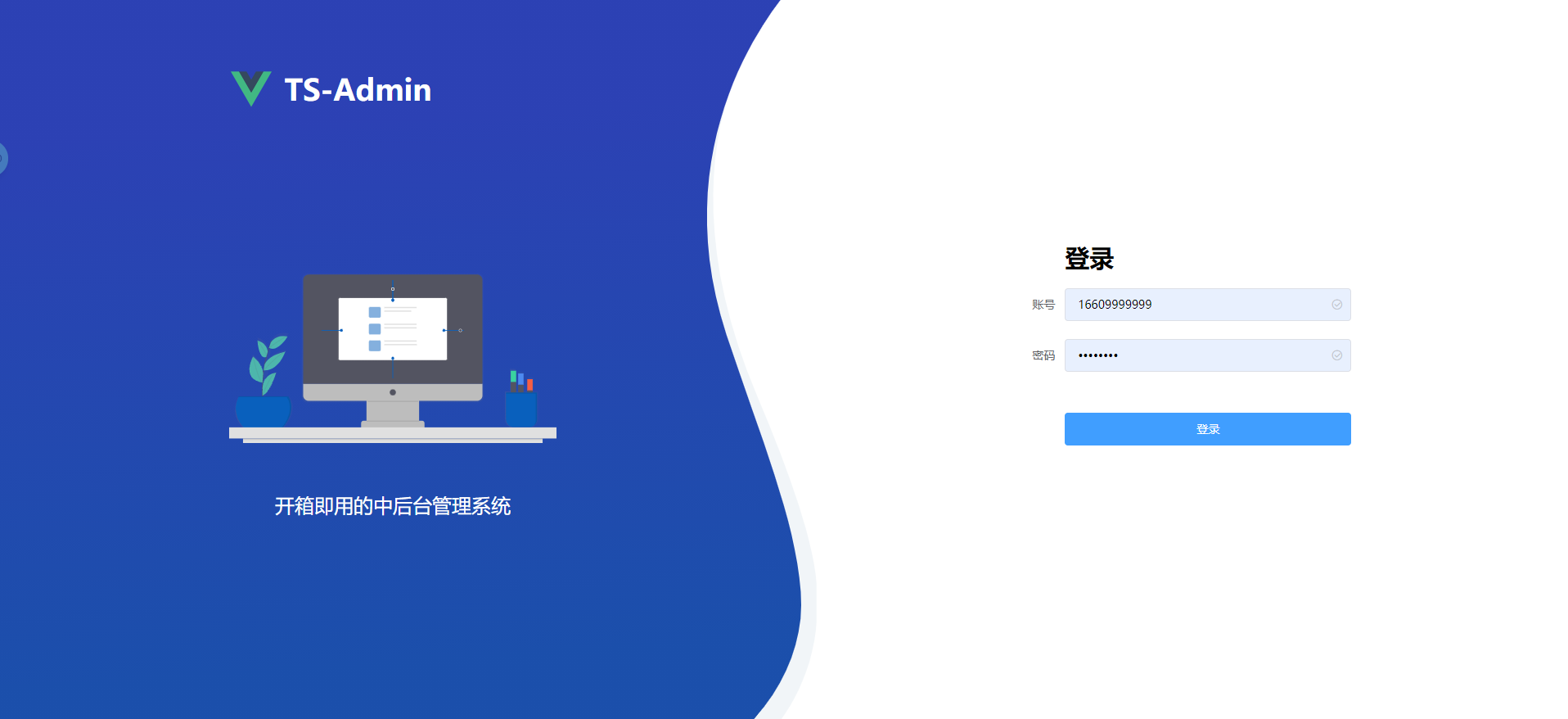
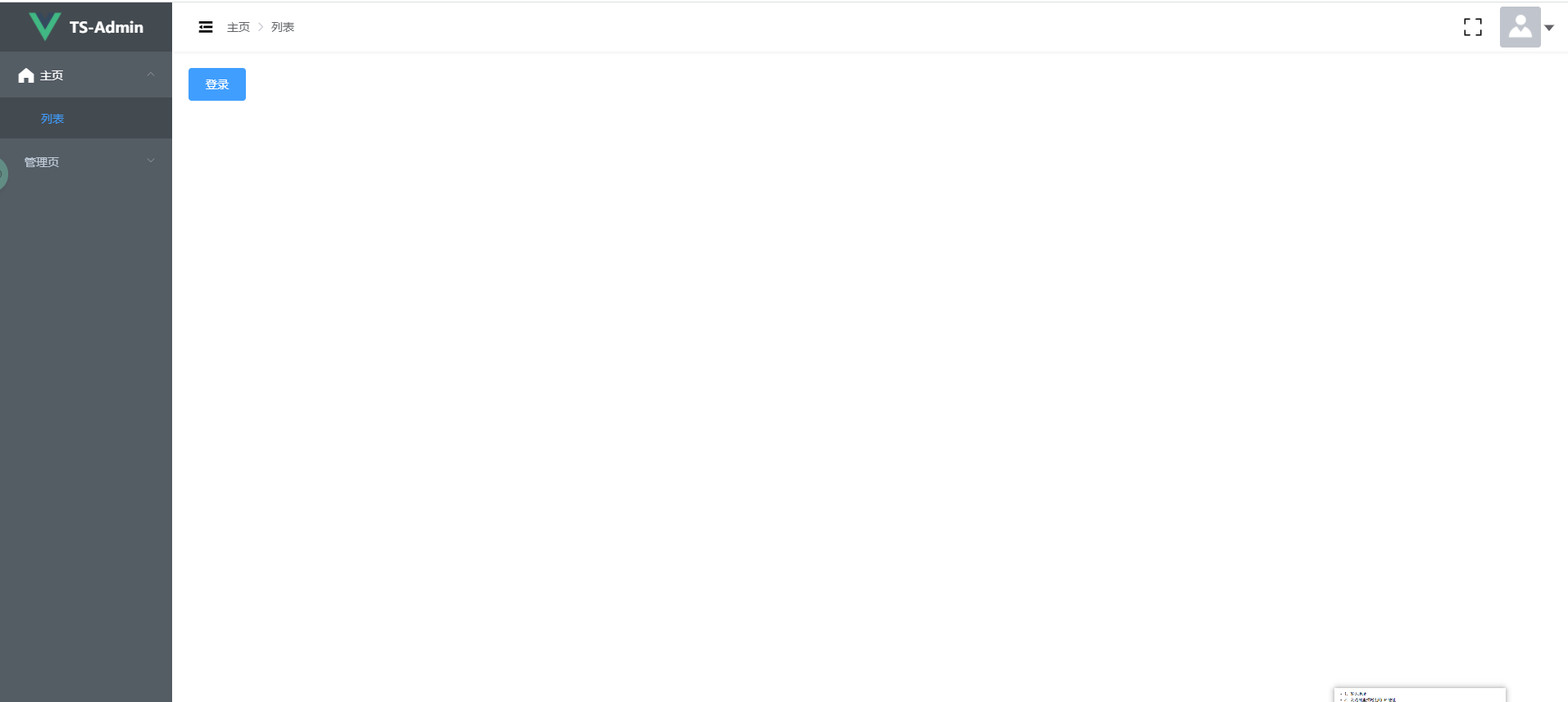
> 这是简单的 vue3 admin 管理后台。它包含了 动态侧边栏 & 权限控制 & 登录
### 使用技术
- 构建工具: Vite
- 核心框架: Vue3.2 VueRouter4.x
- 全局插件: Pinia(代替Vuex)
- 强类型语言: TypeScript
- UI层: Element-plus TailwindCss
- 请求层: axios (自封简易)
- 代码风格: Eslint & Prettier & Stylelint
- 提交规范: husky lint-staged
[Demo 线上地址](https://www.easye.ltd/)
## Demo
 ## 相关参考项目
- [vue-element-admin (Vue2 中最火热admin框架之一,代码精简易懂)](https://github.com/PanJiaChen/vue-element-admin)
- [Vue vben admin (Vue3版本广欢迎的框架,内容齐全,需要一定理解能力) ](https://github.com/anncwb/vue-vben-admin)
## 环境IDE配置
[VSCode](https://code.visualstudio.com/) + [Volar](https://marketplace.visualstudio.com/items?itemName=johnsoncodehk.volar)
## IDE插件推荐
- DotENV
- EditorConfig for VS Code
- ESLint
- Prettier - Code formatter
- Prettier ESLint
- Tailwind CSS IntelliSense
- Stylelint
- Vue Language Features (Volar)
- element-ui-helper
## 启动服务
```bash
# 克隆项目
git clone https://gitee.com/Rick_0/ts-admin.git
# 进入项目目录
cd ts-admin
# 安装依赖
yarn add
# 启动服务
yarn serve:dev
```
浏览器访问 [http://localhost:3000/](http://localhost:3000/)
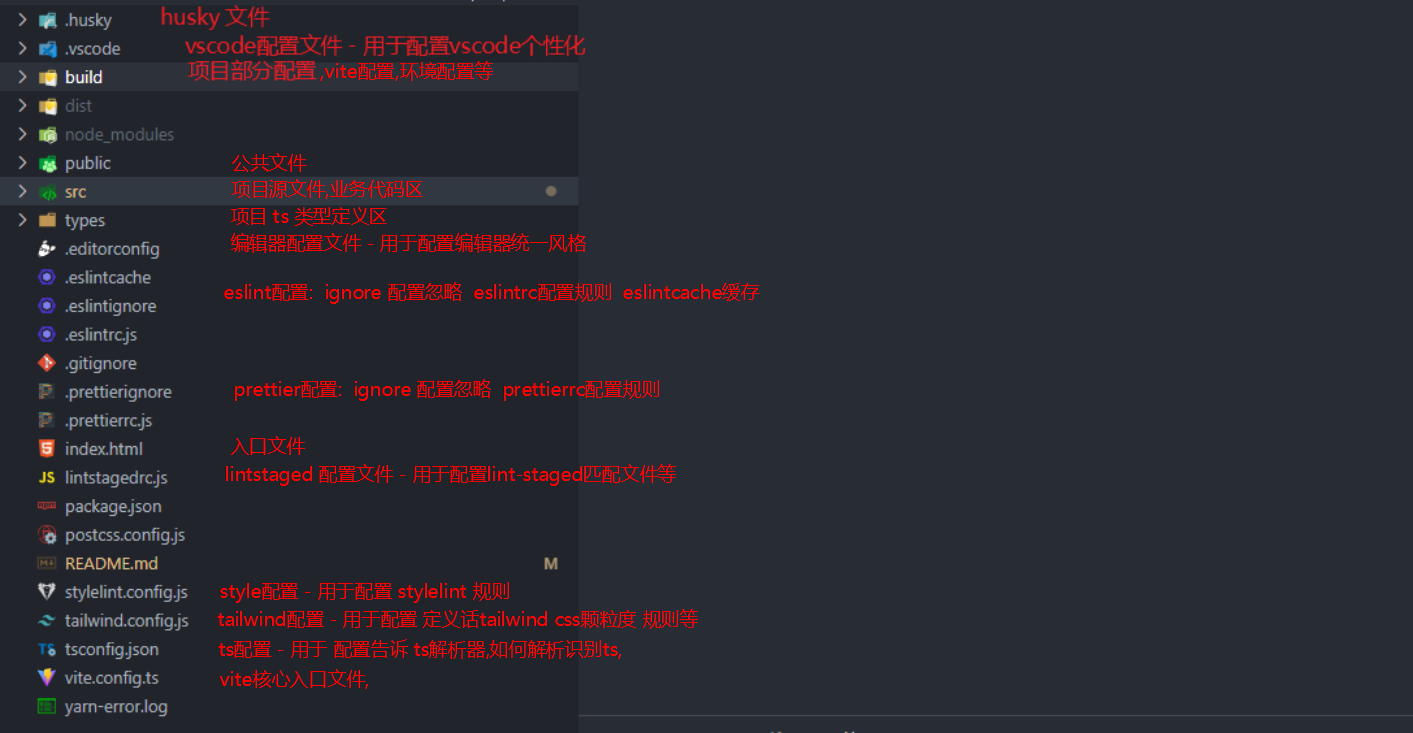
## 项目结构
大体结构
```markdown
|-- ts-admin
|-- .editorconfig
|-- .eslintcache
|-- .eslintignore
|-- .eslintrc.js
|-- .gitignore
|-- .prettierignore
|-- .prettierrc.js
|-- directoryList.md
|-- index.html
|-- lintstagedrc.js
|-- package.json
|-- postcss.config.js
|-- README.md
|-- stylelint.config.js
|-- tailwind.config.js
|-- tsconfig.json
|-- vite.config.ts
|-- yarn-error.log
|-- yarn.lock
|-- .husky
| |-- pre-commit
| |-- _
| |-- .gitignore
| |-- husky.sh
|-- .vscode
| |-- extensions.json //插件配置
| |-- settings.json //vscode配置
|-- build
| |-- env //请求环境管理
| | |-- index.ts //入口
| | |-- type.ts //类型定义
| | |-- module //环境module
| | |-- dev.ts //开发请求环境
| | |-- prod.ts //生成请求环境
| | |-- rele.ts //预发布请求环境
| | |-- test.ts //测试请求环境
| |-- helper
| | |-- index.ts
| |-- vite //vite配置文件
| |-- define.ts //定义环境变量
| |-- plugins.ts //插件处理
| |-- proxy.ts //代理配置
|-- public
| |-- favicon.ico
|-- src
| |-- App.vue
| |-- main.ts //vue入口文件
| |-- apis // 请求模块
| | |-- model //请求的公共类型定义
| | | |-- commonModel.ts
| | |-- user //对应模块
| | |-- user.ts
| | |-- userModel.ts
| |-- assets
| | |-- login-bg.svg
| | |-- login-box-bg.svg
| | |-- logo.png
| | |-- 401-images
| | | |-- 401.gif
| | |-- 404-images
| | |-- 404-cloud.png
| | |-- 404.png
| |-- components //公共组件
| | |-- HelloWorld.vue
| | |-- screenfull
| | |-- Index.vue
| |-- layout 后台管理模板
| | |-- Index.vue // 模板入口文件
| | |-- component
| | |-- index.ts
| | |-- main
| | | |-- Main.vue //内容区域
| | |-- navbar //状态栏
| | | |-- Navbar.vue
| | |-- sidebar // 侧边栏
| | | |-- Sidebar.vue
| | | |-- SidebarItem.vue
| | | |-- SidebarItemLink.vue
| | | |-- SidebarLogo.vue
| | |-- tagbar // tag栏(未开发)
| | |-- Tagbar.vue
| |-- plugins // 项目插件安装
| | |-- element.ts
| | |-- index.ts // 入口整合文件
| |-- router // router路由
| | |-- basicRoutes.ts // 基础路由 防止无需权限的静态路由
| | |-- index.ts // 路由入口文件
| | |-- types.ts // 路由类型文件
| | |-- guard // 路由守卫
| | | |-- permission.ts // 权限设置
| | |-- helper // Router工具函数
| | | |-- indexHelper.ts
| | |-- modules // router模块, 新建模块就在这下面新建文件
| | |-- errPage.ts
| |-- store // 全局项目状态管理 Pinia
| | |-- index.ts //入口文件
| | |-- modules //模块
| | |-- app.ts // 全局app
| | |-- permission.ts // 权限模块
| | |-- setting.ts // 设置
| | |-- user.ts // 用户
| |-- style // 项目全局样式
| | |-- tailwind.css // tailwind 整合文件
| |-- utils //项目全局工具库
| | |-- is.ts
| | |-- axios // axios
| | |-- myAxios.ts // axios二次封装
| | |-- request.ts // axios初始化配置
| |-- views // 页面
| | |-- admin.vue
| | |-- login.vue
| | |-- use.vue
| | |-- error-page
| | |-- 401.vue
| | |-- 404.vue
| |-- vuex // vuex 要废弃!
| |-- index.ts
| |-- interface.ts
| |-- helper
| | |-- modulesHelper.ts
| |-- modules
| | |-- user.ts
| |-- plugins
| |-- index.ts
|-- types // 项目类型定义
|-- env.d.ts //全局项目环境类型定义
|-- global.d.ts // 全局工具高级类型定义
|-- module.d.ts //全局模块类型定义
|-- vue.d.ts // vue文件类型扩展
```
## 请求环境区分
```bash
# 开发环境 - 启动
npm run serve:dev
# 开发环境 - 打包
npm run build:dev
# 测试环境 - 启动
npm run serve:test
# 测试环境 - 打包
npm run build:test
# 预发布环境 - 启动
npm run serve:rele
# 预发布环境 - 打包
npm run build:rele
# 生产环境 - 启动
npm run serve:prod
# 生产环境 - 打包
npm run build:prod
```
#### 注意: 如果有其他不同环境, 只需要按照原有模板添加两处即可, 1. script 添加命令 2. /build/env/module 新建文件 index.ts引入即可
#### 例如添加 `模拟环境` 简写为 mock
1. package.json
```json
{
"script": {
"serve:mock":"cross-env ENV=mock vite",
"build:mock":"cross-env ENV=mock vite build"
}
}
```
2. 添加环境配置文件
1. 在/build/env/module/目录下,新建 mock.ts, 编写如下变量
```typescript
//mock.ts
import type { MockTypes } from '../type'
const serve: MockTypes['serve'] = {
BASE_API: '/api',
ADMIN: 'admin'
}
const build: MockTypes['build'] = {
BASE_API: '/api-prod'
}
export default { serve, build }
```
2. 新建类型保护
```typescript
// types.ts
export interface EnvBasicTypes {
serve: {
BASE_API: string
}
build: {
BASE_API: string
}
}
export type MockTypes = EnvBasicTypes
export type AllEnvTypes = DevTypes['serve'] &
TestTypes['serve'] &
ReleaseTypes['serve'] &
ProdutionTypes['serve'] &
MockTypes['serve']
```
3. index.ts 引入定义
```typescript
// index.ts
import dev from './module/dev'
import test from './module/test'
import rele from './module/rele'
import prod from './module/prod'
import mock from './module/mock' // !!!!
const target = {
dev,
test,
rele,
prod,
mock // !!!!
}[process.env.ENV]
export default target
```
## 命令
```bash
# 清除node_modules缓存
npm clean:cache
# 清除node_modules
npm clean:lib
# ts类型lint
npm run type:check
# 代码格式检查并自动修复
npm run lint:lint-staged
# js代码格式检查
npm run lint:eslint
# css代码格式检查
npm run lint:stylelint
# 整体代码风格检查
npm run lint:prettier
```
## Browser support
The `Chrome 80+` browser is recommended for local development
Support modern browsers, not IE
| [](http://godban.github.io/browsers-support-badges/) IE | [](http://godban.github.io/browsers-support-badges/) Edge | [](http://godban.github.io/browsers-support-badges/) Firefox | [](http://godban.github.io/browsers-support-badges/) Chrome | [](http://godban.github.io/browsers-support-badges/) Safari |
| ------------------------------------------------------------ | ------------------------------------------------------------ | ------------------------------------------------------------ | ------------------------------------------------------------ | ------------------------------------------------------------ |
| not support | last 2 versions | last 2 versions | last 2 versions | last 2 versions |
## Type Support For `.vue` Imports in TS
Since TypeScript cannot handle type information for `.vue` imports, they are shimmed to be a generic Vue component type by default. In most cases this is fine if you don't really care about component prop types outside of templates. However, if you wish to get actual prop types in `.vue` imports (for example to get props validation when using manual `h(...)` calls), you can enable Volar's `.vue` type support plugin by running `Volar: Switch TS Plugin on/off` from VSCode command palette.
## 相关参考项目
- [vue-element-admin (Vue2 中最火热admin框架之一,代码精简易懂)](https://github.com/PanJiaChen/vue-element-admin)
- [Vue vben admin (Vue3版本广欢迎的框架,内容齐全,需要一定理解能力) ](https://github.com/anncwb/vue-vben-admin)
## 环境IDE配置
[VSCode](https://code.visualstudio.com/) + [Volar](https://marketplace.visualstudio.com/items?itemName=johnsoncodehk.volar)
## IDE插件推荐
- DotENV
- EditorConfig for VS Code
- ESLint
- Prettier - Code formatter
- Prettier ESLint
- Tailwind CSS IntelliSense
- Stylelint
- Vue Language Features (Volar)
- element-ui-helper
## 启动服务
```bash
# 克隆项目
git clone https://gitee.com/Rick_0/ts-admin.git
# 进入项目目录
cd ts-admin
# 安装依赖
yarn add
# 启动服务
yarn serve:dev
```
浏览器访问 [http://localhost:3000/](http://localhost:3000/)
## 项目结构
大体结构

```markdown
|-- ts-admin
|-- .editorconfig
|-- .eslintcache
|-- .eslintignore
|-- .eslintrc.js
|-- .gitignore
|-- .prettierignore
|-- .prettierrc.js
|-- directoryList.md
|-- index.html
|-- lintstagedrc.js
|-- package.json
|-- postcss.config.js
|-- README.md
|-- stylelint.config.js
|-- tailwind.config.js
|-- tsconfig.json
|-- vite.config.ts
|-- yarn-error.log
|-- yarn.lock
|-- .husky
| |-- pre-commit
| |-- _
| |-- .gitignore
| |-- husky.sh
|-- .vscode
| |-- extensions.json //插件配置
| |-- settings.json //vscode配置
|-- build
| |-- env //请求环境管理
| | |-- index.ts //入口
| | |-- type.ts //类型定义
| | |-- module //环境module
| | |-- dev.ts //开发请求环境
| | |-- prod.ts //生成请求环境
| | |-- rele.ts //预发布请求环境
| | |-- test.ts //测试请求环境
| |-- helper
| | |-- index.ts
| |-- vite //vite配置文件
| |-- define.ts //定义环境变量
| |-- plugins.ts //插件处理
| |-- proxy.ts //代理配置
|-- public
| |-- favicon.ico
|-- src
| |-- App.vue
| |-- main.ts //vue入口文件
| |-- apis // 请求模块
| | |-- model //请求的公共类型定义
| | | |-- commonModel.ts
| | |-- user //对应模块
| | |-- user.ts
| | |-- userModel.ts
| |-- assets
| | |-- login-bg.svg
| | |-- login-box-bg.svg
| | |-- logo.png
| | |-- 401-images
| | | |-- 401.gif
| | |-- 404-images
| | |-- 404-cloud.png
| | |-- 404.png
| |-- components //公共组件
| | |-- HelloWorld.vue
| | |-- screenfull
| | |-- Index.vue
| |-- layout 后台管理模板
| | |-- Index.vue // 模板入口文件
| | |-- component
| | |-- index.ts
| | |-- main
| | | |-- Main.vue //内容区域
| | |-- navbar //状态栏
| | | |-- Navbar.vue
| | |-- sidebar // 侧边栏
| | | |-- Sidebar.vue
| | | |-- SidebarItem.vue
| | | |-- SidebarItemLink.vue
| | | |-- SidebarLogo.vue
| | |-- tagbar // tag栏(未开发)
| | |-- Tagbar.vue
| |-- plugins // 项目插件安装
| | |-- element.ts
| | |-- index.ts // 入口整合文件
| |-- router // router路由
| | |-- basicRoutes.ts // 基础路由 防止无需权限的静态路由
| | |-- index.ts // 路由入口文件
| | |-- types.ts // 路由类型文件
| | |-- guard // 路由守卫
| | | |-- permission.ts // 权限设置
| | |-- helper // Router工具函数
| | | |-- indexHelper.ts
| | |-- modules // router模块, 新建模块就在这下面新建文件
| | |-- errPage.ts
| |-- store // 全局项目状态管理 Pinia
| | |-- index.ts //入口文件
| | |-- modules //模块
| | |-- app.ts // 全局app
| | |-- permission.ts // 权限模块
| | |-- setting.ts // 设置
| | |-- user.ts // 用户
| |-- style // 项目全局样式
| | |-- tailwind.css // tailwind 整合文件
| |-- utils //项目全局工具库
| | |-- is.ts
| | |-- axios // axios
| | |-- myAxios.ts // axios二次封装
| | |-- request.ts // axios初始化配置
| |-- views // 页面
| | |-- admin.vue
| | |-- login.vue
| | |-- use.vue
| | |-- error-page
| | |-- 401.vue
| | |-- 404.vue
| |-- vuex // vuex 要废弃!
| |-- index.ts
| |-- interface.ts
| |-- helper
| | |-- modulesHelper.ts
| |-- modules
| | |-- user.ts
| |-- plugins
| |-- index.ts
|-- types // 项目类型定义
|-- env.d.ts //全局项目环境类型定义
|-- global.d.ts // 全局工具高级类型定义
|-- module.d.ts //全局模块类型定义
|-- vue.d.ts // vue文件类型扩展
```
## 请求环境区分
```bash
# 开发环境 - 启动
npm run serve:dev
# 开发环境 - 打包
npm run build:dev
# 测试环境 - 启动
npm run serve:test
# 测试环境 - 打包
npm run build:test
# 预发布环境 - 启动
npm run serve:rele
# 预发布环境 - 打包
npm run build:rele
# 生产环境 - 启动
npm run serve:prod
# 生产环境 - 打包
npm run build:prod
```
#### 注意: 如果有其他不同环境, 只需要按照原有模板添加两处即可, 1. script 添加命令 2. /build/env/module 新建文件 index.ts引入即可
#### 例如添加 `模拟环境` 简写为 mock
1. package.json
```json
{
"script": {
"serve:mock":"cross-env ENV=mock vite",
"build:mock":"cross-env ENV=mock vite build"
}
}
```
2. 添加环境配置文件
1. 在/build/env/module/目录下,新建 mock.ts, 编写如下变量
```typescript
//mock.ts
import type { MockTypes } from '../type'
const serve: MockTypes['serve'] = {
BASE_API: '/api',
ADMIN: 'admin'
}
const build: MockTypes['build'] = {
BASE_API: '/api-prod'
}
export default { serve, build }
```
2. 新建类型保护
```typescript
// types.ts
export interface EnvBasicTypes {
serve: {
BASE_API: string
}
build: {
BASE_API: string
}
}
export type MockTypes = EnvBasicTypes
export type AllEnvTypes = DevTypes['serve'] &
TestTypes['serve'] &
ReleaseTypes['serve'] &
ProdutionTypes['serve'] &
MockTypes['serve']
```
3. index.ts 引入定义
```typescript
// index.ts
import dev from './module/dev'
import test from './module/test'
import rele from './module/rele'
import prod from './module/prod'
import mock from './module/mock' // !!!!
const target = {
dev,
test,
rele,
prod,
mock // !!!!
}[process.env.ENV]
export default target
```
## 命令
```bash
# 清除node_modules缓存
npm clean:cache
# 清除node_modules
npm clean:lib
# ts类型lint
npm run type:check
# 代码格式检查并自动修复
npm run lint:lint-staged
# js代码格式检查
npm run lint:eslint
# css代码格式检查
npm run lint:stylelint
# 整体代码风格检查
npm run lint:prettier
```
## Browser support
The `Chrome 80+` browser is recommended for local development
Support modern browsers, not IE
| [](http://godban.github.io/browsers-support-badges/) IE | [](http://godban.github.io/browsers-support-badges/) Edge | [](http://godban.github.io/browsers-support-badges/) Firefox | [](http://godban.github.io/browsers-support-badges/) Chrome | [](http://godban.github.io/browsers-support-badges/) Safari |
| ------------------------------------------------------------ | ------------------------------------------------------------ | ------------------------------------------------------------ | ------------------------------------------------------------ | ------------------------------------------------------------ |
| not support | last 2 versions | last 2 versions | last 2 versions | last 2 versions |
## Type Support For `.vue` Imports in TS
Since TypeScript cannot handle type information for `.vue` imports, they are shimmed to be a generic Vue component type by default. In most cases this is fine if you don't really care about component prop types outside of templates. However, if you wish to get actual prop types in `.vue` imports (for example to get props validation when using manual `h(...)` calls), you can enable Volar's `.vue` type support plugin by running `Volar: Switch TS Plugin on/off` from VSCode command palette.