# streambert
**Repository Path**: t-kirin/streambert
## Basic Information
- **Project Name**: streambert
- **Description**: 一款跨平台的 Electron 桌面应用程序,可用于在线观看和下载全球任何电影、电视剧或动漫
- **Primary Language**: JavaScript
- **License**: GPL-3.0
- **Default Branch**: main
- **Homepage**: https://www.oschina.net/p/streambert
- **GVP Project**: No
## Statistics
- **Stars**: 0
- **Forks**: 1
- **Created**: 2026-05-25
- **Last Updated**: 2026-05-25
## Categories & Tags
**Categories**: Uncategorized
**Tags**: None
## README
[](https://github.com/truelockmc/streambert/releases/latest/)
[](https://github.com/truelockmc/streambert/releases)
[](https://github.com/truelockmc/streambert/issues)
[](https://github.com/truelockmc/streambert/issues?q=is%3Aissue+is%3Aclosed)
[](https://github.com/truelockmc/streambert)
[](https://codeberg.org/truelockmc/streambert)
# Streambert
A cross-platform Electron Desktop App to stream and download any Movie, TV Series or Anime in the World. Zero Ads and Tracking

[Installation](https://github.com/truelockmc/streambert?tab=readme-ov-file#requirements)
## Why Streambert?
- 🎦 **Streaming:** Stream any Movie, Anime or TV Series from around the World.
- 📥 **Downloading:** Download anything you want to watch.
- 📃 **Subtitles:** Download and manage Subtitles.
- ⚙️ **Customizability:** Customize the Interface and Features to your unique needs.
- 📚 **Library:** Track what you watched, save stuff you want to watch and manage your Downloads.
- ✨ **Trending:** Discover new things to Watch every Day.
- 🛡️ **Privacy:** Completely Ads and Tracker free, forever.
- ⚡ **Speed:** Stream faster than any Browser can, download with multithreading.


---
[](https://github.com/truelockmc/streambert/stargazers)
---
## Streaming
The Application mainly gets Video Streams from VidSrc (you can also Stream from videasy.net and 2Embed).
It fetches Information for Images, Info Texts, Search and Homepage from [tmdb](https://www.themoviedb.org/).
---
## Downloading
You can download those Video Streams because the Program sources Links to their .m3u8 Playlist Files ([similar to this Browser Extension](https://addons.mozilla.org/en-US/firefox/addon/m3u8-link-finder/)).
Once you click 'Download' these Links are used to download the Full Movie/TV Episode using [this Program](https://github.com/truelockmc/vid-dl-cli-only). You can then watch them In-App or take the Files on any Storage Medium you want.
---
## Anime
You can also watch Anime, the App checks if a Movie or Series is an Anime and then sources its Metadata from [AniList](https://anilist.co/) instead of [tmdb](https://www.themoviedb.org/).
Media Files for Animes are scraped from AllManga.to (i stole this mechanic from [ani-cli](https://github.com/pystardust/ani-cli)). The App directly gets .mp4 Files and doesnt evem show you the AllManga website, you can also download these Files, just like any other Content.
## Requirements
- [Node.js](https://nodejs.org/) (>=22.12.0) installed (only if you aren't using [prebuilt Binaries](https://github.com/truelockmc/streambert/releases/latest))
- A free TMDB API Read Access Token ([Guide on how to get one](tmdb-tutorial.md))
- For downloading, [this Program](https://github.com/truelockmc/vid-dl-cli-only/releases/latest) somewhere on your PC and [ffmpeg](https://ffmpeg.org/download.html) installed
---
## Installation
On first launch you'll be prompted to enter your TMDB API key. ([Guide on how to get one](tmdb-tutorial.md))
It's saved locally, you only need to do this once.
### Linux, Manual (.deb / .AppImage / .pacman)
Download the latest `.deb` `.pacman` or `.AppImage` from the [Releases](https://github.com/truelockmc/streambert/releases/latest) page.
```bash
# .deb
sudo dpkg -i streambert_*.deb
# Arch Linux (.pacman)
sudo pacman -U streambert-*.pacman
# .AppImage (you can also do it with Gearlever)
chmod +x Streambert-x64.AppImage && ./Streambert-x64.AppImage
```
### Windows
Download the latest `Streambert Setup *.exe` from the [Releases](https://github.com/truelockmc/streambert/releases/latest) page and run it.
---
## Building from Source
1. Install dependencies:
```bash
npm install
```
2. Build
```bash
npm run dist:win
```
or
```bash
npm run dist:linux
```
or (for Arch Linux)
```bash
npm run dist:arch
```
or (for an AppImage only)
```bash
npm run dist:appimage
```
> [!IMPORTANT]
> If you are building/installing on Arch Linux and encounter errors, you may need these libraries:
> - **libcrypt.so.1 error:** `sudo pacman -S libxcrypt-compat`
> - **http-parser dependency error:** `yay -S http-parser` (from AUR)
## Legal Disclaimer
**IMPORTANT: This application is for educational and personal use only.**
- Streambert does not host, store, or distribute any copyrighted content
- All content is sourced from third-party providers and websites
- Users are solely responsible for ensuring they have legal rights to access any content
- The developer does not endorse or encourage copyright infringement
- Users must comply with all applicable laws in their jurisdiction
- Any legal issues should be directed to the actual content providers
- This app functions as a search engine aggregator only
- No copyrighted material is stored on my side
## Legal Notice
This application is provided "as is" for educational purposes. The developer:
- Does not claim ownership of any content
- Does not profit from copyrighted material in any way
- Does not control third-party content providers
- Encourages users to support content creators through legal means
[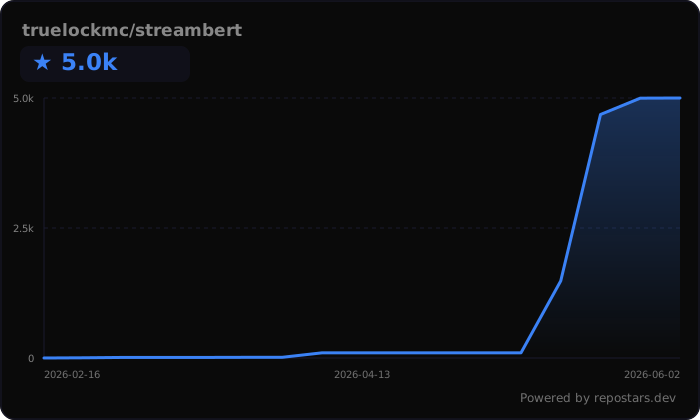](https://repostars.dev/?repos=truelockmc%2Fstreambert&theme=dark)
Project Structure
```
Project Root
├── index.html
├── main.js
├── package.json
├── preload.js
├── vite.config.js
├── LICENSE
├── README.md
├── public
│ ├── icon.png
│ ├── installer-sidebar.bmp
│ └── logo.svg
├── screenshots
│ ├── adblock.png
│ ├── anime.png
│ ├── api-settings_tmdb.png
│ ├── application_tmdb.png
│ ├── download.png
│ ├── icon.png
│ ├── movie.png
│ ├── personal-use_tmdb.png
│ ├── series.png
│ ├── setup.png
│ ├── signup_tmdb.png
│ ├── subs.png
│ ├── token_tmdb.png
│ └── trending.png
└── src
├── App.jsx
├── main.jsx
├── components
│ ├── BlockedStatsModal.jsx
│ ├── CloseConfirmModal.jsx
│ ├── DownloadModal.jsx
│ ├── ErrorBoundary.jsx
│ ├── Icons.jsx
│ ├── KeyboardShortcutsModal.jsx
│ ├── MediaCard.jsx
│ ├── SearchModal.jsx
│ ├── SetupScreen.jsx
│ ├── Sidebar.jsx
│ ├── SubtitleDownloaderModal.jsx
│ ├── TrailerModal.jsx
│ ├── TrendingCarousel.jsx
│ ├── UpdateModal.jsx
│ └── WindowTitlebar.jsx
├── ipc
│ ├── allmanga.js
│ ├── blockStats.js
│ ├── downloads.js
│ ├── player.js
│ ├── storage.js
│ └── subtitles.js
├── pages
│ ├── DownloadsPage.jsx
│ ├── HomePage.jsx
│ ├── LibraryPage.jsx
│ ├── MoviePage.jsx
│ ├── SettingsPage.jsx
│ └── TVPage.jsx
├── styles
│ ├── global.css
│ └── fonts
│ ├── bebas-neue-regular.woff2
│ ├── dm-sans-300.woff2
│ ├── dm-sans-500.woff2
│ ├── dm-sans-600.woff2
│ └── dm-sans-regular.woff2
└── utils
├── ageRating.js
├── aniSkip.js
├── api.js
├── appearance.js
├── backup.js
├── episodeMappings.js
├── homeLayout.js
├── storage.js
├── subtitles.js
├── updates.js
├── useBlockedStats.js
└── useRatings.js
```