| This takes `myImage.jpg`, converts the colors to ansi backgrounds and then stipples the details at a threshold of 40 (of 255) using a higher resolution image and then renders that into a braille overlay in black(#000000) on top of the colors. | ||
JS```javascript art.image({ src: "myImage.jpg", rows:80, cols:80, stipple:"#000000", posterize: true, threshold:40 }, cb) ``` |
CL```bash ascii-art image posterized stippled --rows=80 --cols=80 --stipple="#000000" --threshold=40 myImage.jpg ``` |
Web
```html
|
Example

Example

Example

Example

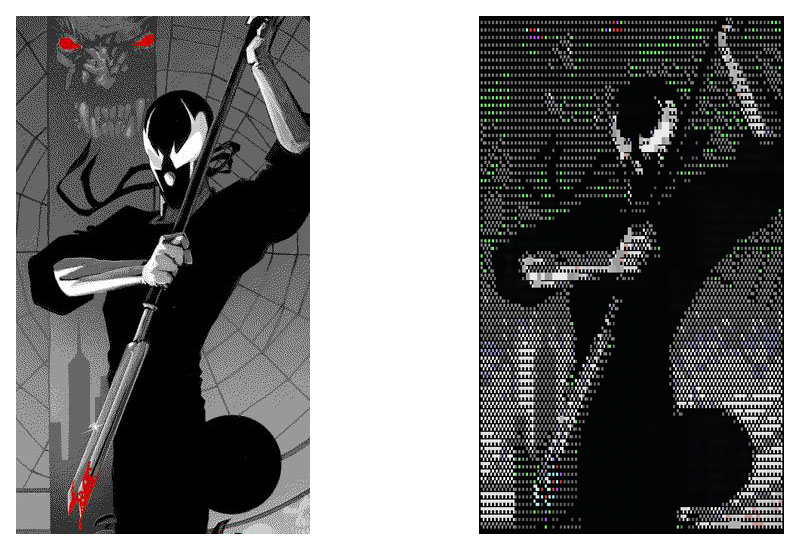
| ### Downsampling and detail loss Because of the [resolution downsampling](https://en.wikipedia.org/wiki/Pixel#Sampling_patterns) from the [original dimensions](https://en.wikipedia.org/wiki/Image_resolution#Pixel_count) to the [destination width](https://en.wikipedia.org/wiki/Characters_per_line), some finer details may be lost. Plan accordingly. Here's an example of [some sequential art](https://en.wikipedia.org/wiki/Grendel_(comics)) in 256 color (primarily greyscale): | ||
Example
| ||
JS```javascript var art = require('ascii-art'); var Color = require('ascii-art-ansi/colors'); Color.is256 = true; art.image({ src: "node_modules/ascii-art/Images/grendel.jpg", alphabet:"blocks" }, cb); ``` |
CL```bash ascii-art image -B 8 -C rankedChannel -a blocks node_modules/ascii-art/Images/grendel.jpg ``` |
Web```html ``` |
 ### Color Modes
Multiple output modes are available including [4bit](https://en.wikipedia.org/wiki/Color_depth#4-bit_color), [8bit](https://en.wikipedia.org/wiki/8-bit_color), [32bit](https://en.wikipedia.org/wiki/Color_depth#Deep_color_(30-bit)) (equivalent to [24bit](https://en.wikipedia.org/wiki/Color_depth#True_color_(24-bit))). [16bit](https://en.wikipedia.org/wiki/Color_depth#High_color_(15/16-bit)) color was intentionally excluded, as there is no direct terminal support and the cost of including color definitions for such a large set would not be justified. It would be feasible to implement as an optional import, should the need exist.
The following example takes [`zero-cool.jpg`](https://www.youtube.com/watch?v=2efhrCxI4J0), converts the colors to ansi foreground color in solid block characters. Note that you will need to tune your distance function in 8bit mode, as what looks good varies by the type of imagery that goes through it.
Anecdotally, the default distance function only covers ~1/3 of the samples we've done, but we support many methods(`euclideanDistance`, `classic`, `ratioDistance`, `classicByValue`, `CIE76Difference`, `closestByIntensity`, `rankedChannel`, `simple`, `minDeviation`, `luminosity`, `saturation`, `hue`, `original`). But helpfully, you can merge algorithms by asking for `algorithm1+algorithm2` (it uses equal weighting), or make your own.
### Color Modes
Multiple output modes are available including [4bit](https://en.wikipedia.org/wiki/Color_depth#4-bit_color), [8bit](https://en.wikipedia.org/wiki/8-bit_color), [32bit](https://en.wikipedia.org/wiki/Color_depth#Deep_color_(30-bit)) (equivalent to [24bit](https://en.wikipedia.org/wiki/Color_depth#True_color_(24-bit))). [16bit](https://en.wikipedia.org/wiki/Color_depth#High_color_(15/16-bit)) color was intentionally excluded, as there is no direct terminal support and the cost of including color definitions for such a large set would not be justified. It would be feasible to implement as an optional import, should the need exist.
The following example takes [`zero-cool.jpg`](https://www.youtube.com/watch?v=2efhrCxI4J0), converts the colors to ansi foreground color in solid block characters. Note that you will need to tune your distance function in 8bit mode, as what looks good varies by the type of imagery that goes through it.
Anecdotally, the default distance function only covers ~1/3 of the samples we've done, but we support many methods(`euclideanDistance`, `classic`, `ratioDistance`, `classicByValue`, `CIE76Difference`, `closestByIntensity`, `rankedChannel`, `simple`, `minDeviation`, `luminosity`, `saturation`, `hue`, `original`). But helpfully, you can merge algorithms by asking for `algorithm1+algorithm2` (it uses equal weighting), or make your own.
| |||
| img |
4
|
8
|
32
|
| JS |
4```javascript var art = require('ascii-art'); art.image({ src: "node_modules/ascii-art/Images/zero-cool.jpg", alphabet:"solid" }, cb); ``` |
8```javascript var art = require('ascii-art'); var Color = require('ascii-art-ansi/colors'); Color.is256 = true; art.image({ src: "node_modules/ascii-art/Images/zero-cool.jpg", alphabet:"solid" }, cb); ``` |
32```javascript var art = require('ascii-art'); var Color = require('ascii-art-ansi/colors'); Color.isTrueColor = true; art.image({ src: "node_modules/ascii-art/Images/zero-cool.jpg", alphabet:"solid" }, cb); ``` |
| CL |
4```bash ascii-art image -B 4 -a solid node_modules/ascii-art/Images/zero-cool.jpg ``` |
8```bash ascii-art image -B 8 -C closestByIntensity -a solid node_modules/ascii-art/Images/zero-cool.jpg ``` |
32```bash ascii-art image -B 32 -a solid node_modules/ascii-art/Images/zero-cool.jpg ``` |
| Web |
4
```html
|
8
```html
|
32
```html
|


| Render a table for with the provided data given the provided options | ||
JS```javascript art.table({}, cb) //returns String ``` |
CL```bash # N/A ``` |
Web```html ``` |
| Render a graph for with the provided data given the provided options | ||
JS```javascript art.graph({}, cb) //returns String ``` |
CL```bash # N/A ``` |
Web```html ``` |
| Fetch artwork from the requested source using the preconfigured request library. | ||
JS```javascript art.artwork({}, cb) //returns String ``` |
CL```bash # N/A ``` |
Web```html ``` |