# drip-table
**Repository Path**: tomdev/drip-table
## Basic Information
- **Project Name**: drip-table
- **Description**: 是京东零售推出的一款用于企业级中后台的动态列表解决方案,项目基于 React 和 JSON Schema,旨在通过简单配置快速生成页面动态列表来降低 CMS 页面列表开发难度、提高工作效率
- **Primary Language**: Unknown
- **License**: MIT
- **Default Branch**: master
- **Homepage**: None
- **GVP Project**: No
## Statistics
- **Stars**: 0
- **Forks**: 63
- **Created**: 2021-12-24
- **Last Updated**: 2021-12-24
## Categories & Tags
**Categories**: Uncategorized
**Tags**: None
## README
 Drip Table
[English](./README.md) | 简体中文 | [官方文档](http://drip-table.jd.com/) | [讨论组](https://github.com/JDFED/drip-table/discussions)|[Gitter群聊](https://gitter.im/drip-table/community)
[contributors]: https://img.shields.io/badge/all_contributors-2-orange.svg?style=flat-square "Number of contributors on All-Contributors"
[](./LICENSE)
[](https://www.npmjs.com/package/drip-table)




[![All Contributors][contributors]](./CONTRIBUTORS.md)
## 📖 介绍
`DripTable` 是京东零售推出的一款用于企业级中后台的动态列表解决方案,项目基于 `React` 和 `JSON Schema`,旨在通过`简单配置`快速生成页面动态列表来降低 `CMS` 页面列表开发难度、提高工作效率。
`DripTable` 目前包含以下子项目:`drip-table`、`drip-table-generator`、`drip-table-driver-antd`。
各个子项目具体介绍如下:
- `drip-table`:动态列表解决方案的核心库,其主要能力是支持符合 `JSON Schema` 标准的数据自动渲染列表内容。
- `drip-table-generator`:一个可视化的用于 `DripTable` 配置 `JSON Schema` 标准的配置数据的生成工具。
- `drip-table-driver-antd`: 一个 `Ant Design` UI 组件库主题包。
## ⬆️ 开始使用
`DripTable` 分为两种应用场景:配置端和应用端。配置端主要负责通过可视化方式和 `low-code` 方式进行 `JSON Schema` 标准数据的生成。应用端的职能则是将 `JSON Schema` 标准配置数据渲染成动态列表。
### 配置端
1. 安装依赖
配置端依赖应用端,安装前先确保已安装 `drip-table` 和 `drip-table-driver-{drivername}`。
> yarn
```sh
yarn add drip-table-generator
```
> npm
```sh
npm install --save drip-table-generator
```
2. 在文件开头引入依赖
```js
import DripTableGenerator from "drip-table-generator";
import "drip-table-generator/dist/index.css";
```
3. 在页面中引用
```js
return ;
```
配置端正常渲染效果如下:

### 应用端
1. 安装依赖
同时安装 `drip-table` 和 `drip-table` 主题包:
> yarn
```sh
yarn add drip-table drip-table-driver-{drivername}
```
> npm
```sh
npm install --save drip-table drip-table-driver-{drivername}
```
目前可选列表如下:
- drip-table-driver-antd
2. 在文件开头引入依赖
```js
// 引入 drip-table
import DripTable from "drip-table";
// 引入主题包,以 antd 为例
import DripTableDriverAntDesign from "drip-table-driver-antd";
// 引入 ant-design 样式
import "antd/dist/antd.css";
// 引入 drip-table 样式
import "drip-table/dist/index.css";
```
3. 引用
```js
const schema = {
$schema: "http://json-schema.org/draft/2019-09/schema#",
configs: {
size: "middle",
},
columns: [
{
$id: "id",
title: "名称",
"ui:type": "text",
"ui:props": { mode: "single" },
type: "string",
dataIndex: "dataIndexName",
},
],
};
return (
);
```
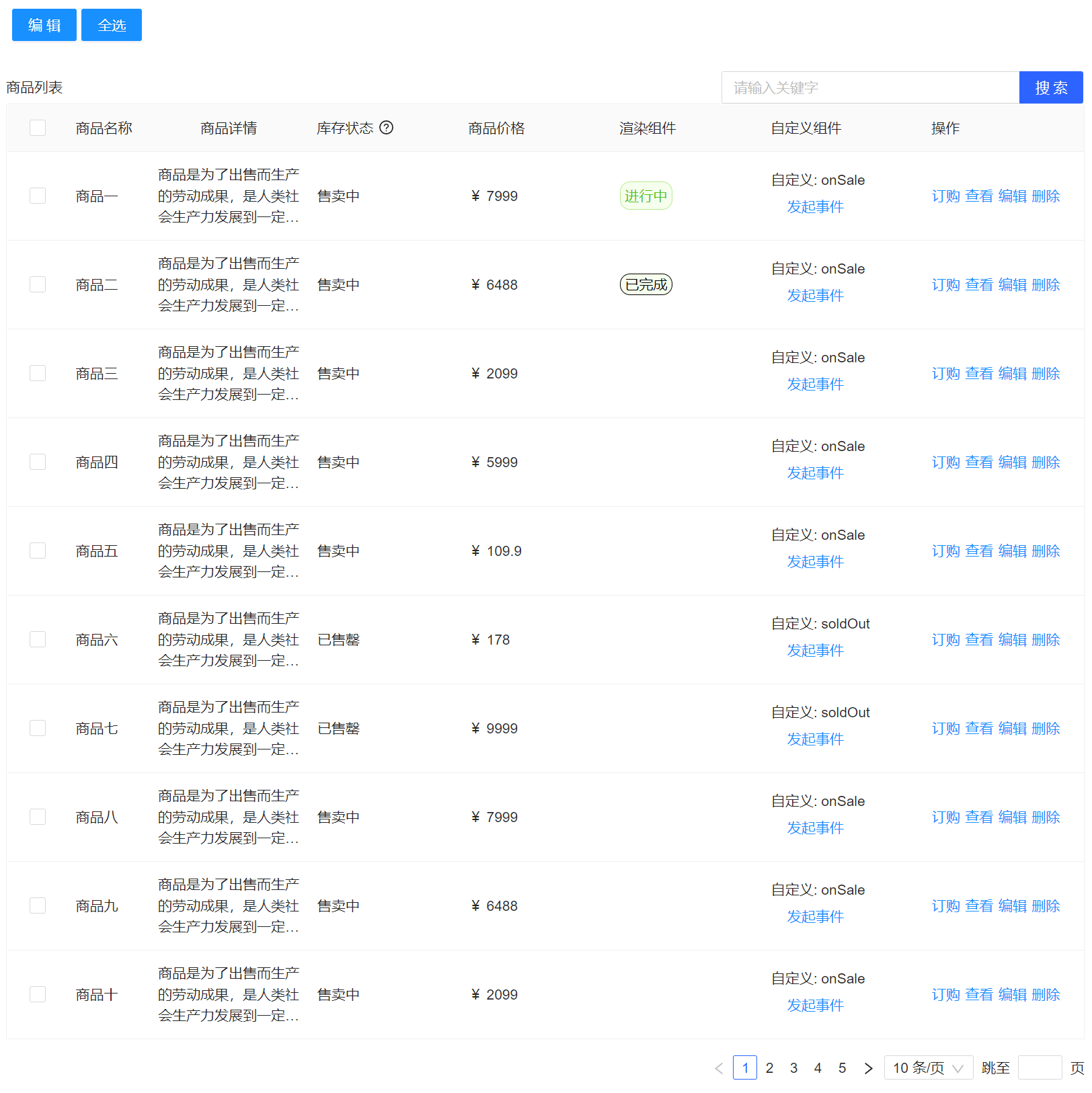
应用端正常渲染效果如下:
## 🤝 开发手册
如果您对这个项目感兴趣,欢迎提 ✨[issue](https://github.com/JDFED/drip-table/issues) ,也欢迎 ❤️[star](https://github.com/JDFED/drip-table) 支持一下。
### 本地运行
1. 克隆项目
```sh
git clone https://github.com/JDFED/drip-table.git
```
2. 安装依赖
```sh
lerna bootstrap
```
3. 运行项目
```sh
yarn start
```
- 访问 http://localhost:8000
- `drip-table` 示例路由:/drip-table/guide/basic-demo
- `drip-table-generator` 示例路由:/drip-table-generator/preview
更多命令请查看 [DEVELOP](./DEVELOP.zh-CN.md) 。
官网地址请访问 [drip-table](http://drip-table.jd.com/) 。
## License
[MIT License](./LICENSE)