# ImageSearch4J
**Repository Path**: tommycloud/ImageSearch4J
## Basic Information
- **Project Name**: ImageSearch4J
- **Description**: 【Github镜像】纯 Java 以图搜图引擎 —— 把 AI 收进底座,把业务留给你。基于 DJL + Spring Boot 3 + Lucene HNSW,把主体检测、特征提取、向量检索整条链路跑在一个 JVM 内,模型经 ONNX 中立承载,不跨语言调用,可作为 Java 应用的 AI 底座。
- **Primary Language**: Unknown
- **License**: Apache-2.0
- **Default Branch**: main
- **Homepage**: None
- **GVP Project**: No
## Statistics
- **Stars**: 0
- **Forks**: 0
- **Created**: 2026-10-03
- **Last Updated**: 2026-10-04
## Categories & Tags
**Categories**: Uncategorized
**Tags**: 以图搜图, 图像检索, DJL, SpringBoot, 人工智能
## README
ImageSearch4J
纯 Java 以图搜图引擎 —— 把 AI 收进底座,把业务留给你。






---
[English](./README.md) | 简体中文
---
ImageSearch4J 是一套基于 **Spring Boot 3 + AWS DJL + ONNX Runtime + Apache Lucene** 的完整以图搜图解决方案。
它把「主体检测 → 特征提取 → 向量检索」整条链路,**原生地实现在 JVM 之上**:
- **零 Python 依赖** —— 不需要起 Python 微服务,不需要跨语言 RPC;
- **零外部服务** —— 模型内置、索引内嵌,一个 JAR 启动即用;
- **零运维负担** —— 没有独立向量数据库,没有额外的中间件要部署。
值得一提的对照是:它在能力与定位上对标飞桨的 **[PP-ShiTu](https://github.com/PaddlePaddle/PaddleClas)** 图像识别套件——**同一套底层模型**(PicoDet-LCNet 主体检测 + PP-LCNetV2 特征提取),**同样免训练**。区别只在生态:PP-ShiTu 运行在 Python / PaddlePaddle 之上,ImageSearch4J 运行在 Java / DJL 之上——**同一件事,两种语言的实现**。
它要解决的问题只有一句话:**让 AI 能力,和你的业务代码,说同一种语言,跑在同一个进程里。**
---
## 目录
- [为什么会有这个项目](#为什么会有这个项目)
- [核心特性](#核心特性)
- [免训练:为什么它开箱就能用](#免训练为什么它开箱就能用)
- [应用场景](#应用场景)
- [界面预览](#界面预览)
- [系统架构](#系统架构)
- [快速开始](#快速开始)
- [接口说明](#接口说明)
- [响应结构](#响应结构)
- [设计取舍:为什么是 ONNX、DJL、Lucene](#设计取舍为什么是-onnx-djllucene)
- [二次开发:注入 Service 即可](#二次开发注入-service-即可)
- [配置说明](#配置说明)
- [项目结构](#项目结构)
- [常见问题](#常见问题)
- [路线图](#路线图)
- [许可与致谢](#许可与致谢)
---
## 为什么会有这个项目
以图搜图,业界几乎默认用 Python 实现。但把它真正落到生产环境,**做的其实是"部署"这件事,而不是"训练"**:
| 阶段 | 核心诉求 | 更合适的技术 |
|---|---|---|
| **模型训练** | 灵活调试、快速实验、生态丰富 | Python(PyTorch / TensorFlow / PaddlePaddle)|
| **服务部署** | 高并发、低延迟、稳定运行、与业务系统集成 | Java / JVM |
国内很多团队因此采用「**Python 训练,Java 部署**」的协同方式——**把两者优势集合起来,这才是工程上务实的选择**。
但现实里,Java 侧通常只能:
- 起一个 **Python 微服务**,通过 HTTP / gRPC 调用 —— 换来的是跨语言序列化开销、两套技术栈、两套部署与监控、以及长期的双团队沟通成本;
- 或者,放弃 Java 生态,把整个业务搬到 Python 侧。
**ImageSearch4J 提供第三条路。** 它把 AI 能力内聚进一个 Java 服务,让 Java 开发者可以:
- 用自己熟悉的语言与工具链,做好以图搜图;
- 不用关心模型如何加载、推理如何调度、向量如何索引;
- 把重心放回业务逻辑,而不是底层实现。
---
## 核心特性
| 特性 | 说明 |
|---|---|
| 🧠 **纯 Java 全链路** | 主体检测、特征提取、向量检索全部运行在 JVM 内,无 Python、无 sidecar、无跨语言调用 |
| 📦 **模型内置,开箱即用** | 检测与特征两个 ONNX 模型随包发布(28MB + 18MB),首次启动自动释放,无需手动下载 |
| 🚀 **免训练(Training-Free)** | 通用预训练模型 + 图库即知识——**新品类只需加图**,无需训练、无需标注、无需 AI 工程师介入 |
| 🔍 **嵌入式向量检索** | 基于 Apache Lucene 9 原生 HNSW 向量索引,内存级检索,**无需部署独立向量数据库** |
| 🎯 **SANMS 主体精修** | 在检测模型内置 NMS 之后再做一层"包含关系"精修,解决「大框吞小框」的经典难题 |
| 🗄️ **零运维** | 一个 JAR,一条命令;索引是本地目录,模型是本地文件,没有外部服务依赖 |
| 🧩 **面向二开的 AI 底座** | AI 复杂度全部内聚在 Service 层,业务侧只面对干净的 Java API |
| 🌐 **自带交互前端** | 附赠两个零框架静态页面(搜索页 / 向量更新页),可直接使用或作为集成参考 |
| 🔒 **长期可维护** | ONNX 中立契约 + 依赖版本锁定,模型迭代、框架换代都不会打断部署侧 |
---
## 免训练:为什么它开箱就能用
以图搜图能够做到**免训练**,根子在一个常被混淆的区别上——**它是"检索"任务,不是"分类"任务。**
| | 分类任务 | 检索任务(以图搜图) |
| ---------------- | ---------------------------------- | ---------------------------- |
| **知识存在哪** | 模型权重里 | **图库里** |
| **新增一个类别** | 重新训练(要数据、要标注、要算力) | **加几张图**(推理一次即可) |
| **模型的角色** | 分类器 | 一个通用的「图 → 向量」函数 |
因为知识不在模型里、而在图库里,**模型只需要做一件事:把任意一张图稳定地映射成向量**。这件事由通用预训练模型完成即可,**不需要针对你的数据做任何调整**——这就是"免训练"成立的原理。
它带来三个直接结果:
- **新品类上线 = 图库加图**。不需要训练、不需要标注、不需要 AI 工程师介入。**"向量更新"在这一架构里替代的,正是其它系统里"重新训练"的那一步**;
- **使用者不需要任何 AI 知识**。不必懂损失函数、学习率,也不必准备 GPU 训练集群——**只需要准备好图片**;
- **Java 侧天然只有推理**。训练是重型工程(数据集、分布式、调参、GPU 调度),推理是轻型的(加载模型、跑一次前向)。**正因为免训练,训练那一整块复杂度被直接消掉,整条链路才得以轻量。**
这也是本项目与 **PP-ShiTu** 一脉相承的地方:**同源模型、同等定位、同样免训练**。换一套数据、换一个行业场景,你需要的通常只是——**一个新的图库**。
---
## 应用场景
**🛒 电商 / 零售 —— 拍立淘式同款检索**
用户拍一张商品照片,在海量商品图库中找出同款或相似款。也可用于货架陈列稽查、竞品比价、商品真伪辅助判断。
**🖼️ 素材 / 图库 —— 相似图与重复图检索**
设计素材库按图找图、自动归集相似图片;内容平台识别重复投稿、变异转载。
**🏭 工业 / 制造 —— 样本比对与外观质检**
以标准样本图为基准,快速找出产线上外观相近的缺陷样本或合格样本。
**🛡️ 内容安全 —— 违规图像变体识别**
识别经过裁剪、加框、拼接等变体的违规图像,辅助人工审核。
**🤖 智能硬件 / 机器人 —— 视觉能力下沉**
在边缘设备或一体机上,用一套 JVM 服务同时承载业务逻辑与视觉检索能力。
---
## 界面预览
### 以图搜图 · 搜索主页面
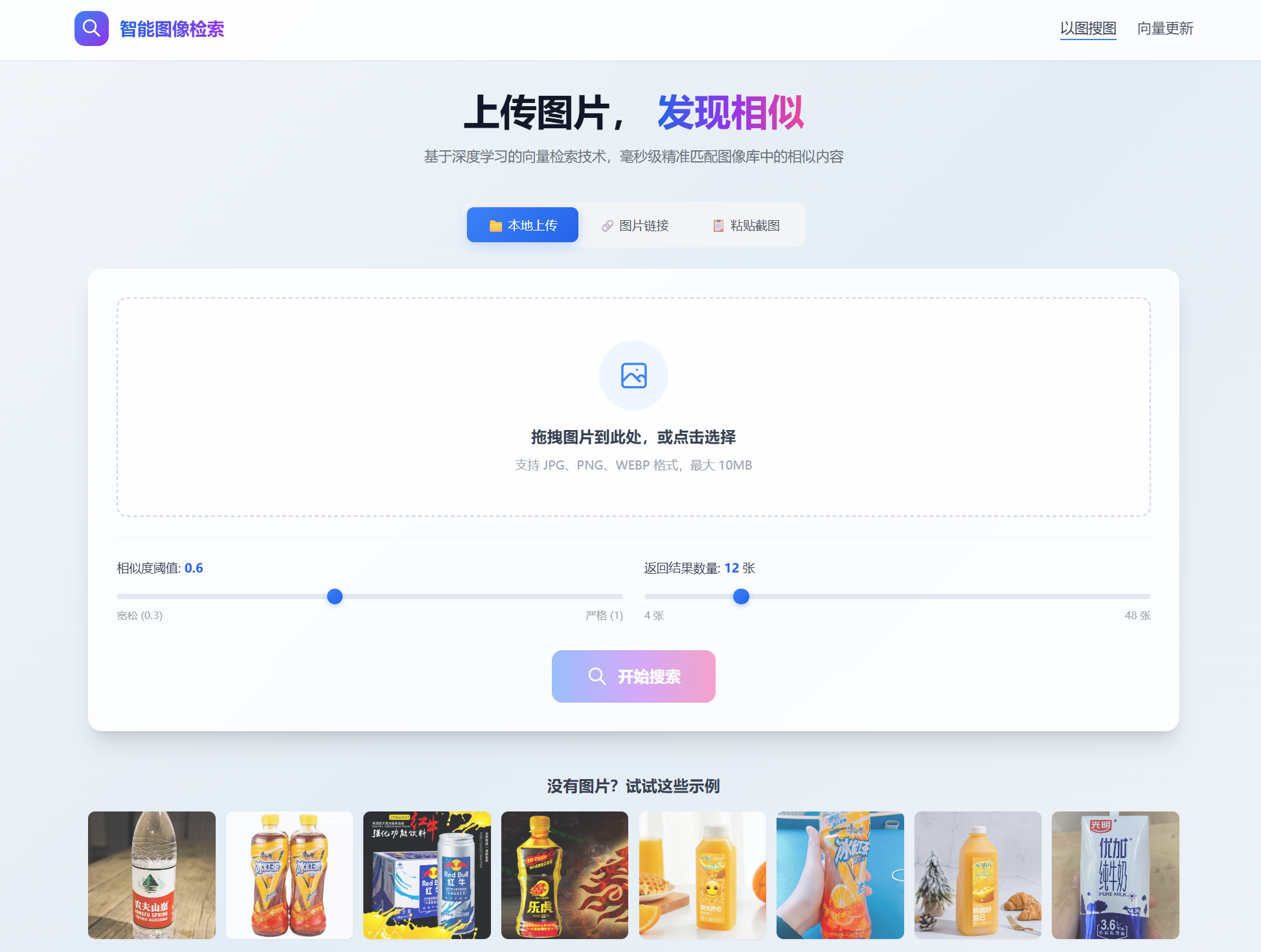
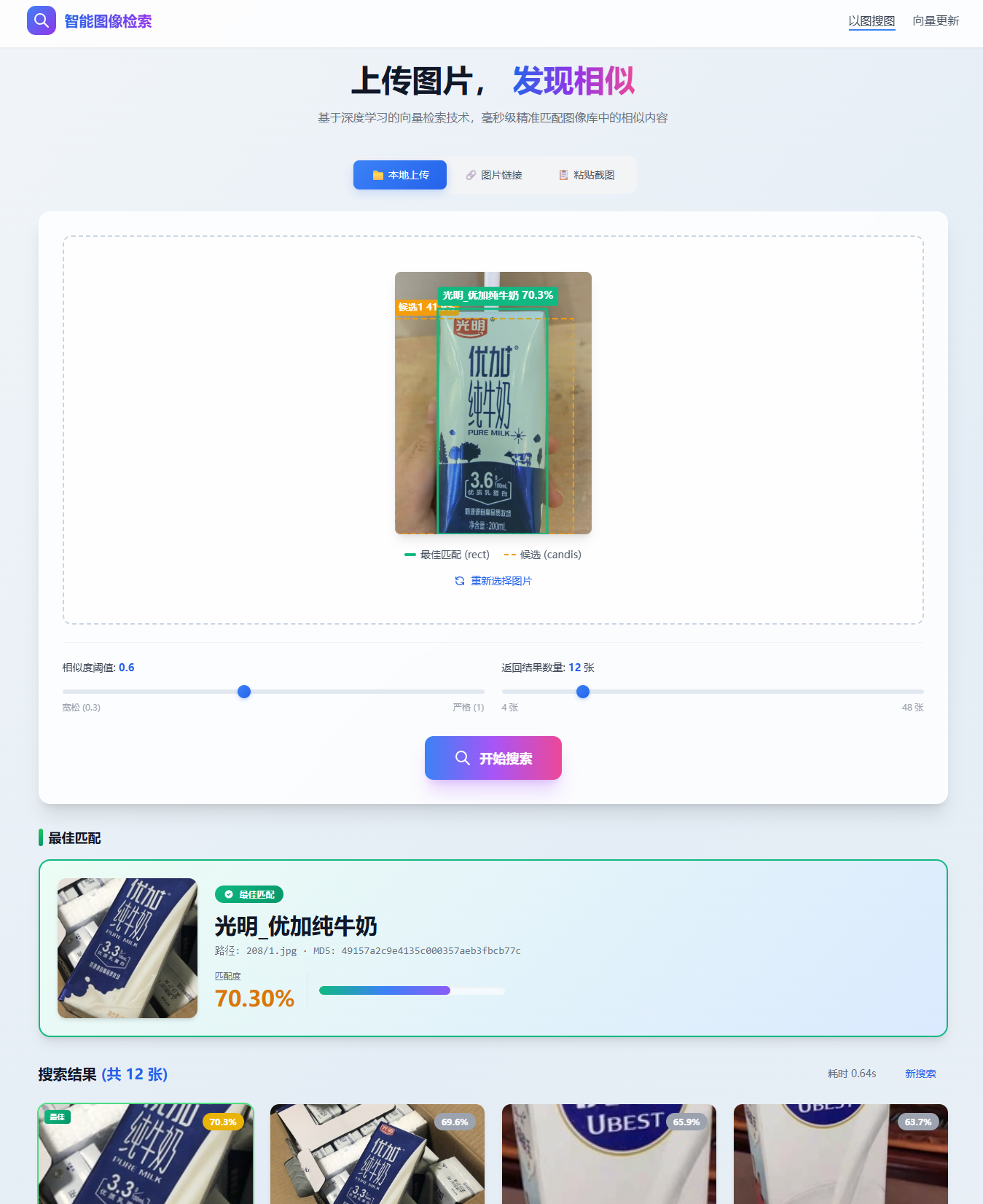
支持三种图片输入方式(**本地上传 / 图片链接 / 粘贴截图**),统一转换为 `File` 上传。
检索结果返回后,自动在预览图上标注:**最佳匹配框(绿色实线)** 与 **候选框(橙色虚线)**,
并在下方展示最佳匹配卡片与相似图片列表。
### 向量更新 · 管理入口页
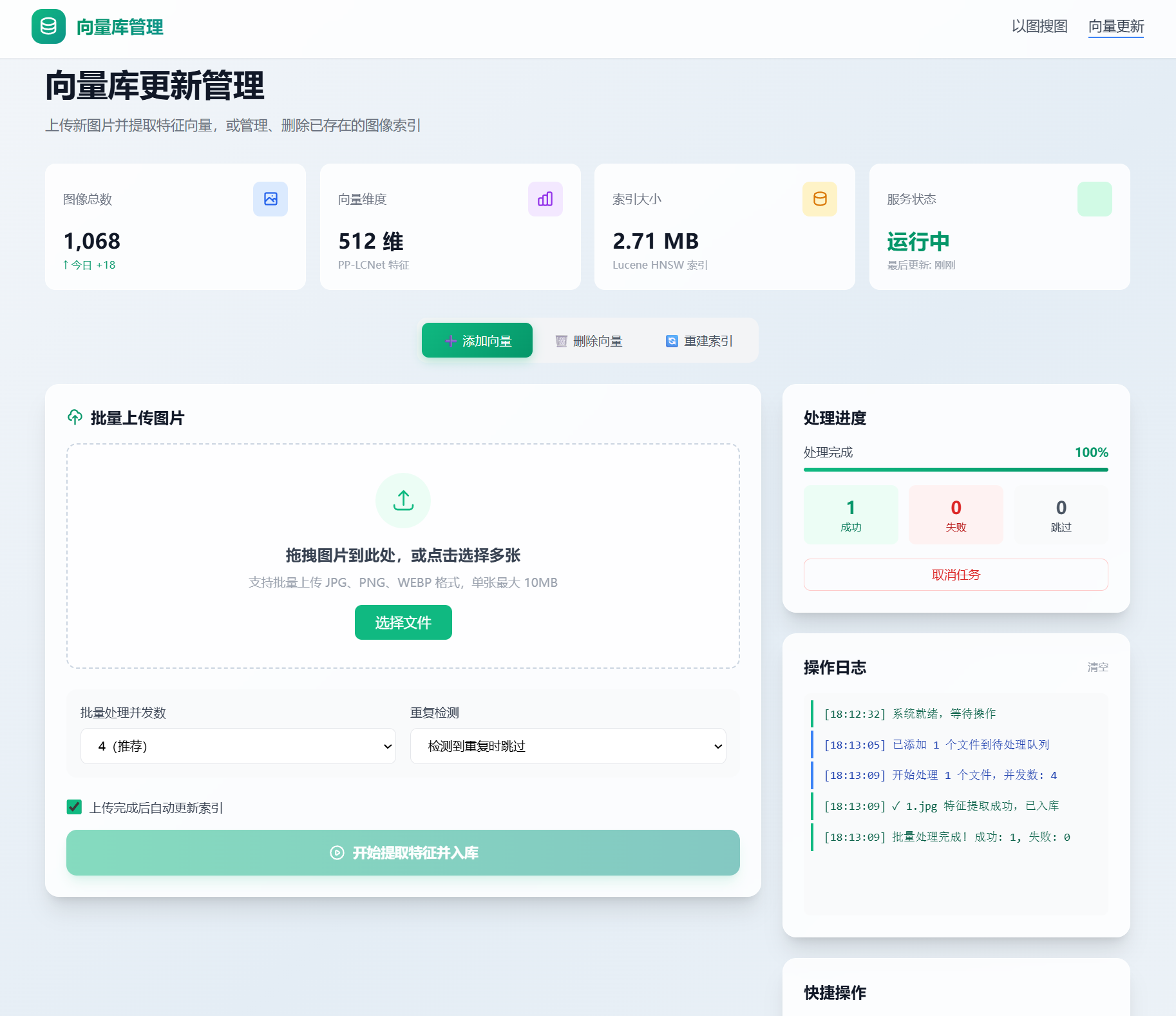
提供向量库的批量上传、增量更新、统计查看与处理日志。
---
## 系统架构
```
┌───────────────────────────────────────────────────────────────────────┐
│ Spring Boot 3 应用(单进程) │
│ │
│ POST /api/search │
│ │ image (File) · topk · threshold │
│ ▼ │
│ ┌─────────────────── ImageSearchService ──────────────────┐ │
│ │ @Async("aiInferExecutor") │ │
│ │ │ │
│ │ ① PipelineService.process() —— 定位「最佳主体」 │ │
│ │ ├─ MainBodyDetectionService.predict() │ │
│ │ │ PicoDet-LCNet 检测 → Top5 粗筛 → 阈值过滤 │ │
│ │ │ → SANMS 精修(大框吞小框 + 分数继承) │ │
│ │ └─ 逐候选:裁剪子图 → PP-LCNetV2 提特征 → 向量检索 │ │
│ │ 二次排序:同分取面积大者 → 确定为 match │ │
│ │ │ │
│ │ ② 以 match 的向量,检索出完整相似列表 similarList │ │
│ └──────────────────────────────────────────────────────────┘ │
│ │
│ 推理层:AWS DJL 0.38 ── ONNX Runtime 1.29 ── PicoDet / PP-LCNetV2 │
│ 检索层:Apache Lucene 9.12 ── HNSW + 标量量化 ── 本地索引目录 │
└───────────────────────────────────────────────────────────────────────┘
```
### 三段式链路
**① 主体检测(PicoDet-LCNet)**
输入图片,检测出图中所有潜在主体框,随后经过一条**漏斗式**的处理链:
```
模型原始输出 → Top5 粗筛 → 阈值过滤 → SANMS 精修
(保召回) (去噪声) (去包含冗余)
```
**② 特征提取(PP-LCNetV2)**
对每个候选框裁剪出子图,缩放到 224×224、按 ImageNet 均值方差归一化后,提取 **512 维特征向量**(已 L2 归一化)。
**③ 向量检索(Lucene HNSW)**
每个候选子图分别检索,**逐候选打分、再二次排序**——同等分数取**面积更大**者,最终确定「最佳主体」。随后用它对应的向量,拉出完整的相似度列表。
### 什么是 SANMS?
> **Structure-Aware NMS —— 在 NMS 之后再精修一层。**
PP-ShiTu 体系的检测模型是**端到端模型**,输出中已经包含一轮内置 NMS。传统 NMS 以 **IoU** 判定冗余,能处理「重叠」(IoU 大),却**无法处理「包含」**——当一个**大框完全套住一个小框**时,两者 IoU 极小,传统 NMS 会把它们**都保留下来**。
而这恰恰是主体检测场景最关键的失效点。例如搜索一瓶可乐:
- 模型同时输出「**整瓶**(低分)」(大框)与「**瓶身标签**(高分)」(小框);
- 传统 NMS 会把两个框都保留下来,高分的小框仍有机会胜出——于是系统**拿着"瓶身标签"去检索**:**该比的是"整瓶",实际拿去比的却是"标签",检索对象从第一步就选错了**;
- **SANMS** 按面积降序处理,若小框被大框**几何包含**,则剔除小框,**并让小框把它的高分继承给大框**。
最终保留的是**整瓶**,且带着标签的高置信度。
**它与传统 NMS 是互补关系,而非替代关系**:内置 NMS 兜住常规重叠,SANMS 补上包含盲区,层层收敛。**让"检测到了什么"与"该拿什么去搜"重新对齐。**
---
## 快速开始
### 环境要求
| 项目 | 要求 |
|---|---|
| **JDK** | **Zulu JDK 17 及以上**(Spring Boot 3 的最低要求) |
| **操作系统** | Windows / Linux / macOS,需与 `ty.onnx-engine-path` 配置的平台一致 |
| **内存** | 建议 ≥ 2 GB 可用 |
| **构建工具** | Maven 3.8+ |
### 第一步:准备图库
本项目**不打包图库数据**,需要你自行准备一个图片目录。推荐使用 PP-ShiTu 的公开示例数据集 **`drink_dataset_v2.0`**(饮料商品数据)。
启动时若未检测到图库,应用会**打印下载地址后主动退出**(而不是抛出一堆堆栈信息)。
**约定的目录结构**:
```
${user.home}/image_gallery/
├── gallery/ # 图库图片(支持子目录)
│ ├── drink_label_all.txt # 标签文件:每行「相对路径名称」
│ ├── 142/2.jpg
│ └── ...
└── test_images/ # 示例图片(供前端「示例图片」功能使用)
```
下载并解压后,将图库根目录重命名为 `image_gallery`,放到用户主目录下即可。
### 第二步:启动应用
```bash
git clone
cd ImageSearch4J
mvn spring-boot:run
```
**首次启动会自动完成三件事**:
1. 从 JAR 内**释放两个 ONNX 模型**到 `${user.home}/models/`;
2. **检查图库**是否就绪;
3. 若索引为空,**自动扫描图库并建索引**(由 `ty.auto-build-index-on-empty` 控制)。
> **端口提示**:默认端口为 `80`。若当前用户无权限绑定(Linux / macOS 常见),可临时指定端口:
>
> ```bash
> mvn spring-boot:run -Dspring-boot.run.arguments=--server.port=8080
> ```
### 第三步:访问页面
浏览器打开:
| 页面 | 地址 |
|---|---|
| 以图搜图 · 搜索主页 | `http://localhost:8080/index.html` |
| 向量更新 · 管理入口 | `http://localhost:8080/vector-update.html` |
---
## 接口说明
### `POST /api/search` —— 以图搜图
| 参数 | 位置 | 类型 | 必填 | 默认值 | 说明 |
|---|---|---|---|---|---|
| `image` | form-data | File | ✅ | — | 待检索的图片文件 |
| `topk` | form-data | int | ✖ | 10 | 返回的相似结果数量(小于 1 时回退为 10)|
| `threshold` | form-data | float | ✖ | 0.4 | 向量检索相似度阈值(超出 0~1 范围时回退为 0.4)|
**请求示例**:
```bash
curl -X POST http://localhost:8080/api/search \
-F "image=@./cola.jpg" \
-F "topk=10" \
-F "threshold=0.4"
```
### `GET /data/examples` —— 随机示例图片
从 `test_images` 目录随机取最多 8 张图片,返回相对路径列表,供前端快速体验。
---
## 响应结构
```json
{
"state": 1,
"code": 200,
"message": "Success",
"uuid": null,
"data": {
"match": {
"name": "康师傅冰红茶",
"path": "142/2.jpg",
"md5": "96b9f53217b116af6b767ba033e74b9f",
"score": 0.8343468
},
"similarList": [
{ "name": "康师傅冰红茶", "path": "142/2.jpg", "md5": "96b9f53217b116af6b767ba033e74b9f", "score": 0.8343468 },
{ "name": "康师傅冰红茶", "path": "142/1.jpg", "md5": "39bd18f36f6aa2b23b19b65bb3acc1ab", "score": 0.81112576 },
{ "name": "康师傅冰绿茶", "path": "164/5.jpg", "md5": "5f55b3b3c66c901597e69af8a79543c6", "score": 0.7852762 }
],
"candis": [
{
"className": "0_foreground,0.36",
"probability": 0.3613264560699463,
"rect": [194.1317901611328, 6.474399566650391, 493.5636749267578, 982.0707130432129]
}
],
"rect": [499.8619079589844, 9.447002410888672, 801.0286254882812, 945.4377250671387]
}
}
```
### 字段说明
| 字段 | 类型 | 说明 |
|---|---|---|
| `state` | int | **1** = 成功,**0** = 失败 |
| `code` | int | 状态码:200 成功 / 400 用户异常 / 500 系统异常 / 999 其他 |
| `message` | string | 提示信息(失败时用于展示给用户)|
| `data.match` | object | **最佳匹配结果**:名称、路径、MD5、相似度 |
| `data.similarList` | array | **完整的相似度检索结果列表**(按分数倒序)|
| `data.candis` | array | **除最佳匹配外的其它候选主体框**(含检测置信度)|
| `data.rect` | array | **最佳匹配主体的矩形框**,原图坐标系 `[x1, y1, x2, y2]` |
### 为什么这样设计?
- **`match` 与 `similarList` 分离**:`match` 回答"这张图里最可能是什么"(识别结论),`similarList` 回答"图库里有哪些像的"(检索证据)。二者语义不同,前端可以分开展示。
- **`rect` 与 `candis` 分离**:`rect` 是系统 **认定的主体**,`candis` 是 **被排除的其它候选**。前端用两种颜色分别标注,用户一眼就能看出"**系统为什么这样判断**"。
- **检测失败也不空手而归**:即便向量库中无匹配,`candis` 与 `rect` 依然有值,前端可提示"**已检测到目标,但向量库中无匹配**",而不是给用户一个空白页。
---
## 设计取舍:为什么是 ONNX、DJL、Lucene
这三个选型不是三件独立的事,而是**同一条原则的三次应用**:**把"必须耦合"的降到最小,把"可以自由"的放到最大。**
### 为什么是 ONNX?

ONNX(Open Neural Network Exchange)是**训练框架与部署目标之间中立的开放标准**(现为 Linux Foundation 项目),**不属于任何一家框架厂商**。它带来两个长期价值:
- **训练侧自由**:AI 工程师可以任意选择 PyTorch / TensorFlow / PaddlePaddle 等框架,**只要最终导出 ONNX**;
- **部署侧稳定**:模型格式的演进不影响运行时。即便未来出现新框架,只要能导出 ONNX,就能接入这条链路——**部署侧一行代码都不用改**。
**它把训练与部署的交接点,从"框架对框架"降级为"框架对标准"。** 这在长期维护的项目中,是关键中的关键。
### 为什么是 DJL?
[AWS Deep Java Library(DJL)](https://djl.ai) 是 **AWS 开源并长期维护的 Java 深度学习框架**,定位为「**引擎无关(engine-agnostic)**」:同一套 Java API,底层可以承载 ONNX Runtime、PyTorch、TensorFlow 等不同引擎。
它已在 AWS 云上经过**大规模生产验证**——SageMaker 的 DJL Serving 就是其官方部署方案,支持动态批处理、自动扩缩与多引擎托管。社区活跃、迭代迅速,是目前 Java 侧最成熟的 AI 推理方案。
**站在 DJL 肩上,我们不需要自己造推理引擎,只需要聚焦在"以图搜图"这一件事上。**
### 为什么是 Lucene?
Apache Lucene 是 Java 生态中**久经考验的搜索引擎内核**——Elasticsearch / Solr 的检索能力均构建于其上。它具备两个对本项目至关重要的特性:
- **嵌入式**:它就是一个 JAR 包,与业务**同进程**运行。没有独立进程、没有网络开销、没有额外运维——**把一个组件整层消掉**;
- **原生向量检索**:自 9.0 起支持 HNSW 图索引。本项目进一步采用**标量量化(Scalar Quantization)**,将 float32 压缩为 int8,**索引内存降至约 1/4**,召回率仍可保持在 95% 以上。
更妙的是,Lucene 的 Document 既支持**向量字段**,也支持**文本倒排字段**。这意味着项目**天然具备「向量 + 关键词」混合检索的架构基础**,且**无需引入任何额外组件**——这正是 1 + 1 > 2。
> 💡 **进阶方向**:当前默认走纯向量检索。对混合检索有需求的二开者,可将 `name` 一并写入文本字段,查询时用 `BooleanQuery` 组合 KNN 子查询与词项子查询,**融合发生在同一次查询内部**,改动不侵入主干。
---
## 二次开发:注入 Service 即可
ImageSearch4J 的目标是做你的 **AI 底座**——底层复杂度全部内聚,业务代码只面对清晰的 Java API。
### 可用的核心 Service
| Service | 关键方法 | 说明 |
|---|---|---|
| `ImageSearchService` | `search(BufferedImage, int topK, float scoreThres)` → `CompletableFuture` | 一站式以图搜图(异步)|
| `PipelineService` | `process(BufferedImage)` → `SearchResult` | 完整的检测 → 特征 → 检索流水线 |
| `MainBodyDetectionService` | `predict(Image / BufferedImage / String base64)` → `List` | 仅执行主体检测 |
| `FeatureExtractionService` | `predict(Image / BufferedImage)` → `float[]` | 仅执行特征提取(512 维)|
| `VectorService` | `add(...)` / `search(...)` / `build()` / `existsByMd5(...)` / `isEmpty()` | 向量索引的写入、检索与建库 |
### 使用示例
```java
@Service
@RequiredArgsConstructor
public class ProductSearchService {
private final ImageSearchService imageSearchService;
public SearchResult search(byte[] imageBytes) throws Exception {
BufferedImage image = ImageIO.read(new ByteArrayInputStream(imageBytes));
// search 标注了 @Async("aiInferExecutor"),返回 CompletableFuture
return imageSearchService.search(image, 10, 0.4f).get();
}
}
```
> ⚠️ **注意**:`search` 方法标注了 `@Async("aiInferExecutor")`,执行在专用线程池中,返回 `CompletableFuture`。
> 请通过 `.get()` / `.join()` 获取结果,不要误以为它是同步方法。
---
## 配置说明
全部配置集中在 `src/main/resources/application.yml` 的 `ty` 前缀下。
```yaml
server:
port: 80 # 服务端口
ty:
# ── 模型 ──
models-dir: "${user.home}/models"
onnx-engine-path: "${user.home}/.djl.ai/onnx/win-x64"
main-body-model-name: "picodet_lcnet_x2_5_640_mainbody.onnx"
general-p-pLCNet-model-name: "general_PPLCNetV2.onnx"
# ── 索引与图库 ──
lucene-buffer-size: 256
index-dir: "${user.home}/image_gallery/vector_index"
image-root: "${user.home}/image_gallery/gallery"
image-data-file: "${user.home}/image_gallery/gallery/drink_label_all.txt"
auto-build-index-on-empty: true
# ── AI 推理线程池 ──
ai-infer:
core-pool-size: 4
max-pool-size: 8
queue-capacity: 100
# ── Predictor 对象池 ──
predictor:
max-total: 8
min-idle: 2
block-when-exhausted: true
max-wait: 1
```
### 关于 `onnx-engine-path`
ONNX Runtime 每次运行都会把自身的原生库(`onnxruntime.dll` 等)解压到一个临时目录,而其清理依赖 `File.deleteOnExit`——**它只能删除空目录**,长期运行会造成临时文件持续堆积。
显式指定原生库所在目录,可**规避反复解压、稳定运行环境**。
> ⚠️ 该路径需与运行平台匹配(如 Windows x64、Linux x64)。**部署到其它平台时,请改成本机对应的目录。**
---
## 项目结构
```
ImageSearch4J
├── src/main/java/com/ty/
│ ├── BootApplication.java # 启动类(@EnableAsync + @EnableScheduling)
│ ├── ai/
│ │ ├── service/ # 主体检测 / 特征提取 / Pipeline
│ │ └── translator/ # ONNX 前处理与后处理(各模型一套)
│ ├── config/ # 模型、Lucene、对象池、线程池配置
│ ├── controller/ # REST 接口(/api/search、/data/examples)
│ ├── listener/ # 启动自举:图库检查 + 自动建库
│ ├── model/ # 统一响应与领域对象
│ ├── task/ # Lucene 定时任务(NRT 刷新 / 持久化)
│ ├── service/ # ImageSearchService / VectorService
│ ├── init/ # 模型资源释放
│ └── utils/ # SANMS、MD5、图像工具等
├── src/main/resources/
│ ├── models/ # 内置 ONNX 模型(启动时自动释放)
│ ├── public/ # 前端页面(index.html / vector-update.html)
│ ├── application.yml
│ └── banner.txt
└── pom.xml
```
---
## 常见问题
**Q:必须安装 Python 吗?**
不需要。项目全链路运行在 JVM 内,你需要的只是两个 ONNX 模型文件——它们已随包内置。
**Q:需要部署向量数据库吗?**
不需要。向量索引基于 Lucene 嵌入式实现,随应用启动,数据落本地目录,**没有独立服务要维护**。
**Q:图库可以放多少张图?**
Lucene 是成熟的搜索引擎内核,支撑海量向量检索没有问题。实际规模主要取决于机器内存——512 维 float32 向量单条约 2 KB,配合标量量化可进一步降低占用。
**Q:检索速度慢怎么办?**
可调整 HNSW 参数与量化策略。索引层会按 `efSearch = max(topk, 10)` 自适应扩大搜索范围;数据量大时,`efSearch` 在 10 ~ 100 之间调节即可。
**Q:为什么我用 `topK` 传参无效?**
接口参数名是 **`topk`(全小写)**。Spring 对 `@RequestParam` 名称大小写敏感。
**Q:能和 Elasticsearch 一起用吗?**
本项目走的是**嵌入式**路线,与 ES 是两种取舍。若你已有一套 ES 集群,也可以参考本项目的 Pipeline 设计,把检索层替换为 ES 的 KNN 查询。
**Q:支持 GPU 吗?**
DJL 支持多引擎与多种硬件后端。本项目默认使用 CPU 推理;如需 GPU,调整 DJL 的引擎与设备配置即可。
---
## 路线图
- [x] 主体检测 + 特征提取 + 向量检索,全链路打通
- [x] SANMS 主体精修
- [x] 模型内置,开箱即用
- [x] 自动建库 + 索引 NRT 刷新(秒级可见)
- [x] 附赠零框架交互前端
- [ ] 混合检索(向量 + 关键词)
- [ ] 更完善的向量管理接口
- [ ] 更多预置模型与场景示例
---
## 许可与致谢
- 本项目采用 **Apache License 2.0** 开源,详见 [LICENSE](LICENSE)。
- 检测与特征模型来自 **[PaddlePaddle / PP-ShiTu](https://github.com/PaddlePaddle/PaddleClas)**,经转换为 ONNX 格式后在 JVM 上运行,特此致谢。
- 感谢 **[AWS Deep Java Library](https://djl.ai)** 与 **[Apache Lucene](https://lucene.apache.org)** 提供的坚实基础。
- 感谢所有让「Python 训练 + Java 部署」这条路越走越宽的同行者。
---
**如果这个项目对你有帮助,欢迎 Star ⭐ 与参与共建。**
*技术服务于场景,而非场景去适应技术。*