# connector-x
**Repository Path**: tommyhot/connector-x
## Basic Information
- **Project Name**: connector-x
- **Description**: No description available
- **Primary Language**: Unknown
- **License**: MIT
- **Default Branch**: 3.12
- **Homepage**: None
- **GVP Project**: No
## Statistics
- **Stars**: 0
- **Forks**: 0
- **Created**: 2024-10-29
- **Last Updated**: 2024-10-29
## Categories & Tags
**Categories**: Uncategorized
**Tags**: None
## README
# ConnectorX [![status][ci_badge]][ci_page] [![discussions][discussion_badge]][discussion_page] [![Downloads][download_badge]][download_page]
[ci_badge]: https://github.com/sfu-db/connector-x/workflows/ci/badge.svg
[ci_page]: https://github.com/sfu-db/connector-x/actions
[discussion_badge]: https://img.shields.io/badge/Forum-Github%20Discussions-blue
[discussion_page]: https://github.com/sfu-db/connector-x/discussions
[download_badge]: https://pepy.tech/badge/connectorx
[download_page]: https://pepy.tech/project/connectorx
Load data from  to
to  , the fastest way.
ConnectorX enables you to load data from databases into Python in the fastest and most memory efficient way.
What you need is one line of code:
```python
import connectorx as cx
cx.read_sql("postgresql://username:password@server:port/database", "SELECT * FROM lineitem")
```
Optionally, you can accelerate the data loading using parallelism by specifying a partition column.
```python
import connectorx as cx
cx.read_sql("postgresql://username:password@server:port/database", "SELECT * FROM lineitem", partition_on="l_orderkey", partition_num=10)
```
The function will partition the query by **evenly** splitting the specified column to the amount of partitions.
ConnectorX will assign one thread for each partition to load and write data in parallel.
Currently, we support partitioning on **numerical** columns (**cannot contain NULL**) for **SPJA** queries.
# Installation
```bash
pip install connectorx
```
Check out [here](https://sfu-db.github.io/connector-x/install.html#build-from-source-code) to see how to build python wheel from source.
# Performance
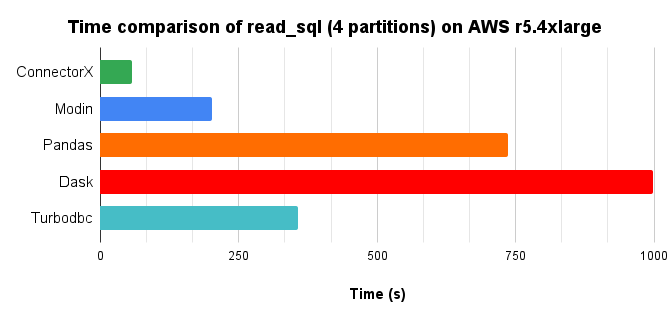
We compared different solutions in Python that provides the `read_sql` function, by loading a 10x TPC-H lineitem table (8.6GB) from Postgres into a DataFrame, with 4 cores parallelism.
## Time chart, lower is better.
, the fastest way.
ConnectorX enables you to load data from databases into Python in the fastest and most memory efficient way.
What you need is one line of code:
```python
import connectorx as cx
cx.read_sql("postgresql://username:password@server:port/database", "SELECT * FROM lineitem")
```
Optionally, you can accelerate the data loading using parallelism by specifying a partition column.
```python
import connectorx as cx
cx.read_sql("postgresql://username:password@server:port/database", "SELECT * FROM lineitem", partition_on="l_orderkey", partition_num=10)
```
The function will partition the query by **evenly** splitting the specified column to the amount of partitions.
ConnectorX will assign one thread for each partition to load and write data in parallel.
Currently, we support partitioning on **numerical** columns (**cannot contain NULL**) for **SPJA** queries.
# Installation
```bash
pip install connectorx
```
Check out [here](https://sfu-db.github.io/connector-x/install.html#build-from-source-code) to see how to build python wheel from source.
# Performance
We compared different solutions in Python that provides the `read_sql` function, by loading a 10x TPC-H lineitem table (8.6GB) from Postgres into a DataFrame, with 4 cores parallelism.
## Time chart, lower is better.
## Memory consumption chart, lower is better.
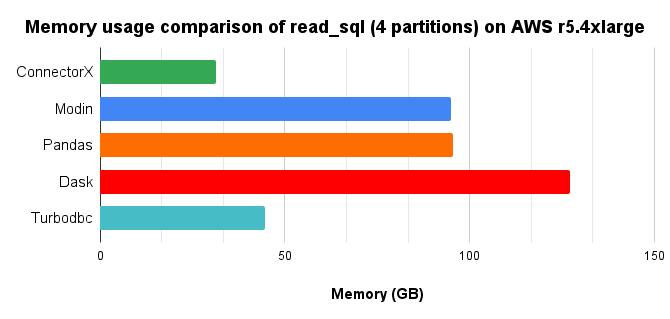
In conclusion, ConnectorX uses up to **3x** less memory and **21x** less time (**3x** less memory and **13x** less time compared with Pandas.). More on [here](https://github.com/sfu-db/connector-x/blob/main/Benchmark.md#benchmark-result-on-aws-r54xlarge).
## How does ConnectorX achieve a lightning speed while keeping the memory footprint low?
We observe that existing solutions more or less do data copy multiple times when downloading the data.
Additionally, implementing a data intensive application in Python brings additional cost.
ConnectorX is written in Rust and follows "zero-copy" principle.
This allows it to make full use of the CPU by becoming cache and branch predictor friendly. Moreover, the architecture of ConnectorX ensures the data will be copied exactly once, directly from the source to the destination.
## How does ConnectorX download the data?
Upon receiving the query, e.g. `SELECT * FROM lineitem`, ConnectorX will first issue a `LIMIT 1` query `SELECT * FROM lineitem LIMIT 1` to get the schema of the result set.
Then, if `partition_on` is specified, ConnectorX will issue `SELECT MIN($partition_on), MAX($partition_on) FROM (SELECT * FROM lineitem)` to know the range of the partition column.
After that, the original query is split into partitions based on the min/max information, e.g. `SELECT * FROM (SELECT * FROM lineitem) WHERE $partition_on > 0 AND $partition_on < 10000`.
ConnectorX will then run a count query to get the partition size (e.g. `SELECT COUNT(*) FROM (SELECT * FROM lineitem) WHERE $partition_on > 0 AND $partition_on < 10000`). If the partition
is not specified, the count query will be `SELECT COUNT(*) FROM (SELECT * FROM lineitem)`.
Finally, ConnectorX will use the schema info as well as the count info to allocate memory and download data by executing the queries normally.
Once the downloading begins, there will be one thread for each partition so that the data are downloaded in parallel at the partition level. The thread will issue the query of the corresponding
partition to the database and then write the returned data to the destination row-wise or column-wise (depends on the database) in a streaming fashion.
# Supported Sources & Destinations
Example connection string, supported protocols and data types for each data source can be found [here](https://sfu-db.github.io/connector-x/databases.html).
For more planned data sources, please check out our [discussion](https://github.com/sfu-db/connector-x/discussions/61).
## Sources
- [x] Postgres
- [x] Mysql
- [x] Mariadb (through mysql protocol)
- [x] Sqlite
- [x] Redshift (through postgres protocol)
- [x] Clickhouse (through mysql protocol)
- [x] SQL Server
- [x] Azure SQL Database (through mssql protocol)
- [x] Oracle
- [x] Big Query
- [ ] ODBC (WIP)
- [ ] ...
## Destinations
- [x] Pandas
- [x] PyArrow
- [x] Modin (through Pandas)
- [x] Dask (through Pandas)
- [x] Polars (through PyArrow)
# Documentation
Doc: https://sfu-db.github.io/connector-x/intro.html
Rust docs: [stable](https://docs.rs/connectorx) [nightly](https://sfu-db.github.io/connector-x/connectorx/)
# Next Plan
Checkout our [discussion][discussion_page] to participate in deciding our next plan!
# Historical Benchmark Results
https://sfu-db.github.io/connector-x/dev/bench/
# Developer's Guide
Please see [Developer's Guide](https://github.com/sfu-db/connector-x/blob/main/CONTRIBUTING.md) for information about developing ConnectorX.
# Supports
You are always welcomed to:
1. Ask questions & propose new ideas in our github [discussion][discussion_page].
2. Ask questions in stackoverflow. Make sure to have #connectorx attached.
# Organizations and Projects using ConnectorX
[ ](https://github.com/pola-rs/polars)
[
](https://github.com/pola-rs/polars)
[ ](https://dataprep.ai/)
[
](https://dataprep.ai/)
[ ](https://modin.readthedocs.io)
To add your project/organization here, reply our post [here](https://github.com/sfu-db/connector-x/discussions/146)
# Citing ConnectorX
If you use ConnectorX, please consider citing the following paper:
Xiaoying Wang, Weiyuan Wu, Jinze Wu, Yizhou Chen, Nick Zrymiak, Changbo Qu, Lampros Flokas, George Chow, Jiannan Wang, Tianzheng Wang, Eugene Wu, Qingqing Zhou. [ConnectorX: Accelerating Data Loading From Databases to Dataframes.](https://www.vldb.org/pvldb/vol15/p2994-wang.pdf) _VLDB 2022_.
BibTeX entry:
```bibtex
@article{connectorx2022,
author = {Xiaoying Wang and Weiyuan Wu and Jinze Wu and Yizhou Chen and Nick Zrymiak and Changbo Qu and Lampros Flokas and George Chow and Jiannan Wang and Tianzheng Wang and Eugene Wu and Qingqing Zhou},
title = {ConnectorX: Accelerating Data Loading From Databases to Dataframes},
journal = {Proc. {VLDB} Endow.},
volume = {15},
number = {11},
pages = {2994--3003},
year = {2022},
url = {https://www.vldb.org/pvldb/vol15/p2994-wang.pdf},
}
```
](https://modin.readthedocs.io)
To add your project/organization here, reply our post [here](https://github.com/sfu-db/connector-x/discussions/146)
# Citing ConnectorX
If you use ConnectorX, please consider citing the following paper:
Xiaoying Wang, Weiyuan Wu, Jinze Wu, Yizhou Chen, Nick Zrymiak, Changbo Qu, Lampros Flokas, George Chow, Jiannan Wang, Tianzheng Wang, Eugene Wu, Qingqing Zhou. [ConnectorX: Accelerating Data Loading From Databases to Dataframes.](https://www.vldb.org/pvldb/vol15/p2994-wang.pdf) _VLDB 2022_.
BibTeX entry:
```bibtex
@article{connectorx2022,
author = {Xiaoying Wang and Weiyuan Wu and Jinze Wu and Yizhou Chen and Nick Zrymiak and Changbo Qu and Lampros Flokas and George Chow and Jiannan Wang and Tianzheng Wang and Eugene Wu and Qingqing Zhou},
title = {ConnectorX: Accelerating Data Loading From Databases to Dataframes},
journal = {Proc. {VLDB} Endow.},
volume = {15},
number = {11},
pages = {2994--3003},
year = {2022},
url = {https://www.vldb.org/pvldb/vol15/p2994-wang.pdf},
}
```