# mockoon
**Repository Path**: trusted-list/mockoon
## Basic Information
- **Project Name**: mockoon
- **Description**: Mockoon is the easiest and quickest way to run mock APIs locally. No remote deployment, no account required, open source.
- **Primary Language**: Unknown
- **License**: MIT
- **Default Branch**: main
- **Homepage**: https://mockoon.com
- **GVP Project**: No
## Statistics
- **Stars**: 0
- **Forks**: 0
- **Created**: 2026-03-10
- **Last Updated**: 2026-11-10
## Categories & Tags
**Categories**: Uncategorized
**Tags**: None
## README



Mockoon: awesome API mocking
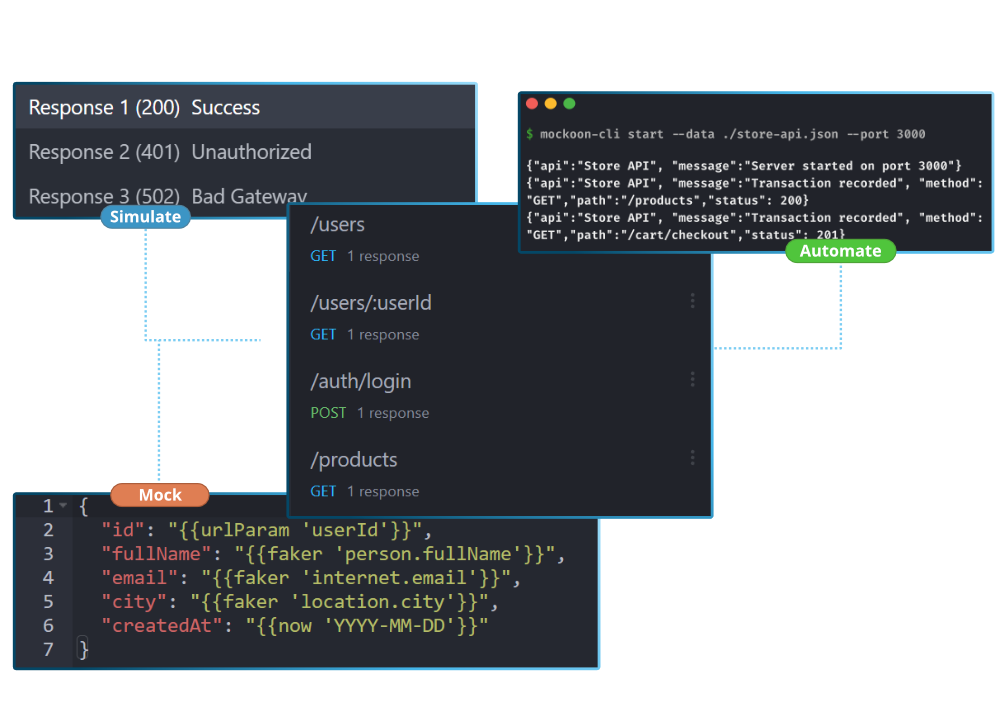
Mockoon is the easiest and quickest way to design and run mock APIs. No remote deployment, no account required, free and open-source.
It combines a [desktop application](https://mockoon.com/download/) to design and run mock servers locally, and a [CLI](https://mockoon.com/cli/) to self-host your fake APIs. [Mockoon Pro](#discover-mockoon-pro) adds a private, self-hosted platform for team collaboration, data synchronization, and managed mock deployments.
API mocking helps you speed up development and third-party API integration by reducing dependency on external services and their limitations: rate limits, costs, availability, etc.
It also allows you to test your applications in a controlled environment with predictable responses, status codes, and latencies, and easily simulate edge cases and error scenarios.
Finally, you can onboard new team members faster by providing them with a consistent and reliable environment to test and develop their applications.
➡️ [Download](https://mockoon.com/download/)
## Features
Mockoon offers many features:
- Unlimited number of mock local servers and routes
- CLI to run your mock in headless environments, CI, etc.
- Complete control on routes definition: HTTP methods and statuses, regex paths, file serving, custom headers, etc.
- OpenAPI compatibility
- Record/logs of all entering and forwarded requests
- JSON templating
- Proxy forwarding mode
- HTTPS support
You can check the [complete list](https://mockoon.com/features/) on the website.
## Download the desktop application
You can get Mockoon desktop's [latest release](https://github.com/mockoon/mockoon/releases/latest) directly from this repository or on the official [website](https://mockoon.com/download/). Mockoon desktop is also available through:
MacOS:
- [_Homebrew_](https://formulae.brew.sh/cask/mockoon): `brew install --cask mockoon`.
Windows:
- _winget_: `winget install mockoon`.
- [_Chocolatey_](https://community.chocolatey.org/packages/mockoon): `choco install mockoon`.
- [_Windows Store_](https://www.microsoft.com/en-us/p/mockoon/9pk8dmsn00jj)
Linux:
- [_Snap store_](https://snapcraft.io/mockoon): `snap install mockoon`.
- [_AUR_](https://aur.archlinux.org/packages/mockoon-bin): `yay -S mockoon-bin`.
## Install the CLI and Docker image
Mockoon CLI is available as an [NPM package](https://www.npmjs.com/package/@mockoon/cli) and as an official [Docker image](https://hub.docker.com/r/mockoon/cli) (`mockoon/cli`). Please check our [CLI documentation](https://github.com/mockoon/mockoon/blob/main/packages/cli/README.md) and [Docker documentation](https://github.com/mockoon/mockoon/tree/main/packages/cli#docker-image) to learn how to install and use them.
## Use in cloud functions and serverless environments
To run Mockoon in cloud functions and serverless environments (AWS Lambda, Google Cloud Run, AWS Fargate, Azure Container Apps, etc.), we recommend running the official **[Mockoon CLI Docker image](https://hub.docker.com/r/mockoon/cli)** (`mockoon/cli`). Please check our [Docker documentation](https://github.com/mockoon/mockoon/tree/main/packages/cli#docker-image) for setup guides.
> *Note: The legacy `@mockoon/serverless` package is deprecated. See the [serverless package documentation](https://github.com/mockoon/mockoon/blob/main/packages/serverless/README.md) for migration information.*
## Support us!
Mockoon is proudly **independent** and **open-source**, maintained without external funding. We rely on both **sponsorships** and **Mockoon Pro licenses** to keep improving the project and building new features. A **big thank you** to the companies below for supporting our work and helping us grow (and all the [sponsors](https://github.com/mockoon/mockoon/blob/main/backers.md) who helped this project over time!):
### Platinum
### Gold
### Silver
If you'd like to **support Mockoon** as well, you can **become a sponsor** or **purchase Mockoon Pro licenses**. Every contribution helps keep the project alive and evolving. Thank you!
## Discover Mockoon Pro
Mockoon Pro is a private, self-hosted platform for teams that need to keep their API mocking workflows and data under their control:
- [Deploy on-premises, in a private cloud, or on an isolated network](https://mockoon.com/pro/docs/self-hosting/installation/)
- [Synchronize data and collaborate in real time](https://mockoon.com/pro/docs/features/data-synchronization-team-collaboration/)
- [Deploy and manage mock API instances](https://mockoon.com/pro/docs/features/api-mock-deployments/)
- [Use the embedded web application](https://mockoon.com/pro/docs/clients/embedded-web-application/)
- [Manage users with local authentication or OIDC SSO](https://mockoon.com/pro/docs/misc/authentication/)
- [Review administrative and workspace events in the audit trail](https://mockoon.com/pro/docs/misc/audit-trail/)
Start a free trial or learn more about [Mockoon Pro](https://mockoon.com/pro/).
## Mockoon's documentation
You will find Mockoon's [documentation](https://mockoon.com/docs/latest/about/) on the official website. It covers Mockoon's most complex features. Feel free to contribute or ask for new topics to be covered.
## Changelogs
You will find Mockoon applications [changelogs](https://mockoon.com/releases/) on the official website.
## Support/feedback
You can discuss all things related to Mockoon and ask for help on the [official community](https://github.com/mockoon/mockoon/discussions). It's also a good place to discuss bugs and feature requests before opening an issue on this repository.
## Contributing
If you are interested in contributing to Mockoon, please take a look at the [contributing guidelines](https://github.com/mockoon/mockoon/blob/main/CONTRIBUTING.md).
Please also take a look at our [Code of Conduct](https://github.com/mockoon/.github/blob/main/CODE_OF_CONDUCT.md).
## Roadmap
If you want to know what will be coming in the next release you can check the global [Roadmap](https://mockoon.com/public-roadmap/) or [subscribe to our newsletter](https://mockoon.com/newsletter/).