# picgo-plugin-lychee
**Repository Path**: ttionya/picgo-plugin-lychee
## Basic Information
- **Project Name**: picgo-plugin-lychee
- **Description**: PicGo plugin for uploading to Lychee.
- **Primary Language**: Unknown
- **License**: MIT
- **Default Branch**: master
- **Homepage**: None
- **GVP Project**: No
## Statistics
- **Stars**: 0
- **Forks**: 0
- **Created**: 2023-08-16
- **Last Updated**: 2024-04-05
## Categories & Tags
**Categories**: Uncategorized
**Tags**: lychee, PicGO, picgo-plugin
## README
# picgo-plugin-lychee
[](https://www.npmjs.com/package/picgo-plugin-lychee) [](https://www.npmjs.com/package/picgo-plugin-lychee) [](https://github.com/ttionya/picgo-plugin-lychee/blob/master/LICENSE)
[PicGo](https://github.com/PicGo/PicGo-Core) [Lychee](https://github.com/LycheeOrg/Lychee) 上传插件。
## 安装
- 对于 GUI: 搜索 `lychee` 并安装
- 对于 Core: 运行 `picgo add lychee`
- 对于 Typora: 查看[这里](#对于-typora)
## 配置
对于 Core 用户,你可以运行 `picgo set uploader lychee` 进入交互式配置。
对于 GUI 用户,你可以在“图床设置”中进行配置。
### `url`
- `Required`
- 示例: `https://mylychee.com`
Lychee 网页地址,需包含协议。
### `token`
- `Required`
- Example: `xxxxxxxxxxxxx`
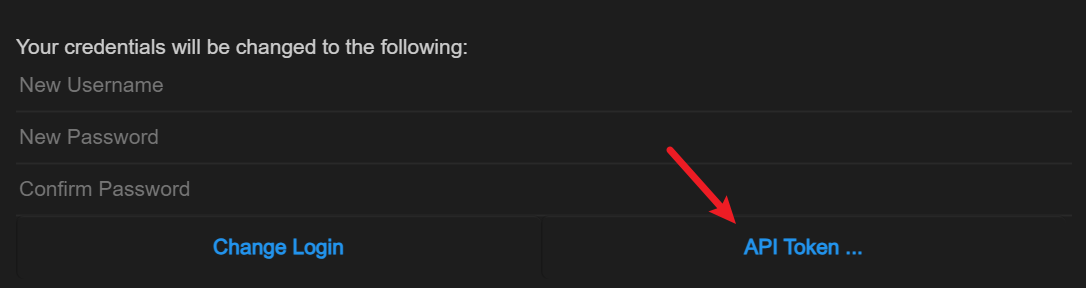
Lychee API token.
你可以在设置中生成 API Token。
### `albumId`
- Default: `unsorted`
- Example: `mTmo_j9SVEie3ETcCMY3YruI`
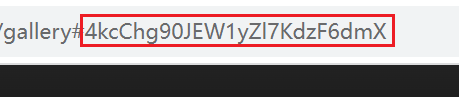
相册的编号,你只能使用**普通相册**,**不能**是**标签相册**。
进入相册后,你可以在 url 上找到相册编号。
### `uniqueImage`
- Default: `false`
如果你想确保相册中相同的图像是唯一的,则可以启用此选项。
启用此选项将导致上传过程中产生额外的请求和哈希计算,这可能会消耗更多的网络和系统资源。
### `uniqueImageSizeLimit`
- Default: `100m`
- Example: `1g` `500k` `1048576` `1m`
此设置仅在启用 `uniqueImage` 时生效。
它进一步防止在计算大图像的哈希值时过度使用系统资源。大于此值的图像将不再保证在相册中是唯一的。
## 对于 Typora
Typora 内置的 PicGo-Core 打包了 Node.js `v12.13.0` 和 PicGo-Core `v1.4.7`。该版本已经过时,无法兼容本工具所需的新 API。
请自行下载最新版本的 [PicGo-Core](https://github.com/PicGo/PicGo-Core),并在 Typora 中使用`自定义命令`来指定使用最新版本的 PicGo-Core。
## LICENSE
MIT