# eda-agent
**Repository Path**: unbt/eda-agent
## Basic Information
- **Project Name**: eda-agent
- **Description**: No description available
- **Primary Language**: Unknown
- **License**: Apache-2.0
- **Default Branch**: main
- **Homepage**: None
- **GVP Project**: No
## Statistics
- **Stars**: 0
- **Forks**: 0
- **Created**: 2026-08-14
- **Last Updated**: 2026-08-14
## Categories & Tags
**Categories**: Uncategorized
**Tags**: None
## README
# eda-agent
MCP server that lets an AI (or any MCP-compatible client) **interact with a live Altium Designer session**, with KiCad and EasyEDA Pro available as additional backends. It exposes around 400 tools on Altium, covering schematic, PCB, library, project, and design-agent operations, over a persistent DelphiScript bridge. The AI reads the design you currently have open, asks questions about it, and can modify it in place while you watch. The [backend](#eda-backends) is selected at startup, so each user sees only their own tool set.
> **⚠️ Experimental.** Not all tools are extensively tested. Some can crash the Altium DelphiScript engine. See [Known limitations](#known-limitations) before using on any design you haven't backed up.
## Demo
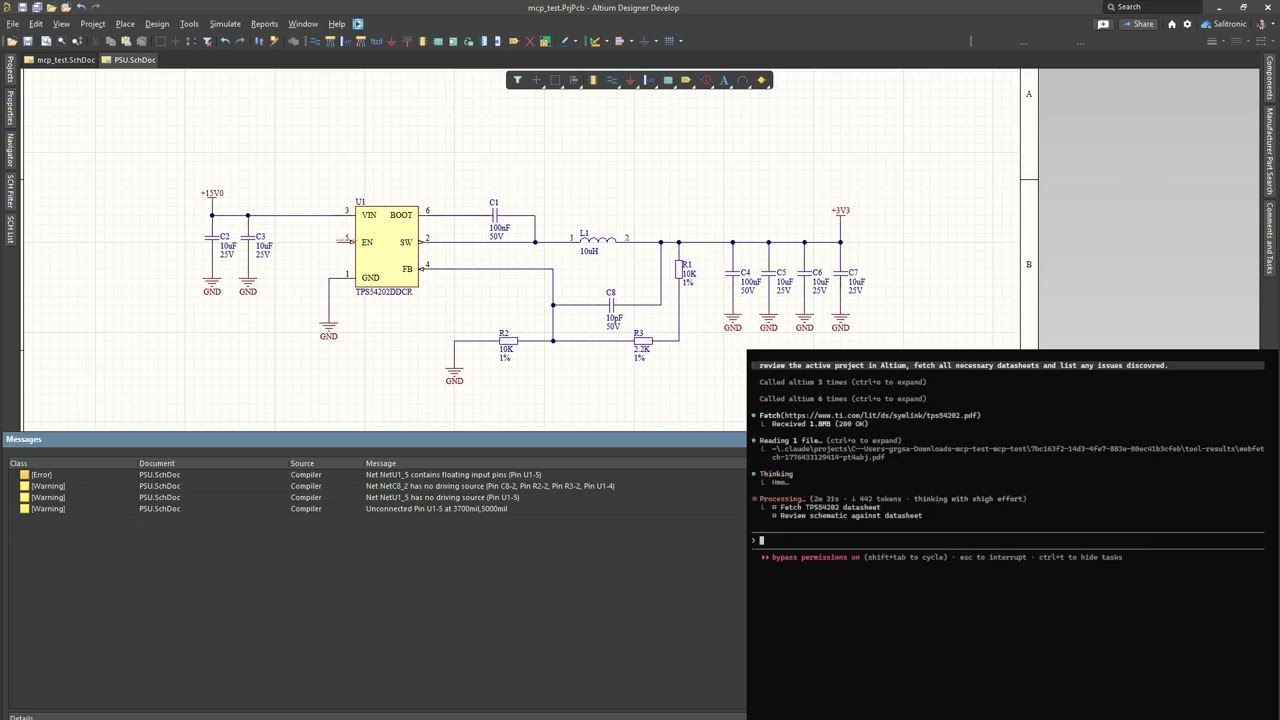
Claude Code reviewing a buck converter through eda-agent. The feedback resistor divider on this schematic is intentionally wrong; Claude catches it among other recommendations.
[](https://youtu.be/snRyCx3OlxM)
## Dashboard
 Two dashboards ship with eda-agent:
- **In-Altium status window** - a floating Altium-side window showing live status, request count, cumulative Altium-side time, auto-shutdown countdown, and a per-command log with durations. `Hide pings` filters the 30 s keep-alive traffic; `Only >100ms` isolates slow calls. The **Detach** button saves all dirty docs and exits the polling loop cleanly.
- **Web dashboard** - a local browser dashboard at `http://127.0.0.1:8766`, focused on design review. A **Review** tab surfaces datasheet / MPN / manufacturer / footprint coverage gauges and an actionable issue queue (missing datasheet, missing MPN, orphan nets, ...); **Project**, **Components**, **Nets**, **Libraries** and **Plan** tabs give live structured views. Click any component or net to drill into a detail drawer; one click cross-probes it into Altium. Light / dark theme, server-sent-events live feed. It is auto-started by the MCP server - the **Open Dashboard** button on the in-Altium status window launches the browser.
## How it works
- Altium Designer stays open and in full control of your design
- A DelphiScript polling loop runs inside Altium's scripting engine
- `eda-agent` (Python, launched by your MCP client) sends commands via file-based IPC
- Altium executes, writes a response, and returns to polling
- You see the changes happen live in Altium
This is **not** a batch tool that opens a project, runs a script, and exits. It's a live connection for as long as you want it (conversational design review, guided refactoring, ad-hoc BOM queries, "what nets does this resistor connect to?"), all on the project you currently have open.
## Features
- **~400 tools on the default Altium backend** (480+ with both registered) across application, project, library, schematic/general, PCB, and design-agent categories
- **Generic primitives** (`obj_query`, `obj_modify`, `obj_create`, `obj_delete`, `run_process`) that work on almost any schematic or PCB object type via late-binding, avoiding per-type handler proliferation
- **Bulk batch primitives**: `obj_batch_modify`, `obj_batch_create`, `obj_batch_delete`, `pcb_place_tracks`, `pcb_move_components`, `sch_place_wires`, `place_net_labels`, `place_power_ports`, `sch_place_components`, `sch_set_components_parameters`, `get_sch_doc_pins`, `lib_add_pins`, `proj_get_connectivity_many`, `sim_attach_primitives`. Collapse N LLM turns + N IPC round-trips into one. Typical wall-time savings: 10 to 100x on multi-item edits
- **Design review snapshot**: `design_review_snapshot` bundles 8 to 12 review reads (project info, components, nets, rules, diff, messages, stats, unrouted, BOM) into a single call. One LLM turn instead of a dozen
- **Design-lint sweep**: `design_lint_report` runs 31 audit checks in one IPC pass and returns a structured violation list - schematic-side (component-parameter visibility per class, power-port orientation, floating ports, multi-output / no-driver nets, duplicate designators, off-grid components) and PCB-side (DNP variant components, tented-via ratio, near-miss track endpoints, signal vias without nearby return via, via antennas, removed pad shapes, components outside outline, pads too close to board edge, invalid polygon regions, optional DRC). Each check is also exposed as a standalone `audit_*` MCP tool; the dashboard's Status → Health subtab has a one-click Lint panel that calls `/api/lint` and groups results by Schematic / PCB
- **Canonical circuit blocks**: `design_add_circuit_block` folds a whole block into a `DesignPlan` in one call, allocating refdes, wiring every pin to the right net and tagging power / ground and roles. Twelve of them: `decoupling`, `pullup`, `pulldown`, `series_resistor`, `voltage_divider`, `rc_lowpass`, `rc_highpass`, `led_indicator`, `crystal`, `pi_filter`, `mosfet_low_side`, `mosfet_high_side`. Naming-agnostic: you supply the part identities, it owns only the wiring pattern. `design_list_circuit_blocks` returns each one's parameter contract, so the planner never guesses a parameter name
- **Datasheet-first discipline**: every component-surfacing response (`pcb_get_components`, `proj_get_bom`, `proj_get_component_info`, `proj_find_component`, `lib_search`, `design_review_snapshot`, `sim_get_readiness`) carries a `_datasheet_guidance` block with per-part vendor search queries. `app_attach` / `app_ping` carry a `_system_reminder` so every MCP client that connects sees the rule at session start. LLM-fabricated datasheet values are forbidden; WebFetch/WebSearch are called out by name
- **Sch <-> PCB netlist crossref**: `crossref_net(net_name)` compares the schematic pin list against the PCB pad list for the same net. Catches ECO drift, stale post-fabrication routing, phantom nets from port/sheet-entry rename conflicts. `in_sync` flag + `sch_only` / `pcb_only` diff
- **SPICE simulation workflow**: `sim_get_readiness` audits every component and partitions into ready / needs-primitive / needs-file. `sim_attach_primitives` sets SpicePrefix + Value on passives. `sim_attach_model` links a vendor `.mdl` / `.ckt`. `sim_run` dispatches the simulator. Built-in guardrail: never fabricate a SPICE model file, fetch the vendor one
- **Focus-independent PCB access**: every PCB handler falls back to `GetPCBBoardByPath` when `GetCurrentPCBBoard` returns nil (user has a sch tab focused). No more misleading "No PCB document is active" when the PCB is right there
- **Fast and compile-cached**: persistent polling loop; ~10 ms per call in active mode. `SmartCompile` caches `DM_Compile` with a 2 s TTL so a multi-read review pays for one compile instead of a dozen. Explicit `proj_force_recompile` + `proj_get_compile_freshness` probes for cases that need a guaranteed-fresh netlist (e.g. after user edits)
- **Persistent polling loop**: one script start, then ~10 ms per tool call in active mode
- **Annotation runs silently**: `proj_annotate` designates components without popping the annotate dialog
- **Deferred save for speed**: mutations mark documents as modified in memory; disk writes happen on explicit `app_save_all` (or automatically on `app_detach`). Before this, every edit triggered a full project save, which dominated latency
- **Two dashboards**: an in-Altium floating status window (status, request count, per-command performance, command log, Detach button) and a browser-based **web dashboard** (`127.0.0.1:8766`) for design review - datasheet / MPN / footprint coverage gauges, an actionable issue queue, component / net drill-in, one-click cross-probe into Altium, light / dark theme. The whole project view loads in one bundled IPC round-trip (`project.dashboard_snapshot`); the web dashboard auto-starts with the MCP server
- **DelphiScript trap linter**: `scripts/altium/lint.py` (wired into `build.py`) scans the Pascal sources for known parser hazards - `Cardinal()` casts, malformed hex literals, empty `.Add('')` arguments, braces inside comments, fixed-size arrays as function locals, reserved-word identifiers - and fails the build before a bad deploy
- **Activity logs**: every command is appended to `workspace/activity.log` (CSV with timestamps, durations, command name, response size). The bridge also writes `bridge_trace.log` for IPC-level diagnostics
- **Bulk-tool nudge**: when a singular tool is hit 2 to 3 times in 10 s, the response carries a `_hint_bulk` field pointing at the batch variant. Clients that missed the bulk tool in the docstring learn about it at runtime
- **Design agent surface**: six MCP tools (`design_get_discipline`, `design_snapshot_inventory`, `design_validate_plan`, `design_execute_plan`, `design_audit_schematic`, `design_validate`) that let an MCP-client LLM produce a structured `DesignPlan` JSON, instantiate it on a fresh sheet (parts + wires + labels + rail glyphs), audit the result for layout problems, and validate ERC + connectivity. Datasheet-first, NDA-isolated by construction
- **Motif composer + canonical priors + Sugiyama placement**: three-layer placement strategy. (1) Sugiyama / force-directed gives every part a baseline position. (2) The motif composer detects canonical sub-circuits in the netlist (bypass cap, voltage divider, fb_divider, lc_output, ...) via VF2 subgraph isomorphism and splats each match into its frozen canonical layout - same data shape, IC-anchored or self-contained. (3) Canonical priors apply per-role-pair nudges (e.g. `vcc_decoup` sits 400 mils from its IC). A final overlap-shove pass repairs any collisions; sheet-edge clamping keeps every glyph and port within the page boundary. Role-compatibility filter drops false-positive motif matches (a structural rc-lowpass that's actually a decoupling cap stays out of the filter motif). Topology-agnostic - works for a buck, an LDO, an MCU, an audio amp, anything with a clean net graph
- **Within-block schematic wiring**: stub wires from each pin endpoint outward to the label / port (no more "floating net labels" ERC warnings), Manhattan routing between same-net pins for signal nets, **rail consolidation** clusters power / ground pins so one VCC bar or GND triangle serves many pins instead of stacking N glyphs. Obstacle-aware: every L-path picks the orientation that crosses fewest component bodies, using real `BoundingRectangle` data queried from Altium
- **Atomic-parts contract**: every existing-status Part must carry `mpn`, `footprint`, `datasheet_url`; the inventory snapshot exposes those fields per component; `design_validate` emits `atomic_parts` warnings when the contract is missed. Aligns with the KiCad Atomic / Digi-Key Library / atopile / JITX convention
- **Schematic audit**: `design_audit_schematic` returns structured `{overlaps, wire_crossings, stacked_ports}` for the active schematic - pairs of components whose bboxes intersect, wire segments crossing a non-endpoint component body (real Pascal-side `Vertex.*` + `BoundingRectangle.*` accessors), and clusters of 3+ rail glyphs of the same net. Each violation carries enough geometry for the planner to compute a corrective move. Programmatic feedback loop without needing a visual snapshot
- **Health and doctor preflight**: `eda-agent health` (offline checks: workspace dir, pointer file, bundled scripts) and `eda-agent doctor` (full preflight talking to Altium: process running, script polling responsive, version match, save_all canary, optional `--library` lib-path checks). `--json` for machine-readable output
- **pip-installable**: no admin, no installer, no touching Altium's config
## Requirements
- Python 3.11+
- An EDA tool, one of:
- **Altium Designer** (recent versions, AD20+ preferred) - Windows only
- **KiCad 9+** with the IPC API server enabled (Preferences → Plugins → KiCad API server), plus `pip install -e .[kicad]`
The server picks a backend at startup (`EDA_AGENT_BACKEND`, default `altium`), so one install drives any of them. See [EDA backends](#eda-backends).
## Installation
```bash
git clone https://github.com/salitronic/eda-agent
cd eda-agent
pip install -e .
```
Register the server with your MCP client. The binary is `eda-agent` and runs on stdio; consult your client's docs for how to add a local stdio-based server.
### Claude Code
```bash
claude mcp add altium eda-agent
```
Adds `eda-agent` as an MCP server named `altium` to your Claude Code project config. Use `-s user` to register it at the user level (available across every project):
```bash
claude mcp add -s user altium eda-agent
```
If `eda-agent` isn't on your `PATH`, give the full path instead (pip reports it after install, typically `%USERPROFILE%\AppData\Roaming\Python\Python312\Scripts\eda-agent.exe` on Windows). To verify the connection: `/mcp` in a Claude Code session should list `altium` as connected.
### Other MCP clients
The server speaks standard MCP over stdio; any client that accepts a local stdio command will work. Invoke `eda-agent` (or `eda-agent serve`) as the subprocess.
### Altium-side scripts
Drop the Altium script project somewhere you can find it:
```bash
eda-agent install-scripts
```
Default destination: `%USERPROFILE%\EDA Agent\scripts\`. Use `--dest PATH` to put it elsewhere.
Register the script as a Global Project in Altium (once):
1. **DXP → Preferences → Scripting System → Global Projects** → **Install from file**
2. Select the `Altium_API.PrjScr` you just installed
From then on, every Altium startup compiles the script project and the polling loop is one click away:
1. **File → Run Script...**
2. Expand `Altium_API` → `Dispatcher.pas`, select **StartMCPServer**, click **Run**
The polling loop starts and your MCP client can drive Altium.
## EDA backends
One tool surface, chosen at startup by `EDA_AGENT_BACKEND` (or `--backend`).
| Backend | Reached through | Status |
|---|---|---|
| `altium` | a persistent DelphiScript bridge | default, most complete |
| `kicad` | KiCad's IPC API and `kicad-cli` | optional |
| `easyeda` | a browser extension you import into EasyEDA Pro | optional |
The EasyEDA connection runs the other way round: the editor dials out to
this server, so nothing here can start it or make it connect.
Full detail, including what differs between them and what each one
cannot do, is in [`docs/BACKENDS.md`](docs/BACKENDS.md).
## Tool count (clients that cap it)
Some MCP clients limit how many tools a server may expose, or serialize every
schema into the model context at startup and slow noticeably. This server
registers several hundred. Set `EDA_AGENT_TOOLSET=minimal` (or pass
`--toolset minimal`) to advertise just two:
- `tool_catalog` - find an operation by category, maturity, interaction or name,
and get its parameters with `with_schema=True`.
- `tool_invoke` - run any tool by name with an arguments dict.
Every other tool stays registered and reachable through that pair; only the
advertised list shrinks, from several hundred to two.
```bash
claude mcp add -s user altium -e EDA_AGENT_TOOLSET=minimal eda-agent
```
The tools are deliberately **not** merged into generic dispatchers. Each one
carries its own name, description and schema, and those are what let a model
find the right operation and follow the per-tool discipline; collapsing them
into `pcb(action=...)` style entry points loses that. Hiding them from the
advertised list keeps the information available on demand via `tool_catalog`.
The trade-off: in `minimal` the model no longer sees
tool schemas up front, so it must discover before it can act, and an argument
mistake surfaces as the target tool's own error rather than a schema
validation message. Call `tool_catalog(query=..., with_schema=True)` to get a
tool's parameters and required list before invoking it, rather than guessing
argument names - some are not what they look like (`current_amps`, not
`current_a`), and the same tool can differ between backends. Prefer `full`
(the default) unless your client forces otherwise.
## Part sourcing
`part_search` queries every enabled provider and merges the results, each
hit attributed to the source that found it; `part_fetch` then pulls one
part's detail from a provider you name. **No provider is enabled by
default**, and there is no fallback order, so a result always names its
source.
The providers, their credentials and their access policies are in
[`docs/PART_SOURCING.md`](docs/PART_SOURCING.md).
## Example use cases
### Full-project design review
> *"Do a design review of the PoE front-end. Pull the snapshot, fetch the TPS2372 and TL072 datasheets, and flag anything that doesn't match."*
One `design_review_snapshot` call gives the AI project info, design stats, components, nets, rules, diff, messages, board stats, and BOM, plus a datasheet-fetch checklist. The AI then grounds every recommendation in the vendor datasheets it actually pulled. 8 to 12 separate queries collapse into one tool call.
### Schematic review
The AI reads your schematic live. Ask it anything a reviewer would:
> *"List every component connected to the 3V3 rail and flag anything whose datasheet limit is below that."*
>
> *"Find all net labels that appear only once across the whole project. Those are probably typos."*
>
> *"What's driving the /RESET net? Walk the connectivity and tell me where it resets and how."*
>
> *"Do any two components share a designator prefix with gaps in numbering (e.g. R1, R2, R4)? Re-annotate or tell me what's missing."*
>
> *"Compare the focused schematic to the version from 3 weeks ago. What parameter values changed?"*
Behind that, the AI calls tools like `query_objects(object_type="eSchComponent", scope="project")`, `get_connectivity_many(designators=[...])`, `get_nets(...)`, `modify_objects(...)`, and so on. You watch Altium repaint as it works.
### Sch ↔ PCB drift detection
> *"Run `obj_crossref_net` on POE_PG. The PCB seems to have R7 on this net but I'm not sure the schematic still does."*
The response shows sch pins, PCB pads, matched count, and the diff in each direction. A non-empty `pcb_only` list means the board was fabricated from an earlier schematic revision and a later edit broke the post-ECO merge; catch this before the next ECO push rips routed connections. `in_sync: false` plus the exact diff tells you which port or sheet-entry rename to undo.
### SPICE simulation setup
> *"Set this schematic up for an AC sweep. Attach SPICE primitives to every passive, fetch vendor SPICE models for the op-amps, and tell me if any part can't be simulated."*
`sim_get_readiness` partitions the design into `ready` / `needs_primitive` / `needs_file`. The AI batches primitives onto every passive in one `sim_attach_primitives` call, searches vendor sites for the IC models, attaches them with `sim_attach_model`, and reports any holdouts. It will not fabricate a SPICE model file; the rule is baked into the tool response.
### Library hygiene
> *"Open `Resistors.SchLib` and report every component missing a Value, ManufacturerPart1, or Description parameter. Fill in the missing Description from the datasheet URL if present."*
>
> *"Diff our `Caps.SchLib` against `Caps_vendor.SchLib` and tell me what's new or changed."*
>
> *"Create a new 48-pin symbol for STM32F411 with this pinout table."*
The last one uses `lib_add_pins`: one call places the whole pinout in a single transaction instead of 48 LLM turns.
### PCB spot-checks
> *"Any unrouted nets on the board?"*
>
> *"What's the total trace length for the USB differential pair, split by layer?"*
>
> *"Show me all vias on the 12V net and their drill sizes."*
>
> *"Run DRC and summarize the violations by severity."*
>
> *"What does the `Clearance_HV` rule actually enforce: clearance value, scope expressions, priority?"*
That last one uses `pcb_get_rule_properties`, which returns the actual numeric gap / widths / impedance targets, not just rule metadata.
### Bulk changes
> *"Every 0402 resistor with value 10k, set its Tolerance parameter to 1% and Voltage to 50V."*
>
> *"Rename the net OLD_CS to SPI_CS across every sheet in the project."*
>
> *"Move C1-C20 into this 200-mil grid layout pattern."*
Bulk tools like `obj_batch_modify`, `pcb_move_components`, and `sch_place_components` finish the whole operation in one IPC round-trip.
## Known limitations
**This tool is experimental. Please read this section before using on a design you haven't backed up.**
> Bridge changes are checked by Free Pascal and a linter before they ship, which cannot prove Altium's own DelphiScript engine accepts them: the two differ on which identifiers exist, and an undeclared one faults at runtime rather than at compile time. [`docs/RELEASE_VERIFICATION.md`](docs/RELEASE_VERIFICATION.md) is the procedure for closing that gap on a release, starting with a self-test that runs inside Altium and needs no document.
### Altium DelphiScript engine can crash
Some tool paths trigger DelphiScript compile or runtime errors ("Undeclared identifier…", "Could not convert variant of type (Dispatch) into type (OleStr)", etc.). When that happens, the script project halts mid-execution and the polling loop stops responding. You will see one of:
- An Altium error dialog stating the problem
- Your MCP client timing out waiting for a response
**Recovery:** in Altium Designer, open the script project tab and press the **red Stop** button in the Script IDE toolbar (equivalently **Run > Stop** from the menu, or **Ctrl+F3**; use **Ctrl+Pause/Break** if the script is stuck in an infinite loop). This stops the halted debugger. Then re-launch the polling loop via **File > Run Script... > StartMCPServer > Run**.
This is an ongoing reliability effort. Every identified crash is either fixed or guarded. If you hit a new one, the Altium error dialog tells you the exact identifier or line. Opening an issue with that text helps us harden the relevant path.
### Projects on a UNC network path do not open
Use a mapped drive letter (`Z:\team\board.PrjPcb`) rather than a UNC path (`\\server\team\board.PrjPcb`). A path given in UNC form arrives at the bridge with one leading backslash missing, so the file is not found and the error names a path that looks almost right. Every other path form is unaffected, and a mapped drive is the workaround until the fix ships with the next script deploy.
### Text above Latin-1 becomes question marks
Altium's DelphiScript strings are single-byte, so the bridge carries text as one byte per character. Any character above U+00FF is replaced with `?` on the way in, silently. Accented Latin, the micro sign, and the degree sign are all below that boundary and survive; the ohm sign and any CJK text do not, so `10Ω` arrives as `10?`.
This shows up most often on imported parts: LCSC descriptions are frequently Chinese, and `lib_easyeda_import` passes the description straight through. If you need those fields readable, set them to a transliteration before importing, or edit them in Altium afterwards.
### Altium tool buttons relying on internal scripting pause while the server is running
Altium itself uses DelphiScript internally for many built-in commands (some ribbon buttons, panel actions, menu items). **While the `eda-agent` polling loop is active, those built-in commands may become temporarily unresponsive** because Altium's scripting engine is single-threaded and currently owned by our polling loop.
**The polling loop owns the scripting engine for as long as it's running.** While it runs, Altium's own script-backed buttons sit waiting. The loop exits when either:
- The MCP client calls `app_detach` (or the dashboard **Detach** button is clicked); the loop saves all dirty docs, exits within ~500 ms, and Altium becomes fully responsive, OR
- **10 minutes of total silence** from the MCP client (no commands AND no keep-alive pings) triggers the built-in auto-shutdown
In practice, while an MCP client is attached and sending keep-alive pings every 30 s, the loop will never time out on its own; you need to either have the AI call `app_detach` or close the MCP client session entirely. After the client disconnects, expect up to ~10 minutes for the loop to auto-exit unless you use **Detach** to release it immediately.
### ECO (sch → PCB update) is not reliably scriptable
`proj_sync_pcb` wraps `RunProcess('PCB:UpdatePCBFromProject')`. On some Altium builds this runs silently without applying changes; on others it pops the modal ECO dialog. The Altium Schematic API doesn't expose a fully scripted ECO executor: `IECO` only records proposed changes, no `DM_Execute` method is documented, and no factory is exposed for obtaining an `IECO` instance from a script.
**Practical workflow:** call `proj_sync_pcb` and check the result's `components_added_to_pcb` count. If it's zero while `in_sync` is `false`, open the PCB in Altium and run **Design → Import Changes From …** yourself. Once the dialog is dismissed, every other tool (`pcb_move_components`, `pcb_place_tracks`, `pcb_run_drc`, etc.) works normally.
### Tools vary in maturity
Not every one of these tools has been exercised on every Altium version or design size. The generic primitives (`obj_query`, `obj_modify`, `obj_create`, `obj_delete`, `run_process`) and the core `application` / `project` tools are the best-tested. Some PCB modify operations (polygon repour, room creation, align-components) are less battle-tested. Queries are generally safer than mutations.
## Timeout and server lifecycle
The server has **three independent timeout mechanisms**:
### 1. Per-command timeout (Python side)
When the MCP client calls a tool, the Python bridge writes a request file and waits up to **10 seconds by default** for a response. Fast queries typically complete in under 100 ms, so a 10 s ceiling surfaces stalls quickly while leaving plenty of margin for real work. Long-running tools that are expected to take longer (`app_save_all`, `stop_server`, `pcb_get_unrouted_nets`) set their own larger timeouts internally.
Each request is published to its own `request_.json` file; Altium replies in `response_.json` with the matching ID. The bridge's keep-alive thread and MCP-client calls each use their own request IDs, so responses never race. The older single-`response.json` channel was retired in IPC v2.
### 2. Server auto-shutdown (Altium side)
The DelphiScript polling loop auto-stops after **10 minutes of inactivity** (`AUTO_SHUTDOWN_MS = 600000`). If the MCP client disconnects and the keep-alive pings stop arriving, the server releases Altium's scripting engine after ten minutes and `StartMCPServer` returns. To resume, re-launch via **File → Run Script... → StartMCPServer → Run**.
### 3. Python keep-alive pings
While an MCP client is attached, the Python bridge pings Altium every 30 seconds so the 10-minute auto-shutdown never fires mid-session. The sequence:
- **AI issues command A** → Altium busy, then idle
- **30 s later, Python pings** → Altium responds "pong", idle timer resets
- **10 min later, still no AI activity and no ping** → Altium auto-shuts down
In practice: the server stays alive as long as an MCP client is connected, and exits cleanly ~10 minutes after the client fully disconnects. No manual stop needed in the common case. For a hard exit, the AI (or the **Detach** button on the dashboard window) calls `app_detach`, which persists any unsaved work via `app_save_all` and returns control to Altium within ~500 ms.
### Why this matters for Altium UI responsiveness
The polling loop goes into idle mode after ~1 second of no MCP commands. In idle mode it polls every 100 ms with a `ProcessMessages` yield in between, so Altium's UI stays responsive continuously. In active mode the loop polls every 10 ms (`ProcessMessages` every 5th tick), giving sub-50 ms round-trip latency for back-to-back commands. For a full release, call `app_detach` or click **Detach** on the dashboard.
## Tool reference
[`docs/TOOL_REFERENCE.md`](docs/TOOL_REFERENCE.md) lists every tool with
its arguments, its **maturity** (offline / simulator / live-verified) and
its **interaction** badge, flagging the ones that open a blocking dialog
or leave work incomplete. It is generated by
`python scripts/gen_tool_reference.py`, so it cannot drift from the code.
At runtime `tool_catalog` serves the same data, filtered by category,
maturity, interaction or substring, and `tool_invoke` calls anything it
lists. That pair is the whole advertised surface under
`EDA_AGENT_TOOLSET=minimal`.
## Architecture
```
+-----------------------------+
| MCP-compatible client |
+-----------------------------+
| ^
v |
tool call tool result
(JSON-RPC) (JSON-RPC)
| |
v |
+-----------------------------+
| eda-agent (Python) |
| application / project / lib |
| / generic / pcb / design |
| | |
| Altium bridge (IPC) |
+-----------------------------+
| ^
v |
request_.json response_.json
| |
v |
+-----------------------------+
| Altium Designer |
| DelphiScript polling loop |
| (Altium_API.PrjScr) |
+-----------------------------+
```
All intelligence lives in Python. The DelphiScript side is a pass-through layer for object iteration, property access, and process execution.
## CLI
| Command | Purpose |
|---|---|
| `eda-agent` | Start the MCP server on stdio (what the MCP client calls) |
| `eda-agent serve` | Explicit form of the above |
| `eda-agent --no-dashboard` / `eda-agent --headless` | MCP server only, no web dashboard. Required by strict-stdio MCP clients (Codex, etc) that can't tolerate the dashboard thread. Also via env var: `EDA_AGENT_DISABLE_DASHBOARD=1` or `EDA_AGENT_HEADLESS=1`. |
| `eda-agent scripts-path` | Print path to bundled DelphiScript sources |
| `eda-agent install-scripts [--dest PATH] [--force]` | Copy scripts to a directory of your choice |
| `eda-agent review --offline [--json/--sarif] [--fail-on ...]` | **Offline** component-level design review of a `.SchDoc`/`.PrjPcb` (no Altium). Opt-in (`--offline` or `EDA_AGENT_HEADLESS_REVIEW=1`); exit 1 on findings at/above `--fail-on` - a hardware-CI gate |
| `eda-agent bom --offline [--csv/--json]` | **Offline** consolidated BOM from a `.SchDoc`/`.PrjPcb` (no Altium). Opt-in |
| `eda-agent netlist --offline [--json] [--fail-on ...]` | **Offline** geometric netlist reconstruction + connectivity ERC (`single_pin_net`, `net_short`) from a `.SchDoc` (no Altium). Opt-in; exit 1 on findings at/above `--fail-on` |
| `eda-agent health` | Fast offline preconditions: workspace dir + writable, pointer file + matches config, bundled scripts findable, bridge constructable. Exit 0 = clean, 1 = critical fail |
| `eda-agent doctor [--library PATH]... [--json]` | Full preflight talking to Altium: all `health` checks plus process running, script polling responsive, script-version matches bundled, `app_save_all` canary round-trip, optional `--library` lib reachability checks (no hardcoded paths; repeat the flag for each lib you want tested) |
## Configuration
Workspace (used for IPC files between Python and Altium):
- Default: `%USERPROFILE%\EDA Agent\workspace\`
- Override: set `EDA_AGENT_WORKSPACE` environment variable
- The DelphiScript side reads the resolved path from `C:\ProgramData\eda-agent\workspace-path.txt`, which Python writes at startup and on every `install-scripts` run
Coordinates throughout the API are in **mils** (1 mil = 0.0254 mm).
## Development
```bash
pip install -e ".[dev]"
python -m pytest tests/ -q
```
The test suite includes a Python Altium simulator for end-to-end integration tests, Free Pascal cross-validation that runs the actual DelphiScript functions against Python mirrors, and a regression suite for previously encountered edge cases.
Rebuild the monolithic DelphiScript file after editing sources under `scripts/altium/`:
```bash
cd scripts/altium
python build.py
```
## Project layout
```
eda-agent/
├── src/eda_agent/ Python package
│ ├── bridge/ Altium communication layer
│ ├── schemas/ Pydantic IPC envelope + per-command schemas
│ ├── tools/ MCP tool implementations (incl. design.py)
│ ├── design/ Design agent: plan / inventory / discipline / executor / validator
│ ├── diag/ Health and doctor checks
│ ├── cli.py CLI subcommands
│ └── server.py MCP server entry point
├── scripts/altium/ DelphiScript sources (dev source of truth)
│ ├── Main.pas, Utils.pas, Dispatcher.pas, …
│ └── Altium_API.PrjScr Altium script project
└── tests/ Python + Free Pascal test suite
```
At wheel build time `scripts/altium/` is copied into `src/eda_agent/scripts/` inside the wheel (via Hatchling `force-include`), so `eda-agent install-scripts` always finds the scripts.
## Troubleshooting
**"Altium Designer is not running"**: open Altium before invoking MCP tools.
**"Script not responding" / MCP tools time out**: confirm the script project is loaded and `StartMCPServer` is running. Re-launch it via **File > Run Script... > StartMCPServer > Run**. Check `%USERPROFILE%\EDA Agent\workspace\` is writable.
**Altium error dialog "Undeclared identifier: ..." or "Could not convert variant..."**: a DelphiScript crash in one of the bridge handlers. In Altium's Script IDE toolbar, press the red **Stop** button (or **Run > Stop** / **Ctrl+F3**; use **Ctrl+Pause/Break** if the script is stuck in an infinite loop) to halt the debugger. Then re-launch the polling loop via **File > Run Script... > StartMCPServer > Run**. Report the identifier or error text as an issue.
**Some Altium buttons don't respond while the server is running**: expected while the AI is actively issuing commands. Built-in Altium functions that depend on DelphiScript wait for the polling loop to yield. The loop enters an idle/yield mode within ~1 s of the last AI command; if a button is still unresponsive after that, call `app_detach` from the MCP client to fully release the scripting engine.
**Command timeouts on very large boards**: default is 10 s so stalls surface fast. Tools known to take longer (`app_save_all`, `pcb_get_unrouted_nets`, `stop_server`) set their own internal timeouts up to 60 s. If you hit a timeout on a custom long-running operation, embed the bridge directly and pass a higher `timeout=` to `send_command_async`. The polling loop itself adapts (10 ms active, 100 ms idle) so it doesn't add latency.
## License
Apache License 2.0. See [LICENSE](LICENSE) and [NOTICE](NOTICE).
## Disclaimer
**Use at your own risk.** `eda-agent` drives Altium Designer programmatically and can modify, save, or delete design data. An AI client operating it can issue rapid, irreversible changes. Before using this tool on any design:
- **Back up your project.** Commit to version control, copy the folder elsewhere, or both. Do not rely solely on Altium's own history.
- Expect the possibility of **data loss, corrupted documents, or Altium crashes**, especially on large boards, unusual object configurations, or untested API paths.
- Review automated changes before saving. Prefer working on a branch or a copy until you have trust in a given workflow.
This software is provided "as is", without warranty of any kind, express or implied. The authors and contributors are not liable for any damage to your designs, projects, data, or installation.
This project is not affiliated with, endorsed by, or sponsored by Altium Limited, the KiCad project, or EasyEDA. "Altium" and "Altium Designer" are trademarks of Altium Limited; "KiCad" and "EasyEDA" are trademarks of their respective owners. `eda-agent` is an independent community tool that interoperates with each of these applications through its own published API: Altium Designer via its scripting API, KiCad via its IPC API and command line, and EasyEDA Pro via its extension API.
Two dashboards ship with eda-agent:
- **In-Altium status window** - a floating Altium-side window showing live status, request count, cumulative Altium-side time, auto-shutdown countdown, and a per-command log with durations. `Hide pings` filters the 30 s keep-alive traffic; `Only >100ms` isolates slow calls. The **Detach** button saves all dirty docs and exits the polling loop cleanly.
- **Web dashboard** - a local browser dashboard at `http://127.0.0.1:8766`, focused on design review. A **Review** tab surfaces datasheet / MPN / manufacturer / footprint coverage gauges and an actionable issue queue (missing datasheet, missing MPN, orphan nets, ...); **Project**, **Components**, **Nets**, **Libraries** and **Plan** tabs give live structured views. Click any component or net to drill into a detail drawer; one click cross-probes it into Altium. Light / dark theme, server-sent-events live feed. It is auto-started by the MCP server - the **Open Dashboard** button on the in-Altium status window launches the browser.
## How it works
- Altium Designer stays open and in full control of your design
- A DelphiScript polling loop runs inside Altium's scripting engine
- `eda-agent` (Python, launched by your MCP client) sends commands via file-based IPC
- Altium executes, writes a response, and returns to polling
- You see the changes happen live in Altium
This is **not** a batch tool that opens a project, runs a script, and exits. It's a live connection for as long as you want it (conversational design review, guided refactoring, ad-hoc BOM queries, "what nets does this resistor connect to?"), all on the project you currently have open.
## Features
- **~400 tools on the default Altium backend** (480+ with both registered) across application, project, library, schematic/general, PCB, and design-agent categories
- **Generic primitives** (`obj_query`, `obj_modify`, `obj_create`, `obj_delete`, `run_process`) that work on almost any schematic or PCB object type via late-binding, avoiding per-type handler proliferation
- **Bulk batch primitives**: `obj_batch_modify`, `obj_batch_create`, `obj_batch_delete`, `pcb_place_tracks`, `pcb_move_components`, `sch_place_wires`, `place_net_labels`, `place_power_ports`, `sch_place_components`, `sch_set_components_parameters`, `get_sch_doc_pins`, `lib_add_pins`, `proj_get_connectivity_many`, `sim_attach_primitives`. Collapse N LLM turns + N IPC round-trips into one. Typical wall-time savings: 10 to 100x on multi-item edits
- **Design review snapshot**: `design_review_snapshot` bundles 8 to 12 review reads (project info, components, nets, rules, diff, messages, stats, unrouted, BOM) into a single call. One LLM turn instead of a dozen
- **Design-lint sweep**: `design_lint_report` runs 31 audit checks in one IPC pass and returns a structured violation list - schematic-side (component-parameter visibility per class, power-port orientation, floating ports, multi-output / no-driver nets, duplicate designators, off-grid components) and PCB-side (DNP variant components, tented-via ratio, near-miss track endpoints, signal vias without nearby return via, via antennas, removed pad shapes, components outside outline, pads too close to board edge, invalid polygon regions, optional DRC). Each check is also exposed as a standalone `audit_*` MCP tool; the dashboard's Status → Health subtab has a one-click Lint panel that calls `/api/lint` and groups results by Schematic / PCB
- **Canonical circuit blocks**: `design_add_circuit_block` folds a whole block into a `DesignPlan` in one call, allocating refdes, wiring every pin to the right net and tagging power / ground and roles. Twelve of them: `decoupling`, `pullup`, `pulldown`, `series_resistor`, `voltage_divider`, `rc_lowpass`, `rc_highpass`, `led_indicator`, `crystal`, `pi_filter`, `mosfet_low_side`, `mosfet_high_side`. Naming-agnostic: you supply the part identities, it owns only the wiring pattern. `design_list_circuit_blocks` returns each one's parameter contract, so the planner never guesses a parameter name
- **Datasheet-first discipline**: every component-surfacing response (`pcb_get_components`, `proj_get_bom`, `proj_get_component_info`, `proj_find_component`, `lib_search`, `design_review_snapshot`, `sim_get_readiness`) carries a `_datasheet_guidance` block with per-part vendor search queries. `app_attach` / `app_ping` carry a `_system_reminder` so every MCP client that connects sees the rule at session start. LLM-fabricated datasheet values are forbidden; WebFetch/WebSearch are called out by name
- **Sch <-> PCB netlist crossref**: `crossref_net(net_name)` compares the schematic pin list against the PCB pad list for the same net. Catches ECO drift, stale post-fabrication routing, phantom nets from port/sheet-entry rename conflicts. `in_sync` flag + `sch_only` / `pcb_only` diff
- **SPICE simulation workflow**: `sim_get_readiness` audits every component and partitions into ready / needs-primitive / needs-file. `sim_attach_primitives` sets SpicePrefix + Value on passives. `sim_attach_model` links a vendor `.mdl` / `.ckt`. `sim_run` dispatches the simulator. Built-in guardrail: never fabricate a SPICE model file, fetch the vendor one
- **Focus-independent PCB access**: every PCB handler falls back to `GetPCBBoardByPath` when `GetCurrentPCBBoard` returns nil (user has a sch tab focused). No more misleading "No PCB document is active" when the PCB is right there
- **Fast and compile-cached**: persistent polling loop; ~10 ms per call in active mode. `SmartCompile` caches `DM_Compile` with a 2 s TTL so a multi-read review pays for one compile instead of a dozen. Explicit `proj_force_recompile` + `proj_get_compile_freshness` probes for cases that need a guaranteed-fresh netlist (e.g. after user edits)
- **Persistent polling loop**: one script start, then ~10 ms per tool call in active mode
- **Annotation runs silently**: `proj_annotate` designates components without popping the annotate dialog
- **Deferred save for speed**: mutations mark documents as modified in memory; disk writes happen on explicit `app_save_all` (or automatically on `app_detach`). Before this, every edit triggered a full project save, which dominated latency
- **Two dashboards**: an in-Altium floating status window (status, request count, per-command performance, command log, Detach button) and a browser-based **web dashboard** (`127.0.0.1:8766`) for design review - datasheet / MPN / footprint coverage gauges, an actionable issue queue, component / net drill-in, one-click cross-probe into Altium, light / dark theme. The whole project view loads in one bundled IPC round-trip (`project.dashboard_snapshot`); the web dashboard auto-starts with the MCP server
- **DelphiScript trap linter**: `scripts/altium/lint.py` (wired into `build.py`) scans the Pascal sources for known parser hazards - `Cardinal()` casts, malformed hex literals, empty `.Add('')` arguments, braces inside comments, fixed-size arrays as function locals, reserved-word identifiers - and fails the build before a bad deploy
- **Activity logs**: every command is appended to `workspace/activity.log` (CSV with timestamps, durations, command name, response size). The bridge also writes `bridge_trace.log` for IPC-level diagnostics
- **Bulk-tool nudge**: when a singular tool is hit 2 to 3 times in 10 s, the response carries a `_hint_bulk` field pointing at the batch variant. Clients that missed the bulk tool in the docstring learn about it at runtime
- **Design agent surface**: six MCP tools (`design_get_discipline`, `design_snapshot_inventory`, `design_validate_plan`, `design_execute_plan`, `design_audit_schematic`, `design_validate`) that let an MCP-client LLM produce a structured `DesignPlan` JSON, instantiate it on a fresh sheet (parts + wires + labels + rail glyphs), audit the result for layout problems, and validate ERC + connectivity. Datasheet-first, NDA-isolated by construction
- **Motif composer + canonical priors + Sugiyama placement**: three-layer placement strategy. (1) Sugiyama / force-directed gives every part a baseline position. (2) The motif composer detects canonical sub-circuits in the netlist (bypass cap, voltage divider, fb_divider, lc_output, ...) via VF2 subgraph isomorphism and splats each match into its frozen canonical layout - same data shape, IC-anchored or self-contained. (3) Canonical priors apply per-role-pair nudges (e.g. `vcc_decoup` sits 400 mils from its IC). A final overlap-shove pass repairs any collisions; sheet-edge clamping keeps every glyph and port within the page boundary. Role-compatibility filter drops false-positive motif matches (a structural rc-lowpass that's actually a decoupling cap stays out of the filter motif). Topology-agnostic - works for a buck, an LDO, an MCU, an audio amp, anything with a clean net graph
- **Within-block schematic wiring**: stub wires from each pin endpoint outward to the label / port (no more "floating net labels" ERC warnings), Manhattan routing between same-net pins for signal nets, **rail consolidation** clusters power / ground pins so one VCC bar or GND triangle serves many pins instead of stacking N glyphs. Obstacle-aware: every L-path picks the orientation that crosses fewest component bodies, using real `BoundingRectangle` data queried from Altium
- **Atomic-parts contract**: every existing-status Part must carry `mpn`, `footprint`, `datasheet_url`; the inventory snapshot exposes those fields per component; `design_validate` emits `atomic_parts` warnings when the contract is missed. Aligns with the KiCad Atomic / Digi-Key Library / atopile / JITX convention
- **Schematic audit**: `design_audit_schematic` returns structured `{overlaps, wire_crossings, stacked_ports}` for the active schematic - pairs of components whose bboxes intersect, wire segments crossing a non-endpoint component body (real Pascal-side `Vertex.*` + `BoundingRectangle.*` accessors), and clusters of 3+ rail glyphs of the same net. Each violation carries enough geometry for the planner to compute a corrective move. Programmatic feedback loop without needing a visual snapshot
- **Health and doctor preflight**: `eda-agent health` (offline checks: workspace dir, pointer file, bundled scripts) and `eda-agent doctor` (full preflight talking to Altium: process running, script polling responsive, version match, save_all canary, optional `--library` lib-path checks). `--json` for machine-readable output
- **pip-installable**: no admin, no installer, no touching Altium's config
## Requirements
- Python 3.11+
- An EDA tool, one of:
- **Altium Designer** (recent versions, AD20+ preferred) - Windows only
- **KiCad 9+** with the IPC API server enabled (Preferences → Plugins → KiCad API server), plus `pip install -e .[kicad]`
The server picks a backend at startup (`EDA_AGENT_BACKEND`, default `altium`), so one install drives any of them. See [EDA backends](#eda-backends).
## Installation
```bash
git clone https://github.com/salitronic/eda-agent
cd eda-agent
pip install -e .
```
Register the server with your MCP client. The binary is `eda-agent` and runs on stdio; consult your client's docs for how to add a local stdio-based server.
### Claude Code
```bash
claude mcp add altium eda-agent
```
Adds `eda-agent` as an MCP server named `altium` to your Claude Code project config. Use `-s user` to register it at the user level (available across every project):
```bash
claude mcp add -s user altium eda-agent
```
If `eda-agent` isn't on your `PATH`, give the full path instead (pip reports it after install, typically `%USERPROFILE%\AppData\Roaming\Python\Python312\Scripts\eda-agent.exe` on Windows). To verify the connection: `/mcp` in a Claude Code session should list `altium` as connected.
### Other MCP clients
The server speaks standard MCP over stdio; any client that accepts a local stdio command will work. Invoke `eda-agent` (or `eda-agent serve`) as the subprocess.
### Altium-side scripts
Drop the Altium script project somewhere you can find it:
```bash
eda-agent install-scripts
```
Default destination: `%USERPROFILE%\EDA Agent\scripts\`. Use `--dest PATH` to put it elsewhere.
Register the script as a Global Project in Altium (once):
1. **DXP → Preferences → Scripting System → Global Projects** → **Install from file**
2. Select the `Altium_API.PrjScr` you just installed
From then on, every Altium startup compiles the script project and the polling loop is one click away:
1. **File → Run Script...**
2. Expand `Altium_API` → `Dispatcher.pas`, select **StartMCPServer**, click **Run**
The polling loop starts and your MCP client can drive Altium.
## EDA backends
One tool surface, chosen at startup by `EDA_AGENT_BACKEND` (or `--backend`).
| Backend | Reached through | Status |
|---|---|---|
| `altium` | a persistent DelphiScript bridge | default, most complete |
| `kicad` | KiCad's IPC API and `kicad-cli` | optional |
| `easyeda` | a browser extension you import into EasyEDA Pro | optional |
The EasyEDA connection runs the other way round: the editor dials out to
this server, so nothing here can start it or make it connect.
Full detail, including what differs between them and what each one
cannot do, is in [`docs/BACKENDS.md`](docs/BACKENDS.md).
## Tool count (clients that cap it)
Some MCP clients limit how many tools a server may expose, or serialize every
schema into the model context at startup and slow noticeably. This server
registers several hundred. Set `EDA_AGENT_TOOLSET=minimal` (or pass
`--toolset minimal`) to advertise just two:
- `tool_catalog` - find an operation by category, maturity, interaction or name,
and get its parameters with `with_schema=True`.
- `tool_invoke` - run any tool by name with an arguments dict.
Every other tool stays registered and reachable through that pair; only the
advertised list shrinks, from several hundred to two.
```bash
claude mcp add -s user altium -e EDA_AGENT_TOOLSET=minimal eda-agent
```
The tools are deliberately **not** merged into generic dispatchers. Each one
carries its own name, description and schema, and those are what let a model
find the right operation and follow the per-tool discipline; collapsing them
into `pcb(action=...)` style entry points loses that. Hiding them from the
advertised list keeps the information available on demand via `tool_catalog`.
The trade-off: in `minimal` the model no longer sees
tool schemas up front, so it must discover before it can act, and an argument
mistake surfaces as the target tool's own error rather than a schema
validation message. Call `tool_catalog(query=..., with_schema=True)` to get a
tool's parameters and required list before invoking it, rather than guessing
argument names - some are not what they look like (`current_amps`, not
`current_a`), and the same tool can differ between backends. Prefer `full`
(the default) unless your client forces otherwise.
## Part sourcing
`part_search` queries every enabled provider and merges the results, each
hit attributed to the source that found it; `part_fetch` then pulls one
part's detail from a provider you name. **No provider is enabled by
default**, and there is no fallback order, so a result always names its
source.
The providers, their credentials and their access policies are in
[`docs/PART_SOURCING.md`](docs/PART_SOURCING.md).
## Example use cases
### Full-project design review
> *"Do a design review of the PoE front-end. Pull the snapshot, fetch the TPS2372 and TL072 datasheets, and flag anything that doesn't match."*
One `design_review_snapshot` call gives the AI project info, design stats, components, nets, rules, diff, messages, board stats, and BOM, plus a datasheet-fetch checklist. The AI then grounds every recommendation in the vendor datasheets it actually pulled. 8 to 12 separate queries collapse into one tool call.
### Schematic review
The AI reads your schematic live. Ask it anything a reviewer would:
> *"List every component connected to the 3V3 rail and flag anything whose datasheet limit is below that."*
>
> *"Find all net labels that appear only once across the whole project. Those are probably typos."*
>
> *"What's driving the /RESET net? Walk the connectivity and tell me where it resets and how."*
>
> *"Do any two components share a designator prefix with gaps in numbering (e.g. R1, R2, R4)? Re-annotate or tell me what's missing."*
>
> *"Compare the focused schematic to the version from 3 weeks ago. What parameter values changed?"*
Behind that, the AI calls tools like `query_objects(object_type="eSchComponent", scope="project")`, `get_connectivity_many(designators=[...])`, `get_nets(...)`, `modify_objects(...)`, and so on. You watch Altium repaint as it works.
### Sch ↔ PCB drift detection
> *"Run `obj_crossref_net` on POE_PG. The PCB seems to have R7 on this net but I'm not sure the schematic still does."*
The response shows sch pins, PCB pads, matched count, and the diff in each direction. A non-empty `pcb_only` list means the board was fabricated from an earlier schematic revision and a later edit broke the post-ECO merge; catch this before the next ECO push rips routed connections. `in_sync: false` plus the exact diff tells you which port or sheet-entry rename to undo.
### SPICE simulation setup
> *"Set this schematic up for an AC sweep. Attach SPICE primitives to every passive, fetch vendor SPICE models for the op-amps, and tell me if any part can't be simulated."*
`sim_get_readiness` partitions the design into `ready` / `needs_primitive` / `needs_file`. The AI batches primitives onto every passive in one `sim_attach_primitives` call, searches vendor sites for the IC models, attaches them with `sim_attach_model`, and reports any holdouts. It will not fabricate a SPICE model file; the rule is baked into the tool response.
### Library hygiene
> *"Open `Resistors.SchLib` and report every component missing a Value, ManufacturerPart1, or Description parameter. Fill in the missing Description from the datasheet URL if present."*
>
> *"Diff our `Caps.SchLib` against `Caps_vendor.SchLib` and tell me what's new or changed."*
>
> *"Create a new 48-pin symbol for STM32F411 with this pinout table."*
The last one uses `lib_add_pins`: one call places the whole pinout in a single transaction instead of 48 LLM turns.
### PCB spot-checks
> *"Any unrouted nets on the board?"*
>
> *"What's the total trace length for the USB differential pair, split by layer?"*
>
> *"Show me all vias on the 12V net and their drill sizes."*
>
> *"Run DRC and summarize the violations by severity."*
>
> *"What does the `Clearance_HV` rule actually enforce: clearance value, scope expressions, priority?"*
That last one uses `pcb_get_rule_properties`, which returns the actual numeric gap / widths / impedance targets, not just rule metadata.
### Bulk changes
> *"Every 0402 resistor with value 10k, set its Tolerance parameter to 1% and Voltage to 50V."*
>
> *"Rename the net OLD_CS to SPI_CS across every sheet in the project."*
>
> *"Move C1-C20 into this 200-mil grid layout pattern."*
Bulk tools like `obj_batch_modify`, `pcb_move_components`, and `sch_place_components` finish the whole operation in one IPC round-trip.
## Known limitations
**This tool is experimental. Please read this section before using on a design you haven't backed up.**
> Bridge changes are checked by Free Pascal and a linter before they ship, which cannot prove Altium's own DelphiScript engine accepts them: the two differ on which identifiers exist, and an undeclared one faults at runtime rather than at compile time. [`docs/RELEASE_VERIFICATION.md`](docs/RELEASE_VERIFICATION.md) is the procedure for closing that gap on a release, starting with a self-test that runs inside Altium and needs no document.
### Altium DelphiScript engine can crash
Some tool paths trigger DelphiScript compile or runtime errors ("Undeclared identifier…", "Could not convert variant of type (Dispatch) into type (OleStr)", etc.). When that happens, the script project halts mid-execution and the polling loop stops responding. You will see one of:
- An Altium error dialog stating the problem
- Your MCP client timing out waiting for a response
**Recovery:** in Altium Designer, open the script project tab and press the **red Stop** button in the Script IDE toolbar (equivalently **Run > Stop** from the menu, or **Ctrl+F3**; use **Ctrl+Pause/Break** if the script is stuck in an infinite loop). This stops the halted debugger. Then re-launch the polling loop via **File > Run Script... > StartMCPServer > Run**.
This is an ongoing reliability effort. Every identified crash is either fixed or guarded. If you hit a new one, the Altium error dialog tells you the exact identifier or line. Opening an issue with that text helps us harden the relevant path.
### Projects on a UNC network path do not open
Use a mapped drive letter (`Z:\team\board.PrjPcb`) rather than a UNC path (`\\server\team\board.PrjPcb`). A path given in UNC form arrives at the bridge with one leading backslash missing, so the file is not found and the error names a path that looks almost right. Every other path form is unaffected, and a mapped drive is the workaround until the fix ships with the next script deploy.
### Text above Latin-1 becomes question marks
Altium's DelphiScript strings are single-byte, so the bridge carries text as one byte per character. Any character above U+00FF is replaced with `?` on the way in, silently. Accented Latin, the micro sign, and the degree sign are all below that boundary and survive; the ohm sign and any CJK text do not, so `10Ω` arrives as `10?`.
This shows up most often on imported parts: LCSC descriptions are frequently Chinese, and `lib_easyeda_import` passes the description straight through. If you need those fields readable, set them to a transliteration before importing, or edit them in Altium afterwards.
### Altium tool buttons relying on internal scripting pause while the server is running
Altium itself uses DelphiScript internally for many built-in commands (some ribbon buttons, panel actions, menu items). **While the `eda-agent` polling loop is active, those built-in commands may become temporarily unresponsive** because Altium's scripting engine is single-threaded and currently owned by our polling loop.
**The polling loop owns the scripting engine for as long as it's running.** While it runs, Altium's own script-backed buttons sit waiting. The loop exits when either:
- The MCP client calls `app_detach` (or the dashboard **Detach** button is clicked); the loop saves all dirty docs, exits within ~500 ms, and Altium becomes fully responsive, OR
- **10 minutes of total silence** from the MCP client (no commands AND no keep-alive pings) triggers the built-in auto-shutdown
In practice, while an MCP client is attached and sending keep-alive pings every 30 s, the loop will never time out on its own; you need to either have the AI call `app_detach` or close the MCP client session entirely. After the client disconnects, expect up to ~10 minutes for the loop to auto-exit unless you use **Detach** to release it immediately.
### ECO (sch → PCB update) is not reliably scriptable
`proj_sync_pcb` wraps `RunProcess('PCB:UpdatePCBFromProject')`. On some Altium builds this runs silently without applying changes; on others it pops the modal ECO dialog. The Altium Schematic API doesn't expose a fully scripted ECO executor: `IECO` only records proposed changes, no `DM_Execute` method is documented, and no factory is exposed for obtaining an `IECO` instance from a script.
**Practical workflow:** call `proj_sync_pcb` and check the result's `components_added_to_pcb` count. If it's zero while `in_sync` is `false`, open the PCB in Altium and run **Design → Import Changes From …** yourself. Once the dialog is dismissed, every other tool (`pcb_move_components`, `pcb_place_tracks`, `pcb_run_drc`, etc.) works normally.
### Tools vary in maturity
Not every one of these tools has been exercised on every Altium version or design size. The generic primitives (`obj_query`, `obj_modify`, `obj_create`, `obj_delete`, `run_process`) and the core `application` / `project` tools are the best-tested. Some PCB modify operations (polygon repour, room creation, align-components) are less battle-tested. Queries are generally safer than mutations.
## Timeout and server lifecycle
The server has **three independent timeout mechanisms**:
### 1. Per-command timeout (Python side)
When the MCP client calls a tool, the Python bridge writes a request file and waits up to **10 seconds by default** for a response. Fast queries typically complete in under 100 ms, so a 10 s ceiling surfaces stalls quickly while leaving plenty of margin for real work. Long-running tools that are expected to take longer (`app_save_all`, `stop_server`, `pcb_get_unrouted_nets`) set their own larger timeouts internally.
Each request is published to its own `request_.json` file; Altium replies in `response_.json` with the matching ID. The bridge's keep-alive thread and MCP-client calls each use their own request IDs, so responses never race. The older single-`response.json` channel was retired in IPC v2.
### 2. Server auto-shutdown (Altium side)
The DelphiScript polling loop auto-stops after **10 minutes of inactivity** (`AUTO_SHUTDOWN_MS = 600000`). If the MCP client disconnects and the keep-alive pings stop arriving, the server releases Altium's scripting engine after ten minutes and `StartMCPServer` returns. To resume, re-launch via **File → Run Script... → StartMCPServer → Run**.
### 3. Python keep-alive pings
While an MCP client is attached, the Python bridge pings Altium every 30 seconds so the 10-minute auto-shutdown never fires mid-session. The sequence:
- **AI issues command A** → Altium busy, then idle
- **30 s later, Python pings** → Altium responds "pong", idle timer resets
- **10 min later, still no AI activity and no ping** → Altium auto-shuts down
In practice: the server stays alive as long as an MCP client is connected, and exits cleanly ~10 minutes after the client fully disconnects. No manual stop needed in the common case. For a hard exit, the AI (or the **Detach** button on the dashboard window) calls `app_detach`, which persists any unsaved work via `app_save_all` and returns control to Altium within ~500 ms.
### Why this matters for Altium UI responsiveness
The polling loop goes into idle mode after ~1 second of no MCP commands. In idle mode it polls every 100 ms with a `ProcessMessages` yield in between, so Altium's UI stays responsive continuously. In active mode the loop polls every 10 ms (`ProcessMessages` every 5th tick), giving sub-50 ms round-trip latency for back-to-back commands. For a full release, call `app_detach` or click **Detach** on the dashboard.
## Tool reference
[`docs/TOOL_REFERENCE.md`](docs/TOOL_REFERENCE.md) lists every tool with
its arguments, its **maturity** (offline / simulator / live-verified) and
its **interaction** badge, flagging the ones that open a blocking dialog
or leave work incomplete. It is generated by
`python scripts/gen_tool_reference.py`, so it cannot drift from the code.
At runtime `tool_catalog` serves the same data, filtered by category,
maturity, interaction or substring, and `tool_invoke` calls anything it
lists. That pair is the whole advertised surface under
`EDA_AGENT_TOOLSET=minimal`.
## Architecture
```
+-----------------------------+
| MCP-compatible client |
+-----------------------------+
| ^
v |
tool call tool result
(JSON-RPC) (JSON-RPC)
| |
v |
+-----------------------------+
| eda-agent (Python) |
| application / project / lib |
| / generic / pcb / design |
| | |
| Altium bridge (IPC) |
+-----------------------------+
| ^
v |
request_.json response_.json
| |
v |
+-----------------------------+
| Altium Designer |
| DelphiScript polling loop |
| (Altium_API.PrjScr) |
+-----------------------------+
```
All intelligence lives in Python. The DelphiScript side is a pass-through layer for object iteration, property access, and process execution.
## CLI
| Command | Purpose |
|---|---|
| `eda-agent` | Start the MCP server on stdio (what the MCP client calls) |
| `eda-agent serve` | Explicit form of the above |
| `eda-agent --no-dashboard` / `eda-agent --headless` | MCP server only, no web dashboard. Required by strict-stdio MCP clients (Codex, etc) that can't tolerate the dashboard thread. Also via env var: `EDA_AGENT_DISABLE_DASHBOARD=1` or `EDA_AGENT_HEADLESS=1`. |
| `eda-agent scripts-path` | Print path to bundled DelphiScript sources |
| `eda-agent install-scripts [--dest PATH] [--force]` | Copy scripts to a directory of your choice |
| `eda-agent review --offline [--json/--sarif] [--fail-on ...]` | **Offline** component-level design review of a `.SchDoc`/`.PrjPcb` (no Altium). Opt-in (`--offline` or `EDA_AGENT_HEADLESS_REVIEW=1`); exit 1 on findings at/above `--fail-on` - a hardware-CI gate |
| `eda-agent bom --offline [--csv/--json]` | **Offline** consolidated BOM from a `.SchDoc`/`.PrjPcb` (no Altium). Opt-in |
| `eda-agent netlist --offline [--json] [--fail-on ...]` | **Offline** geometric netlist reconstruction + connectivity ERC (`single_pin_net`, `net_short`) from a `.SchDoc` (no Altium). Opt-in; exit 1 on findings at/above `--fail-on` |
| `eda-agent health` | Fast offline preconditions: workspace dir + writable, pointer file + matches config, bundled scripts findable, bridge constructable. Exit 0 = clean, 1 = critical fail |
| `eda-agent doctor [--library PATH]... [--json]` | Full preflight talking to Altium: all `health` checks plus process running, script polling responsive, script-version matches bundled, `app_save_all` canary round-trip, optional `--library` lib reachability checks (no hardcoded paths; repeat the flag for each lib you want tested) |
## Configuration
Workspace (used for IPC files between Python and Altium):
- Default: `%USERPROFILE%\EDA Agent\workspace\`
- Override: set `EDA_AGENT_WORKSPACE` environment variable
- The DelphiScript side reads the resolved path from `C:\ProgramData\eda-agent\workspace-path.txt`, which Python writes at startup and on every `install-scripts` run
Coordinates throughout the API are in **mils** (1 mil = 0.0254 mm).
## Development
```bash
pip install -e ".[dev]"
python -m pytest tests/ -q
```
The test suite includes a Python Altium simulator for end-to-end integration tests, Free Pascal cross-validation that runs the actual DelphiScript functions against Python mirrors, and a regression suite for previously encountered edge cases.
Rebuild the monolithic DelphiScript file after editing sources under `scripts/altium/`:
```bash
cd scripts/altium
python build.py
```
## Project layout
```
eda-agent/
├── src/eda_agent/ Python package
│ ├── bridge/ Altium communication layer
│ ├── schemas/ Pydantic IPC envelope + per-command schemas
│ ├── tools/ MCP tool implementations (incl. design.py)
│ ├── design/ Design agent: plan / inventory / discipline / executor / validator
│ ├── diag/ Health and doctor checks
│ ├── cli.py CLI subcommands
│ └── server.py MCP server entry point
├── scripts/altium/ DelphiScript sources (dev source of truth)
│ ├── Main.pas, Utils.pas, Dispatcher.pas, …
│ └── Altium_API.PrjScr Altium script project
└── tests/ Python + Free Pascal test suite
```
At wheel build time `scripts/altium/` is copied into `src/eda_agent/scripts/` inside the wheel (via Hatchling `force-include`), so `eda-agent install-scripts` always finds the scripts.
## Troubleshooting
**"Altium Designer is not running"**: open Altium before invoking MCP tools.
**"Script not responding" / MCP tools time out**: confirm the script project is loaded and `StartMCPServer` is running. Re-launch it via **File > Run Script... > StartMCPServer > Run**. Check `%USERPROFILE%\EDA Agent\workspace\` is writable.
**Altium error dialog "Undeclared identifier: ..." or "Could not convert variant..."**: a DelphiScript crash in one of the bridge handlers. In Altium's Script IDE toolbar, press the red **Stop** button (or **Run > Stop** / **Ctrl+F3**; use **Ctrl+Pause/Break** if the script is stuck in an infinite loop) to halt the debugger. Then re-launch the polling loop via **File > Run Script... > StartMCPServer > Run**. Report the identifier or error text as an issue.
**Some Altium buttons don't respond while the server is running**: expected while the AI is actively issuing commands. Built-in Altium functions that depend on DelphiScript wait for the polling loop to yield. The loop enters an idle/yield mode within ~1 s of the last AI command; if a button is still unresponsive after that, call `app_detach` from the MCP client to fully release the scripting engine.
**Command timeouts on very large boards**: default is 10 s so stalls surface fast. Tools known to take longer (`app_save_all`, `pcb_get_unrouted_nets`, `stop_server`) set their own internal timeouts up to 60 s. If you hit a timeout on a custom long-running operation, embed the bridge directly and pass a higher `timeout=` to `send_command_async`. The polling loop itself adapts (10 ms active, 100 ms idle) so it doesn't add latency.
## License
Apache License 2.0. See [LICENSE](LICENSE) and [NOTICE](NOTICE).
## Disclaimer
**Use at your own risk.** `eda-agent` drives Altium Designer programmatically and can modify, save, or delete design data. An AI client operating it can issue rapid, irreversible changes. Before using this tool on any design:
- **Back up your project.** Commit to version control, copy the folder elsewhere, or both. Do not rely solely on Altium's own history.
- Expect the possibility of **data loss, corrupted documents, or Altium crashes**, especially on large boards, unusual object configurations, or untested API paths.
- Review automated changes before saving. Prefer working on a branch or a copy until you have trust in a given workflow.
This software is provided "as is", without warranty of any kind, express or implied. The authors and contributors are not liable for any damage to your designs, projects, data, or installation.
This project is not affiliated with, endorsed by, or sponsored by Altium Limited, the KiCad project, or EasyEDA. "Altium" and "Altium Designer" are trademarks of Altium Limited; "KiCad" and "EasyEDA" are trademarks of their respective owners. `eda-agent` is an independent community tool that interoperates with each of these applications through its own published API: Altium Designer via its scripting API, KiCad via its IPC API and command line, and EasyEDA Pro via its extension API.