# Motrix
**Repository Path**: unitysir_admin/Motrix
## Basic Information
- **Project Name**: Motrix
- **Description**: 替代迅雷的下载工具
- **Primary Language**: Unknown
- **License**: MIT
- **Default Branch**: master
- **Homepage**: None
- **GVP Project**: No
## Statistics
- **Stars**: 0
- **Forks**: 0
- **Created**: 2021-10-05
- **Last Updated**: 2021-10-05
## Categories & Tags
**Categories**: Uncategorized
**Tags**: None
## README
# Motrix
 ## 一款全能的下载工具
[](https://github.com/agalwood/Motrix/releases)   
[English](./README.md) | 简体中文
我是个兴趣使然的桌面应用开发者🤓,利用搬砖之余开发了 Motrix。
Motrix 是一款全能的下载工具,支持下载 HTTP、FTP、BT、磁力链等资源。它的界面简洁易用,希望大家喜欢 👻。
✈️ 去 [官网](https://motrix.app/zh-CN) 逛逛 | 📖 查看 [帮助手册](http://motrix.app/support/issues)
## 💽 安装稳定版
[GitHub](https://github.com/agalwood/Motrix/releases) 和 [官网](https://motrix.app/zh-CN) 提供了已经编译好的稳定版安装包,当然你也可以自己克隆代码编译打包。
### Windows
建议使用安装包(Motrix-Setup-x.y.z.exe)安装 Motrix 以确保完整的体验,例如关联 torrent 文件,捕获磁力链等。
如果你在 Windows 是用包管理工具来管理应用,如 [Chocolatey](https://chocolatey.org)、[scoop](https://github.com/lukesampson/scoop),你可以使用它们安装 Motrix。
#### Chocolatey
感谢 [@Yato](https://github.com/iYato) 持续维护着 [Motrix Chocolatey](https://community.chocolatey.org/packages/motrix) 包。要安装 Motrix,请从 `命令行` 或 `PowerShell` 中运行以下命令:
```bash
# 安装
choco install motrix
# 升级
choco upgrade motrix
```
#### scoop
如果你更喜欢便携版,你可以使用 [scoop](https://github.com/lukesampson/scoop)(需要 Windows 7+,天朝用户可能需要设置 Git 代理)安装最新便携版本的 Motrix。
```bash
scoop bucket add extras
scoop install motrix
```
### macOS
macOS 用户可以使用 `brew cask` 安装 Motrix,感谢 [@Mitscherlich](https://github.com/Mitscherlich) 的 [PR](https://github.com/Homebrew/homebrew-cask/pull/59494)。
```bash
brew update && brew install --cask motrix
```
### Linux
你可以下载 `AppImage` (适用于所有 Linux 发行版)或 `snap` 来安装 Motrix,更多 Linux 安装包格式请查看 [GitHub/release](https://github.com/agalwood/Motrix/releases) 。
Motrix 在 Linux 中首次启动可能需要使用 `sudo` 运行,因为可能没有创建下载会话文件的权限 (`/var/cache/aria2.session`)。
如果你想自己通过编译源码来安装,请阅读 **编译打包** 部分。
#### AppImage
最新版的 Motrix AppImage 需要自己手动进执行桌面集成。请查看 [AppImageLauncher](https://github.com/TheAssassin/AppImageLauncher) 的文档进行操作。
> 桌面集成
> electron-builder v21 之后,桌面集成不再是 AppImage 文件的一部分。
> 推荐使用 [AppImageLauncher](https://github.com/TheAssassin/AppImageLauncher) 集成 AppImage。
Deepin 20 Beta 用户安装 Motrix 失败的问题,请按照以下方法处理:
打开`终端`,黏贴运行如下命令之后再次安装 Motrix。
```bash
sudo apt --fix-broken install
```
#### Snap
Motrix 已经上架 [Snapcraft](https://snapcraft.io/motrix) ,Ubuntu 用户推荐从 Snap 商店下载。
v1.5.10 提示
系统托盘可能无法正常显示指示器,导致退出应用程序不方便。
请取消勾选 偏好设置——基本设置——隐藏应用程序菜单(仅限Windows和Linux),点击保存并应用。然后点击 "文件 "菜单中的 "退出",退出应用程序。
请更新到 v1.5.12 及以上版本,可以使用键盘组合快捷键 Ctrl + q 快速退出应用。
#### AUR
对于 Arch Linux 用户,可以使用 [aur](https://aur.archlinux.org/packages/motrix/) 安装 Motrix,感谢维护者 [@weearc](https://github.com/weearc)。
运行以下命令进行安装:
```bash
yay motrix
```
#### Flatpak
感谢 [@proletarius101](https://github.com/proletarius101) 的 [PR](https://github.com/flathub/flathub/pull/2334),Motrix 已经上架 [Flathub](https://flathub.org/apps/details/net.agalwood.Motrix),喜欢 Flatpak 的 Linux 用户可以尝试。
```bash
# 安装
flatpak install flathub net.agalwood.Motrix
# 运行
flatpak run net.agalwood.Motrix
```
## ✨ 特性
- 🕹 简洁明了的图形操作界面
- 🦄 支持BT和磁力链任务
- ☑️ 支持选择性下载BT部分文件
- 📡 每天自动更新 Tracker 服务器列表
- 🔌 UPnP & NAT-PMP 端口映射
- 🎛 最高支持 10 个任务同时下载
- 🚀 单任务最高支持 64 线程下载
- 🚥 设置上传/下载限速
- 🕶 模拟用户代理UA
- 🔔 下载完成后通知
- 💻 支持触控栏快捷键 (Mac 专享)
- 🤖 常驻系统托盘,操作更加便捷
- 📟 系统托盘速度仪表显示实时速度 (Mac 专享)
- 🌑 深色模式
- 🗑 移除任务时可同时删除相关文件
- 🌍 国际化,[查看已可选的语言](#-国际化)
- 🛠 更多特性开发中
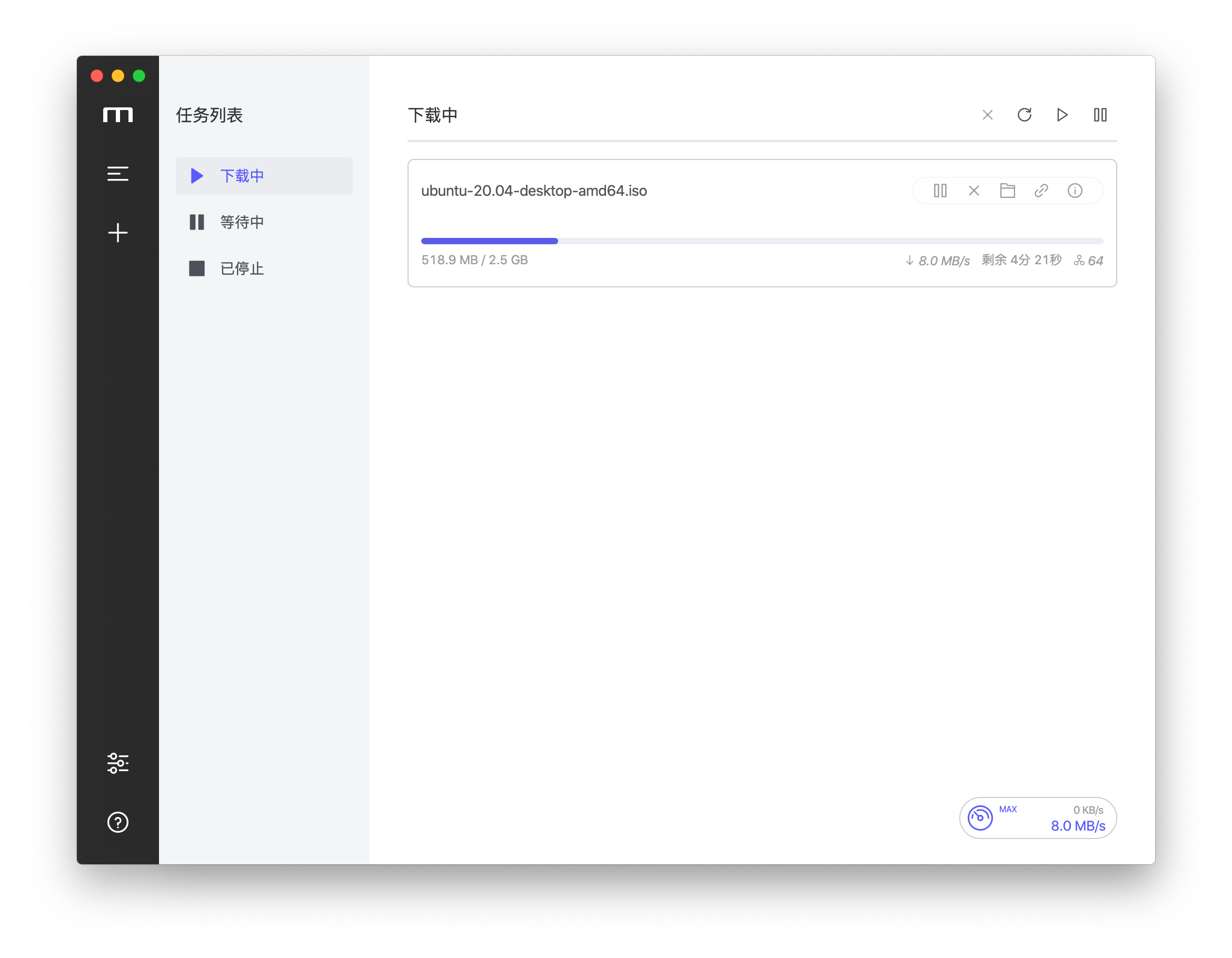
## 🖥 应用界面
## ⌨️ 本地开发
### 克隆代码
```bash
git clone git@github.com:agalwood/Motrix.git
```
### 安装依赖
```bash
cd Motrix
yarn
```
天朝大陆用户建议使用淘宝的 npm 源
```bash
yarn config set registry 'https://registry.npm.taobao.org'
npm config set registry 'https://registry.npm.taobao.org'
export ELECTRON_MIRROR='https://npm.taobao.org/mirrors/electron/'
export SASS_BINARY_SITE='https://npm.taobao.org/mirrors/node-sass'
```
> Error: Electron failed to install correctly, please delete node_modules/electron and try installing again
`Electron` 下载安装失败的问题,解决方式请参考 https://github.com/electron/electron/issues/8466#issuecomment-571425574
### 开发模式
```bash
yarn run dev
```
### 编译打包
```bash
yarn run build
```
完成之后可以在项目的 `release` 目录看到编译打包好的应用文件
## 🛠 技术栈
- [Electron](https://electronjs.org/)
- [Vue](https://vuejs.org/) + [VueX](https://vuex.vuejs.org/) + [Element](https://element.eleme.io)
- [Aria2](https://aria2.github.io/) (注:macOS 和 Linux 版本使用的是 64 位的 aria2c,Windows 版使用的 32 位的)
## ☑️ TODO
开发计划请移步 [Trello](https://trello.com/b/qNUzA0bv/motrix) 查看
## 🤝 参与共建 [](http://makeapullrequest.com)
如果你有兴趣参与共同开发,欢迎 FORK 和 PR。
## 🌍 国际化
欢迎大家将 Motrix 翻译成更多的语言版本 🧐,开工之前请先阅读一下 [翻译指南](./CONTRIBUTING-CN.md#-翻译指南)。
| Key | Name | Status |
|-------|:--------------------|:-------------|
| ar | Arabic | ✔️ [@hadialqattan](https://github.com/hadialqattan), [@AhmedElTabarani](https://github.com/AhmedElTabarani) |
| bg | Българският език | ✔️ [@null-none](https://github.com/null-none) |
| ca | Català | ✔️ [@marcizhu](https://github.com/marcizhu) |
| de | Deutsch | ✔️ [@Schloemicher](https://github.com/Schloemicher) |
| el | Ελληνικά | ✔️ [@Likecinema](https://github.com/Likecinema) |
| en-US | English | ✔️ |
| es | Español | ✔️ [@Chofito](https://github.com/Chofito)|
| fa | فارسی | ✔️ [@Nima-Ra](https://github.com/Nima-Ra) |
| fr | Français | ✔️ [@gpatarin](https://github.com/gpatarin) |
| hu | Hungarian | ✔️ [@zalnaRs](https://github.com/zalnaRs) |
| id | Indonesia | ✔️ [@aarestu](https://github.com/aarestu) |
| it | Italiano | ✔️ [@blackcat-917](https://github.com/blackcat-917) |
| ja | 日本語 | ✔️ [@hbkrkzk](https://github.com/hbkrkzk) |
| ko | 한국어 | ✔️ [@KOZ39](https://github.com/KOZ39) |
| nb | Norsk Bokmål | [@rubjo](https://github.com/rubjo) |
| pl | Polski | ✔️ [@KanarekLife](https://github.com/KanarekLife) |
| pt-BR | Portuguese (Brazil) | ✔️ [@andrenoberto](https://github.com/andrenoberto) |
| ro | Română | ✔️ [@alyn3d](https://github.com/alyn3d) |
| ru | Русский | ✔️ [@bladeaweb](https://github.com/bladeaweb) |
| tr | Türkçe | ✔️ [@abdullah](https://github.com/abdullah) |
| uk | Українська | ✔️ [@bladeaweb](https://github.com/bladeaweb) |
| vi | Tiếng Việt | ✔️ [@duythanhvn](https://github.com/duythanhvn) |
| zh-CN | 简体中文 | ✔️ |
| zh-TW | 繁體中文 | ✔️ [@Yukaii](https://github.com/Yukaii) |
## 📜 开源许可
基于 [MIT license](https://opensource.org/licenses/MIT) 许可进行开源。
## 一款全能的下载工具
[](https://github.com/agalwood/Motrix/releases)   
[English](./README.md) | 简体中文
我是个兴趣使然的桌面应用开发者🤓,利用搬砖之余开发了 Motrix。
Motrix 是一款全能的下载工具,支持下载 HTTP、FTP、BT、磁力链等资源。它的界面简洁易用,希望大家喜欢 👻。
✈️ 去 [官网](https://motrix.app/zh-CN) 逛逛 | 📖 查看 [帮助手册](http://motrix.app/support/issues)
## 💽 安装稳定版
[GitHub](https://github.com/agalwood/Motrix/releases) 和 [官网](https://motrix.app/zh-CN) 提供了已经编译好的稳定版安装包,当然你也可以自己克隆代码编译打包。
### Windows
建议使用安装包(Motrix-Setup-x.y.z.exe)安装 Motrix 以确保完整的体验,例如关联 torrent 文件,捕获磁力链等。
如果你在 Windows 是用包管理工具来管理应用,如 [Chocolatey](https://chocolatey.org)、[scoop](https://github.com/lukesampson/scoop),你可以使用它们安装 Motrix。
#### Chocolatey
感谢 [@Yato](https://github.com/iYato) 持续维护着 [Motrix Chocolatey](https://community.chocolatey.org/packages/motrix) 包。要安装 Motrix,请从 `命令行` 或 `PowerShell` 中运行以下命令:
```bash
# 安装
choco install motrix
# 升级
choco upgrade motrix
```
#### scoop
如果你更喜欢便携版,你可以使用 [scoop](https://github.com/lukesampson/scoop)(需要 Windows 7+,天朝用户可能需要设置 Git 代理)安装最新便携版本的 Motrix。
```bash
scoop bucket add extras
scoop install motrix
```
### macOS
macOS 用户可以使用 `brew cask` 安装 Motrix,感谢 [@Mitscherlich](https://github.com/Mitscherlich) 的 [PR](https://github.com/Homebrew/homebrew-cask/pull/59494)。
```bash
brew update && brew install --cask motrix
```
### Linux
你可以下载 `AppImage` (适用于所有 Linux 发行版)或 `snap` 来安装 Motrix,更多 Linux 安装包格式请查看 [GitHub/release](https://github.com/agalwood/Motrix/releases) 。
Motrix 在 Linux 中首次启动可能需要使用 `sudo` 运行,因为可能没有创建下载会话文件的权限 (`/var/cache/aria2.session`)。
如果你想自己通过编译源码来安装,请阅读 **编译打包** 部分。
#### AppImage
最新版的 Motrix AppImage 需要自己手动进执行桌面集成。请查看 [AppImageLauncher](https://github.com/TheAssassin/AppImageLauncher) 的文档进行操作。
> 桌面集成
> electron-builder v21 之后,桌面集成不再是 AppImage 文件的一部分。
> 推荐使用 [AppImageLauncher](https://github.com/TheAssassin/AppImageLauncher) 集成 AppImage。
Deepin 20 Beta 用户安装 Motrix 失败的问题,请按照以下方法处理:
打开`终端`,黏贴运行如下命令之后再次安装 Motrix。
```bash
sudo apt --fix-broken install
```
#### Snap
Motrix 已经上架 [Snapcraft](https://snapcraft.io/motrix) ,Ubuntu 用户推荐从 Snap 商店下载。
v1.5.10 提示
系统托盘可能无法正常显示指示器,导致退出应用程序不方便。
请取消勾选 偏好设置——基本设置——隐藏应用程序菜单(仅限Windows和Linux),点击保存并应用。然后点击 "文件 "菜单中的 "退出",退出应用程序。
请更新到 v1.5.12 及以上版本,可以使用键盘组合快捷键 Ctrl + q 快速退出应用。
#### AUR
对于 Arch Linux 用户,可以使用 [aur](https://aur.archlinux.org/packages/motrix/) 安装 Motrix,感谢维护者 [@weearc](https://github.com/weearc)。
运行以下命令进行安装:
```bash
yay motrix
```
#### Flatpak
感谢 [@proletarius101](https://github.com/proletarius101) 的 [PR](https://github.com/flathub/flathub/pull/2334),Motrix 已经上架 [Flathub](https://flathub.org/apps/details/net.agalwood.Motrix),喜欢 Flatpak 的 Linux 用户可以尝试。
```bash
# 安装
flatpak install flathub net.agalwood.Motrix
# 运行
flatpak run net.agalwood.Motrix
```
## ✨ 特性
- 🕹 简洁明了的图形操作界面
- 🦄 支持BT和磁力链任务
- ☑️ 支持选择性下载BT部分文件
- 📡 每天自动更新 Tracker 服务器列表
- 🔌 UPnP & NAT-PMP 端口映射
- 🎛 最高支持 10 个任务同时下载
- 🚀 单任务最高支持 64 线程下载
- 🚥 设置上传/下载限速
- 🕶 模拟用户代理UA
- 🔔 下载完成后通知
- 💻 支持触控栏快捷键 (Mac 专享)
- 🤖 常驻系统托盘,操作更加便捷
- 📟 系统托盘速度仪表显示实时速度 (Mac 专享)
- 🌑 深色模式
- 🗑 移除任务时可同时删除相关文件
- 🌍 国际化,[查看已可选的语言](#-国际化)
- 🛠 更多特性开发中
## 🖥 应用界面

## ⌨️ 本地开发
### 克隆代码
```bash
git clone git@github.com:agalwood/Motrix.git
```
### 安装依赖
```bash
cd Motrix
yarn
```
天朝大陆用户建议使用淘宝的 npm 源
```bash
yarn config set registry 'https://registry.npm.taobao.org'
npm config set registry 'https://registry.npm.taobao.org'
export ELECTRON_MIRROR='https://npm.taobao.org/mirrors/electron/'
export SASS_BINARY_SITE='https://npm.taobao.org/mirrors/node-sass'
```
> Error: Electron failed to install correctly, please delete node_modules/electron and try installing again
`Electron` 下载安装失败的问题,解决方式请参考 https://github.com/electron/electron/issues/8466#issuecomment-571425574
### 开发模式
```bash
yarn run dev
```
### 编译打包
```bash
yarn run build
```
完成之后可以在项目的 `release` 目录看到编译打包好的应用文件
## 🛠 技术栈
- [Electron](https://electronjs.org/)
- [Vue](https://vuejs.org/) + [VueX](https://vuex.vuejs.org/) + [Element](https://element.eleme.io)
- [Aria2](https://aria2.github.io/) (注:macOS 和 Linux 版本使用的是 64 位的 aria2c,Windows 版使用的 32 位的)
## ☑️ TODO
开发计划请移步 [Trello](https://trello.com/b/qNUzA0bv/motrix) 查看
## 🤝 参与共建 [](http://makeapullrequest.com)
如果你有兴趣参与共同开发,欢迎 FORK 和 PR。
## 🌍 国际化
欢迎大家将 Motrix 翻译成更多的语言版本 🧐,开工之前请先阅读一下 [翻译指南](./CONTRIBUTING-CN.md#-翻译指南)。
| Key | Name | Status |
|-------|:--------------------|:-------------|
| ar | Arabic | ✔️ [@hadialqattan](https://github.com/hadialqattan), [@AhmedElTabarani](https://github.com/AhmedElTabarani) |
| bg | Българският език | ✔️ [@null-none](https://github.com/null-none) |
| ca | Català | ✔️ [@marcizhu](https://github.com/marcizhu) |
| de | Deutsch | ✔️ [@Schloemicher](https://github.com/Schloemicher) |
| el | Ελληνικά | ✔️ [@Likecinema](https://github.com/Likecinema) |
| en-US | English | ✔️ |
| es | Español | ✔️ [@Chofito](https://github.com/Chofito)|
| fa | فارسی | ✔️ [@Nima-Ra](https://github.com/Nima-Ra) |
| fr | Français | ✔️ [@gpatarin](https://github.com/gpatarin) |
| hu | Hungarian | ✔️ [@zalnaRs](https://github.com/zalnaRs) |
| id | Indonesia | ✔️ [@aarestu](https://github.com/aarestu) |
| it | Italiano | ✔️ [@blackcat-917](https://github.com/blackcat-917) |
| ja | 日本語 | ✔️ [@hbkrkzk](https://github.com/hbkrkzk) |
| ko | 한국어 | ✔️ [@KOZ39](https://github.com/KOZ39) |
| nb | Norsk Bokmål | [@rubjo](https://github.com/rubjo) |
| pl | Polski | ✔️ [@KanarekLife](https://github.com/KanarekLife) |
| pt-BR | Portuguese (Brazil) | ✔️ [@andrenoberto](https://github.com/andrenoberto) |
| ro | Română | ✔️ [@alyn3d](https://github.com/alyn3d) |
| ru | Русский | ✔️ [@bladeaweb](https://github.com/bladeaweb) |
| tr | Türkçe | ✔️ [@abdullah](https://github.com/abdullah) |
| uk | Українська | ✔️ [@bladeaweb](https://github.com/bladeaweb) |
| vi | Tiếng Việt | ✔️ [@duythanhvn](https://github.com/duythanhvn) |
| zh-CN | 简体中文 | ✔️ |
| zh-TW | 繁體中文 | ✔️ [@Yukaii](https://github.com/Yukaii) |
## 📜 开源许可
基于 [MIT license](https://opensource.org/licenses/MIT) 许可进行开源。