# webstack-go
**Repository Path**: usench/webstack-go
## Basic Information
- **Project Name**: webstack-go
- **Description**: ❤️ 基于 Golang 开源的网址导航网站项目,具备完整的前后台,您可以拿来制作自己平日收藏的网址导航。
- **Primary Language**: Go
- **License**: MIT
- **Default Branch**: master
- **Homepage**: http://hao.ch3nnn.cn/
- **GVP Project**: No
## Statistics
- **Stars**: 0
- **Forks**: 4
- **Created**: 2023-07-09
- **Last Updated**: 2023-07-09
## Categories & Tags
**Categories**: Uncategorized
**Tags**: None
## README
# webstack-go 网址导航后台系统
基于 Golang 开源的网址导航网站项目,具备完整的前后台,您可以拿来制作自己平日收藏的网址导航。
- 图标库: [lineicons](https://lineicons.com/icons/)
- 前端模板: [WebStackPage](https://github.com/WebStackPage/WebStackPage.github.io)
- 后端 Gin 框架: 基于 [go-gin-api ](https://github.com/xinliangnote/go-gin-api)项目二次开发
原有后端项目基础上新增功能:
- [x] 新增 webstack - 导航首页
- [x] 新增 系统管理员 - 网站分类
- [x] 新增 系统管理员 - 网站列表
- [x] 网站新增支持自动获取标题、Logo、网站描述
- [x] 新增 `docker-compose.yml` 一键安装各组件
- [x] 新增 首页看板娘
- [x] 批量添加网址
- [ ] 图片管理
- [ ] 城市天气, 每日一句经典语录
## 快速开始
### 一、运行环境
> 安装 Golang、Mysql、Redis
- Golang 1.16+ 因为使用了 //go:embed 特性;
- MySQL
- 连接地址,例如:127.0.0.1:3306;
- 数据库名,例如:webstack,会在此数据库下初始化数据表;
- 用户名,不可为空;
- 密码,不可为空;
- Redis
- 连接地址,例如:127.0.0.1:6379;
- 密码,可为空;
- 连接DB,默认是 0 ;
### 二、启动服务
> 两种方式运行 1. 源码启动服务 2. Docker启动服务
**一、源码运行服务**
1. 目录下执行 `go mod tidy` 拉取项目依赖库
2. 安装完依赖执行 `go run main.go` 首次启动程序之后,会在浏览器中自动打开安装界面,链接地址:http://127.0.0.1:9999/install
3. 点击 `初始化项目` 会看到如下图所示, 如果提示重新运行服务说明项目初始化完成, 只需重新运行服务就 OK 了!
 **二、Docker运行服务**
> 包含两部分 1. 基础服务(Mysql、Redis、Service) 2. 监控服务(Prometheus、Grafana)
**一、基础服务**
1. 目录下执行 `docker-compose -f docker-compose.yml up -d` 等待基础组件启动 (Mysql、Redis、Service)
```shell
$ docker-compose -f docker-compose.yml up -d
[+] Running 4/4
✔ Network webstack-go Created 0.1s
✔ Container webstack-go-mysql Healthy 12.9s
✔ Container webstack-go-redis Healthy 13.4s
✔ Container webstack-go-service Started
```
2. 执行`docker-compose -f docker-compose.yml ps `服务正常运行如下
```shell
NAME IMAGE COMMAND SERVICE CREATED STATUS PORTS
webstack-go-mysql mysql/mysql-server:5.7 "/entrypoint.sh mysq…" webstack-go-mysql 2 minutes ago Up 2 minutes (healthy) 0.0.0.0:3306->3306/tcp, 33060/tcp
webstack-go-redis redis:6.2.4 "docker-entrypoint.s…" webstack-go-redis 2 minutes ago Up 2 minutes (healthy) 0.0.0.0:6379->6379/tcp
webstack-go-service webstack-go-webstack-go-service "./webstack-go -env …" webstack-go-service 2 minutes ago Up 2 minutes (healthy) 0.0.0.0:9999->9999/tcp
```
3. docker container 正常运行后, 在浏览器中打开安装界面,链接地址:http://127.0.0.1:9999/install
4. 点击 `初始化项目` 会看到如下图所示, 如果提示重新运行服务说明项目初始化完成, 只需重新运行 `webstack-go-service` 容器服务就 OK 了!
**二、prometheus、grafana监控服务**
> 注: 监控服务看自己是否需要, 不运行也不影响正常使用
1. 目录下执行 `docker-compose -f docker-compose-prometheus.yml up -d` 等待监控组件启动 (Prometheus、Grafana)
```shell
[+] Running 4/4
✔ Container webstack-go-prometheus Started 4.0s
✔ Container webstack-go-loki Started 3.6s
✔ Container webstack-go-grafana Started 4.3s
✔ Container webstack-go-promtail Started
```
2. 执行`docker-compose -f docker-compose-prometheus.yml ps `服务正常运行如下
```shell
NAME IMAGE COMMAND SERVICE CREATED STATUS PORTS
webstack-go-grafana grafana/grafana-enterprise:9.4.3 "/run.sh" webstack-go-grafana 2 minutes ago Up 2 minutes 0.0.0.0:3000->3000/tcp
webstack-go-loki grafana/loki:2.7.3 "/usr/bin/loki -conf…" webstack-go-loki 2 minutes ago Up 2 minutes 0.0.0.0:3100->3100/tcp
webstack-go-mysql mysql/mysql-server:5.7 "/entrypoint.sh mysq…" webstack-go-mysql 3 minutes ago Up 3 minutes (healthy) 0.0.0.0:3306->3306/tcp, 33060/tcp
webstack-go-prometheus prom/prometheus:latest "/bin/prometheus --c…" webstack-go-prometheus 2 minutes ago Up 2 minutes 0.0.0.0:9090->9090/tcp
webstack-go-promtail grafana/promtail:2.7.3 "/usr/bin/promtail -…" webstack-go-promtail 2 minutes ago Up 2 minutes
webstack-go-redis redis:6.2.4 "docker-entrypoint.s…" webstack-go-redis 3 minutes ago Up 3 minutes (healthy) 0.0.0.0:6379->6379/tcp
webstack-go-service webstack-go-webstack-go-service "./webstack-go -env …" webstack-go-service 3 minutes ago Up 3 minutes (healthy) 0.0.0.0:9999->9999/tcp
```
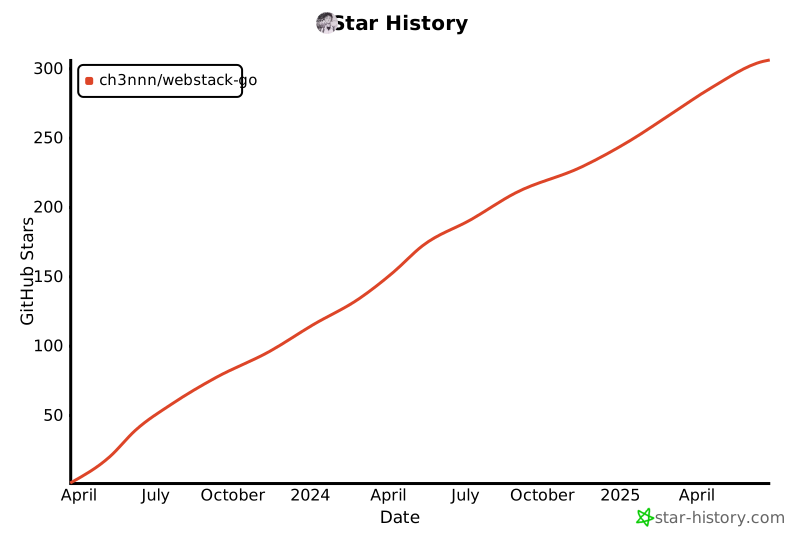
## Star History
[](https://star-history.com/#ch3nnn/webstack-go&Date)
## 效果图
> **首页**

> **网站分类**

> **新增网站**

> **网站信息**

> **监控组件**
![]()
**二、Docker运行服务**
> 包含两部分 1. 基础服务(Mysql、Redis、Service) 2. 监控服务(Prometheus、Grafana)
**一、基础服务**
1. 目录下执行 `docker-compose -f docker-compose.yml up -d` 等待基础组件启动 (Mysql、Redis、Service)
```shell
$ docker-compose -f docker-compose.yml up -d
[+] Running 4/4
✔ Network webstack-go Created 0.1s
✔ Container webstack-go-mysql Healthy 12.9s
✔ Container webstack-go-redis Healthy 13.4s
✔ Container webstack-go-service Started
```
2. 执行`docker-compose -f docker-compose.yml ps `服务正常运行如下
```shell
NAME IMAGE COMMAND SERVICE CREATED STATUS PORTS
webstack-go-mysql mysql/mysql-server:5.7 "/entrypoint.sh mysq…" webstack-go-mysql 2 minutes ago Up 2 minutes (healthy) 0.0.0.0:3306->3306/tcp, 33060/tcp
webstack-go-redis redis:6.2.4 "docker-entrypoint.s…" webstack-go-redis 2 minutes ago Up 2 minutes (healthy) 0.0.0.0:6379->6379/tcp
webstack-go-service webstack-go-webstack-go-service "./webstack-go -env …" webstack-go-service 2 minutes ago Up 2 minutes (healthy) 0.0.0.0:9999->9999/tcp
```
3. docker container 正常运行后, 在浏览器中打开安装界面,链接地址:http://127.0.0.1:9999/install
4. 点击 `初始化项目` 会看到如下图所示, 如果提示重新运行服务说明项目初始化完成, 只需重新运行 `webstack-go-service` 容器服务就 OK 了!
**二、prometheus、grafana监控服务**
> 注: 监控服务看自己是否需要, 不运行也不影响正常使用
1. 目录下执行 `docker-compose -f docker-compose-prometheus.yml up -d` 等待监控组件启动 (Prometheus、Grafana)
```shell
[+] Running 4/4
✔ Container webstack-go-prometheus Started 4.0s
✔ Container webstack-go-loki Started 3.6s
✔ Container webstack-go-grafana Started 4.3s
✔ Container webstack-go-promtail Started
```
2. 执行`docker-compose -f docker-compose-prometheus.yml ps `服务正常运行如下
```shell
NAME IMAGE COMMAND SERVICE CREATED STATUS PORTS
webstack-go-grafana grafana/grafana-enterprise:9.4.3 "/run.sh" webstack-go-grafana 2 minutes ago Up 2 minutes 0.0.0.0:3000->3000/tcp
webstack-go-loki grafana/loki:2.7.3 "/usr/bin/loki -conf…" webstack-go-loki 2 minutes ago Up 2 minutes 0.0.0.0:3100->3100/tcp
webstack-go-mysql mysql/mysql-server:5.7 "/entrypoint.sh mysq…" webstack-go-mysql 3 minutes ago Up 3 minutes (healthy) 0.0.0.0:3306->3306/tcp, 33060/tcp
webstack-go-prometheus prom/prometheus:latest "/bin/prometheus --c…" webstack-go-prometheus 2 minutes ago Up 2 minutes 0.0.0.0:9090->9090/tcp
webstack-go-promtail grafana/promtail:2.7.3 "/usr/bin/promtail -…" webstack-go-promtail 2 minutes ago Up 2 minutes
webstack-go-redis redis:6.2.4 "docker-entrypoint.s…" webstack-go-redis 3 minutes ago Up 3 minutes (healthy) 0.0.0.0:6379->6379/tcp
webstack-go-service webstack-go-webstack-go-service "./webstack-go -env …" webstack-go-service 3 minutes ago Up 3 minutes (healthy) 0.0.0.0:9999->9999/tcp
```
## Star History
[](https://star-history.com/#ch3nnn/webstack-go&Date)
## 效果图
> **首页**

> **网站分类**

> **新增网站**

> **网站信息**

> **监控组件**
![]()