# LivePlayer
**Repository Path**: vesper0407/live-player
## Basic Information
- **Project Name**: LivePlayer
- **Description**: No description available
- **Primary Language**: Unknown
- **License**: Not specified
- **Default Branch**: master
- **Homepage**: None
- **GVP Project**: No
## Statistics
- **Stars**: 0
- **Forks**: 0
- **Created**: 2022-03-25
- **Last Updated**: 2022-04-13
## Categories & Tags
**Categories**: Uncategorized
**Tags**: None
## README
# 新媒体服务系统
## 部署
### 部署流程
1. 安装anywhere或者 [http-server](https://urlify.cn/VFNrqa) 配置服务器,并启动
2. 安装Chrome浏览器,并在`chrome://flags`中打开有关webGL与WebXR相关选项,以便于HMD交互
3. 输入对应网址(需要先[处理视频](#video)然后构建对应文件),调整至对应的json配置文件,播放
:star: 如果没有音频需要注意使用 `"audio": ""`
### 相关工具与框架
1. [dash.js](http://reference.dashif.org/dash.js/nightly/samples/dash-if-reference-player/index.html) - For adaptive bitrate streaming via [DASH](https://reference.dashif.org/dash.js/latest/samples/index.html).
2. [three.js](https://threejs.org/docs/) - For 3D rendering, with CSS3DRenderer.js so far (WebXR not supported).
3. [A-Frame](https://techbrood.com/aframe/introduction/) - For 3D rendering ([WebXR API](https://developer.mozilla.org/en-US/docs/Web/API/WebXR_Device_API) supported for any videos based on VP9).
4. [Angular.js](https://angular.cn/) - For data virtualization and code optimization.
5. sensitive segmentation suites - For video's content analytics.
## 文件结构
- [process_shell](./process_shell/README.md): 处理视频的各种脚本文件夹
- ABR:实现各种ABR算法的js文件
- FoV:实现FoV预测逻辑,和后端通信
- updateCache:实现缓存更新
- aframe:集成WebXR的[aframe框架](./aframe/dist/aframe-master.js),版本是1.1.0
- app: 页面主要逻辑在[main.js](./app/main.js)中
- [dash.js](dash.js/dist/dash.all.debug.js): 实现每个tile的视频播放以及默认的ABR算法
- [Index.html](./Index.html): 播放器主界面布局
- [6_1_1.html](./6_1_1.html): 6个面,每个面1个tile的html文件,相当于6个dash播放器
- [6_2_2.html](./6_2_2.html): 6个面,每个面4个tile的html文件,相当于24个dash播放器
- [6_3_3.html](./6_3_3.html): 6个面,每个面9个tile的html文件,相当于54个dash播放器
- [default.json](./default.json): 设置每个tile位置的默认json文件
- [package.json](./package.json): 安装依赖的配置文件
## 视频处理
1. ffmpeg转成CMP投影视频
2. ffmpeg crop分割视频成6个面
3. ffmpeg对每个面的视频进行不同质量的编码
4. mp4fragment对每个面不同质量的视频按照1s切片
5. mp4dash将切片转成可以tile播放的mpd文件
:star: 具体可以[process_shell](./process_shell)文件夹
## AFrame和HMD交互
**主要关注[aframe-master.js](./aframe/dist/aframe-master.js)文件**
### **getPose and updatePose**
❌ tick函数: 这个玩意没有更新?
🤔 好像是和controller相关的
### **updateOrientation**
- [ ] tick函数调用频率很快,是多少还不清楚🤔
- [ ] **this.el.sceneEl**:https://www.techbrood.com/aframe/core?p=entity#sceneel
:sweat_smile: 不太理解:**pose = sceneEl.renderer.xr.getCameraPose()**
:sweat_smile: 进入VR模式之后的pose变量有用吗
- 调研一下以下数据类型的含义: **this.el.object3D**、**poseMatrix.elements**
```javascript
var object3D = this.el.object3D;
var pitchObject = this.pitchObject;
var yawObject = this.yawObject;
var pose;
var sceneEl = this.el.sceneEl;
// In VR mode, THREE is in charge of updating the camera pose.
if (sceneEl.is('vr-mode') && sceneEl.checkHeadsetConnected()) {
// With WebXR THREE applies headset pose to the object3D matrixWorld internally.
// Reflect values back on position, rotation, scale for getAttribute to return the expected values.
if (sceneEl.hasWebXR) {
pose = sceneEl.renderer.xr.getCameraPose();
if (pose) {
poseMatrix.elements = pose.transform.matrix;
poseMatrix.decompose(object3D.position, object3D.rotation, object3D.scale);
}
}
return;
}
```
- **this.el.object3D**: https://www.techbrood.com/aframe/core?p=entity#object3d
- **各种属性参考**:[Object3D – three.js docs (threejs.org)](https://threejs.org/docs/?q=object3D#api/en/core/Object3D)
- **position**:位置坐标,Vector3,默认是(0,0,0)
- **quaternion**:四元素,Object's local rotation as a Quaternion.
- **rotation**:Object's local rotation (see [Euler angles](https://en.wikipedia.org/wiki/Euler_angles)), in radians.
### quaternion
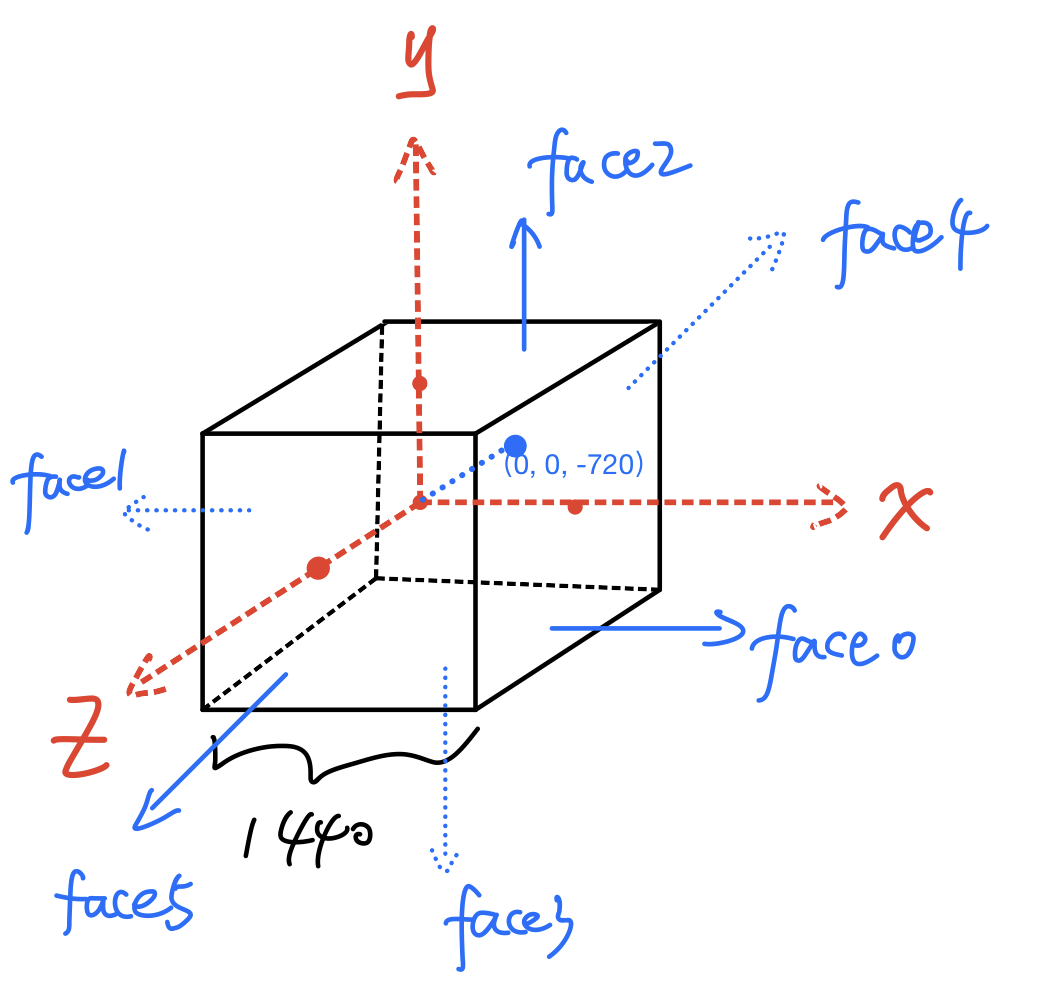
- 假设观看时是以立方体中心为原点的右手坐标系

 - 据播放json文件信息我假设最初始的观看点是(0,0,-720),然后通过HMD旋转之后获取四元数得到旋转之后的三维位置坐标,具体可以参考知乎:[如何形象地理解四元数?](https://www.zhihu.com/question/23005815/answer/33971127)
```json
[[{"src": "face0/output/stream.mpd", "width": "1440", "height": "1440", "x": 720, "y": 0, "z": 0, "rx": 0, "ry": 270, "rz": 0}],
[{"src": "face1/output/stream.mpd", "width": "1440", "height": "1440", "x": -720, "y": 0, "z": 0, "rx": 0, "ry": 90, "rz": 0}],
[{"src": "face2/output/stream.mpd", "width": "1440", "height": "1440", "x": 0, "y": 720, "z": 0, "rx": 90, "ry": 0, "rz": 180}],
[{"src": "face3/output/stream.mpd", "width": "1440", "height": "1440", "x": 0, "y": -720, "z": 0, "rx": -90, "ry": 0, "rz": 180}],
[{"src": "face4/output/stream.mpd", "width": "1440", "height": "1440", "x": 0, "y": 0, "z": -720, "rx": 0, "ry": 0, "rz": 0}],
[{"src": "face5/output/stream.mpd", "width": "1440", "height": "1440", "x": 0, "y": 0, "z": 720, "rx": 0, "ry": 180, "rz": 0}]]
```
- CMP视频具体位置关系图
- 据播放json文件信息我假设最初始的观看点是(0,0,-720),然后通过HMD旋转之后获取四元数得到旋转之后的三维位置坐标,具体可以参考知乎:[如何形象地理解四元数?](https://www.zhihu.com/question/23005815/answer/33971127)
```json
[[{"src": "face0/output/stream.mpd", "width": "1440", "height": "1440", "x": 720, "y": 0, "z": 0, "rx": 0, "ry": 270, "rz": 0}],
[{"src": "face1/output/stream.mpd", "width": "1440", "height": "1440", "x": -720, "y": 0, "z": 0, "rx": 0, "ry": 90, "rz": 0}],
[{"src": "face2/output/stream.mpd", "width": "1440", "height": "1440", "x": 0, "y": 720, "z": 0, "rx": 90, "ry": 0, "rz": 180}],
[{"src": "face3/output/stream.mpd", "width": "1440", "height": "1440", "x": 0, "y": -720, "z": 0, "rx": -90, "ry": 0, "rz": 180}],
[{"src": "face4/output/stream.mpd", "width": "1440", "height": "1440", "x": 0, "y": 0, "z": -720, "rx": 0, "ry": 0, "rz": 0}],
[{"src": "face5/output/stream.mpd", "width": "1440", "height": "1440", "x": 0, "y": 0, "z": 720, "rx": 0, "ry": 180, "rz": 0}]]
```
- CMP视频具体位置关系图
 :star: **three.js**:[matrix4的顺序问题](https://github.com/mrdoob/three.js/blob/00a692864f541a3ec194d266e220efd597eb28fa/src/math/Matrix4.js#L24) 用three.js自带的比较麻烦,所以自己构造js函数完成四元数相关的矩阵运算,参考`aframe-mater.js`中的`multiply: function(a, b)`函数
## 下载数据以及改变样式
### 启动
- npm run startVR
### downloadRecord button
- 下载当前存储的比特率等级、吞吐量、rebuffer时间等信息
- 观看时间较短的时候(<5s)不让下载
- 具体可见 https://gitee.com/vesper0407/dash-front/blob/master/README.md
### style update
- update the style of chart to display info
- [fastswitchenabled](http://cdn.dashjs.org/latest/jsdoc/module-Settings.html)
### fix git issues
https://stackoverflow.com/questions/5181845/git-push-existing-repo-to-a-new-and-different-remote-repo-server
:star: **three.js**:[matrix4的顺序问题](https://github.com/mrdoob/three.js/blob/00a692864f541a3ec194d266e220efd597eb28fa/src/math/Matrix4.js#L24) 用three.js自带的比较麻烦,所以自己构造js函数完成四元数相关的矩阵运算,参考`aframe-mater.js`中的`multiply: function(a, b)`函数
## 下载数据以及改变样式
### 启动
- npm run startVR
### downloadRecord button
- 下载当前存储的比特率等级、吞吐量、rebuffer时间等信息
- 观看时间较短的时候(<5s)不让下载
- 具体可见 https://gitee.com/vesper0407/dash-front/blob/master/README.md
### style update
- update the style of chart to display info
- [fastswitchenabled](http://cdn.dashjs.org/latest/jsdoc/module-Settings.html)
### fix git issues
https://stackoverflow.com/questions/5181845/git-push-existing-repo-to-a-new-and-different-remote-repo-server