# imooc-lego
**Repository Path**: view-cli/imooc-cli-dev
## Basic Information
- **Project Name**: imooc-lego
- **Description**: 慕课网前端架构师课程笔记。https://class.imooc.com/sale/fearchitect
- **Primary Language**: Unknown
- **License**: Not specified
- **Default Branch**: master
- **Homepage**: None
- **GVP Project**: No
## Statistics
- **Stars**: 0
- **Forks**: 4
- **Created**: 2023-07-11
- **Last Updated**: 2023-07-11
## Categories & Tags
**Categories**: Uncategorized
**Tags**: None
## README
# 介绍
* 流程图:https://whimsical.com/mongodb-RTJphPrwzksyotCdA32LQU
* 需求文档:https://imooc-lego.yuque.com/imooc-lego/zlz87z
* 作业|学习笔记:https://homework.imooc-lego.com/
* 慕课网:https://class.imooc.com/fearchitect#Anchor
`imooc-cli-dev` 为脚手架代码
`imooc-cli-dev-server` 为模板代码的服务端
`lego` 为前端代码
# 项目笔记
## 第一周:需求分析和架构设计
> 浅层学习看输入,深入学习看输出!
## 第二周:脚手架架构设计和框架搭建
### 创建脚手架流程
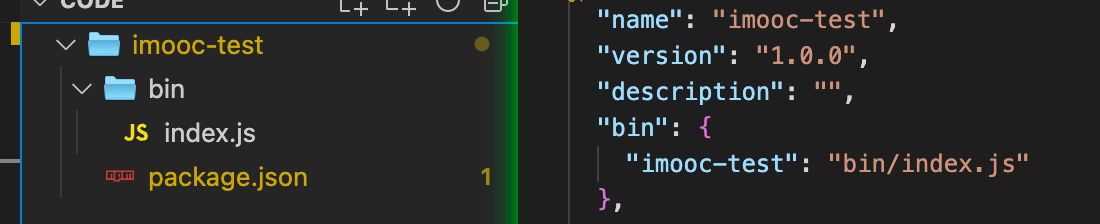
package.json 中添加 `bin:{"imooc-test":"bin/index.js"}`
#### 脚手架参数解析
```javascript
const process = require('process')
const argv = process.argv
```
### Lerna
#### lerna 搭建脚手架
```javascript
lerna init // 初始化 lerna 项目
lerna create core // 通过 lerna 创建分包
```
分包 name 规则:`"name": "@imooc-yishen-cli-dev/core"` ,`@imooc-yishen-cli-dev` 为 `Organizations` 名称;`core` 为分包名称。
#### lerna 本地依赖实现方式
```javascript
"dependencies": {
"@imooc-yishen-cli-dev/utils": "file:../utils"
}
// 执行 lerna publish 时lerna 会帮我们将 file:../utils 提换成线上链接
```
## 第三周:脚手架核心流程开发
### 脚手架架构设计
#### 脚手架架构设计图

#### 脚手架拆包策略
* 核心流程:core
* 命令:commands
* 初始化
* 发布
* 清除缓存
* 模型车:models
* Command 命令
* Project 项目
* Component 组件
* Npm 模块
* Git 仓库
* 支撑模块:utils
* Git 操作
* 云构建
* 工具方法
* API 请求
* Git API
#### core 模块技术方案

## 第四周 脚手架命令注册和执行过程开发

execCommand

## 第五周 脚手架创建项目流程设计和开发
项目/组件的初始化

## 第六周 脚手架项目和组件初始化开发
项目/组件初始化中的安装模板步骤

### ejs 模板引擎
* https://github.com/mde/ejs
#### 基本用法
```javascript
const html = '<%= user.name %>
'
const options = {}
const data = {
user: {
name: 'yishen',
blog:'https://mdashen.com'
},
}
const data2 = {
user: {
name: 'yishen_2',
},
}
```
1. compile 渲染
```javascript
// compile 相比 渲染变量更消耗资源。所以设计:只需 compile 一次,就可渲染多个template
const template = ejs.compile(html, options)
const compileTemplate = template(data)
const compileTemplate2 = template(data2)
console.log(compileTemplate, compileTemplate2)
// out
yishen
yishen_2
```
2. render 渲染
```javascript
ejs.render(html, data, options);
// 不需要反复使用 1. 中的template 可直接使用此方法。若需要对 template 反复使用,建议使用第一种方法。性能有提升
```
3. 读取文件渲染
```javascript
ejs.renderFile(filename, data, options, function(err, str){
// str => Rendered HTML string
});
// filename 为文件路径。
```
#### 标签
- `<%` 'Scriptlet' tag, for control-flow, no output
- `<%_` 'Whitespace Slurping' Scriptlet tag, strips all whitespace before it
- `<%=` Outputs the value into the template (escaped)
- `<%-` Outputs the unescaped value into the template
- `<%#` Comment tag, no execution, no output
- `<%%` Outputs a literal '<%'
- `%%>` Outputs a literal '%>'
- `%>` Plain ending tag
- `-%>` Trim-mode ('newline slurp') tag, trims following newline
- `_%>` 'Whitespace Slurping' ending tag, removes all whitespace after it
## 第七周 B端项目需求分析和架构设计
流程图:https://whimsical.com/mongodb-RTJphPrwzksyotCdA32LQU
需求:https://imooc-lego.yuque.com/imooc-lego/zlz87z
## 第八周 前端基础技术回顾和巡礼
### Typescript
```typescript
// interface 约束函数
const sum = (x: number, y: number) => {
return x + y
}
interface Isum {
(x: number, y: number): number
}
const sum2: Isum = sum
// 可变属性名
interface RandoMap {
[propName: string]: string
}
const test: RandoMap = {
a: 'hello',
b: 'hello',
}
```
```typescript
// interface 约束类
// 实例类型
interface ClockInterface {
currentTime: number
alert(): void
}
// 静态类型
interface ClockStatic {
// new 表示这个约束可以被new调用(即构造函数)
new (h: number, m: number): void
}
// ClockStatic 用来约束构造函数。ClockInterface用来约束class。静态类型和实例类型共同约束class
// implements 关键词 类来实现接口
const Clock: ClockStatic = class Clock implements ClockInterface {
currentTime = 0
alert: () => {}
constructor(h: number, m: number) {}
}
interface GameInterface {
play(): void
}
class Cellphone implements ClockInterface, GameInterface {
currentTime: number
alert() {}
play() {}
}
```
```typescript
// 泛型
// 第一个T:代表使用泛型 需要使用<>包裹
// 第二个T:代表参数的类型
// 第三个T:代表函数的返回值类型
function echo(arg: T): T {
return arg
}
const numberResult = echo(1)
const stringResult = echo('123')
```

```typescript
// TS 操作类型
interface CountryResp {
name: string
area: number
population: number
}
// keys 联合类型:name || area || population
type Keys = keyof CountryResp
type NameType = CountryResp['name']
type Test = {
[key in Keys]: any
}
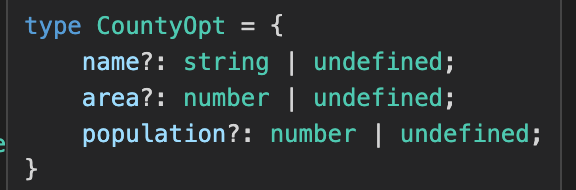
type CountyOpt = {
[p in Keys]?: CountryResp[p]
}
```
```typescript
// 泛型约束
interface IWidthLength {
length: number
}
// 传入的参数 arg 必须携带有 length 属性
function echoWithArr(arg: T): T {
console.log(arg.length)
return arg
}
const arrs = echoWithArr([1, 2, 3])
const str = echoWithArr('123')
const obj = echoWithArr({ length: 123 })
```
### Vue3
纯函数 pure function
* 相同的输入,永远会得到相同的输出
* 没有副作用
watch 遇到非响应式值的情况

## 第九周 项目整体搭建
## 第十周 业务组件库初步开发,业务组件属性的展示和更新
# 与项目业务无关的一些通用知识点
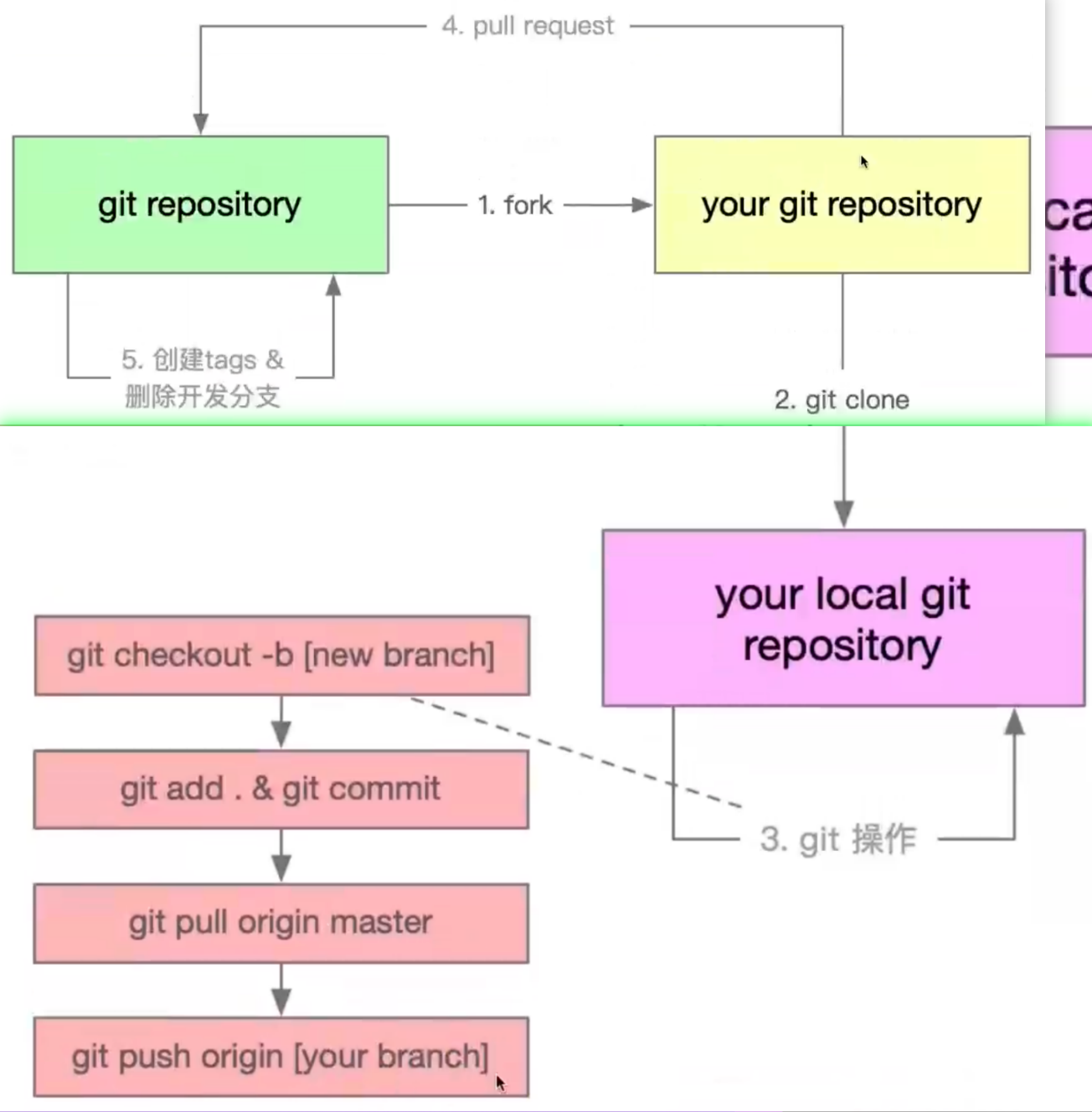
### 大厂 git 规范讲解
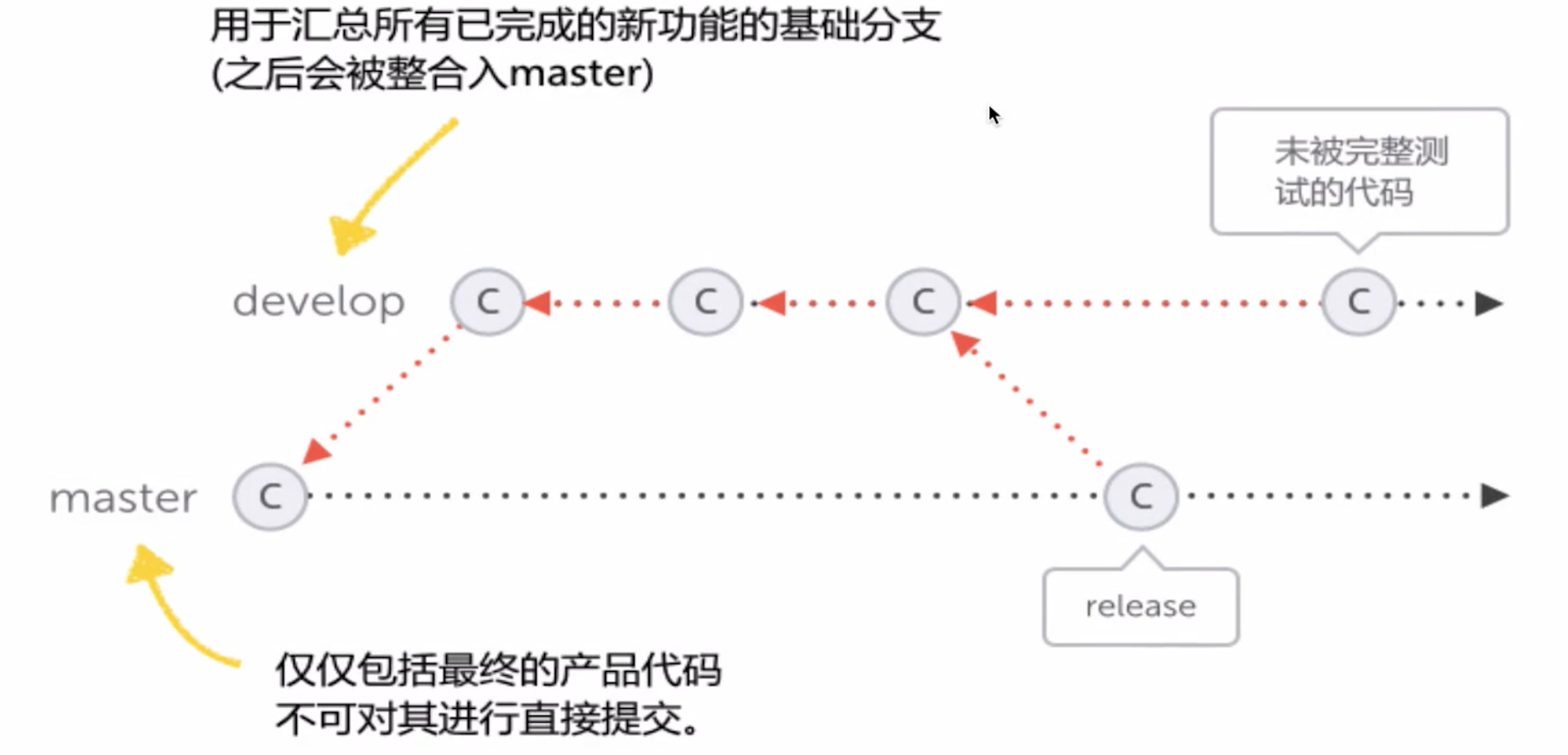
### git flow
### require 加载资源类型
```javascript
const pkg = require('../package.json')
// require 支持.js 、.json 文件
```
* js 文件:`module.exports ` / `exports`
* json文件:JSON.parse 解析成对象
* .node:c++ 插件,不常用
* 其他任意文件,当做.js 解析,解析失败报错。解析成功就是js文件。
### NodeJS 支持 ES Module
两种标准 CommonJS、ES Module
* CommonJS: require()、modulex.exports / exports.x
* ES Module:import、export default / export function/const
#### 通过 webpack 支持模块化
`npm i webpack webpack-cli`
```javascript
// webpack.config.js
const path = require('path')
module.exports = {
entry: './bin/index.js',
mode: 'development',
output: {
path: path.join(__dirname, '/dist'),
filename: 'index.js',
},
}
```
```javascript
// package.json
"scripts": {
"dev": "webpack --watch",
"build": "webpack"
},
```
##### babel 转es5 语法
`npm i babel-loader @babel/core @babel/preset-env`
```javascript
// webpack.config.js
const path = require('path')
module.exports = {
entry: './bin/core.js',
// mode: 'development',
mode: 'production',
output: {
path: path.join(__dirname, '/dist'),
filename: 'index.js',
},
target: 'node',
module: {
rules: [
{
test: /\.js$/,
exclude: /(node_modules|dist)/,
use: {
loader: 'babel-loader',
options:{
presets:['@babel/preset-env']
}
},
},
],
},
}
```
#### 通过 Node 原生支持 ES Module
mjs
* https://stackoverflow.com/questions/57492546/what-is-the-difference-between-js-and-mjs-files
> Node.js's original module system is [CommonJs](https://nodejs.org/docs/latest/api/modules.html) (which uses `require` and `module.exports`).
>
> Since Node.js was created, the [ECMAScript module system](https://nodejs.org/docs/latest/api/esm.html) (which uses `import` and `export`) has become standard and Node.js has added support for it.
>
> Node.js will treat `.cjs` files as CommonJS modules and `.mjs` files as ECMAScript modules. It will treat `.js` files as whatever the default module system for the project is (which is CommonJS unless *package.json* says `"type": "module",`).
>
> See also: [Differences between ES6 module system and CommonJs](https://nodejs.org/docs/latest/api/esm.html#esm_differences_between_es_modules_and_commonjs)
### Node 多进程
* child_process 中创建的进程就是 Node.js 的子进程
* spawn:耗时任务,需要不断日志
* exec/exceFile:开销比较小的任务
```javascript
// 执行命令
cp.exec('ls -al', (error, stdout, stderr) => {
console.log('')
})
// 执行文件
cp.execFile(
path.resolve(__dirname, 'test.shell'),
['-al', '-bl'],
(error, stdout, stderr) => {
console.log(error)
console.log(stdout)
console.log(stderr)
}
)
```
```javascript
const child = cp.spawn(path.resolve(__dirname, 'test.shell'), ['-al', '-bl'], {
cwd: path.resolve('..'),
})
child.stdout.on('data', function (chunk) {
console.log(chunk.toString())
})
child.stderr.on('data', function (chunk) {
console.log(chunk.toString())
})
```
* fork:创建一个新进程(子),通过 node 执行
```javascript
// main
const child = cp.fork(path.resolve(__dirname, 'child.js'))
// 父进程像子进程发送消息
child.send('hello child process', () => {
// child.disconnect()
})
// 父进程监听子进程的发来的消息
child.on('message', (msg) => {
console.log(msg)
})
console.log('main pid:', process.pid)
```
```javascript
// child
console.log('child process')
console.log('child pid', process.pid)
process.on('message', (msg) => {
console.log(msg)
})
process.send('hello main process')
```
result
```sh
main pid: 2023
child process
child pid 2024
hello main process
hello child process
```
### 命令行交互原理
// TODO 视频跳过了,看完整个项目再回来补。
// TODO 第五章、7-x