# transitioner
**Repository Path**: wanghf/transitioner
## Basic Information
- **Project Name**: transitioner
- **Description**: No description available
- **Primary Language**: Android
- **License**: MIT
- **Default Branch**: master
- **Homepage**: None
- **GVP Project**: No
## Statistics
- **Stars**: 0
- **Forks**: 0
- **Created**: 2018-03-01
- **Last Updated**: 2020-12-19
## Categories & Tags
**Categories**: Uncategorized
**Tags**: None
## README

[](https://opensource.org/licenses/MIT) [](https://bintray.com/radoslav/maven/transitioner/1.3/link) [](http://kotlinlang.org) [](http://twitter.com/devlabsbg)
Transitioner provides easy, dynamic and adjustable animations between two views with nested children.
 App design feature [here](https://www.uplabs.com/posts/ios-weather-app-animation-interface).
## Usage
First you need to create a Transitioner object containing your original and ending views:
```kotlin
val transition = Transitioner(original_view, ending_view)
```
The view pairs must have matching "tag" attributes so that they can be bound together:
```xml
```
I recommend you hide the second view layout, since it's only used as a placeholder for the end destination.
The views can be of any type, you can mix and match them, the two layouts can have a different number of views and nested layouts are 100% supported. The only things to keep in mind are:
- all views which you would want to match together must have the same tag attribute in both layouts
- all unmatched views will remain at their original place inside the original layout
- the second layout is just a placeholder. It doesn't hold any logic, it only shows where the original layout should move to.
### Basic Usage
```kotlin
transition.setProgress(0.5f)
//or
transition.setProgress(50)
```
### Additional methods and tweaks
```kotlin
transition.duration = 500
transition.interpolator = AccelerateDecelerateInterpolator()
transition.animateTo(percent = 0f)
transition.onProgressChanged {
//triggered on every progress change of the transition
seekBar.progress = (it * 100).toInt()
}
val progress: Float = transition.currentProgress
```
Here is a preview of a simple application made using this library
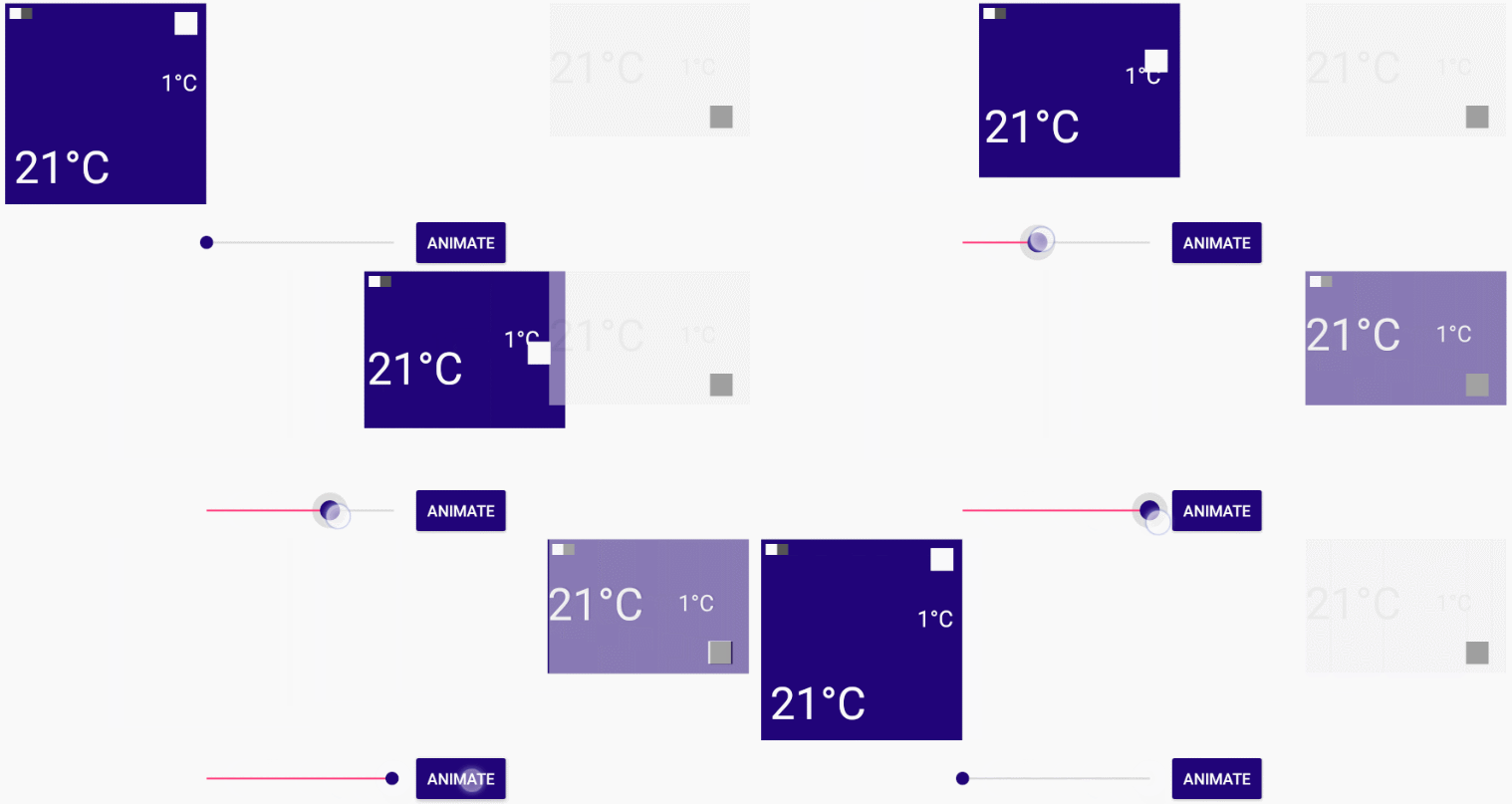
This effect can be reproduced by placing the "Transitioner.setProgress(Float)" function inside a onTouch or a onProgressChanged method.
---
## Download
### Gradle
```gradle
dependencies {
compile 'bg.devlabs.transitioner:transitioner:'
}
```
### Maven
```xml
bg.devlabs.transitioner
transitioner
latest_version
pom
```
### Manually
You can also manually download [the library class](https://github.com/dev-labs-bg/transitioner/blob/master/transitioner/src/main/java/bg/devlabs/transitioner/Transitioner.kt) and use it in your application.
---
## Compatibility
Minimum Android SDK: API level 19
---
## Author
Radoslav Yankov [@Radoslav_Y](https://twitter.com/Radoslav_Y)
---
## Getting help
If you spot a problem you can open an issue on the Github page, or alternatively, you can tweet us at [@devlabsbg](https://twitter.com/devlabsbg)
---
## License
Transitioner is released under the [MIT License](https://gitlab.com/SimonaStoyanova/flying-fab/blob/master/LICENSE).
App design feature [here](https://www.uplabs.com/posts/ios-weather-app-animation-interface).
## Usage
First you need to create a Transitioner object containing your original and ending views:
```kotlin
val transition = Transitioner(original_view, ending_view)
```
The view pairs must have matching "tag" attributes so that they can be bound together:
```xml
```
I recommend you hide the second view layout, since it's only used as a placeholder for the end destination.
The views can be of any type, you can mix and match them, the two layouts can have a different number of views and nested layouts are 100% supported. The only things to keep in mind are:
- all views which you would want to match together must have the same tag attribute in both layouts
- all unmatched views will remain at their original place inside the original layout
- the second layout is just a placeholder. It doesn't hold any logic, it only shows where the original layout should move to.
### Basic Usage
```kotlin
transition.setProgress(0.5f)
//or
transition.setProgress(50)
```
### Additional methods and tweaks
```kotlin
transition.duration = 500
transition.interpolator = AccelerateDecelerateInterpolator()
transition.animateTo(percent = 0f)
transition.onProgressChanged {
//triggered on every progress change of the transition
seekBar.progress = (it * 100).toInt()
}
val progress: Float = transition.currentProgress
```
Here is a preview of a simple application made using this library

This effect can be reproduced by placing the "Transitioner.setProgress(Float)" function inside a onTouch or a onProgressChanged method.
---
## Download
### Gradle
```gradle
dependencies {
compile 'bg.devlabs.transitioner:transitioner:'
}
```
### Maven
```xml
bg.devlabs.transitioner
transitioner
latest_version
pom
```
### Manually
You can also manually download [the library class](https://github.com/dev-labs-bg/transitioner/blob/master/transitioner/src/main/java/bg/devlabs/transitioner/Transitioner.kt) and use it in your application.
---
## Compatibility
Minimum Android SDK: API level 19
---
## Author
Radoslav Yankov [@Radoslav_Y](https://twitter.com/Radoslav_Y)
---
## Getting help
If you spot a problem you can open an issue on the Github page, or alternatively, you can tweet us at [@devlabsbg](https://twitter.com/devlabsbg)
---
## License
Transitioner is released under the [MIT License](https://gitlab.com/SimonaStoyanova/flying-fab/blob/master/LICENSE).