# vite-plugin-version-mark
**Repository Path**: wanglaibin/vite-plugin-version-mark
## Basic Information
- **Project Name**: vite-plugin-version-mark
- **Description**: No description available
- **Primary Language**: Unknown
- **License**: Not specified
- **Default Branch**: main
- **Homepage**: None
- **GVP Project**: No
## Statistics
- **Stars**: 0
- **Forks**: 0
- **Created**: 2024-12-02
- **Last Updated**: 2024-12-02
## Categories & Tags
**Categories**: Uncategorized
**Tags**: None
## README
中文 | [English](./README.md)
# vite-plugin-version-mark
> 自动插入版本号到你的 Vite/Nuxt 项目中.
[![npm version][npm-version-src]][npm-version-href]
[![npm downloads][npm-downloads-src]][npm-downloads-href]
[![types][types-src]][types-href]
[![License][license-src]][license-href]
[![Vite][vite-src]][vite-href]
[![Nuxt][nuxt-src]][nuxt-href]
[![Awesome][awesome-src]][awesome-href]
## 使用样例
[](https://zhongxuyang.github.io/vite-plugin-version-mark)
## 安装
```sh
pnpm add -D vite-plugin-version-mark
# 或者 yarn add -D vite-plugin-version-mark
# 或者 npm install -D vite-plugin-version-mark
```
## 使用
### Vite
```ts
// vite.config.ts
import {defineConfig} from 'vite'
import {vitePluginVersionMark} from 'vite-plugin-version-mark'
export default defineConfig({
plugins: [
vitePluginVersionMark({
// name: 'test-app',
// version: '0.0.1',
// command: 'git describe --tags',
// outputFile: true,
// ifGitSHA: true,
ifShortSHA: true,
ifMeta: true,
ifLog: true,
ifGlobal: true,
})
],
})
```
### Nuxt3+
```ts
// nuxt.config.ts
export default defineNuxtConfig({
modules: [
['vite-plugin-version-mark/nuxt', {
// name: 'test-app',
// version: '0.0.1',
// command: 'git describe --tags',
// outputFile: true,
// ifGitSHA: true,
ifShortSHA: true,
ifMeta: true,
ifLog: true,
ifGlobal: true,
}]
],
})
```
至此,你就在开始使用 `vite-plugin-version-mark` 啦! 🎉
## 配置
> `vite-plugin-version-mark` 可以在 `Console` 中打印版本号,也可以在全局定义变量供您使用, 同时支持在 `` 标签中显示版本号。
| 属性 | 描述 | 类型 | 默认值 | 支持版本 |
| --- | --- | --- | --- | --- |
| name | 应用名 | `string` | 在 `package.json` 中定义的 `name` 属性 | `0.0.1+` |
| version | 应用版本 | `string` | 在 `package.json` 中定义的 `version` 属性 | `0.0.1+` |
| ifGitSHA | 使用git commitSHA作为版本号 | `boolean` | false | `0.0.1+` |
| ifShortSHA | 使用git的短commitSHA作为版本号 | `boolean` | false | `0.0.1+` |
| command | 提供自定义指令,以便自定义版本号的获取方式
例如使用git tag作为版本号: `git describe --tags` | `string` | git rev-parse --short HEAD | `0.0.8+` |
| ifLog | 在控制台打印版本信息 | `boolean` | true | `0.0.1+` |
| ifGlobal | 在window上定义变量 *\`\_\_${APPNAME}\_VERSION\_\_\`*
[对于TypeScript使用者, 请确保您在 env.d.ts 或者 vite-env.d.ts 文件中定义该变量,以便通过类型检查。](https://vitejs.dev/config/shared-options.html#define) | `boolean` | true | `0.0.4+` |
| ifMeta | 在 `` 中添加 `` | `boolean` | true | `0.0.1+` |
| ifExport | 在入口文件导出版本字段。这在您使用vite构建 `library mode`时或许会用到。
通过 `import { {APPNAME}_VERSION} from ` | `boolean` | false | `0.0.11+` |
| outputFile | 构建时根据版本生成一个静态文件,具体配置详见下方的 `outputFile` 配置项说明 | `boolean`/`function` | false | `0.1.1+` |
> **版本字段**的取值优先级为: `command` > `ifShortSHA` > `ifGitSHA` > `version`
### `outputFile` 配置项说明
如需启用可设置为 `true`,会在相对构建目录(`vite` 默认为 *dist*,`nuxt3` 默认为 *.output/public*)下创建路径为 `.well-known/version` 的文件,内容为当前版本号。
也可以设置为一个函数,该函数接收版本号作为参数,并返回一个对象,以便自行定义生成的内容信息,例如:
```ts
// vite.config.ts
vitePluginVersionMark({
// ...other options
outputFile: (version) => ({
path: 'custom/version.json',
content: `{"version":"${version}"}`,
})
}),
```
如此配置便可以生成一个名为 `custom/version.json` 的文件,内容为 `{"version":"${当前版本号}"}`。
## 其它
### 如何在您的vite插件中获取版本号?
```ts
// vite.config.ts
import {defineConfig} from 'vite'
import type {Plugin} from 'vite'
import {vitePluginVersionMark} from 'vite-plugin-version-mark'
const yourPlugin: () => Plugin = () => ({
name: 'test-plugin',
config (config) {
// get version in vitePlugin if you open `ifGlobal`
console.log(config.define)
}
})
export default defineConfig({
plugins: [
vue(),
vitePluginVersionMark({
ifGlobal: true,
}),
yourPlugin(),
],
})
```
### 如何通过 `提交SHA` 来获取所属分支?
通过下方的 `git` 指令,可以列出所有包含指定 `提交SHA` 的分支。
```sh
git branch -r --contains
```
## Star History
[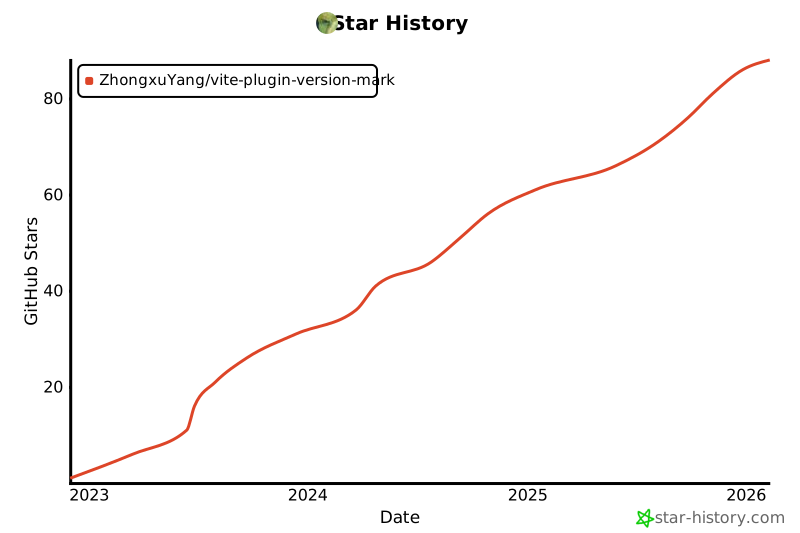](https://star-history.com/#ZhongxuYang/vite-plugin-version-mark&Date)
查看 [CHANGELOG](./CHANGELOG.md)
[npm-version-src]: https://img.shields.io/npm/v/vite-plugin-version-mark/latest.svg?style=flat&colorA=18181B
[npm-version-href]: https://www.npmjs.com/package/vite-plugin-version-mark?activeTab=versions
[npm-downloads-src]: https://img.shields.io/npm/dm/vite-plugin-version-mark.svg?style=flat&colorA=18181B
[npm-downloads-href]: https://npmcharts.com/compare/vite-plugin-version-mark?interval=7&minimal=true
[types-src]: https://img.shields.io/npm/types/vite-plugin-version-mark.svg?style=flat&colorA=18181B
[types-href]: https://npmjs.com/package/vite-plugin-version-mark
[license-src]: https://img.shields.io/npm/l/vite-plugin-version-mark.svg?style=flat&colorA=18181B
[license-href]: https://npmjs.com/package/vite-plugin-version-mark
[nuxt-src]: https://img.shields.io/badge/Nuxt-18181B?&logo=nuxt.js
[nuxt-href]: https://nuxt.com
[vite-src]: https://img.shields.io/badge/Vite-18181B?&logo=vite
[vite-href]: https://vitejs.dev
[awesome-src]: https://awesome.re/mentioned-badge.svg
[awesome-href]: https://github.com/vitejs/awesome-vite#transformers 