# FX-BorderlessScene-fromgithub
**Repository Path**: wbz3038/fx-borderless-scene-fromgithub
## Basic Information
- **Project Name**: FX-BorderlessScene-fromgithub
- **Description**: No description available
- **Primary Language**: Unknown
- **License**: Not specified
- **Default Branch**: master
- **Homepage**: None
- **GVP Project**: No
## Statistics
- **Stars**: 0
- **Forks**: 0
- **Created**: 2025-11-21
- **Last Updated**: 2025-11-21
## Categories & Tags
**Categories**: Uncategorized
**Tags**: None
## README
[](https://ko-fi.com/Q5Q3WBIC)
---
FX-BorderlessScene ( Library )
💠
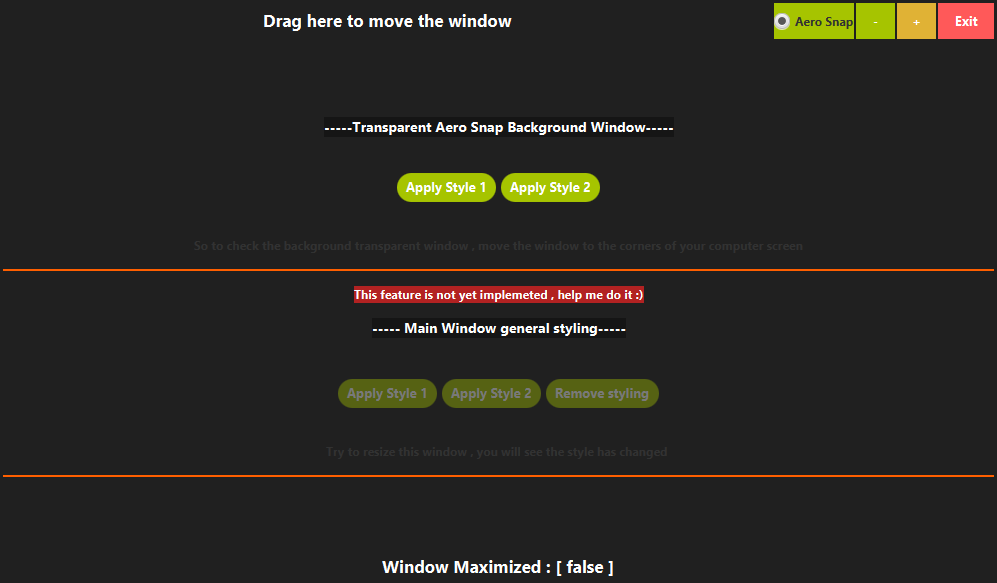
Undecorated JavaFX Scene with implemented move, resize, minimise, maximise, close and Windows Aero Snap controls.
Implement any style you want for your JavaFX application using custom css or default .
---
[](https://github.com/goxr3plus/FX-BorderlessScene/releases)
[![GitHub contributors][contributors-image]][contributors-url]
[](http://hits.dwyl.io/goxr3plus/FX-BorderlessScene)
[](https://github.com/goxr3plus/FX-BorderlessScene/releases)
[contributors-url]: https://github.com/goxr3plus/FX-BorderlessScene/graphs/contributors
[contributors-image]: https://img.shields.io/github/contributors/goxr3plus/FX-BorderlessScene.svg
### Donate if you love me

 ## Features
- **Done ✔️**
- Implemented drag and move
- resize, minimise, maximise, close
- Windows Aero Snap controls.
- Styling Aero Snap window
- Styling Main window
- **TODO 🚧**
- Multiple Screens Support
- Fix lagging on resizing
This project has been forked and further developed from [this](https://github.com/NicolasSenetLarson/BorderlessScene) github repository
### Use it with Maven , Gradle etc ... with
https://jitpack.io/#goxr3plus/FX-BorderlessScene
Add JitPack on your repositories :
``` XML
jitpack.io
https://jitpack.io
```
Add the dependency :
``` XML
com.github.goxr3plus
FX-BorderlessScene
4.4.0
```
### > Advanced example (styling AeroSnap Window , spying window maximize status etc ) with ready code for you to run
Main Window -> [here](https://github.com/goxr3plus/FX-BorderlessScene/blob/master/src/main/java/com/goxr3plus/fxborderlessscene/application/Main.java)
Main Window Controller -> [here](https://github.com/goxr3plus/FX-BorderlessScene/blob/master/src/main/java/com/goxr3plus/fxborderlessscene/application/MainWindowController.java)
### Simple example
``` JAVA
import javafx.application.Application;
import javafx.geometry.Pos;
import javafx.scene.control.Button;
import javafx.scene.control.Label;
import javafx.scene.layout.BorderPane;
import javafx.scene.layout.HBox;
import javafx.stage.Stage;
import javafx.stage.StageStyle;
import com.goxr3plus.fxborderlessscene.borderless.BorderlessScene;
/**
* Testing the application to see if it works
*
* @author GOXR3PLUS
*
*/
public class Main extends Application {
@Override
public void start(Stage primaryStage) throws Exception {
//BorderPane
BorderPane borderPane = new BorderPane();
//Create a Top Label
Label topLabel = new Label("Drag Me :)");
topLabel.setMinHeight(50);
topLabel.setMaxSize(Double.MAX_VALUE, Double.MAX_VALUE);
topLabel.setStyle("-fx-background-color:#303030; -fx-text-fill:white; -fx-font-weight:bold;");
topLabel.setAlignment(Pos.CENTER);
borderPane.setTop(topLabel);
//Close Button
Button closeButton = new Button("Exit");
closeButton.setOnAction(a -> primaryStage.close());
// Constructor using your primary stage and the root Parent of your content.
BorderlessScene scene = new BorderlessScene(primaryStage, StageStyle.UNDECORATED, borderPane, 250, 250);
primaryStage.setScene(scene); // Set the scene to your stage and you're done!
//Close Button
Button removeDefaultCSS = new Button("Remove Default Corners CSS");
removeDefaultCSS.setOnAction(a -> scene.removeDefaultCSS());
//BorderPane
HBox hbox = new HBox(removeDefaultCSS,closeButton);
hbox.setAlignment(Pos.CENTER);
hbox.setSpacing(15);
borderPane.setCenter(hbox);
//remove the default css style
//scene.removeDefaultCSS();
// Maximise (on/off) and minimise the application:
//scene.maximizeStage();
//scene.minimizeStage();
// To move the window around by pressing a node:
scene.setMoveControl(topLabel);
// To disable resize:
//scene.setResizable(false);
// To switch the content during runtime:
//scene.setContent(yourNewParent);
// Check if maximised:
//Boolean bool = scene.isMaximised();
// Get windowed* size and position:
//scene.getWindowedSize();
//scene.getWindowedPosition();
//Show
primaryStage.setTitle("Draggable and Undecorated JavaFX Window");
primaryStage.show();
}
public static void main(String[] args) {
launch(args);
}
}
```
### [XR3Player](https://github.com/goxr3plus/XR3Player) is using this Library
| Video|
|:-:|
| [](https://www.youtube.com/watch?v=7Hai7cavmUY) |
---
## Features
- **Done ✔️**
- Implemented drag and move
- resize, minimise, maximise, close
- Windows Aero Snap controls.
- Styling Aero Snap window
- Styling Main window
- **TODO 🚧**
- Multiple Screens Support
- Fix lagging on resizing
This project has been forked and further developed from [this](https://github.com/NicolasSenetLarson/BorderlessScene) github repository
### Use it with Maven , Gradle etc ... with
https://jitpack.io/#goxr3plus/FX-BorderlessScene
Add JitPack on your repositories :
``` XML
jitpack.io
https://jitpack.io
```
Add the dependency :
``` XML
com.github.goxr3plus
FX-BorderlessScene
4.4.0
```
### > Advanced example (styling AeroSnap Window , spying window maximize status etc ) with ready code for you to run
Main Window -> [here](https://github.com/goxr3plus/FX-BorderlessScene/blob/master/src/main/java/com/goxr3plus/fxborderlessscene/application/Main.java)
Main Window Controller -> [here](https://github.com/goxr3plus/FX-BorderlessScene/blob/master/src/main/java/com/goxr3plus/fxborderlessscene/application/MainWindowController.java)
### Simple example
``` JAVA
import javafx.application.Application;
import javafx.geometry.Pos;
import javafx.scene.control.Button;
import javafx.scene.control.Label;
import javafx.scene.layout.BorderPane;
import javafx.scene.layout.HBox;
import javafx.stage.Stage;
import javafx.stage.StageStyle;
import com.goxr3plus.fxborderlessscene.borderless.BorderlessScene;
/**
* Testing the application to see if it works
*
* @author GOXR3PLUS
*
*/
public class Main extends Application {
@Override
public void start(Stage primaryStage) throws Exception {
//BorderPane
BorderPane borderPane = new BorderPane();
//Create a Top Label
Label topLabel = new Label("Drag Me :)");
topLabel.setMinHeight(50);
topLabel.setMaxSize(Double.MAX_VALUE, Double.MAX_VALUE);
topLabel.setStyle("-fx-background-color:#303030; -fx-text-fill:white; -fx-font-weight:bold;");
topLabel.setAlignment(Pos.CENTER);
borderPane.setTop(topLabel);
//Close Button
Button closeButton = new Button("Exit");
closeButton.setOnAction(a -> primaryStage.close());
// Constructor using your primary stage and the root Parent of your content.
BorderlessScene scene = new BorderlessScene(primaryStage, StageStyle.UNDECORATED, borderPane, 250, 250);
primaryStage.setScene(scene); // Set the scene to your stage and you're done!
//Close Button
Button removeDefaultCSS = new Button("Remove Default Corners CSS");
removeDefaultCSS.setOnAction(a -> scene.removeDefaultCSS());
//BorderPane
HBox hbox = new HBox(removeDefaultCSS,closeButton);
hbox.setAlignment(Pos.CENTER);
hbox.setSpacing(15);
borderPane.setCenter(hbox);
//remove the default css style
//scene.removeDefaultCSS();
// Maximise (on/off) and minimise the application:
//scene.maximizeStage();
//scene.minimizeStage();
// To move the window around by pressing a node:
scene.setMoveControl(topLabel);
// To disable resize:
//scene.setResizable(false);
// To switch the content during runtime:
//scene.setContent(yourNewParent);
// Check if maximised:
//Boolean bool = scene.isMaximised();
// Get windowed* size and position:
//scene.getWindowedSize();
//scene.getWindowedPosition();
//Show
primaryStage.setTitle("Draggable and Undecorated JavaFX Window");
primaryStage.show();
}
public static void main(String[] args) {
launch(args);
}
}
```
### [XR3Player](https://github.com/goxr3plus/XR3Player) is using this Library
| Video|
|:-:|
| [](https://www.youtube.com/watch?v=7Hai7cavmUY) |
---