
English | 中文 | Español | 日本語 | 한국어 | Français | Deutsch | Italiano | Русский | Português | العربية | हिन्दी | বাংলা
ChatGPT Shortcut, Maximize your Efficiency and Productivity
## Why use AiShort? AiShort provides a concise and easy-to-use list of AI instructions. Even without understanding of prompts, you can easily find the prompts suitable for various scenarios through filtering and searching, thus improving your productivity. 🚀 **One-click prompts**: With just one click, you can get a variety of prompts carefully selected by experts. Send them to AI language models like ChatGPT and you can get the expected output. 💻 **Boost productivity**: By using optimized prompts, you can get more accurate and practical feedback, thus effectively enhancing your work efficiency. 🌍 **Optimization for Non-English Languages**: We provide translations for English prompts in 12 major global languages, and support default responses in your mother tongue, which is convenient for non-English speakers to understand and use. 💾 **Save prompts**: Conveniently collect, edit, and manage your favorite prompts for future use. 🌐 **Share prompts**: Share your favorite prompts, collaborate with others, and inspire more ideas. 🗳️ **Community voting system**: Similar to Product Hunt or Reddit, the platform is community-driven. The best prompts will be pushed to the homepage. 📦 **Ready to use**: Just visit https://www.aishort.top/en/ to start using. The source of AiShort prompts includes internet selections, community shares, and [Awesome ChatGPT Prompts](https://github.com/f/awesome-chatgpt-prompts). We will regularly update to provide you with new prompts and inspiration. To understand how to use AiShort, please refer to [user manual](https://www.aishort.top/en/docs/guides/getting-started). Welcome to join our Discord community to exchange ideas and feedback.
## Browser Extension
AiShort (ChatGPT Shortcut) browser extension supports Chrome and Edge with functionality consistent with the web version and is regularly updated. The extension can be automatically triggered as the ChatGPT page loads, or you can activate the extension window by pressing the `Alt+Shift+S` hotkey.

 ## Deploy
### Deploy With Vercel
[](https://vercel.com/new/clone?repository-url=https%3A%2F%2Fgithub.com%2Frockbenben%2FChatGPT-Shortcut%2Ftree%2Fgh-pages)
### Installation
```shell
# Installation
yarn
# Local Development
yarn start
# Build: This command generates static content into the `build` directory
yarn build
```
## Synchronized Updates
If you have deployed your own project on Vercel with a single click, you might encounter an issue where updates are consistently indicated. This arises from Vercel's default behavior of creating a new project for you instead of forking the current project, thereby impeding proper update detection. It is recommended to follow the subsequent steps for re-deployment:
1. Remove the previous repository.
2. Utilize the "fork" button located in the upper right corner of the page to fork the current project.
3. On the [Vercel New Project page](https://vercel.com/new), select the recently forked project from the Import Git Repository section and proceed with deployment.
### Automatic Updates
> In the event of encountering an error during the execution of Upstream Sync, manually perform a single Sync Fork.
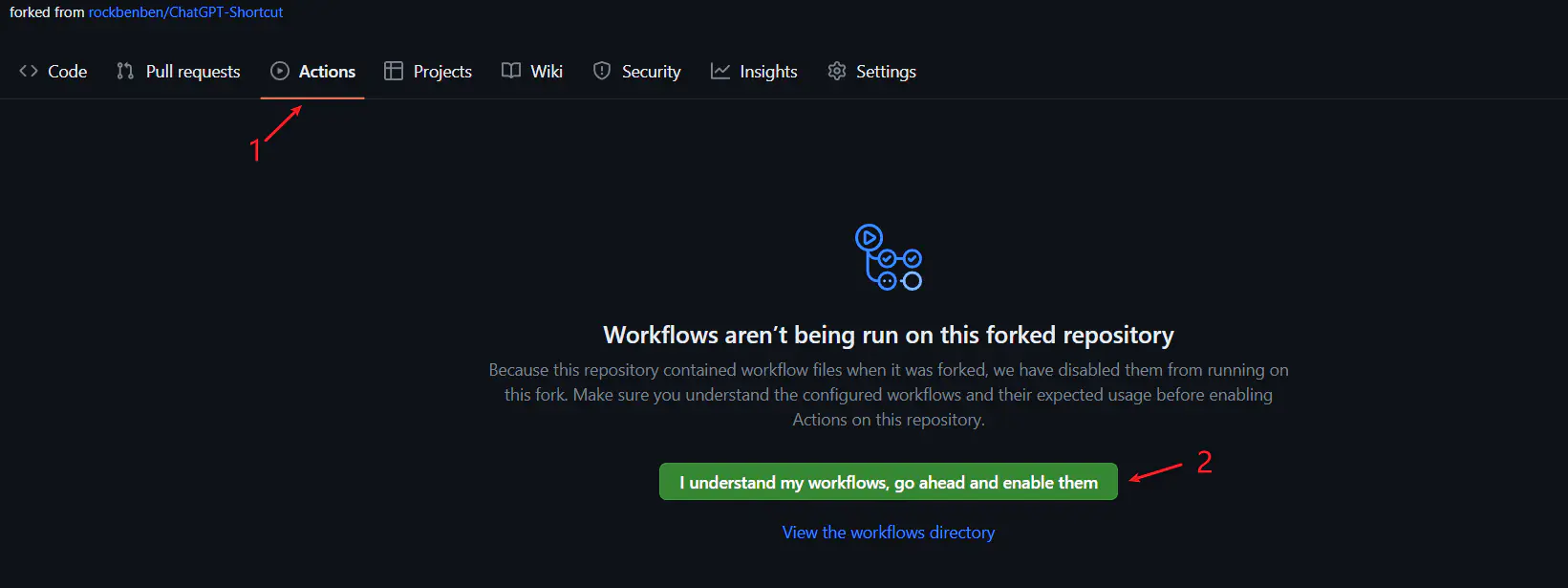
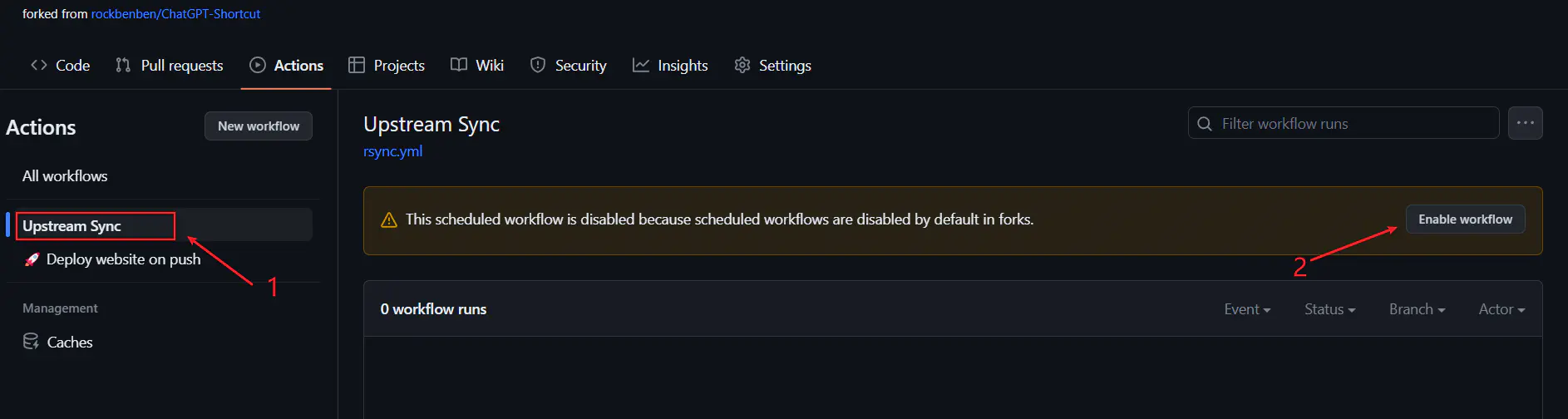
Once you have forked the project, due to GitHub restrictions, it is necessary to manually enable Workflows on the Actions page of your forked project and activate the Upstream Sync Action. Upon activation, updates will be automatically executed on a daily basis.
### Manual Updates
If you wish to manually update immediately, you can refer to [GitHub's documentation](https://docs.github.com/en/pull-requests/collaborating-with-pull-requests/working-with-forks/syncing-a-fork) to learn how to synchronize the forked project with the upstream code.
Feel free to show support for this project by giving it a star/follow, or by following the author, to stay informed about timely notifications regarding new feature updates.
## Modification Information
AI Short is an open-source project, affording you the liberty to make alterations to the nomenclature and explication of the website.
- To amend the appellation of the page, please peruse the `docusaurus.config.js` document.
- For the modification of usage directives, navigate to the `docs` directory.
- To tailor the cues, you may find them within `src/data/prompt.json`. If you require alteration solely for a particular language, such as Chinese, direct your edits to `src/data/prompt_zh.json`.
- Presently, the user-end system is already integrated with a communal backend infrastructure. Should the need arise, you have the autonomy to establish your own backend, with pertinent interfaces located in the `src/api.js` file.
`CodeUpdateHandler.py` is the script designed for bulk processing of multilingual deployments. Upon completing your alterations, execute `python CodeUpdateHandler.py`. It will, in accordance with the prescribed rules, partition the `prompt.json` into diverse languages and synchronize the principal page code as well as individual page code for the selected cues in each language.
## Deploy
### Deploy With Vercel
[](https://vercel.com/new/clone?repository-url=https%3A%2F%2Fgithub.com%2Frockbenben%2FChatGPT-Shortcut%2Ftree%2Fgh-pages)
### Installation
```shell
# Installation
yarn
# Local Development
yarn start
# Build: This command generates static content into the `build` directory
yarn build
```
## Synchronized Updates
If you have deployed your own project on Vercel with a single click, you might encounter an issue where updates are consistently indicated. This arises from Vercel's default behavior of creating a new project for you instead of forking the current project, thereby impeding proper update detection. It is recommended to follow the subsequent steps for re-deployment:
1. Remove the previous repository.
2. Utilize the "fork" button located in the upper right corner of the page to fork the current project.
3. On the [Vercel New Project page](https://vercel.com/new), select the recently forked project from the Import Git Repository section and proceed with deployment.
### Automatic Updates
> In the event of encountering an error during the execution of Upstream Sync, manually perform a single Sync Fork.
Once you have forked the project, due to GitHub restrictions, it is necessary to manually enable Workflows on the Actions page of your forked project and activate the Upstream Sync Action. Upon activation, updates will be automatically executed on a daily basis.


### Manual Updates
If you wish to manually update immediately, you can refer to [GitHub's documentation](https://docs.github.com/en/pull-requests/collaborating-with-pull-requests/working-with-forks/syncing-a-fork) to learn how to synchronize the forked project with the upstream code.
Feel free to show support for this project by giving it a star/follow, or by following the author, to stay informed about timely notifications regarding new feature updates.
## Modification Information
AI Short is an open-source project, affording you the liberty to make alterations to the nomenclature and explication of the website.
- To amend the appellation of the page, please peruse the `docusaurus.config.js` document.
- For the modification of usage directives, navigate to the `docs` directory.
- To tailor the cues, you may find them within `src/data/prompt.json`. If you require alteration solely for a particular language, such as Chinese, direct your edits to `src/data/prompt_zh.json`.
- Presently, the user-end system is already integrated with a communal backend infrastructure. Should the need arise, you have the autonomy to establish your own backend, with pertinent interfaces located in the `src/api.js` file.
`CodeUpdateHandler.py` is the script designed for bulk processing of multilingual deployments. Upon completing your alterations, execute `python CodeUpdateHandler.py`. It will, in accordance with the prescribed rules, partition the `prompt.json` into diverse languages and synchronize the principal page code as well as individual page code for the selected cues in each language.